How to Set Up a Version-Controlled Research Project
By Dr. Zubair Khalid, DVM, MS, PhD ·

By the end of this guide you will have a working research project folder that records every change you ever make to your code, documents, and analysis scripts. You will have a reusable directory structure, a README that explains the project to a stranger, a ignore file that keeps bulky data out of your history, a snapshot of your software environment, an offsite backup, and a tagged release you can point a reviewer to. In short, you will have a complete version controlled research project template that you can clone for every new study.
To follow the walkthrough you need a computer with a terminal (Terminal on macOS, PowerShell or Git Bash on Windows), about 30 minutes, and no prior git experience. You will install git if it is not already present. A free account on GitHub, GitLab, or a university-hosted git server is needed only for the backup step near the end.
Why Version Control Belongs in Every Research Project
Version control is the practice of recording a permanent, labeled history of changes to files so that any earlier state can be recovered exactly. Git is the tool most researchers use for this. The payoff is reproducible research, which means a project that another person, or you in two years, can rerun from the original data and code and reach the same numbers.
Consider what published studies actually have to report. A Bayesian network meta-analysis of acupuncture for post-stroke insomnia stated that the analysis was run in R version 4.4.1 and Stata version 18.0 [1]. A meta-analysis of pegfilgrastim for stem cell mobilization reported R version 4.4.2, a PROSPERO registration number, and the exact databases it searched [2]. A cross-sectional study of cardiovascular risk in Nigerian patients with type 2 diabetes specified SPSS version 25 and a significance threshold of p less than 0.05 [3]. A newborn hearing screening pilot in Ghana documented SPSS version 20.0 and a centralized tracking system called pathTrack for its screening records [4]. Every one of those version numbers is a small reproducibility decision. If the authors had not recorded them, nobody could confirm that the results were not an artifact of a software update. Git automates that recording for your own work.
Version labeling also shows up outside code. The American Society of Clinical Oncology publishes its PARP inhibitor guidance as a living guideline with an explicit version number, Version 2026.1.0, so that clinicians know precisely which evidence snapshot they are reading [5]. Your commits and tags do the same job for a research project: they name the state of the work at a meaningful moment.
What a Version-Controlled Research Project Template Contains
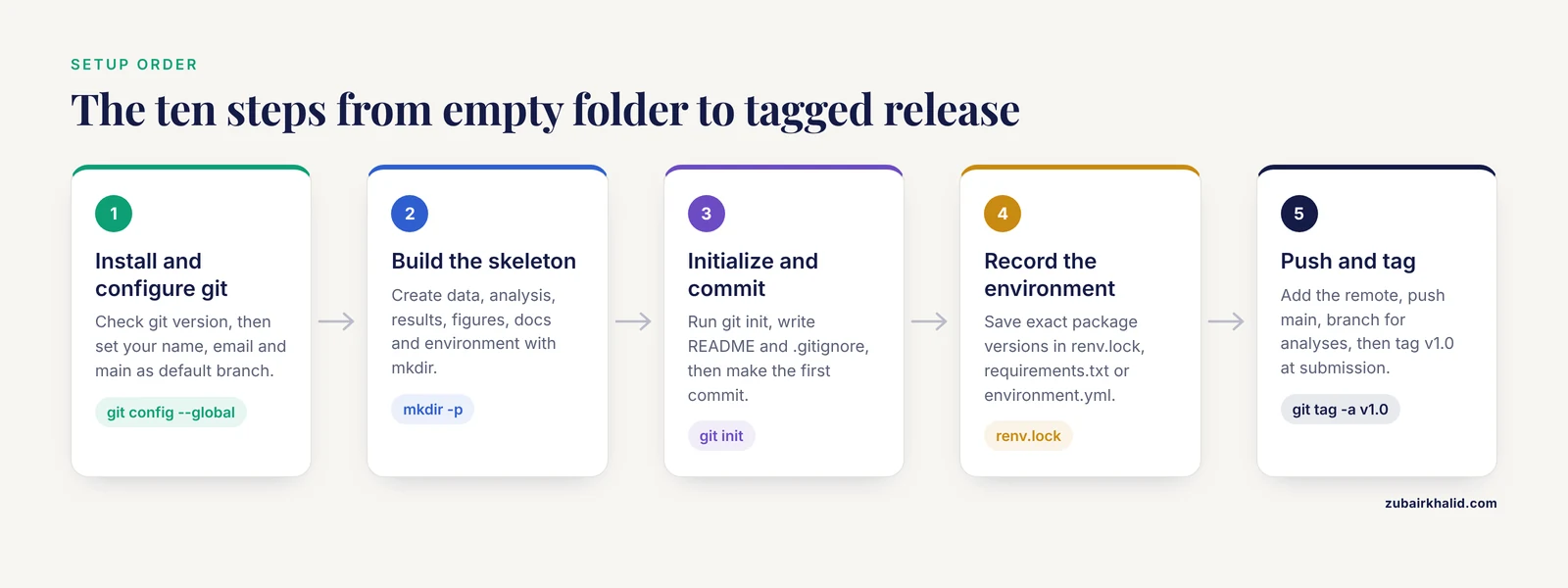
A good version controlled research project template format is deliberately boring. It separates files that change constantly (scripts, documents) from files that should never be rewritten by hand (raw data) and files that are generated (results, figures). The table below shows a template you can reuse for wet-lab analysis projects, systematic reviews, modeling studies, and clinical datasets alike.
| File or folder | Purpose | Committed to git? |
|---|---|---|
README.md | Explains what the project does, who runs it, and how to rerun it | Yes |
data/raw/ | Untouched original data files | No, unless small and shareable |
data/processed/ | Cleaned data produced by scripts | No, regenerate from scripts |
analysis/ | Scripts in R, Python, or your language of choice | Yes |
results/ | Output tables and logs produced by scripts | Usually no, or only small summary files |
figures/ | Plots generated by scripts | Optional, often yes for manuscripts |
docs/ | Protocols, data dictionary, meeting notes | Yes |
environment/ | Software environment files such as requirements.txt or renv.lock | Yes |
.gitignore | Tells git which files to skip | Yes |
LICENSE | States how others may reuse the code | Yes |
The single most valuable habit this structure builds is the rule that nothing in data/processed/ or results/ is ever created by hand. If a number appears in your manuscript, a script in analysis/ must be able to regenerate it from data/raw/. Systematic reviews illustrate the same principle on the data side. One review of celecoxib safety documented searches of Embase, Web of Science, MEDLINE, the Cochrane Central Register of Controlled Trials, and Scopus from inception to April 2025, plus the ClinicalTrials.gov registry, and reported the exact screening counts at each stage, 3976 records at title and abstract screening and 273 at full text [6]. Another review of diabetes distress interventions documented searches of PubMed, the Cochrane Library, APA PsycInfo, and CINAHL through 23 September 2024 and ended up including 248 randomized trials [7]. Those dates, databases, and counts are the search equivalent of a git history, and a docs/ folder is where yours will live.
Step 1: Install and Configure Git
Check whether git is already installed.
git --versionExpected output on a current system:
git version 2.43.0If you see command not found instead, install git from your operating system's package manager, from the installer at the official git website on Windows, or with Xcode Command Line Tools on macOS.
Git needs to know who you are, because every commit is signed with a name and email. Set these once for all projects on the machine.
git config --global user.name "Zubair Khalid"
git config --global user.email "[email protected]"
git config --global init.defaultBranch main
The first two values appear on every commit you make, so use the name and email attached to your GitHub or GitLab account if you have one. The third line makes main the default name of your primary branch, which matches what most hosting services expect.
Step 2: Create the Project Skeleton
Pick a short, descriptive project name. Suppose you are analyzing screening outcomes from a hospital pilot study. Create the folder structure from a terminal.
mkdir hearing-screening-analysis
cd hearing-screening-analysis
mkdir -p data/raw data/processed analysis results figures docs environment
ls
Expected output:
analysis    data       docs       environment
figures     results
Each folder earns its place. data/raw/ holds the files exactly as they arrived from the instrument, the registry, or the collaborator. analysis/ holds the scripts that transform raw into processed. docs/ holds your protocol and data dictionary. If your project is a systematic review rather than a data analysis, the same skeleton works, with docs/ holding your search strings and screening logs and data/ holding your extracted study records.
Step 3: Initialize the Repository
From inside the project folder, run:
git initExpected output:
Initialized empty Git repository in /Users/zk/hearing-screening-analysis/.git/Git has created a hidden .git/ directory that stores the entire history of the project. You will almost never look inside it, and you should never edit it by hand. Confirm git can see your files.
git statusExpected output:
On branch main

No commits yet

nothing to commit (create/copy files and use "git add" to track)
From this point on, git status is your dashboard. Run it whenever you are unsure what git is paying attention to.
Step 4: Write the README
Create a file named README.md in the project root and give it, at minimum, these sections.
# Hearing Screening Pilot Analysis

Analysis code for the multicentre newborn hearing screening pilot.

## Data
Raw screening exports live in data/raw/. Do not edit them.
The data dictionary in docs/data-dictionary.md defines every column.

## How to run
1. Install R 4.4.1 and the packages listed in environment/requirements.txt
2. Run analysis/01_clean.R, then analysis/02_analyze.R
3. Figures appear in figures/

## Contact
Zubair Khalid, [email protected]
A README written on day one takes ten minutes. A README reconstructed after submission takes an afternoon and is usually wrong.
Step 5: Write the .gitignore
The .gitignore file tells git which files to leave out of the history. Create it in the project root with contents like these.
# Raw data stays out unless it is small and shareable
data/raw/*.csv
data/raw/*.xlsx

# Generated outputs
results/*
figures/*.png

# System and editor clutter
.DS_Store
.Rhistory
.RData
__pycache__/
.ipynb_checkpoints/

# Large model files
*.RData
*.rds
*.h5
Lines starting with # are comments. Patterns such as *.csv match any file ending in .csv anywhere in the project. The logic is simple. Git is excellent at tracking small text files that change line by line and poor at tracking binary files that change wholesale, because it stores a new near-complete copy of every binary version. Hosting services enforce this with hard limits. GitHub blocks any single file over 100 MB, which makes committing raw imaging or sequencing data impractical anyway. Large binary files that must be versioned belong in Git LFS (Large File Storage), a git extension that keeps big files on a separate storage layer, or in an institutional data repository.
There is one deliberate exception to consider. If your raw data are small, de-identified, and licensed for sharing, committing them to data/raw/ gives you a single self-contained snapshot that collaborators can clone. Pilot screening datasets with a few thousand rows often qualify. Patient-identifiable data never qualify, regardless of size.
Step 6: Make the First Commit
A commit is a named snapshot of every tracked file at one moment. Stage your files and commit them.
git add README.md .gitignore
git commit -m "Add README and gitignore"
Expected output:
[main (root-commit) 3f2a9c1] Add README and gitignore
 2 files changed, 24 insertions(+)
 create mode 100644 README.md
 create mode 100644 .gitignore
The string 3f2a9c1 is the commit hash, a unique identifier for this snapshot. Then add the empty folder skeleton and your first scripts as they appear.
git add .
git commit -m "Add project skeleton and first cleaning script"
Two conventions make your history useful. First, commit small units of work, one script change or one section of writing, rather than a week of mixed edits. Second, write commit messages that finish the sentence "this commit will". "Add exclusion criteria to cleaning script" is a useful message. "updates" is not.
Step 7: Record the Computational Environment
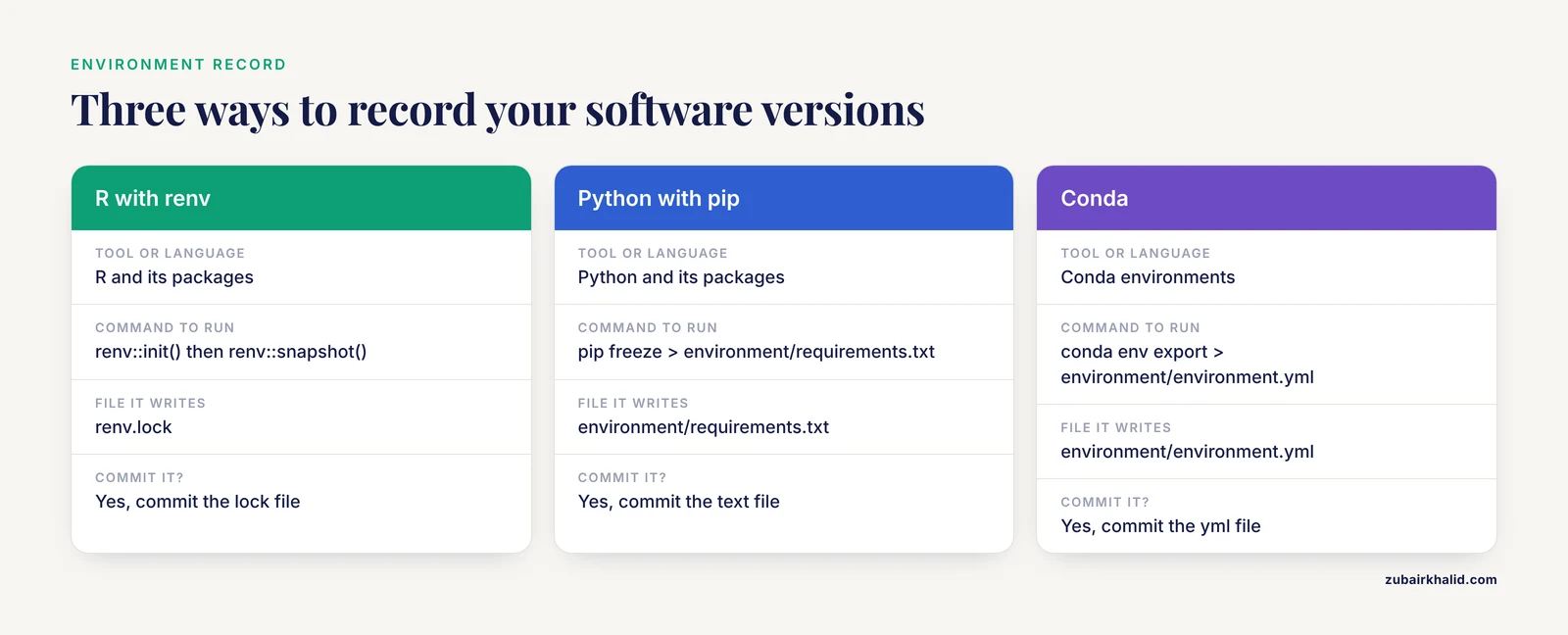
Reproducible research requires more than code history. Anyone rerunning your analysis needs the same software. The published literature shows how specific this record should be. The acupuncture meta-analysis named R 4.4.1 and Stata 18.0 [1], the pegfilgrastim meta-analysis named R 4.4.2 [2], and the Ghana hearing screening study named SPSS 20.0 [4]. You can capture the equivalent record for your project in three common ways.
In R, print the session information into your log.
sessionInfo()This prints the R version, operating system, and every loaded package with its version. Better still, use the renv package to lock the environment.
install.packages("renv")
renv::init()
renv::snapshot()
renv::snapshot() writes a file called renv.lock into your project, listing every package and exact version. Commit that file. In Python, freeze your packages.
pip freeze > environment/requirements.txtIn conda, export the full environment.
conda env export > environment/environment.ymlCommit whichever file your workflow produces. Six months from now, that one text file is the difference between rerunning your analysis in an afternoon and rebuilding your environment from memory.
Step 8: Add a Remote and Push
A remote is a copy of the repository on another server. It is your offsite backup and, later, your collaboration platform. On GitHub or GitLab, create an empty repository through the web interface, then connect your local folder to it.
git remote add origin [email protected]:zk-lab/hearing-screening-analysis.git
git push -u origin main
Expected output:
Enumerating objects: 5, done.
Counting objects: 100% (5/5), done.
Writing objects: 100% (3/3), 1.21 KiB | 1.21 MiB/s, done.
Total 3 (delta 0), reused 0 (delta 0)
To github.com:zk-lab/hearing-screening-analysis.git
 * [new branch]      main -> main
branch 'main' set up to track 'origin/main'.
From now on, plain git push sends new commits to the server. Run it at the end of every work session. A repository that exists only on your laptop is one stolen bag away from losing a semester of work.
Step 9: Branch for Analyses, Merge When Done
A branch is a parallel line of history. The default branch, main, should always represent a working state of the project. When you try a new analysis or rewrite a script, create a branch for it.
git switch -c sensitivity-analysis
# ... edit analysis/02_analyze.R ...
git add analysis/02_analyze.R
git commit -m "Add sensitivity analysis excluding referrals"
git switch main
git merge sensitivity-analysis
Expected output after a clean merge:
Updating 3f2a9c1..8b4e2d7
Fast-forward
 analysis/02_analyze.R | 14 ++++++++--
 1 file changed, 12 insertions(+), 2 deletions(-)
Branches shine in collaborations. Two students can each work on their own branch, and the merge step is where conflicts surface and get resolved deliberately rather than silently. If a branch turns out to be a dead end, git switch main and delete it with git branch -d sensitivity-analysis, and the abandoned work vanishes from the main line without ever having endangered it.
Step 10: Tag a Release
When your project reaches a meaningful milestone, manuscript submission, a committee review, a shared dataset release, freeze it with a tag.
git tag -a v1.0 -m "Analysis as submitted to journal"
git push origin v1.0
A tag is a permanent named pointer to one commit. Reviewers can be given the exact state of the code behind the manuscript, and you can always return to it with git checkout v1.0. This is the same instinct behind protocol papers. Trial protocols are published, with registration, precisely so the planned analysis exists as a fixed reference. A BMJ Open protocol for a pre-pregnancy weight loss trial specified its randomization ratio, diet intervention length of 8 to 10 weeks, and endpoints before enrollment began [8]. A Frontiers in Oncology protocol fixed its primary endpoint, the change in a symptom cluster score at 2 months on the MDASI-C instrument, for 262 planned participants across 11 hospitals [9]. A pilot trial protocol in BMJ Open fixed its sample of 40 mother-infant pairs and its feasibility endpoint of enrolling at least 50 percent of that target [10]. Your v1.0 tag plays the same role at the scale of a single project.
Fixing Common Git Errors
Every researcher hits these messages. Each has a short fix.
| Exact message | Cause | Fix |
|---|---|---|
fatal: not a git repository (or any of the parent directories): .git | You ran a git command outside the project folder | cd into the project folder, or run git init if the folder is new |
fatal: remote origin already exists. | You ran git remote add origin twice | Run git remote set-url origin YOUR-URL instead |
[email protected]: Permission denied (publickey). | Your SSH key is missing or not registered | Generate a key with ssh-keygen, add the public key in your hosting account settings |
error: failed to push some refs to '...' with a hint about work you do not have locally | Someone else pushed first, or you edited on the website | Run git pull, resolve any conflict, then git push again |
warning: in the working copy of 'notes.md', LF will be replaced by CRLF | Windows and Unix line endings differ | Harmless. Optionally set git config, global core.autocrlf true on Windows |
fatal: pathspec 'results.txt' did not match any files | A typo in a filename, or the file is ignored | Check spelling with ls, check .gitignore with git check-ignore -v results.txt |
error: Your local changes to the following files would be overwritten by checkout | You tried to switch branches with unsaved edits | Commit or stash the changes first with git stash |
One frequent trap has no error message at all. If you committed a large or sensitive file before writing your .gitignore, adding the filename to .gitignore does nothing, because git already tracks the file. You must remove it from tracking while keeping it on disk, using git rm with the cached flag, commit that removal, and ideally rewrite history with a tool like git filter-repo if the file contained patient identifiers, because ordinary deletion leaves the file in older commits.
Verification: How to Check the Setup Is Right
Run these four checks in order. If all four pass, your project is correctly set up.
git statusreportsnothing to commit, working tree cleanafter a commit and push.git logshows your commits with hashes, dates, and your configured name and email.git remote -vprints the origin URL twice, once for fetch and once for push.- In a different directory,
git clone [email protected]:zk-lab/hearing-screening-analysis.git test-clonesucceeds, and the cloned folder contains your README and scripts. Delete the test clone afterward.
As a final functional check, hand the cloned copy to a labmate and ask them to run the first script. Their success, or their precise complaint, is the real test of whether your README and environment files are complete.
The Reproducibility Checklist
Use this reproducibility checklist before you consider any project finished. It converts the habits above into a pass and fail audit.
- Every script, document, and configuration file is in a git repository with a readable commit history.
- Raw data live in
data/raw/and are never edited by hand, or are referenced indocs/if too large or too sensitive to commit. - No file in
results/orfigures/was created by a human, only by a script. - The software environment is recorded with exact versions, in
renv.lock,requirements.txt, orenvironment.yml. - The README lets a stranger rerun the analysis from scratch in under an hour.
- Protocols, search strings, screening decisions, and data dictionaries are stored in
docs/with dates. - Sensitive or patient-identifiable data are confirmed absent from the entire git history, not just the current version.
- A tagged release, such as
v1.0, marks the state of the project at submission or at data sharing. - The repository is pushed to a remote server, so a laptop failure cannot destroy the work.
- A collaborator has cloned the repository and rerun at least the first script successfully.
Published work gives you models for the high-stakes versions of these items. Reviews that logged search dates, database lists, and per-stage screening counts [6], [7], protocols that fixed endpoints and randomization before recruitment [9], [8], [11], a trial protocol that pre-specified its 10-week group intervention and four data collection time points [12], and a shared curated evidence repository, the MED-ADHD database, built from systematic searches of PubMed, BIOSIS Previews, CINAHL, the Cochrane Central Register, and EMBASE and used to reanalyze 171 randomized trials [13], all demonstrate the same principle at publication scale. Your docs/ folder and your tags are the project-scale version of the same discipline.
Common Mistakes and Limitations
Committing sensitive data. The most damaging mistake in research version control is placing patient identifiers, addresses, or genetic sequences with re-identification risk into a repository, especially a public one. Deletion is not enough because history preserves every committed version. Decide data-sharing status on day one and encode it in .gitignore.
Committing generated files. When results/ and figures/ are tracked, every rerun produces a fake "change" that buries real edits in the history. Keep generated outputs out of git unless they are small summary tables you specifically want versioned.
Committing everything at once. A single end-of-month commit labeled "work" defeats the purpose. The value of git lives in the small, labeled steps between snapshots.
Treating git as backup only. Pushing to GitHub satisfies the backup need, but the larger return comes from branches, tags, and a history you actually read when a number changes and nobody knows why.
Ignoring the environment record. Code history without software versions reproduces poorly. A rerun on a different R or Python version can produce different numbers, which is exactly why published analyses report version numbers as specific as R 4.4.1 [1] or SPSS 25 [3].
One limitation belongs in the open. Version control protects files and history. It does not by itself verify that a script is statistically correct, that a measurement was performed properly, or that a clinical interpretation is sound, and individual projects, especially those involving human participants, need the oversight of the appropriate ethics board, supervisor, or clinician. Git is a record-keeping layer, not a quality-assurance layer.
Next Steps
Once the template works for one project, reuse it. The fastest route is to keep a clean master copy of the skeleton, README, and .gitignore in its own repository, then start every new study with git clone of that master. If your institution or funder requires data archiving, connect the tagged release to a repository that issues a citable identifier, and check your target journal's data and code policy before submission. When you add collaborators, move from shared commits to pull requests, where proposed changes are reviewed before they merge, and your project history becomes a lab notebook that two or more people write in without stepping on each other.
Frequently Asked Questions
What is a version controlled research project template?
It is a standard folder structure, README, ignore file, and environment record that you copy into each new study so every project starts with a reproducible layout and a git history from day one. The table in this article gives a complete example you can rebuild in five commands.
How do I set up a version-controlled research project if I have never used git?
Follow the ten steps above in order, which take about 30 minutes. Install git, create the folder skeleton, run git init, write a README and .gitignore, commit, record your software versions, connect a remote, and push. You only need five commands for daily work: git add, git commit, git push, git pull, and git status.
Can I get a free version controlled research project template?
Yes. Git itself is free and open source, GitHub and GitLab offer free repositories, and the template in this article can be rebuilt from the commands shown with no paid tools. Many universities also host free private git servers, so ask your IT department before paying for anything.
What files should never go into the repository?
Patient-identifiable data, raw files above roughly 100 MB, large binary outputs, credentials or API keys, and editor clutter such as .DS_Store or .Rhistory. Keep the raw data path in .gitignore, store keys in environment variables outside the project, and use Git LFS or a data repository for genuinely large files that must be versioned.
How does version control make research reproducible?
Git records the exact state of every script and document at every commit, tags freeze the state behind a given manuscript, and the committed environment file records exact software versions. Together these let anyone recover and rerun the precise combination of code, data, and software that produced a published result.
How often should I commit?
Commit each time you complete one small unit, such as a finished function, a fixed bug, or a drafted paragraph, and push at the end of each work session. A useful rule of thumb is that any commit message longer than one line of typing probably bundles several commits.
What is the difference between git and GitHub?
Git is the version control program that runs on your computer and records history locally. GitHub, GitLab, and similar services host copies of git repositories online, which provides backup, sharing, and collaboration tools. You can use git without any hosting service, but you lose the offsite copy.
Do I need version control for a small project with one collaborator?
Yes, and it matters most in small projects. A two-person team sharing files by email has no record of which file version produced which figure, and a single overwritten script can erase days of work. Git plus one shared remote solves both problems in the same 30 minutes of setup.
Sources
- Effectiveness of acupuncture and related therapies for post-stroke insomnia: A systematic review and Bayesian network analysis.
- Efficacy and Safety of Pegfilgrastim for Hemopoietic Stem Cell Mobilization in Healthy Donors: A Systematic Review and Meta-Analysis.
- Beyond blood pressure and glucose: exploring potential biochemical predictors of cardiovascular disease risk in patients with type 2 diabetes mellitus and co-morbid hypertension.
- Quality-controlled newborn hearing screening in Ghana: Outcomes and challenges from a pilot project.
- PARP Inhibitors in the Management of Ovarian Cancer: ASCO Living Guideline, Version 2026.1.0.
- Safety Profile of the Non-steroidal Anti-inflammatory Drug Celecoxib in the Short-Term Management of Acute Non-cancer Pain: A Systematic Review with Meta-analysis of Randomised Controlled Trials.
- Interventions to reduce diabetes-related distress among adults with type 1 or type 2 diabetes: a systematic review and meta-analysis of randomised controlled trials.
- PRE-Pregnancy Weight Loss and the Reducing Effect on CHILDhood Overweight (PREPARE CHILD): clinical trial protocol for a randomised controlled trial.
- Shenqi Shiyiwei Granule for breast cancer related fatigue-centered symptom cluster: protocol of a multicenter randomized double-blind placebo-controlled trial.
- Does nicotinamide riboside supplementation increase milk production in postpartum women with infants admitted to a neonatal intensive care unit? Protocol for the MOONRISE randomised, double-blind, placebo-controlled pilot feasibility trial.
- Efficacy of a needle-free blood collection device (PIVO Pro) for avoiding contaminated blood culture sets in Australian emergency departments: protocol for an adaptive group sequential randomised controlled trial.
- Bouldering-Psychotherapy for treating depression in adolescents (BooSt): study protocol for a randomized controlled trial.
- Candidate Clinico-Demographic Predictors or Moderators of Efficacy and Tolerability of Pharmacological Treatment in Attention-Deficit/Hyperactivity Disorder (ADHD): An Analysis of the MED-ADHD Repository of Randomised Controlled Trials.