Troubleshooting Collaboration Tool Integration in Research
By Dr. Zubair Khalid, DVM, MS, PhD ·

Most integration failures between research collaboration tools trace back to one cause: the person or system trying to connect does not have the right identity or permission at the boundary between the two tools. The first thing to check is whether the failing account can open the shared resource when you log in directly, with no integration in the middle. If direct access works but the connection fails, the problem sits in the integration layer. If direct access also fails, you are dealing with a permissions or provisioning problem, and no amount of API debugging will help.
This guide walks through the causes of broken integrations in research collaboration tools, from the most common to the rarest, gives you a diagnostic sequence you can follow in under an hour, and ends with prevention practices that keep multi-institution projects from stalling. The advice applies to the full modern stack of research collaboration tools: shared document platforms, reference managers, electronic lab notebooks, secure data environments, version control, and analysis pipelines.
Why Integrations Fail: The Four Failure Domains
Every integration problem you will encounter falls into one of four domains. Identifying the domain early saves hours of aimless clicking.
- Identity and access. Accounts, groups, or permission scopes do not match across systems. This is the single most common cause in troubleshooting collaboration tool integration research teams report, because universities run separate identity systems that drift out of sync.
- Data and interoperability. The tools connect but the data arrives wrong. Encoding mismatches, incompatible schemas, loose deduplication rules, and version drift all live here.
- Governance and legal. The technical connection works, but institutional review, data protection rules, or cross-border agreements block it. Studies of large international database collaborations consistently list legal constraints and the difficulty of reaching internal structural agreement among the main barriers to sustained scientific collaboration [1].
- People and workflow. The integration works but nobody uses it, or two teams use it differently. Research on collaborative learning shows that effective collaboration is not automatic and emerges only under specific conditions, including psychological safety and structured mediation [2].
A retrospective process-mapping study of a multi-site quality improvement collaboration found that the stages with the highest perceived difficulty were ethical and institutional approvals, data collection, analysis, and dissemination, together consuming about half of an estimated 1,020 person-hours of total project effort [3]. That result carries a practical lesson: the hardest parts of tool integration are usually administrative and human, not code.
A Short Diagnostic Sequence
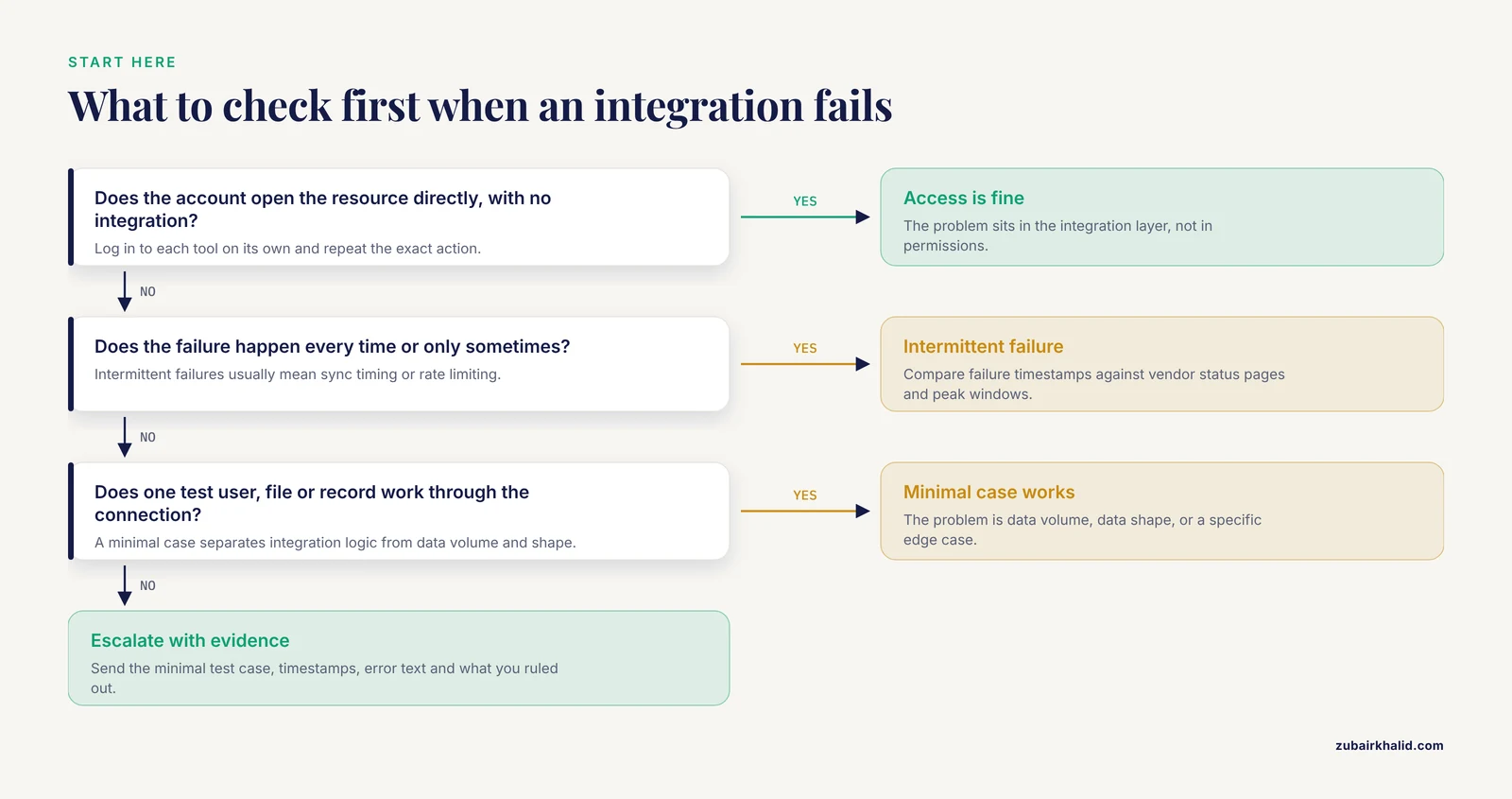
Follow these five steps in order before changing any configuration. Each step narrows the search space.
- Reproduce the failure once, on demand. Note the exact action, the exact account, and the exact error message. Intermittent failures usually mean sync timing or rate limiting rather than permissions.
- Test each side separately. Log in to tool A directly and perform the action. Then log in to tool B directly. The failure lives at whichever side breaks, or at the connection between them.
- Check the boundary type. Ask whether the failure is between a human and a tool (login, permissions), between two tools (API, file format), or between two institutions (identity federation, data agreements). Domain 3 failures cannot be fixed by anyone with administrator rights alone.
- Read the logs before the UI. Both tools usually log the real reason. A web interface might say "something went wrong" while the log says the access token expired forty minutes ago.
- Build a minimal test case. Try connecting one test file, one test user, or one test record instead of the full project. Minimal cases isolate whether the problem is the integration logic or the volume and shape of your actual data.
Troubleshooting Table
This table covers the symptoms research teams report most often, ordered roughly from most to least common.
| Symptom | Likely cause | How to confirm | Fix |
|---|---|---|---|
| Collaborator cannot open a shared dataset or notebook | Permission was granted to an individual or group that no longer matches after an account change | Log in as the affected user on a test account, or check the platform's sharing audit log | Re-share with the correct role and confirm group membership syncs from the institutional identity provider |
| Single sign-on works on the web but the integration fails | The integration uses its own credential, such as an API token, that was never created or has expired | Check the token's creation and expiry dates in the account settings | Generate a new token, store it in the team password manager, and set a renewal reminder |
| Sync produces duplicate or conflicting files | Two-way sync combined with offline edits, or two team members mapped to different local folders | Compare version history timestamps against edit times | Nominate one canonical location, enable single-direction sync where possible, and resolve conflicts manually before re-enabling sync |
| Data looks garbled or columns misalign after import | Character encoding or delimiter mismatch between exporting and importing tools | Open the raw file in a plain text editor and inspect the bytes around the first broken character | Standardize on UTF-8 and comma-separated values across the team, and publish a shared data dictionary |
| Reference records double after linking a reference manager to a manuscript tool | The deduplication rule matches too loosely or too tightly | Count records before and after the first sync | Deduplicate on a stable identifier such as the DOI, and run one cleanup pass before reconnecting |
| Working integration breaks after a platform update | The tool vendor deprecated the API version your integration relies on | Check the vendor release notes and changelog for your version | Pin the integration to a supported API version, then schedule a migration before the deprecation date |
| Automated pipelines fail intermittently at busy hours | Rate limiting or scheduled maintenance windows on the remote service | Compare failure timestamps against vendor status pages | Add retry logic with exponential backoff, or schedule heavy jobs outside peak windows |
| Sensitive data appears in a tool where it should not | Access scope set broader than the protocol allows, often at initial setup | Run a permission audit listing every person and application with access | Apply variable-level or row-level access control and move analysis into a controlled environment [4] |
| Tool works but the team stopped using it after the pilot | Workflow mismatch, inadequate training, or no perceived benefit over the old process | Compare usage logs with meeting attendance and actual deliverables | Redesign the workflow with users before forcing adoption, and provide scaffolded training [2] [5] |
Cause Deep Dives, From Most Common to Rarest
Identity and Permission Mismatches
This domain causes most failures in troubleshooting collaboration tool integration research settings encounter. The mechanism is simple. University IT systems provision accounts in batches, research groups create guest accounts ad hoc, and collaboration platforms cache group memberships for hours or days. When those systems disagree, the integration fails even though every individual tool works.
Three patterns cover most cases:
- Group membership drift. A collaborator changed departments and their group assignment updated in the identity provider but not in the collaboration platform. The fix is to force a group sync and then verify the user appears in the correct access group.
- Scope mismatch. The account exists in both tools but with different roles. A collaborator might be an editor in the document platform and a read-only user in the data repository, which breaks upload steps in automated workflows.
- Service accounts versus personal accounts. Pipelines that authenticate as a person break when that person leaves or changes passwords. For any recurring integration, create a dedicated service account owned by the group, not the individual.
Institutions handling sensitive health data increasingly address this domain with purpose-built trusted research environments. The TRACE system, for example, was designed so that institutions can manage study data access through granular variable selection and provisioning into a sealed analysis environment, with auditable workflows throughout [4]. The design principle generalizes: make access decisions explicit, at the smallest useful granularity, and logged.
Data Format and Interoperability Failures
The second domain covers connections that authenticate fine but move broken data. The underlying mechanism is that two tools disagree about what a field means or how characters are encoded.
Common variants and their mechanisms:
- Encoding and delimiters. A spreadsheet exported from one locale uses semicolons as separators, and the importing tool expects commas. Standardize on UTF-8 encoding and document the delimiter in the data dictionary.
- Identifier collisions. Two tools both assign record numbers starting at 1. When linked, records merge incorrectly. Always carry a globally unique identifier, such as a DOI for references or a UUID for samples, through every integration.
- Schema drift. Someone adds a column to the shared spreadsheet and the analysis script breaks. Version the data schema itself and record schema versions alongside the data.
The FAIR principles, short for Findable, Accessible, Interoperable, and Reusable, exist precisely because this domain causes so much friction. A recent report on the TRACE trusted research environment notes the standing tension between the open science imperative for FAIR data sharing and the stringent requirements of data protection regulations, and argues that tools must make responsible sharing low-effort rather than adding another burden [4]. In practice, that means your integration should preserve metadata and provenance, not just move raw values.
Researchers mapping collaboration networks across the literature use dedicated bibliometric platforms such as VOSviewer, CiteSpace, and the Bibliometrix package, and their workflows depend on clean, consistently formatted export files from databases like Web of Science [6]. When those exports change format, the entire downstream analysis breaks, which makes bibliometric pipelines a useful small-scale rehearsal for the same interoperability discipline large projects need.
API and Version Failures
The third domain is quieter. Everything works, then something breaks on a date nobody chose. The mechanism is deprecation: vendors retire old API versions, and integrations built against them stop working.
Confirmation and fix:
- Check the vendor's changelog and status history around the failure date.
- Pin integrations to a specific supported version rather than "latest."
- Subscribe to release announcements for every tool in your critical path.
- Test integrations in a sandbox tenant before production updates roll out.
For research groups adopting AI-assisted components, add a validation step here. A recent viewpoint on generative AI in academic medicine argues that academic institutions should take responsibility for independent, methodologically rigorous validation of clinical AI tools and for governance structures around them [7]. If a third-party AI service sits inside your collaboration pipeline, treat its model version the way you would treat a reagent lot number and record it.
Governance, Legal, and Institutional Barriers
This domain produces the longest delays and the least satisfying fixes, because the obstacle is not technical. Experience from large international surgical database collaborations identifies the major challenges as internal structural agreement, content updating, legal constraints, and sustainability [1]. The same four barriers appear at smaller scale whenever two institutions try to connect their systems.
Practical approaches:
- Start the approval conversation before building anything. The process-mapping study of a multi-country antibiotic stewardship collaboration found that ethical and institutional approvals were among the most difficult and time-consuming stages, and that barriers clustered in the institutional and regulatory domain, including heterogeneous ethics requirements across sites [3]. Map your approval path in parallel with your technical build.
- Use an existing template agreement. Data sharing agreements, memoranda of understanding, and data use agreements exist at most institutions. Reusing one shortens negotiation substantially.
- Design for the strictest site. If one collaborator's rules prohibit data leaving their institution, build the integration so analysis travels to the data instead of data traveling to the analysis. Trusted research environments with controlled, auditable access workflows are built for exactly this pattern [4].
- Plan for sustainability from day one. International database collaborations repeatedly find that long-term maintenance funding, not initial setup, determines whether a collaboration survives [1].
Cross-national research networks face the same structure at larger scale. The WINSA workshop, which brought together vector-borne disease experts from thirteen South American countries and territories, used a structured workshop format to align surveillance systems, identify research priorities, and strengthen regional collaboration among academia, public health institutions, and international organizations [8]. The transferable lesson is that alignment meetings, held before technical integration, prevent months of rework.
Human Factors and Adoption Failures
The rarest cause in log files and the most common cause in practice is that the integration works and people do not use it, or use it inconsistently.
The evidence base here is consistent. A design-based study of collaborative learning in flipped classrooms found that collaboration did not emerge automatically. It required specific conditions: emotional safety, guided mediation that redistributed participation, and scaffolded interaction [2]. Translated to a research lab rolling out a new connected toolset, that means the PI or team lead must actively model usage, early sessions must be low-stakes, and support must be tiered rather than all-at-once.
Digital literacy varies widely within any team, and usability work should reflect that. A co-design study of a transportation planning e-tool for older adults in Sherbrooke, Canada showed how participatory design, heuristic evaluation, and iterative usability workshops shaped an interface that matched real user needs rather than assumed ones [5]. The same method, running short co-design sessions with the people who will actually use the integration, routinely exposes workflow mismatches that no administrator would predict.
Training design also matters. Research on technological competence in professional settings shows that competence is multidimensional, spanning digital tool use, professional digital practice, adaptability, and technology-related self-efficacy, and that these components are best assessed together rather than separately [9]. A one-hour demo addresses the first component only. Self-efficacy grows through guided practice on real project tasks, not through watching a screen share.
Step-by-Step: How to Fix a Broken Integration
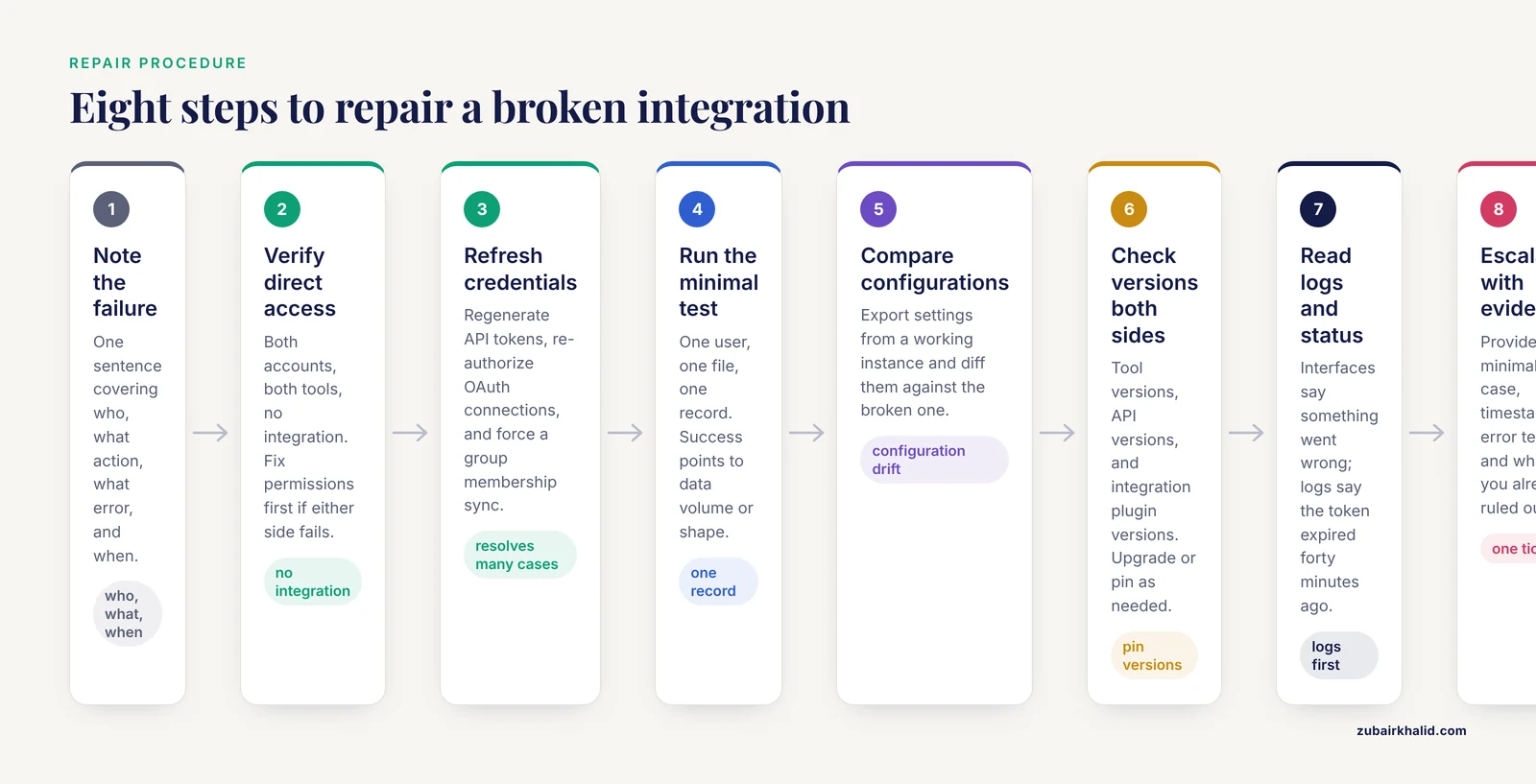
For readers who want a single procedure for how to fix troubleshooting collaboration tool integration problems, here is the sequence that resolves the majority of cases.
- Write down the failure. One sentence: who, what action, what error, when.
- Verify direct access. Both accounts, both tools, no integration. Fix permissions first if either side fails.
- Refresh credentials. Regenerate API tokens, re-authorize OAuth connections, and force a group membership sync. This alone resolves a large share of cases.
- Run the minimal test. One user, one file, one record. If the minimal case succeeds, the problem is data volume, data shape, or a specific edge case in your real content.
- Compare configurations. Export settings from a working instance and diff them against the broken one. Configuration drift between environments is a classic hidden cause.
- Check versions on both sides. Tool versions, API versions, and integration plugin versions. Upgrade or pin as needed.
- Consult the logs and vendor status. Error messages in interfaces are written for humans reading them once. Logs are written for diagnosis.
- Escalate with evidence. When contacting institutional IT or the vendor, provide the minimal test case, timestamps, error text, and what you have already ruled out. This converts a week of back-and-forth into a single ticket.
Handling Sensitive Data During Integration
Safety note. Whenever an integration touches human subject data, clinical records, or other regulated information, stop and confirm the data handling plan with your institutional review board and data protection office before connecting anything. Connecting two compliant tools can create a non-compliant data flow.
Health and biomedical research faces this tension directly. Reports on trusted research environments describe the standing conflict between transparency expectations for FAIR data sharing and the strict requirements of health data protection, and they resolve it with controlled access, variable-level permissions, and auditable, reproducible workflows [4]. Reviews of digital twin applications in healthcare, which depend on continuous integration of patient data across systems, likewise identify data integration challenges and ethical concerns around virtual health models as central open problems [10].
Three practices keep sensitive integrations safe:
- Map every data flow before enabling it. List what leaves each system, in which fields, to which destination.
- Prefer integrations that support granular access control and produce audit logs, and verify those logs actually populate [4].
- Assume any integration could be read by its vendor. Never route regulated data through a consumer-grade tool without an executed data processing agreement.
Prevention Practices
Prevention costs less than troubleshooting. Five habits cover most of what breaks.
- Maintain an integration inventory. A simple document listing each connection, its owner, its credentials location, and its renewal dates. Most outages become crises because nobody knew who owned the token.
- Use service accounts for all automated flows. Personal accounts leave when people do.
- Pin and review versions. Subscribe to release notes for every tool on your critical path and test updates in a sandbox first.
- Standardize data at the boundary. UTF-8 encoding, a shared data dictionary, stable unique identifiers, and versioned schemas prevent the entire encoding and deduplication family of failures.
- Budget governance time as project time. The process evidence shows that approvals and dissemination consume roughly half of collaborative project effort [3], so schedule them rather than hoping they happen in the background.
Common Mistakes and Limitations
- Debugging the code before checking permissions. Teams routinely spend a day reading API documentation for what turns out to be an expired token or a group that lost its membership.
- Granting broad access to fix a failure quickly. Giving everyone admin rights makes the error disappear and creates a data governance problem that surfaces later, often during a security review.
- Assuming the pilot predicts adoption. A tool used enthusiastically by two volunteers tells you little about the whole team. Plan structured, scaffolded training rather than relying on early adopters to carry the rollout [2].
- Treating legal review as a formality. Cross-institution agreements genuinely take time, and pretending otherwise shifts the delay to the moment you least afford it [1].
- Skipping the data dictionary. Every integration built without an agreed field definition breaks the first time a column is renamed or a unit changes.
- Conflating tool problems with workflow problems. If usage declines despite a technically healthy integration, the fix is workflow redesign with the users, not more configuration [5].
A final limitation applies to everything above: institutional policies, vendor plans, and identity systems differ, so the exact steps and options available to you depend on your own institution's configuration. When a fix involves regulated data or administrative systems, involve your IT and compliance staff rather than working around them.
Frequently Asked Questions
Why do my tools work individually but fail when connected?
Because each tool validates identity and data against its own rules, and those rules conflict at the connection. Verify direct access in each tool first, then test a single minimal record through the connection to see exactly where the disagreement occurs.
What is the first thing to check when an integration stops working?
Check whether the affected account can access the resource directly, without the integration. If direct access works, regenerate the integration's token or reauthorization, since expired credentials cause a large share of sudden failures.
How do I fix permission errors in a shared research workspace?
Confirm the user's group membership in the identity provider, force a sync to the collaboration platform, and re-share the resource with the correct role. Avoid widening permissions for the whole group, which hides the error and creates a security gap.
Why does the same dataset look different in two connected tools?
The tools are interpreting the file differently, usually due to encoding, delimiters, date formats, or how missing values are represented. Open the raw file, standardize on UTF-8 with an agreed delimiter, and document field definitions in a shared data dictionary.
How do we deal with institutional approval delays in a multi-site project?
Start the approval process in parallel with the technical build, not after it. Reuse existing agreement templates where possible, and design the integration for the strictest participating site so a single data flow satisfies every institution.
Should our team standardize on one vendor's suite to avoid integration problems?
Standardization reduces the number of boundaries and therefore the number of failures, but it can lock you out of specialized tools your research needs. A middle path is to standardize identity, file formats, and identifiers across tools, which fixes the failure modes that matter most while keeping tool choice open.
How do we train collaborators who resist new tools?
Use short, scaffolded practice sessions on real project tasks rather than a single demonstration. Research on collaborative settings shows that participation grows when early sessions feel safe, when leaders model the behavior, and when support is layered over time [2].
When should we escalate an integration problem to IT or the vendor?
Escalate once you have a reproducible minimal test case, exact timestamps, and the log error text, and after you have confirmed the failure is not a permissions or credential issue. Escalating with that evidence in hand typically resolves the ticket in one round instead of several.
Sources
- International General Thoracic Database Collaboration.
- A design-based approach to collaborative learning in flipped classrooms: Fostering socio-cognitive and psychological competencies among female Saudi postgraduates.
- Process mapping of a collaborative quality improvement study to optimise the use of antibiotics in intensive care units in Argentina: a Pathfinder study.
- FAIR by design (TRACE): A Trusted Research Access & Collaboration Environment.
- Development and Evaluation of a Transportation Planning e-Tool for Older Adults: Co-Design Study.
- Global research landscape and hot-spot evolution of telesurgery in urology: A bibliometric analysis based on Web of Science Core Collection.
- The New Gravity: How Generative AI Remapped Innovation and What Academia Must Do Next.
- Challenges and opportunities for strengthening South American responses to insecticide resistance in disease vectors: Lessons from the WINSA workshop in Bogotá, Colombia.
- A multidimensional measure of pre-service teachers' perceived technological competence for teaching: integrating TPACK, DigCompEdu, and self-efficacy.
- Digital Twins for Hospital and Healthcare Operations: A Systematic Review of Resource Allocation, Infection Control, and Workflow Optimization.