How to Train Your Research Team on New Collaboration Tools
By Dr. Zubair Khalid, DVM, MS, PhD ·

By the end of this article you will be able to run a complete rollout of a new collaboration platform in your lab or research group. That means auditing your current workflows, choosing a small toolset, writing shared conventions before anyone logs in, running a pilot on real work, teaching in short modules, and measuring whether people actually kept using the tool after the first week. You will also know the mistakes that sink most rollouts and how to avoid them.
Here is what to have on hand before you start:
- Administrator access to the tool you are introducing, whether that is a chat workspace, a project board, a shared document system, or a data platform
- A pilot group of three to eight volunteers who have a real deliverable due in the next month
- A one-page list of the tasks your team performs weekly, written down by the people who do them
- A simple spreadsheet or plain-text file for recording training attendance and skill scores
- About two hours of your own time per week for four to six weeks
Why Tool Rollouts Fail Before Training Begins
Most training problems are adoption problems in disguise. A survey of 557 professionals found that digital collaborative tools significantly improve communication and collaboration inside organizations, but the effect depended on how often and for what purpose people used the tools, not merely on whether the tools existed [1]. Frequency and purpose are things a rollout plan controls. Installing software does not.
A separate qualitative study of technology adoption across the technology, finance, and healthcare sectors identified the factors that actually predict success. Strong leadership support accounted for the largest share, followed by continuous learning and then effective communication [2]. Translated to a research setting, this means the principal investigator and lab manager must visibly use the tool themselves, training must continue past the first session, and the reason for the change must be stated plainly and repeatedly.
Research teams bring two extra complications. First, senior scientists often have decades of invested workflow habits, and a survey of 200 undergraduates found that even digital-native students varied widely in awareness of collaborative tools and faced identifiable challenges when using them, which the authors linked to how instruction was delivered [3]. If students need structured instruction, faculty need it too, just framed differently. Second, research data carries obligations that ordinary office chat does not, which is why data governance deserves its own step later in this guide.
A Step-by-Step Training Plan
This is the core walkthrough for training research team on collaboration tools, built around a six-week cycle.
Step 1: Audit What the Team Actually Does
Before you pick software, write down the recurring communication and coordination tasks your team performs. Interview each member for ten minutes and list their weekly activities in their own words. Typical entries look like this:
- Share instrument schedules with the group
- Send versions of a manuscript back and forth by email
- Ask where the current protocol document lives
- Report failed runs and troubleshoot with a remote collaborator
- Compile weekly progress for the grant report
The goal is a map of real work, not a wish list of features. When a team in any technical field maps its operations this way, patterns emerge quickly. The ocean exploration community faced exactly this problem when integrating shoreside teams with ship-based crews. A 2024 expedition study found that success depended first on determining the requirements and appropriate tools for shared situational awareness, meaning each side could see the same task state, before any new remote workflow was attempted. Your lab needs the same clarity. Ask what each person needs to see, know, and hand off, then let those answers drive tool choice.
Step 2: Choose a Small Toolset and Map It to Workflows
Resist the temptation to adopt five platforms at once. A defensible starting set covers three functions: a chat channel for questions and quick updates, a shared document system as the single home for protocols and manuscripts, and a task board for deliverables with owners and dates.
To keep the toolset coherent, borrow a structural idea from synthetic biology. A 2025 perspective in Nature Communications proposed an abstraction hierarchy for biofoundries that organizes all activity into four interoperable levels: Project, Service or Capability, Workflow, and Unit Operation. The authors showed that this layered structure improves communication between researchers and systems, supports reproducibility, and eases integration of software tools [4]. You can apply the same logic without any special software:
- Project level. One folder or board per grant, manuscript, or study. Everyone can find it.
- Workflow level. A written, reusable procedure, such as your sample submission or manuscript review process.
- Unit operation level. The smallest repeated action, such as posting an instrument booking or requesting a reagent.
Assign every tool in your stack to exactly one level. A chat channel is a unit-operation tool. A shared protocol repository sits at the workflow level. If two tools claim the same level, drop one. This mapping also becomes your training curriculum, because each session can teach one level at a time.
Step 3: Write Conventions Before the First Session
Tools do not create shared habits. Written conventions do. Before anyone logs in, draft a one-page conventions file that the whole team reviews. Store it in your version-controlled handbook repository so changes are tracked. A concrete example:
# team-conventions.yaml
# Shared rules for how this lab uses its collaboration stack.
# Review at the monthly meeting. Changes are proposed by pull request.

team: cell-biology-lab

channels:
  naming: "topic-subtopic"          # example: massspec-methods
  default_channel: "#general"
  archive_after_days: 90

documents:
  system_of_record: "shared drive folder /2026/projects"
  naming: "YYYYMMDD_project_shortname_vN.ext"

meetings:
  agenda_deadline_hours: 24         # agenda posted this many hours before start
  notes_owner: rotating

escalation:
  response_expected_hours: 24
  escalate_to: "lab manager"
The expected output of this step is a merged file in the team repository plus one announcement message in the chat workspace that links to it. Every parameter matters. The naming pattern for documents prevents the classic failure where three files named final_v2 circulate by email. The agenda deadline converts an unwritten social expectation into a checkable rule. The escalation clause tells junior members exactly what to do when a senior colleague does not respond within the expected window, which removes the most common source of silent friction in scientific collaboration.
Step 4: Run a Pilot on Real, Small-Stakes Work
Never pilot a tool on a fake exercise. Pick a real deliverable with a near deadline that touches three to eight people. Good candidates include preparing a seminar talk, assembling a quarterly instrument maintenance log, or drafting a short grant section. Announce that for this one task, the new tool is the only channel. Mixed systems, where some updates arrive by chat and others by email, teach people to ignore the new tool.
The pilot principle shows up across research domains. When NASA and JAXA built the D-NET system for coordinating disaster-response aircraft, the central challenge was coordinated information sharing among multiple organizations that each had their own procedures, and the solution was to define shared information formats and joint operating procedures before live operations [5]. Your pilot is the small version of the same move. The pilot group practices the shared format on low-risk work so the whole team inherits a tested procedure rather than an experiment.
Run the pilot for two weeks. Collect three pieces of evidence at the end: what the pilot group managed to do without falling back to email, what confused them, and what they improvised that your conventions file did not anticipate. Revise the conventions file immediately while the experience is fresh.
Step 5: Teach in Short Modular Sessions
Long launch workshops produce short-lived knowledge. Divide training into modules of twenty to thirty minutes, each covering one task from your workflow map, and schedule them weekly. Evidence from an experimental teaching program for generative AI tools in design education supports this structure. The Creator-Thon study found that embedding tool skills directly into realistic workflows, simplifying tool operations, and iteratively refining the teaching framework based on participant feedback markedly improved engagement and practical skill. The same design applies to research collaboration tools. A module titled "Posting an instrument booking that others can find" teaches more than an hour of feature tours.
Structure each module the same way:
- Show the finished result first, so learners know what success looks like
- Demonstrate the task once, slowly, on screen
- Have every participant perform the same task on their own account
- End with one convention from your YAML file connected to the task
Record each module. New hires and rotating students then onboard themselves from the recordings, which turns your training into a durable asset instead of a one-time event.
Step 6: Measure Adoption and Iterate
Adoption decays quietly. People attend the workshop, use the tool for a week, then drift back to email, and nobody notices for months. Counter this with two simple measurements taken weekly: a skills self-rating from a short survey, and usage counts from the tool's administrative dashboard. A small script makes this painless:
# adoption_check.py
# Reads two CSVs: the team skills survey and the tool admin dashboard export.
# skills.csv columns: person,task,score(1-5)
# usage.csv columns:  week,active_users,posts,docs_created

import csv
from statistics import median

with open("skills.csv") as f:
    rows = list(csv.DictReader(f))
scores = [int(r["score"]) for r in rows]
core_tasks = ("post_update", "share_document", "raise_ticket")
core = [r for r in rows if r["task"] in core_tasks]
core_ready = sum(1 for r in core if int(r["score"]) >= 4) / len(core)

with open("usage.csv") as f:
    usage = list(csv.DictReader(f))
baseline, latest = usage, usage[-1]

print(f"Median skill score: {median(scores):.1f} / 5")
print(f"Core-task readiness: {core_ready:.0%} (target 80%)")
print(f"Weekly active users: {baseline['active_users']} -> {latest['active_users']}")
Expected output after three weeks of a healthy rollout:
Median skill score: 4.2 / 5
Core-task readiness: 83% (target 80%)
Weekly active users: 6 -> 11
The core-task readiness figure deserves explanation. A person counts as ready on a task when they rate themselves 4 or 5 out of 5, meaning they can do it without help. Tracking the three core tasks, rather than every feature, keeps the metric honest and small. If readiness stalls below your target two weeks in a row, the fix is almost always another short module on the weakest task, not a reminder email.
Treat the rollout itself as an iterative project. Reviews of agile methods applied to governance work describe the same pattern: incremental implementation with feedback loops lets an organization balance flexibility against necessary control, and fostering a collaborative culture is named explicitly as a key practice [6]. Concretely, hold a fifteen-minute review every Friday during the rollout. Change one thing per week. Log the change in the handbook repository so the reason survives staff turnover.
Step 7: Handle Sensitive Data and Governance Deliberately
Research collaboration tools often carry data that regulation or funder policy protects, including human subject data, unpublished results, and material transfer information. Address this in training directly rather than leaving it to individual judgment.
A useful model comes from a system called TRACE, a Trusted Research Access and Collaboration Environment built to help researchers share sensitive data responsibly. Its designers emphasized controlled and auditable workflows, reproducibility at the level of both data and analysis code, and consistent standard operating procedures, with features such as granular variable selection and provisioning into a sealed analysis environment [7]. Even if your lab uses ordinary commercial tools, adopt the underlying principles:
- Decide in writing which data classes may live in each tool and which may not
- Give every project folder an owner responsible for access reviews
- Prefer tools that log who accessed what, so workflows stay auditable
- Write the sharing procedure into the workflow-level documentation from Step 2
Governance need not fight agility. The data governance literature notes that collaborative culture and appropriate tooling let organizations add controls without freezing progress [6]. Frame access rules as part of the training content, one module among the rest, so they arrive as ordinary practice rather than a late punishment.
Key Training Decisions at a Glance
| Decision | Option A | Option B | Choose A when | Choose B when |
|---|---|---|---|---|
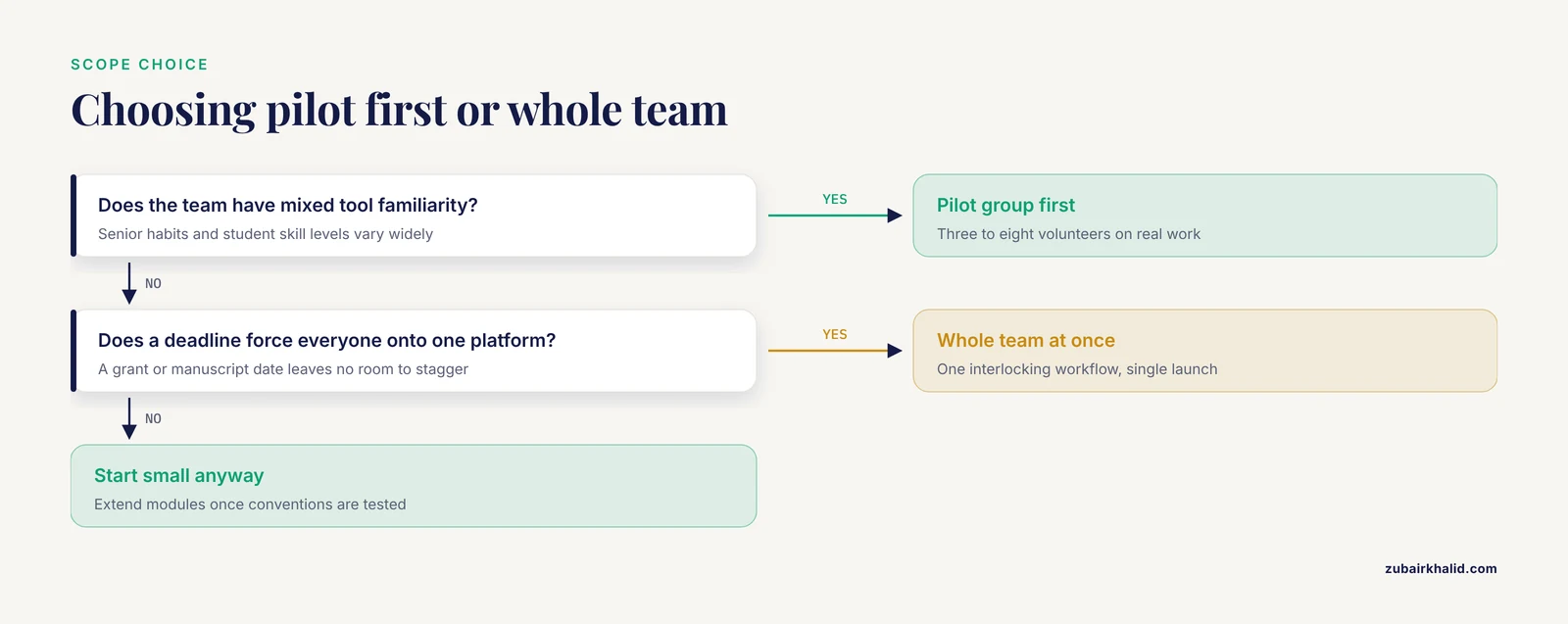
| Rollout scope | Pilot group first (3 to 8 people) | Whole team at once | The team has mixed tool familiarity | A deadline forces everyone onto one platform |
| Session format | Short weekly modules (20 to 30 min) | Single launch workshop | Tasks are independent and repeatable | The tool has one interlocking workflow |
| Conventions | Written and version-controlled | Informal, learned by example | The team spans multiple sites or hires often | A stable two or three person group |
| Curriculum source | Workflow audit from Step 1 | Vendor feature list | You control the tasks being trained | The tool replaces a regulated process wholesale |
| Adoption check | Weekly metrics script | End-of-rollout survey only | You want to catch decay early | The tool is seasonal or project-bound |
Common Mistakes and Limitations
Launching the tool and the training on the same day. Announce the change, publish the conventions file, and schedule the pilot before the all-hands session. Teams adopt faster when a working example already exists.
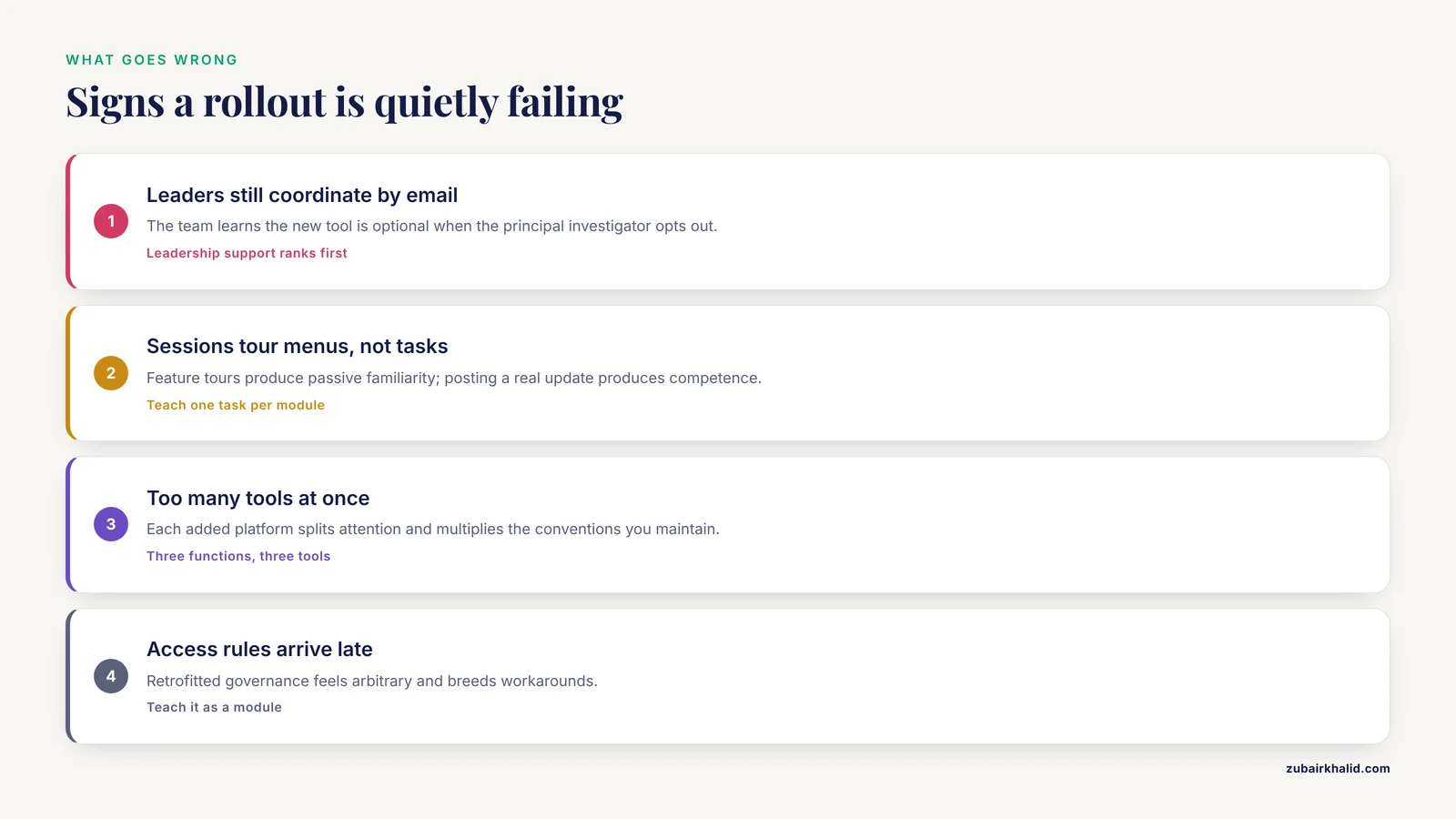
Training features instead of tasks. A session that tours every menu produces passive familiarity. A session that has each person post a real update produces competence. Evidence on tool-based learning consistently favors workflow-embedded, task-first instruction.
Letting leaders opt out. If the principal investigator keeps coordinating by email, the team learns that the new tool is optional. The adoption literature places leadership support at the top of the success factors [2], and in a lab that support is visible daily, not stated once in a memo.
Adopting too many tools at once. Each added platform splits attention and multiplies the conventions you must maintain. Three functions, three tools, one mapping is a workable ceiling for most groups.
Assuming digital fluency transfers automatically. Even among students raised on digital technology, surveys show uneven awareness of collaborative tools and real challenges in using them for shared work [3]. Survey your team's actual skill levels rather than guessing from age or seniority.
Treating governance as an afterthought. Retrofitted access rules feel arbitrary and breed workarounds. Sensitive-data handling belongs in the training modules and the conventions file from the start, following the auditable-workflow model of purpose-built trusted research environments [7].
Ignoring interoperability across groups. If your collaborators at other institutions use different systems, define what crosses the boundary and in what format early on. Multi-agency programs such as the NASA and JAXA D-NET effort show that shared information formats, not identical software, are what make cross-organization collaboration work [5].
Expecting training to end. Continuous learning was one of the three dominant success factors in adoption research [2]. Budget one short refresher module per quarter and fold tool review into your regular lab meeting so the skill never fossilizes.
A limitation of any rollout plan. Every research group has a different mix of grant obligations, data sensitivity, and staffing, so the specific toolset and timeline here are a template rather than a prescription. Adapt the steps to your own audit results, and revisit the conventions file whenever the team's composition or funding changes.
Frequently Asked Questions
How long does it take to train a research team on new collaboration tools?
Plan a four to six week cycle with weekly twenty to thirty minute modules plus a two-week pilot. Full, self-sustaining habits usually settle in over one to two months, and a quarterly refresher keeps them alive.
Which research collaboration tools should we start with?
Start with three: a chat workspace, a shared document system, and a task board. Map each to exactly one level of your workflow hierarchy so no two tools overlap in purpose.
How do we get senior researchers to adopt a new tool?
Put the principal investigator and lab manager on the pilot group first and make the tool the sole channel for one real deliverable they care about. Visible daily use by leadership outranks any memo.
Should we train everyone at once or in small groups?
Train a pilot group of three to eight first, then extend modules to the rest of the team once the pilot has refined the conventions. Small groups surface problems cheaply and produce credible internal examples.
How do we measure whether the training worked?
Track two numbers weekly: the share of the team rating themselves 4 or higher on the three core tasks, and active user counts from the admin dashboard. Rising numbers together indicate the training is sticking.
What is the biggest mistake teams make when rolling out new tools?
Training on features instead of tasks, and letting the old and new systems run in parallel indefinitely. Pick real tasks, make the new tool the only channel for those tasks, and retire the old path on a stated date.
How do we handle sensitive data in shared tools?
Write down which data classes may live in each tool, assign a named owner to every shared folder, and prefer tools with access logs and auditable workflows. Teach the rules as an ordinary training module, not an exception.
Do we need a dedicated trainer or administrator?
No dedicated hire is needed for most groups. One person should own the conventions file and the metrics script, and the owner role can rotate, but someone must be clearly responsible or the rollout stalls.
Sources
- Digital Collaborative Tools, Strategic Communication, and Social Capital: Unveiling the Impact of Digital Transformation on Organizational Dynamics
- DevOps Implementation: Essential Tools, Best Practices, and Solutions to Overcome Challenges for Seamless Development and Operations Integration
- Undergraduate Awareness and Perception on the Use of Digital Collaborative Tools in Facilitating Learning in Selected Universities within the Ilorin Metropolis
- Abstraction hierarchy to define biofoundry workflows and operations for interoperable synthetic biology research and applications
- UTM and D-NET: NASA and JAXA’s Collaborative Research on Integrating Small UAS with Disaster Response Efforts
- Integrating agile methodologies into data governance: Achieving flexibility and control simultaneously
- FAIR by design (TRACE): A Trusted Research Access & Collaboration Environment.