How to Test That Your Shared Code Reproduces Your Results
By Dr. Zubair Khalid, DVM, MS, PhD ·

By the end of this article you will be able to run a full reproduction test on your own analysis code before you share it, using a fresh checkout, a pinned software environment, and a numeric comparison of your outputs against the numbers in your manuscript. You will need a computer with Git installed, the language your analysis uses (R or Python in the worked examples below), and optionally Docker. Everything else is free.
The habit of testing before sharing matters because shared code frequently fails on first contact with a new user. In a survey of 400 aging research articles, 92% had no code availability statement at all, and even among articles that claimed code was open, the materials could only be located 81% of the time [1]. In clinical prediction model research, only 12.2% of nearly 4,000 articles included any code-sharing statement, and the repositories that did exist showed wide variation in documentation, dependency specification, and executable structure [2]. A large Delphi study of researchers, editors, publishers, funders, and policymakers identified independent verification of findings as a core target for strengthening research integrity, which is exactly what a tested reproduction package enables [3]. This article gives you a step-by-step procedure to test reproducibility of shared code, tips for each step, and the common mistakes that cause most failures.
What "Reproduces Your Results" Actually Means
Computational reproducibility means that another person, working from your shared code and data, can rerun your analysis and obtain your published numbers. A larger study of 110 economics and political science articles found that when data and code sharing is mandatory and done well, more than 85% of published claims were computationally reproducible, and 72% of statistically significant estimates remained significant under independent robustness checks [4]. That result shows two distinct things can be tested, and you should not confuse them.
- Computational reproducibility. The same data plus the same code yields the same numbers. This is what you can and should test yourself before sharing.
- Robustness and replication. Different analysts, different data, or different analytic choices reach similar conclusions. This requires other people and is usually organized after publication.
Your job before sharing is the first one. A useful benchmark for how close is "close enough" comes from meta-analysis reproduction work, where authors classified a meta-analysis as fully reproducible when the difference between the original and reproduced summary estimate and confidence interval width was under 10% [5]. For most deterministic scripts you can demand far stricter agreement, often exact equality to many decimal places, and the steps below show you how to check.
What a Tested Reproduction Package Contains
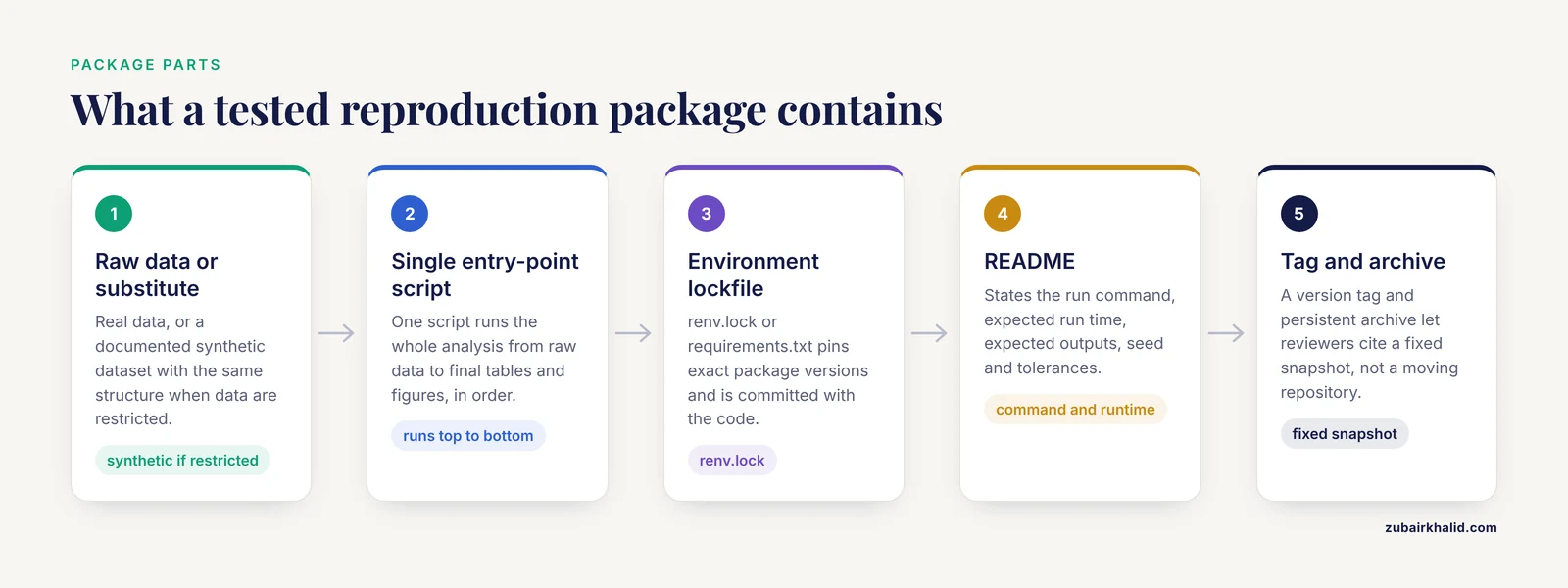
Before you can test anything, you need a package worth testing. Five recommendations from a review of coding practices in a large medical cohort capture the essentials: make reproducibility a priority and budget time for it, use structured peer code review, write well-organized comprehensible code, report decisions transparently in annotated workflow code, and share code and data through an accessible repository [6]. In practice, a minimal package has these parts.
- Raw data, or a documented synthetic substitute if the real data are restricted.
- A single entry-point script that runs the whole analysis from raw data to final tables and figures, in the correct order.
- An environment file that pins software versions (covered in Step 1 below).
- A README that states the expected run time, the expected outputs, and the command to run.
- A version tag and persistent archive so reviewers cite a fixed snapshot rather than a moving repository.
Tools like GitHub for version control and Google Colaboratory for runnable notebooks exist precisely because traditional publication cannot carry code and data, and they make it possible for a reader to execute your analysis directly [7]. Educational resources such as Metabonaut demonstrate the same principle in metabolomics, teaching executable workflows that run from raw instrument files to annotated feature tables, which is the standard your package should aim for [8].
How to Test Reproducibility of Shared Code Step by Step
The walkthrough below uses a generic project. Replace file names with your own. Steps 1 through 5 should be done in order, because each step depends on the previous one.
Step 0: Pin Your Random Seeds and Input Versions
Any analysis that uses simulation, bootstrapping, cross-validation, or Bayesian sampling must fix its random seed, otherwise two runs of your own code will disagree before anyone else even touches it.
In R, set the seed at the top of your main script and record the R version in the output.
set.seed(20260101)
R.version.string
#> [1] "R version 4.4.1 (2024-06-14)"
In Python, do the same for NumPy and any resampling library you use.
import numpy as np
np.random.seed(20260101)
Also record which version of each input dataset you used, including download dates for public databases. A meta-research review of Global Burden of Disease papers checked whether articles reported the R version and code availability, and found reporting of this basic information far from universal [9]. Make your article the exception.
Step 1: Freeze the Environment
Your code depends on specific package versions. Journal research data policies in materials science were found to give far less attention to software versioning, dependency disclosure, and reproducible execution environments than to data, which means reviewers often cannot check these details, so you must supply them yourself [10].
For R, use the renv package to capture exact package versions.
install.packages("renv")
renv::init()
renv::snapshot()
#> The following package(s) will be updated in the lockfile:
#>   ggplot2 [3.5.1]
#>   dplyr   [1.1.4]
#>   renv    [1.0.7]
#> - The lockfile is at renv.lock.
For Python, export your installed packages.
python -m pip freeze > requirements.txt
# head of requirements.txt after running:
# numpy==1.26.4
# pandas==2.2.2
# scipy==1.1.1
The lockfile (renv.lock or requirements.txt) is the machine-readable statement of your environment. Commit it to your repository alongside the code.
Step 2: Build the Package in a Clean Location
Reproducibility failures almost always come from files that exist on your laptop but nowhere else. Test from a fresh clone, which simulates what a reviewer does.
cd /tmp
git clone https://github.com/yourname/my-paper-code.git
cd my-paper-code
ls
#> README.md  data/  code/  renv.lock  results/
Then run the pipeline from the top, exactly as your README instructs.
Rscript code/01_run_analysis.RIf the run completes and produces files in results/, the first structural test has passed. If it fails here, you have found the most common class of reproducibility bug before your reviewers did.
Step 3: Compare Your Outputs to Your Manuscript Numbers
This is the step most people skip, and it is the one that proves your code reproduces your results rather than merely running. Open every table and figure in your manuscript and check each number against the regenerated output.
For a deterministic analysis, use exact or near-exact comparison. In R:
new_estimate <- read.csv("results/primary_estimate.csv")
# published hazard ratio was 1.73 (95% CI 1.21 to 2.48)
stopifnot(abs(new_estimate$hr - 1.73) < 1e-8)
stopifnot(abs(new_estimate$ci_low - 1.21) < 1e-8)
stopifnot(abs(new_estimate$ci_high - 2.48) < 1e-8)
If the script exits silently, every comparison passed. If it throws an error, the code and the manuscript disagree, and you must find out which one is wrong before sharing.
For output files, checksums catch silent differences.
md5sum results/table1.csv
#> e3b0c44298fc1c149afbf4c8996fb924  results/table1.csv
Store the checksum in your README so you and others can verify byte-identical output after a clean run.
For stochastic analyses, agreement will be looser, and you should state the tolerance. The meta-analysis reproduction study used the criterion that the reproduced summary estimate and confidence interval width differ from the original by less than 10% [5]. Choose a tolerance that matches your method, write it in the README, and test against it explicitly rather than eyeballing.
Step 4: Run It in a Sealed Environment
A container wraps your operating system, R or Python version, and system libraries into one reproducible unit. This catches failures that only appear on machines unlike yours, which is exactly the situation of an external reviewer.
A minimal Dockerfile for an R project looks like this.
FROM rocker/r-ver:4.4.1
COPY renv.lock renv.lock
RUN Rscript -e 'install.packages("renv"); renv::restore()'
COPY code/ code/
COPY data/ data/
CMD ["Rscript", "code/01_run_analysis.R"]
Build and run it.
docker build -t my-paper-code .
docker run --rm -v $(pwd)/results:/results my-paper-code
Expected output ends with your script's final log line, for example:
[1] "Analysis complete. Wrote results/table1.csv and results/figure1.png"Distributed research networks use the same logic at scale, writing analysis code once and executing it locally at each site against a common data model, precisely because separating the code from a particular machine makes the analysis auditable and reproducible [11]. If your code passes inside a container on a colleague's machine, you have strong evidence it will pass for a journal reviewer.
Step 5: Have a Colleague Run It Blind
Structured peer review of code is one of the five core recommendations for reproducible analysis code, and it strengthens reproducibility in ways solo testing cannot, because a fresh reader exposes undocumented assumptions [6]. Hand a colleague only the repository link and the README. Do not answer questions by screen-sharing or typing their commands for them. Instead, log every question they ask, because each unanswered question becomes a README revision. Radiology AI researchers have argued that transparent reporting must be embedded prospectively in study design rather than reconstructed at manuscript stage, and the same logic applies here, since the questions your colleague asks today are the omissions a reviewer would find after publication [12].
Step 6: Tag, Archive, and Link
When the package passes, tag a release in your repository, deposit the snapshot in an archived repository that issues a persistent identifier, and cite that identifier in your data and code availability statement. Reporting standards for prediction models are being developed specifically to push expectations beyond mere code availability toward documentation, dependency specification, and executable structure [2], and depositing a tested, tagged package puts you ahead of that curve. Institutional repository management is recommended so that code remains accessible even if a personal account lapses [6].
A Test Summary Table
| Test level | What you run | What passing looks like | What a failure means |
|---|---|---|---|
| Seed check | Run script twice | Identical outputs | A random step lacks a fixed seed |
| Clean clone | Fresh git clone, run entry point | Pipeline completes | Hidden files or absolute paths |
| Numeric check | Compare outputs to manuscript | Matches within stated tolerance | Code or manuscript has an error |
| Checksum | md5sum on output files | Matches stored checksum | Non-deterministic step or environment drift |
| Container | docker build, docker run | Script finishes, outputs written | Missing system dependency or version mismatch |
| Blind colleague | Runs from README only | Completes without your help | Documentation gaps |
Common Mistakes and Limitations
The most frequent failures are simple, and each one has a direct fix.
- Absolute paths.
setwd("C:/Users/you/Desktop/project")breaks on every other machine. Use paths relative to the project root, or use the here package in R. - Unexported random seeds. Your bootstrap gives a different confidence interval on every run. Fix the seed as shown in Step 0 and state it in the README.
- Notebook cell-order dependence. A Jupyter notebook that only works if cells run in your historical order is not a script. Either linearize it or convert the analysis into an ordered script that runs top to bottom.
- Testing only on your own machine. If it runs only where it was written, you have not tested reproducibility. The clean clone and container steps exist for this reason.
- Missing dependency versions. Code that works with one version of a package and fails with another is a classic complaint among people attempting reproductions, who report that open code was never, rarely, or only sometimes available in the publications they read, and that documentation preparation time is the leading barrier to sharing [13].
- Comparing outputs to nothing. A script that runs is not a script that reproduces. Always complete the numeric comparison in Step 3 against your actual published numbers.
- Stale repositories. If you push corrections after testing, retest. A repository snapshot that no longer matches the tested version undermines the whole exercise, and journal policies that ignore versioning contribute to this problem [10].
- Restricted data with no substitute. If privacy or governance rules prevent sharing the raw data, the code alone cannot be fully tested by others. Document this openly, provide a synthetic dataset with the same structure, and consider controlled-access mechanisms that support auditable, reproducible workflows for sensitive health data [14].
A final limitation to state honestly in your README: passing all these tests proves computational reproducibility on the environments you tested. It does not prove your methods are correct, your data are of high quality, or your conclusions generalize. Those are separate scientific questions, and no tool can substitute for them.
Reproducibility Checklist
Use this reproducibility checklist before you submit. Each item maps to a step above.
- Random seed set and stated in the README.
- Software environment pinned in a lockfile.
- Input data versions and download dates recorded.
- Single entry-point script that runs the full analysis from raw data.
- Pipeline tested from a fresh clone on a different machine.
- Every manuscript number checked against regenerated output, with the tolerance stated.
- Output checksums stored and verified.
- Container build and run tested, if feasible.
- Colleague completed a blind run using only the README.
- Release tagged, archived with a persistent identifier, and cited in the availability statement.
Researchers who ran this kind of structured process report that the main obstacles are time and publication pressure rather than technical difficulty, with 65% citing lack of time to prepare documentation as the main barrier to code sharing [13]. Budgeting one focused day for the checklist, ideally during manuscript revision rather than after acceptance, keeps the cost manageable. Expert consensus on reproducibility priorities points the same direction, favoring concrete, implementable practices over aspirational policies [3].
Frequently Asked Questions
What is the difference between reproducibility and replication?
Reproducibility means rerunning your exact code and data to get your exact numbers. Replication means a new study, often with new data, tests whether your finding holds. Reproducibility is something you can fully verify yourself before sharing, while replication requires independent researchers and new samples.
Do I need Docker to share reproducible code?
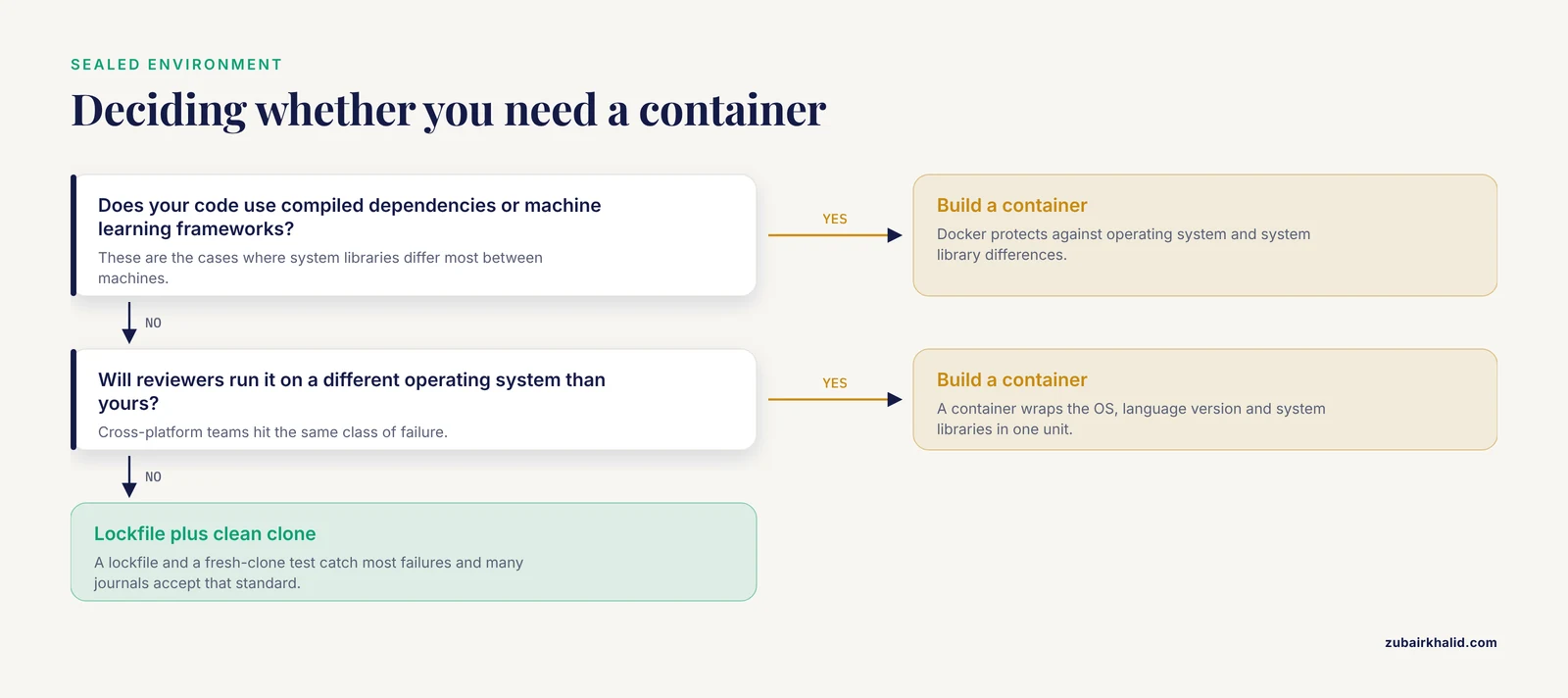
No. A lockfile plus a clean-clone test catches most failures, and many journals accept that standard. Docker adds protection against differences in operating system and underlying system libraries, which matters most for compiled dependencies, machine learning frameworks, and cross-platform teams.
What if my data are confidential and cannot be shared?
Share the full code, document the data structure precisely, and provide a synthetic dataset with identical column names and types so the code can be executed end to end. For sensitive health records, controlled-access environments with auditable workflows can support reproducibility while meeting privacy requirements [14].
How close do reproduced numbers need to be?
For deterministic scripts, expect exact agreement to high precision, which you can enforce with stopifnot or an equivalent assertion. For stochastic methods, state a tolerance in advance. One published benchmark classified reproductions as fully successful when the summary estimate and confidence interval width differed by less than 10% [5].
Which numbers in my manuscript should I test?
All of them that the code produces, including every cell of every table and the exact data behind every figure. Partial testing defeats the purpose, because the one untested cell is the one a reanalysis will question first.
How do I handle package versions that change over time?
Freeze the versions you tested in a lockfile and archive the tested release with a persistent identifier. Reviewers then reproduce the archived snapshot rather than whatever the current package ecosystem happens to install.
What should the README contain?
The exact command to run, the expected runtime, the expected output files, the seed and software versions, the numeric tolerances for stochastic steps, and contact information. If a blind colleague can complete a run using only the README, it is sufficient.
How long does a full reproducibility test take?
Plan roughly one focused working day for a typical analysis project, less if you started with a lockfile and relative paths and more if the pipeline grew organically. The time investment is front-loaded, and a package that passes once is cheap to retest after every edit.
Sources
- An assessment of data and code sharing in research funded by the Nathan Shock Centers, 2017-2022: a meta-research study.
- AI-assisted scoping review of code sharing in clinical prediction model research.
- Prioritising measures and interventions to strengthen research reproducibility: a Delphi consultation study.
- Reproducibility and robustness of economics and political science research.
- Reproducibility of meta-analytic results in systematic reviews of interventions: meta-research study.
- Improving reproducibility of data analysis and code in medical research: 5 recommendations to get started.
- GitHub and Google Colab for Sharing Data and Code.
- Metabonaut: an open educational resource for learning reproducible, script-based untargeted LC-MS/MS metabolomics.
- Paper mill or paper mine? A tentative answer to the sharp increase in research papers based on the Global Burden of Disease database.
- Journal research data policies in materials science.
- Congenital heart disease in pregnancy and severe maternal morbidity: a distributed data network study.
- Transparent reporting is central to reproducible radiological AI research: A call to action.
- Exploratory Insights into Barriers and Open Practices for Computational Reproducibility in Scientific Research.
- FAIR by design (TRACE): A Trusted Research Access & Collaboration Environment.