How to Share Your Reproducible Environment
By Dr. Zubair Khalid, DVM, MS, PhD ·

By the end of this article you will be able to package the complete computational environment behind a life science analysis, publish it so that another person gets identical results with one command, and check that you have not left anything out. You will need a terminal, a package manager such as Conda or Mamba, and optionally Docker or Apptainer for containers and a Git account for code hosting.
Why Sharing a Reproducible Environment Matters
Reproducible research means that another person, or you six months from now, can rerun an analysis and get the same numbers. In computational biology this is harder than it sounds because results depend on the exact versions of dozens of software packages, reference files, and parameters. A pipeline that ran on Python 3.9 with an older scikit-learn release can fail or give different output on a machine with Python 3.12. Reviewers, collaborators, and trainees all run into this gap.
The gap is well documented across fields. Journal research data policies in materials science found that most journals ask for data availability statements but very few require public deposition, and expectations for software are even weaker than for data, with limited attention to dependency disclosure or reproducible execution environments [1]. In other words, you cannot rely on a journal policy to force you into good habits. You have to build the habit yourself.
Modern life science platforms are converging on a simple idea. A study becomes reproducible when you can share a small, complete description of the workflow plus the environment, and the consumer needs nothing else. The QuNex recipes framework for neuroimaging is an explicit example. A fully reproducible study there can be shared and replicated by providing only three things, the software version, the recipe file that captures every processing step and parameter, and the data [2]. That is the target structure this article helps you reach with everyday tools.
What a Reproducible Environment Actually Contains
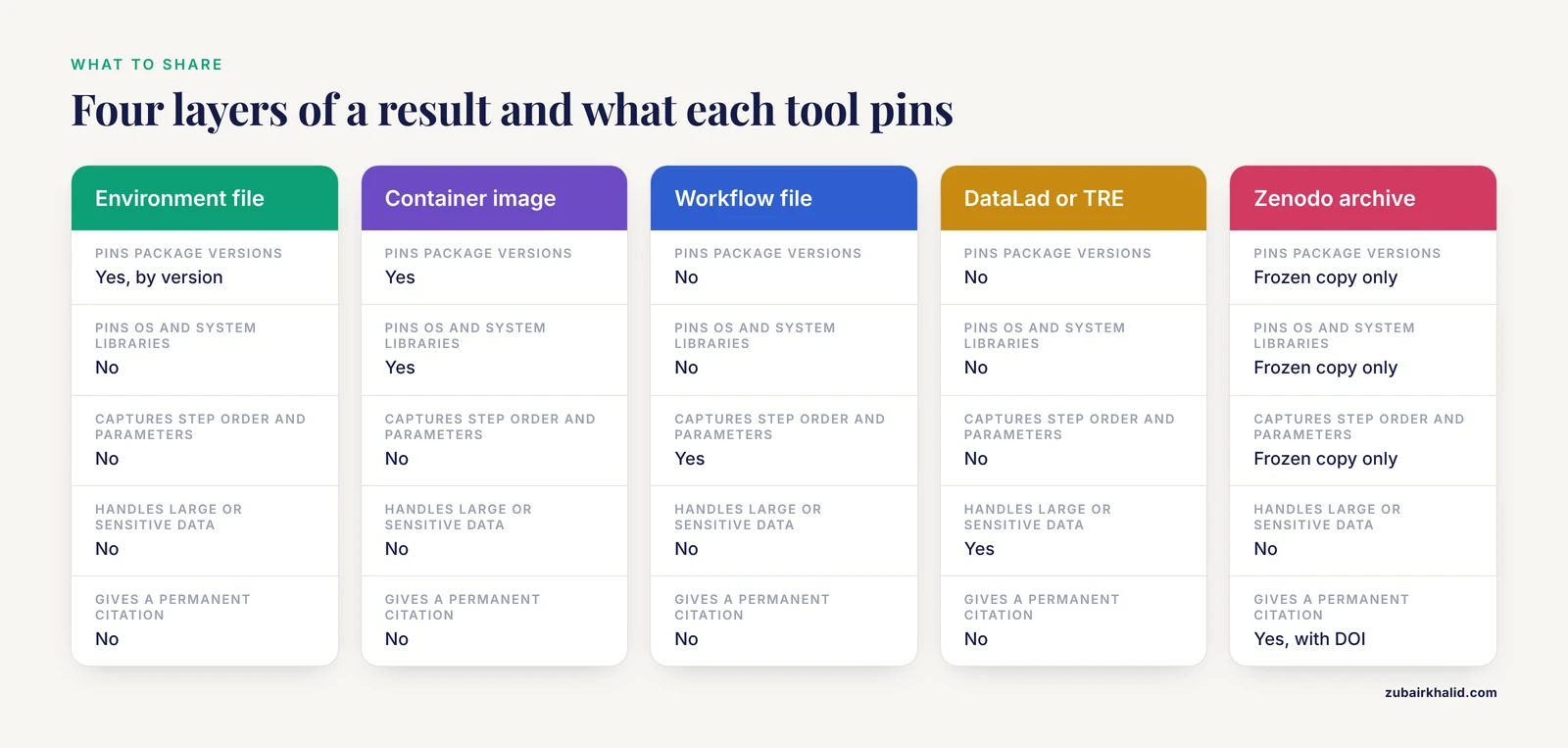
Before sharing anything, be clear about the four layers that make up a computational result.
- Code. Your scripts and notebooks, ideally in version control.
- Software environment. The exact interpreter and package versions, often captured as an environment file or a container image.
- Data and metadata. Input files, often too large for Git, plus their checksums so others can confirm they have the same bytes.
- Workflow definition. The order of steps, their parameters, and how they connect, expressed in a workflow engine or a documented script.
If you share only the code, you have one quarter of the problem. The phrase "dependency hell" describes what happens when a consumer tries to install scattered packages by hand and hits version conflicts. Tools such as BioImageIT were built specifically to resolve dependencies automatically across fragmented image analysis ecosystems, and they capture metadata for every processing step along the way [3].
How to Share Your Reproducible Environment Step by Step
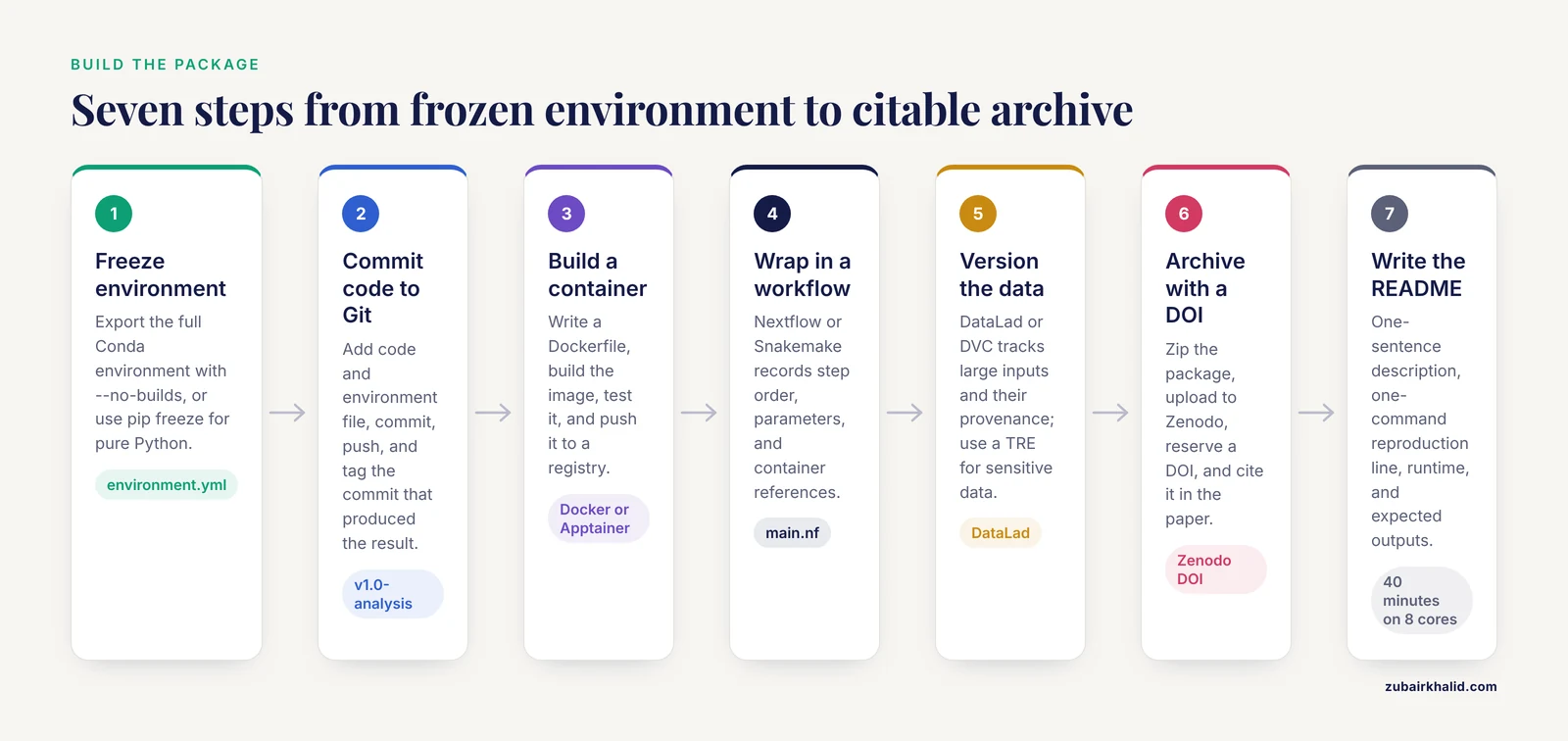
The walkthrough below assumes a Python-based analysis that runs on a laptop or a high-performance computing (HPC) cluster. The same logic applies to R or command-line tools, and the equivalent commands are noted where they differ.
Step 1. Freeze your environment
If you used Conda or Mamba, export the full environment, not just the packages you think matter.
conda activate rnaseq-2026
conda env export --no-builds > environment.yml
Expected output, the head of a real environment.yml:
name: rnaseq-2026
channels:
  - conda-forge
  - bioconda
dependencies:
  - python=3.11.4
  - samtools=1.19.2
  - fastqc=0.12.1
  - pip=24.0
  - pip:
      - multiqc==1.21
      - pandas==2.2.1
The -no-builds flag keeps the file portable across operating systems by dropping platform-specific build strings. The tradeoff is that you pin package versions but not compiled binaries, which is usually the right balance for sharing. For a pure Python project without Conda, use pip instead.
pip freeze > requirements.txtA better practice is to manage dependencies with a lock tool such as pip-tools or Poetry so that versions are pinned deterministically rather than whatever happened to be installed the day you typed pip freeze.
Step 2. Put your code in version control
Initialize a Git repository and commit the environment file with the code.
git init
git add . environment.yml README.md
git commit -m "Add analysis code and pinned environment"
git remote add origin https://github.com/yourname/rnaseq-project.git
git push -u origin main
Expected output:
Enumerating objects: 42, done.
Compressing objects: 100% (38/38), done.
Writing objects: 100% (42/42), 105.3 KiB | 2.10 MiB/s, done.
To https://github.com/yourname/rnaseq-project.git
 * [new branch]      main -> main
Tag the exact commit that produced your published result.
git tag v1.0-analysis
git push origin v1.0-analysis
That tag is what you cite in your paper. A reader who finds the repository a year later should land on the tagged state, not your current working directory.
Step 3. Containerize for exact reproduction
An environment file pins package versions, but a container pins the operating system, system libraries, and compiler stack as well. Software containerization packages code, dependencies, and the execution environment into a portable unit, and it has become a cornerstone of modern computational biology [4]. Write a minimal Dockerfile.
FROM mambaorg/micromamba:latest
COPY environment.yml /tmp/environment.yml
RUN micromamba create -y -f /tmp/environment.yml
COPY analysis/ /opt/analysis/
WORKDIR /opt/analysis
Build, test, and publish it.
docker build -t yourname/rnaseq-project:v1.0 .
docker run --rm -v $PWD/data:/opt/analysis/data yourname/rnaseq-project:v1.0
docker push yourname/rnaseq-project:v1.0
Expected output at the end of a successful build:
naming to docker.io/yourname/rnaseq-project:v1.0 doneOn HPC systems where users cannot run Docker, Apptainer (formerly Singularity) is the standard alternative, and it can pull your Docker image directly.
apptainer pull rnaseq-project_v1.0.sif docker://yourname/rnaseq-project:v1.0
apptainer run rnaseq-project_v1.0.sif run_pipeline.sh
Containers are powerful but easy to misuse. Superficial container use can create brittle environments or false confidence in reproducibility, so think about when containerization is appropriate, how you balance reproducibility with flexibility, and how you will share the image responsibly [4]. One concrete rule, always rebuild your image from the Dockerfile on a clean machine before you share it. If you cannot rebuild it, you are sharing a snapshot, not a reproducible environment.
Step 4. Wrap the environment in a workflow engine
A container answers "what software," a workflow engine answers "in what order, with what parameters." Nextflow and Snakemake are the dominant choices in the life sciences. A Nextflow pipeline bundles steps, dependency management, and container references in one place. Workflows built this way manage tool dependencies automatically and run identically on laptops, HPC schedulers, and cloud platforms. This pattern is used widely, for example in proteomics, where a Nextflow pipeline wrapping the FragPipe toolset enables reproducible large-scale mass spectrometry analysis on HPC and cloud systems without extensive computation expertise [5], and in clinical genomics, where nf-core-compliant Nextflow pipelines standardize variant annotation from resource setup through interpretation inside fully containerized workflows [6].
A minimal Nextflow process looks like this.
process FASTQC {
    container "quay.io/biocontainers/fastqc:0.12.1--hdfd78af_0"
    input:
    path reads
    output:
    path "*_fastqc.html"
    script:
    """
    fastqc ${reads}
    """
}
Run it.
nextflow run main.nf -with-docker yourname/rnaseq-project:v1.0Expected output:
[-] process FASTQC (1) COMPLETED [12/4a9f21]Nextflow writes a work/ directory and a .nextflow.log that record every command, which is provenance you can archive with your results.
Step 5. Version your data, not just your code
Git handles text well but chokes on the multi-gigabyte files common in sequencing and imaging. DataLad is a Python-based tool built on Git and git-annex for joint management of code, data, and their relationship, and it can capture complete process provenance of data transformations so results can be recomputed automatically [7]. A basic DataLad workflow.
datalad create my-project
cd my-project
datalad save -m "Add raw fastq inputs" data/
datalad siblings add -s origin --url https://github.com/yourname/rnaseq-project-data
datalad push --to origin
A collaborator then retrieves the exact same bytes with one command.
datalad clone https://github.com/yourname/rnaseq-project-data
cd rnaseq-project-data
datalad get data/sample_A1.fastq.gz
For sensitive data, you cannot use a public host at all. Trusted Research Environments (TREs) exist for this situation. TRACE, a Trusted Research Access and Collaboration Environment for health data, provides controlled and auditable workflows with reproducibility at the level of data and analysis code, so analysts work inside a sealed environment rather than downloading data [8]. The Human Intracerebral EEG Platform applies the same model to collaborative epilepsy research, pairing a cloud-based TRE with standardized BIDS-iEEG data organization so that institutions can share data under formal agreements while keeping FAIR alignment [9]. If your data are covered by data protection rules, the shareable artifact is your environment and workflow definition, run inside the TRE, not the data itself.
Step 6. Archive the whole package with a persistent identifier
Your code is on GitHub, your container is on Docker Hub, and your data are on a LFS-enabled remote. None of those guarantee permanence. Archive a frozen copy in a repository that mints a digital object identifier (DOI). Zenodo is the most common choice, and it integrates directly with GitHub releases.
zip -r rnaseq-project-v1.0.zip code/ environment.yml workflow/ README.mdUpload the archive to Zenodo, fill in the metadata form, reserve a DOI, and cite that DOI in your manuscript alongside the GitHub tag. Openly available environments and documentation in a repository such as Zenodo are now a normal expectation, as demonstrated by workflows that publish their software environments alongside documentation and computational requirements [10]. Versioned Zenodo records also let you publish v1.0 and v1.1 of the same analysis without breaking earlier citations.
Step 7. Write the README that makes it usable
A shared environment nobody can run is not reproducible. Your README should contain, in this order, a one-sentence description of the analysis, the one-command reproduction line, the expected runtime, and the expected outputs. Here is a template.
# rnaseq-project

Differential expression analysis for the prophage drug-resistance study.

## Reproduce

    docker run --rm -v $PWD:/data yourname/rnaseq-project:v1.0

Runtime: about 40 minutes on 8 cores.

Outputs: results/deseq2.csv, figures/volcano.png
The one-command goal is real, not aspirational. Platforms built around this principle, such as the Microbiology Galaxy Lab, combine hundreds of tool suites and curated workflows in a FAIR-aligned environment specifically so that scientists can create, share, and update best-practice workflows with a low barrier to entry [11].
Checking That Your Shared Environment Actually Works
The verification step is where most sharing fails. Do this before you publish.
- Delete your local Conda environment and rebuild it from
environment.yml. - On a different machine, or in a fresh container, run the full pipeline from the top.
- Compare outputs against your saved results with checksums.
md5sum results/deseq2.csv
md5sum -c checksums.md5
Expected output:
results/deseq2.csv: OKIf checksums differ because of floating point or parallelism nondeterminism, document that in the README and record the seed or thread count that fixes it. A shared environment that produces statistically equivalent but not byte-identical output is acceptable if you say so. Silent differences are not.
Jupyter notebooks deserve a special check. Notebooks mix code, annotations, and plots, which makes them excellent for communication, but installing dependencies for a specific notebook can compromise reproducibility if the environment is not identical. Deploying a JupyterHub server gives each notebook a containerized environment, improves reproducibility, and speeds up manuscript review [12]. Cloud-based notebook tutorials, such as those developed for bulk RNA-seq analysis on Google Cloud Platform, show the same pattern in teaching contexts, where the environment ships with the tutorial so every learner runs the same setup [13].
A Table of Sharing Options and When to Use Each
| Artifact | Tool | Best for | Limitation |
|---|---|---|---|
environment.yml / requirements.txt | Conda, pip | Fast sharing of package versions | Does not pin system libraries or OS |
Dockerfile and image | Docker, Apptainer | Exact reproduction including OS | Large images, registry management |
| Workflow file | Nextflow, Snakemake | Multi-step pipelines with parameters | Learning curve, engine version matters |
| Data versioning | DataLad, DVC | Large or sensitive datasets with provenance | Extra infrastructure to learn |
| Sealed platform | JupyterHub, TRE, Galaxy | Sensitive data, collaboration, teaching | Requires server or institutional support |
| Archived snapshot | Zenodo with DOI | Permanent citation in a paper | Static, needs a new version for changes |
Tips for Sharing Reproducible Environment Research
These tips address decisions people get wrong repeatedly, beyond the mechanics above.
- Pin everything you did not write. Your own code is in Git. The things that break silently are the reference genome build, the database release date, the software version, and the parameter file. Record all of them explicitly, the way standardized, versioned workflows do when they capture every processing step and parameter setting [2].
- Use community standards for data layout. Standardized formats such as the Brain Imaging Data Structure (BIDS) make datasets interoperable and let downstream tools detect metadata problems automatically. Curation tools like CuBIDS validate large BIDS datasets and track provenance with DataLad integration, catching hidden variability that would otherwise produce inconsistent processing across sessions [14].
- Learn the workflow engine before you need it. Computational biology trainees often inherit research plans whose datasets and technical constraints were fixed before they arrived, and the execution gap between an inherited plan and reproducible results is where projects stall [15]. A shared, executable workflow closes much of that gap by making the plan explicit.
- Report computational requirements. Record cores, memory, and wall time for major steps. Reproducibility workflows that document resource needs on standard HPC infrastructure make it possible for others to plan their own runs instead of discovering failures at hour six [10].
- Make institution-level sharing easier where you can. Shared resources are moving from transactional fee-for-service models toward integrated research partnerships, with reproducibility and faster turnaround as explicit goals [16]. If your institution has a core facility or research computing group, its templates and storage are often better starting points than building alone.
- Re-run your own archive once. Before declaring a project done, download your own Zenodo snapshot on a clean machine and rerun it. This single habit catches the majority of reproducibility failures, including missing files that Git ignored and paths hardcoded to your home directory.
Common Mistakes and Limitations
Relying on pip freeze alone. It records Python packages but not system libraries, compilers, or the R situation at all. A Conda environment file or a container covers more of the stack.
Shipping containers without the recipe. A pushed image with no Dockerfile is a black box. Others cannot audit it, update it, or trust it, and container sharing done responsibly means sharing the build recipe [4].
Hardcoding absolute paths. /home/yourname/project/data fails on every other machine. Use relative paths or pass them as workflow parameters.
Ignoring database versions. Annotation results change when reference databases change. Genomic pipelines that integrate many annotation resources must pin database releases, because clinical interpretation depends on exactly which population frequencies and prediction scores were current [6].
Assuming open means shareable. Human data often cannot leave institutional control. For those projects the reproducible artifact is the workflow and environment, executed inside a governed environment with auditable access [8]. Publishing the workflow while the data stay sealed is a legitimate and increasingly standard outcome.
Confusing a README with documentation. A README that says "install the usual packages" is not documentation. Name versions, give the command, show expected output.
Skipping the journal policy check. Journals differ widely in what they require, and even within one field most policies encourage rather than mandate FAIR deposition, with software expectations weaker than data expectations [1]. Check your target journal early, because retro-fitting reproducibility at revision stage is painful.
One honest limitation of the whole approach. Environments pin software, not biology. Batch effects, reagent lots, and instrument states are not captured by any environment.yml, so reproducibility here means computational reproducibility of a defined analysis, not automatic replication of a wet-lab result.
Your Reproducibility Checklist
Run through this list before you share. Print it or turn it into your lab's pull request template.
- Code is in Git with a tagged release.
environment.ymlorrequirements.txtis committed and pinned by version.- A Dockerfile or Apptainer definition file builds the environment from scratch.
- The image rebuilds successfully on a clean machine.
- The workflow file (Nextflow or Snakemake) captures every step and parameter.
- Data files have checksums and are retrievable, versioned, or hosted in a TRE if sensitive.
- Reference databases and genome builds are named with version or release date.
- The README has a one-command reproduction line, runtime estimate, and expected outputs.
- A Zenodo DOI or equivalent archive exists and is cited in the manuscript.
- A colleague has rerun the pipeline from your shared artifact and reported success.
That final item, the outside test, is the one most often skipped and the one that matters most.
Frequently Asked Questions
What is a reproducible environment?
It is a complete, machine-readable description of the software, versions, system libraries, and settings needed to rerun an analysis. Conda environment files, container images, and workflow definitions are the standard formats.
Do I need containers if I already have a Conda environment file?
Usually yes for publication. A Conda file pins package versions but not the operating system or system libraries, so results can still differ across machines. Containers close that gap.
How do I share a reproducible environment when my data are confidential?
Publish the code, environment file, and workflow openly, and run the analysis inside a trusted research environment where the data stay under institutional control with auditable access.
What is the smallest acceptable reproducibility package?
A Git repository with pinned environment files, a README containing one working command, checksums for inputs, and a DOI-tagged archive. Everything beyond that improves convenience, not the core guarantee.
How long does making an environment reproducible take?
For a small project with clean code, an afternoon. For a legacy project with scattered scripts and unrecorded parameters, expect several days, mostly spent discovering implicit dependencies you never knew you had.
Can I share reproducible environments for R as well as Python?
Yes. Use renv for R package locking, or capture R and R packages inside the same Conda environment or container so both languages are pinned together.
What if my pipeline uses tools with graphical interfaces?
Look for platforms that host the tools for you. Community gateways such as Galaxy provide browser-based access to curated, versioned workflows, which sidesteps local installation entirely.
How do I cite a shared environment in a paper?
Cite the Zenodo DOI of the archived snapshot and the Git tag, and state the container image reference in your methods. Any one of the three alone can drift, so all three together give readers a stable, checkable pointer.
Sources
- Journal research data policies in materials science.
- QuNex recipes: Executable, human-readable workflows for reproducible neuroimaging research.
- BioImageIT: A novel python-based architecture for reproducible bio-image workflows.
- Nine quick tips for software containerization.
- Frag'n'Flow: automated workflow for large-scale quantitative proteomics in high performance computing environments.
- MuSA: a Nextflow pipeline for deep, reproducible annotation and clinical ranking of genomic variants.
- DataLad: distributed system for joint management of code, data, and their relationship.
- FAIR by design (TRACE): A Trusted Research Access & Collaboration Environment.
- The Human Intracerebral EEG Platform: A Cloud-Based Trusted Research Environment for Collaborative SEEG Research in Epilepsy and Neuroscience.
- PoLoCo: a reproducible pooled low-coverage workflow for draft genome assembly and allele frequency analysis from ethanol-preserved small non-model invertebrates.
- Microbiology Galaxy Lab: a community-driven gateway for reproducible and FAIR analysis of microbiological data.
- Deploying a JupyterHub Server for Academic Research Using Netbooks as an Example.
- Reusable tutorials for using cloud-based computing environments for the analysis of bacterial gene expression data from bulk RNA sequencing.
- Curation of BIDS (CuBIDS): A workflow and software package for streamlining reproducible curation of large BIDS datasets.
- Ten simple rules for executing an inherited research plan in computational biology.
- From Core Facility to Collaborative Partner: Reimagining Institutional Shared Resources as CRO-Model Research Partners Enhanced by Agentic AI.