How to Share Large Genomic Datasets During Research
By Dr. Zubair Khalid, DVM, MS, PhD ·

By the end of this guide you will be able to move a multi-terabyte sequencing dataset from your lab server to a cloud destination, set up controlled or open access, publish a persistent identifier, and verify that a collaborator can actually download what you shared. This is the full workflow for how to share large genomic datasets during research, written for people who have command-line access but no dedicated informatics team.
Before you start, have the following on hand:
- A terminal on a Linux or macOS machine with AWS CLI, Google Cloud SDK (which provides the
gcloudandgsutiltools), or rclone installed - A cloud account with billing enabled, or an invitation to an institutional cloud workspace
- Your raw and processed data files in standard formats (FASTQ, BAM or CRAM, VCF), compressed and indexed
- A metadata spreadsheet describing every sample
- Your data-use agreement, consent language, and any access restrictions in writing
Why Cloud Sharing Is Now the Default
A single whole-genome sequence produces raw files measured in tens of gigabytes, and a cohort study multiplies that fast. A published resequencing project for acute myeloid leukemia reported BAM files of 5 to 10 GB per sample, with each alignment step consuming eight CPUs for about 12 hours [1]. Datasets at this scale do not travel by email, portable drives, or FTP servers maintained by a single lab.
Cloud computing changed the economics of this problem. It offers a utility model of computing and storage, with near-unlimited capacity, burstable usage, and flexible payment, and it creates new opportunities to share data, reduce duplication, and make datasets and computational methods easily available for reproducibility [2]. The same shift explains why platforms like Bionimbus were built as open-source, petabyte-scale cloud environments combining on-demand virtual machines with high-performance clustered file systems [1].
The core idea, now standard across biomedical informatics, is to move the computation to the data rather than copy terabytes to every collaborator's workstation. When researchers cannot move datasets locally, shared cloud infrastructure lets them run quality control, alignment, variant calling, and annotation in one place [1].
Choosing a Sharing Destination: A Data Repository Comparison
The most consequential decision in research data sharing is where the data will live. Grossman's review of platforms for analyzing and sharing genomic data draws a useful line between three models [3]:
- Data commons combine the dataset with cloud computing infrastructure, software services, and analysis tools, so users analyze data where it sits. Building one takes sustained curation effort.
- Data lakes simply provide access to the raw data. Curation and analysis are deferred to whoever accesses it [3].
- Data ecosystems interoperate multiple data commons so datasets from different programs can be combined [3].
Most researchers do not build any of these from scratch. They deposit into an existing platform. The table below is a practical data repository comparison.
| Destination type | Best suited for | Access model | Real examples |
|---|---|---|---|
| , - | , - | , - | , - |
| Disease-specific data commons | Analysis-ready multi-omics with rich metadata | Open and controlled tiers | NCI Cancer Research Data Commons, whose Proteomic Data Commons holds annotated data from more than 160 datasets across 19 cancer types [4] |
| National genomic cloud platforms | Large controlled-access human genomics under funder policy | Controlled, application-based | AnVIL and BioData Catalyst, secure cloud workspaces where researchers find, access, share, store, and compute on large-scale datasets [5][6] |
| Consortium data-sharing agreements | Multi-institution studies with heterogeneous legacy datasets | Application-based plus federated analysis | The PRIMED Consortium, which coordinated dbGaP applications and a Consortium Data Sharing Agreement, with federated analyses where individual-level data cannot be shared [7] |
| Disease portals for open exploration | Cohort-level summary data and visual analytics | Free, open access with controlled-access features for sensitive tiers | The St. Jude Survivorship Portal, which exposes more than 1,600 phenotypic variables and 400 million genetic variants from more than 7,700 childhood cancer survivors [8] |
| Institutional repositories | Multimodal clinical, imaging, and genetic data with local governance | Registered access or open | The C-BIG Repository at the Montreal Neurological Institute, an institution-level open science platform built with governance, ethics, and training infrastructure [9] |
| General-purpose cloud buckets (S3, Google Cloud Storage) | Raw file exchange between known collaborators, staging for deposit | You manage permissions | Used as the storage layer under repositories such as GenoVault, a cloud genomics repository built on OpenStack with object-based storage [10] |
Match the destination to your data's sensitivity and audience. Summary-level clinical and genomic data with the sensitive individual-level components gated behind an application works well in a portal model, which is exactly how the St. Jude Survivorship Portal structures its open and controlled access tiers [8]. Human genotypes that could re-identify participants belong in a controlled-access platform, and if you are aggregating legacy datasets with different consent terms, plan for a formal agreement and possibly federated analysis, as PRIMED did [7].
How to Share Large Genomic Datasets in the Cloud, Step by Step
This walkthrough covers how to share large genomic datasets cloud using Amazon S3 commands as the worked example. The same logic maps onto Google Cloud Storage with gcloud storage commands and onto any object store supported by rclone.
Step 1. Prepare the Files and Metadata
Before anything moves, make the dataset FAIR: findable, accessible, interoperable, and reusable. The ORCESTRA platform was built precisely because biomedical data of increasing complexity is hard to process and share in a FAIR manner, and it addresses this by creating integrated, fully documented data objects with persistent identifiers and managed versions [11]. You can borrow its core practices without adopting the platform.
- Compress and index everything. FASTQ files should be bgzip-compressed, BAM and CRAM files should have
.baior.craiindex files alongside them, and tab-delimited variant or interval files should be bgzipped and tabix-indexed.
samtools index sample01.sorted.bam
bgzip -c variants.vcf > variants.vcf.gz
tabix -p vcf variants.vcf.gz- Generate checksums so any recipient can verify integrity after download.
md5sum *.bam *.bam.bai *.vcf.gz *.tbi > md5.txtExpected output in md5.txt:
3f5a9c1e77b2d4a8e91c6d0f2b7a44d1  sample01.sorted.bam
8c2e11d0b4a6f3e95d7c1a8f0b6e2d94 sample01.sorted.bam.bai- Write a metadata file, one row per sample, covering sample identifier, donor or patient identifier, tissue, sequencing platform, library layout, coverage, treatment or condition, and consent terms. Repository builders emphasize that extensive metadata, including clinical, biospecimen, and workflow annotations, is what makes shared data interpretable and reusable [4].
- Decide on a version number and record it. Managing multiple dataset versions is a recognized requirement for reusable sharing [11].
Step 2. Decide the Access Model
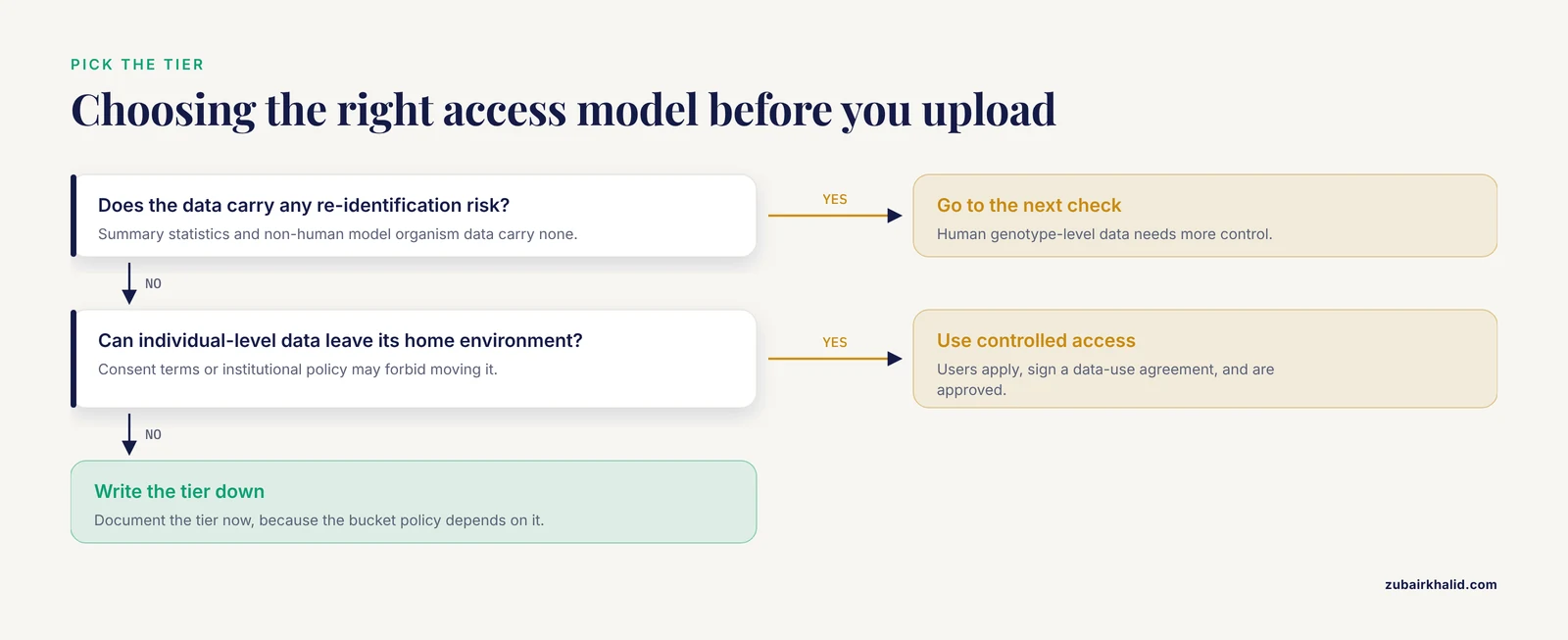
Choose one of three tiers before creating any bucket:
- Open access for data with no re-identification risk, such as summary statistics or non-human model organism data.
- Controlled access for human genomic data, where users apply, sign a data-use agreement, and are approved. Regulators increasingly mandate specific security protocols and access patterns for genomic data held on commercial cloud service providers [12].
- Federated access when consent terms or institutional policy forbid moving individual-level data out. In that case the data stays put and the analysis moves, an approach PRIMED adopted when individual-level data could not be shared within the consortium [7].
Document the tier in writing now, because the bucket policy in the next step depends on it.
Step 3. Create the Bucket and Set Permissions
aws s3 mb s3://lab-cancer-wgs-2026Expected output:
make_bucket: lab-cancer-wgs-2026Then attach a policy that grants your collaborator's account read-only access to a single prefix, for example s3://lab-cancer-wgs-2026/release-1/. The narrow scope matters. A security framework such as the five-safes model implemented in the RAPTOR repository exists because, without adequate security controls, the risk of unauthorized access is higher for data stored in the cloud, and building the required controls is not trivial even with provider tooling [12].
If your institution runs its own OpenStack-based platform, the same pattern applies through its interface. GenoVault, for example, gives users an option to make data shareable to the public or restrict it as private, with upload over SFTP and per-container isolation in object-based storage [10].
Step 4. Upload With Parallel Transfer
For a bucket holding hundreds of multi-gigabyte files, use the multipart-friendly sync command with concurrency tuned to your bandwidth:
aws s3 sync ./release-1/ s3://lab-cancer-wgs-2026/release-1/ \
  --storage-class INTELLIGENT_TIERING \
  --metadata dataset-version=1.0,consent=controlled \
  --exclude "*" --include "*.bam" --include "*.bai" \
  --no-progress
Expected output lines look like this:
upload: release-1/sample01.sorted.bam.bai to s3://lab-cancer-wgs-2026/release-1/sample01.sorted.bam.bai
upload: release-1/sample01.sorted.bam to s3://lab-cancer-wgs-2026/release-1/sample01.sorted.bam
Key parameters:
synccompares local and remote listings and uploads only what changed, which makes reruns cheap after an interrupted transfer.-storage-class INTELLIGENT_TIERINGmoves rarely accessed objects to cheaper tiers automatically, which suits archived sequencing data.-metadataattaches version and consent labels to every object so the access tier travels with the file.-excludeand-includefilter the transfer, useful when you want indexes uploaded first so downstream tools can validate alignment files.
On a 1 Gbps link, a 10 GB BAM takes roughly 80 to 90 seconds under ideal conditions. Real throughput is usually lower, which is why large transfers should run inside tmux or screen so a dropped SSH session does not kill the job.
Step 5. Index and Verify the Upload
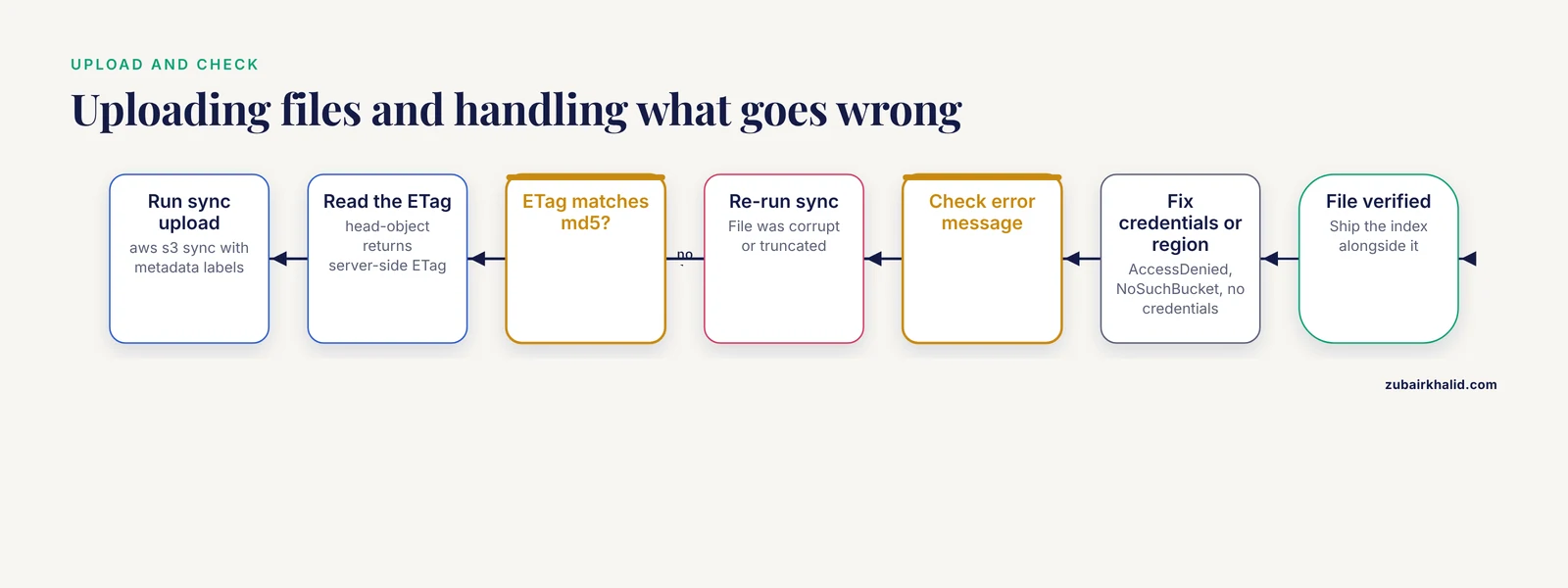
Verify that object checksums match your local md5.txt. The S3 CLI exposes the server-side ETag, and for single-part uploads the ETag equals the MD5.
aws s3api head-object --bucket lab-cancer-wgs-2026 \
  --key release-1/sample01.sorted.bam
Expected output (trimmed):
{
    "LastModified": "2026-11-11T14:02:31+00:00",
    "ContentLength": 8589934592,
    "ETag": "\"3f5a9c1e77b2d4a8e91c6d0f2b7a44d1\"",
    ...
}
Compare the ETag value to the corresponding line in md5.txt. If they match, the file transferred intact. A mismatch means a corrupt or truncated upload, so re-run sync for that file.
Common errors at this stage, with exact messages and fixes:
AccessDeniedon upload. Your IAM credentials lacks3:PutObjecton the bucket prefix. Have your administrator attach the permission or use a role with write access.NoSuchBucket. The bucket name is misspelled or the bucket is in a different Region than your CLI profile. Runaws s3 lsto list the actual name and set-regionexplicitly.Unable to locate credentials. The CLI has no profile configured. Runaws configureand enter the access key, secret key, and default Region.- A sync that stalls near the end. Large multipart uploads of failed parts still accrue storage charges. Clean them with a lifecycle rule or an abort-multipart-upload command before retrying.
Step 6. Publish Metadata and a Persistent Identifier
A bucket by itself is not discoverable. Register the dataset with a repository so it carries a DOI and a landing page. This is the model ORCESTRA uses, creating fully documented data objects with persistent identifiers and managed versions that can be shared for future studies [11]. At minimum, publish:
- A descriptive landing page or repository record with the version number and DOI
- The sample metadata table
- The workflow definitions used to process the data, since reproducible, documented processing is a stated goal of modern sharing platforms [11][13]
- Terms of use and the access request procedure for controlled tiers
Domain repositories handle much of this for you. The NCI Proteomic Data Commons, for instance, cross-references proteomic data with genomic and imaging data for the same samples held in other nodes of the Cancer Research Data Commons, which is what makes multi-omics integration practical [4]. The NHLBI BioData Catalyst ecosystem similarly provides secure cloud workspaces, search, tools, and workflows so researchers can find and compute on large datasets [5].
Step 7. Test the Download as a Collaborator
Ask a collaborator, or use a second account, to run:
aws s3 cp s3://lab-cancer-wgs-2026/release-1/sample01.sorted.bam ./test.bam
md5sum ./test.bam
The second command must reproduce the checksum from Step 1. Then confirm the collaborator can open the file with its index:
samtools view ./test.bam 1:1,000,000-2,000,000 | head -5Expected output, five alignment lines showing read name, flag, reference, position, and mapping quality:
read0001234  99  chr1  1000112  60  100M  ...
read0001456  99  chr1  1000160  60  100M  ...
If the index was never uploaded, this command fails with samtools index: the index file is missing. Always ship index files alongside the data files.
Tips for Sharing Large Genomic Datasets in the Cloud
These are the field-tested tips that separate a smooth release from a painful one.
- Compute near the data. When the dataset is enormous, re-analysis is only feasible without a supercomputer if filtering and analysis run on the storage side. BAMSI demonstrated this by deploying filtering workers close to data across many mirrors of the 1000 Genomes phase 3 aligned reads, improving horizontal scalability [14]. Design your share so collaborators can bring code to the data, not the reverse.
- Use community platforms where they exist. Microbiologists who lacked bioinformatics infrastructure adopted CLIMB, a shared cloud facility designed from the ground up so microbiologists can share and reuse methods and data [15]. If a community platform serves your field, contributing there multiplies your audience far beyond a private bucket.
- Plan for heterogeneous consent terms up front. Consortium data sharing is complicated by legacy datasets, evolving policies, and multi-institution stakeholders, which is why PRIMED designed its data-sharing policies and procedures before analysis began, including coordinated dbGaP applications and a formal Consortium Data Sharing Agreement [7].
- Support both browsers and power users. A portal with on-the-fly summary statistics, interactive charts, and cohort-building tools serves clinical collaborators who will never touch a command line, while the controlled-access tier serves computational users. That dual structure is how the St. Jude Survivorship Portal reaches both audiences [8].
- Document transfer expectations. Tell recipients the file formats, reference genome build, checksums, and index requirements. Multi-cloud setups, such as the PRoBE platform for the I-SPY 2 trial, which used Google BigQuery tables and SQL for data mining alongside public genomic databases, succeed because data structure is uniform and documented [16].
- Think about reuse in education. Open shared datasets now underpin classroom-scale research projects. One undergraduate genomics course used about 60 published open datasets in a cloud notebook environment so 80 students with limited computing experience could analyze data with thousands of subjects [17]. If your data can support teaching, say so in the access terms.
Common Mistakes and Limitations
Sharing large genomic datasets cloud comes with a set of recurring errors. Each of these is a real mistake researchers make, phrased so you can check against your own project.
- Uploading without index files. A BAM without
.bai, a CRAM without.crai, or a bgzipped VCF without.tbiis functionally unusable for region queries. Ship every index with every data file. - No checksums. Recipients who cannot verify integrity will not trust a silent bit flip in a 10 GB file. Generate MD5 sums before upload and publish them with the dataset.
- Granting bucket-wide access. A single policy that exposes the entire bucket to a collaborator leaks data you meant to restrict. Scope permissions to a specific prefix per release.
- Ignoring the access tier until after upload. If consent terms require controlled access, uploading first and deciding later forces a costly re-share. The regulatory pressure on cloud-hosted genomic data is explicit and growing [12].
- Confusing a bucket with a repository. A private S3 prefix has no discovery, no DOI, no citation record, and no governance. Repositories and data commons exist because raw buckets do not satisfy research data sharing expectations [3].
- Assuming summary data needs the same controls as individual data. Portal builders deliberately split open and controlled tiers, publishing summary statistics openly while gating individual-level genotypes [8]. Applying one uniform policy to both wastes effort on one and risks exposure on the other.
- Underestimating metadata. Datasets without clinical, biospecimen, and workflow annotations cannot be reanalyzed meaningfully, which defeats the purpose of sharing [4].
- Forgetting that scale changes the failure modes. Performance-limiting factors change substantially when a dataset grows by orders of magnitude, and cloud platforms introduce new robustness problems at petascale [2]. Test your pipeline on 1 percent of the data before the full run.
One limitation applies to every step here. Cloud platforms, bucket names, storage classes, and repository submission interfaces change over time, and your institution's agreements and your funder's data policy override anything in this guide. Confirm the current requirements with your institutional data office before a formal deposit.
Frequently Asked Questions
How large does a dataset need to be before cloud sharing becomes necessary?
There is no fixed threshold, but once a dataset exceeds what collaborators can download and store locally, which for whole-genome BAM files happens at 5 to 10 GB per sample and hundreds of samples, compute-near-data sharing on a cloud platform is the practical route [1].
What is the difference between a data commons and a data lake?
A data commons pairs the dataset with cloud computing, software services, and analysis tools so users analyze data in place, while a data lake simply provides access to the data and defers curation and analysis to whoever downloads it [3].
Do I always need controlled access for human genomic data?
Not always, but human genotype-level data generally requires an application and data-use agreement, and some datasets cannot leave their home environment at all, in which case federated analysis is the standard alternative [7].
Which cloud destination should I choose for my dataset?
Match the destination to sensitivity and audience, using the data repository comparison table above, open portals for summary data, controlled-access national platforms for human genomics, institutional repositories for multimodal clinical data, and plain buckets for direct collaborator exchange [8][4][9][5].
How do I give a collaborator access to one file without exposing the whole bucket?
Create a read-only policy scoped to a single key or prefix, or generate a pre-signed URL with an expiration, rather than granting account-wide bucket permissions.
What metadata should accompany a shared genomic dataset?
At minimum, one row per sample covering sample and donor identifiers, tissue, platform, library layout, coverage, condition, consent terms, plus the workflow definitions used to process the data, since extensive annotation is what makes shared data interpretable and reusable [4][11].
Can my dataset be used for teaching as well as research?
Yes, and open cloud-hosted datasets are already used this way, including a course in which 80 undergraduates with limited computing experience analyzed published open datasets with thousands of subjects in a cloud notebook environment [17].
How should collaborators cite a shared dataset?
Cite the repository record and its persistent identifier, such as the DOI issued when the dataset version was published, and cite the platform publication if one exists [11].
Sources
- Bionimbus: a cloud for managing, analyzing and sharing large genomics datasets.
- Computational biology in the cloud: methods and new insights from computing at scale.
- Data Lakes, Clouds, and Commons: A Review of Platforms for Analyzing and Sharing Genomic Data.
- NCI's Proteomic Data Commons: A Cloud-Based Proteomics Repository Empowering Comprehensive Cancer Analysis through Cross-Referencing with Genomic and Imaging Data.
- Building a collaborative cloud platform to accelerate heart, lung, blood, and sleep research.
- Insights into the Datasets, Tools, and Training Needs of the AnVIL Community: 2024.
- Data sharing in the PRIMED Consortium: Design, implementation, and recommendations for future policymaking.
- St. Jude Survivorship Portal: Sharing and Analyzing Large Clinical and Genomic Datasets from Pediatric Cancer Survivors.
- The C-BIG Repository: an Institution-Level Open Science Platform.
- GenoVault: a cloud based genomics repository.
- Orchestrating and sharing large multimodal data for transparent and reproducible research.
- A five-safes approach to a secure and scalable genomics data repository.
- DolphinNext: a distributed data processing platform for high throughput genomics.
- BAMSI: a multi-cloud service for scalable distributed filtering of massive genome data.
- CLIMB (the Cloud Infrastructure for Microbial Bioinformatics): an online resource for the medical microbiology community.
- PRoBE the cloud toolkit: finding the best biomarkers of drug response within a breast cancer clinical trial.
- Teaching genomics to life science undergraduates using cloud computing platforms with open datasets.