How to Share Lab Notebook Templates Across Your Team
By Dr. Zubair Khalid, DVM, MS, PhD ·

By the end of this guide you will be able to draft a lab notebook template that captures everything your lab needs, validate it so every entry has the same structure, publish it in a place your whole team can reach, control who can edit it, train new members on it, and keep the template from drifting out of date. To follow along you need three things on hand: a draft template (a text editor is enough to start), a decision about where the master copy will live (an electronic lab notebook, a shared drive, or a version-controlled folder), and a short list of the experiments your team runs most often.
Why a Shared Lab Notebook Template Matters
Every lab writes things down, but labs that write things down the same way move faster. A shared template fixes the structure of an entry before anyone starts typing, which means a colleague can find the Thermocycler run number, the operator name, and the deviations section in the same place on every page, in every notebook, across every project.
The published record backs this up. When Indiana University School of Medicine rolled out an electronic lab notebook institution-wide, the medical library did not just hand researchers a license. The library team delivered training sessions, offered one-on-one consults, and developed best-practice guidance along with template notebooks to help labs adopt the system. That program grew from a 15-lab pilot in late 2018 to 829 users by August 2021 [1]. The template notebooks were part of the adoption engine, not an afterthought.
There is also a structural reason to standardize. Research on how scientific teams organize and exchange information shows that both extremes fail. Silos prevent knowledge sharing and reduce research efficiency, while forced de-siloing can produce groupthink. Treating the structure of information sharing as something you can deliberately configure, rather than something that happens by accident, is an active area of research [2]. A shared template is the simplest configuration lever a lab chief has.
Finally, templates reduce the cost of switching systems later. When a lab course moved from paper to the cloud-based ELN LabArchives, instructors reported streamlined workflow, quick data recording and archiving, enhanced data sharing and collaboration, and better data integrity compared with paper notebooks [3]. Labs whose records follow a predictable structure migrate cleanly. Labs whose records are freeform prose migrate painfully.
What Goes Into a Shareable Lab Notebook Template
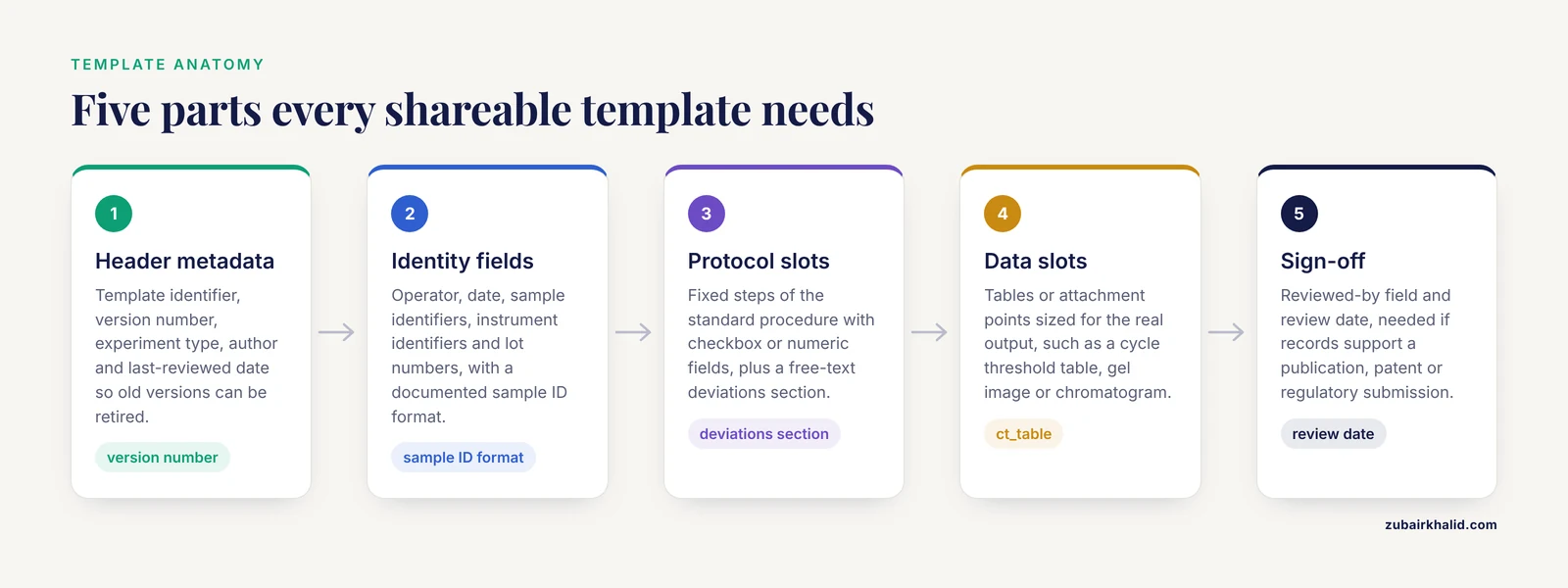
A template is a contract. It tells every team member which fields an entry must contain, which values are allowed, and where attachments go. A usable lab notebook template for a life science lab usually has five parts.
- Header metadata. Template identifier, version number, experiment type, author, and last-reviewed date. This is what lets you retire version 1 and prove everyone is on version 2.
- Identity fields. Operator name, date, sample identifiers, instrument identifiers, and lot numbers. Use a documented sample ID format so the field can be validated.
- Protocol slots. The fixed steps of the standard procedure, with checkbox or numeric fields for each step, plus a free-text deviations section.
- Data slots. Tables or file-attachment points sized for the actual output, whether that is a cycle threshold table, a gel image, or a chromatogram.
- Sign-off. A reviewed-by field and a review date, which matters if your records ever need to support a publication, a patent, or a regulatory submission.
The more of this structure you make machine-readable, the more you can do with it later. Work on semantic lab notebooks, which represent experiments as structured, machine-interpretable records rather than plain text, has shown that a structured template lets software check that an entry is complete and lets other groups reuse the recorded experiment [4]. The Solar Lab Notebook project took this approach further and defined a formal data standard, written in the W3C XML Schema language, that a notebook file must satisfy to count as valid, so that scientific groups at different labs could exchange information with confidence that the files would parse [5].
Choose the Sharing Model That Fits Your Lab
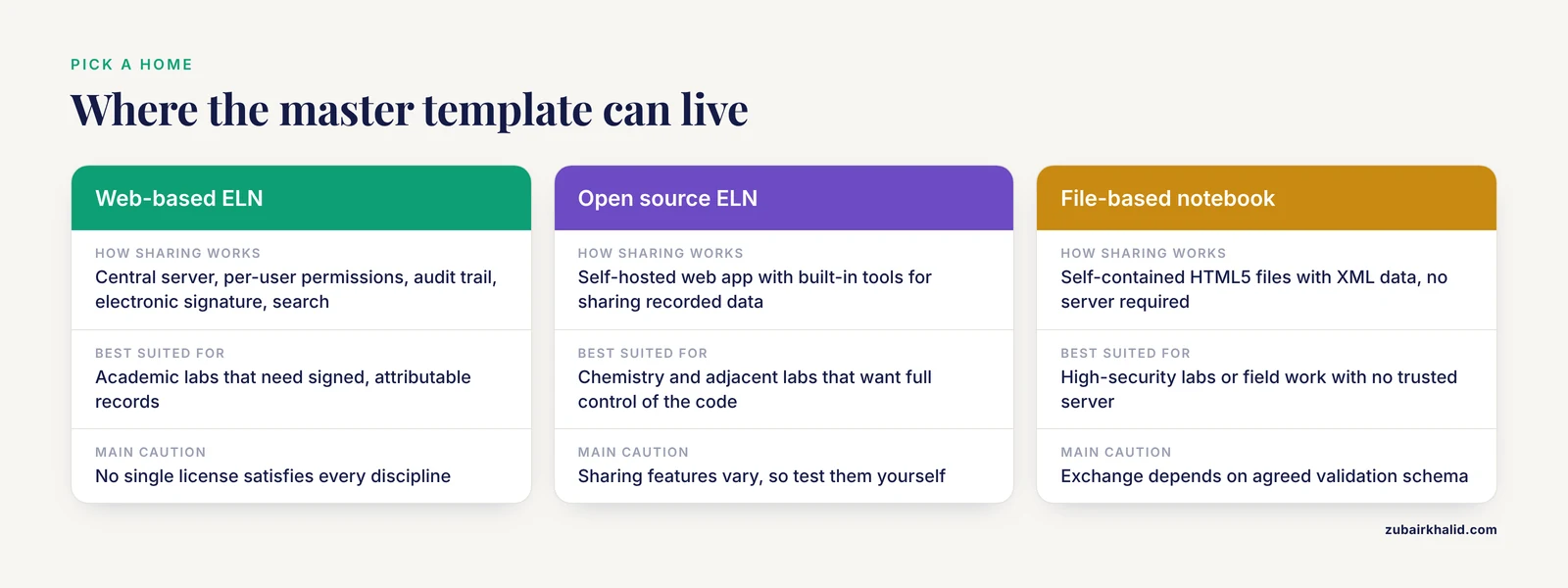
Before you publish anything, decide where the master template lives and how copies reach your team. The right answer depends on your data sensitivity, your discipline, and your budget. Here is an electronic lab notebook comparison based on systems documented in the research literature.
| System or model | How sharing works | Best suited for |
|---|---|---|
| Web-based ELN with permissions (eCAT style) | Central server, per-user permissions, controlled sharing, audit trail, electronic signature, search [6] | Academic labs that need signed, attributable records |
| Open source discipline-specific ELN (Chemotion) | Self-hosted web app with built-in tools for sharing recorded research data among colleagues [7] | Chemistry and adjacent labs that want full control of the code |
| Cloud-hosted ELN with an API (LabArchives) | Cloud storage plus a Python object model (labapi) that lets computational workflows read and write notebook content [8] | Labs generating large datasets that pipeline analysis outputs into notebooks |
| File-based portable notebook (SLN style) | Self-contained HTML5 files with XML data that any group can exchange, no server required [5] | High-security labs or field work with no trusted server |
| Consortium research environment (e-Lab style) | Secure web environment combining data repository, compute, and shared methods for many groups [9] | Multi-institution collaborations with common datasets |
| Cloud analysis platform (AnVIL style) | Analysis moves to the data in a shared cloud workspace instead of data moving to each lab [10] | Genomic collaborations where transferring large datasets is prohibitive |
Two cautions from the literature apply to every row. First, a study of ELN adoption at an R1 university in the southeastern United States found that no single institutional ELN license satisfies all scientific disciplines, so the practical approach is to build foundational tools everyone needs and then tailor additional templates and best practices to each lab's research process [11]. Second, sharing features vary widely even within one product category, so evaluate the permission system, the export format, and the audit trail against your own requirements rather than a vendor's feature list.
Step-by-Step: How to Share Lab Notebook Templates Across Your Team
This walkthrough uses a worked example from a molecular biology lab, a qPCR quality-control template, but the steps apply to any experiment type.
Step 1. Draft the template in a plain, portable format
Start in a format any editor can open. YAML is a good choice because humans can read it and programs can validate it. Here is a share lab notebook template team example for a qPCR run:
template_id: pcr-qc-v2.1
version: 2.1
experiment_type: qPCR_quality_control
owner: [email protected]
last_reviewed: 2026-10-30
fields:
  operator:
    type: text
    required: true
  run_date:
    type: date
    required: true
  sample_id:
    type: text
    required: true
    pattern: "^[A-Z]{2}-[0-9]{4}$"
  primer_set:
    type: controlled_list
    allowed: [assay-N1, assay-N2, internal-control]
  thermocycler_output:
    type: file_attachment
    required: true
  ct_table:
    type: table
    columns: [sample_id, replicate, ct_value]
  deviations:
    type: long_text
    required: false
sign_off:
  reviewed_by: null
  review_date: null
Every parameter in this file does a job. The pattern field enforces your sample ID convention, here two letters followed by four digits, so a typo like AB12O7 (letter O instead of zero) gets caught at entry time. The controlled_list prevents someone from typing N1 assay, assay N1, and assay-N1 as three different primer sets. The required flags define what makes an entry complete. If your template omits the sign_off block, add it now, because unsigned entries cause the most rework later.
Step 2. Add a validation rule set
For labs that need formal structure guarantees, express the template as a schema. The SLN project demonstrated exactly this pattern, using W3C XML Schema to define rules that a notebook file must conform to, which lets any developer implement validation or use freely available tools to check whether a data file is properly structured [5]. A minimal instance document for one experiment looks like this:
<experiment id="EXP-2026-0142" template="pcr-qc-v2.1">
  <operator>J. Alvarez</operator>
  <run_date>2026-11-04</run_date>
  <sample id="AB-1207">
    <replicate n="1">23.4</replicate>
    <replicate n="2">23.6</replicate>
  </sample>
</experiment>
If you publish a schema alongside the template, anyone on the team, or at a collaborating lab, can check a file before importing it. The check is one command:
$ xmllint --schema pcr-qc-v2.1.xsd EXP-2026-0142.xml
EXP-2026-0142.xml validates
Expected output for a valid file is the filename followed by the word validates. If the file fails, xmllint prints the line number and the specific rule that broke, for example Element sample: Missing child element(s). Expected is id. That message tells the author exactly what to fix before the record enters the notebook.
Step 3. Publish the template where the team already works
Put the master template in the system your team uses daily, not in an email attachment. If your lab uses a web-based ELN, create a dedicated templates section, often a top-level notebook or folder named 00_LAB_TEMPLATES, and store one authoritative copy of each template there. The IUSM implementation followed this pattern, with the library maintaining template notebooks as part of its support offer [1]. If your lab is file-based, a version-controlled repository or a clearly named shared folder works, as long as exactly one location is designated as authoritative.
For chemistry labs, an open source option is worth considering seriously. Chemotion ELN is a web-based open source application built for chemical researchers, supporting planning, description, storage, and management of routine work, and it provides tools for communicating and sharing recorded research data among colleagues [7]. Because the code is open, a lab can adapt template handling to its own workflow rather than waiting on a vendor.
Step 4. Set permissions before you invite anyone
Templates need three permission tiers, and the eCAT development history shows why. eCAT was designed from the start as a web-based collaboration tool with a permissions system, controlled sharing, an audit trail, electronic signature, and search [6]. Map those capabilities onto your template store:
- Template maintainers (usually the lab manager and one senior per project) can edit the master template.
- Template users (everyone at the bench) can start new entries from the template but cannot change it.
- Auditors (the PI, quality staff) can read everything and see the change history.
Write the three lists down with names, not just roles. When a student leaves, you will need to know whose access to revoke.
Step 5. Automate the flow of data into the template where you can
If your lab produces analysis outputs by script, connect the pipeline to the notebook so template fields populate themselves. The labapi library was built for exactly this purpose on the LabArchives platform. Without an API connection, researchers must manually upload each workflow output through the web interface, navigating to the right page each time. labapi translates the platform's flat API into a Python object model that follows the notebook hierarchy, so workflows can navigate and modify notebook content and later analysis code can read those outputs back [8]. The following snippet is illustrative pseudocode in the spirit of that design:
# Illustrative pseudocode modeled on the labapi object model [8]
for run in todays_qpcr_runs:
    page = notebook.experiments["qPCR QC"].new_page(template="pcr-qc-v2.1")
    page.write_field("operator", run.operator)
    page.write_field("run_date", run.date)
    page.attach(run.report_pdf)
The expected outcome is that a bench scientist opens the notebook in the morning and finds partially completed entries waiting, with instrument outputs already attached to the correct template fields. Even partial automation of this kind removes the most error-prone step, manual transcription.
Step 6. Train the team on the template, not just the tool
Training on the software is not training on the template. The IUSM library paired its ELN rollout with trainings covering adoption strategies and hands-on demos, plus one-on-one consults for individual labs [1]. A teaching-lab study that implemented LabArchives found that limited training and a workforce lacking ELN knowledge had restricted ELN adoption in academic settings, and that explicit instruction in good documentation practices was part of what made the implementation succeed [3]. Your template training should cover three things in a 30-minute session: which template applies to which experiment, what to do when a field genuinely does not fit (record it in deviations, never delete a field), and how the sign-off works.
Evidence from a large undergraduate rollout is encouraging here. An interdisciplinary program that moved 384 students across 13 lab course sections onto ELNs found that students preferred the electronic format, citing the ease of moving data into lab reports and the longevity of their records, and course grades were not affected by the change [12]. People adapt to shared templates faster than most PIs expect, provided the template itself is sensible.
Step 7. Version the template and announce changes
When you change a template, change the version number and keep the old copy readable. Entries already made under version 2.0 stay under 2.0. Announce the change in the same channel your team uses for lab meetings, state the effective date, and name the one person who answers template questions. A template without an owner becomes a template nobody trusts.
Step 8. Extend the same structure to external collaborators
Templates earn their keep when data has to cross institutional boundaries. The STELAR consortium built the Asthma e-Lab, a secure web-based research environment supporting consistent recording, description, and sharing of data, methods, and emerging findings across five UK birth cohorts, with all activities transparent and analytical methods linked to the findings they produced [9]. You do not need that infrastructure to borrow the principle: give collaborators the template file and its validation schema, agree on the sample ID format in writing, and require that exchanged records pass validation on arrival.
For genomic-scale collaborations, the sharing direction itself may need to flip. The NHGRI AnVIL platform inverts the traditional model by providing a unified cloud environment where analysis happens next to the data, eliminating costly data movement and making security monitoring consistent across participants [10]. If your shared templates will govern work on protected human genomic data, plan for the analysis-to-data model from the start rather than retrofitting it.
Common Mistakes and Limitations
Building one template for every experiment. A qPCR template forced onto a mouse behavioral study produces fields nobody fills in honestly. The R1 university study reached the same conclusion at institutional scale, recommending foundational tools for all plus tailored best practices per lab and research process [11]. Make a small family of templates, one per experiment class.
Treating the template as finished. Collect feedback after two weeks of real use. Fields that are always blank get cut, fields people keep adding under deviations get promoted. The Labtune framework makes the point in a research setting that laboratory organization and information-sharing policy should be treated as variables you adjust and measure, not constants you set once [2].
Sharing copies instead of a master. Email attachments create five versions within a month. Designate one authoritative location, link to it rather than attaching the template, and record the version number in every entry's header.
Skipping permissions until later. If everyone can edit the master template, someone will, right before a grant renewal. Set the three permission tiers on day one, following the model of systems built with controlled sharing and audit trails from the outset [6].
Assuming structure equals compliance. A template with a sign-off field does not make records attributable if the ELN itself lacks audit trails or electronic signatures. Check that the platform provides those functions, as eCAT did as core capabilities [6].
Ignoring the one-size limit of any ELN. No single ELN satisfies every discipline, and a comparison exercise like the one in the table above is a starting point, not a verdict [11]. Revisit the choice if your research direction changes substantially.
Underestimating the human transition. In the teaching-lab implementation, positive user-experience attributes improved between the first and second year of ELN use, which means the first year is the hard one [3]. Expect friction, staff the training, and do not judge the template by month one.
One general limitation applies to everything above. Template design choices for regulated work, clinical records, or patented processes depend on your institution's compliance office, so confirm those requirements with them before locking a format.
Frequently Asked Questions
What is the best way to share a lab notebook template across my team?
Publish one authoritative master copy in the system your team uses daily, typically a dedicated templates folder inside your electronic lab notebook, and give everyone read access while restricting edits to one or two maintainers. Share links to the master rather than sending copies, and record the template version in every entry.
Can I share a lab notebook template with my team for free?
Yes. A plain-text template in YAML or a spreadsheet costs nothing, a version-controlled repository on a free tier can host it, and several open source ELNs such as Chemotion can be self-hosted at no license cost [7]. If your institution already licenses an ELN, ask your library, because many institutional ELN programs include template notebooks and training at no extra charge to individual labs [1].
What format should a shared lab notebook template use?
Use a format that is both human-readable and machine-validatable. YAML works well for authoring, XML with a W3C XML Schema works well when you need formal validation, as demonstrated by the SLN project, which defined schema rules so files could be checked for proper structure and exchanged between groups. Avoid freeform word-processor documents as the canonical format, because they cannot be validated automatically.
How do I share templates inside an electronic lab notebook?
Create a top-level templates area, place one master copy of each template there, set edit rights to your maintainers, and grant view rights to everyone else. In cloud ELNs with an API, you can go further and have analysis workflows create new entries from a template automatically, as the labapi Python object model enables on LabArchives [8].
How do I handle version control when several people suggest template changes?
Number every template version, keep superseded versions readable, and route all proposed changes through a single maintainer or a short weekly review. Entries created under an older version stay linked to that version, so historical records remain interpretable even after the template evolves.
Should each team member keep a personal copy of the template or work from one shared master?
Work from one shared master. Personal copies drift, and drifted templates destroy the consistency that made the template worth building. Personalization belongs in how people fill in the free-text fields, not in the template structure itself.
How do I get a new lab member productive on our templates quickly?
Give them the template set, a one-page field glossary, and a 30-minute walkthrough that covers which template applies to which experiment, how to record deviations, and how sign-off works. Institutions that succeeded with ELN adoption paired software access with structured training and one-on-one support, and that combination is what makes new users productive [1].
How do I share templates with collaborators outside my lab?
Send the template file together with its validation schema and your sample ID conventions, and agree that any exchanged record must pass validation before import. For multi-group projects, a shared secure environment where all parties record and describe data consistently, as the STELAR Asthma e-Lab did across five cohorts, is the proven pattern [9]. For large genomic datasets, plan for cloud-based analysis where the data lives rather than shipping records between institutions [10].
Sources
- Implementing an institution-wide electronic lab notebook initiative
- Labtune: Treating Lab Organization and Information Sharing as Experimental Variables in LLM-Agent Discovery
- Implementation and use of cloud-based electronic lab notebook in a bioprocess engineering teaching laboratory
- A Semantic Lab Notebook - Report on a Use Case Modelling an Experiment of a Microwave-based Quarantine Method
- Solar Lab Notebook (SLN): An Ultra-Portable Web-Based System for Heliophysics and High-Security Labs
- eCAT: Online electronic lab notebook for scientific research
- Chemotion ELN: an Open Source electronic lab notebook for chemists in academia
- labapi: a Python object model for the LabArchives electronic lab notebook.
- The Study Team for Early Life Asthma Research (STELAR) consortium ‘Asthma e-lab’: team science bringing data, methods and investigators together
- Inverting the model of genomics data sharing with the NHGRI Genomic Data Science Analysis, Visualization, and Informatics Lab-space (AnVIL)
- Exploring electronic lab notebooks (ELNs) at a R1 institution in the Southeast USA
- Implementation of electronic lab notebooks (ELNs) in science laboratory classes: student response and lessons learned