How to Create a Revision Summary Table That Impresses Editors
By Dr. Zubair Khalid, DVM, MS, PhD ·

By the end of this article you will be able to build a revision summary table that maps every reviewer comment to a specific response, a specific manuscript change, and a specific location in the revised file. You will also know how to adapt that table to systematic reviews, how to justify a respectful disagreement with a reviewer, and how to check the table for the errors that most often trigger a second round of revisions.
What you need on hand before you start:
- The decision letter, including every reviewer report and any editor comment
- The submitted version of your manuscript (not a newer draft)
- A word processor, a spreadsheet program such as Excel or Google Sheets, and the tracked-changes copy of your revision
- Your target journal's author instructions, which state whether responses go in a separate reviewer response letter, in an online submission box, or in both
Nothing needs to be installed beyond standard office software. If your journal uses LaTeX, a basic template appears in the walkthrough below.
What a Revision Summary Table Is and Why Editors Care
A revision summary table, sometimes called a point-by-point response table, is a document that lists each reviewer comment in one column and your answer in the adjacent columns, together with the exact place in the manuscript where you made the requested change. Editors and reviewers read this table first. When it is complete and easy to scan, they can verify that every concern was addressed without hunting through the manuscript, and revisions move faster.
Structured summary tables work because they make decision-making transparent. The OMERACT group built its Summary of Measurement Properties (SOMP) table through an iterative process between methodologists and end users, with the explicit goal of communicating what was done, what was found, and what recommendations follow, so that readers can understand the reasoning behind each decision [1]. A reviewer response table serves the same function in miniature. It shows the editor what was done in response to each comment and why.
Journals reward this clarity in practice. In one revised review of vaccine allocation models, the authors strengthened the manuscript by adding a summary comparison table of model features, an explicit search strategy, and a comprehensive limitations section for each model, and the abstract of the revised paper lists these additions directly [2]. That kind of visible, structured revision is what editors want to see. A summary table makes it visible.
Revision Summary Table Template Format
The most widely used format has five columns. Some authors merge or split them, but every strong response document covers these five functions:
| Column | What goes in it | Example content |
|---|---|---|
| , - | , - | , - |
| 1. Comment ID | Reviewer number and comment number | R1.3 (Reviewer 1, comment 3) |
| 2. Reviewer comment | The comment, verbatim or lightly trimmed | "The sample size justification is missing." |
| 3. Response | What you did and the reasoning | "We added a formal power calculation based on the primary outcome." |
| 4. Change in manuscript | Section, page, and line numbers, plus a short quoted passage | "Methods, page 8, lines 14 to 22: 'A sample size of 120 per arm provides 80 percent power...'" |
| 5. Status | Complete, pending, or declined with justification | Complete |
Three rules govern the format:
- One comment per row. If a reviewer packed three concerns into one sentence, split them into three rows labeled R1.3a, R1.3b, and R1.3c. This proves that nothing was skipped.
- Every response points to a change or a justification. A response that says only "done" forces the editor to search the manuscript. A response that quotes the new text does not.
- Every quoted change carries a location. Page and line numbers from the tracked-changes file, or a paragraph number for journals without line numbers.
The skeleton below is a free revision summary table template you can copy directly into any plain-text editor, Word document, or markdown-based submission system:
| ID | Reviewer comment | Response | Change in manuscript | Status |
|----|------------------|----------|----------------------|--------|
| R1.1 | [paste comment] | [your response] | [section, page, lines, short quote] | Complete |
| R1.2 | [paste comment] | [your response] | [section, page, lines, short quote] | Complete |
| R2.1 | [paste comment] | [your response] | [section, page, lines, short quote] | Complete |
| ED.1 | [editor comment] | [your response] | [section, page, lines, short quote] | Complete |
When rendered, the output looks like this:
| ID | Reviewer comment | Response | Change in manuscript | Status |
|---|---|---|---|---|
| , - | , - | , - | , - | , - |
| R1.1 | [paste comment] | [your response] | [section, page, lines, short quote] | Complete |
Include editor comments as a separate block at the top, labeled ED. Editors frequently ask global questions, such as a request to shorten the manuscript or to clarify the novelty claim, and they deserve their own rows.
Choosing the Right Format for Your Table
The right tool depends on the journal, the number of comments, and how you draft. This table summarizes the main options:
| Format | Best for | Strengths | Watch out for |
|---|---|---|---|
| , - | , - | , - | , - |
| Word table | Most journals | Universal, supports tracked changes, easy pasting of quotes | Tables break when quotes are long, use fixed row heights |
| Excel or Google Sheets | Large revisions, 40 or more comments | Filtering by status, progress formulas, sorting by reviewer | Hard to paste formatted text, convert to Word before submission |
| Markdown | Labs with version control, preprint workflows | Plain text, diff-able, reusable across revisions | Not accepted directly by most submission systems |
| LaTeX | STEM journals that accept LaTeX source | Consistent typography, longtable support for long quotes | Requires compilation, collaborators may not use it |
A practical workflow for a heavily commented paper: draft and track status in a spreadsheet, then paste the finished rows into a Word table for submission. Drafting in the spreadsheet keeps the process organized. The final Word version is what the editor reads.
Step-by-Step Walkthrough
The following walkthrough takes you from a raw decision letter to a finished, editor-ready table.
Step 1: Inventory every comment
Open the decision letter and copy each reviewer report into a single document, keeping the reviewers separate. Number the comments sequentially. If Reviewer 2 wrote a paragraph containing four distinct points, assign numbers R2.1 through R2.4 in the order they appear. Do this before writing any responses, because the inventory tells you the true scale of the revision. A letter that looks like three comments often contains fifteen.
Step 2: Split compound comments into atomic rows
Reviewers rarely write one concern per sentence. Take this example:
"The introduction overstates prior work, and Figure 3 is unreadable in grayscale."
That is two rows, not one:
- R1.5a: The introduction overstates prior work.
- R1.5b: Figure 3 is unreadable in grayscale.
Splitting serves two purposes. It stops you from answering only the easier half of a comment, and it shows the reviewer exactly which half of their concern you addressed where.
Step 3: Build the table skeleton
Create the table with the five-column format from the previous section. In a spreadsheet, set up headers in row 1 and freeze that row. In Word, use a table style with visible borders and repeat header rows across pages.
Step 4: Write each response using a four-part formula
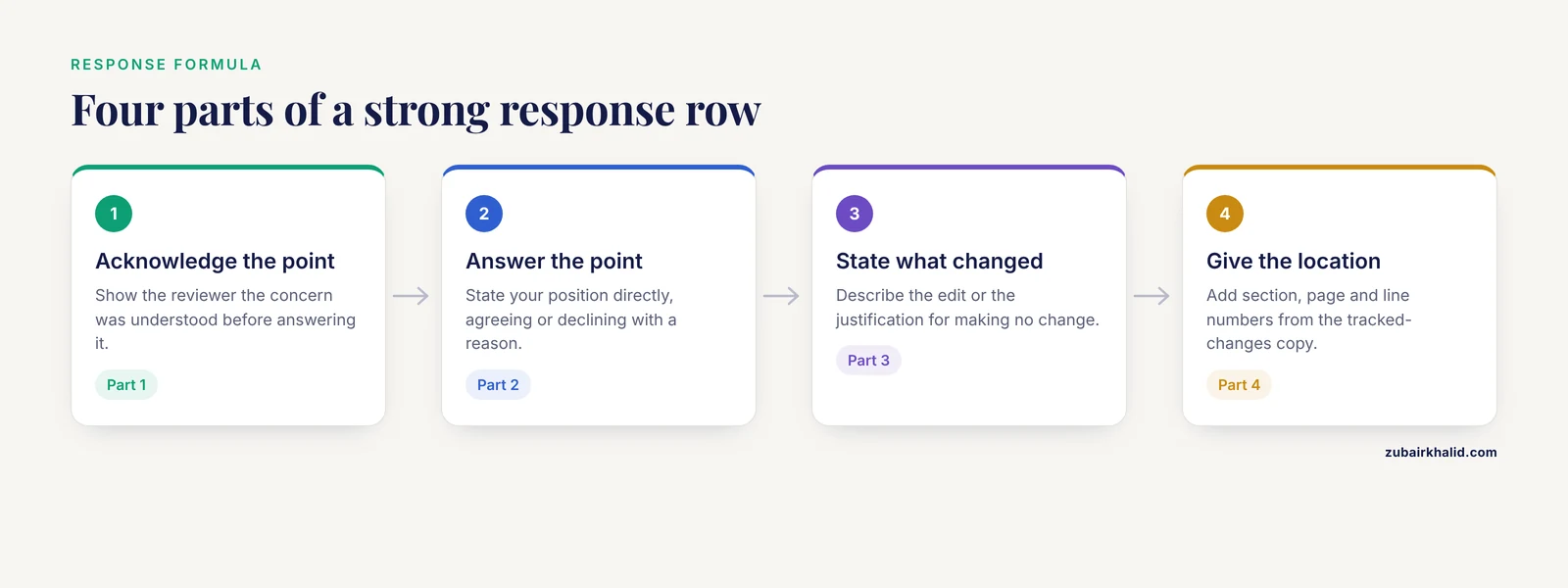
A strong response does four things in order: acknowledges the point, answers it, states what changed, and gives the location. This structure mirrors how effective summaries communicate what was done, what was found, and what follows from it [1].
Here is a completed example row for a manuscript about a classroom intervention:
| ID | Reviewer comment | Response | Change in manuscript | Status |
|----|------------------|----------|----------------------|--------|
| R1.3 | "The claim that the intervention improved attendance needs stronger support." | We agree. We have reframed the claim to match the data, describing the attendance result as suggestive rather than definitive, and we now cite the caveat that the observation period covered one academic term. | Discussion, page 14, lines 3 to 9: "Attendance improved during the study term, although the single-term observation window limits stronger causal claims." | Complete |
Rendered output:
| ID | Reviewer comment | Response | Change in manuscript | Status |
|---|---|---|---|---|
| , - | , - | , - | , - | , - |
| R1.3 | "The claim that the intervention improved attendance needs stronger support." | We agree. We have reframed the claim to match the data, describing the result as suggestive rather than definitive, and we now note the single-term observation window. | Discussion, page 14, lines 3 to 9: "Attendance improved during the study term, although the single-term observation window limits stronger causal claims." | Complete |
Notice what the response does not do. It does not argue, it does not repeat the reviewer's comment back at length, and it does not say "as we already explained." It answers, changes, and locates.
Step 5: Add precise locations and short quotes
Use the page and line numbers from the tracked-changes copy, not from an older draft. Quote no more than one or two sentences per change. For a restructured section rather than a local edit, describe the change instead of quoting it, for example "Methods subsection reordered so that the sampling description precedes the measurement description, page 6."
Step 6: Track status with a simple formula
If you draft in Excel or Google Sheets, put the status in column E and add a progress counter in an empty cell:
=COUNTIF(E2:E60,"Complete")/COUNTA(E2:E60)Expected output with 45 of 50 rows complete:
0.9Format the cell as a percentage to display 90 percent. Conditional formatting on the Status column, green for Complete, orange for Pending, gives you an instant picture of what remains before the deadline. Sort or filter by Pending when you assign remaining tasks to coauthors.
Step 7: Convert to the journal's required format
Most journals want the response document as a Word or PDF file uploaded alongside the revised manuscript. Paste the finished table into a Word document titled "Response to Reviewers" and check the author instructions for file naming rules. If the journal accepts LaTeX, this longtable skeleton handles long quoted passages without overflowing the page:
\begin{longtable}{p{0.08\textwidth}p{0.24\textwidth}p{0.34\textwidth}p{0.26\textwidth}}
\textbf{ID} & \textbf{Comment} & \textbf{Response} & \textbf{Change} \\
\hline
R1.3 & Reviewer 1, comment 3, quoted verbatim & Thank the reviewer, answer the point, state the change & Discussion, page 14, lines 3--9, quoted text \\
\hline
\end{longtable}
Wait, that line range uses a double hyphen, which LaTeX requires for an en dash. In the visible text of your response document, write "lines 3 to 9" or use the correct LaTeX dash, never a double hyphen in plain prose.
Step 8: Cross-check against the inventory
Return to the numbered list from Step 1 and tick off every comment ID in the table. The counts must match. Then verify that every row marked Complete has a nonempty location column. A row with a response but no location is an unfinished row wearing a finished label.
A Worked Revision Summary Table Template Example
Here is a condensed example showing how a short revision looks when finished. The manuscript is a fictional cohort study, and the comments are typical of a first-round decision.
| ID | Reviewer comment | Response | Change in manuscript | Status |
|---|---|---|---|---|
| , - | , - | , - | , - | , - |
| ED.1 | Please shorten the manuscript by at least 10 percent. | We cut the secondary background material on measurement theory and moved two methodological details to a supplement. The main text shrank by about one page. | Throughout, see tracked changes. Summary of cuts in the supplement, page S2. | Complete |
| R1.1 | The novelty statement is vague. | We rewrote the final paragraph of the introduction to state the specific gap the study fills and removed the phrase "to our knowledge" where it weakened the claim. | Introduction, page 3, lines 24 to 31, quoted in full in the response letter. | Complete |
| R1.2a | Methods lack detail on how participants were recruited. | We added the recruitment setting, the exclusion criteria applied at screening, and the dates of enrollment. | Methods, page 6, lines 2 to 14. | Complete |
| R1.2b | The sample size seems small. | We added a limitations paragraph acknowledging that the cohort size limits precision for subgroup comparisons and softened the corresponding conclusion. | Discussion, page 13, lines 18 to 26. | Complete |
| R2.1 | Figure 2 axes are unlabeled. | We labeled both axes with units and increased the font size to remain legible when printed. | Figure 2, page 9, revised file. | Complete |
This example illustrates the pattern editors respond to well. Every row is self-contained. An editor who reads only the table already knows what changed and where.
How to Respond to Peer Reviewers Without Making It Worse
The table carries the structure, but the wording carries the tone. Several practices separate professional reviewer response letters from frustrating ones.
Answer every point, including the small ones. Reviewers notice skipped comments, and editors treat a skipped comment as an unanswered one. The inventory-and-tick system in the walkthrough exists for this reason.
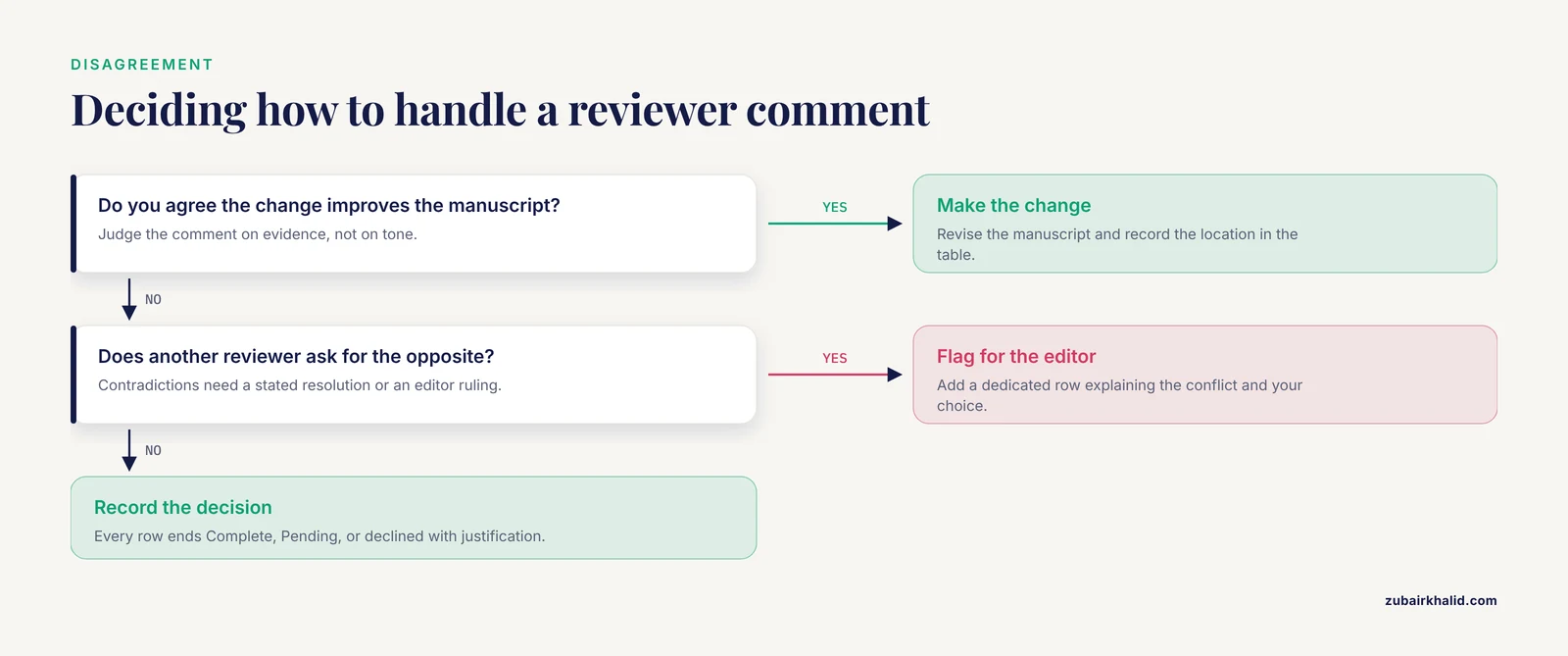
Disagree with evidence, not with attitude. You do not have to make every requested change. When you decline, state the reason plainly and support it with a citation, a dataset, or a methodological argument, then thank the reviewer for the perspective. Disagreement handled this way is normal and healthy. Structured disagreement is also how expert groups settle contentious points, as in the international consensus on ventral rectopexy, where an expert panel compiled evidence-based statements, reviewed them across nine meetings, and recorded anonymous votes that produced unanimous agreement on 13 of 17 statements and about 91 percent agreement overall [3]. Your author team can use a lighter version of the same method. When coauthors disagree about a response, write the two candidate responses, discuss them once, decide, and record the decision in the table.
Have a second person check every response. Two-person checking is standard practice in evidence synthesis, where data extracted by one reviewer are verified by a second [4]. Apply the same safeguard to your response table. A coauthor who did not write a given response will catch the vague answer, the missing location, and the tone problem that you cannot see in your own writing.
Circulate the draft table for internal review before formalizing it. Guideline developers generate literature tables and summary statements through a writing group and then put them through task force revision before finalizing [5]. For a manuscript, one structured pass through the whole table by all coauthors, with each person assigned a batch of rows to verify against the tracked-changes file, takes an hour and prevents the most embarrassing error class, claiming a change that never made it into the file.
Special Case: Systematic Reviews and Meta-Analyses
Revisions to systematic reviews carry extra obligations because the review protocol is a public commitment. Three adjustments to your revision summary table matter in this genre.
Disclose any protocol deviations explicitly. If your registered protocol changed between submission and revision, say so in the response table and in the manuscript itself. One spinal surgery systematic review handled this well, registering its protocol after the search and disclosing the post-registration eligibility and analysis deviations rather than leaving them for readers to detect [6]. Editors respect disclosed deviations and penalize discovered ones.
Re-run or verify the search if the revision changed the question or the timeframe. The same spinal surgery review performed a focused verification audit of its PubMed search during revision [6]. If reviewers ask you to add a database, extend the search window, or add search terms, document the new search in the methods and note the change in the response table.
Map responses to reporting standards. Reviewers of systematic reviews often phrase comments as reporting gaps, for example missing PRISMA flow diagram details or unclear risk-of-bias methods. In your response table, link each such comment to the specific reporting item you updated. Protocols that register in PROSPERO and state their adherence to PRISMA give reviewers a checklist to respond against [7], and diagnostic accuracy reviews similarly anchor their structure to PRISMA extensions designed for that study type [8]. Matching your response rows to those items shortens the next review round.
Use a structured framework for substantive reviewer questions. When a reviewer challenges your research question, restate it in PICO form, population, intervention, comparison, outcome, in the response. Review protocols build their questions and search strategies on exactly this framework [9], and it translates directly to defending a question's coherence in a response letter.
Common Mistakes and Limitations
These are the errors that most often send a revision back for another round.
- Responding to the paragraph, not the point. A long response to a compound comment that silently drops the third concern is the single most common cause of a repeat review. Split and number every point.
- Writing "we have revised accordingly" with no location. This phrase tells the editor nothing. Every response needs a section, page, and line reference or a description of a global change.
- Quoting page and line numbers from the wrong version. Locations must come from the tracked-changes copy you are submitting. Line numbers shift with every edit, and a table built on the old draft sends reviewers to the wrong paragraphs.
- Arguing tone. Responses such as "the reviewer misunderstood the methods" read as defensive even when the reviewer is wrong. Write "we apologize that this point was unclear, the methods were X, and we have revised the passage to say Y." The content of the disagreement stays, the friction goes.
- Treating the table as a substitute for revising the manuscript. Editors cross-check. If the response letter describes a thoughtful new limitations paragraph that does not exist in the file, the revision fails on credibility.
- Letting the table bloat. Responses longer than a paragraph per point, except for genuinely complex methodological disputes, bury the changes. Move extended arguments to an appendix within the response document and summarize them in the table.
- Skipping editor and journal comments. Global requests about length, framing, or scope belong in the table as ED rows. They are the comments the editor personally checks.
- Pilot testing nothing. Before filling in fifty rows, complete two or three fully, then review whether the format is working. Data extraction tools in evidence synthesis are routinely pilot tested, modified, and revised before full use [10], and a response table deserves the same treatment. A format flaw caught at row 3 costs minutes. Caught at row 48, it costs an afternoon.
One general limitation applies to any guidance of this kind. Journals differ in what they require, some provide their own response templates, some want responses in free prose, and some cap the response file length. The journal's author instructions override every convention in this article.
Quality Check Before You Submit
Run this five-item check on the finished table.
- Count match. The number of inventory comment IDs equals the number of table rows, including split subcomments and editor rows.
- Location check. Every row's location column is nonempty, and a random sample of five locations, checked against the tracked-changes file, points to the correct text.
- Quote fidelity. Every quoted passage in the table appears verbatim in the revised manuscript.
- Status closure. No row remains Pending, and any row where you declined a change contains a justification with support.
- Format compliance. The file type, file name, and any length limits match the journal's instructions.
Frequently Asked Questions
What is a revision summary table?
It is a table that lists each reviewer comment alongside your response, the exact change you made in the manuscript, and the location of that change, usually with a status column for tracking. It is the core of most reviewer response letters and the first thing editors read in a revised submission.
Do all journals require a revision summary table?
No, requirements vary by journal, but most journals that send manuscripts out for a second round of review expect a point-by-point response document in some form. Check the decision letter and the author instructions, since some journals supply their own template and ask you to use it.
How long should each response be?
One to four sentences for most points, reserving longer treatment for substantive methodological disputes. The goal is a response an editor can verify in seconds, which means a direct answer, a statement of the change, and a location, with extended arguments moved to an appendix if needed.
What should I do if I disagree with a reviewer?
Decline the change politely and justify the disagreement with a citation, a dataset, or a clear methodological argument, then note in the table that no manuscript change was made and why. Editors accept well-reasoned disagreement routinely. What they do not accept is silence or a response that ignores the comment.
Should I quote the changed text in every response row?
For local edits, yes, because a one or two sentence quote lets the editor verify the change without opening the manuscript. For global changes such as reordering a section or shortening the whole paper, describe the change instead of quoting it.
How do I handle two reviewers who contradict each other?
Address both comments in their own rows, explain the conflict in each response, and state the resolution you chose and why, or flag the conflict for the editor in a dedicated row and ask for a ruling. Editors expect to arbitrate contradictions between reviewers and generally prefer being asked directly.
Can I reuse a revision summary table template from a previous paper?
Yes, the column structure transfers well between papers and even between journals. Update the comment IDs, clear the old content, and check the new journal's instructions before reusing anything, since file format and length rules differ.
What format should the final table be submitted in?
Follow the journal's instructions, which most often mean a Word or PDF file uploaded alongside the revised manuscript. If you drafted in a spreadsheet, convert to a document format before submission, because editors and reviewers generally cannot filter or sort inside a PDF and expect a linear, readable table.
Sources
- Summary of findings tables for measurement property reviews: The evolution and application of OMERACT's summary of measurement properties (SOMP) Table.
- Optimizing vaccine allocation: a review of epidemiological models with behavioral adaptation.
- Ventral Rectopexy: An International Expert Panel Consensus and Review of Contemporary Literature.
- Termination of Resuscitation Rules and Survival Among Patients With Out-of-Hospital Cardiac Arrest: A Systematic Review and Meta-Analysis.
- Congress of Neurological Surgeons Systematic Review and Evidence-Based Guidelines Update for the Role of Imaging in the Management of Patients With Vestibular Schwannomas.
- Osteoporosis and Mechanical Failure After Long-Segment Fusion for Degenerative Lumbar Scoliosis: A Systematic Review of Direct and Indirect Evidence.
- Diabetic Dyslipidemia and Its Determinants Among People With Diabetes in South Africa: Protocol for a Systematic Review and Meta-Analysis.
- MRI for diagnosing uterine sarcoma: a systematic review and meta-analysis.
- Effectiveness of self-management interventions for asthma control and healthcare utilisation among school-aged children in minority families in the United States: A protocol for systematic review and meta-analysis.
- Characterization of critical health promotion: a scoping review protocol.