Research Team File Sharing Problems and How to Fix Them
By Dr. Zubair Khalid, DVM, MS, PhD ·
Scientific collaboration depends on files. Manuscripts, datasets, analysis scripts, figures, protocols, and grant documents all move between the members of a research team, and every one of those handoffs is a chance for something to go wrong. Modern research is also intensely collaborative at scale. Bibliometric analyses of large literatures routinely map co-authorship networks that span thousands of researchers across many countries and institutions, which means the file behind that next submission may pass through more hands than you expect [1].
The most likely cause of research team file sharing problems is simple and unglamorous: the team has no single agreed location for each file, so parallel copies multiply and nobody knows which one is current. The first thing to check is which copy of the file in question each team member is actually working from. Ask two people who edited the document most recently to open the file they were using. If the two copies differ, you have found the core problem, and most of the fixes in this article follow from it.
This article walks through the causes of file sharing failures from the most common to the rarest, explains the mechanism behind each one, gives a short diagnostic sequence you can run this week, and closes with prevention practices that keep the problem from coming back.
The Most Common Cause: Parallel Copies and Version Drift
When a team circulates files by email attachment, every recipient receives an independent copy. Each person who edits their copy creates a fork, meaning two files that were identical now diverge. This process is called version drift. It is invisible while it happens and expensive to reverse, because reconstructing which edits belong in the final document requires comparing every fork by hand.
The mechanism is worth understanding because it explains why the problem keeps returning even after a painful rebuild. Email has no shared state. Once an attachment is sent, the sender has one version and each recipient has another, and no system tracks them. A shared platform with a single stored copy and a version history does track them, which is why moving files off email is the single highest-impact change a team can make.
The fix follows directly. Declare one canonical location, meaning the one authoritative place where the current version of each file lives. Email becomes a channel for notifications ("the manuscript is updated, see the shared folder"), never a channel for the file itself. Every team member needs to agree that a file received as an attachment is treated as stale until verified against the canonical copy.
Troubleshooting Table: Symptoms, Likely Causes, and Fixes
| Symptom | Likely cause | How to confirm | Fix |
|---|---|---|---|
| Two versions of a manuscript with different results sections | Email attachments created parallel copies | Ask each editor where their copy came from and compare timestamps | Designate one canonical location and treat emailed files as stale |
| Filenames like "final_final_v3_REVISED.docx" | No naming convention | List the filenames in the shared folder | Adopt a convention with date (YYYY-MM-DD), descriptor, and initials |
| Someone's edits disappeared | Two people edited downloaded copies at the same time | Check the version history in the platform | Co-edit in the browser or use version control, never edit local copies |
| A new student cannot find anything | No folder structure or README | Time how long a new member needs to locate a key file | Standard folder tree with a README at the top level |
| Files disappeared when a student graduated | Files lived in a personal cloud account | Check account ownership in the admin console | Use institutional ownership and transfer assets before departure |
| External collaborator cannot open a link | Access restricted to one institution's domain | Test the link from an outside account | Use guest access or expiring shared links with named recipients |
| Large dataset upload keeps failing | File size or bandwidth limits | Check the platform's documented limits and test connection speed | Use chunked uploads, a data repository, or physical media |
| Nobody can reproduce a figure from the raw data | No separation of raw data, code, and outputs | Pick one figure and try to rebuild it from scratch | Restructure the project folder and document the pipeline |
| The team quietly stopped using the shared system | Tool never embedded in daily workflow | Track where new files actually land over one week | Match the tool to the existing workflow and model the behavior from the lead |
| Restricted data exposed by a public link | Link sharing defaulted to "anyone with the link" | Audit sharing settings on sensitive folders | Set default sharing to named people only and audit quarterly |
Work down this table in order. The top rows account for the majority of day-to-day pain in most labs.
Research Team File Sharing Problems, From Common to Rare
The causes below are ordered by how often they show up in real teams. Each entry explains the mechanism, because knowing why a failure happens tells you which fix will hold and which will not.
1. No Agreed Folder Structure or Naming Convention
A shared drive without a structure is a landfill with good intentions. Files get uploaded to whatever folder is open at the moment, duplicated because the uploader could not find the original, and named according to whatever convention each person prefers. Six months later, searching the drive returns dozens of near-duplicates and no way to tell the current version from the abandoned one.
The mechanism here is that humans default to the path of least effort at the moment of saving. If the correct folder is not obvious, the file goes to the convenient one. The fix is not discipline, it is design. A shallow folder tree (no more than three levels deep), a written naming convention, and a README file at the top level that explains the layout remove the ambiguity that causes bad saves. A good naming convention puts the sortable date first, for example 2026-11-11_manuscript-draft_JK.docx, so that alphabetical order equals chronological order.
2. Permission and Ownership Failures
Every cloud storage platform attaches files to an account. When files live in a personal account rather than an institutional one, the account holder effectively owns the lab's data. This produces two classic failures. First, the owner's permissions drift over time as they share ad hoc with collaborators, so the access list no longer matches the team roster. Second, when the owner graduates, leaves, or loses their account, the team inherits an access crisis at the worst possible moment, such as the week a grant report is due.
The mechanism is that consumer accounts were built for individuals, not for groups whose membership changes every academic year. The fix is structural. Store shared files under an institutional or group-owned account, grant access through a group or team rather than to individuals one at a time, and run an offboarding checklist that transfers ownership of anything still in a departing member's personal space.
3. Account Lifecycle Gaps
This is a close cousin of the previous cause but distinct enough to catch teams that solved ownership and still get burned. Research groups turn over constantly. Students rotate, postdocs move on, visiting scholars arrive for a semester. Each transition is a chance to forget one of three things: granting access to the newcomer, revoking access to the departed, and transferring files the departed person held. Revocation matters more than people assume. A former member with lingering access to a live project folder is an unmonitored write path into your data.
The fix is a standing two-line checklist attached to every personnel change: add the person to the correct group on day one, remove them and transfer their files on their last day. Teams that attach this to existing HR or lab-management routines, rather than relying on memory, stop having this problem.
4. File Size and Bandwidth Limits
Most general-purpose cloud storage handles documents easily and chokes on the files modern science produces. Raw imaging data, sequencing runs, and video can exceed per-file upload limits, and teams on constrained connections face real barriers to moving data at all. Research on remote professional development in low-bandwidth environments shows that asynchronous designs, where material is posted for later access rather than transferred in real time, are the workable pattern when bandwidth is scarce [2]. The same principle applies to a lab with members on poor connections.
The mechanism is straightforward. Synchronous transfer (both machines online at once, pushing data directly) competes for limited bandwidth and fails on interruption. Asynchronous transfer through an intermediary platform tolerates interruptions because the upload resumes where it stopped. The fix is to stop treating large datasets like documents. Move them through a repository or storage service designed for them, use chunked and resumable uploads, and reserve physical drives for transfers too large to move over the network. Record which repository holds which dataset in the project README so the location itself does not become another mystery.
5. Tool Overload
Many teams accumulate platforms: one cloud drive inherited from a former member, a second adopted by the new lead, a messaging app where files get posted, and email underneath it all. Each platform works individually. Together they guarantee that any given file exists in several places and that no one knows which is authoritative. The mechanism is accretion. Tools get adopted for a single urgent need and never retired, and the cost of the accumulated overlap only becomes visible during a crisis.
The fix is a written decision, not a purge. The team agrees that exactly one platform is canonical for project files and states where other content types live (code in a version control repository, for instance). Old platforms get read-only or are emptied on a stated date. Announce the decision in writing so a new member's first question has an answer.
6. Missing Metadata and Provenance
Files that arrive safely can still fail their purpose. Provenance is the record of where a file came from and what was done to it. Without it, a folder full of sample_A_clean.csv and analysis_v2.R cannot answer the questions a collaborator will ask in a year: which instrument produced the raw data, which script processed it, and which parameter settings were used. The mechanism is that provenance lives in the analyst's memory at the moment of analysis, and memory is not a storage medium.
The fix is procedural rather than technical. Keep raw data in a folder that is never edited. Put processed data, scripts, and outputs in clearly separated folders. Add a short README inside each analysis folder stating what the scripts do and the order to run them. A useful test is to hand the folder to a labmate and ask them to reproduce one figure without asking you anything.
7. Compliance and Data Sensitivity Restrictions
Some files cannot legally move the way ordinary files do. Human subjects data, patient information, and proprietary materials are often bound by agreements that restrict where the data may be stored and who may access it. Teams that treat these files like any others risk a reportable breach. The mechanism is that general-purpose platforms optimize for frictionless sharing, which is precisely the property restricted data cannot have.
The fix is to identify restricted files early, before they are shared anywhere, and route them to a platform or enclave approved by your institution's research compliance office. Mark the restricted folders clearly and give them a stricter permission model than the rest of the project. When in doubt about a category of data, ask the compliance office before the first transfer, not after.
8. Synchronization Conflicts
Sync clients (the desktop software that mirrors cloud files to a local folder) create a specific and confusing failure. If two people edit the same file while offline or in separate local copies, the sync service cannot merge the changes, so it keeps both versions under modified filenames such as "conflicted copy." Team members then edit whichever copy looks newer, and work is silently lost. The mechanism is that sync handles storage, not authorship. It can copy a file but cannot reconcile two sets of edits to it.
The fix is to change editing behavior, not the software. Edit documents in the browser against the cloud copy whenever the platform supports it, so there is only ever one live version. For text and code, use version control, where branches and explicit merges replace silent overwrites. Reserve sync-based editing for cases where only one person touches a given file.
9. Tools That Never Entered the Workflow
The rarest and most discouraging cause is the platform that was chosen well, deployed with training, and then quietly abandoned. A qualitative study of district nursing teams implementing an evidence-informed triage instrument found exactly this pattern. Despite preparation, training, and reported benefits, the tool was used only four times across a three-month implementation period. Facilitators included user-friendliness and collaborative engagement, while barriers included the tool not being ingrained in practice, a low sense of urgency, and stressful working conditions [3].
The same mechanism operates in research groups. A file sharing platform succeeds when using it is the easiest way to get the day's work done, and fails when it is an extra step bolted onto existing habits. The fix is to embed the platform into an existing routine. If the lab already has a weekly meeting, make the shared folder the meeting's screen. If the lead posts updates, the updates link to the canonical files and nowhere else. Adoption follows the leader's behavior far more reliably than it follows any memo.
A Diagnostic Sequence You Can Follow
If your team has acute file sharing problems, run this sequence in order. It takes one to two hours and produces the information you need to choose fixes.
- Inventory every location where files live. List the shared drives, personal cloud accounts, email attachments, messaging app uploads, and lab computers in use. You are mapping the current state, not judging it.
- Trace one recent deliverable. Pick the last manuscript or report the team finished and reconstruct its history. Count the copies that existed and identify which edits happened where.
- Audit permissions and ownership. For the main shared location, list who currently has access and who owns the underlying account. Compare that list to the actual team roster.
- Check naming and structure. Open the main folder and look at the filenames without opening any files. If the names do not tell you what is current, the convention is missing.
- Watch where new files land. For one week, note where each newly created team file is first saved. This reveals the real, de facto system, which may differ from the official one.
- Interview each team member for ten minutes. Ask three questions: where do you save your work, where do you look for shared files, and what was the last file you could not find. The answers will converge on two or three root causes.
- Classify sensitive files. Identify which files are bound by data use agreements, human subjects protections, or proprietary terms.
- Write the target state on one page. One canonical platform, one folder structure, one naming convention, one permission model. That page becomes the team's file policy.
How to Fix Research Team File Sharing Problems
Diagnosis done, the solutions fall into four groups. Apply them in this order, because later fixes depend on earlier ones.
Choose One Platform and a Permission Model
Select a single primary platform for project files and evaluate candidates against five criteria: institutional support (does your university provide it and its administration), access control (can you grant and revoke access through groups), version history (can you recover an earlier version of an edited file), storage capacity appropriate to your data types, and external sharing that works with collaborators outside your institution. An institutional platform under a group-owned account solves the ownership and lifecycle problems from the start.
For the permission model, prefer groups over individuals. Create a "lab members" group, a "project X" group, and a "collaborators" group, and grant folder access to groups. When people join and leave, you update membership in one place and every folder's access follows. Set the default sharing option to named recipients rather than "anyone with the link."
Standardize Names and Structure
Write down a folder template and a naming convention, apply them to new files immediately, and migrate old files opportunistically rather than in one heroic weekend. A workable starter convention is a shallow tree with raw_data, analysis, outputs, manuscripts, and admin at the project root, a README at the root explaining what belongs where, and filenames that begin with the sortable date. The convention matters less than its existence and consistency.
Separate Raw Data From Everything Else
Raw data, meaning the unmodified files as generated or collected, gets one folder and a rule: nothing in it is ever edited or overwritten. All processing happens in the analysis folder, whose scripts read from raw data and write to outputs. This single rule protects you from the most expensive class of file sharing accident, which is irreversible alteration of the only copy of hard-won data. Keep at least one backup copy of raw data on an independent system.
Write It Down and Onboard to It
A file policy that lives in one person's head does not survive that person's departure. Put the platform, structure, naming convention, and permission rules on one page in the shared space itself. Give every new team member a fifteen-minute onboarding walkthrough of that page on their first week. When the policy changes, update the page and announce the change. The document is also what you attach to your data management plan, the section of a grant application that describes how data will be organized, stored, and shared, so reviewers and funders see a deliberate system rather than improvised habits.
Choosing Among Research Collaboration Tools
Research collaboration tools fall into a few functional categories, and most teams need more than one category. General cloud storage and document co-editing handles manuscripts, figures, and administrative files. Version control repositories (systems such as Git-based services that track every change to text and code and support explicit merging) handle analysis code and anything with a history that must be auditable. Electronic lab notebooks handle protocols and day-to-day experiment records. Domain-specific data repositories handle datasets that must be preserved and shared publicly at publication time, and many funders and journals require deposit in such a repository.
Two findings from the implementation literature should shape the choice. First, quality is judged by the user. A qualitative study of how researchers and practitioners perceive the quality of shared methodological tools found that definitions of quality differ across user groups, which means a tool that delights a methodologist may frustrate a front-line user, and the team's actual users are the ones whose judgment matters [4]. Second, adoption is earned in the workflow, not in the demo. The triage instrument study cited above showed that user-friendliness and genuine collaborative engagement drive use, while absence from daily routine kills it, even for a tool everyone agreed was sound [3]. Practical translation: run a two-week trial with the two or three people who generate the most files, and judge candidates by how those people work, not by feature lists.
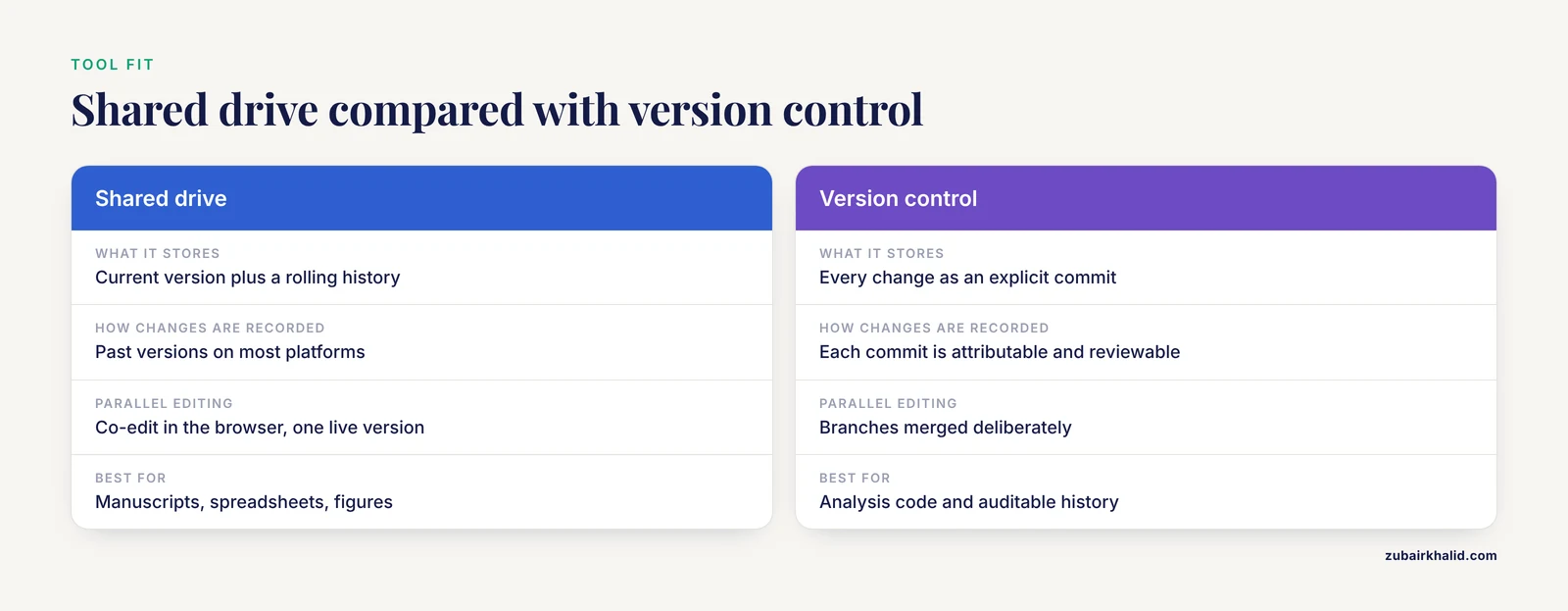
One caution on vocabulary. A shared drive is not version control. A shared drive stores the current state of files and, on most platforms, a rolling history of past versions. Version control stores every change as an explicit, attributable commit and lets two people work in parallel and merge deliberately. Manuscripts and spreadsheets are usually fine on a shared drive. Analysis code belongs in version control, where a mistake can be rolled back precisely and an collaborator's changes can be reviewed before they land.
A Short Data Safety Note
File sharing decisions carry real hazards when the files are sensitive. Human subjects data, patient information, and proprietary materials are often bound by agreements that restrict storage location and access. Before moving any such file onto a new platform, confirm with your institution's research compliance office that the platform is approved for that data class. Set sharing to named recipients only for restricted folders, never "anyone with the link," and audit those settings quarterly. Do not store restricted data in personal cloud accounts under any circumstances, because personal accounts lack institutional access control and survive the departure of the account holder.
Prevention Practices
Once the acute problems are fixed, these habits keep them fixed.
- One canonical location per file type, stated in writing. Every team member can answer "where does X live" without asking.
- Institutional ownership of all shared storage. No project files in personal accounts.
- Group-based permissions with a standing onboarding and offboarding checklist. Two lines, attached to every personnel change.
- A written naming convention with sortable dates. Enforced by example from the lab lead.
- Raw data locked and backed up. One immutable folder, one independent backup.
- Code under version control, documents under co-editing. Match the tool to the file type.
- A quarterly fifteen-minute audit. Check permissions, check where new files landed, and confirm the README still matches reality.
- A file policy page in the shared space. Updated when the system changes, shown to every new member in week one.
Common Mistakes and Limitations
The mistakes below recur across teams that have already tried to fix their file sharing and failed.
- Migrating files without retiring the old path. If the old email habit or legacy folder still works, people will use it. Announce a cutoff date and make the old location read-only.
- Designing the perfect structure before observing actual work. Teams that impose an elaborate taxonomy in one weekend usually watch it collapse. Start shallow, watch a week of real saving behavior, then refine.
- Assigning ownership to a person instead of a role. "Priya's folder" fails when Priya graduates. Ownership belongs to the group account, with administrators listed in the policy page.
- Confusing storage with organization. Buying more storage quota does not fix version drift, because the problem was never capacity. It was the absence of a single authoritative copy.
- Treating a policy document as the fix. The written policy is necessary and insufficient. The behavior of the team lead, embedded into existing meetings and routines, is what determines whether the system holds [3].
- Delaying sensitive-data decisions. The time to determine where restricted data may live is before the first transfer, because after a breach the question changes from "where should this go" to "who has seen this."
- Assuming one solution fits every team. A two-person collaboration needs far less structure than a twenty-person multi-institution consortium. Scale the system to the team, and revisit the design when the team's size or composition changes materially.
Frequently Asked Questions
What is the most common file sharing problem in research teams?
Parallel copies created by emailing attachments, which produce version drift where nobody knows which copy is current. Confirm it by having two recent editors open the copy they used and compare. The fix is a single canonical location with all emailed files treated as stale until verified.
Should we use email to share files at all?
Use email to notify, never to transfer. An attachment creates an independent copy in every inbox, and no system tracks those copies afterward. Send a link to the file in the shared platform instead, so every recipient opens the same live document.
What is version control and does our team need it?
Version control is a system that records every change to a file as an explicit, attributable entry and lets multiple people work in parallel and merge their changes deliberately. Teams that write analysis code need it, because silent overwrites and unrecoverable mistakes are common there. Teams that work only in documents and spreadsheets can usually rely on a shared platform's version history instead.
Where should raw data live?
Raw data belongs in one dedicated folder that nobody ever edits, backed up on an independent system, with all processing done by scripts in a separate analysis folder that write their results elsewhere. This separation is what makes results reproducible and protects the only copy of hard-won data from irreversible alteration.
How do we handle files when a lab member leaves?
Run an offboarding checklist on their last day: transfer ownership of their files from any personal space to the group account, remove their access from all shared locations, and add their successor to the relevant groups. Doing this on a fixed schedule tied to departure dates prevents both the vanished-files crisis and lingering access by former members.
Is a shared drive the same thing as version control?
No. A shared drive stores the current version of each file plus, on most platforms, a rolling history of previous versions. Version control records every change as a discrete commit and supports parallel work with explicit merging. Use a shared drive for documents, spreadsheets, and figures, and version control for code and anything whose change history must be auditable.
How do we share very large datasets with external collaborators?
Do not treat large datasets like documents. Check your platform's documented size limits first, then use a resumable or chunked upload through a storage service designed for large files, deposit the data in a domain repository if it must be publicly available, or move it on physical media when network transfer is impractical. Record where each dataset lives in the project README.
How often should we review our file sharing setup?
Run a short review once per quarter and a fuller one at each personnel change cycle such as the start of the academic year. The quarterly check covers permissions, link-sharing settings on sensitive folders, and where new files actually landed. The fuller review revisits whether the platform, structure, and policy still match how the team works.
Sources
- Global research landscape and emerging frontiers in primary insomnia treatment (2005-2025): A bibliometric analysis.
- An ODeL-based teacher professional development framework for teacher-facilitated human-AI collaboration in primary mathematics problem-solving: a conceptual analysis.
- District nursing staff's experiences with implementing an evidence-informed triage instrument for delirium in home care; an action research-informed qualitative study.
- Quality is in the eye of the beholder: A qualitative description study to explore the perceptions of researchers and practitioners on the quality of implementation science tools.