The Anatomy of a Reproducible Lab Notebook Entry
By Dr. Zubair Khalid, DVM, MS, PhD ·

By the end of this article you will be able to write a single lab notebook entry that a stranger in your field could pick up and repeat your experiment without asking you a question. You will know the fixed structure every entry should follow, how to fill each field so it survives an audit or a handover, how to link digital files to a paper or electronic record, and how to catch the errors that make entries useless months later.
You need very little to follow along. For a paper notebook you need a bound or permanently page-numbered notebook and an archival, waterproof black pen. For an electronic notebook you need any account that timestamps entries and keeps a version history. For the worked example you need access to a terminal (macOS, Linux, or Windows with a terminal open) so you can run the timestamp and file-integrity commands shown.
Why Entry Structure Decides Reproducibility
Reproducibility lives or dies at the bench, not at publication time. When an experiment fails to repeat, the cause is usually an undocumented difference: a different reagent lot, an unplugged incubator, a reagent that thawed twice, a centrifuge run at a different speed. A structured entry is the defense against those silent differences.
Standard laboratory practice, taught in research training courses across molecular biology, analytical chemistry, and the life sciences, treats the notebook as a legal record of what happened, written contemporaneously, in a format a reviewer can reconstruct. That translates into four properties every entry needs:
- Contemporaneity. Write during the work, not days later from memory or from scrap paper.
- Completeness. A reader with no conversation with you can repeat the work.
- Immutability. Corrections are struck through with a single line, never erased or overwritten, and initialed.
- Traceability. Every physical material traces to a lot number, every file traces to a checksum or attachment, and every page traces to a date and signature.
An entry that has these four properties is reproducible in the practical sense. The structure below exists to force all four.
The Core Structure of a Reproducible Entry
A reproducible lab notebook entry structure has nine fixed fields in a fixed order. The order matters because it mirrors how an experiment unfolds, which makes contemporaneous recording natural instead of a chore. Here is the full reproducible lab notebook entry structure template you can copy into the front of your notebook or build as a repeating template in your electronic notebook:
================================================================
ENTRY No. ____      DATE: YYYY-MM-DD      START: HH:MM (time zone)
PROJECT: ______      STUDY: ______      EXPERIMENT ID: ______
OPERATOR: ______      SOP REFERENCE: ______
================================================================
1. OBJECTIVE
   One sentence. What question does today answer?

2. HYPOTHESIS OR EXPECTATION
   One sentence, written before the work starts.

3. MATERIALS
   Reagents and consumables, each with lot number and expiry:
   - Example: Taq [DNA polymerase](/blog/guides/dna-polymerase), lot 2026-08A, exp 2027-08
   Equipment with identifying numbers:
   - Example: centrifuge model 5424R, SN 88142, rotor F-45-64

4. PROTOCOL
   Either "performed per SOP-XXXX rev N" with page reference,
   or a full step list if no SOP exists. Deviations written
   inline at the step where they occurred, in brackets.

5. OBSERVATIONS
   What you saw, when you saw it, with timestamps.

6. RAW DATA
   Numbers, readings, and printed output pasted or taped in.
   Digital files listed by filename with a checksum.

7. CALCULATIONS
   Every derived number shown with its formula and inputs.

8. DEVIATIONS AND ERRORS
   Numbered list of anything that did not go to plan.

9. CONCLUSION AND NEXT STEPS
   One to three sentences. Does the data answer the objective?

SIGNATURE: ______   DATE: ______   WITNESS: ______   DATE: ______
================================================================
Two rules govern this format. First, the header fields (entry number, date, start time, project, experiment ID, operator, SOP reference) are filled in before any work begins, because they make the entry findable later. Second, fields 4 through 8 are interleaved in time as the experiment proceeds, not written as one block at the end.
The header block
The entry number is the primary key for your whole project. A common convention is a running integer per notebook (047, 048, 049) or a structured code such as Exp-012-R3 meaning experiment 12, repeat 3. Pick one convention per project and never mix them, because cross-references in later entries depend on it.
The date uses the ISO 8601 format, YYYY-MM-DD (for example 2026-11-11). This format sorts correctly in any spreadsheet or electronic notebook and is unambiguous to an international reader, unlike 11/06/2026, which reads as June 11 or November 6 depending on the country. The start time should carry a time zone, because freezer alarm logs, instrument logs, and collaborator notes may all be in UTC while you work in local time.
Objective and hypothesis
The objective is not "do PCR." It is the question the run answers, such as "does the target amplify from plasmid template at the expected 512 base pair size." The hypothesis is written before results exist. Both take one sentence. Their value shows up six months later, when the entry explains why the experiment happened at all.
Materials with lot numbers
Record every consumable that could vary between batches, with the lot number printed on the container: enzymes and their lots, primers and their synthesis IDs, cell lines and passage numbers, antibody lots, culture medium lots. Record equipment identifiers too, because two apparently identical centrifuges can behave differently after different maintenance histories. If a material has a certificate of analysis, note that the certificate is on file and where.
Protocol and inline deviations
If your lab has a standard operating procedure (an SOP, a controlled written protocol), you reference it rather than recopying it, including the revision number, because revision 3 and revision 4 of the same SOP can differ in ways that matter. If no SOP exists, write the full steps as performed, in the order performed, with volumes, concentrations, times, temperatures, speeds, and settings.
Deviations go inline, at the step where they happened, in brackets, so a reader never has to reconcile a deviation list against a protocol mentally:
4. Performed per SOP-PCR-002 rev 3, steps 1 to 9.
   Step 4: [DEV: annealing temp set to 58 C instead of 60 C,
   gradient block already occupied. See deviation 1 below.]
Observations, raw data, and calculations
Observations are dated and timed: what the cell monolayer looked like, whether a precipitate formed, what the balance display read. Raw data goes in untransformed. If you paste a printout or tape in a chart trace, tape all four edges, sign and date across the tape so the attachment cannot be swapped later.
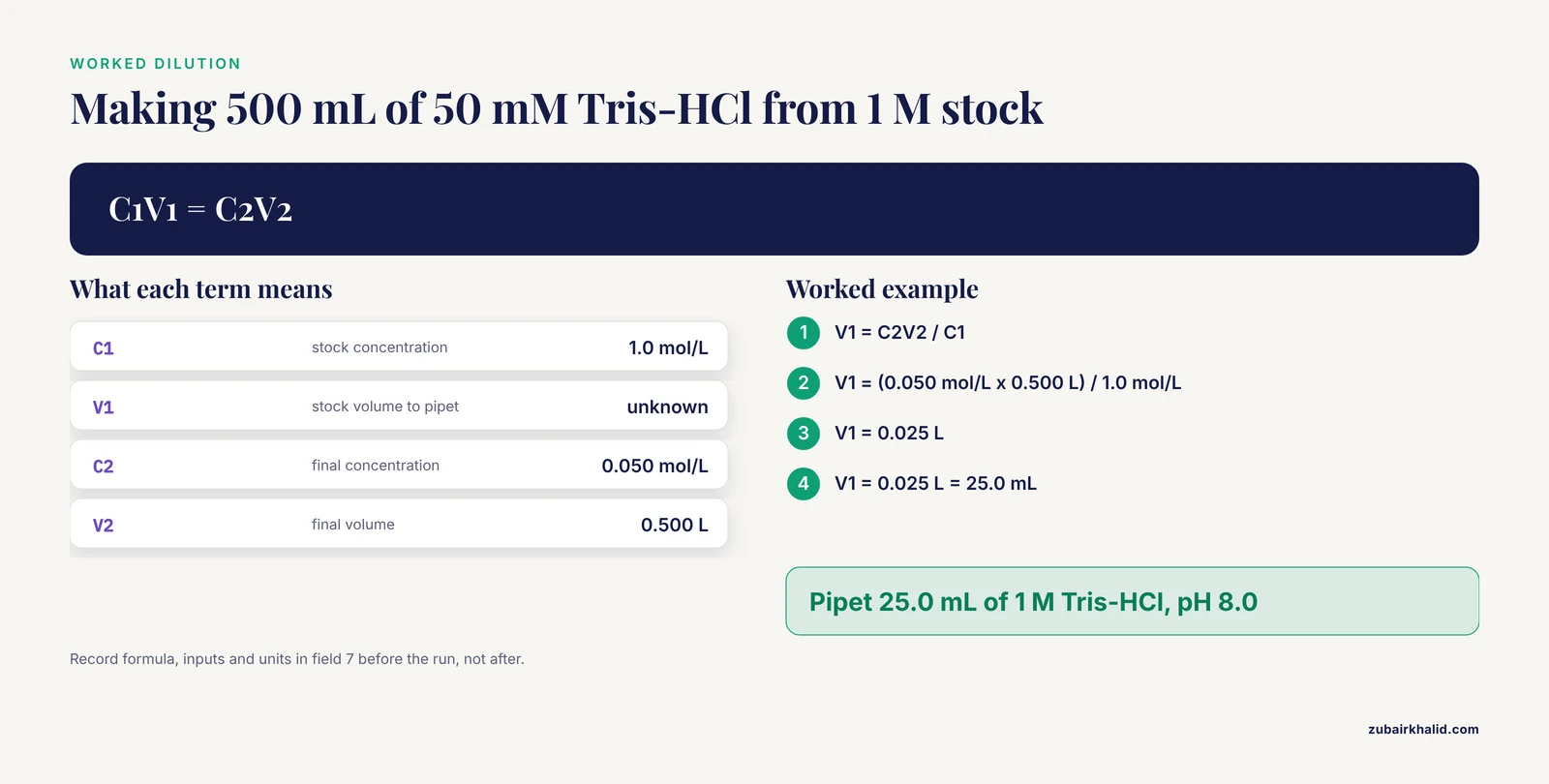
Calculations show the formula and the inputs, every time. The standard dilution relation is C1V1 = C2V2, where C1 and V1 are the stock concentration and stock volume and C2 and V2 are the final concentration and final volume. An entry that just says "made 500 mL of 50 mM Tris-HCl" is not reproducible. The same entry with the calculation is:
7. CALCULATIONS
   Target: 500 mL of 50 mM Tris-HCl, pH 8.0, from 1 M stock.
   C1V1 = C2V2
   V1 = C2V2 / C1
   V1 = (0.050 mol/L x 0.500 L) / 1.0 mol/L
   V1 = 0.025 L = 25.0 mL
   Action: pipet 25.0 mL of 1 M Tris-HCl, pH 8.0, into a
   500 mL graduated cylinder, bring to volume with
   Milli-Q water, filter sterilize, label.
Deviations, conclusion, signature
Field 8 collects the numbered deviations referenced inline, plus anything that went wrong: a dropped tube, a power flicker, an instrument error code. Field 9 answers the objective in one to three sentences and states the next action. Sign, date, and have a witness sign where your lab or institutional policy requires it. The witness confirms they observed the work, not that they agree with your conclusions.
A Numbered Walkthrough: Writing One Entry Start to Finish
This walkthrough uses the template above for a real scenario, a PCR repeat run. Commands are shown in fenced blocks with expected output so you can follow along at a terminal.
Step 1. Open the entry with an unambiguous timestamp. Before touching a pipette, write the header and confirm the exact time. On a terminal:
$ date -u +"%Y-%m-%dT%H:%M:%SZ"Expected output:
2026-11-11T14:15:32ZThe -u flag requests UTC and the quoted string fixes the format. Write the corresponding local start time in the header and note your time zone. If you work in an electronic notebook, its automatic timestamp replaces this step, which is one of the concrete advantages covered in the comparison section below.
Step 2. Write the objective, hypothesis, and header fields. Entry number 047, project Grant-A-2026, experiment Exp-012-R3, operator your name, SOP reference SOP-PCR-002 rev 3. Objective: "Confirm the 512 bp target amplifies from plasmid template under standard cycling conditions." Hypothesis: "A single band at approximately 512 bp will appear in the positive control and the test wells."
Step 3. Record materials with lot numbers as you take them out. Write the polymerase lot, primer lot, master mix lot, and template tube ID directly into field 3 as you retrieve each item. Recording later from the empty boxes is the most common source of lot-number errors, because empty boxes get discarded or shared.
Step 4. Reference the SOP and write the setup calculation. For each reaction you need a 25 microliter total volume with 0.2 micromolar final primer concentration. If your primer stock is 10 micromolar:
C1V1 = C2V2
V1 = C2V2 / C1
V1 = (0.2 umol/L x 25 uL) / 10 umol/L
V1 = 0.5 uL primer per 25 uL reaction
Write this in field 7 now, not after the run, because the calculation is part of the setup and any arithmetic error should be catchable before the reaction is sealed.
Step 5. Run the protocol and record deviations inline. Follow SOP-PCR-002 rev 3. Suppose the thermocycler lid gasket looks worn and you lower the lid screw one quarter turn. That is a deviation. Bracket it at the corresponding step, then add it to field 8 as "Deviation 1: lid screw adjusted one quarter turn counterclockwise, gasket shows wear, concern about evaporation in outer wells."
Step 6. Record observations and raw data. After the run, photograph the gel. In field 6, list the digital files by filename:
6. RAW DATA
   - Gel image: Exp012-R3_gel.tiff (attached to ELN entry 047)
   - Plate reader export: Exp012-R3_ct.csv
   Band present at ~512 bp in wells A1 to A4. No band in
   negative control, as expected.
Step 7. Fix the integrity of every digital file with a checksum. A checksum is a fixed-length fingerprint computed from a file's bytes. If the file changes by even one character, the checksum changes, so a matching checksum proves the file attached to the entry is the file you produced. On macOS or Linux:
$ shasum -a 256 Exp012-R3_ct.csvExpected output (your values will differ, the format is what matters):
9c2f4a8e1d7b6c3f5e0a2b8d4f6c1e9a3b7d5f0c2e8a4b6d1f3c5e7a9b0d2f4 Exp012-R3_ct.csvOn Linux the command sha256sum Exp012-R3_ct.csv produces the same style of output. Write or paste that full string into the entry next to the filename. Six months from now, anyone can rerun the command on the archived file and confirm nothing was altered. If your electronic notebook computes and stores checksums automatically, use that feature and skip the manual step.
Step 8. Write the conclusion and next steps. "The target amplifies at the expected size in all four test wells with a clean negative control. Exp-012 objective met. Next: proceed to the dilution series in Exp-013."
Step 9. Sign, date, and witness. Sign and date at the end of the entry, never below a gap where text could be added later. Draw a horizontal line across the empty remainder of the page after the signature so nothing can be inserted. Have the witness sign if your policy requires it.
Field-by-Field Guidance: What Separates a Strong Entry From a Weak One
The table below summarizes the fields where entries most often fail, what a strong version contains, and what the failure looks like.
| Field | Strong entry contains | Typical weak entry |
|---|---|---|
| Header | Entry number, ISO date, time with zone, operator, SOP revision | Date only, no operator, no SOP version |
| Materials | Reagent names with lot numbers and expiry | "PCR mix, Taq" with no lots |
| Protocol | SOP reference with revision, or full steps with volumes and settings | "Standard PCR" |
| Deviations | Inline brackets at the affected step, numbered list | Nothing recorded, or a vague note on another page |
| Raw data | Raw values or pasted output, filenames with checksums | Only the summary figure, raw numbers lost |
| Calculations | Formula, inputs, intermediate results, units | Final number only |
| Conclusion | Direct answer to the objective, next action | "Experiment worked" |
| Signature | Dated signature closing the page, empty space ruled off | Unsigned pages, gaps below the last line |
Three fields deserve extra attention. Lot numbers matter because reagent lots genuinely differ, and a failed repeat is uninterpretable if you cannot rule the lot in or out. The protocol reference must include the revision letter or number, because protocols evolve and "current SOP" is not a stable pointer. Raw data must be the unprocessed values, because every downstream transformation can be recomputed from raw data but never the reverse.
Paper Notebook or Electronic: A Practical Comparison
An electronic lab notebook (ELN) is software that stores entries with automatic timestamps, version history, and searchable text. A paper notebook is the bound record most labs still maintain alongside or instead of one. Neither is universally better. The comparison that matters is feature by feature:
| Feature | Paper notebook | Electronic lab notebook |
|---|---|---|
| Automatic timestamp and time zone | No, you write it | Yes, recorded on save |
| Full-text search across years | No | Yes |
| Version history of edits | No, corrections are struck through | Yes, every save is retained |
| Embedding images and files | Tape or paste, limited size | Direct upload, no size limit |
| Checksums and file integrity | Manual, as shown above | Sometimes automatic |
| Legal-style witnessing | Established wet-ink practice | Supported by many systems with e-signatures |
| Works with no power or network | Yes | No |
| Controlled templates | Hand-drawn each time | Reusable, enforceable |
| Backup and disaster recovery | Photocopy or scan manually | Automatic with vendor or server backups |
The practical pattern in most labs is a hybrid. Structured, high-volume instrument output goes to the ELN or to files referenced from the notebook, while the bench-side narrative, the sketch, and the deviation notes go wherever your hands are at the moment. Whatever the medium, the nine-field structure is identical. The structure is the reproducibility, the medium is only the container.
Common Errors, Their Exact Messages, and Fixes
Error: KeyError: 'ct' when loading your CSV in Python. This comes from pandas when the column name in your analysis code does not match the file, for example because the instrument exported CT in capitals or Ct with different spacing. Fix by printing the actual column names before indexing:
$ python -c "import pandas as pd; df = pd.read_csv('Exp012-R3_ct.csv'); print(df.columns.tolist())"Expected output:
['Well', 'Sample', 'Ct', 'Quantity']Then index with the exact string. The deeper fix is to record the exact export column headers in the entry, so future analysis scripts match the recorded format.
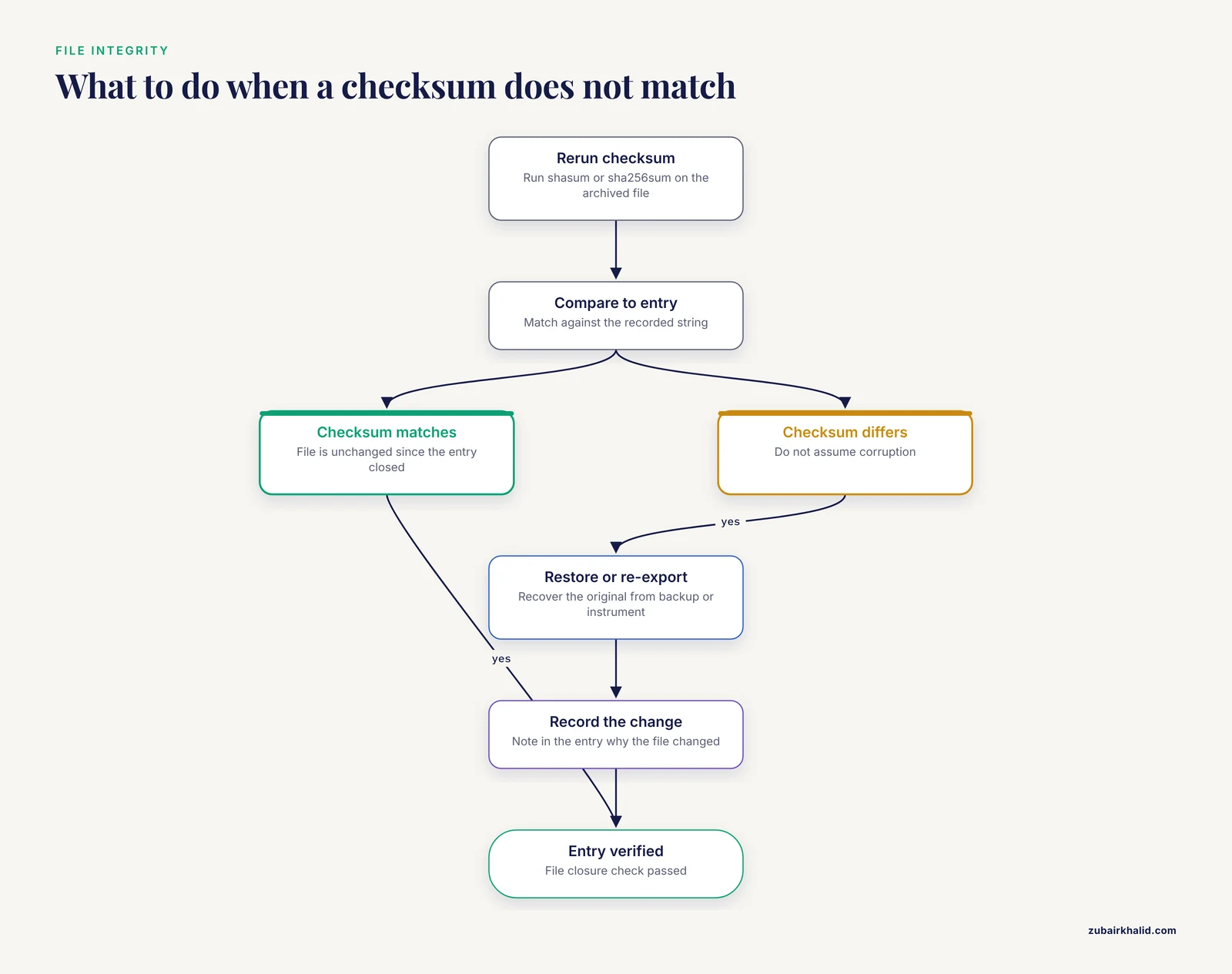
Error: WARNING: 1 computed checksum did NOT match from sha256sum -c. This means the file you are verifying differs from the file whose checksum was recorded. Do not assume corruption. The most common cause is opening a CSV in a spreadsheet, saving it, and silently reformatting numbers or dates, which changes the bytes. Fix: restore the original file from backup or re-export it from the instrument, recompute the checksum, and record in the entry why the file changed. Never overwrite the recorded checksum to make the warning go away.
Error: No such file or directory when attaching a file to an ELN entry. The path in your attachment is a typo or the file lives on a drive that is not mounted. Run the same path through the terminal to see the real state:
$ ls -l ~/experiments/Exp012-R3_ct.csvIf that prints the file, the attachment path was mistyped. If it prints an error, the file is not where the entry claims. Resolve this before signing the entry, because a broken file reference is the digital equivalent of a blank page.
Error in the paper record: backfilled pages. If you discover an entry was written days after the work, correct it honestly. Write the late entry, note the actual date of the work and the date of writing, and initial. Fabricating a contemporaneous date is falsification. A visibly late entry is recoverable, a false date is not.
Error in spreadsheets: silent value changes. Spreadsheet software reformats values on open and save, converting long identifiers to numbers and stripping leading zeros. The symptom is a checksum mismatch (above) or a value that no longer matches the instrument printout. Fix: store raw instrument exports untouched, and do analysis in copies, never in the original file.
How to Check That an Entry Is Actually Reproducible
Run this five-point check before signing any entry. It takes about three minutes.
- The stranger test. Hand the entry to a labmate who does not know the project. Can they state the objective and outline how to repeat the work from the entry alone, without asking you anything? If not, the gap they hit is the gap to fix.
- Arithmetic recheck. Recompute one calculation independently. The C1V1 = C2V2 example above should give 25.0 mL. Any derived concentration, molarity, or dilution factor gets the same treatment.
- Lot closure. Every material named in the protocol appears in the materials field with a lot number. A reagent used but not recorded is the classic reproducibility hole.
- File closure. Every filename named in the entry exists at the stated location, and its recorded checksum matches on recomputation.
- Chronology check. Timestamps run forward and the signature closes the page with no empty gap below it. An entry whose observations are dated before its start time is a record-keeping error an auditor will find immediately.
Common Mistakes and Limitations
The recurring failure modes in real notebooks are procedural, not technical.
- Writing in pencil or erasable ink. Use permanent archival black ink. Pencil can be altered, which destroys the record's evidentiary value.
- Transcribing from scrap paper at the end of the day. Details degrade within hours. Write at the bench, in real time, even if your handwriting suffers.
- Recording only successful experiments. A failed run with its deviation list is often more valuable than the successful repeat, because it documents the failure modes. Record both with equal care.
- Unnumbered or unindexed pages. If your notebook is not prenumbered, number every page when you start it and keep a running index at the front. An unfindable entry is functionally the same as a missing one.
- Skipping the witness line. Where your institution requires witnessed entries, an unsigned entry may be rejected as evidence or as documentation in a patent or audit context. Follow your own lab's policy, which takes precedence over any general format.
- Trusting ELN timestamps blindly. Automatic timestamps reflect the workstation clock. If a machine's clock is wrong, recorded times are wrong. Report a suspicious clock to your administrator and note it in the entry.
One limitation to state plainly: this article describes general professional practice for scientific record keeping. Individual institutions, funders, and regulated environments impose their own specific requirements, and your supervisor or quality unit defines what your notebook must satisfy in your setting.
Frequently Asked Questions
What is the correct structure for a reproducible lab notebook entry?
Use nine fixed fields in order: header, objective, hypothesis, materials with lot numbers, protocol with inline deviations, observations, raw data, calculations, deviations and errors, then conclusion and next steps, closed with a dated signature. The fixed order mirrors the experiment's chronology and makes omissions obvious at a glance.
Should I use a lab notebook template or write entries freehand?
Use a template. A reusable preprinted or digital template guarantees you never omit a field under time pressure, and it makes entries from different days directly comparable. Fill freehand only inside the fields, and keep the field boundaries intact.
What belongs in the materials section of a notebook entry?
Every reagent and consumable that could vary between batches, each with its lot number and expiry date, plus equipment identifiers such as instrument model, serial number, and rotor type. Template tubes, primer IDs, and cell passage numbers belong here as well.
How do I record a mistake or a failed experiment in the notebook?
Write what happened, when, and what you did about it, in the same entry, using a single-line strike-through for errors with your initials and the date. Never remove pages, erase, or overwrite. A documented failure with its cause is a valid, useful record.
Do I need a witness signature on every entry?
Follow your lab's or institution's written policy, because requirements vary. Where witnessing is required, the witness confirms they observed the work being done, signs and dates the same page, and does so close in time to the work, not weeks later.
Is an electronic lab notebook better than a paper notebook?
Neither is universally better. ELNs win on search, automatic timestamps, version history, and file embedding. Paper wins on availability without power or network and on long-established witnessing practice. Many labs run both, and the nine-field entry structure applies identically to either.
How detailed should the protocol section be when I follow a standard SOP?
Reference the SOP with its full identifier and revision number, then record only what you actually did that differs from it, inline at the affected step. If no SOP exists, write out every step with volumes, concentrations, times, temperatures, and instrument settings as performed.
How do I make digital data files traceable to my notebook entry?
List each file in the raw data field by exact filename, attach it or record its storage location, and record a SHA-256 checksum computed at the time of the experiment. Rerunning the checksum command later verifies the archived file has not changed since you closed the entry.