The Reproducible Environment Checklist
By Dr. Zubair Khalid, DVM, MS, PhD ·
By the end of this article you will be able to capture every software dependency in a bioinformatics or imaging project, package that environment so another person can rebuild it exactly, verify the rebuild works, and archive it alongside your data and code. The whole process takes under an hour for a typical analysis project, and it prevents the single most common reason reviewers cannot rerun a published analysis: undocumented software.
To follow the walkthrough you need a computer with Python 3 installed, a package manager such as conda or Miniconda, and either Docker or Apptainer (formerly Singularity). Git should be installed. If you manage large datasets, DataLad is worth adding, and the instructions below show where it fits.
Why Software Environments Break
Reproducible research means that another person, or you six months from now, can rerun an analysis and get the same result from the same inputs. The data and the code get most of the attention, but the software environment is the third ingredient, and it fails most often.
A Python package that was version 2.1 when you ran your analysis may be version 2.4 when a reviewer tries to rerun it. The function you called may have changed its default parameters or disappeared entirely. On top of that, life science software is fragmented across programming languages and packaging systems, a situation researchers in microscopy analysis describe bluntly as "dependency hell" [1]. The problem is not just inconvenience. Reviews of containerization practice in computational biology warn that superficial use of containers can produce brittle environments, security risks, and a false sense of confidence that an analysis is reproducible when it is not [2].
The reproducible environment checklist exists to catch these failures before they cost you. It turns environment capture into a routine you complete at defined points in a project, the same way you complete a quality control step before sequencing.
The Reproducible Environment Checklist Template
Here is the core checklist. Copy it into your project README or a file named REPRODUCIBILITY.md and check off each item. This is a working reproducible environment checklist example, and the numbered walkthrough below shows how to complete each item with real commands.
- [ ] 1. Pin the interpreter. Record the exact language version (for example Python 3.11.9 or R 4.3.2), not just "Python 3".
- [ ] 2. Pin every package version. Generate a lockfile or export file that lists each dependency and its exact version number.
- [ ] 3. Record the operating system and hardware context. Note the OS (for example Ubuntu 22.04), the architecture (x86_64 or ARM), and any accelerator dependency such as a CUDA version.
- [ ] 4. Separate code from data. The environment file describes software. Datasets, reference genomes, and model weights live under version control for data or in a persistent repository, not inside the container.
- [ ] 5. Choose one source of truth. Decide whether the lockfile or the container image is the canonical environment and keep the other as a derived artifact.
- [ ] 6. Test a clean rebuild. Delete the environment, rebuild it from the recorded files on a machine you did not develop on, and run a smoke test.
- [ ] 7. Capture provenance for every run. Record which code version, which data version, and which environment produced each result.
- [ ] 8. Validate inputs and metadata. Run a schema or metadata check on inputs before processing so silent format errors do not propagate.
- [ ] 9. Document computational requirements. State the memory, CPUs, wall time, and storage the analysis actually needs.
- [ ] 10. Set random seeds. Fix seeds for any stochastic step so reruns are bit-identical where that is possible.
- [ ] 11. Archive the environment publicly. Deposit the environment files, or the container image itself, in a repository such as Zenodo and cite the deposit in the paper.
- [ ] 12. Keep a changelog. When you change the environment, note what changed and why, so old results can still be traced to the old environment.
A useful reproducibility checklist is short enough to actually use. Twelve items fit on one screen. Anything longer tends to get skipped, and an unchecked checklist is worse than none because it signals diligence that does not exist.
Step-by-Step Walkthrough
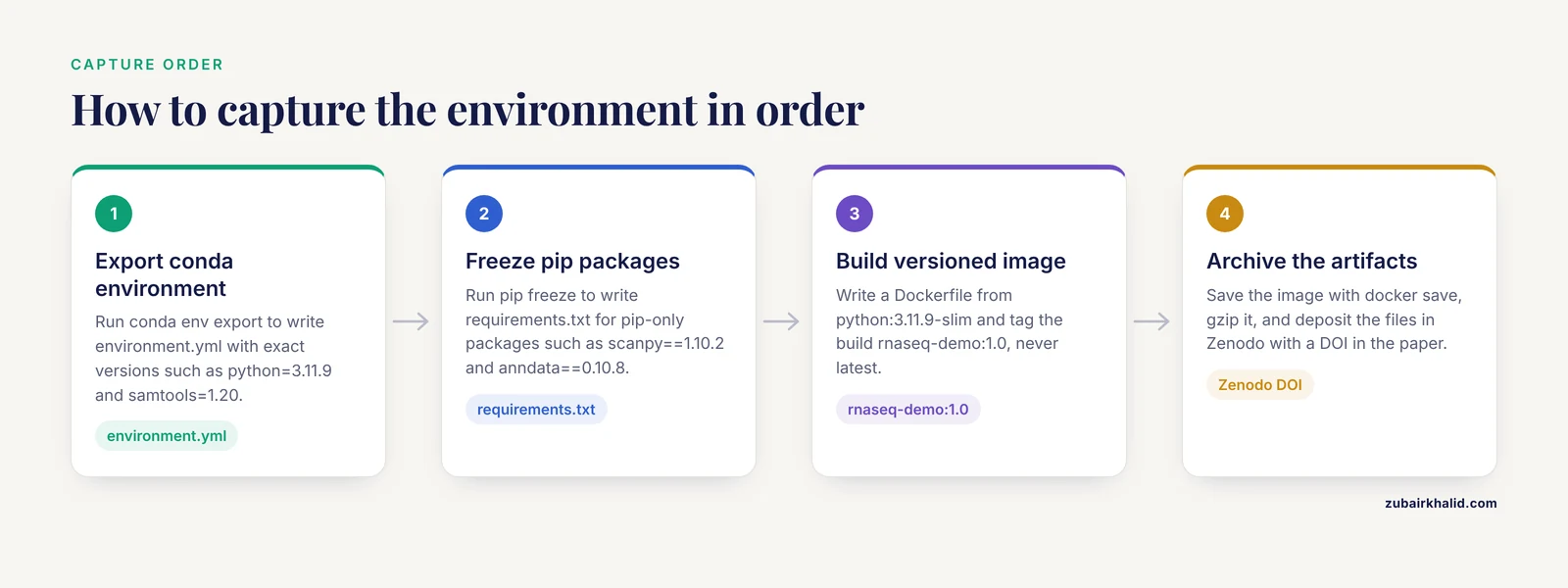
This walkthrough uses a small RNA-seq style analysis project as the running example. The same steps apply to proteomics, imaging, and genomics pipelines.
Step 1: Export your conda environment
If you use conda, navigate to your project directory and export the active environment:
conda activate rnaseq-analysis
conda env export > environment.yml
The output file looks like this:
name: rnaseq-analysis
channels:
  - conda-forge
  - bioconda
dependencies:
  - python=3.11.9
  - fastqc=0.12.1
  - samtools=1.20
  - pip=24.0
  - pip:
    - scanpy==1.10.2
    - anndata==0.10.8
Every package now has an exact version attached. This file is the anchor of the reproducible environment checklist format, and it belongs in your Git repository.
Step 2: Capture pip-only dependencies
If your project also installs packages through pip, capture them separately so the pip section stays consistent:
pip freeze > requirements.txtTypical output:
scanpy==1.10.2
anndata==0.10.8
numpy==1.26.4
pandas==2.2.2
The difference between the two files matters. environment.yml captures conda channel packages plus the interpreter itself. requirements.txt captures only pip packages and does not record the Python version unless you add it manually. Keep both if you use both installers.
Step 3: Wrap the environment in a container
A lockfile records package versions, but it does not record the operating system libraries those packages link against. A container image packages the code, the dependencies, and the execution environment together into a portable unit, which is why containerization has become a cornerstone of modern computational biology [2].
Create a file named Dockerfile in your project root:
FROM python:3.11.9-slim
WORKDIR /work
COPY requirements.txt .
RUN pip install -r requirements.txt
COPY analysis.py .
CMD ["python", "analysis.py"]
Build and run it:
docker build -t rnaseq-demo:1.0 .
docker run -v "$PWD":/work rnaseq-demo:1.0
Expected output:
QC summary written to qc_report.tsv
Alignment stats: 41,203,881 reads mapped
Note that the image tag includes a version number. An untagged image called latest is a common source of confusion because nobody can tell which state of the project it represents.
If your institution's cluster does not run Docker, Apptainer serves the same purpose and is standard on high performance computing (HPC) systems. The Nextflow workflow management system, used by pipelines such as Frag'n'Flow for large-scale proteomics and MuSA for clinical variant annotation, executes every process inside a container so the pipeline runs identically on HPC, cloud, and cluster infrastructure [3] [4].
Step 4: Validate inputs before processing
An environment can be perfectly pinned and the analysis can still fail quietly if input metadata is wrong. Large neuroimaging projects face exactly this problem, where even validly formatted metadata can contain incorrect values that cause inconsistent processing across sessions. The CuBIDS tool addresses it with robust validation that scales to large samples, quality control over image metadata, and identification of unique parameter combinations so pipelines can be tested on a representative subset first [5]. The general principle transfers to any data type: run your validator, then process.
For a tabular example, a minimal check before running looks like this:
import pandas as pd

samples = pd.read_csv("samplesheet.csv")
assert set(samples.columns) == {"sample_id", "condition", "fastq_path"}
assert samples["sample_id"].is_unique
print(f"Validated {len(samples)} samples")
Expected output:
Validated 24 samplesStep 5: Record provenance for each run
Provenance answers the question "which exact code and data produced this file." DataLad, a Python-based tool built on Git and git-annex, manages code and data jointly and can capture complete process provenance of data transformations, enabling automatic re-computation of results [6]. CuBIDS incorporates DataLad as an optional dependency for exactly this reason, ensuring reproducibility and provenance tracking across the entire dataset curation process [5].
A minimal DataLad session:
datalad create my-project
cd my-project
datalad save -m "Add samplesheet and analysis script"
datalad run -m "Run QC on batch 1" "python analysis.py"
The datalad run command records which code version and which input files produced the output, so the linkage is stored rather than remembered.
Step 6: Test the clean rebuild
This step separates a pinned environment from a verified one. On a second machine, or in a fresh directory on the same one:
git clone https://github.com/yourname/rnaseq-demo.git
cd rnaseq-demo
conda env create -f environment.yml
conda activate rnaseq-analysis
python analysis.py --test-subset
If the smoke test produces the same numbers as your development machine, item 6 on the checklist is genuinely complete. If it fails, you have found an undocumented dependency while it is still cheap to fix.
Step 7: Document resources and archive everything
Publishers and funders increasingly expect the environment to be archived, not just described. The PoLoCo workflow for population genomics from ethanol-preserved invertebrates provides a concrete model: the authors documented the computational requirements of the major workflow components on standard HPC infrastructure and made the workflow, documentation, and software environments openly available in Zenodo, a permanent research repository [7].
For your project, upload three things to Zenodo: environment.yml, requirements.txt, and the exported container image. Export an image like this:
docker save rnaseq-demo:1.0 | gzip > rnaseq-demo-1.0.tar.gzThen record the resulting digital object identifier in your manuscript. When your paper is reviewed three years later, the reviewer retrieves the deposit and reruns the analysis against the exact environment you used.
Choosing the Right Environment Artifact
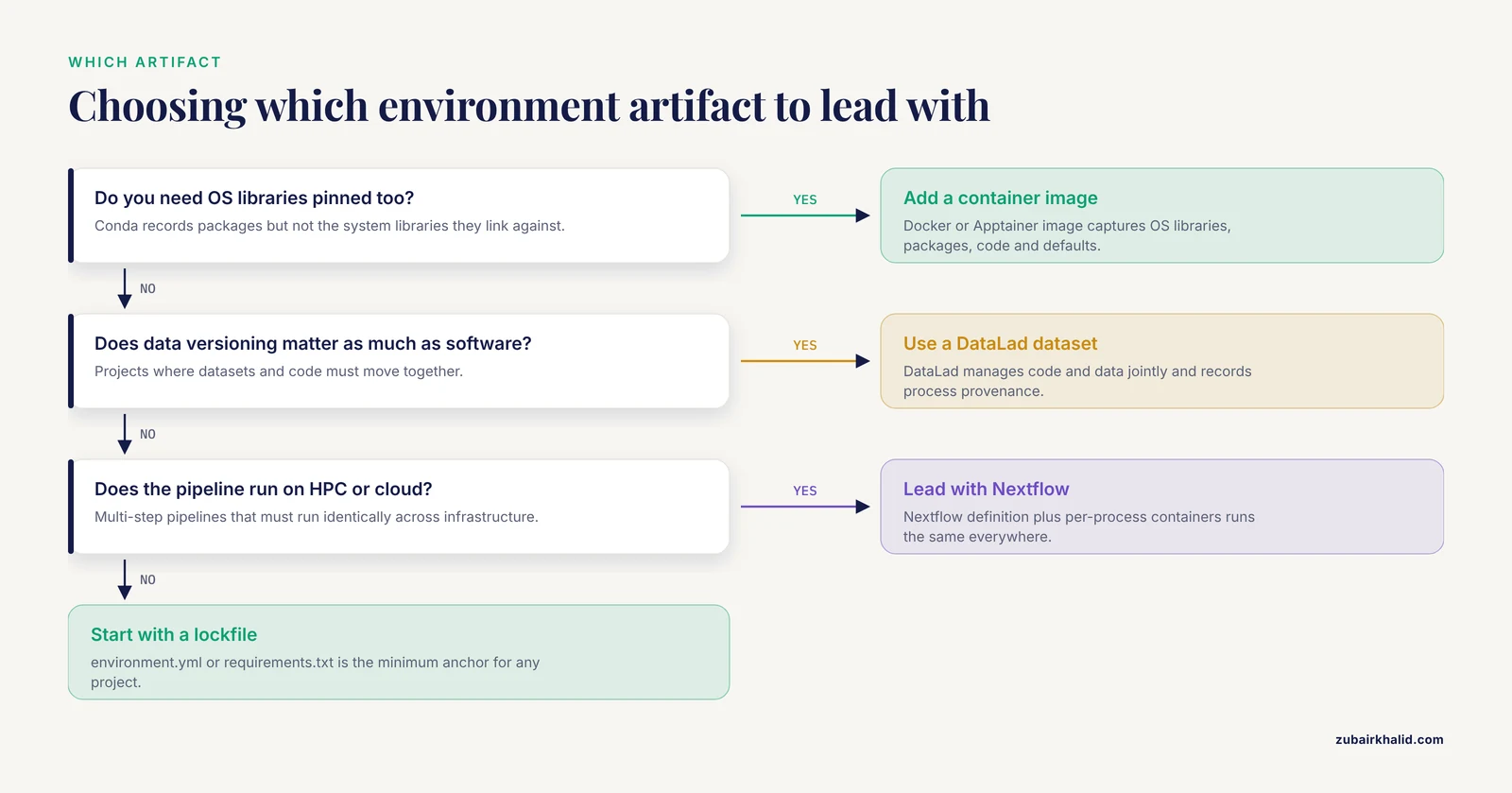
Different artifacts solve different parts of the problem, and part of the reproducible environment checklist format is knowing which one to lead with.
| Artifact | What it captures | Best for |
|---|---|---|
| , - | , - | , - |
environment.yml | Conda packages and interpreter version | Python or R projects on conda-managed systems |
requirements.txt | Pip packages only | Lightweight Python projects, Docker builds |
| Lockfiles (conda-lock style) | Fully resolved dependency tree | Teams that need identical solves across platforms |
| Docker or Apptainer image | OS libraries, packages, code, execution defaults | Cross-platform sharing, HPC deployment, publication archives |
| DataLad dataset | Data, code, and process provenance together | Projects where data versioning matters as much as software |
| Nextflow pipeline definition | Workflow structure plus per-process containers | Multi-step pipelines run on HPC or cloud |
A mature project uses several of these at once. A Nextflow pipeline such as MuSA, which automates germline variant annotation from resource setup through clinical classification, standardizes inputs and executes parallel annotation branches in a fully containerized workflow, combining the pipeline definition and container layers in one system [4].
Special Cases Worth Knowing
Cloud teaching and training environments. If you teach bioinformatics, prebuilt cloud notebooks remove the biggest barrier for students at small institutions, which is access to tailored analysis environments and training in cloud resources. The NIGMS Sandbox delivers reusable bulk RNA-seq tutorials as Jupyter notebooks on the Google Cloud Platform, guiding learners through a real workflow step by step [8]. The same pattern, a frozen notebook plus a defined cloud instance, works for lab onboarding.
Metadata-heavy projects. Projects with heterogeneous inputs need an explicit metadata validation step in the checklist. CuBIDS exists because hidden variability in metadata across large imaging datasets is difficult to detect and classify by eye, and automated validation surfaces it [5]. Apply the same logic to sample sheets, assay metadata, and reference genome versions.
Integrated analysis platforms. If your team mixes tools written in different languages, a workflow system with automatic dependency resolution reduces the integration burden. BioImageIT, a workflow management system for bio-image analysis, pairs a visual interface with a Python API and captures comprehensive metadata for every processing step as part of its design around FAIR principles, meaning Findable, Accessible, Interoperable, and Reusable [1].
Extreme or nonstandard settings. Some environments introduce variables you cannot fully control in software. Humidity, for example, directly influences the performance, reliability, and lifespan of electronic devices, which is why flexible capacitive humidity sensors must be validated across diverse moisture conditions [9]. If your instrument sits in a humid or variable environment, log those conditions alongside your computational environment, because hardware drift is a reproducibility variable the checklist items above will not catch.
Common Mistakes and Limitations
Treating the container as the whole answer. A container pins software, but it does not pin data, parameters, or the sequence of steps. Reviews of container practice emphasize that inappropriate or superficial use leads to false confidence in reproducibility [2]. Pair the image with provenance tracking and a lockfile.
Shipping a container with data baked in. This makes images enormous, hides the data from version control, and often violates data-sharing agreements. Mount data at runtime with a volume flag instead.
Trusting pip freeze alone. pip freeze lists every package in the current environment, including packages you never intended to depend on and transitive dependencies that may not install cleanly elsewhere. It is a snapshot, not a curated specification. Review it, or generate it from a clean environment created only from your declared dependencies.
Ignoring the base image. Two Dockerfiles with identical RUN pip install lines can behave differently if one starts from python:3.11-slim and the other from python:3.12-slim. Record the base image digest, not just the tag.
Never testing the rebuild. The most common failure in practice is an environment file that was exported once and never verified. Rebuild from scratch whenever you touch dependencies, and always before submission.
Not recording hardware and scale. A pipeline that ran in two hours on a 64-core node may be infeasible for a reviewer with a laptop. PoLoCo's documentation of computational requirements on standard HPC infrastructure is the model to copy [7]. State memory, CPUs, and wall time.
Forgetting nondeterminism. Multithreaded tools, cloud autoscaling, and some machine learning libraries introduce nondeterminism even with fixed seeds. If exact bit-identical reruns are not achievable, say so in the README and define what counts as an equivalent result, for example identical summary statistics.
Assuming the environment covers experimental reproducibility. A perfect software environment cannot rescue an underpowered design, ambiguous sample metadata, or unrecorded bench conditions. The checklist covers the computational layer of reproducible research, and it works only alongside disciplined experimental documentation. Individual experimental cases also need domain-specific judgment, and the checklist does not replace it.
Frequently Asked Questions
What is a reproducible environment checklist?
It is a short, repeatable list of steps that capture every software dependency, version, and execution condition of an analysis so that another person can rebuild and rerun it exactly. The twelve items above are a working template you can copy into any project.
Do I need Docker if I already use conda?
Conda pins package versions but not operating system libraries, so it covers most but not all of the reproducibility problem. For anything you will publish, share across operating systems, or run on a cluster, add a container image on top of the conda export.
What is the difference between environment.yml and requirements.txt?
environment.yml is a conda format that records the interpreter version, the channels, and conda-installed packages. requirements.txt records only pip packages. If you use both installers, keep both files and make sure the pip section of the conda file matches the requirements file.
How do I share my environment with a collaborator?
Commit environment.yml and requirements.txt to the project's Git repository, and push the built container image to a public registry such as Docker Hub. Your collaborator then runs one create command or one pull command instead of reinstalling anything by hand.
How often should I rebuild and recheck my environment?
Rebuild from scratch whenever you add, remove, or upgrade any dependency, and always before a submission or a handoff to a new team member. A quarterly rebuild on an unchanged project is a cheap way to catch silent upstream changes.
Is a container image enough to make my research reproducible?
No. A container pins software only. Full reproducibility also requires versioned data, fixed parameters, recorded provenance, and input validation. Treating the container as the complete solution creates false confidence rather than reproducibility [2].
What should I put on Zenodo when I publish?
Deposit the environment export files, the container image archive, the analysis code, and a README describing hardware requirements and how to run the smoke test. The workflow, documentation, and environment deposits of published pipelines such as PoLoCo show what a complete package looks like [7].
What is the most common environment failure in bioinformatics?
An undeclared system-level dependency, usually a C library or a GPU driver, that exists on the developer's machine but nowhere else. The error surfaces only on the clean rebuild, which is exactly why item 6, the clean rebuild test, is the item most often skipped and most often saves a publication.
Sources
- BioImageIT: A novel python-based architecture for reproducible bio-image workflows.
- Nine quick tips for software containerization.
- Frag'n'Flow: automated workflow for large-scale quantitative proteomics in high performance computing environments.
- MuSA: a Nextflow pipeline for deep, reproducible annotation and clinical ranking of genomic variants.
- Curation of BIDS (CuBIDS): A workflow and software package for streamlining reproducible curation of large BIDS datasets.
- DataLad: distributed system for joint management of code, data, and their relationship.
- PoLoCo: a reproducible pooled low-coverage workflow for draft genome assembly and allele frequency analysis from ethanol-preserved small non-model invertebrates.
- Reusable tutorials for using cloud-based computing environments for the analysis of bacterial gene expression data from bulk RNA sequencing.
- From Moisture to Signal: A Comprehensive Review of Flexible Capacitive Humidity Sensors.