How to Manage Remote and Hybrid Research Teams: Communication Tools
By Dr. Zubair Khalid, DVM, MS, PhD ·
By the end of this article you will be able to build a communication plan for a remote or hybrid research team, choose the right mix of synchronous and asynchronous tools, write a one-page communication charter, and avoid the failure patterns that show up again and again in distributed research groups. You do not need special software to get started. You need a video conferencing account (Zoom, Microsoft Teams, or an equivalent), a chat platform such as Slack or Teams, a shared document system, a project tracker, and about two hours with your team to agree on how you will talk to each other.
Why Research Teams Need a Different Communication Model
A scientometric analysis of remote team management identified four pillars that determine whether distributed teams succeed: trust, project management, effective communication, and leadership [1]. Research teams strain all four at once. Laboratory work produces time-sensitive handoffs between people who never share a room. Field sites can sit in different countries and time zones. Students, technicians, and principal investigators hold unequal power, which makes silence dangerous, because a junior member who does not understand an instruction may not say so.
A study of virtual teams across education, health care, and telecommunications found that the communication methods a team uses measurably affect member trust and commitment, and that this effect holds across industries [2]. Translation for a lab or field program: how you communicate is not a soft preference. It shapes whether people trust the data, the decisions, and each other.
Research-specific communication also has a traceability problem that ordinary office teams do not face. A protocol change, a reagent lot number, or a decision about sample exclusion must be findable months later, often by reviewers, collaborators, or a new student. Chat threads are poor archives. Your communication plan has to route decisions into durable records, which is a core discipline of research project management.
Remote Research Team Communication Step by Step
This walkthrough builds a complete communication system for a team of roughly 4 to 20 people. Work through the steps in order. Budget one to two hours for the charter meeting in step 3.
Step 1: Map Who Talks to Whom, and About What
List every recurring information flow in your project. For a typical wet lab or field program the list looks like this:
- Daily operational questions (reagent locations, instrument bookings, quick troubleshooting)
- Weekly progress and planning
- Protocol and method changes
- Data handoffs between people, sites, or facilities
- Decisions that affect the project plan or publications
- External communication (funders, collaborators, journals, ethical review boards)
For each flow, note the sender, the receiver, the urgency, and whether the content must be permanently recorded. Flows that must be recorded (protocol changes, data decisions) get routed to documents and trackers. Flows that do not (quick questions) stay in chat or video calls. A quality improvement team at St. Jude Children's Research Hospital used exactly this approach when it mapped communication between geographically separated facilities: each team drew flow diagrams of the current state, used fishbone diagrams to identify barriers, and found that inconsistent communication and unclear ownership were the root problems [3]. Your map serves the same purpose.
Step 2: Separate Synchronous From Asynchronous Channels
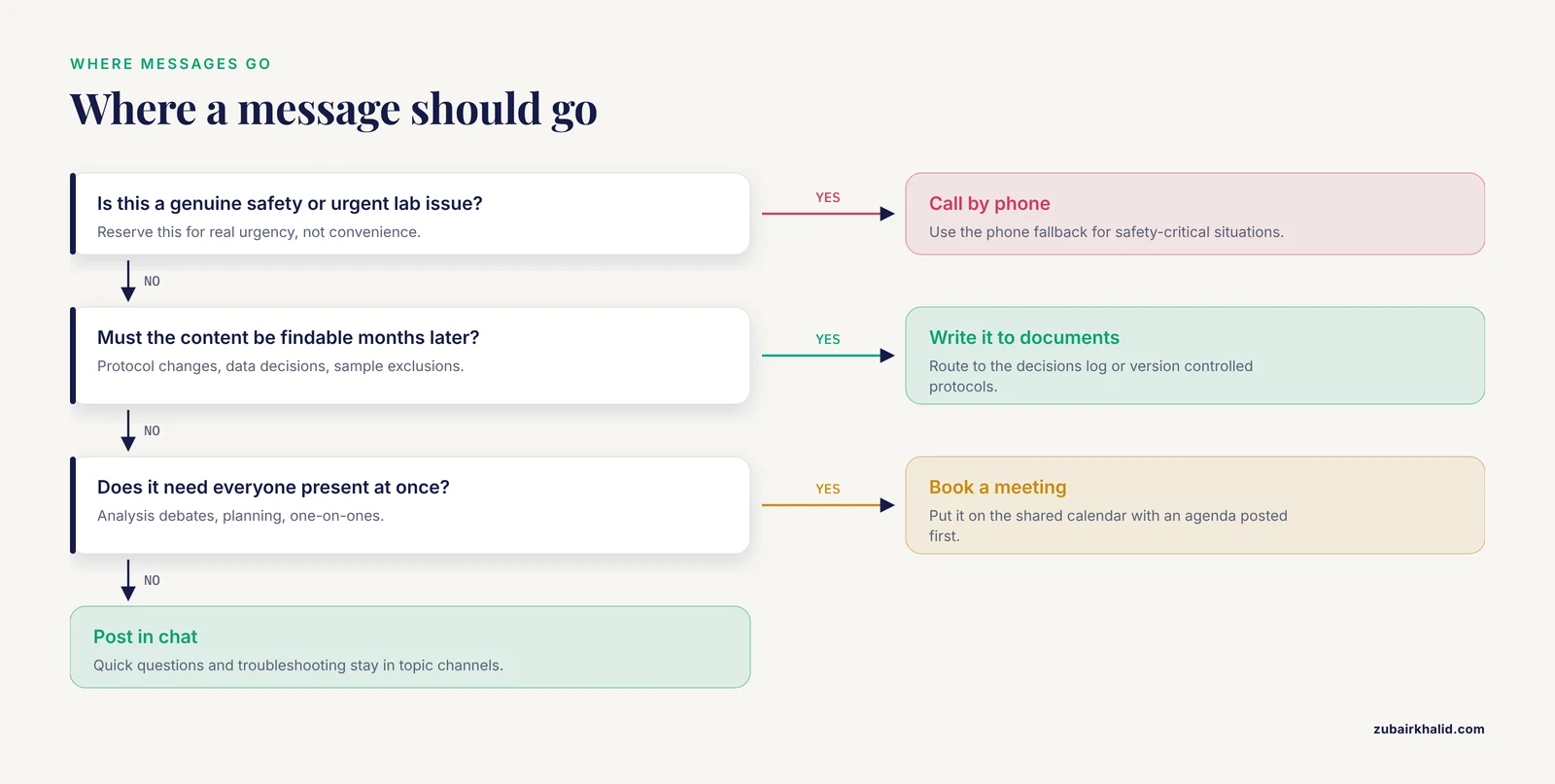
Synchronous communication means everyone is present at the same moment, such as a video call. Asynchronous communication means messages are written and read at different times, such as chat, email, or shared documents. Reviews of remote management consistently report that the importance of multichannel and asynchronous communication is growing, because it gives distributed teams flexibility while creating risks of information overload and employee alienation if it is poorly governed.
Assign each flow from step 1 to one of three buckets:
- Synchronous, scheduled. Weekly team meeting, monthly all-hands, one-on-ones. These go on a shared calendar with agendas posted in advance.
- Asynchronous, threaded. Chat channels organized by topic, shared documents with comments, issue trackers. This is where most research communication should live.
- Synchronous, ad hoc. Urgent troubleshooting, emergency response. Define a paging rule, for example a specific chat channel with @channel reserved for genuine urgency, plus a phone fallback for safety-critical lab situations.
Management research on commercial IT teams recommends implementing communication platforms such as Slack or Zoom to facilitate information sharing and coordination, combined with regular online meetings to maintain team spirit. Studies of digital leadership reach the same conclusion, finding that tools like Slack, Microsoft Teams, and Zoom amplify leadership effectiveness when they are paired with inclusive communication practices [4].
Step 3: Write a One-Page Communication Charter
A communication charter is a short document that answers five questions. Draft it in your shared document system, review it in a live meeting, and revisit it every six months or at every major project milestone.
# research-project-plan-template.yaml
# The communication section of a research project plan template

project:
  name: "Microbiome Stability Study"
  duration: "2026-01-01 to 2027-06-30"
  sites:
    - name: "Main lab"
      timezone: "America/Chicago"
    - name: "Field site"
      timezone: "Asia/Kolkata"

communication_charter:
  response_expectations:
    chat_direct_message: "within 1 business day"
    chat_channel_post: "within 1 business day"
    email: "within 2 business days"
    urgent_safety_issue: "phone call, immediately"

  meeting_cadence:
    weekly_standup:
      day: "Tuesday"
      time_utc: "15:00"        # falls inside 9-17 in both site timezones
      duration_min: 30
      agenda_posted_by: "Monday 15:00 UTC"
      minutes_posted_to: "docs/project/minutes/"
    monthly_deep_dive:
      duration_min: 90
      rotating_chair: true

  channels:
    general_announcements: "slack/#announcements"
    lab_operations: "slack/#lab-ops"
    data_questions: "slack/#data-help"
    decisions_log: "docs/project/decisions-log.md"
    protocol_changes: "docs/protocols/ (version controlled)"

  escalation:
    blocked_over_24h: "tag PI in the task tracker and post in #lab-ops"
    unresolved_over_72h: "raise at weekly standup as a formal agenda item"

  documentation_rules:
    decisions: "Any decision affecting data, protocol, or timeline gets a dated
                entry in the decisions log with who decided and why"
    protocols: "Changes are committed to the protocol repository with a
                version number, never announced only in chat"
Expected output after you fill this in and share it: every team member can answer, without asking, where a given type of message goes, how fast a reply should arrive, and where to look for a decision made three weeks ago. If anyone on the team cannot answer those three questions, the charter is not finished.
Step 4: Set Up the Tool Stack With Clear Rules
Install and configure four tool categories. Table 1 summarizes them.
| Tool category | Purpose | Best for | Watch out for |
|---|---|---|---|
| Video conferencing (Zoom, Teams) | Scheduled meetings, discussions requiring tone and face | Weekly standups, one-on-ones, analysis debates | Meeting fatigue, timezone exclusion |
| Chat platform (Slack, Teams channels) | Fast asynchronous questions and coordination | Daily operations, quick troubleshooting | Decisions buried in threads, notification overload |
| Shared documents (Google Docs, Office 365, wiki) | Durable records, protocols, meeting minutes, decisions log | Anything that must be findable later | Version confusion, unowned documents |
| Project tracker (Trello, Asana, Jira, GitHub Projects) | Task ownership, deadlines, status at a glance | Who does what by when | Trackers that go stale become noise |
Two evidence-based cautions when you configure this stack. First, research on software teams found that successful virtual leadership depends on selecting collaboration platforms that align with the team's actual needs and workflow processes, not simply on adopting the most popular tools [5]. Second, work on remote 3D coordination in engineering teams showed that even a powerful collaborative tool fails when members cannot follow each other inside it. In that study, immersive VR with markup tools supported communication better than 2D screenshot markup, but only when members actively guided one another through the shared environment [6]. The general lesson transfers directly: every tool you adopt needs an orientation session and a rule for when to use it, or people will get lost in it.
Step 5: Calculate Your Meeting Window
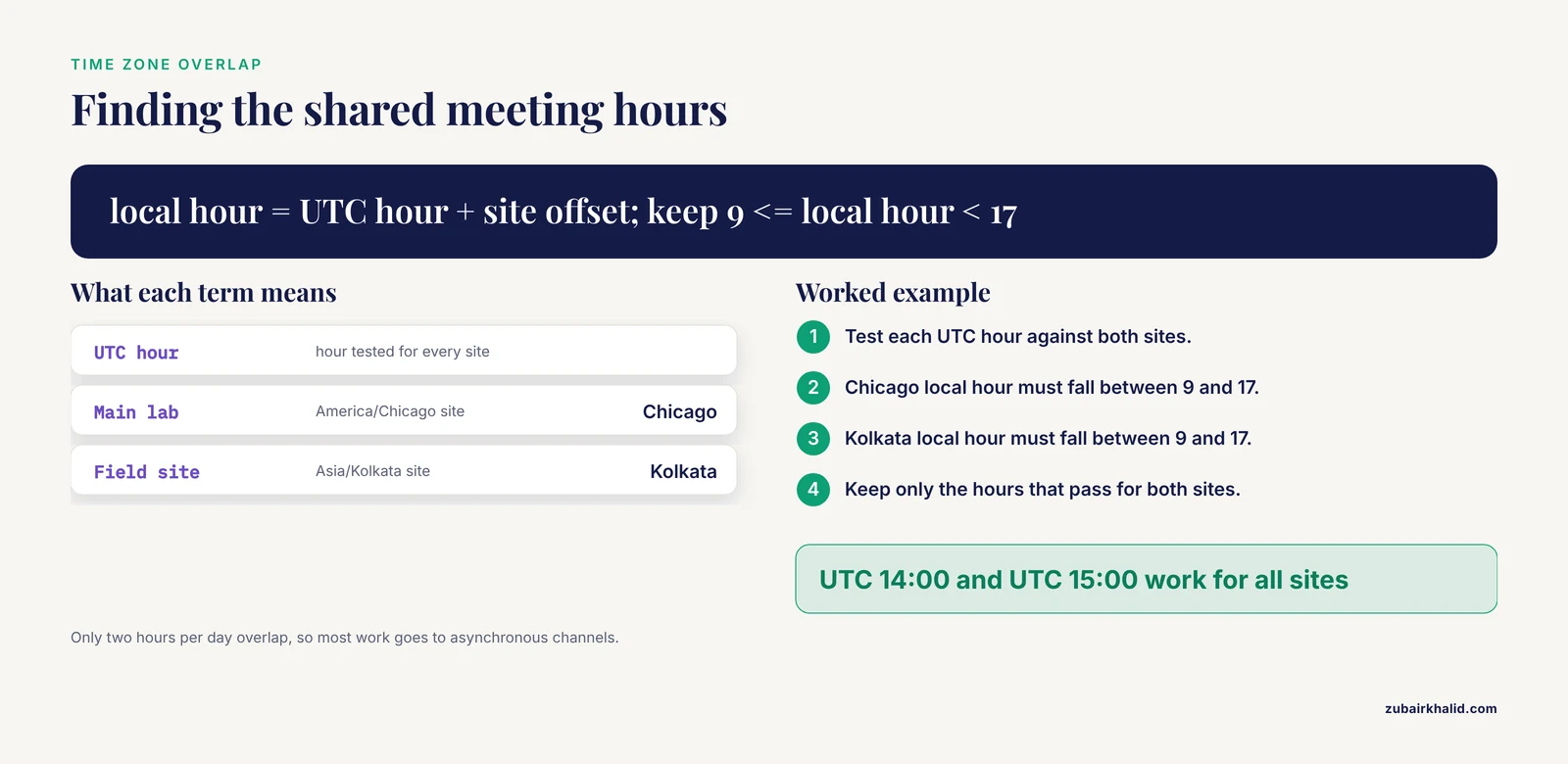
For teams spread across time zones, pick a recurring meeting window by finding the overlap of everyone's working hours. Here is a worked calculation you can run with Python if the timezone math gets tedious.
# meeting_window.py
# Find hours that fall within 9:00-17:00 local time for every site.
from datetime import datetime
from zoneinfo import ZoneInfo

sites = {
    "Main lab":   ZoneInfo("America/Chicago"),
    "Field site": ZoneInfo("Asia/Kolkata"),
}

for utc_hour in range(24):
    ok = True
    for name, tz in sites.items():
        local = datetime(2026, 1, 6, utc_hour, 0, tzinfo=ZoneInfo("UTC")).astimezone(tz)
        if not (9 <= local.hour < 17):
            ok = False
    if ok:
        print(f"UTC {utc_hour:02d}:00 works for all sites")
Expected output for the Chicago plus Kolkata example:
UTC 14:00 works for all sites
UTC 15:00 works for all sites
Only two hours per day overlap in this configuration, which is realistic. This is why the charter routes most work through asynchronous channels and protects the overlapping hours for human contact. When overlap is zero, alternate meeting times so the burden of odd hours rotates rather than falling permanently on one site.
Step 6: Define Handoff and Data Communication Protocols
Research handoffs, where responsibility for a sample, dataset, or analysis passes from one person or site to another, are a classic failure point. The St. Jude affiliate program solved this with a standardized communication bundle sent by secure email, which took less than 10 minutes to send or receive and achieved closed-loop communication between sites within three months at their pilot locations [3]. Build the research equivalent: a short, mandatory template for every handoff that states what is being transferred, its status, known problems, and who now owns it.
Remote data collection needs the same discipline. In a remote ethnobotanical project, an on-site team documented plant knowledge as voice messages and photos sent over WhatsApp to an off-site team, which identified 57 percent of 54 recorded taxa to species level and preserved names and uses as primary audio data [7]. The method succeeded because the two teams agreed in advance on what would be recorded, how it would be sent, and who would do what with it. That agreement, not the specific app, is the transferable part.
Step 7: Verify the System Works
Check your communication system the way you would check an assay. Use these verification steps monthly:
- Pick a decision made last month. Can a team member who was not involved find it in the decisions log within two minutes?
- Pick a task in the tracker. Does its status match what the responsible person reports verbally?
- Ask each member privately whether they know their top priority for the next two weeks. Ambiguous answers indicate the asynchronous channels are not carrying planning information.
- Review response times against the charter. If chat messages routinely go unanswered for days, either the expectation is unrealistic or the channel assignments are wrong.
Choosing and Governing Tools Without Overload
Information overload is one of the documented risks of multichannel remote communication. Three governance rules keep it controlled. First, every channel has a declared purpose, and off-topic posts are moved rather than scolded. Second, notifications are tuned by role, so a junior technician is not mentioned in every thread. Third, chat is explicitly declared a non-archive, and anything worth keeping is copied into a durable document.
For teams whose work involves shared visual artifacts such as microscopy, molecular structures, geospatial layers, or instrument outputs, choose tools that let more than one person annotate the same view. The VR versus BIM study found that the ability for users to draw together in a shared spatial context supported communication more than single-user markup on a 2D screenshot [6]. The practical equivalent in most labs is a shared whiteboard or a collaborative viewer where all participants can annotate simultaneously during the call.
When your communication depends on language interpretation, plan for its cost in time and accuracy. A controlled simulation of pediatric appointments found that video remote medical interpretation added measurable time to visits and produced translation errors of varying severity. Research teams collaborating across languages should budget extra meeting time through interpreters and confirm critical instructions in writing in both languages.
How to Manage Remote and Hybrid Research Teams Day to Day
Lead for trust and clarity, not surveillance. A mixed-methods study of software professionals found that successful virtual leadership rests on clear communication, trust building, and strategic use of digital tools [5]. Comparative studies of leadership styles in global virtual firms found that adaptive and transformational styles, characterized by flexibility and empathy, significantly enhance communication, coordination, trust, and motivation, while purely transactional styles sustain engagement poorly across time zones and cultures [4]. In a research setting this means stating priorities explicitly, admitting uncertainty about data publicly, and asking questions that surface problems rather than audits that punish them.
Invest in deliberate team building. Remote teams do not accumulate social capital in hallways, so it must be built on purpose. A workflow-based study of remote team collaboration used Tuckman's team development model to assess each team's current stage, then applied targeted team building activities tracked with key performance indicators before and after the intervention, and observed measurable improvements in collaboration and service quality [8]. Case studies of Ukrainian companies operating under martial law found that psychological support initiatives and structured team building sustained cohesion and productivity under extreme conditions [9]. For a research lab, the scaled-down version is a recurring informal video coffee, recognition of contributions in meetings, and protected time at the start of weekly standups for non-technical check-ins.
Train communication skills explicitly. A one-day creative drama workshop for remote and hybrid R&D engineers at an international telecommunications company improved active listening, empathy, feedback quality, and collaborative decision making, with benefits that persisted at two-week follow-up [10]. Structured communication exercises are not soft extras. They repair exactly the failure modes, role ambiguity, poor feedback, and withholding of information, that distributed research teams report most often.
Support the least powerful members of the team. Remote fieldwork research with local research assistants in upland Vietnam showed that an approach centered on frequent communication, feedback, and trusting team dynamics improved research quality and reduced power hierarchies between senior researchers and local staff, and the authors argue remote collaboration should be treated as a legitimate mode of knowledge production rather than an inferior fallback [11]. Concretely, rotate meeting chairing, ask junior members for their read on the data before seniors state theirs, and give research assistants direct authorship of the documentation they produce.
Standardize what repeats. A diagnostic study of a lagging remote business team found the root causes included absent standard operating procedures, missing key performance indicators, centralized data management, and inadequate training, and the prescribed fixes included written SOPs, defined KPIs, decentralized data access, and regular training [12]. Write the SOP for every recurring process in your lab, from instrument calibration to manuscript submission, and store each one where the person performing the task will actually look.
Keep services connected to the team. When specialized services such as instrument calibration or core facility support go remote, apply the same traceability logic. Reviews of remote metrology show that remote value transmission and traceability for measuring instruments can shorten calibration cycles and avoid transport-induced errors, provided the remote method is selected to match the instrument and application [13]. Whatever the service, the record of what was done, by whom, and against what reference must arrive with the result.
Common Mistakes and Limitations
- Treating chat as the record. Decisions announced in chat vanish into scrollback. Route every decision that affects data, protocols, or timelines into a dated decisions log.
- Scheduling meetings only in the headquarters timezone. This quietly excludes one site from every discussion. Calculate the overlap window, and rotate the burden when no overlap exists.
- Assuming silence means agreement. Written communication strips out tone and hesitation. Ask for explicit confirmation on consequential instructions, especially from junior members who may hesitate to push back.
- Adopting tools without orientation. The VR coordination study showed that team members who were not guided through a shared environment could not follow the conversation at all [6]. Budget an onboarding session for every new tool.
- Confusing activity with alignment. High message volume can mask the fact that people are working toward different goals. The weekly standup should answer one question above all: is everyone working on the same version of the plan?
- Skipping informal contact entirely. Research on remote team cohesion shows structured, low-stakes social interaction measurably improves collaboration and service quality [8].
- Overloading channels. Multichannel communication carries a documented risk of information overload and member alienation. Fewer channels with clearer rules beat more channels with no rules.
- Ignoring cross-cultural communication differences. Studies of multicultural remote teams emphasize directness norms, feedback expectations, and digital inequality as recurring friction points, and recommend leadership models built on digital skill and inclusivity, [4].
- Assuming remote methods transfer without pilot testing. A survey study that switched from mail-only to a modified web-push strategy saw response rates fall from 36.6 percent to 13.4 percent [14]. When you move a research procedure to a remote modality, pilot it and compare against the prior method before committing.
- A limitation of this guidance. Every team's constraints differ, and specific personnel, safety, or compliance situations call for advice from your institution's research administration and, where applicable, a qualified safety officer.
Frequently Asked Questions
What is the best communication tool for a remote research team?
There is no single best tool. Research on remote teams consistently finds that outcomes depend on matching tools to the team's workflow, combining a video platform, a chat platform, shared documents, and a project tracker, [5]. Choose the combination your team will actually maintain.
How often should a remote research team meet?
Most research teams function well with one 30-minute weekly standup, monthly deep-dive meetings, and regular one-on-ones. The right frequency depends on how much overlap your time zones allow and how fast your project moves, so state the cadence explicitly in your communication charter.
How do you build trust in a remote research team?
Trust grows from predictable behavior: clear expectations, reliable follow-through, and explicit acknowledgment of contributions. Virtual team research identifies clear communication, trust building, and strategic tool use as the foundations of effective virtual leadership [5], and finds that communication methods themselves measurably affect trust and commitment [2].
How do you handle time zone differences in international research collaborations?
Calculate the daily overlap window, protect it for synchronous meetings, and route everything else through asynchronous channels. When there is no overlap, rotate meeting times so the inconvenience is shared rather than always falling on the same site.
What should go in a research project plan communication section?
Include meeting cadence with agendas, response-time expectations by channel, channel assignments, a decisions log location, handoff templates, and escalation rules for blocked work. The YAML template earlier in this article gives a working structure you can adapt.
How do you prevent information overload in chat-based teams?
Give every channel a declared purpose, tune notifications by role, and declare chat a non-archive so durable information moves to documents. Information overload is a documented failure mode of multichannel remote communication.
What is the biggest mistake new remote research PIs make?
Treating communication as something that happens by default. Distributed teams need explicit norms for where messages go, how fast replies arrive, and where decisions are recorded. Teams that skip this drift into buried decisions and misaligned priorities within weeks.
How do you onboard a new student or technician remotely?
Combine a written SOP library, a one-hour live orientation to every tool in the stack, a named buddy for their first two weeks, and a first-week task that produces a visible contribution. Research on remote fieldwork shows that comprehensive training and ongoing support are what make remote team structures work [11].
Sources
- FUNDAMENTALS OF REMOTE (VIRTUAL) TEAM MANAGEMENT: SCIENTOMETRIC CONCEPT ANALYSIS
- Trust and commitment; a comparative study of virtual team communication across industries
- Handoff Communication between Remote Healthcare Facilities
- Digital Leadership Styles and Their Impact on Remote Team Collaboration Effectiveness in Global Virtual Firms
- THE ROLE OF VIRTUAL LEADERSHIP AND COLLABORATION TOOLS IN ENHANCING REMOTE TEAM PRODUCTIVITY IN SOFTWARE HOUSE INDUSTRY
- Immersive VR versus BIM for AEC Team Collaboration in Remote 3D Coordination Processes
- Ethnobotanical research under the COVID-19 pandemic: assessing a remote method for documenting Indigenous plant-related knowledge
- A Workflow-Based Approach to Improving Remote Team Collaboration
- TEAM BUILDING IN REMOTE TEAMS UNDER MARTIAL LAW: CHALLENGES AND OPPORTUNITIES
- Communication Enhancement with Drama Techniques Analysis of Inter-Team Dynamics and the Adaptation Process
- From a Distance: The ‘New Normal’ for Researchers and Research Assistants Engaged in Remote Fieldwork
- Improving Remote Leadership on PT. XYZ Business Development Expansion Team
- Remote value transmission and traceability technology of measuring instruments based on wireless communication.
- Adaptations for remote research work: a modified web-push strategy compared to a mail-only strategy for administering a survey of healthcare experiences