Reference Manager Comparison: Top Tools Compared
By Dr. Zubair Khalid, DVM, MS, PhD ·

A reference manager stores your citations and PDFs in one searchable library and inserts correctly formatted citations into your manuscripts, while a plain folder of PDFs or a hand-typed bibliography does neither. The rule of thumb is simple: pick Zotero if you want a free, flexible, open tool that works everywhere, pick Mendeley if your team already lives inside Elsevier products, pick EndNote if your institution pays for it and your colleagues use it, and pick a BibTeX-based workflow if you write in LaTeX.
What Reference Management Software Actually Does
Reference management software is a database for the literature you read. At minimum, every citation manager does four things:
- Imports records from databases, publisher websites, and library catalogs with one click, usually through a browser connector.
- Stores metadata (authors, title, journal, year, volume, pages, DOI) in a structured, searchable form.
- Attaches and organizes the PDF full text so you can read and annotate inside the program.
- Inserts in-text citations and builds a reference list in your word processor, reformatting the whole document instantly when you switch between styles such as APA, Vancouver, or Chicago.
Two features separate the serious tools from the basic ones. The first is metadata quality, which means how reliably the importer captures authors, journal names, and DOIs without manual cleanup. The second is sync and collaboration, which determines whether you can share a library with coauthors and work across a laptop, a desktop, and a phone. Any reference manager comparison that ignores metadata quality and collaboration misses the two things that cause the most day-to-day frustration.
The Main Reference Manager Comparison Options
These are the tools you will realistically choose among in 2026. Each one is explained on its own terms first, before the head-to-head comparison.
Zotero
Zotero is a free, open-source citation manager developed by a nonprofit (the Corporation for Digital Scholarship, with support from Digital Scholar and Sloan Foundation funding historically). It runs on Windows, macOS, and Linux, has an official iOS app, and integrates with Word, LibreOffice, and Google Docs.
Its strengths follow from its design. The browser connector captures books, journal articles, web pages, government reports, newspaper pieces, and even preprints with better metadata cleanup than most competitors. Zotero's storage is unlimited on your own computer. Cloud sync through zotero.org gives 300 MB free, which is enough for several thousand reference records but fills up quickly with PDFs, so many users point Zotero at a third-party storage service (WebDAV-compatible services or paid plans) instead.
The open-source model shows up in the extension ecosystem. The Zotero community maintains plugins such as Better BibTeX (for LaTeX users who need stable citation keys and automatic .bib file exports), translation add-ons, and annotation importers. Zotero also reads PDFs, extracts annotations into notes, and indexes full text so you can search inside every PDF in your library.
The drawbacks are real. Cloud storage beyond the free tier requires a paid plan. The software occasionally lags a release cycle behind the newest operating system versions because it depends on volunteer and nonprofit resources. And if your coauthors are committed to another tool, Zotero's group libraries do not import or export into that other tool's format without friction.
Mendeley
Mendeley Reference Manager is free, closed-source, and owned by Elsevier. It runs on Windows, macOS, Linux, and iOS, and it works with Word and LibreOffice through the Mendeley Cite add-in. Mendeley's identity is tied to its ecosystem: an Elsevier account connects the reference manager to Scopus, ScienceDirect, and the Researcher profile network.
Mendeley's historical strengths were PDF handling and social features. It still extracts metadata from PDFs you drop into the library, and it suggests related papers. Its cloud sync is unlimited for references and PDFs, which is a genuine advantage if you work across several machines and do not want to think about storage quotas.
The drawbacks have shaped its reputation. Elsevier retired the older Mendeley Desktop in favor of the newer Mendeley Reference Manager, and long-time users still report that the newer client lost features such as robust local database control. Because the software is closed-source and the sync service is proprietary, you depend entirely on Elsevier keeping the service healthy. A widely publicized episode in 2022, when Mendeley disabled the local API that other applications relied on and broke plugins overnight, is the standard cautionary tale. Mendeley Cite also has fewer citation-style options than Zotero or EndNote in some workflows, and group-library sharing is capped at a number of private groups and members per account (five private groups with up to 25 members each on the free tier, according to Mendeley's own documentation).
EndNote
EndNote is the oldest commercial citation manager, now published by Clarivate (which also runs the Web of Science database). It is paid software sold as a perpetual desktop license, with institutional site licenses common at universities and medical centers. It runs on Windows and macOS, integrates tightly with Microsoft Word, and ships with the largest collection of output styles of any tool, numbering in the thousands, including many journal-specific styles that matter in medicine, law, and some engineering fields.
EndNote's strengths are reliability at scale and institutional support. It handles libraries with tens of thousands of references without choking, its "Cite While You Write" plugin is the most mature Word integration in the field, and IT departments at many hospitals and universities install and support it for you. EndNote Web (now branded EndNote Basic or EndNote Web depending on the version) provides cloud sync and a lighter browser-based tier.
The drawbacks are cost and openness. A personal license costs real money and must be renewed for major-version upgrades. EndNote does not run on Linux. Its metadata capture from the web is less nimble than Zotero's connector, and sharing libraries with users on other tools is painful because there is no clean export path that preserves everything.
Papers (ReadCube Papers)
ReadCube Papers is a commercial manager aimed at researchers who want a polished reading experience. It runs on Windows, macOS, and the web, with strong PDF annotation, smart articles that suggest related work, and built-in article search across databases. It uses a subscription pricing model rather than a one-time purchase, which some users like and others resent. Its word processor integrations cover Word and Google Docs. Papers historically had enthusiastic fans among biomedical researchers, and its PDF reader is among the best in the category. The downsides are a smaller user community, fewer troubleshooting resources, and the same lock-in concerns as any closed, subscription-based product.
Citavi
Citavi is a German reference manager with a distinctive feature set: it combines reference management with knowledge organization, task planning, and structured note-taking designed around how long projects (theses, dissertations, systematic reviews) actually get written. It runs on Windows and, in newer cloud versions, in the browser. Citavi is free for users at many German and Swiss universities under site licenses, and paid elsewhere. If your workflow involves planning chapters, assigning quotations to categories, and building an outline before you write, Citavi's approach is unusual and genuinely useful. The main drawbacks are a Windows-centered history, a smaller international user base, and less third-party tooling than Zotero.
JabRef and BibTeX workflows
JabRef is a free, open-source reference manager built around the BibTeX and BibLaTeX file formats used by LaTeX document systems. If you write manuscripts in LaTeX and compile with TeX, your references live in a .bib file, and JabRef is the standard editor for that file. It runs on Windows, macOS, and Linux, pulls metadata from Crossref, arXiv, and MathSciNet, and supports groups, search, and PDF linking.
A LaTeX workflow has no need for a Word plugin at all. Citations are typed as keys such as \cite{smith2024} and the bibliography is generated at compile time from the .bib file. That makes this option unbeatable for reproducibility and version control, and incomprehensible for anyone who writes in Word. You can also combine tools: many LaTeX users keep Zotero with Better BibTeX and let the plugin export the .bib file automatically.
Built-in citation tools in Word and Google Docs
Word's built-in citation feature and Google Docs' citation tool both create a small database of references inside a document and insert citations in a handful of common styles. They are adequate for a short essay with ten sources. They do not store PDFs, they do not import metadata from databases reliably, they do not sync into a reusable library, and they break when you move a document between computers. Anyone writing a thesis, a grant, or a multi-author manuscript outgrows them within weeks.
Side-by-Side Comparison Table
This table is the core of the citation manager comparison. Qualities are described qualitatively because pricing, storage tiers, and feature sets change frequently, and you should verify current terms on each vendor's official site before deciding.
| Criterion | Zotero | Mendeley | EndNote | Papers (ReadCube) | Citavi | JabRef |
|---|---|---|---|---|---|---|
| Cost model | Free, open source. Paid cloud storage tiers. | Free, closed source, Elsevier-owned. | Paid license (institutional site licenses common). | Paid subscription. | Paid, free under many German/Swiss site licenses. | Free, open source. |
| Operating systems | Windows, macOS, Linux, iOS | Windows, macOS, Linux, iOS | Windows, macOS | Windows, macOS, web | Windows, web | Windows, macOS, Linux |
| Word processor integration | Word, LibreOffice, Google Docs | Word, LibreOffice (via Mendeley Cite) | Word (deepest integration), LibreOffice, Pages via RTF/ODF scan | Word, Google Docs | Word, LibreOffice | None needed (LaTeX-based) |
| Metadata quality on import | Excellent, best-in-class browser connector | Good, strong PDF metadata extraction | Good, large style database | Good | Good | Good for scientific sources |
| PDF reading and annotation | Built-in reader, annotation extraction | Built-in reader, good PDF workflow | Built-in reader | Excellent reader, discovery features | Reader plus notes and tasks | External reader, file linking |
| Sync | Via zotero.org (300 MB free) or WebDAV | Unlimited via Elsevier cloud | Via Clarivate cloud (EndNote Web) | Vendor cloud | Vendor cloud | File-level (dropbox/cloud drive of your choice) |
| Group libraries | Yes, generous free sharing | Yes, limited private groups on free tier | Yes, up to 1,000 people in shared libraries (per Clarivate documentation) | Limited | Yes | Not built in (shared .bib files instead) |
| Openness and data portability | Open source, full export, open formats | Closed, export possible but lock-in risk | Closed, export possible but lock-in risk | Closed, subscription lock-in risk | Semi-open, exports standard formats | Fully open (plain-text .bib files) |
| LaTeX support | Via Better BibTeX plugin | Weak | Weak | Weak | Limited | Native, purpose-built |
| Best fit | Most users, esp. students and interdisciplinary work | Elsevier ecosystem users, teams wanting free unlimited sync | Institutional users, large libraries, journal-specific styles | Reading-heavy workflows | Structured long-form writing (theses, reviews) | LaTeX writers |
The Criteria That Decide Real Choices
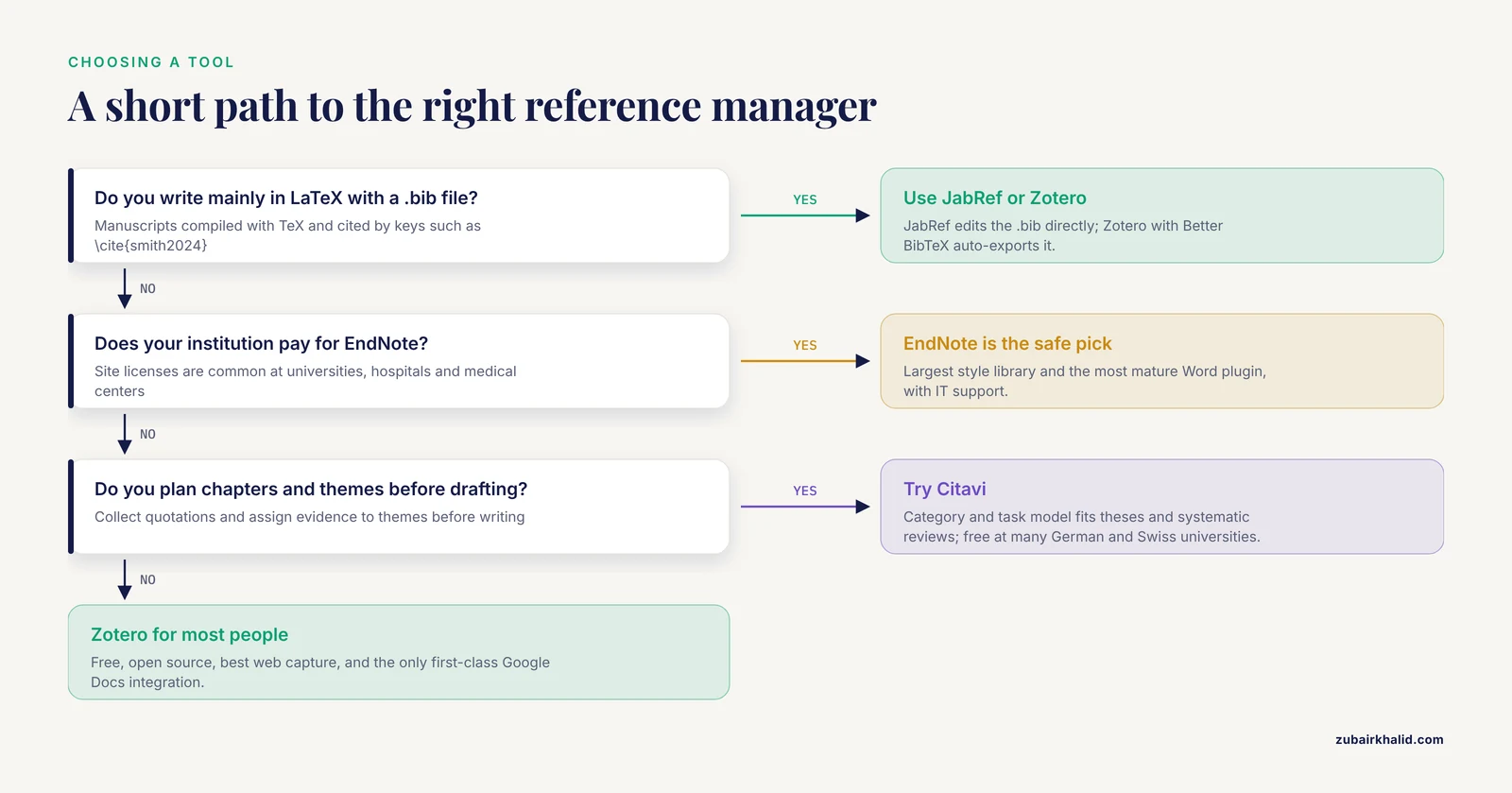
Feature lists flatter every product. These six criteria are what actually separate the best reference manager comparison outcomes in practice.
Cost and licensing
Zotero and JabRef cost nothing and will never disappear behind a paywall. Mendeley is free but closed. EndNote and Papers cost money, either as a one-time license or a subscription. The question is not only what you pay today but what happens when you graduate, change jobs, or lose institutional access. A library trapped in a tool you can no longer afford is a real and common problem. Export your library in a standard format (BibTeX, RIS, or the CSL JSON used by Zotero) at least once a year no matter which tool you use.
Storage and sync
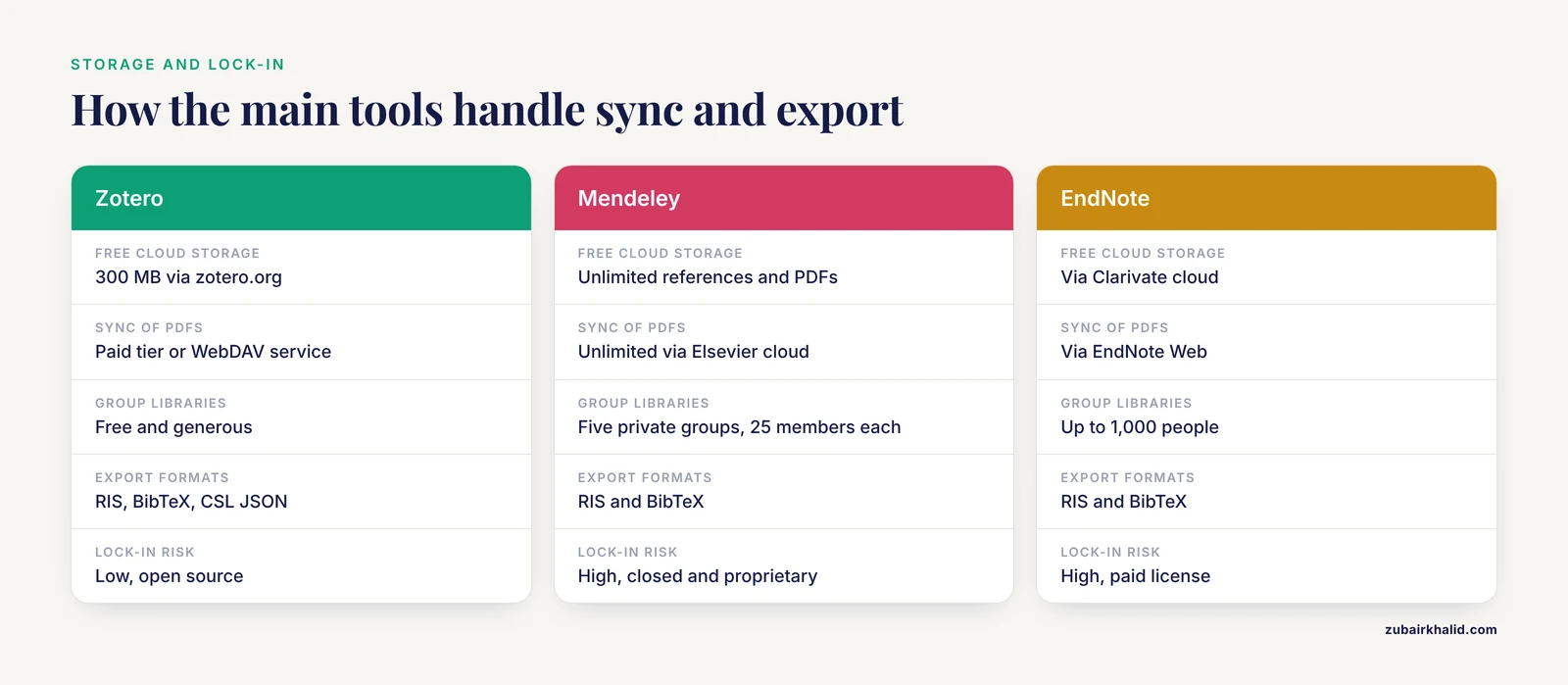
Zotero's free cloud tier (300 MB) stores references generously but fills fast with PDFs, so heavy PDF users either pay for storage or sync attachments through a WebDAV service. Mendeley syncs references and attachments without a visible quota, which is its strongest practical advantage. EndNote syncs through its own cloud. The key insight many new users miss: your reference database and your PDFs do not have to travel through the same pipe. Zotero can sync PDFs through a third-party service while syncing metadata through zotero.org.
Word processor integration
If you write in Word, EndNote's Cite While You Write remains the most mature and error-resistant integration, particularly for documents with hundreds of citations that must switch between hundreds of journal styles. Zotero's Word and Google Docs plugins are close behind and cover the overwhelming majority of real needs. Mendeley Cite works but has historically lagged in style availability and offline behavior. If you write in Google Docs, Zotero is the only major tool with a first-class native integration.
PDF handling and annotation
All major tools now read PDFs. The differences are in emphasis. ReadCube Papers and Mendeley put reading and discovery at the center. Zotero emphasizes capturing and extracting annotations into notes you can reuse in drafts. EndNote treats the PDF as an attachment to a database record. If your day is reading-heavy, weight this criterion heavily.
Collaboration and shared libraries
A shared library that keeps working after your postdoc leaves is worth more than any single feature. Zotero's group libraries are free and generous for open and most private use. Mendeley caps private groups on the free tier. EndNote shares libraries between EndNote users and handles large shared libraries well, but only if everyone involved has EndNote. Mixed-tool collaborations usually settle on Zotero because it is free for everyone, or on a shared BibTeX file because plain text survives everything.
Data portability and lock-in
Every tool exports to RIS and BibTeX, so nothing is ever fully trapped. But export loses things: annotations, notes, PDF folder organization, and citation keys may not survive a move intact. Zotero's open formats and JabRef's plain-text .bib files are structurally the safest. Closed cloud-only tools carry the most lock-in risk, which is why the 2022 Mendeley API episode gets cited so often as an argument for open tools.
Reference Manager Comparison Pros and Cons at a Glance
Zotero
- Pros: free, open source, best-in-class web capture, excellent Google Docs support, strong plugin ecosystem, good group libraries.
- Cons: free cloud storage is small for PDF-heavy libraries, Linux users love it but Windows institutional support is not automatic, fewer journal-specific styles than EndNote.
Mendeley
- Pros: free, unlimited sync of references and PDFs, tidy PDF workflow, ties into Scopus and ScienceDirect.
- Cons: closed source with a documented history of breaking third-party integrations, private group limits on the free tier, dependence on Elsevier's roadmap.
EndNote
- Pros: the most polished Word integration, the largest style library, proven at very large library sizes, institutional support and training common.
- Cons: costs money, no Linux version, weaker web capture than Zotero, painful to share with non-EndNote users.
ReadCube Papers
- Pros: excellent reading and annotation experience, strong discovery features, Google Docs support.
- Cons: subscription cost, smaller community, fewer troubleshooting resources when something breaks.
Citavi
- Pros: unique knowledge-organization and task-planning features for long projects, structured notes tied to categories, free at many European universities.
- Cons: Windows-centered heritage, smaller international community, less tooling.
JabRef
- Pros: free, open source, native to LaTeX, plain-text files that version-control beautifully.
- Cons: useless in a Word-only workflow, no built-in PDF reader to speak of, requires comfort with file-based workflows.
Worked Scenarios
The PhD student starting from zero
You have no institutional software budget, you write in Word and Google Docs, and you need to share a library with two labmates who use different operating systems. Zotero wins this scenario outright. It is free for all three of you, group libraries work without payment, the browser connector captures everything from PubMed to a government report, and the Google Docs integration covers collaborative drafts. Set up a paid storage tier or WebDAV sync once your PDF collection passes a few hundred files.
The lab with a shared PDF library
A molecular biology lab wants every member to see the same annotated collection. Mendeley's unlimited sync looks attractive, but the private-group caps and the closed ecosystem create long-term risk. The more durable pattern is Zotero group libraries with synced attachments, or a shared folder of PDFs plus a shared .bib file for LaTeX labs. Whatever you choose, name one person as the library owner and have that person control the folder structure, because shared libraries collapse without a curator.
The clinician or medical writer with journal-specific styles
You submit to journals with idiosyncratic Vancouver variants, your institution has an EndNote site license, and your collaborators are all in the same hospital system. EndNote is the right call here. The style library, the mature Word plugin, and institutional IT support solve exactly your problems. Keep an annual RIS export anyway.
The LaTeX writer on a methods paper
Your manuscript lives in a Git repository and compiles with LaTeX. JabRef or Zotero with Better BibTeX is the correct answer. Zotero with Better BibTeX gives you the best of both worlds: capture metadata with the browser connector, keep auto-exporting a .bib file, and cite with stable keys in your .tex sources. JabRef is better if you want to edit the .bib file directly as the source of truth.
The dissertation writer who plans before drafting
If you outline chapters, collect quotations, and assign evidence to themes before writing, Citavi's category-and-task model fits that workflow better than any competitor. Students at universities with Citavi site licenses should try it seriously before defaulting to Zotero.
Common Mistakes and Limitations
These are the errors that cost students and researchers the most time, in rough order of frequency.
- Importing without checking the metadata. Every importer, including the good ones, occasionally mangles author names, splits a journal into two entries, or attaches the wrong year. Cite a record only after opening it and confirming the fields. Bibliography errors from lazy imports survive into print embarrassingly often.
- Collecting references you never read. A reference manager makes hoarding 400 PDFs effortless. A library you cannot actually search usefully is worse than a small, curated one. Use collections and tags deliberately, and delete what you will never return to.
- Assuming the formatted citation is correct because the software produced it. Reference managers reproduce whatever is in the metadata field. If the author list is wrong or the DOI is missing, the software will format an error beautifully and confidently. The tool automates typing, not judgment. This is the single biggest misconception in citation manager comparisons.
- Mixing citation insertions. If some citations in a Word document are typed by hand and others inserted by the plugin, the field codes and the typed text conflict, and switching styles will not fix the typed ones. Insert every citation through the plugin from day one.
- Skipping backups. Cloud sync is not a backup. A local backup of your library file plus an export in RIS or BibTeX, stored somewhere else, protects you from corrupted databases, expired accounts, and discontinued services.
- Choosing a tool because of a feature you will use once. Fancy discovery dashboards seduce new users while the boring criteria (Word integration, metadata quality, sync reliability) decide daily satisfaction. Rank the boring criteria higher.
- Ignoring the learning curve entirely. Budget a focused hour to learn your chosen tool properly: importing, annotating, inserting your first citation, and creating a group library. An hour of training saves dozens later.
One honest limitation applies to every tool in this reference manager comparison: none of them verifies that a paper says what you think it says. They manage metadata and formatting. Your reading, your judgment, and your citation of the right claim from the right paper remain your responsibility. For individual cases, such as a specific journal's style requirements or a specific dataset's citation policy, check the journal's author guidelines directly rather than trusting any general guide.
Frequently Asked Questions
Which is the best reference manager overall?
For most people in 2026, Zotero is the best overall choice because it is free, open source, excellent at capturing metadata, and works with Word, LibreOffice, and Google Docs. EndNote is the better pick if your institution provides it and you need its journal-specific styles and Word integration, and JabRef wins for LaTeX writers.
Is Zotero better than Mendeley?
Zotero is better on openness, metadata capture, plugin support, and Google Docs integration, while Mendeley is better on unlimited free sync of references and PDFs. Choose Zotero if you value data portability and a healthy open ecosystem, and Mendeley if you are already inside the Elsevier ecosystem and want zero-cost sync without storage thinking.
Can I switch reference managers without losing my library?
Yes, but with losses. Every major tool exports to RIS and BibTeX, which preserve references and PDF links, yet annotations, notes, tags, and folder structures often do not survive the move cleanly. Plan the export carefully, test with a small subset first, and keep your original library untouched until the new one is verified.
Do I really need reference management software?
You need it for anything longer than a short essay with a handful of sources. Manual bibliographies break every time a style changes, a reference is added mid-document, or a coauthor reorders paragraphs. A citation manager reformats an entire manuscript's citations in seconds, which is the core value that no folder of PDFs can replicate.
Does a citation manager guarantee accurate references?
No. A citation manager formats whatever metadata it was given, so an incorrect import produces an incorrect reference with perfect typographic confidence. Check author lists, years, and DOIs on each record before citing, and spot-check the generated bibliography before submission.
Which reference managers work with Microsoft Word and Google Docs?
Zotero works with Word, LibreOffice, and Google Docs. Mendeley works with Word and LibreOffice through Mendeley Cite. EndNote works with Word through its Cite While You Write plugin. ReadCube Papers works with Word and Google Docs. If your writing lives primarily in Google Docs, Zotero is the strongest option in this comparison.
Further Reading
- Safety, Accuracy, Empathy, Information Quality, and Readability of Chronic Obstructive Pulmonary Disease Health Advice Generated by 6 Large Language Models: Cross-Sectional Comparative Evaluation Study.
- A Comparison of Two Strategies for Converting to Adalimumab Biosimilarsa.
- Evaluation of a new assay for the detection of IgM in recent and congenital Toxoplasma infections.
- Role of Transvaginal Ultrasound and MRI in the Evaluation and Characterization of Gynaecological Pelvic Pathologies: A Clinico-Histopathological Correlation Study.
- Benchmarking Clinical Safety and Diagnostic Accuracy of Large Language Models in Otorhinolaryngology Emergencies: A Cross-Lingual Comparison of ChatGPT 5.2 and Gemini 3 Pro.
- The Human Gut Cell Atlas v1.0: A Unified, Community-Built Reference of Cellular Diversity Across the Gut.