Real-Time Collaboration in Lab Notebooks
By Dr. Zubair Khalid, DVM, MS, PhD ·

Real-time collaboration in lab notebooks means that several people can read and write the same electronic lab notebook (ELN) at the same time, with every change visible to the whole team within seconds. An ELN is software that replaces the bound paper notebook as the day-to-day record of what you did, when, why, and what happened. By the end of this guide, you will be able to set up a shared cloud ELN for your lab, structure it so simultaneous edits never destroy anyone's work, connect it to the repositories that hold your code and large data files, and run a short audit to confirm the whole setup behaves the way you expect.
To follow the walkthrough you need three things: an account on a cloud-based ELN (many universities provide one, and LabArchives is the platform a bioprocess engineering course used for exactly this purpose [1]), a current web browser, and a few practice files such as a plate map spreadsheet and an instrument photo. No programming background is required. One optional step uses Git, the standard version control tool for code, and every command is printed in full so you can copy it directly.
What Real-Time Collaboration in Lab Notebooks Means
A paper lab notebook (PLN) is a physical object with one location. If your adviser wants to see yesterday's results while traveling, the notebook sits in the lab. If two people need it at once, one of them waits. A cloud-based ELN stores every entry on remote servers, so a postdoc at the bench, a principal investigator (PI) at a conference, and a collaborator at another university all open the same live page. Real-time collaboration goes one step beyond shared reading. It means concurrent editing, two or more people writing to the same notebook during the same window of time without overwriting each other.
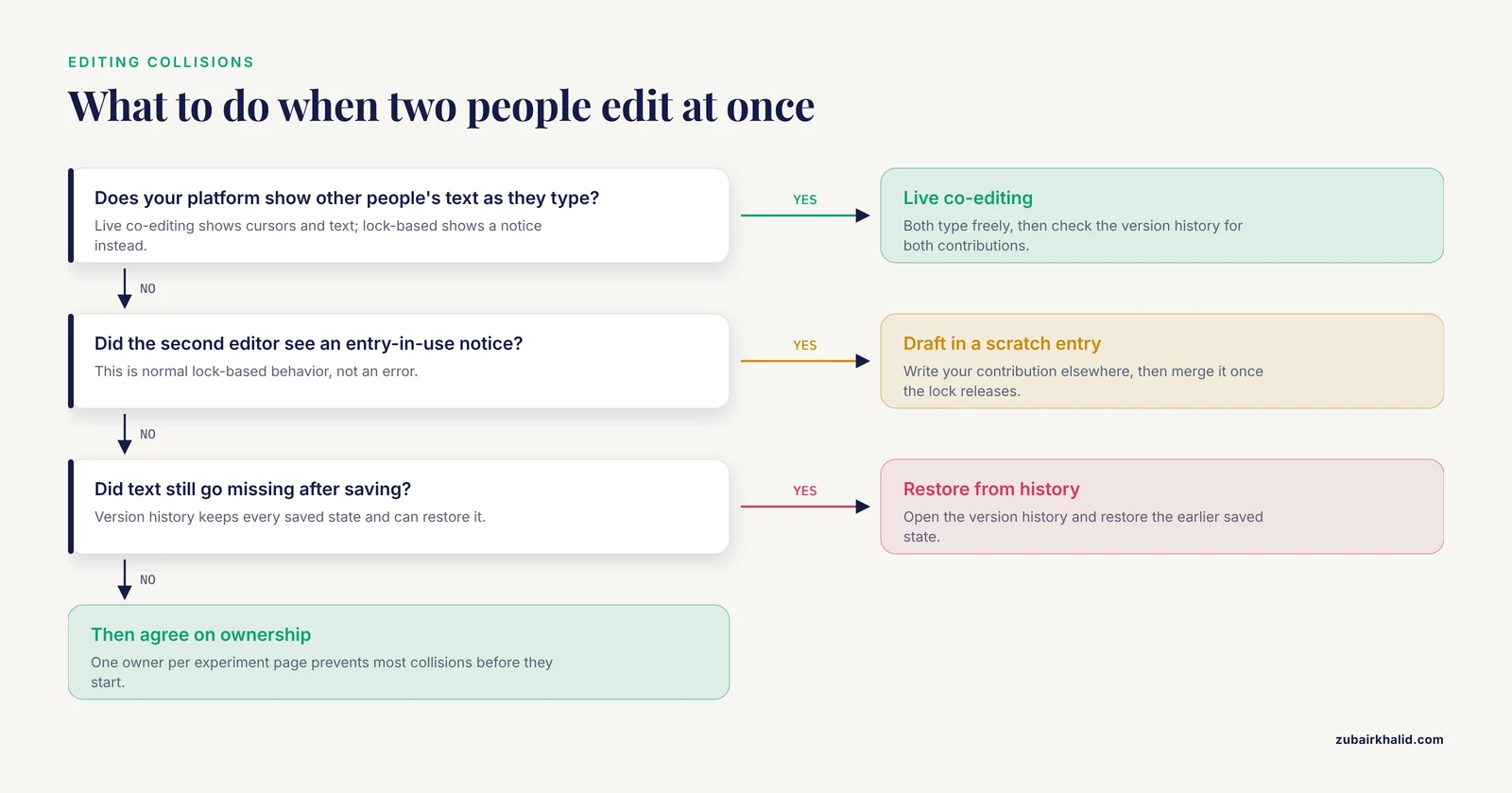
Products handle concurrency in one of two ways. Live co-editing platforms show every participant's cursor and text as it is typed, the way shared documents do. Lock-based platforms let one person hold an entry at a time and show everyone else a notice until the entry is released. Both models count as real-time collaboration as long as the underlying record is shared, timestamped, and preserved. The version history, a time-ordered list of every saved state of an entry, is the safety net in both cases, because any earlier state can be reviewed or restored.
Two related terms come up constantly. An audit trail is an automatic, time-stamped log of who changed what and when, and users cannot edit it. An electronic signature is a signed, attributed assertion attached to an entry stating that the record is complete and accurate, the digital equivalent of signing and dating a paper page.
From Paper to Shared Online Notebooks
The collaboration features that feel standard today were deliberate design goals from the beginning. eCAT, described by its developers in 2009, was the first online ELN and the first built in close collaboration with working scientists rather than for commercial recordkeeping alone [2]. By late 2006 the concept had settled into a specific checklist: a scalable web-based collaboration tool with a permissions system, controlled sharing, an audit trail, an electronic signature, search, and an interface that resembled the electronic counterpart of a paper notebook [2]. More than 100 individuals and groups tested the beta version between September 2008 and June 2009, including the FDA's Center for Biologics Evaluation and Research, Uppsala University, Children's Hospital Boston, a lab at the Garvan Institute in Sydney, and Imperial College. Early users compiled images, spreadsheets, and even meeting minutes in the same shared space [2].
Adoption still lagged behind the technology. A 2017 report noted that limited training and a shortage of people fluent in ELNs kept many academic and industry laboratories on cumbersome paper records, even as experiments produced larger datasets and higher data-integrity demands [1]. That gap between what the tools can do and what users know how to do is the reason a structured rollout, described below, matters more than the choice of brand.
Why Labs Switch: Documented Benefits
The clearest published picture of a real-time ELN rollout comes from a bioprocess engineering teaching laboratory that adopted LabArchives across two successive course years [1]. Instructors reported a streamlined workflow, quick data recording and archiving, enhanced data sharing and collaboration, superior data integrity, and simplified information exchange. The ELN also allowed real-time and remote monitoring of experiments, meaning an instructor could watch progress from outside the lab while students recorded at the bench. Attributes tied to positive user experience improved between the first and second year as training matured, and student responses indicated the ELN was better than the paper notebook for compliance [1].
Reproducibility pressures push in the same direction. A 2026 analysis of research practice in neuroimaging found that fragmented tools, inconsistent documentation, and poor platform integration undermine reproducibility, and proposed consolidating data, documents, and code into one centralized web-based system with real-time monitoring across the whole research cycle [3]. The lesson scales to any lab. When the narrative record, the raw data, and the analysis code live in connected places that everyone can see at once, the work becomes easier to trust and easier to repeat.
Electronic Lab Notebook Comparison
When you compare platforms, judge them against the checklist that has defined ELNs since the beginning: permissions, controlled sharing, an audit trail, an electronic signature, and search [2]. The table summarizes how the three common record-keeping options differ for collaborative work.
| Capability | Paper notebook | Single-user or desktop ELN | Cloud ELN with real-time collaboration |
|---|---|---|---|
| , - | , - | , - | , - |
| Simultaneous editing | Impossible | Rare | Standard |
| Off-site access | Requires the physical book | Depends on installation | Browser or phone, anywhere |
| Search | Manual page flipping | Limited to one computer | Full text across all projects |
| Audit trail | None | Varies by product | Automatic [2] |
| Electronic signature | Ink on paper | Varies by product | Built in [2] |
| Large datasets | Poor fit [1] | Limited by local storage | Handled through repository links |
| Training needed | Almost none | Low | Real, plan for it [1] |
After the table, weigh the practical questions that decide day-to-day success. Can you set permissions per page or per entry, or only per notebook? Does the platform keep a version history for every entry, and can you restore an older version? Can you export everything, including signatures and audit trails, in a format your institution can archive? Does it connect to the tools your lab already uses, such as GitHub for code or Overleaf for manuscripts? Vendors answer these questions differently, and the answers matter more than the length of a feature list.
Real-Time Collaboration in an Electronic Lab Notebook, Step by Step
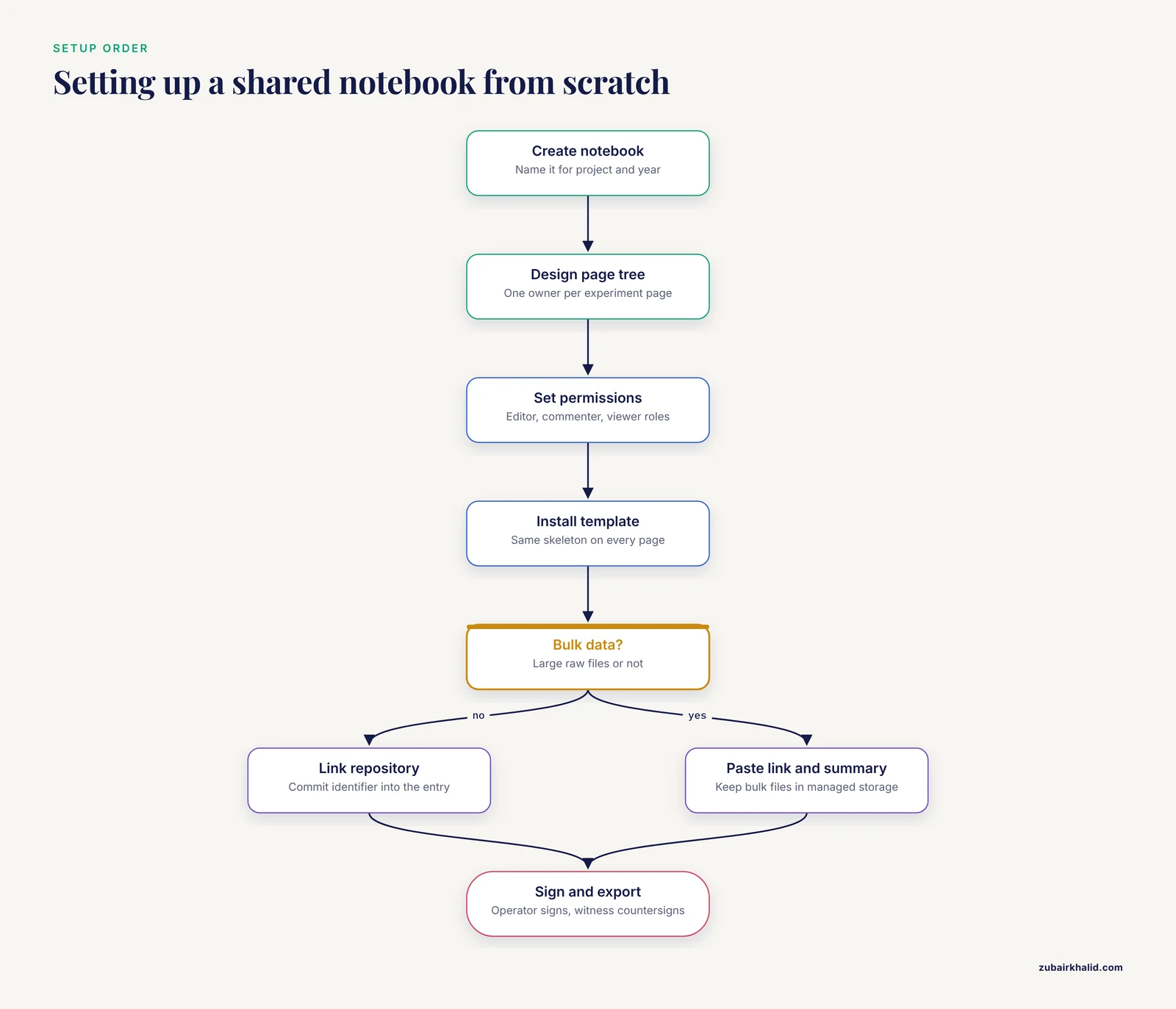
The walkthrough below sets up a shared notebook for an eight-person university lab studying enzyme kinetics. The same sequence works for any group size. Follow the steps in order, because each one assumes the previous one exists.
- Create the notebook and name it deliberately. Sign in through your institution's ELN portal and create a new notebook. Use a name that encodes the project and the year, such as
enzyme-kinetics-2026. You will thank yourself when search results span several years of notebooks.
- Design the page tree before inviting anyone. Make one top-level page per project, one child page per experiment, and standard subpages under each experiment: Protocol, Data, Analysis, Decisions. Assign one owner to each experiment page. The owner writes the primary narrative, and everyone else contributes through comments or clearly attributed additions. This single convention prevents most editing collisions before they happen.
- Invite collaborators and set permissions. Add each member at the lowest role that lets them work: editor for active project members, commenter for the PI or an external collaborator, viewer for auditors or a rotation student in their first week. Turn on the audit trail at the notebook level if your platform makes that a choice. Permissions and controlled sharing have been core ELN capabilities since the first online products [2], so any platform you are considering should expose them clearly.
- Install a lab notebook template on every experiment page. A template keeps eight people writing entries that look alike, which is what makes the notebook searchable and reviewable later. Paste this skeleton into your platform's template feature:
---
experiment_id: EXP-2026-014
date: 2026-11-11
operator: j.alvarez
project: enzyme-kinetics
objective: Measure Km and Vmax of [alkaline phosphatase](/knowledge/molecular-biology/alkaline-phosphatase) at pH 9.0
protocol_version: AP-kinetics-v3
instrument: Benchtop spectrophotometer, asset tag A-1187
data_repository: github.com/ourlab/enzyme-kinetics
---

## Procedure
1. Follow protocol AP-kinetics-v3 exactly. Paste the text or link it.

## Observations
Record what actually happened, including every deviation from the protocol.

## Results
Link to files. Summarize key numbers in text so search can find them.

## Sign-off
Operator signature and date. Witness signature and date.
A filled-in entry shows the level of detail to aim for. The dilution calculation below uses C1V1 = C2V2, the standard relation between stock and working solution concentrations:
## Observations
Prepared 10 mL of 10 mM p-nitrophenyl phosphate working stock from the
100 mM bottle: V1 = (10 mM × 10 mL) / 100 mM = 1.0 mL stock plus
9.0 mL diethanolamine buffer. Run started 14:05 lab time. Bubble in
well A3 noted, that well is flagged for a repeat.
Here Km and Vmax are the substrate affinity constant and the maximum reaction rate, the two numbers the experiment exists to produce.
- Edit together and learn the collision behavior. Open the same experiment page from two browsers, ideally on two networks, and both type into different sections. On a live co-editing platform you will see each other's text appear as it is typed. On a lock-based platform the second person receives a notice that the entry is in use. Either way, save often and check the version history, which should look something like this:
Version 4  Nov 11, 2026 15:52  j.alvarez  Added plate map and incubation times
Version 3  Nov 11, 2026 15:47  m.okafor  Corrected substrate stock to 10 mM
Version 2  Nov 11, 2026 15:31  j.alvarez  Initial protocol entry
Version 1  Nov 11, 2026 15:28  j.alvarez  Page created
Every saved state is preserved and restorable, so a collision costs minutes, not data.
- Connect the notebook to your code and bulk data. The notebook carries the narrative and the links. Repositories carry the bulk. For analysis code, use Git from a terminal:
git clone https://github.com/ourlab/enzyme-kinetics.git
cd enzyme-kinetics
mkdir -p run014
cp ~/Downloads/plate_map.csv run014/
git add run014/plate_map.csv
git commit -m "Run 014: plate map and incubation times"
git push origin main
A successful commit and push looks like this:
[main 4f9c2e1] Run 014: plate map and incubation times
 1 file changed, 12 insertions(+)
Copy the commit identifier, here 4f9c2e1, into the ELN entry so any reader can jump from the narrative to the exact code state used. For multi-gigabyte files such as sequencing runs or microscopy stacks, Git is the wrong tool. Use your institution's managed storage, or DataLad, a data management tool built on Git that handles large files and served as one of the integrations in a recent reproducibility-focused ELN framework [3].
- Record from the bench and monitor from anywhere. Put a tablet or an old phone at the bench, signed in to the ELN's mobile view. Photograph instrument displays and annotate them in the entry the same day. Because the notebook is cloud-based, the PI can review progress from off campus and leave comments without interrupting the work, one of the concrete advantages reported in the teaching-lab implementation [1].
- Sign, export, and archive on a schedule. When an experiment closes, the operator applies the electronic signature and a witness countersigns [2]. Once a quarter, export the notebook, including signatures and audit trails where the platform allows, to an institutional archive. A shared notebook that lives only inside one vendor is a risk you can retire in ten minutes per quarter.
Settings and Parameters That Matter
Six settings determine whether collaboration feels smooth or adversarial. Check each one before the first real experiment lands in the notebook.
| Role | View entries | Edit entries | Comment | Typical holder |
|---|---|---|---|---|
| , - | , - | , - | , - | , - |
| Owner | Yes | Yes | Yes | Experiment lead |
| Editor | Yes | Yes | Yes | Project members |
| Commenter | Yes | No | Yes | PI, external collaborator |
| Viewer | Yes | No | No | Auditors, first-week rotation students |
Role names vary between products, so read your platform's documentation rather than assuming. Beyond roles, set the following deliberately:
- Permission granularity. Per-entry permissions let you share one experiment with an outside collaborator without exposing the whole notebook. Per-notebook permissions are simpler but coarser.
- Version retention. Confirm how long the platform keeps every version. Indefinite retention is the norm for research records and the safer default.
- Notifications. Too many notifications train people to ignore them. Default to notifications for comments and signatures, not for every minor save.
- Offline behavior. Learn what happens when the network drops. Some platforms queue changes and sync later, others refuse to load. Know which one you have before fieldwork or a basement instrument room forces the question.
- Export formats. Verify that you can export to PDF with signatures visible and to a structured format your institution can archive.
- Integrations. Connect the repository and document tools your lab already uses so the notebook remains the single entry point, the consolidation approach advocated in recent reproducibility work [3].
Common Errors and Fixes
These are the failures that actually occur during collaborative notebook work, with the exact messages and the shortest reliable fixes.
- Push rejected in Git. Two people commit to the linked repository before either pushes. The second push fails with:
To https://github.com/ourlab/enzyme-kinetics.git
 ! [rejected]        main -> main (fetch first)
error: failed to push some refs to 'https://github.com/ourlab/enzyme-kinetics.git'
hint: Updates were rejected because the remote contains work that you do not have locally.
Fix it with git pull, rebase origin main, resolve any conflict, then push again.
- Merge conflict markers in a shared file. After that pull, Git may mark the contested lines:
<<<<<<< HEAD
Vmax = 42 umol/min/mg
=======
Vmax = 45 umol/min/mg
>>>>>>> 8c3f1a2
Open the file, decide which value matches the raw data, keep one line, delete the markers, and commit with a message explaining the decision. Never leave the markers in place, because downstream scripts will fail to parse the file.
- Upload fails with HTTP 413. Web servers reject oversized uploads with the standard status 413, Payload Too Large. A two-gigabyte raw file dropped into a notebook entry is the usual trigger. Keep bulk files in managed storage or a data repository and paste the link plus a one-line summary into the entry.
- Entry locked by a teammate. On lock-based platforms, the second editor sees a banner stating that another user is editing the entry, with wording that varies by product. Draft your contribution in a scratch entry or a comment, then merge it when the lock releases. Do not paste your draft over theirs once the lock clears, because that is how someone's afternoon disappears.
- Search finds nothing in scanned pages. Scanned protocol sheets are images without machine-readable text, so full-text search skips them. Type a two-line summary under every scan. Optical character recognition (OCR) exists in some platforms, but a typed summary is faster and always works.
- Timestamps that disagree. A collaborator in another time zone records 09:15 for an event you recorded as 06:15. Pick one lab time zone, or record in UTC, and state the convention in the notebook template.
- Offline edits that misbehave. Edits made during a network outage may sit in a local queue and fail to sync cleanly. Sync before you start a session, keep offline sessions short, and after reconnecting check the version history for an orphaned copy before retyping anything.
How to Verify Your Setup
Run this six-point audit after setup and again whenever someone new joins the lab:
- Two-person edit test. Open one entry from two accounts, both save, and confirm both contributions appear in the version history.
- Permission test. Open the notebook from a viewer-level test account and confirm restricted pages are hidden and editing controls are absent.
- Audit trail check. Change a permission, then confirm the audit trail logs who changed what and when.
- Search test. Search for a distinctive phrase you typed yesterday and confirm the correct entry surfaces.
- Restore drill. Delete a test sentence, then restore it from the version history. Practicing recovery before you need it is the entire point.
- Export test. Export one completed experiment to PDF and confirm images, signatures, and dates render correctly.
Sensible next steps after the audit: pilot the setup with a single project for two weeks, fix whatever the pilot exposes, then onboard the rest of the lab, schedule the first quarterly export, and arrange good documentation practice training if your institution offers it.
Practical Tips for Day-to-Day Collaboration
Write the entry the same day. Contemporaneous records are the heart of good documentation practice (GDP), the discipline of recording what you did, when, why, and what went wrong as it happens. The teaching lab that reported the strongest results paired its ELN rollout with explicit GDP training [1]. Beyond that habit, these tips earn their keep quickly:
- Assign one owner per experiment page, and have everyone else contribute through comments.
- Use ISO 8601 dates in the form YYYY-MM-DD, so 03/04 never means two different days.
- Paste instrument parameters as text, not only as screenshots, so search can find them.
- Photograph whiteboards and instrument displays into the entry immediately.
- Comment on a colleague's observation instead of rewriting it.
- Tag entries with the project code so filters and searches stay clean.
- Hold a 15-minute notebook review each week in which the PI scrolls recent entries and asks questions.
- Keep raw data in repositories and interpretations in the notebook.
- When you find an error in someone else's entry, correct it in a new dated addition rather than silently editing, so the record shows both the mistake and the fix.
- Retire blank templates ruthlessly. A template nobody fills in is worse than no template.
Common Mistakes and Limitations
The recurring mistakes in real-time collaboration in lab notebooks are predictable, which makes them avoidable:
- Treating the notebook as a file dump. Uploading spreadsheets without narrative context recreates the fragmentation that undermines reproducibility [3]. Every file deserves a sentence explaining what it is and why it exists.
- Skipping permissions at setup. An open notebook invites accidental edits and makes the audit trail less meaningful. Controlled sharing exists precisely to prevent this [2].
- Assuming co-editing is conflict-free. Two people typing into the same paragraph can still lose text on some platforms. Entry ownership and version history are your defenses.
- Believing the platform guarantees compliance. Software supports compliance through audit trails, access control, and signatures, but habits produce it. The course that documented success trained its students in good documentation practices explicitly [1].
- Overreading newer assurance layers. Cryptographic certification can establish who recorded what and when. It cannot make an incomplete record complete.
- Keeping the only copy inside one vendor. Export on a schedule, every quarter, without exception.
Limitations to keep in mind: platform selection depends on institutional licensing, intellectual property policy, and data governance rules that differ between organizations, so decisions with legal or compliance weight belong with your institution's research office or technology transfer group. Questions about a specific experiment belong with your principal investigator and your approved protocol. The published evidence base, while consistent, comes largely from single-lab implementations rather than large controlled trials, so treat the reported benefits as strong signals rather than guarantees for your exact situation.
Where Collaborative Notebooks Are Heading
The frontier is interoperability plus provable integrity. The IntegriLAB framework, published in 2026 for neuroimaging research, consolidates data, documents, and code into one centralized web-based system, integrates tools researchers already use, including DataLad, Overleaf, and GitHub, so familiar workflows survive, and adds a component called LabTrace that certifies research activities through cryptographically signed, immutable records on a low-energy blockchain, a distributed ledger in which written records cannot be altered, providing verifiable authorship and auditability beyond a conventional audit trail [3]. Expect the direction of travel to be notebooks that follow the whole research cycle in real time and can establish who contributed what by proof rather than assertion. None of that changes the fundamentals in this guide. A well-structured shared notebook with clear ownership, templates, and disciplined daily entries is the foundation every later layer builds on.
Frequently Asked Questions
What is real-time collaboration in an electronic lab notebook?
It is the ability for several people to read and write the same notebook at the same time, with every change visible to the whole team within seconds. It requires a cloud-based ELN where all users work from one live copy rather than private copies merged after the fact.
How do I set up real-time collaboration in an electronic lab notebook?
Create the notebook, design the page structure before inviting anyone, assign roles at the lowest sufficient permission, install a template on each experiment page, and agree on who owns each entry. The step-by-step walkthrough earlier in this guide covers each action in order.
Can two people edit the same lab notebook entry at the same time?
On platforms with live co-editing, yes, and each person sees the other's text as it is typed. On lock-based platforms the second person sees a notice and must wait or work in a separate entry, and the version history preserves every saved state either way.
Which features matter most in an electronic lab notebook comparison?
Permissions granularity, audit trail, electronic signature, full-text search, version history, export formats, and integrations with repositories such as GitHub. Those capabilities have formed the core checklist since the first online ELNs appeared.
Do electronic lab notebooks satisfy data-integrity and compliance expectations?
They support compliance far better than paper through audit trails, access control, and electronic signatures, but compliance ultimately depends on documentation habits. Training in good documentation practices remains necessary on any platform.
What should a lab notebook template include?
Identifiers, date, operator, objective, protocol version, instrument details, data links, procedure, observations, results, and signature lines. The template earlier in this article is a working example you can adapt to your lab.
Do I need coding skills to use a collaborative electronic lab notebook?
No. Daily use needs only a web browser. Basic Git knowledge helps if your lab links analysis code to notebook entries, but one designated person can own that step for everyone.
How should a collaborative ELN handle large raw data files?
Keep bulk files in managed storage or a data repository and put a link plus a short summary in the notebook entry. The notebook stays fast and searchable while the raw files remain under proper version control.