Real-Time Co-Editing in Research Notes
By Dr. Zubair Khalid, DVM, MS, PhD ·

Real-time co-editing in research notes means several people write in the same document at the same moment and see each other's additions appear live, while sequential editing means one person finishes a draft before anyone else touches it. The rule of thumb for choosing is simple: if two or more people need to add to the same note within a day, use a platform built for simultaneous editing. If your notes are mostly private synthesis that you share occasionally, a solo note system with periodic export will serve you better.
This guide covers what real-time co-editing actually is, the main options for research note taking, the pros and cons of each, worked scenarios from lab and literature work, and the mistakes that cause shared note systems to fall apart.
What Real-Time Co-Editing Means in Practice
Real-time co-editing is a technical capability, not just a sharing setting. Several features separate a true co-editing platform from a document that gets emailed back and forth:
- Simultaneous editing. Two or more people type into the same document at once. The platform merges keystrokes so that no one's work overwrites another's.
- Presence indicators. You can see collaborators' colored cursors or selection highlights, so two people do not edit the same sentence by accident.
- Conflict resolution. When edits collide, the platform merges them using algorithms designed for concurrent writing. Two well-known families of these algorithms are operational transformation and conflict-free replicated data types (CRDTs, data structures that let copies of a document diverge and then merge cleanly).
- Comment threads and suggestions. Collaborators can raise questions in the margin or propose edits without changing the base text.
- Version history. The platform stores snapshots so you can see who changed what and restore an earlier state.
- Granular permissions. You can grant view-only, comment-only, or edit access to different people.
Sequential editing lacks these properties. A Word file passed by email, a PDF with tracked changes, or a notebook photocopied for a colleague all force one person to finish before the next begins, and merging two divergent copies is manual work.
Where Co-Editing Fits in a Research Workflow
Research note taking falls into a few categories, and co-editing changes the calculus differently for each:
- Working notes. Meeting minutes, brainstorming sessions, day-to-day questions, and running agendas. These benefit most from real-time co-editing because many people contribute in a short window.
- Literature notes. Summaries of papers you read, linked to citations. A literature notes system works best when each person owns their own reading notes but the group maintains a shared synthesis layer, such as a review matrix or annotated bibliography.
- Lab records. Experimental procedures, observations, and raw data annotations. These are formal records. Many institutions require electronic lab notebooks to preserve attribution, timestamps, and tamper-evident histories. A casual co-edited document is usually not a substitute for a compliant record system, although it can draft the content that later gets transferred.
- Manuscripts and grants. Documents with a defined endpoint that multiple authors revise. Real-time editing helps during drafting, while suggestion mode and comment threads help during revision.
The case for structured collaboration is not theoretical. The Medical Research Council recommends regular communication between the practitioners delivering a complex intervention and the researchers evaluating it during a pilot phase, yet practical guidance on how to do that work has historically been thin. A team developing the DAFNEplus intervention for type 1 diabetes responded by designing a structured Collaborative Working Group process specifically to capture and act on collective learning before their randomized trial [1]. That experience illustrates the core argument of this article: shared, current notes are the substrate that makes iterative group decisions possible.
Side-by-Side Comparison of the Main Options
The table below is the core of this article. It compares the options most life science teams actually use.
| Option | Editing model | Best fit | Notable strength | Main tradeoff |
|---|---|---|---|---|
| Google Docs | True real-time, character-level sync | Meeting notes, protocols drafts, quick shared working docs | Lowest friction, strong presence indicators and comments | Weak long-term structure, files get messy at scale |
| Microsoft 365 co-authoring (Word, OneNote) | Real-time in Word via cloud storage, near-real-time in OneNote | Teams already on institutional Microsoft accounts | Word's track changes and styles carry into co-authoring | Sync latency and notebook corruption complaints in OneNote |
| Overleaf | Real-time collaboration on LaTeX documents | Manuscripts, theses, methods with equations | Versioned history and citation integration with BibTeX | LaTeX learning curve, unsuitable for quick notes |
| Markdown pads (HackMD and similar) | Real-time co-editing on plain markdown | Reading groups, technical notes, code-adjacent notes | Plain text, exports cleanly, git integration on some platforms | Minimal formatting, math and images need care |
| Notion | Near-real-time block-based editing | Lab wikis, project dashboards, structured literature databases | Databases, templates, and linking between pages | Slower to load, export fidelity is imperfect |
| Obsidian (with a sync or collaboration layer) | File-based, not inherently real-time | Personal literature notes and permanent notes | Local markdown files, strong linking, plugins | Collaboration requires add-ons or a shared vault, and it is not true simultaneous editing |
| Electronic lab notebooks (ELNs) | Varies, many support concurrent entries | Formal experimental records | Audit trails, witnessing, templates, data attachment | Heavier to set up, less fluid for brainstorming |
| Word with tracked changes, passed by email | Sequential | Documents requiring formal revision chains | Universally accepted for manuscript revision | No simultaneity, merge conflicts are manual |
No single option wins every column. The right question is which tradeoffs your team can live with.
The Options Explained on Their Own Terms
Google Docs
Google Docs is the most common entry point for real-time co-editing in research notes. Everyone with the link can type at once, cursors are visible, comments resolve in threads, and version history lets you roll back. For a lab meeting where six people add discussion points live, nothing is faster to set up.
The weakness appears over months. Docs organize content into individual files inside folders, which encourages the "one giant document" problem. A three-hundred-page shared doc with no internal structure becomes unusable. Teams that thrive with Docs treat each meeting or project as its own file and maintain an index that links to them.
Microsoft 365 Co-Authoring
If your institution runs on Microsoft accounts, Word and OneNote offer co-editing without new tooling. Word's co-authoring keeps familiar features such as styles, cross-references, and tracked changes, which matters when a shared draft must eventually become a formatted manuscript. OneNote organizes content into notebooks, sections, and pages, which suits loosely structured lab knowledge better than a single stream of text. Both are near-real-time rather than perfectly character-synchronized, and occasional sync delays are a known complaint, so teams working on a hard deadline often draft in one shared file rather than several.
Overleaf
Overleaf applies real-time co-editing to LaTeX, the typesetting system standard in mathematics, physics, and parts of computational biology. Two authors can write different sections of a manuscript at once, compile the PDF, and see changes rendered immediately. Built-in version history and integration with BibTeX reference files make it the strongest option where the "notes" are actually a manuscript in progress. It is a poor fit for freeform brainstorming because every edit must survive LaTeX syntax.
Markdown Pads
Platforms in the HackMD family provide real-time co-editing over plain markdown files. Markdown is a lightweight markup language where symbols such as ## denote headings. For reading groups and technical teams, markdown pads hit a sweet spot: they are faster than Docs for people who type in markdown anyway, and the plain-text output drops cleanly into version control systems, static sites, or a literature notes system built on plain files. Formatting options are limited, and embedding figures or equations takes more care than in a word processor.
Notion
Notion stores content as blocks (paragraphs, headings, database rows, toggles) on pages that can link to each other. Editing is near-real-time, and the block model makes it easy to build a lab wiki with templates, a database of papers tagged by theme, and meeting notes that inherit a standard structure. Teams that invest in setup get a durable, searchable knowledge base. The costs are page load time, an export format that loses some structure, and a learning curve for database views.
Obsidian
Obsidian is a desktop application for markdown files stored locally on your computer. It is not a real-time co-editing platform by design. Its strength is a personal literature notes system built on bidirectional links between notes, which supports the habit of writing one idea per note and connecting ideas over time. Collaboration requires add-ons or a shared vault synced through a third-party service, and even then it behaves more like turn-taking with file merging than true simultaneous editing. Use Obsidian for the private layer of your note system and co-edited platforms for the shared layer.
Electronic Lab Notebooks
ELNs are purpose-built systems for experimental records. Their defining features are attribution (every entry is tied to a signed-in user), timestamps, immutability controls, witnessing workflows, and the ability to attach raw data files. Some ELNs support concurrent editing within a notebook entry, but their value lies in compliance and traceability rather than conversational speed. ELNs belong in the formal record layer of your workflow, not the brainstorming layer.
Word With Tracked Changes
The traditional sequential model still has a place. Journals, thesis committees, and regulatory writers often expect a document with tracked changes because it shows who proposed what. The limitation is that merging is manual: if two reviewers edit different copies, someone must reconcile them line by line. Reserve this model for formal revision checkpoints, and draft in a co-edited platform beforehand.
Comparison Criteria That Decide Real Choices
Beyond the table, five criteria separate teams that keep a shared note system alive from teams that abandon it within a semester.
Latency and Conflict Behavior
True real-time platforms (Docs, Overleaf, markdown pads) merge at the character or block level, so collisions are rare and visible. Near-real-time platforms (OneNote, Notion) can show brief delays or last-writer-wins behavior in rare cases. Sequential models (emailed Word files) have the worst conflict behavior by far. If your use case is live meeting capture, latency is the criterion that matters most.
Structure at Scale
Ask where the notes will live in a year. A folder of Docs files scales poorly past a few dozen documents. Notion and OneNote impose page hierarchies that hold up better. Obsidian and markdown pads scale indefinitely as plain files but need deliberate linking discipline. The literature notes system question is decisive here: reading notes accumulate for years, so choose a structure designed for retrieval, not just capture.
Citation Integration
A literature notes system lives or dies on how easily a note connects to the source paper. Overleaf integrates BibTeX keys directly. Notion and Obsidian can pair with reference managers such as Zotero, which stores citations and PDFs and can push formatted references into notes. Docs has no native citation system, so teams improvise with templates that include DOI fields. Decide your citation workflow before you pick the platform, because migrating notes later is painful.
Data Ownership, Export, and Continuity
Students graduate, postdocs move, and grants end. Notes should outlive any single platform. Plain-text systems (markdown pads, Obsidian) export losslessly. Notion exports markdown with some loss of database structure. Docs and Word export cleanly but lose comment threads and version history. An ELN's export policy is set by your institution, so check it before your project starts, not after your account closes.
Audit Trail Versus Conversational Flow
A real-time co-edited document records version history, but version history is not the same as a compliant audit trail. The DAFNEplus team treated their collaborative process as a designed intervention in itself, building in a qualitative evaluation to learn how the structured working process performed so future teams could apply the lessons [1]. The parallel lesson for note systems: if a record must be defensible (for a manuscript, a regulatory submission, or a reproducibility check), move it into a system designed for that purpose rather than relying on a co-edited doc's history panel.
Pros and Cons at a Glance
Because "real-time co-editing research notes pros and cons" is usually the deciding question, here is the honest ledger.
Pros of real-time co-editing overall:
- Everyone sees the current state, so there is no "which version is latest" question.
- Meeting capture improves, because quiet participants can add points while someone else speaks.
- Collective correction happens fast. If a protocol step is wrong, a colleague fixes it while you watch.
- Onboarding new lab members is easier when the working notes are already current.
Cons of real-time co-editing overall:
- Shared documents accumulate noise faster than personal notes, because there is no gatekeeping.
- Real-time platforms create a false sense of permanence. Cloud docs can be deleted, access can lapse, and institutional accounts expire.
- Simultaneous editing invites simultaneous disorganization. Without conventions for headings, tags, and ownership, a shared space degrades within weeks.
- Some platforms store data outside your institution's control, which matters for unpublished results and human subjects data.
Pros and cons by option:
- Google Docs. Pros: fastest setup, excellent comments, strong presence. Cons: weak structure at scale, no native citation management.
- Microsoft co-authoring. Pros: institutional support, track changes continuity, OneNote's flexible canvas. Cons: sync hiccups, OneNote export limitations.
- Overleaf. Pros: real-time LaTeX, versioning, citation keys. Cons: LaTeX barrier, wrong tool for casual notes.
- Markdown pads. Pros: plain text durability, real-time speed, git-friendly. Cons: bare formatting, equation and image handling requires effort.
- Notion. Pros: databases, templates, linking, near-real-time. Cons: export fidelity, performance on large workspaces.
- Obsidian. Pros: local files, powerful linking, ideal for a personal literature notes system. Cons: not built for simultaneous editing, collaboration needs add-ons.
- ELNs. Pros: compliance-grade records, witnessing, data attachment. Cons: setup weight, less fluid for fast group thinking.
- Sequential Word. Pros: universally accepted for formal revisions. Cons: no simultaneity, manual merging.
Worked Scenarios
Scenario 1: A Reading Group Building a Literature Notes System
A immunology journal club of eight graduate students meets every two weeks. Each member reads one paper and presents. Their setup: a shared markdown pad with one page per paper, a standard template (citation with DOI, one-paragraph summary, methods notes, critiques, questions), and a rotating scribe who pastes the template before each meeting. During discussion, everyone types into the paper's page simultaneously, and the presenter resolves comment threads afterward. Personal deep-dive notes stay in each student's own Obsidian vault, with links back to the shared pages. This division, private synthesis plus shared capture, is the pattern that keeps a literature notes system alive.
Scenario 2: Live Lab Meeting Minutes
A lab of twelve meets weekly. The agenda lives in a Google Doc created by a template, with sections for updates, blockers, and action items. Everyone with an update adds their name and bullet before and during the meeting. The principal investigator assigns action items live by typing names into an owner column. Afterward, decisions that affect experiments get copied into the ELN entry for the relevant project, preserving the formal record requirement. The doc is never used as the record of what was done, only as the record of what was decided.
Scenario 3: A Multi-Site Pilot Refining an Intervention
Consider how a structured process turns shared notes into an instrument. The DAFNEplus program piloted its diabetes education intervention in three NHS diabetes centers, run in two waves so that refinements from the first wave could inform the second [1]. The team used a Collaborative Working Group process combining monthly teleconferences with four strategically timed face-to-face meetings to identify problems and agree on changes [1]. A team running a multi-site study today can mirror that structure with co-edited tools: a running decision log that all sites edit during the monthly call, a live issues register where site staff add problems as they occur, and a refinement tracker that pairs each issue with the change made before the next wave. The key design feature is that real-time, collective learning, drawing together practitioner experience, process evaluation data, and patient advisory input, is captured between waves rather than reported after the fact [1]. Shared, live-edited notes are what make that cadence workable.
Scenario 4: Drafting a Manuscript With Three Authors
Three co-authors outline a review in Overleaf, each writing separate sections in real time to avoid stylistic collisions. The lead author then switches the document into a revision phase: sections are frozen, and co-authors propose changes through comments and targeted edits rather than open editing. The final revision chain, if the target journal or the thesis committee requires it, is exported into Word with tracked changes. Drafting fast in real time, then revising formally in sequence, plays to the strengths of both models.
Common Mix-Ups
- Confusing sharing with co-editing. Sending a link that grants view access is not co-editing. Check that collaborators can actually type before a live session.
- Confusing comments with edits. Comment threads accumulate questions. If nobody is assigned to resolve them, the document fills with unresolved suggestions and becomes unreadable.
- Assuming version history is an audit trail. Platform history shows edits but does not provide the attribution, witnessing, and immutability controls that formal records require.
- Putting raw data into narrative notes. Raw instrument output belongs in managed storage with a pointer from the note. Notes describe and interpret data, they do not store it.
- Building one giant document. A single endlessly growing file defeats retrieval. Use one document per meeting or paper, plus an index.
- Editing offline and expecting a clean merge. Sequential models merge manually. If you must work offline, do it in a copy and reconcile deliberately, not by pasting over the shared version.
- Choosing a tool before choosing conventions. A mediocre platform with clear conventions (templates, ownership, tagging) outperforms a powerful platform with none.
Common Mistakes and Limitations
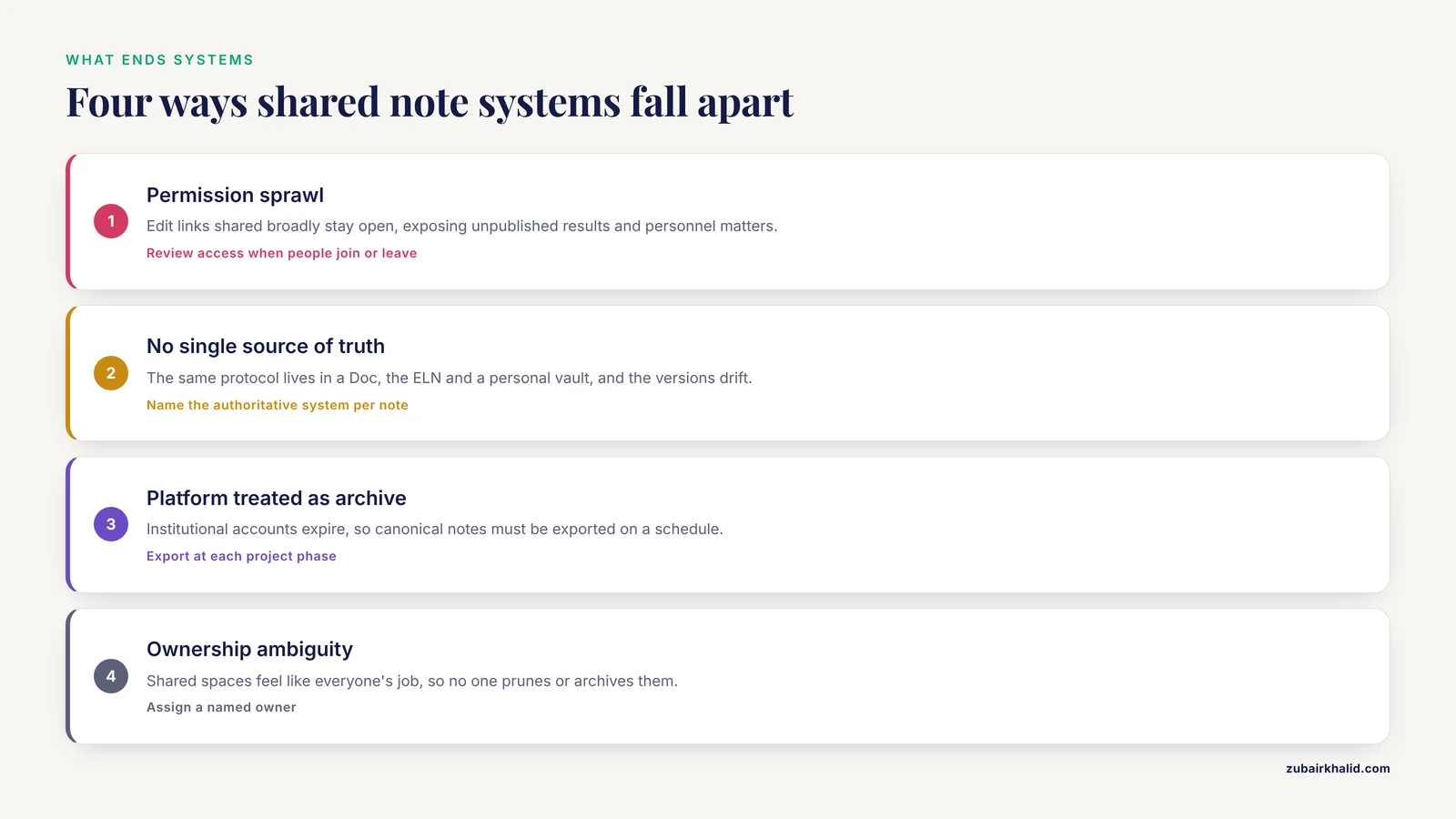
These are the failure modes that end shared note systems, and the honest limits of any co-editing setup:
- Permission sprawl. Teams share edit links broadly "for now" and never tighten them. Unpublished results, reviewer comments, and personnel matters end up visible to people who should not see them. Review the access list when someone joins or leaves.
- No single source of truth. The same protocol exists in a Doc, in the ELN, and in someone's personal vault, and the three versions drift apart. Decide which system is authoritative for each note type and link to it from everywhere else.
- Treating the platform as the archive. Institutional accounts expire. Export the canonical notes on a schedule (for example, end of each project phase) into storage your department controls.
- Ownership ambiguity. Shared documents feel like everyone's responsibility, which means no one's. Assign a named owner to each shared space whose job is to prune, restructure, and archive.
- Capture without synthesis. Real-time capture fills documents with raw discussion. The value comes from the second step, when someone distills the capture into a short, durable summary. Budget time for it.
- Losing the personal layer. When everything becomes shared, individuals stop writing the speculative, half-formed notes where real thinking happens. Keep a private notes space alongside the shared one.
- Expecting software to supply the process. Structured collaboration requires designed meetings and defined decision points, as the DAFNEplus team found when they built their working group process rather than assuming communication would happen on its own [1]. A tool schedules nothing and decides nothing by itself.
One final limitation: record-keeping obligations vary by institution, funding agency, and study type. For decisions about what counts as a compliant record in your specific project, consult your institution's research office rather than relying on general guidance.
Frequently Asked Questions
What counts as real-time co-editing in research notes?
Real-time co-editing means multiple people type into the same document at the same time and see each other's cursors and changes appear live, with the platform merging edits automatically. Passing a file back and forth, even quickly, is sequential editing rather than co-editing.
Which is the best real-time co-editing tool for research note taking?
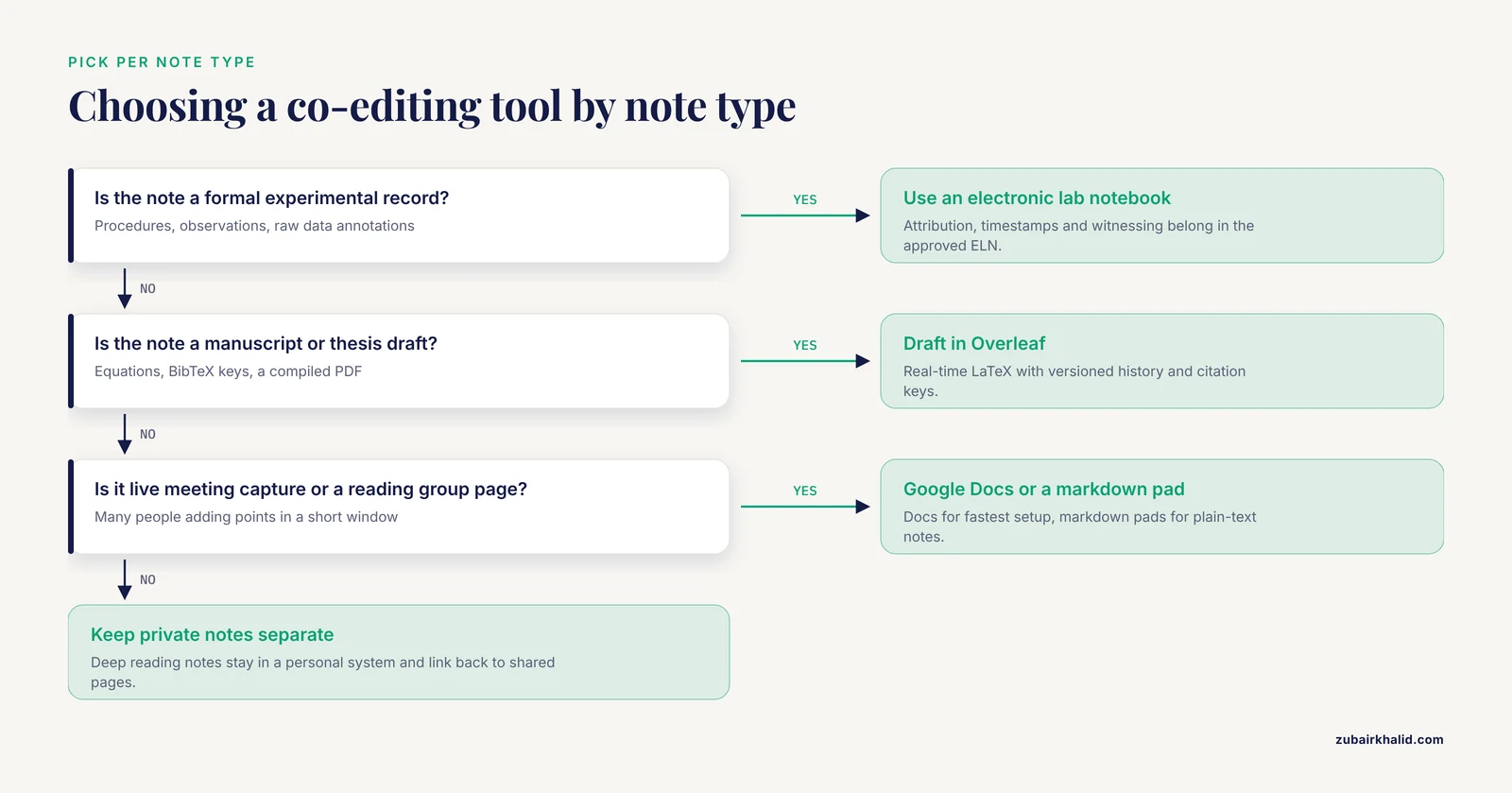
There is no single best tool, because the answer depends on what the notes are. Google Docs is usually the best choice for live meeting capture, Overleaf for co-authored manuscripts, a markdown pad for reading groups and technical notes, and an ELN for formal experimental records. Pick per note type rather than forcing one tool onto everything.
Can a literature notes system be co-edited in real time?
Yes, but the durable pattern is a shared capture layer plus private synthesis. Use a co-edited space for shared summaries, reading-group discussion, and review matrices, and keep each person's deep reading notes in their own system such as Obsidian, linked back to the shared pages.
How do we handle conflicting edits when two people work offline?
In a true real-time platform, edits made offline usually sync and merge automatically when you reconnect, but large divergences can still produce awkward merges. The safer habit is to work offline in a clearly labeled copy and reconcile it deliberately against the live version rather than pasting over it.
Do co-edited notes satisfy electronic lab notebook requirements?
Generally no. Most co-edited documents lack the attribution controls, witnessing workflows, and tamper-evident histories that formal research records require. Use co-edited documents to draft and decide, then transfer anything that constitutes a formal experimental record into your institution's approved ELN.
How do we keep a shared document usable as it grows?
Split content into one document or page per meeting, paper, or project, and maintain a linked index. Assign a named owner to prune and restructure, archive finished material on a schedule, and use templates so every new entry starts with the same structure.