R Markdown vs. Jupyter Notebooks vs. Quarto
By Dr. Zubair Khalid, DVM, MS, PhD ·

R Markdown is an R-centered tool for mixing code, results, and narrative text in one document, Jupyter Notebooks are language-agnostic interactive documents built around a running kernel, and Quarto is a newer publishing system that can render both R Markdown and Jupyter content into polished outputs. The rule of thumb is simple. If your analysis is entirely in R and you mainly need reports for a course, thesis, or paper, R Markdown still works well. If you work in Python or switch between languages interactively, use Jupyter. If you are starting fresh and want one system that handles R, Python, and publication-grade output across many formats, choose Quarto.
This guide is written for biology students, early-career researchers, and anyone planning a life science career who needs to pick one of these tools for coursework, a thesis, or a manuscript. The comparison below explains each tool on its own terms, then compares them on the criteria that actually decide real choices.
The Shared Idea Behind All Three Tools
All three tools descend from the same idea, literate programming, a term coined by computer scientist Donald Knuth to describe programs written for humans first and machines second. In a literate analysis, the narrative explains why each step exists, and the code embedded in the narrative generates the actual numbers and figures that appear in the text.
Recent life science literature argues that this idea matters more than ever. A 2026 educational review of untargeted LC-MS/MS metabolomics points out that public archives for raw data, such as MetaboLights, Metabolomics Workbench, GNPS, and MassBank, have matured over two decades, yet the analyses that turn raw files into reported feature tables remain difficult to share, audit, and reuse. The review adopts the FAIR principles, originally written for data and later extended to research software and workflows, and argues that executable, narrative-style workflows are how FAIR practice moves from data to analysis [1]. R Markdown, Jupyter, and Quarto are the three mainstream document formats researchers use to build exactly those executable narratives.
What Each Tool Is
R Markdown
R Markdown is a document format and rendering system built around the R language. You write a plain text file with an .Rmd extension, embed R code in fenced chunks that look like triple backticks followed by a lowercase r in braces, and the knitr package executes each chunk when you render the document. Pandoc, a universal document converter, then turns the results into HTML, PDF, Microsoft Word, presentations, and other formats.
Key characteristics:
- Chunks run in a single R session in document order when you knit the file.
- A YAML header at the top controls the title, author, output format, and table of contents.
- An ecosystem of extensions grew around it, including bookdown for multi-chapter documents, flexdashboard for dashboards, and learnr for interactive tutorials.
- The
sessionInfo()function prints your R version and package versions, which is the baseline record for reproducible research.
Because R Markdown executes the whole document top to bottom on render, the finished output and the code that produced it cannot drift apart. That property is why R Markdown became the default for reproducible reports in R-based labs.
Jupyter Notebooks
A Jupyter Notebook is an interactive document with an .ipynb extension that runs against a kernel, a live process that executes your code and returns results cell by cell. The name Jupyter reflects the original core languages, Julia, Python, and R, although the kernel system supports many more, including Bash and Ruby.
Key characteristics:
- You run cells interactively, so you see a plot or a table immediately after running the code that makes it.
- The notebook file itself is JSON, storing code, outputs, and metadata together.
- The same kernel machinery supports R through the IRkernel, so the question of "R Markdown or Jupyter" is partly a question of workflow style, not language support.
- nbconvert can execute a notebook end to end from the command line, which is how notebooks get used in automated pipelines.
- JupyterLab provides a full interface with file browsing, terminals, and notebooks side by side.
The interactive style is Jupyter's greatest strength for data exploration and its greatest weakness for reproducibility. Because you can run cells in any order, a notebook that "works" on your machine may hide stale variables, deleted cells, or out-of-order execution that a fresh run would expose.
Quarto
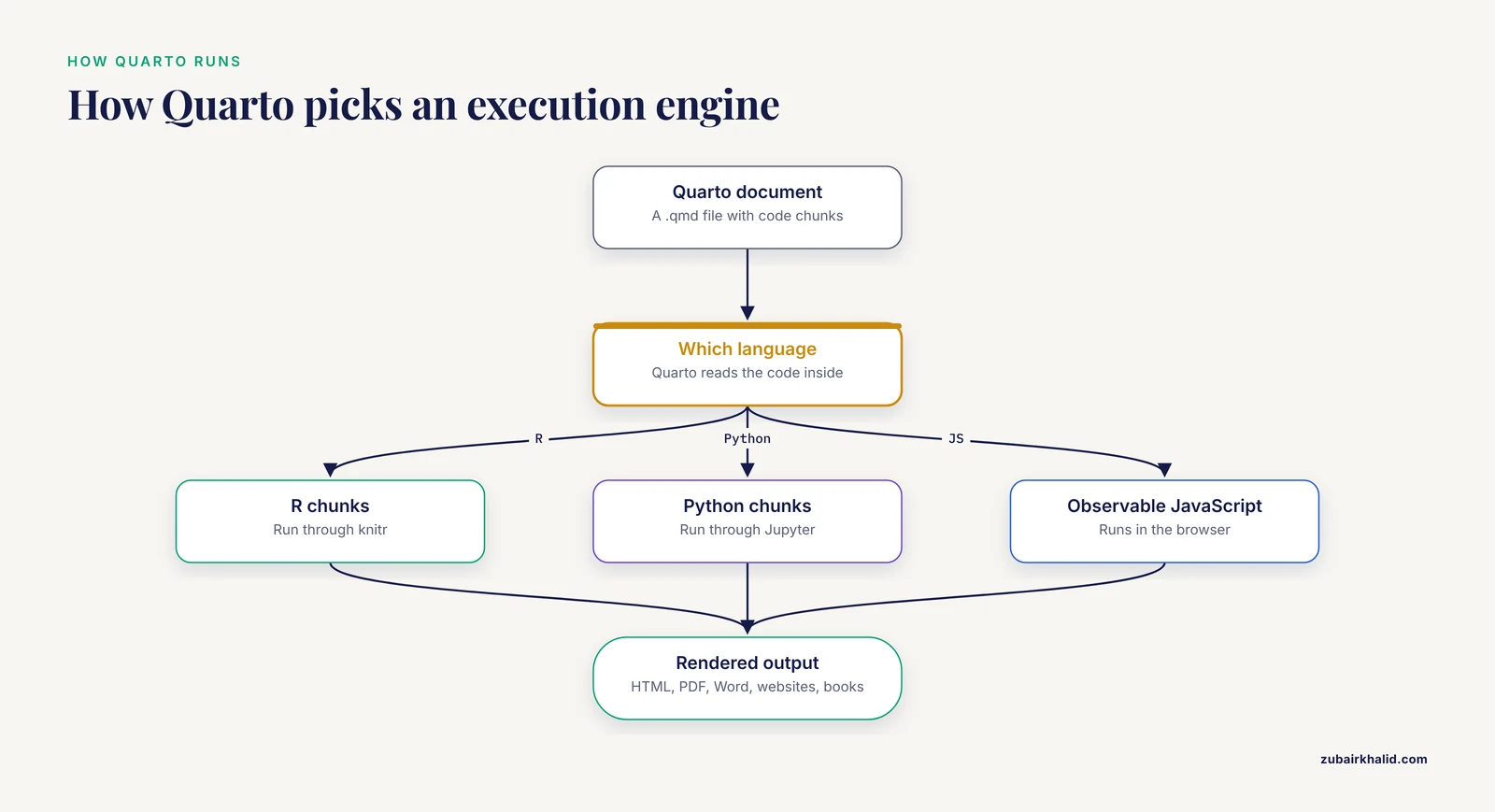
Quarto is a scientific and technical publishing system built on Pandoc. It was introduced by Posit, the company behind RStudio, and it deliberately works across languages. A Quarto document uses an .qmd extension and looks a lot like an R Markdown file, but Quarto decides which execution engine to use based on the code inside. R chunks run through knitr, Python chunks run through Jupyter, and Observable JavaScript runs in the browser.
Key characteristics:
- One tool renders
.qmd,.Rmd, and.ipynbfiles. - Output formats include HTML, PDF, Word, presentations, websites, and full multi-chapter books.
- Features that previously required separate R Markdown extensions, such as cross-references, citations, and multi-document projects, are built in.
- Quarto is positioned as the forward path for R Markdown. Existing
.Rmdfiles generally render with few or no changes, and Posit has stated that R Markdown remains supported while new development focuses on Quarto.
For a researcher, the practical meaning is this. Quarto separates the document toolchain from the analysis language, which removes the main structural reason to choose between the two older tools.
Side-by-Side Comparison
| Aspect | R Markdown | Jupyter Notebooks | Quarto |
|---|---|---|---|
| Primary orientation | R, with limited support for other engines | Language-agnostic, any language with a kernel | Language-agnostic by design |
| File format | .Rmd plain text | .ipynb JSON | .qmd plain text, also renders .Rmd and .ipynb |
| Execution model | Whole document knits top to bottom in one R session | Cells run interactively against a live kernel in any order | Depends on engine, knitr for R, Jupyter for Python |
| Typical editing environment | RStudio (now Positron-era RStudio), any text editor | JupyterLab, Jupyter Notebook, VS Code, Colab | RStudio, VS Code, any text editor |
| Output formats | HTML, PDF, Word, presentations via Pandoc | HTML, PDF, slides via nbconvert, often reworked by hand | HTML, PDF, Word, presentations, websites, books, dashboards |
| Reproducibility story | Strong by default, full re-execution on knit | Weak by default, strong only if you re-run from a clean kernel | Strong, inherits full re-execution from knitr or Jupyter engines |
| Maturity | Long track record, enormous community knowledge | Long track record, standard in Python data science | Newer, actively developed, designed as the successor direction |
| Best fit | R-only reports, theses, teaching materials in R | Python-centric exploration, tutorials, shared exploratory work | New projects wanting one tool for many languages and formats |
How Each Tool Handles Reproducible Research
Reproducible research means that another person, or your own future self, can re-run your analysis on the same input data and obtain the same reported results. The three tools differ mainly in how much discipline they force on you.
R Markdown enforces re-execution. When you knit, every chunk runs again from a fresh session in order. If a chunk depends on a variable you created interactively last week, the knit fails or produces an error, and you find out immediately. This built-in audit is why R Markdown became the default format for reproducible reports in R-heavy fields such as genomics and ecology.
Jupyter leaves re-execution to you. The saved notebook shows the outputs of whatever cells you last ran, in whatever order you ran them. Two mitigations exist and both should be habitual. First, before sharing, restart the kernel and run all cells from the top, then save. Second, use nbconvert to execute the notebook from a clean state in a scripted pipeline. Reviewers and collaborators increasingly ask for exactly this.
Quarto inherits the enforcement model of whichever engine runs your code. A .qmd file with R chunks behaves like R Markdown, with full re-execution on render. A .qmd or .ipynb file with Python chunks behaves like a Jupyter document, so the same restart-and-run-all discipline applies.
The metabolomics review cited earlier frames the stakes well. Raw data in public archives is now the norm, but the analysis layer between a raw mzML file and a reported feature table is where reuse breaks down, and executable workflows built on literate programming are the proposed fix [1]. Your choice of document tool is the container for that fix, so the choice matters even before you write your first chunk.
The Criteria That Decide Real Choices
Language ecosystem
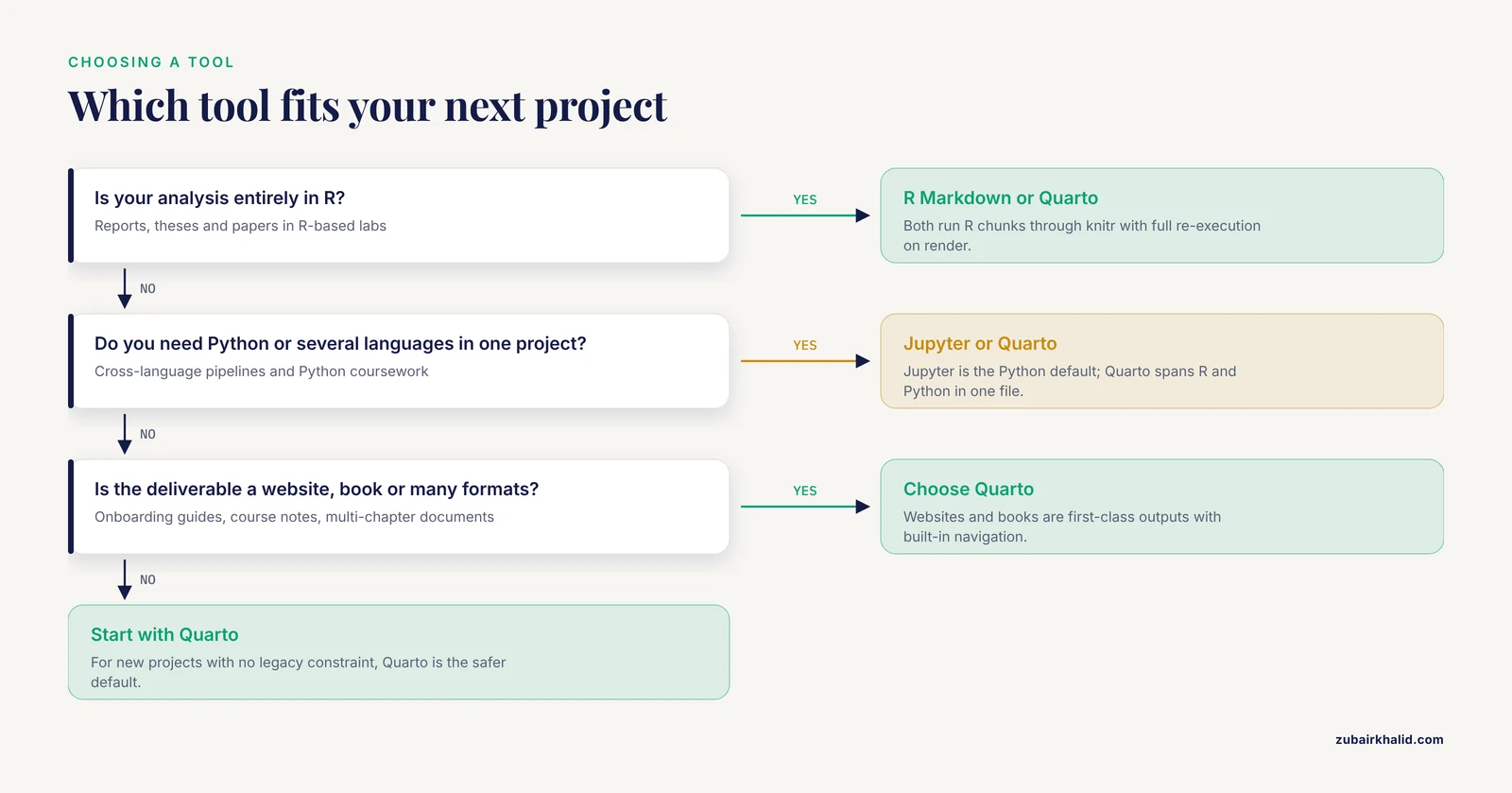
If your analysis lives entirely in R, R Markdown and Quarto with the knitr engine are both natural, and Jupyter with the IRkernel is a workable but less integrated alternative. If your analysis is primarily Python, Jupyter is the community default, and Quarto wraps it cleanly. If you genuinely mix languages in one project, which the metabolomics review highlights as a growing reality in cross-language workflows [1], Quarto gives you one authoring format and one output pipeline for all of them.
Workflow style, interactive versus document-driven
Jupyter optimizes for exploration. You plot, inspect, adjust, and re-plot in seconds, and the notebook records the journey. R Markdown and Quarto optimize for the destination, a finished document whose every number was generated by the code shown next to it. Many researchers use both, Jupyter or a scratch R script while exploring, then a final R Markdown or Quarto document that re-runs the cleaned analysis from raw data.
Output and publishing
If the deliverable is a PDF thesis, a Word manuscript for co-author edits, a departmental website, or a book-length set of course notes, Quarto handles all of these in one system without extensions. R Markdown reaches the same outputs but historically spread them across bookdown, blogdown, and related packages. Jupyter output is functional but typically needs extra tooling to look publication-ready.
Version control and collaboration
All three produce files you can put under Git, but plain text formats are far friendlier to diffs and merge conflicts than JSON. An .Rmd or .qmd file shows clean line-by-line changes in a pull request. An .ipynb file stores code, outputs, and images in one JSON blob, so a changed plot produces a sprawling diff. Practical mitigations exist, such as clearing outputs before committing or using tools that strip notebook outputs, but plain text authoring formats start with an advantage.
Tooling and where the community is
R Markdown knowledge is densest in R-using academic fields, and nearly every common R Markdown error has a published answer. Jupyter is the lingua franca of Python data science, machine learning coursework, and most tutorials you will find for Python biology packages. Quarto documentation is centralized and thorough, and its community is growing quickly because both the R and Python ecosystems point new projects at it.
Worked Scenarios
Scenario 1, an R-only master's thesis in ecology
You fit mixed models, make ggplot2 figures, and your committee wants a PDF. R Markdown is the straightforward answer. You knit chapter files, the analysis re-runs from raw data on every render, and sessionInfo() in an appendix records your R and package versions. When you use R Markdown in this situation, you also get the largest pool of troubleshooting help, because thousands of R students before you hit the same LaTeX and knitr errors. Quarto would also work and would make the thesis easier to republish as a website later, so a student starting a multi-year project today could reasonably pick either.
Scenario 2, a Python machine learning course project
You load single-cell RNA-seq data, train a classifier with scikit-learn, and need to share your exploration with a teaching assistant. Jupyter is the right tool. The interactive loop matters more than the final document, the Python ecosystem assumes notebooks, and your instructor almost certainly expects an .ipynb file. Apply the discipline anyway, restart the kernel, run all cells top to bottom, and save before submission so the outputs actually correspond to the code.
Scenario 3, a cross-language metabolomics pipeline
You process raw LC-MS/MS data in R with the R for Mass Spectrometry ecosystem, but a downstream statistical step lives in a Python package. The Metabonaut educational resource models exactly this situation, providing executable vignettes that run from raw mzML files to annotated feature tables, and explicitly demonstrating interoperability across programming languages as one of its teaching themes [1]. For a project like this, Quarto is the strongest container, because one .qmd document can run knitr chunks for the R processing and Jupyter-backed chunks for the Python step, and render the whole workflow as a single reproducible HTML report that a reviewer can audit.
Scenario 4, a lab onboarding guide that must become a website
You want new lab members to follow a data-processing SOP with runnable code blocks. Quarto handles this directly, since websites and books are first-class output formats with built-in navigation and search. Building the same thing in R Markdown means assembling several extensions, which works but adds moving parts.
When to Use R Markdown
Given that Quarto can render R Markdown files, a fair question is when to use R Markdown at all. The honest answers:
- Your course, supervisor, or department provides templates and support in R Markdown, and matching that infrastructure saves more time than migrating saves.
- You maintain an existing large body of
.Rmddocuments, bookdown chapters, or learnr tutorials that work well and have no reason to be rewritten this semester. - You are following a textbook or published tutorial written around R Markdown, and learning the material matters more than modernizing the tooling.
For brand new projects with no legacy constraint, Quarto is the safer default, because it renders R Markdown content and carries forward the same knitr execution model while adding multi-language and multi-format support. The difference between R Markdown and Quarto is therefore less a rivalry than a generational handoff, similar to how .Rmd once succeeded earlier Sweave-based workflows in R.
R Markdown or Jupyter, Which Should a Student Learn First?
Learn the one your next project demands, then add the second. The underlying skills transfer almost completely, chunked code, markdown narrative, YAML metadata, and the habit of re-running from a clean state. An R student who learns R Markdown can read and write Quarto in an afternoon, and a Python student who learns Jupyter already understands kernels, which is the concept Quarto borrows for Python execution. The difference between R Markdown and Jupyter and Quarto shrinks considerably once you realize all three reward the same core habit, documented code that runs from nothing to final figure without manual steps in between.
Common Mistakes and Limitations
- Treating a Jupyter notebook as a record of a clean run. The saved outputs reflect whatever cells you last executed, in whatever order. Always restart the kernel and run all cells before sharing, or your collaborator will get different numbers than your notebook shows.
- Setting the random seed in the console instead of in the document. If your analysis uses sampling or bootstrapping, the
set.seed()call must appear in a chunk inside the document, or re-execution produces different results. - Forgetting to record the computing environment. R Markdown users should include
sessionInfo()output, Python users should capture their package versions, and projects with many dependencies should use an environment manager. Without this, re-running code against silently updated packages is a classic source of irreproducibility. - Assuming a knit or a run-all guarantees scientific reproducibility. Full re-execution guarantees computational reproducibility of the analysis as written. It does not guarantee that the raw data is available, documented, or correctly annotated. The FAIR framing in the metabolomics literature makes this distinction explicit, treating data deposition, software, and workflows as separate layers that each need attention [1].
- Migrating to Quarto mid-project without testing. Most
.Rmdfiles render in Quarto with little change, but heavy use of R Markdown extension packages can surface incompatibilities. Test on a copy, not on your thesis the night before submission. - Hiding code with echo settings on documents meant to be audited. Suppressing code output is fine for a slide deck, but a methods document whose numbers cannot be traced to visible code undermines the point of literate analysis.
- Confusing the file format with the workflow. An
.Rmdfile run by hand-cherry-picking chunks is no more reproducible than a Jupyter notebook run out of order. The format enables the discipline, the discipline still has to be yours.
A Practical Reproducibility Checklist
Before you share any analysis built in R Markdown, Jupyter, or Quarto, walk through this list:
- The document runs end to end from a fresh session, a restarted kernel, or a clean environment, with no manual steps.
- The raw input data is included, deposited in a public archive, or unambiguously described with access instructions.
- Any randomness is controlled by a seed set inside the document.
- Package versions are recorded, through
sessionInfo()for R, a requirements or environment file for Python, or an environment manager for complex projects. - Every number and figure in the narrative is generated by code visible in the document, not pasted in by hand.
- The document states its execution date and, where relevant, software versions in the rendered output.
- File paths are relative to the project root, never absolute paths to your laptop.
- If the project will be reused, the analysis is organized so a stranger can identify the entry point and the expected output, which is the workflow-level principle emphasized in the FAIR-oriented metabolomics literature [1].
Frequently Asked Questions
Is Quarto replacing R Markdown?
Quarto is the forward direction, and R Markdown remains supported and widely used. Posit recommends Quarto for new projects, and existing .Rmd files generally render in Quarto with minimal changes. You lose nothing by learning R Markdown concepts, because they transfer directly to Quarto.
Can I use R in Jupyter Notebooks?
Yes. The IRkernel lets Jupyter run R code, and the notebook experience is genuinely interactive. The trade-off is that you leave the R-centric tooling, such as knitr chunk options and native R Markdown output control, and you take on the notebook's out-of-order execution risks.
Should I learn R Markdown or Jupyter first?
Learn whichever matches your next project's language and your instructor's or supervisor's expectations. The core skills, chunked execution, markdown narrative, and clean re-runs, transfer between all three tools, so the first choice is far less permanent than it feels.
Can Quarto render my existing R Markdown and Jupyter files?
Yes. Quarto renders .Rmd files through the knitr engine and .ipynb files through the Jupyter engine, in addition to its native .qmd format. Most R Markdown documents convert with little or no editing, though documents that rely on R Markdown-specific extension packages should be tested.
Which tool is best for reproducible research?
R Markdown and Quarto with the knitr engine have the strongest default behavior, because rendering forces complete top-to-bottom re-execution. Jupyter can be equally reproducible if you restart the kernel, run all cells, and execute from the command line before sharing. The tool enforces good habits in R Markdown and Quarto, while in Jupyter the habits must be yours.
Do I need to pick one tool for my whole career?
No. These are document formats, not identity commitments. Most working researchers end up with Jupyter or scratch scripts for exploration and an R Markdown or Quarto document as the reproducible deliverable, and many labs now standardize on Quarto precisely because it spans both worlds.