Preparing Your Lab Notebooks for External Audit: A Checklist
By Dr. Zubair Khalid, DVM, MS, PhD ·
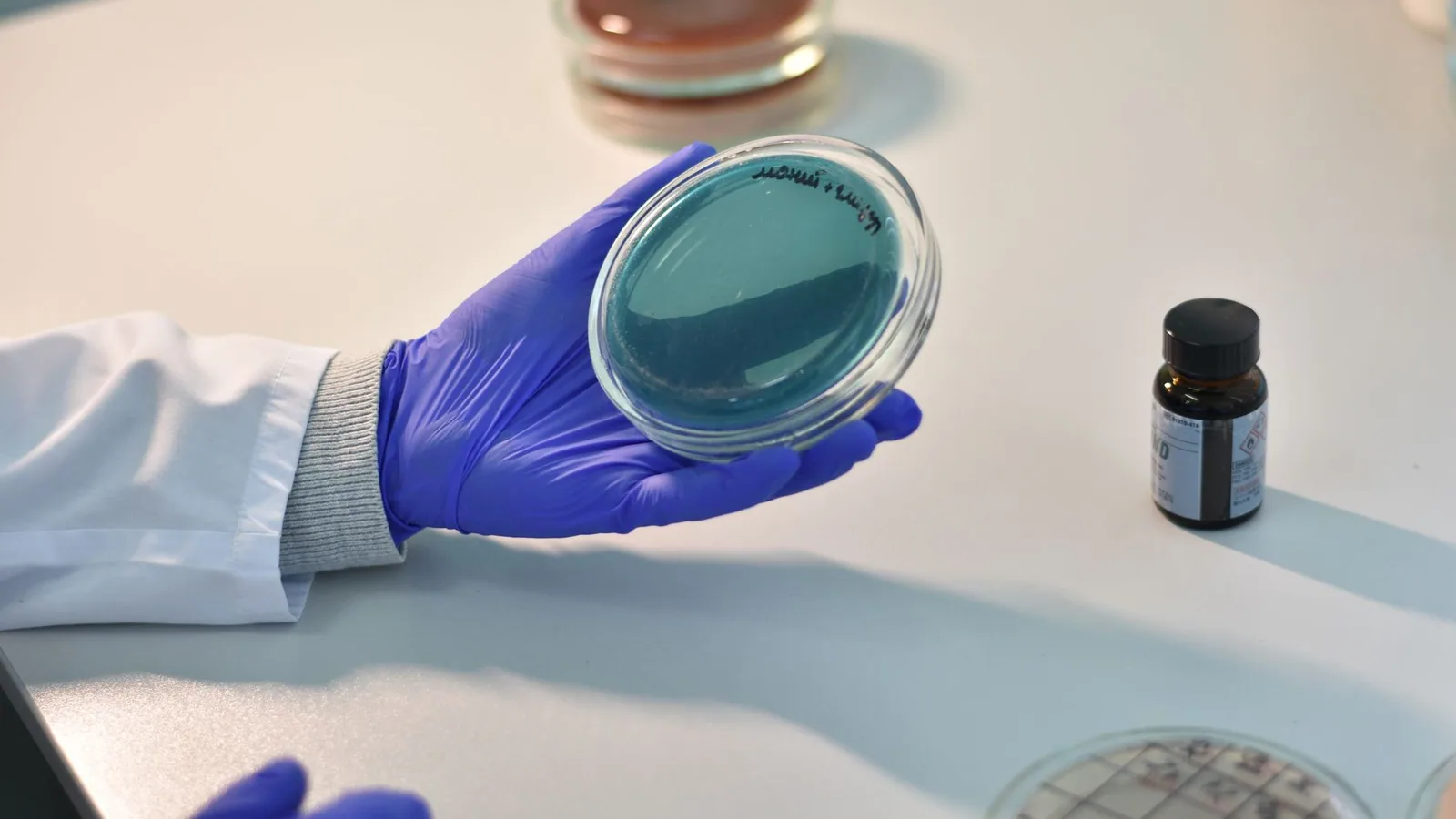
An inspector opens a notebook and, within ten minutes, knows whether your lab keeps trustworthy records. This checklist makes that moment go well. By the end of this guide you will be able to build a complete inventory of your paper and electronic notebooks, verify that entries meet the ALCOA+ data integrity standard, fix corrections the way auditors expect, export electronic records with checksums you can prove, and run a mock audit that finds problems before an FDA auditor does.
Have these on hand before you start: a list of active and archived notebooks, owner or administrator access to your electronic lab notebook (ELN), a computer with PowerShell (Windows) or a terminal (macOS or Linux), spreadsheet software, your standard operating procedures (SOPs), and the contact for your quality assurance (QA) unit. If your lab has no QA unit, designate one experienced colleague as the reviewer. Budget one to two hours per notebook for the first pass. The work goes faster after the first few.
Why Auditors Read Notebooks First
Lab notebooks are raw data. Under FDA Good Laboratory Practice (GLP) regulations, raw data includes laboratory worksheets, handwritten notes, printouts, photographs, dictated observations, and recorded output from automated instruments. When an inspector reviews a study, they trace results from the final report back to the original entry. A number that cannot be traced to a signed, dated, contemporaneous record is treated as unsupported.
Auditors judge notebooks against the ALCOA+ framework: records must be Attributable, Legible, Contemporaneous, Original, and Accurate, and, in the expanded form used across the industry, Complete, Consistent, Enduring, and Available. Contemporaneous means recorded at the time the activity happened, not reconstructed later.
For electronic records, 21 CFR Part 11 applies when an FDA regulation requires the record in electronic form. Part 11 expects secure, computer-generated, time-stamped audit trails that independently record when entries are created, modified, or deleted, and electronic signatures that are unique to each person and linked to their records.
Most notebook findings fall into a few repeat categories: entries made after the fact, corrections without initials or reasons, pages that cannot be accounted for, shared logins, audit trails that were never enabled, and failed experiments that were never written down. The checklist below addresses each of these in order.
Know Which Rules Apply to Your Notebook
Match your notebook to the framework that governs your work, because audit scope follows the framework.
- 21 CFR Part 58 (GLP) covers nonclinical laboratory safety studies submitted to FDA. Raw data must be retained for at least five years after study results are submitted in support of an application for a research or marketing permit, and longer while the facility holds the permit. If you run a contract toxicology lab, this is your baseline.
- 21 CFR Part 211 and related Good Manufacturing Practice (GMP) parts cover quality control laboratories that test drug product. Batch testing and laboratory control records follow the same record-keeping logic.
- 21 CFR Part 11 governs electronic records and electronic signatures whenever an FDA regulation requires those records. It does not ban electronic systems. It requires that they be trustworthy and validated for their intended use.
- Sponsor audits and internal audits. Contract labs are audited by sponsors who apply FDA-like expectations even when no inspection is pending. Treat a sponsor audit as a rehearsal.
- Academic and preclinical research labs. FDA rules may not apply, but the same habits protect you in patent disputes, journal corrections, and grant audits.
Three terms used throughout: an audit trail is the automatic, time-stamped log of who changed what and when. A pre-approval inspection (PAI) is an FDA site inspection before a drug application is approved, during which analytical notebooks are traced against the application. Data integrity is the degree to which records are complete, consistent, accurate, trustworthy, and reliable across their life cycle.
Preparing Lab Notebooks for an FDA Audit, Step by Step
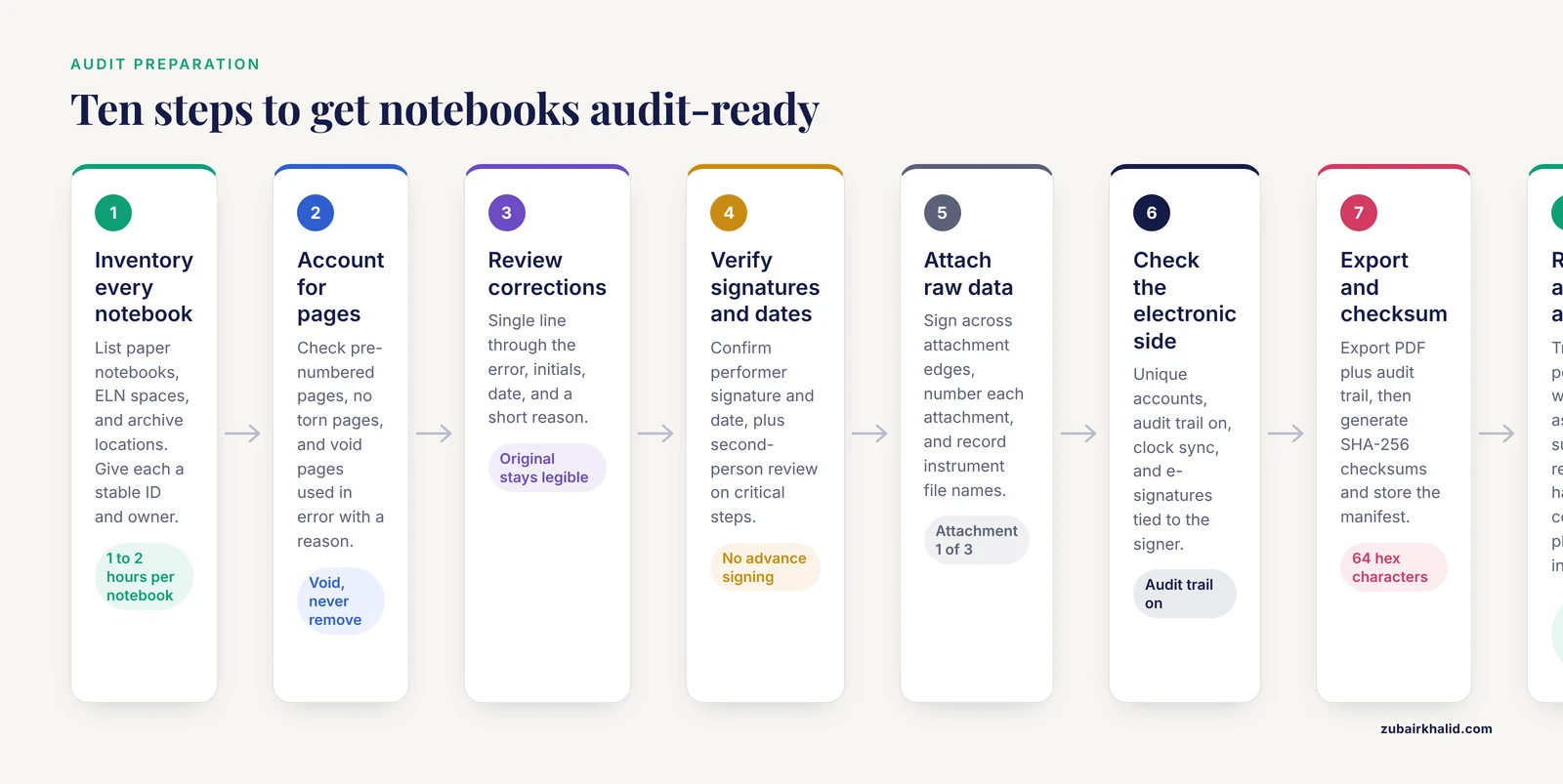
Step 1. Build a complete inventory of every notebook
You cannot protect records you have not listed. Inventory every paper notebook, every ELN space, and every archive location, including laptops, shared drives, and cold storage. Classify each item as paper, electronic, or hybrid (paper at the bench plus scanned copies in the ELN).
On macOS or Linux, run:
find /lab/notebooks -type f | sort > notebook_inventory.txt
wc -l notebook_inventory.txt
Expected output:
412 notebook_inventory.txtThe number is your total file count. In PowerShell on Windows:
Get-ChildItem -Path "C:\lab\notebooks" -Recurse -File |
  Select-Object FullName, Length, LastWriteTime |
  Export-Csv -Path "C:\lab\notebook_inventory.csv" -NoTypeInformation
Open notebook_inventory.csv and you should see rows like:
"FullName","Length","LastWriteTime"
"C:\lab\notebooks\2026\study_A\NB-014_p60-75.pdf","482133","3/1/2026 2:41:19 PM"
Parameters that matter: -Recurse includes every subfolder, Length is file size in bytes, LastWriteTime is the last modification timestamp, and -NoTypeInformation drops the PowerShell type header so the first row is your column names. Give each notebook a stable ID such as NB-014, note its owner, and mark its status as active or archived.
Step 2. Confirm every page is accounted for
Open each paper notebook and check three things. First, pages are numbered in ink before use, or the notebook was purchased with pre-numbered pages. Second, there are no torn or missing pages. Third, blank space is handled deliberately.
For a page used in error, void it rather than removing it:
VOID: entered data for the wrong study on this page.
Data moved to page 49. J. Rivera  2026-03-01
Draw a single diagonal line across the page, write VOID with a reason, then sign and date. An inspector treats a missing page as a potential deleted record. A voided page with a documented reason is acceptable. A torn-out page is a finding that is hard to explain.
In the ELN, confirm that deleted or discarded entries remain retrievable through the audit trail rather than disappearing.
Step 3. Review every correction
Read through each notebook and check every correction against one rule: the original entry stays readable, a single line is drawn through the error, and the author adds initials, the date, and a short reason.
Worked example:
Original:   Weight = 10.52 g
Corrected:  10.25 g ([transcription error](/knowledge/molecular-biology/transcription-error), digits reversed)
            J. Rivera  2026-03-01
The line must be thin enough that 10.52 g stays legible. Correction fluid, overwriting, and erasures are alterations, and an inspector will read them as attempts to hide the original value. If a whole entry is wrong, draw one line through it, note the reason, and rewrite it on the next line or page with a cross-reference.
While you review, look for the patterns inspectors look for: corrections in a different ink color from the original entry, which suggests later reworking, and clusters of corrections dated long after the experiment, which suggests reconstruction. If you find an unsigned correction, initial and date it now with an honest note such as "late review, J. Rivera, 2026-03-01". Never backdate.
Step 4. Verify signatures, dates, and second-person review
Every data page needs the signature of the person who did the work and the date the work was done. In GLP and quality control labs, critical steps also carry a second-person verification, where a second qualified person signs to confirm the work was performed as written.
Check three failure modes. Advance signing, where pages are signed before the work is done, destroys contemporaneity and is among the most serious notebook findings. Missing dates leave a record unattributable in time. Unused reviewer lines show that the template required review that never happened.
For electronic records, 21 CFR Part 11 expects each electronic signature to be unique to one individual and to include the printed name of the signer, the date and time, and the meaning of the signature, such as performed, reviewed, or approved. Confirm your ELN displays all three when a signature is applied.
Step 5. Attach and cross-reference raw data
Notebooks rarely stand alone. Instrument printouts, chromatograms, gel images, and calculation sheets must be attached or referenced. For paper attachments, sign and date across the edge of the attachment so part of the signature is on the notebook page and part is on the document. This proves the attachment is the one described. Number each attachment, for example "Attachment 1 of 3", and reference it in the entry text.
For electronic instrument files, record the file name and storage location in the entry, for example: "raw file HPLC-2026-0301-S05.raw stored on instrument PC, folder D:\Data\2026-03". An inspector will pick a result from your final report and ask to see the notebook entry, the attachment, and the instrument file. You will practice that trace in Step 10.
Confirm that every printout includes the instrument ID, date, and time, and that thermal printer paper, which fades, has been scanned or photocopied onto stable paper with the copy signed and dated.
Step 6. Check the electronic side: audit trails and accounts
Open your ELN settings and verify four things.
First, unique accounts. Each person signs in with their own named account. Shared logins make every entry unattributable and are among the most common data integrity findings. Disable generic accounts such as lab1 and issue individual accounts.
Second, audit trails enabled. The system must record, automatically and independently, the date and time of every entry, modification, and deletion, and it must not obscure previous values. Confirm the audit trail is switched on for your space, because some systems allow it to be disabled per project. Pull one entry and read its audit trail to confirm you can see the original value, each change, who made it, and when.
Third, clock synchronization. ELN servers and instrument computers should sync to the same network time source, because timestamps that disagree by hours undermine the audit trail.
Fourth, e-signature configuration. Confirm that signing requires the signer's own credentials, records the signer name, timestamp, and meaning, and cannot be applied by an administrator on behalf of someone else.
Write down what you find. If the audit trail cannot be enabled, or deleted entries can be permanently purged, escalate to QA before the audit rather than after.
Step 7. Export records and verify integrity with checksums
Export the electronic records the auditor will need, then prove the exports are intact.
Export each notebook space to a human-readable format, typically PDF, together with the audit trail for that space. Name files with the study code, the content, and an ISO 8601 date (the international format YYYY-MM-DD, which sorts chronologically):
study_A_notebook_2026-03-01.pdf
study_A_audit_trail_2026-03-01.pdf
Then generate a checksum. A checksum is a fixed-length fingerprint computed from a file's bytes. If even one byte changes, the fingerprint changes, so a matching checksum proves the file you archived is the file you exported. Use SHA-256, which produces a 256-bit digest written as 64 hexadecimal characters and is the current standard for file integrity.
On macOS or Linux:
cd /lab/exports
shasum -a 256 *.pdf > SHA256SUMS.txt
shasum -a 256 -c SHA256SUMS.txt
Expected output, where every line must end in OK:
study_A_audit_trail_2026-03-01.pdf: OK
study_A_notebook_2026-03-01.pdf: OK
On Windows PowerShell, build the manifest:
Get-ChildItem "C:\lab\exports\*.pdf" |
  Get-FileHash -Algorithm SHA256 |
  Export-Csv "C:\lab\exports\SHA256SUMS.csv" -NoTypeInformation
To verify a file later:
Get-FileHash -Algorithm SHA256 "C:\lab\exports\study_A_notebook_2026-03-01.pdf"Expected output shows the algorithm, the hash, and the path:
Algorithm       Hash                    Path
---------       ----                    ----
SHA256          A1B2C3...               C:\lab\exports\study_A_notebook_2026-03-01.pdf
The hash above is truncated for display. A real SHA-256 hash has 64 hexadecimal characters. Compare it against SHA256SUMS.csv. If they match, the file is unchanged. To prove to yourself the method works, copy a file to a scratch folder, change one character inside the copy, and hash both. The hashes will differ.
Store the checksum manifest with the exports, and keep at least two copies in different locations.
Common command errors and fixes
| Exact message | What caused it | Fix |
|---|---|---|
| , - | , - | , - |
sha256sum: study_A_notebook_2026-03-01.pdf: No such file or directory | Typo in the file name, or you are in a different folder than you think | Run ls (or dir on Windows) to list the folder, then correct the name |
study_A_notebook_2026-03-01.pdf: FAILED followed by sha256sum: WARNING: 1 computed checksum did NOT match | The file changed after the manifest was created, or the copy is corrupted | Re-export from the ELN, regenerate the manifest, and replace the bad copy. Investigate why the file changed before overwriting anything |
shasum: no properly formatted checksum lines found | The manifest passed to -c was edited by hand or generated by a different tool | Regenerate SHA256SUMS.txt with shasum -a 256 and verify again |
Export-Csv : Access to the path 'C:\lab\notebook_inventory.csv' is denied. | The CSV is open in Excel, which locks the file | Close Excel and run the command again |
Get-FileHash : Cannot find path 'C:\lab\exports\study_A_notebook_2026-03-01.pdf' because it does not exist. | Wrong path, or the export failed before writing the file | Confirm the export finished, then check the path letter by letter |
A FAILED line is never fixed by rerunning the command. A checksum failure means the file differs from the manifest, and the difference needs an explanation.
Step 8. Reconcile notebooks against study files
Take the final report or application summary and trace three data points back through the chain: report table, calculation sheet, notebook entry, instrument file. Every link should carry a date, an initials or signature, and a cross-reference. Then work in the other direction: pick two notebook entries and confirm the data appears in the study file.
While reconciling, list every protocol deviation you find and confirm each one is documented in the notebook with what happened, when it happened, and the corrective action. Inspectors accept documented deviations. They write findings for undocumented ones. Confirm notebook dates agree with instrument dates, because an entry dated after the instrument run it describes needs an explanation.
Step 9. Assemble supporting records
Notebook questions rarely stop at the notebook. Prepare these companion records and know where each one lives:
- SOPs for notebook use, corrections, data review, and record retention, with version numbers and effective dates.
- Training records showing each signer was trained on those SOPs before the dates they signed.
- Equipment logs and calibration certificates for instruments cited in the notebook.
- The retention schedule, showing where records are stored and for how long.
- The delegation of authority or signature log, listing who is authorized to perform and review which steps.
An inspector who finds an unsigned entry from two years ago will ask whether the person was trained and authorized. These five documents answer that question without a scramble.
Step 10. Run a mock audit
Ask a colleague who did not write the notebooks to play inspector. Give them one study file and two hours. Their tasks: trace three data points from report to raw entry, read the audit trail for one electronic entry, find one correction and judge whether it meets the single-line rule, and ask the author to explain any entry dated after the activity.
Log every gap in a simple table with columns for finding, notebook ID, page, severity, owner, and due date. Fix findings the correct way, with retrospective documentation that states exactly when and why it was made, never with backdating. Then re-run the trace on the fixed pages. A mock audit that finds ten problems is a success. It means the real audit will not find them first.
Build a Lab Notebook Template That Survives an Audit
Whether your organization provides a template or you start from a blank book, every entry should capture the same fields. A lab notebook template turns that expectation into the structure of the page:
Notebook ID: NB-014          Page 47 of 148
Project: Study 2026-014, HPLC method validation
Date: 2026-03-01
Purpose: Verify system suitability before sample batch 12
Materials and lot numbers: Column XB-C18, lot 4471
                           Mobile phase batch MP-031
Procedure: (steps followed, or SOP number and version)
Observations and data: (raw values, units, instrument ID, file names)
Deviations: none
Attachments: 1 of 1, HPLC-2026-0301-S05 printout
Performed by: J. Rivera        Date: 2026-03-01
Reviewed by: M. Chen           Date: 2026-03-03
Field notes:
- Notebook ID and page number make every entry citable. Pre-number pages.
- Purpose states why the work was done, which helps an inspector follow the logic.
- Materials with lot numbers make the entry reproducible and attributable.
- Procedure references the SOP and version instead of restating every step, or records the steps when no SOP exists.
- Observations and data holds raw values with units, the instrument ID, and raw file names.
- Deviations records anything that differed from the plan, even if it seems minor.
- Performed by and Reviewed by carry the signatures, dates, and, where required, the meaning of each signature.
For electronic notebooks, configure the same fields as required form fields so an entry cannot be saved incomplete.
Electronic Lab Notebook Comparison for Audit Readiness
| Capability | Paper notebook | Generic ELN | Part 11-configured ELN |
|---|---|---|---|
| , - | , - | , - | , - |
| Contemporaneous dating | Handwritten at the bench | Automatic timestamps | Automatic, server-generated timestamps |
| Corrections | Single line, initial, date, reason | Version history if configured | Full audit trail preserving prior values |
| Attribution | Handwritten signature | Account login | Unique named accounts with e-signatures |
| Audit trail | The page itself is the record | Depends on settings | Secure, computer-generated, time-stamped, independent of the operator |
| Search and retrieval | Page flipping | Full-text search | Full-text search plus metadata filters |
| Backup | Photocopy or scan | Vendor-managed backups | Validated backups plus verified exports |
| Export for auditors | Photocopies | PDF export | PDF plus audit trail export |
| Typical fit | Teaching labs, field work, small labs | Academic and industrial research | GLP and GMP regulated labs |
When choosing or auditing an ELN, evaluate against these criteria. Request the vendor's Part 11 compliance documentation and validation package. Confirm audit trails cannot be disabled by ordinary users and that deleted entries remain retrievable. Confirm export produces human-readable records that include the audit trail, because a PDF without its audit trail is an incomplete record. Confirm unique account provisioning and that each signature captures its meaning. Ask how long the vendor retains backups and where they live.
Many labs run a hybrid: paper at the bench, scanned into the ELN. In that case the scan must be a true copy, meaning an exact and complete reproduction of the original, and the original paper is retained per your retention schedule. Document that arrangement in an SOP so the inspector reads it before asking about it.
Common Mistakes and Limitations
These are the errors that turn a routine inspection into a difficult one:
- Reconstructing entries before the audit. The fix for a missing entry is a dated, signed retrospective note explaining what happened, not a rebuilt entry.
- Backdating anything. A date that disagrees with instrument logs or audit trails converts a small gap into a credibility problem.
- Correction fluid, overwriting, and erasures. All three obscure the original value.
- Pencil and erasable ink. Use permanent black or blue ink on paper.
- Shared logins. One generic account makes an entire ELN space unattributable.
- Assuming the audit trail is on. Verify it per project, per space.
- Exporting the record without the audit trail. The pair travels together.
- Keeping one copy. A single file on one laptop fails the enduring and available tests.
- Mixing studies on one page without cross-references. Traceability breaks at the page.
- Undocumented abbreviations. Keep a legend at the front of each notebook.
- Loose attachments without a signature across the edge. The attachment cannot be tied to the page.
- Signing pages in advance. This single habit can invalidate a whole notebook.
- Hiding failed experiments. Unreported data is a classic data integrity finding. Record every experiment, including the ones that did not work.
- Ignoring thermal paper. Faded printouts are unreadable records. Scan them.
- Preparing only the notebooks. Auditors ask for SOPs, training records, and equipment logs too.
One limitation: this checklist reflects general expectations drawn from FDA regulations and standard industry practice, while scope, retention periods, and inspection focus vary with the program, the application type, and the study. For a specific audit, work with your quality assurance or regulatory affairs unit, and involve counsel for anything involving litigation or patent matters.
After the Checklist: Keeping Notebooks Audit-Ready
Audit readiness is a habit, not a project. Keep it running with four recurring tasks. Check new notebook pages monthly against the template and the correction rule. Re-verify checksums quarterly with the same -c command, which takes a minute. Refresh the inventory whenever a notebook is archived or a new ELN space opens. Close out every mock audit finding log, because an open log is itself a finding. Train every new hire on the template and the correction rule during onboarding, and file the training record where the next visitor can see it.
Frequently Asked Questions
How far back will an FDA auditor look at my lab notebooks?
Inspectors generally focus on records within the retention period that applies to your program. Under GLP that window runs for years after a submission, so ask your quality unit for the retention schedule and make sure every notebook inside that window is audit-ready.
Do I need a validated electronic lab notebook, or is paper acceptable?
Paper is acceptable when it is controlled well. 21 CFR Part 11 applies when an FDA regulation requires records in electronic form, not to paper records. Pick the format your lab can sustain, then meet the same ALCOA+ expectations either way.
What does ALCOA+ mean?
ALCOA stands for Attributable, Legible, Contemporaneous, Original, and Accurate. The plus adds Complete, Consistent, Enduring, and Available. Auditors use these nine words as the yardstick for every record you show them.
What should I do if I find an error in an old entry while preparing?
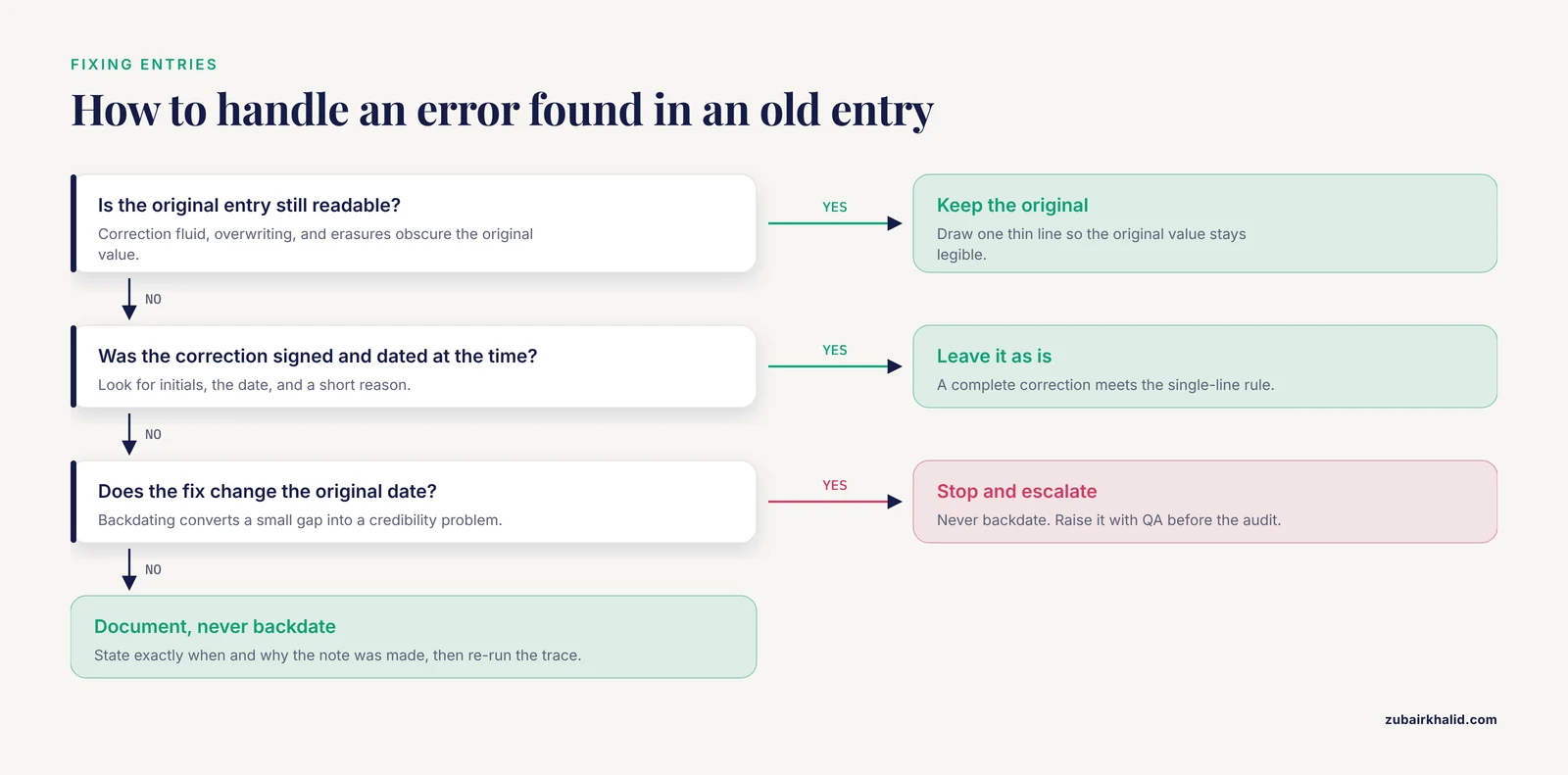
Add a dated, signed retrospective note beside the entry explaining what you found and what review you performed now. Never backdate, erase, or rewrite the original entry.
Can I redact confidential information before showing notebooks?
Raise redaction with your quality unit and the inspector before the audit starts. Inspectors commonly accept documented redaction of proprietary information, but redactions must never touch the data under review, and pages are never removed.
Who should review and sign my notebook entries?
The person who performed the work signs and dates each entry, and a second trained, authorized person reviews critical entries per your SOP. Each signature must carry its meaning, such as performed or reviewed.
How do I export an electronic lab notebook for an audit?
Export the records to a human-readable format such as PDF together with the audit trail, name the files with a study code and ISO dates, generate SHA-256 checksums, and store the manifest with at least two backup copies.
What happens if an auditor finds a data integrity problem?
Expect the finding on the Form FDA 483, the list of observations an inspector issues at the close of the inspection. Respond with a documented correction and a preventive action. Serious or repeated data integrity findings can escalate to a warning letter and can affect an application's review.