Package Management for Reproducible Research
By Dr. Zubair Khalid, DVM, MS, PhD ·

By the end of this article you will be able to build a pinned software environment for a real analysis project, export it as a lockfile, wrap it in a container, and hand it to a collaborator or reviewer who can rerun your code and get the same numbers. You will also be able to rebuild an environment that has decayed, and audit your own project against a concrete reproducibility checklist.
To follow the walkthrough you need a computer with a Unix-style shell (macOS terminal, Windows Subsystem for Linux, or any Linux host), about 5 GB of free disk space, and either Miniconda or Miniforge installed. R users will additionally need R 4.x and internet access to a CRAN mirror. No administrator privileges are required for any command shown here.
Why Package Management Decides Whether Your Research Reproduces
Reproducible research means that another person, or you in six months, can rerun your analysis on the same data and obtain the same results. Code and data alone are not enough. Every script runs on top of a software stack: an interpreter version, dozens of libraries, and system-level dependencies. When that stack drifts, results drift with it.
Researchers who study this problem have given the drift a name. Hassan and colleagues describe how scientific software, often built quickly in research settings with limited testing and documentation, accumulates what they call Reproducibility Debt, and they propose a management framework to identify and prevent it [1]. The debt is invisible at publication time and comes due when someone tries to rerun the analysis. In computational text analysis, Pasula documents the same failure mode from the other direction: pipelines break not because code or data are missing, but because package versions become obsolete, dependencies conflict, and system-level libraries change underneath the code [2].
The scale of the problem is measurable. When Vangala and Malik evaluated how well modern coding agents specify the software environment needed to run generated code, dependency-set agreement across agents dropped as low as 7 percent for identical tasks, and the largest divergence appeared between the dependencies a project declares and the ones actually installed at runtime [3]. A specification that omits or misstates dependencies will pass every functional test and still fail on a different machine. That is exactly the trap reproducible research has to close.
Package management is the discipline that closes it. A package manager installs software together with its dependencies in a controlled, isolated location, and a lockfile records the exact version of every installed package. Together they turn "I used pandas" into "I used pandas 2.2.1 against Python 3.11.6 with numpy 1.26.4," which is a statement someone else can act on.
Core Concepts and Vocabulary
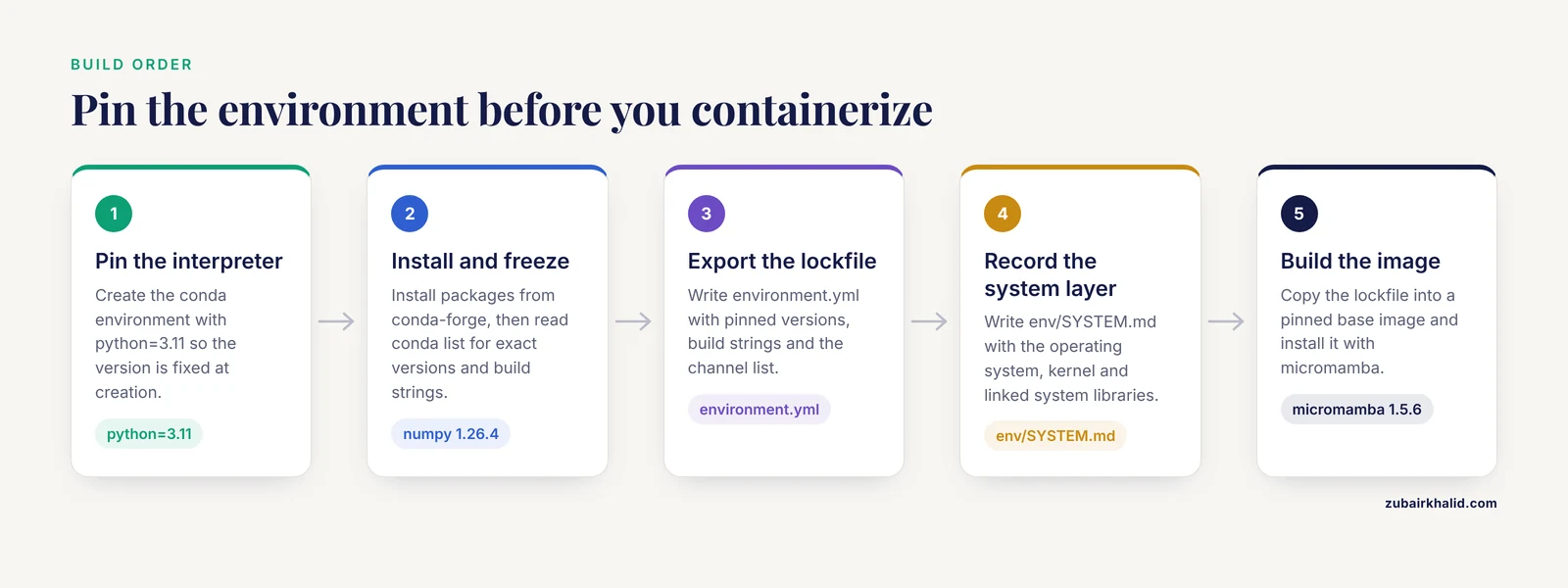
Four terms appear throughout this article and in every tool you will use.
Environment. An isolated directory containing a specific interpreter and a specific set of package versions. Two projects can use conflicting versions of the same package without interfering, because each environment is separate.
Lockfile. A machine-readable file that lists every package in an environment at its exact version, usually including a cryptographic hash of each package file. Examples are renv.lock for R, environment.yml exported from conda, and requirements.txt generated by pip. A lockfile is the contract between your project and every future machine that runs it.
Snapshot. A frozen, dated view of a package repository. CRAN, the R package archive, serves daily snapshots that let you resolve package versions as they existed on a specific date [2].
Software Bill of Materials (SBOM). A formal, machine-readable inventory of every software component in a build, including dependencies. SBOM tools were developed to document component and dependency structures in software supply chains, and an empirical study of generation tools across diverse IT environments found that they can discover components installed without any operating system package manager, which makes them useful for auditing research images that mix installation methods [4].
One conceptual point saves beginners the most pain: containers are not a substitute for package management. Containers bundle an application with its dependencies for consistency across environments [5], but building the image still requires deciding which package versions go inside, and researchers who examined this found that building images from pre-existing software often lacks reproducibility safeguards unless the build is pinned and uniquely identified. Similarly, a containerized MPI application may be binary-portable and still fail if the host cluster does not provide the parallel execution interfaces it expects [6]. Pin first, container second.
Choosing a Tool
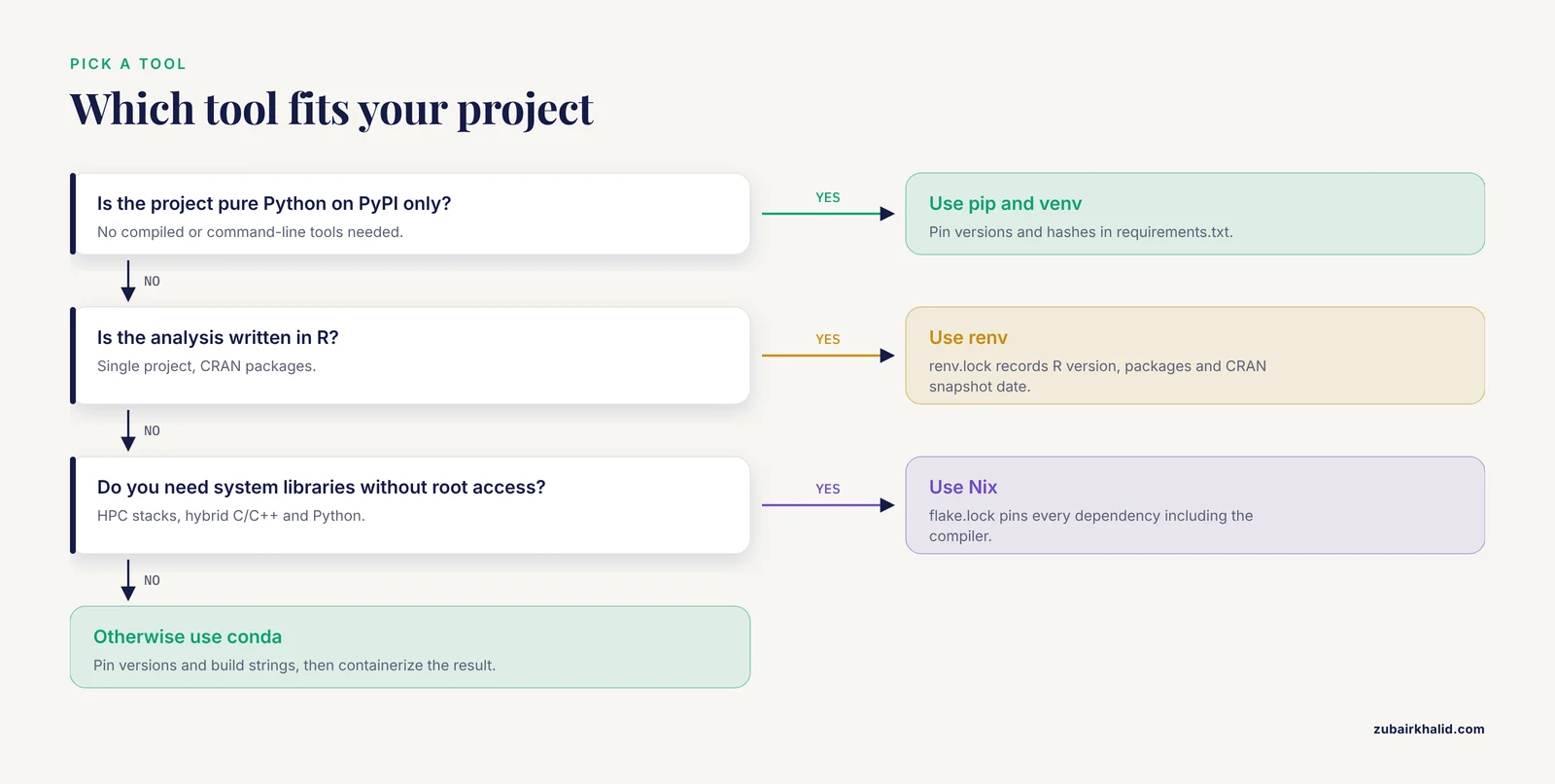
The right tool depends on your language and computing context. The table below summarizes the standard options and what each one actually pins.
| Tool | Ecosystem | What it pins | Key output file | Best suited for |
|---|---|---|---|---|
| renv | R | R version, package versions, CRAN snapshot date | renv.lock | R analyses in single projects |
| conda / mamba | Cross-language (Python, R, compiled tools) | Package versions, build strings, channel list | environment.yml (loose) or explicit lock (strict) | Mixed Python and command-line bioinformatics tools |
| pip + venv | Python (PyPI only) | Package versions and hashes | requirements.txt | Pure Python projects |
| Nix | Cross-language, system level | Every dependency including the C libraries and compiler | flake.lock | HPC stacks without root access, hybrid C/C++ and Python projects |
| Docker / Apptainer | Any | The whole filesystem image | Dockerfile plus pinned base image digest | Deployment, sharing with non-experts, cluster execution |
| Spack / Guix | Compiled HPC software | Versions, variants, compiler | Environment spec | Performance-critical scientific stacks |
Two observations from the research literature should shape your choice. First, teams building a hybrid HPC and AI software stack reported that traditional environment modules and Conda approaches require manual dependency discovery, leak system libraries into builds, and fail to compose across projects, while Nix resolved those problems through full environment isolation and a declarative specification that also generates the deployment container. Second, workflow-oriented research frameworks in epidemiology and genomics increasingly standardize on R ecosystems with explicit package management precisely because reproducibility, adaptability, and transparency are design requirements rather than afterthoughts [7]. Pick the tool your field already uses, pin it aggressively, and containerize the result.
Step-by-Step Walkthrough
The following walkthrough builds a pinned, containerized, documented environment for a hypothetical RNA-seq differential expression project. Every command is one you can run today.
Step 1: Create the project directory
Reproducibility starts with a fixed directory structure. Everything the analysis needs lives inside one folder.
mkdir rnaseq-project && cd rnaseq-project
mkdir data code results env
Expected output: no text. Running ls afterward shows the four subdirectories. The discipline here matters more than the names. A project whose inputs, code, and environment definitions sit in one place can be archived as a single unit, which is exactly what structured research data packages are designed to support [8].
Step 2: Create and activate a conda environment
conda create -n rnaseq python=3.11
conda activate rnaseq
Expected output after the create command includes a summary block:
## Package Plan ##
The following packages will be downloaded:
    python-3.11.6        31 MB
Preparing to transaction: ... done
#
# To activate this environment, use
#     $ conda activate rnaseq
The -n flag names the environment, and python=3.11 pins the interpreter major and minor version at creation time. Pinning the interpreter here, not later, prevents the most common silent failure in which a lockfile written against Python 3.9 is rebuilt on Python 3.12 and behaves differently.
Step 3: Install packages and freeze exact versions
conda install -c conda-forge numpy pandas scipy scikit-learn matplotlib
conda list
The conda list output shows every package with its exact version and build string:
# packages in environment at .../envs/rnaseq:
numpy                     1.26.4         py311h64a7726_0    conda-forge
pandas                    2.2.1         py311h320ae9b_0    conda-forge
python                    3.11.6          hab00c5b_0_cpython    conda-forge
scipy                     1.12.0         py311h8f5b8e9_0    conda-forge
The build string (the trailing characters such as py311h64a7726_0) records which compiled build of the package you have. Two builds of the same version number can link against different underlying libraries, which is why conda reproducibility depends on recording builds as well as versions.
Step 4: Export a lockfile
conda env export > env/environment.ymlExpected output: none. The resulting file looks like this:
name: rnaseq
channels:
  - conda-forge
dependencies:
  - python=3.11.6
  - numpy=1.26.4=py311h64a7726_0
  - pandas=2.2.1=py311h320ae9b_0
  - pip=24.0
  - pip:
      - scikit-learn==1.4.1.post1
Each line beginning with a package name is a pinned dependency. The channels section matters because the same package name can exist on different channels with different builds. An environment file without its channel list is only half a lockfile.
For pure Python projects, the equivalent command is:
pip freeze > env/requirements.txtFor R projects, the equivalent workflow uses renv. From within an R session opened in the project directory:
install.packages("renv")
renv::init()
renv::init() scans the project, records the R version, the CRAN snapshot, and every package version into a file called renv.lock, and sets up a project-local library so packages installed for this project never touch your global R installation. After adding a package with renv::install("DESeq2"), run:
renv::snapshot()Expected output:
- The following package(s) will be updated in the lockfile:

  CRAN ===============================
  - DESeq2   [1.42.0]

Do you want to proceed? [y/N]: y
- Lockfile written and updated (`renv.lock`).
Step 5: Record the system-level layer
Package versions are only part of the environment. The R interpreter version, system libraries such as BLAS, and operating system components all belong to the record. A framework for reconstructing historical R environments demonstrates the point in reverse: it queries archival CRAN, Bioconductor, and GitHub snapshots to resolve full dependency graphs at specific timestamps, capturing package versions, the R interpreter version, and system requirements together, and only then containerizes the result [2]. Your goal prospectively is to capture that same three-layer record on day one rather than archaeologically later.
For projects on high-performance computing systems, Dhruv, Barba, and colleagues recommend explicitly creating an execution environment that provides a clear record of traceability, and they enumerate the documentation a comprehensive record of HPC computational experiments requires, including the software stack, module versions, and hardware context [9]. Even on a laptop, writing a short env/SYSTEM.md file that states the operating system, kernel or OS version, and any system libraries your code links against is a low-cost version of the same practice.
Step 6: Containerize the environment
A Dockerfile turns your lockfile into a runnable image. A minimal, pinned build for the conda environment looks like this:
FROM mambaorg/micromamba:1.5.6
COPY env/environment.yml /tmp/environment.yml
RUN micromamba create -y -f /tmp/environment.yml && micromamba clean -a -y
COPY code /opt/code
COPY data /opt/data
CMD ["python", "/opt/code/run_analysis.py"]
Each line is a build instruction. FROM sets the base image with an explicit version tag, never latest. COPY transfers your lockfile into the image. RUN installs exactly the pinned environment inside the container. The final CMD defines what runs when the image starts.
Build and run it:
docker build -t rnaseq-analysis:1.0 .
docker run --rm -v "$PWD/results:/opt/results" rnaseq-analysis:1.0
Expected build output ends with a line like:
Successfully tagged rnaseq-analysis:1.0This pattern matches the standard approach in the reproducibility literature: uniquely identified container images serve as the unit of computation for workflows that require a high degree of reproducibility, and dedicated frameworks exist to extend containerization to cluster-level environments where scientific software needs middleware and libraries beyond what the image alone provides [6]. For shared laboratory and teaching infrastructure, the same isolation principle is applied with virtual appliances and containers so that each activity gets a controlled, reproducible setup that users can replicate on their own machines.
Step 7: Verify by rebuilding from zero
The test that counts is a clean rebuild on a machine that has never seen your project. Hand the folder to a colleague, or clone it into a fresh container, and run only the commands in your README. If the analysis completes and the output files match byte-for-byte or numerically to the tolerance your field accepts, your environment specification is sufficient. If anything fails, the failure message itself is your missing dependency list.
This verification step is the same principle that underlies benchmarks of real-world software faults: each bug record connects the report and affected code to structured metadata, environment setup scripts, and a reproduction trigger, and reproduction succeeds only under the recorded execution conditions, which allowed 84.7 percent of 770 real-world bugs to be reproduced [10]. The lesson generalizes directly. Recording execution conditions is what makes reproduction possible.
Step 8: Attach a component inventory
For archival rigor, generate an SBOM for your container image so that every component, including ones installed outside any package manager, is documented [4]. Then write a README containing four items: the lockfile name, the build command, the run command, and the expected output files. Interactive research platforms take this a step further by providing executable snapshots of entire working sessions with versioning and standard provenance technologies, so users can trace and recover the exact state of data and tools at any point [11]. Your README plus lockfile plus image is the portable, do-it-yourself equivalent.
A Reproducibility Checklist
Run every project through this list before you submit a manuscript, archive a dataset, or hand code to a new lab member.
- A single project directory contains all code, small inputs, environment files, and documentation.
- The interpreter version is pinned in the environment definition, not left to whatever the machine has.
- A lockfile (
renv.lock,environment.ymlwith builds, orrequirements.txtwith hashes) records every dependency at an exact version. - The package repository snapshot or channel list is recorded, so future resolution happens against the same source.
- System-level requirements, including compiler or OS details where they matter, are written down [2].
- A Dockerfile or equivalent recipe builds the full environment from the lockfile with no manual steps.
- The container base image is pinned by version or digest, never by
latest. - A clean-machine rebuild has actually been performed and succeeded.
- A README states the three commands a stranger needs: install, run, and verify.
- The complete package is deposited with the publication or archive as a machine-readable unit [8].
Ten items, roughly one hour of work per project, and the difference between results that replicate and results that quietly expire.
Common Mistakes and Limitations
Using unpinned dependencies. Writing numpy instead of numpy=1.26.4 in a requirements file delegates your environment to whatever the repository serves that day. A study of environment specification failures found that declared and runtime-installed dependency sets diverge systematically, and that functional tests do not detect the mismatch [3]. Pin everything, including the base image.
Treating a container as the whole solution. Containers encapsulate applications with dependencies for consistency, but their ephemeral, rapidly propagated nature also means vulnerabilities in base images or third-party libraries stay hidden unless actively scanned [5]. And for scientific workloads, a container image alone does not guarantee reproducibility when execution depends on host-provided services such as parallel MPI interfaces [6]. Container plus lockfile, not container instead of lockfile.
Assuming package managers capture everything. SBOM generation tools were specifically valued for their ability to discover open-source components installed without reliance on the operating system package manager [4]. Anything you installed manually, compiled from source, or dropped into a bin/ folder is invisible to your lockfile. Either containerize it or document it.
Mixing installation methods silently. Installing some packages with conda, some with pip, and some by compiling source is functionally fine and procedurally fragile, because the resulting environment has no single source of truth. Declarative approaches that generate a self-contained reproducible bundle with all configurations and provenance data, leaving no implicit dependencies, demonstrate the standard to aim for [12]. Choose one primary manager and isolate the exceptions explicitly.
Letting environments decay. Software environments rot. Legacy pipelines fail because packages become obsolete and dependencies conflict, and some services that once preserved historical environments are no longer guaranteed to persist [2]. The durable defense is to archive your lockfiles, your Dockerfile, and your built image with your project rather than trusting a third-party service to remain available. Long-term reproducibility research reaches the same conclusion: preserving binaries and pre-built environments is not enough, and the goal must be preserving the ability to rerun the work from recorded, inspectable specifications [13].
Never testing the rebuild. An environment that was never rebuilt from its specification is a hypothesis, not a result. Clean-machine rebuilds expose the gaps between declared and actual dependencies before a reviewer does [3].
Limitations to acknowledge honestly. Exact numerical reproducibility can still be blocked by hardware variation, GPU drivers, parallel scheduling, and licensed software you cannot redistribute. Floating-point results across different CPU architectures may differ in low-order digits even with identical software. State these boundaries in your README rather than implying universal reproducibility, and flag where results are statistically equivalent rather than bit-identical.
Frequently Asked Questions
What is package management for reproducible research?
It is the practice of recording and controlling the exact versions of every software package, library, and interpreter your analysis uses, so that anyone can rebuild the same environment and rerun the same code with the same results.
Do I need Docker if I already use renv or conda?
Not always. renv or conda handles your packages, and Docker additionally captures the operating system layer and makes handoff to non-experts trivial. If your analysis depends on system libraries or will run on a cluster, containerize it.
What is a lockfile and why does it matter?
A lockfile is a machine-readable list of every package at its exact version, often with hashes, that a package manager can use to rebuild the identical environment. It converts a description of your software into a rebuildable specification.
How do I reproduce someone else's analysis environment?
Get their lockfile or environment file, create a fresh environment from it with the matching tool, and if system-level components are missing, use their Dockerfile. When only the paper exists, reconstruct the environment from the recorded package versions and repository snapshots.
How do I handle old packages that no longer install?
Resolve the dependency graph against a dated repository snapshot and capture the original interpreter version and system requirements, then containerize the result. This retrospective reconstruction method has successfully re-executed legacy text-analysis pipelines, including recovery of a defunct classification package [2].
Should I use Nix, conda, or a container?
They solve different layers. Conda manages language packages well, Nix manages the full stack including system libraries without root access, and containers package the finished environment for deployment. The most robust setups combine them, letting one declarative specification drive the container build.
How often should I update packages during a project?
Do not update mid-analysis. Freeze the environment, finish the analysis, publish with the lockfile, and only then update in a new environment, rerunning the analysis to confirm the results hold before you rely on them.
What belongs in a reproducibility checklist?
At minimum: pinned interpreter, a complete lockfile, recorded package sources or snapshot dates, system-level requirements documented, a container recipe with a pinned base image, a successful clean-machine rebuild, and a README with install, run, and verify commands.
Sources
- Managing Reproducibility Debt in Scientific Software: A Practical Framework
- Temporal Dependency Archaeology: Reconstructing Historical R Environments for Reproducible Text Analysis Pipelines
- Code That Works, Environments That Don't: Measuring Environment Reproducibility in AI-Generated Software
- Enhancing Visibility of Components and Dependencies Across Diverse IT Environments with Open-Source Software-Bill-of-Materials Generation Tools
- Managing Vulnerabilities in Containerized and Kubernetes Environments
- VCC: A framework for building containerized reproducible cluster software environments
- Workflow-Based Information Management Framework for Multicenter Research Studies: Design and Development.
- bMINTY: enabling reproducible management of high-throughput sequencing analysis results and their metadata.
- Managing Software Provenance to Enhance Reproducibility in Computational Research
- AIFaultBench: A Reproducible Benchmark of Real-World Faults in AI Software Systems
- SWIRRL. Managing Provenance-aware and Reproducible Workspaces
- A DECLARATIVE APPROACH TO THE DESIGN AND REPRODUCIBLE LEARNING OF COMPLEX MODEL STRUCTURES FOR MONITORING SOFTWARE AGENTS
- Supporting Long-term Reproducible Software Execution