How to Organize a Shared Drive for Your Research Team
By Dr. Zubair Khalid, DVM, MS, PhD ·
The most likely cause of a broken research shared drive is organic growth without a written convention. Files accumulate around whoever uploaded them, around dates, or around one-off project names, and within a year nobody except the person who organized last Tuesday's uploads can find anything. The first thing to check is simple. Ask a lab member who joined in the last month to locate the current version of a key file, such as the latest plate reader export or the draft manuscript, in under one minute. If they cannot, the problem is structure and convention, not technology.
A shared drive is the backbone of scientific collaboration in most groups. It holds raw data, analysis scripts, protocols, manuscripts, grant documents, and the administrative records that keep a lab running. Process mapping work on a multi-site quality improvement study documented eleven distinct stages of the research process, from question formulation to dissemination, and found that the stages perceived as most difficult, including data collection, analysis, and dissemination, accounted for roughly half of the estimated 1,020 person-hours of total effort [1]. A drive organized around those stages gives every one of them a predictable home.
This article explains why shared drives fail, how to structure one that survives staff turnover, how to fix the problems you already have, and which research collaboration tools to add when a drive alone is no longer enough.
Why Most Research Shared Drives Fail
Collaboration is not automatic. Studies of collaborative learning show that effective teamwork emerges only under specific conditions, including psychological safety, clear mediation of participation, and scaffolded interaction, rather than from simply placing people in a shared space [2]. The same principle applies to file storage. Giving eight people access to one folder does not produce organized science. It produces eight filing philosophies in one directory.
The recurring causes fall into a short list.
Person-based organization. Folders named after postdocs and students break the moment those people graduate. The next person inherits a folder named "Sarah_Old" that they are afraid to delete and unable to decode.
No naming convention. When "final," "final2," "final_REAL," and "final_use_this_one" all exist, the team burns time reconstructing which file is authoritative. This is the single most common symptom, and it has a single root cause: the group never agreed on a filename grammar.
Missing version discipline. Without a rule for how a file moves from draft to final, people hedge by making copies. Copies multiply. Two collaborators edit different copies, and the divergence is discovered weeks later.
Permissions set by instinct. Access is granted generously to avoid friction, then never revoked. When the drive eventually holds identifiable human data or unpublished competitive results, the cleanup becomes an audit rather than a housekeeping task. Work on trusted research environments shows the alternative: granular, variable-level access control with auditable workflows is achievable with institutional staff, not just dedicated security teams [3].
Documentation that lives in people's heads. Protocols, analysis decisions, and folder logic exist as tribal knowledge. When a process mapping team reviewed what kept their collaboration running, the documented components were protocols, standard operating procedures, monitoring reports, and publications, all stored as retrievable documents rather than memories [1].
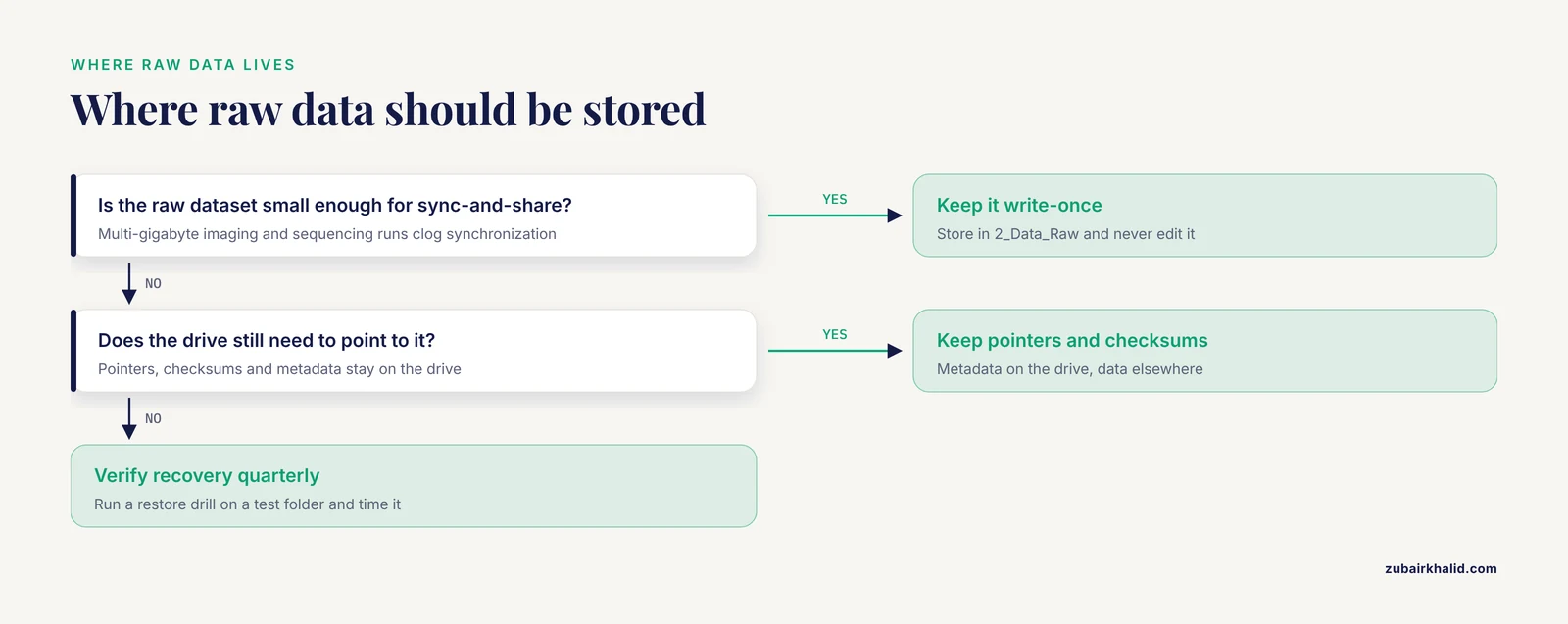
Raw data stored where it does not belong. Shared drives are sync-and-share systems, not archival data repositories. Multi-gigabyte imaging datasets and sequencing runs clog synchronization, exceed quotas, and evade meaningful backup verification.
What a Well-Organized Drive Looks Like
The organizing principle that works for research teams is the research lifecycle, not the org chart. Every project produces the same classes of material, so every project folder can have the same internal skeleton.
Top-Level Folder Design
A workable top level has four to six folders. Resist the urge to create more.
- 01_Projects, with one subfolder per project, each containing the standard skeleton described below.
- 02_Protocols_and_SOPs, holding standard operating procedures, institutional approvals, and method documents shared across projects.
- 03_Admin, holding grant documents, ethics and biosafety files, equipment records, and personnel paperwork.
- 04_Shared_Resources, holding reagent databases, antibody inventories, oligomer records, and instrument calibration files.
- 05_Archive, holding completed projects moved out of active view but retained for the retention period your institution requires.
Inside each project folder, repeat the lifecycle skeleton:
- 1_Admin, for the project plan, ethics approvals, and material transfer agreements.
- 2_Data_Raw, write-once storage for untouched instrument output.
- 3_Data_Processed, for cleaned and transformed data generated by scripts, never by hand-edited spreadsheets.
- 4_Analysis, for scripts, notebooks, and model files.
- 5_Results, for figures, tables, and summary statistics.
- 6_Manuscript, for drafts, submission packages, and reviewer responses.
- 7_Metadata_and_README, for the files that explain everything else.
Numbered prefixes force sort order that matches workflow order. The rule that raw data is write-once is the load-bearing wall of this structure. Every downstream file should be reproducible from 2_Data_Raw plus the scripts in 4_Analysis, a design goal that mirrors the reproducibility standards promoted in modern trusted research environments [3].
Naming Conventions That Survive Contact With Reality
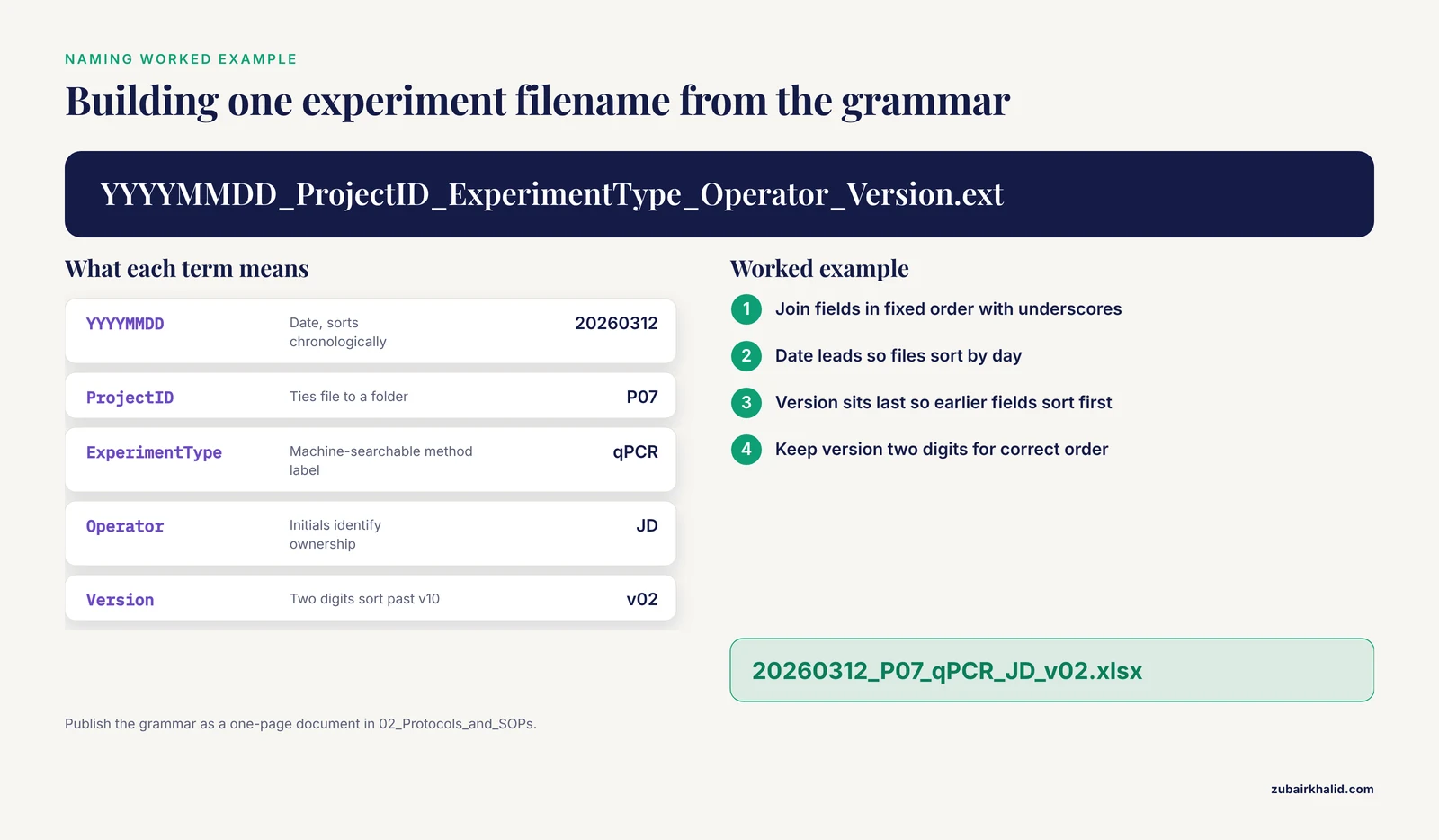
A naming convention only works if it is short, written down, and enforced at the point of upload. A practical grammar for most labs is:
YYYYMMDD_ProjectID_ExperimentType_Operator_Version.ext
For example: 20260312_P07_qPCR_JD_v02.xlsx. The date sorts chronologically, the project ID ties the file to a folder, the experiment type is machine-searchable, the operator initials identify ownership, and the two-digit version number sorts correctly past v10. The version suffix lives at the end so it never blocks sorting by earlier fields.
Publish the convention as a one-page document in 02_Protocols_and_SOPs. Multi-institutional collaborations depend on exactly this kind of shared convention. The WINSA network, which coordinated insecticide resistance expertise across 13 South American countries and territories, relied on structured shared priorities and documented agreements to keep contributors aligned across institutional and national boundaries [4].
Version Control Without New Software
Many teams never adopt Git for documents and never need to. What they need is a rule. Two options work:
- Suffix versioning. Every edit creates a new file with an incremented version suffix. The drive accumulates history. Nobody overwrites a colleague's work. Add a
_FINALsuffix only when a document is submitted or locked, and treat that suffix as a status change recorded in the project README. - Single live document. For collaborative drafting, use a cloud-native document with built-in revision history and export a dated snapshot to the drive at milestones. The drive holds milestones. The live document holds work in progress.
Pick one rule per document class. Mixed systems produce the divergent-copy problem the rule exists to prevent.
Permissions and Access Control
Organize permissions at the folder level, not the file level. Folder-level inheritance keeps the permission model legible. A workable default for an academic team:
- Team-wide read access to Projects, Protocols, and Shared Resources.
- Write access limited to project members within each project folder.
- Restricted subfolder for identifiable or sensitive data, with membership limited to people named on the approval.
- No anonymous link sharing. Disable "anyone with the link" settings at the drive level and require named accounts.
The restricted subfolder deserves a hazard note. If your drive holds human subject data, protected health information, or unpublished patient-level results, storing it in the general team space is a compliance hazard as serious as any chemical reagent in the lab. Keep identifiable data out of the general drive entirely, or isolate it in a controlled, auditable environment with access limited to the minimum necessary people. Research platforms built for this purpose demonstrate that controlled provisioning, granular access selection, and reproducible workflows can be operated by existing institutional staff rather than specialized security personnel [3]. Governance of such data is an institutional responsibility, and academic centers are increasingly called to steward it explicitly rather than rely on commercial defaults [5].
Audit permissions twice a year. Export the access list, remove people who left, and downgrade anyone whose role changed. The rarest and most damaging failure in this category is the departed collaborator who still holds write access to raw data years later.
Documentation: README, SOPs, and the Self-Explaining Drive
Every project folder gets a README file. One page is enough. It answers five questions: what is this project, who works on it, where is the raw data, what do the folder names mean, and what is the current status. Update it when the status changes, not continuously.
Standard operating procedures belong in the central protocols folder with dated filenames, because an SOP without a date cannot be trusted as current. The value of this documentation is measurable. When researchers mapped a collaborative quality improvement study, the operational record they could audit, including protocols, monitoring reports, and standard procedures, was what allowed them to reconstruct effort, barriers, and solutions after the fact [1]. A drive with dated SOPs does the same service for your own team, and it makes onboarding a new member a reading assignment instead of a month of interruptions.
Write the folder logic down too. A half-page document that says "numbered prefixes indicate lifecycle stage, raw data is never edited, version numbers are two digits" prevents ninety percent of convention drift.
Troubleshooting: Symptoms, Causes, and Fixes
Work through this table from the most common failure to the rarest. Each row gives the mechanism behind the problem, because fixes that ignore mechanism fail again.
| Symptom | Likely cause | How to confirm | Fix |
|---|---|---|---|
| Constant "where is the file?" messages in chat | No naming convention, or one that exists but is not enforced | Ask three members to name the current manuscript file from memory. Three different answers confirm drift | Publish a one-page naming grammar in the SOPs folder, rename the ten most-accessed files today, and route new uploads through the convention |
| Multiple versions of the same document diverge | No version rule, so people hedge with copies | Count files sharing a stem, such as "manuscript," across the project folder. More than three is diagnostic | Adopt suffix versioning or live-document editing as described above, consolidate to one authoritative version, and note the decision in the README |
| New members take weeks to become useful | No README, no orientation document, undocumented folder logic | Ask the newest member to describe the folder structure. Hesitation confirms the gap | Write the project README and a drive map, then give onboarding as a structured task with a check-back conversation. Structured team formats with defined roles and shared materials measurably improve collaborative outcomes in adjacent settings [6] |
| People report files locked or sync conflicts | Simultaneous edits to office-format files, or edits while offline then reconnecting | Check the platform's conflict or sync log for repeated conflict copies | Move collaborative drafting to live cloud documents, keep the drive for milestones, and set desktop sync to selective folders only |
| Someone sees data they should not, or a link leaks | Permission sprawl and anonymous link sharing | Review the permission export for the drive and each project folder. Look for link-based grants | Restructure to folder-level permissions, disable anonymous links at the drive root, and move sensitive data into a restricted, access-controlled subfolder with auditable grants [3] |
| Drive is full, sync is slow, laptops run hot | Raw instrument data stored in a sync-and-share system | Sort the drive by file size. Files over one gigabyte at the top of the list confirm the diagnosis | Move raw data to institutional storage or a dedicated data repository, keep pointers and checksums on the drive, and set a written size threshold above which data lives elsewhere |
| A needed file was deleted and nobody can recover it confidently | Backup and retention discipline never verified | Run a recovery drill on a test folder. Time it and note what a non-administrator can restore | Enable version history and trash retention on the platform, verify recovery quarterly with a drill, and keep an off-drive archive of irreplaceable raw data |
| A former member still has write access years after leaving | No offboarding step for drive access | Compare the current personnel roster to the permission export | Revoke at departure as a standing checklist item, then run a retrospective sweep of all historical grants |
A Five-Step Diagnostic Sequence
When you inherit a drive in unknown condition, follow this sequence before changing anything.
- Inventory the top two levels. Export or screenshot the folder tree. You need a map before you reorganize, and renaming folders while people are working causes lost-file panic.
- Run the findability test. Give three members the same five retrieval tasks and time them. This produces a baseline you can measure improvement against.
- Audit access. Export the permission list and match it against the current roster. Fix the worst outlier first, usually a link-shared folder or a departed member with write access.
- Identify the five most-accessed items. Ask the team, or check activity logs if the platform provides them. Fixing navigation for the top five items delivers most of the practical benefit.
- Introduce structure incrementally. Create the new skeleton, migrate one project completely as the model, then migrate the rest over scheduled weeks. Announce dates in advance so nobody is surprised by a moved folder.
Beyond the Shared Drive: Research Collaboration Tools
A shared drive solves storage and retrieval. It does not solve conversation, task tracking, or analysis reproducibility. When your team's pain shifts from "where is the file" to "what happened to this dataset," add purpose-built research collaboration tools around the drive rather than inside it.
Watch for the integration failure mode. A systematic review of digital twin deployments in hospital operations found that data integration across heterogeneous systems was a recurring challenge even for well-funded implementations, with benefits depending on how cleanly the component systems exchange information [7]. A lab that stacks a chat tool, a task tracker, an electronic notebook, and a cloud drive without agreed links between them recreates the same fragmentation in miniature.
A pragmatic stack looks like this:
- Shared drive for documents, protocols, milestone data, and administrative records.
- Electronic lab notebook or protocol tool for day-to-day experimental records, with exports filed to the drive.
- Version-controlled repository for analysis code, with the drive holding released versions and results.
- Chat or project platform for conversation and task assignment, with decisions of record copied into the project README.
- Institutional data repository or trusted research environment for raw data at scale and for controlled sharing of sensitive datasets [3].
The division of labor matters more than the specific products. The drive is the archival layer. Everything that requires real-time collaboration or large-scale compute lives in a tool built for it, with its outputs filed back to the archive.
Common Mistakes and Limitations
Reorganizing everything at once. A single weekend migration breaks every bookmark, script path, and habit simultaneously. Incremental migration with announced dates works better and is reversible.
Designing for the person who designed it. The organizer can navigate any structure. Test the structure on someone who did not build it before declaring it finished.
Confusing the shared drive with a data repository. A drive satisfies team access. It does not, by itself, make data FAIR, meaning Findable, Accessible, Interoperable, and Reusable, which is the standard framework for responsible data sharing [3]. Publication-grade sharing usually requires a repository with persistent identifiers and a data description, which the drive should feed rather than replace.
Treating the naming convention as permanent on first draft. The first convention you write will be wrong in ways you discover within a month. Revise it early and date revisions, rather than preserving a flawed system out of consistency.
Assuming collaboration improves because tooling improved. The evidence from collaborative learning is that collaboration depends on conditions such as safety, clear roles, and scaffolded interaction, and that these conditions must be deliberately created [2]. A reorganized drive with unchanged habits produces the same chaos in neater folders.
Ignoring the maintenance budget. Documentation and coordination cost real time. The process mapping study estimated roughly 1,020 person-hours across eleven stages of one study, with approvals, data collection, analysis, and dissemination the hardest stages [1]. Budget drive maintenance as a recurring task, roughly an hour per month for a small team, not as a one-time project.
A final limitation applies to individual cases. Data handling obligations, retention periods, and approval requirements vary by institution and by project, so confirm your specific requirements with your institutional research office before finalizing retention and access policies.
Prevention Practices
Prevention is cheaper than repair, and it is a short list.
- Write the two documents first. The naming grammar and the folder map prevent more failures than any other investment. Keep both in the SOPs folder and date them.
- Make onboarding a reading assignment. New members read the drive map, the naming grammar, and the project README in week one, then confirm by locating five files unassisted.
- Enforce at the point of upload. Conventions decay when enforcement happens at retrospection. A thirty-second check when a file lands prevents months of drift.
- Never edit raw data. Write-once raw data plus scripted processing is the foundation of reproducibility, and it aligns your internal practice with the auditable, reproducible workflows now expected in modern research data environments [3].
- Revoke access on departure, audit twice a year. Put permission review on the calendar. Treat it like instrument calibration, a scheduled task with a record.
- Archive on project completion. Move finished projects to the archive folder, write the final README status, and free attention for active work.
- Rehearse recovery. A quarterly restore drill on a test folder turns backup anxiety into a known, timed procedure.
Frequently Asked Questions
What is the best folder structure for a research team shared drive?
Organize the top level by function, such as Projects, Protocols and SOPs, Admin, Shared Resources, and Archive, and organize each project folder by research lifecycle stage from admin through raw data, processed data, analysis, results, and manuscript. Function-then-lifecycle structure survives personnel changes, which person-based structures never do.
How do we stop people from saving duplicate files with different names?
Adopt one written versioning rule per document class and publish it in the SOPs folder. Suffix versioning, where every edit increments a two-digit version at the end of the filename, works well for documents that need visible history, while live cloud documents with dated milestone exports work better for collaborative drafting.
Should raw data live on the shared drive?
Small raw datasets can, but treat raw data as write-once and keep it in a clearly labeled raw folder that nobody edits. For large instrument outputs, store raw data on institutional storage or a dedicated repository and keep pointers, checksums, and metadata on the drive, because sync-and-share systems handle multi-gigabyte files poorly.
How do we handle permissions when someone joins or leaves the team?
Grant folder-level access matching the person's project role at the moment they join, and revoke all access as a standing checklist item at the moment they leave. Run a full permission audit twice a year by exporting the access list and comparing it against the current roster.
How often should we reorganize or clean up the drive?
Do one full reorganization, then shift to maintenance. Archive completed projects as they finish, audit permissions twice a year, and revisit the naming convention whenever a revised draft is warranted rather than on a fixed schedule. Continuous small maintenance beats periodic disruption.
What naming convention should we use for experiment files?
Use a fixed-order grammar such as date, project ID, experiment type, operator initials, and version, for example 20260312_P07_qPCR_JD_v02.xlsx. Leading dates sort chronologically, fixed field order makes search predictable, and two-digit versions sort correctly past ten.
Can a shared drive replace an electronic lab notebook or LIMS?
No. A shared drive stores and shares files, while an electronic lab notebook captures timestamped experimental records and a laboratory information management system tracks samples and workflows. Use the drive as the archival layer and export structured records into it, rather than asking the drive to perform functions it was not built for.
How do we prepare the drive for data sharing at publication time?
Plan for FAIR data, meaning data that is Findable, Accessible, Interoperable, and Reusable, from the start of the project rather than at submission. Keep raw data unmodified, maintain metadata in the project folder, and plan to deposit the final datasets in an institutional or disciplinary repository with a persistent identifier, using the drive as the organized source that feeds the deposit.
Sources
- Process mapping of a collaborative quality improvement study to optimise the use of antibiotics in intensive care units in Argentina: a Pathfinder study.
- A design-based approach to collaborative learning in flipped classrooms: Fostering socio-cognitive and psychological competencies among female Saudi postgraduates.
- FAIR by design (TRACE): A Trusted Research Access & Collaboration Environment.
- Challenges and opportunities for strengthening South American responses to insecticide resistance in disease vectors: Lessons from the WINSA workshop in Bogotá, Colombia.
- The New Gravity: How Generative AI Remapped Innovation and What Academia Must Do Next.
- Team-based learning and its impact on clinical reasoning in medical education: A review and the unexplored role of artificial intelligence.
- Digital Twins for Hospital and Healthcare Operations: A Systematic Review of Resource Allocation, Infection Control, and Workflow Optimization.