How to Organize a Lab Notebook for Multi-Project Research
By Dr. Zubair Khalid, DVM, MS, PhD ·

By the end of this guide you will have a working system for running two or more studies through one notebook: a project index that tells you the status of any study in seconds, a naming rule that keeps notes and data files linked, a daily entry template, and a version-controlled folder you can hand to a collaborator without a briefing meeting. This is how to organize a lab notebook for multiple projects without doubling your writing load.
You need one of three setups on hand: a bound notebook with numbered pages, an account on an electronic lab notebook (ELN), which is software that replaces the paper book with dated, searchable entries, or a computer with a plain-text editor and Git, the standard version-control tool, installed. DataLad, a free program that manages data folders with a recorded history, is optional but useful when raw instrument files should live beside your notes.
The walkthrough below uses the plain-text model because every command and its output can be shown and checked. The same structure maps directly onto ELN workspaces or tabbed paper sections.
Why Multi-Project Notebooks Get Messy
A lab notebook is the dated record of what you did, why, and what happened. Multi-project research means two or more studies running in parallel, often sharing instruments, reagent lots, samples, and people. That shared surface is where notebooks break down, in five predictable ways:
- Interleaved chronology with no index. One book fills front to back, project A on Monday, project B on Tuesday, and months later nobody can list what was done on either study without rereading everything.
- Shared resources recorded once. A reagent lot or instrument session gets written into project A's entry and never appears in project B, so traceability stops at the folder boundary.
- Drifting identifiers. The same study gets called p2, P002, and "the time course" in different places, which defeats any search.
- Results stranded in spreadsheets. The entry says "see spreadsheet" with no path, sheet name, or version, so the link decays the first time the file moves.
- Collaborators inheriting silence. Notes written for the author's own memory cannot be interpreted by anyone else.
The pressure is not new. A 2003 report on transmission electron microscopy (TEM), a technique that images thin biological specimens at very high resolution, described how the volume of data and the number of projects underway had risen dramatically, making a robust data management tool essential for extracting the most from the available data [1]. Modern data-intensive work adds analysis scripts, workflows, and documentation on top of raw measurements, and researchers report that fragmented tools, inconsistent documentation, and poor platform integration undermine reproducibility across the research cycle [2]. A notebook system built for several projects is the first line of defense.
Choose a Notebook Model Before You Write Anything
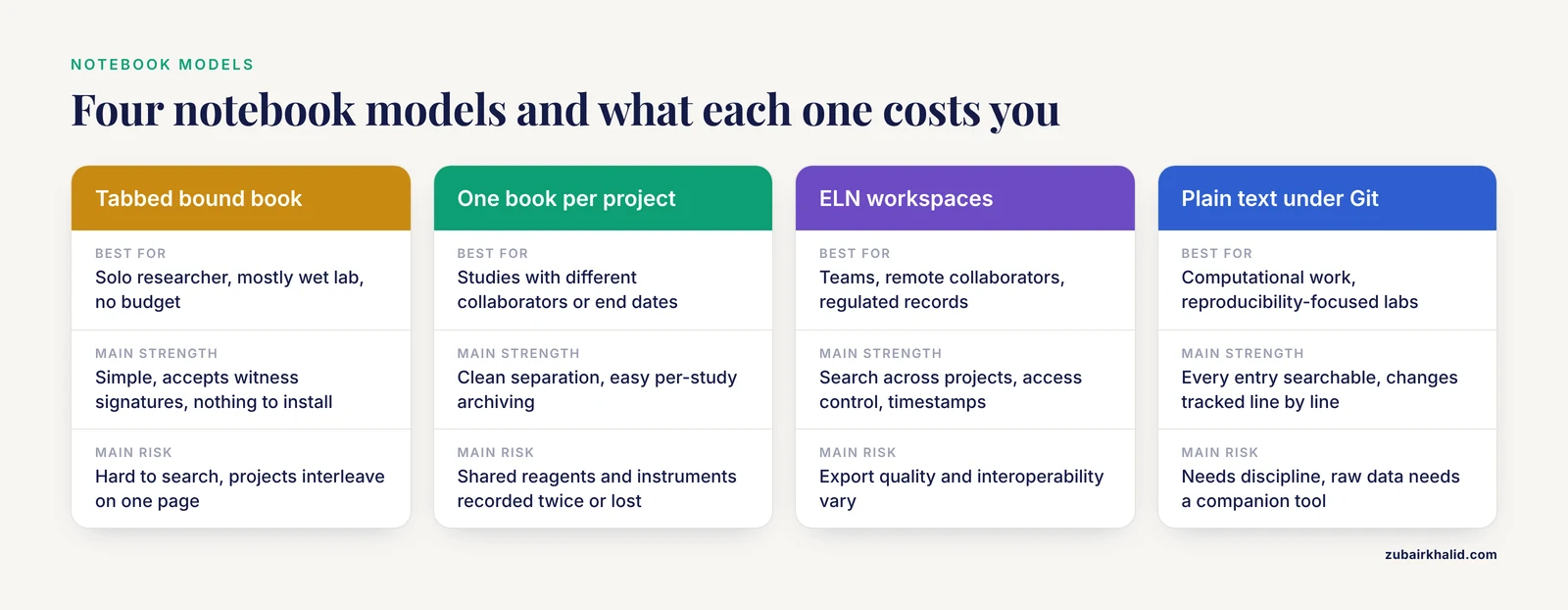
Four models cover nearly every lab. Pick one before your next experiment, because switching mid-project is what creates orphaned pages.
| Model | Best for | Strengths | Watch out for |
|---|---|---|---|
| One bound notebook, tabbed sections | Solo researcher, mostly wet lab, no budget | Simple, accepts witness signatures, nothing to install | Hard to search, projects interleave on the same page |
| One notebook per project | Studies with different collaborators or end dates | Clean separation, easy per-study archiving | Shared reagents and instruments get recorded twice or lost |
| ELN with project workspaces | Teams, remote collaborators, regulated records | Search across projects, access control, automatic timestamps | Export quality and interoperability vary between platforms |
| Plain-text folder under Git | Computational work, scripts, reproducibility-focused labs | Every entry searchable, changes trackable line by line, works offline | Needs discipline, raw data needs a companion tool such as DataLad |
The models combine. A common hybrid keeps decisions and observations in a plain-text or markdown notebook (markdown is a plain-text format in which simple symbols mark headings and lists), raw data in DataLad, and the manuscript in Overleaf. That trio is not speculative. The IntegriLAB framework, proposed for reproducible neuroimaging research, uses DataLad, Overleaf, and GitHub as its repository layer, consolidating data, document, and code repositories into one centralized web-based system for end-to-end project tracking [2].
The design target was stated plainly two decades ago by EMEN, an electronic notebook built for electron microscopy: keep the flexibility of a paper notebook while maintaining a structure suitable for data mining and direct interaction with data-processing software [1]. Whatever model you choose, aim for that. Flexible enough to write in daily, structured enough to query a year later.
How to Organize a Lab Notebook for Multi-Project Research, Step by Step
The walkthrough assumes the plain-text model. If you use paper or an ELN, perform the same steps with dividers, tabs, or workspaces.
Step 1: Build the project index
Create one file, index.csv, at the top of the notebook folder, with one row per project:
project_id,title,status,lead,collaborators,notebook_path,data_path
p001,atpase-activity-assay,active,j-lee,r-novak,notebooks/p001/,data/p001/
p002,rnaseq-timecourse,active,s-patel,m-ortiz,notebooks/p002/,data/p002/
p003,cryostat-maintenance,paused,facilities,shared,facilities/,facilities/
Field rules: project_id is a short lowercase code, two to four characters, assigned once and never changed. status takes one of three values, active, paused, or closed, so a weekly scan takes seconds. Paths point to folders rather than files, so they survive renames.
Step 2: Fix a naming convention
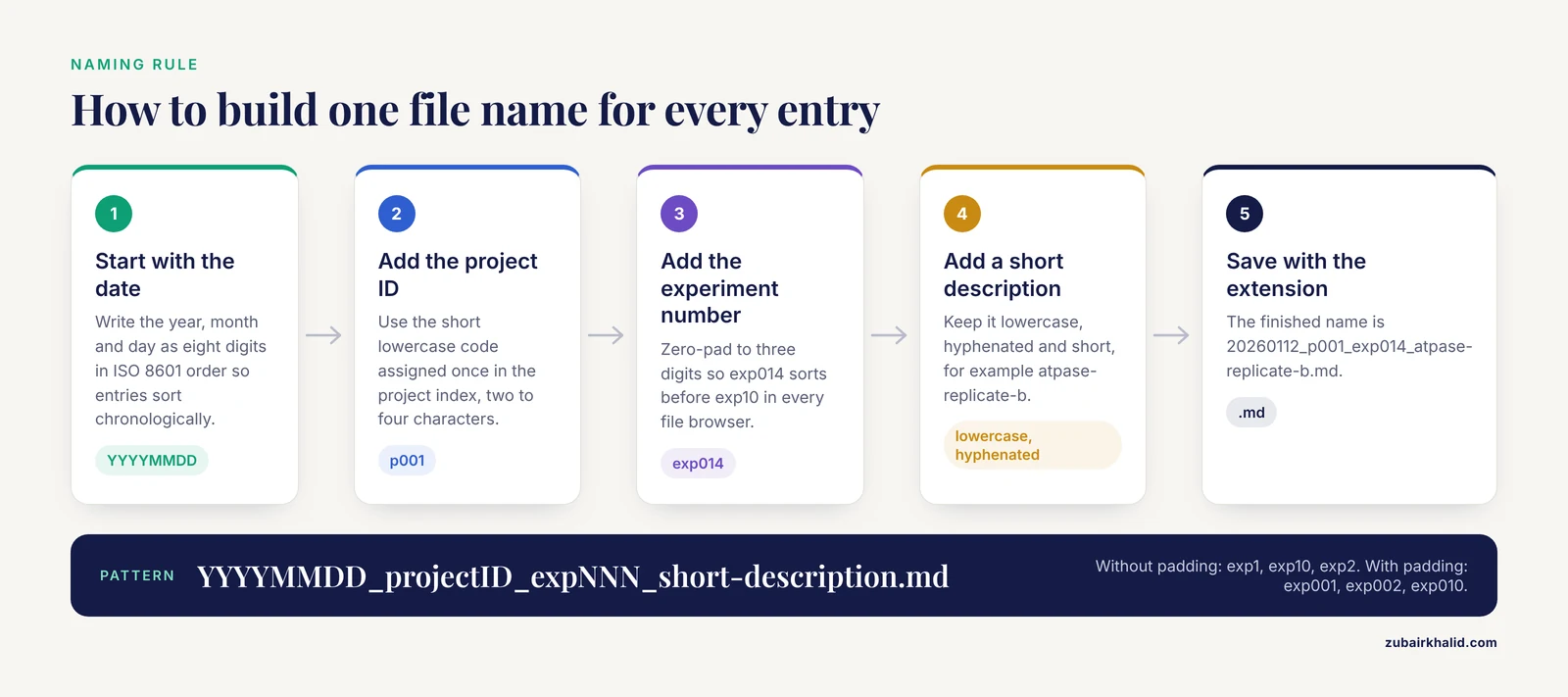
Name every entry, file, and scan with one pattern:
YYYYMMDD_projectID_expNNN_short-description.mdWorked examples:
20260112_p001_exp014_atpase-replicate-b.md
20260112_p002_exp031_rnaseq-library-prep.md
20260115_p001_exp015_atpase-replicate-c.md
The date uses eight digits in ISO 8601 order (year, month, day), so entries sort chronologically in every file browser. The experiment number is zero-padded to three digits, meaning exp014 rather than exp14. Padding matters because text sorting is alphabetical:
Without padding:  exp1, exp10, exp2, exp3        (wrong order)
With padding:     exp001, exp002, exp003, exp010  (correct order)
Three digits support 999 experiments per project, four digits if one study outlives that. Keep the description lowercase, hyphenated, and short.
Step 3: Create per-project folders
mkdir -p notebooks/p001/protocols notebooks/p002/protocols notebooks/sharedThe -p flag creates nested folders without complaining if they already exist. Each project folder holds its dated entries, an index.md summary page, and a protocols subfolder with versioned files such as atpase-v3.md. The shared folder holds the resource register from Step 7.
Step 4: Write daily entries from a template
Every entry answers seven questions: why (objective), how (protocol and version), what you actually did (deviations, timings, lot numbers), what you saw (raw observations), where the data went (file paths), what went wrong (problems), and what happens next (next steps). The full copyable template sits in the next section. Write the entry during the session or within an hour of it. In multi-project work the next-steps field carries the most value, because it lets you reopen a study after two weeks on the others without rereading anything.
Step 5: Cross-link everything with IDs
Because every entry carries its project ID, the whole notebook becomes queryable from the top level. To list every file mentioning project p002:
grep -rl "p002" notebooks/Expected output:
notebooks/p002/20260112_p002_exp031_rnaseq-library-prep.md
notebooks/p002/index.md
notebooks/shared/resource-register.md
The -r flag searches every file in every subfolder and -l prints file names only. The same command answers questions that cross projects, such as which experiments touched a shared reagent lot:
grep -rl "4417A" notebooks/When grep finds nothing it prints nothing and exits with status 1, which matters inside scripts. Before concluding that nothing matches, check the spelling and rerun with -i to ignore case.
Step 6: Put the folder under version control
Git records a snapshot, called a commit, of every file together with an author, a timestamp, and a message:
cd notebooks
git init
git add index.md
git commit -m "Create project index"
Expected output:
Initialized empty Git repository in /home/you/notebooks/.git/
[main (root-commit) 3f9c1d2] Create project index
 1 file changed, 6 insertions(+)
Some Git versions name the first branch master instead of main. Either works.
Two errors appear in the first hour. Running a Git command outside the notebook folder prints:
fatal: not a git repository (or any of the parent directories): .gitChange into the notebook folder, or run git init there first. The first commit may also be refused because Git does not know who you are. Set your identity inside the folder:
git config user.name "Your Name"
git config user.email "[email protected]"
Then commit again. Use your real name, because the author line and timestamp on each commit are what make the history auditable.
Check the result with git log, which prints each commit with its author and date, and git status, which reports a clean working tree once everything is saved.
When raw instrument files belong beside the notes, use DataLad, which manages a folder as a dataset, meaning a folder whose every saved change is recorded with a message:
datalad create multi-project-notebook
cd multi-project-notebook
datalad save -m "Add p001 exp014 entry"
Expected output:
create(ok): /home/you/multi-project-notebook (dataset)
add(ok): /home/you/multi-project-notebook/20260112_p001_exp014_atpase-replicate-b.md (file)
save(ok): /home/you/multi-project-notebook (dataset)
Step 7: Keep a shared resource register and run a weekly review
Multi-project labs share freezers, instruments, cell lines, and reagent lots. Record each shared item once, in notebooks/shared/resource-register.md, and reference that register entry from each project:
# Shared resource register

| Date | Resource | ID or lot | Used by | Notes |
|---|---|---|---|---|
| 2026-01-12 | ATP | lot 4417A | p001, p002 | Freezer 2, -20 C |
| 2026-01-13 | Confocal microscope | scope-3 | p002 | Booked Tuesday mornings |
Once a week, take ten minutes: update the status column in index.csv, close stale experiments, write a handoff note for any collaborator waiting on you, and confirm the backup ran. An index that is wrong is worse than no index, because people act on it.
Sensible next steps once the system runs: connect the folder to a remote host for off-site backup, move every protocol into the versioned protocols folders, and, if the lab adopts an ELN, mirror the same index and naming rules inside it.
A Lab Notebook Template You Can Copy
The first template is the summary page at the top of each project folder, here notebooks/p001/index.md:
# Project p001: ATPase activity assay

- Status: active
- Lead: J. Lee
- Collaborators: R. Novak
- Start date: 2026-01-05
- Data location: /data/p001/
- Current protocol: protocols/atpase-v3.md
- Open questions:
  - Does the new substrate lot change the blank reading?

## Experiment log

| Date | Entry file | One-line result |
|---|---|---|
| 2026-01-12 | 20260112_p001_exp014_atpase-replicate-b.md | Activity 2.1x blank |
| 2026-01-15 | 20260115_p001_exp015_atpase-replicate-c.md | Replicate within 5 percent |
The second is the daily entry. Save it once as _template.md and copy it for each session:
# YYYY-MM-DD | pXXX | expNNN | short title

## Objective
One sentence. What question does today answer?

## Plan
Protocol file and version: protocols/atpase-v3.md
Conditions or samples: ...

## What I did
Everything that differed from the written protocol: timings, temperatures,
lot numbers, instrument settings.

## Observations
Raw numbers and direct observations, recorded before interpretation.

## Results and data location
File paths, spreadsheet names, or instrument run IDs.

## Problems
What went wrong and the current suspicion.

## Next steps
The first action for the next session, written so that starting again
requires no rereading.

## Signature
Name, date, and a witness line if your lab requires one.
Fill every heading even when the answer is "none". An empty heading shows the question was considered, which is information in itself.
Electronic Lab Notebook Comparison for Multi-Project Work
With several projects running, an ELN earns its keep through seven capabilities. Evaluate any platform against this list.
- Cross-project search. One search box that returns hits from every project, so a lot number or instrument ID finds all touching entries.
- Per-project access control. A collaborator invited to project B sees project B and nothing from project A unless separately invited.
- Timestamped audit trail. An audit trail is the recorded history of who changed what and when. Entries from different studies sit side by side in multi-project work, which makes this non-negotiable.
- Authorship certification and immutability. A review of current ELN practice found that ELNs aid organization but often lack cross-platform interoperability, authorship certification, and immutable auditability [2]. The IntegriLAB framework responds by certifying research activities through cryptographically signed, immutable records built with LabTrace on low-impact blockchain technology, a record design in which each entry is linked to the previous one, so past entries cannot be altered without detection and authorship can be verified [2].
- Interoperability and export. The same work identified poor platform integration as a reproducibility risk and designed around existing tools rather than locking content inside one product [2]. Before committing to a platform, test that entries, attachments, and metadata export in open formats.
- Extensible structure. EMEN was built as an object-oriented database, a design in which the record structure can be extended without rebuilding it, and its developers added information types not defined in the original specification [1]. Look for custom fields and reusable templates with the same flexibility.
- Multi-site readability. EMEN was deliberately organized and annotated so multiple collaborators at different geographic locations could access and interpret the data without assistance [1]. That is the standard for any shared multi-project notebook: a reader who was not there can reconstruct what happened.
Paper still has a place. It needs no power, accepts a witness signature, and never becomes unreadable when a vendor disappears. The hybrid that works in many labs: paper at the bench, photographed or scanned weekly, filed under the same naming convention as everything else.
Practical Tips to Organize a Lab Notebook Across Multiple Projects
- Write the project ID on every page and entry, including shared pages. The ID is the thread you will pull in six months.
- One experiment, one entry, one ID. Two experiments on one page means neither can be cited cleanly later.
- End every entry with next steps. The gap between sessions on one study is measured in weeks, and the next-steps line closes it.
- Version your protocols and cite the version in each entry. "The usual protocol" is ambiguous the moment the protocol changes.
atpase-v3.mdis not. - Keep one register for shared resources, referenced from each project, instead of copying lot numbers into several notebooks where they drift apart.
- Photograph paper pages weekly and file the images under the same date-prefixed name as the entry they document.
- Write a handoff note when a project pauses. A paused study with a five-line handoff note restarts in minutes. Without one, it restarts with an archaeology session.
- Back up the whole folder, not per project. Three copies, on two kinds of storage, with one off site, is the standard pattern.
Common Mistakes and Limitations
- Running a single chronological stream with no index. The book fills, and answering "what did I do on project B in March" means rereading three months of interleaved entries. The index in Step 1 prevents this, but only if it exists from the first week.
- Letting IDs drift. p2, P002, and "time course" for one study break grep, sorting, and cross-referencing. Assign the ID once, in lowercase, and never retype it from memory.
- Recording results only in spreadsheets. The entry should name the file, the sheet, and what differed about this run. A bare pointer decays the first time the file moves.
- Uploading files to an ELN without context. An attachment with no objective, no protocol version, and no interpretation is a data dump. The EMEN project treated annotation as a design requirement so that entries could be interpreted without assistance [1].
- Skipping the weekly review. Statuses go stale, closed experiments stay open, and the index starts lying. Ten minutes weekly is the maintenance cost of the whole system.
- Assuming memory spans projects. The next-steps and handoff fields exist because context evaporates in days, not months.
- Mixing project records with administrative records. Ordering, grading, and meeting notes belong in a separate system, or they bury the experiments.
A few limitations apply. Institutional requirements for signatures, witnessing, and record retention differ across labs and tighten further in regulated settings, so adapt these templates to your institution's written policies before adopting them. Software features change quickly, so evaluate current platform documentation rather than any single description. The commands shown assume a Unix-style terminal, and the same tools run on Windows through equivalent shells.
Frequently Asked Questions
Should each project have its own lab notebook or one shared notebook?
One shared notebook with a strict project index works well for a solo researcher, because everything stays in one searchable place. Move to one notebook per project when studies have different collaborators or end at different times, and keep a shared register for common reagents and equipment either way.
How do I keep paper pages and electronic files in sync?
Give every experiment one ID built from the date, the project code, and an experiment number, and write that ID on the paper page and in every file name. Photograph or scan paper pages weekly and file the images under the same ID.
What belongs in every daily lab notebook entry?
The objective, the protocol file and its version, what you actually did including deviations, raw observations, where the data files live, problems, and the next step for the following session. The template above lists all seven fields.
How should I name experiments across several projects?
Use the date in eight digits, then the project ID, then a zero-padded experiment number, for example 20260112_p001_exp014. Zero padding keeps entries in true chronological order in every file browser and search tool.
Can an electronic lab notebook fully replace a paper notebook?
For most academic work, yes, and it adds search, backups, and access control. In regulated or clinical settings, signature and witnessing rules may still favor paper, so confirm your institution's requirements before going fully electronic.
Which ELN features matter most when running several projects?
Cross-project search, per-project access control, a timestamped audit trail, easy export in open formats, and reusable templates. Interoperability and authorship certification vary between platforms, so test both with your own workflow before committing.
How do I record a shared reagent or instrument used by two projects?
Log it once in a shared resource register with the lot number or instrument ID and the projects that used it, then reference that register entry from each project notebook. One record, many references, no drift.
How often should I update the project index?
Weekly, and whenever a project changes status. A stale index is worse than none, because people act on it.