How to Track Dataset Impact With ORCID and DataCite
By Dr. Zubair Khalid, DVM, MS, PhD ·

By the end of this article you will be able to publish a dataset with a citable Digital Object Identifier (DOI), link that dataset to your ORCID iD, and query public APIs to see who is citing, reusing, and downloading it. You will need an ORCID account, a dataset ready for deposit in a repository that mints DataCite DOIs, and a terminal with curl installed. A free jq utility for parsing JSON helps but is optional.
Why Dataset Impact Deserves Its Own Tracking System
Papers have impact factors and citation counts. Datasets, until recently, had little more than a download counter. That gap matters because shared data now produces real, measurable scholarship. A cross sectional study of the Yale University Open Data Access (YODA) Project platform examined 336 Johnson & Johnson sponsored clinical trials with individual participant level data available for external sharing. Among those trials, 265 (79 percent) had at least one secondary publication, totalling 1,167 publications, and most external users obtained the data through the sharing platform itself [1]. Datasets get reused, and reuse can be traced, when the infrastructure makes it visible.
ORCID and DataCite are that infrastructure. ORCID (Open Researcher and Contributor ID) issues a persistent 16 digit identifier, written in hyphenated groups such as 0000-0002-1825-0097, that disambiguates you from every other researcher with a similar name. DataCite is a membership organization that registers DOIs for research data and other nontraditional scholarly outputs. When a dataset carries a DataCite DOI, that DOI lists your ORCID iD in its creator metadata, and the dataset can then appear in your ORCID record automatically. Citations, references, and downloads accumulate against the DOI instead of vanishing into a lab hard drive.
The payoff is practical. Grant reports, tenure dossiers, and data management plans all ask what happened to shared data. With the two identifiers wired together, you can answer with numbers rather than anecdotes.
How ORCID and DataCite Connect
DataCite assigns each dataset a DOI and stores metadata about it in a public schema. Two parts of that schema do the work of tracking:
- The creator element can carry your ORCID iD through the
nameIdentifierfield, withnameIdentifierSchemeset toORCIDandschemeURIset tohttps://orcid.org. This is what lets ORCID systems and DataCite Commons recognize the dataset as yours. - The relatedIdentifier elements link the dataset to other objects, and vice versa. Each one has a
relationTypethat describes the connection. When another DataCite DOI declaresIsCitedBypointing at your dataset DOI, DataCite counts it.
The table below summarizes the metadata fields and relation types you will use most.
| Field or relationType | What it does | Example value |
|---|---|---|
resourceTypeGeneral | Declares the object type, must be Dataset for data | Dataset |
creator.nameIdentifier | Binds the creator to an ORCID iD | 0000-0002-1825-0097 |
publisher | Names the repository or institution | Zenodo |
publicationYear | Year the DOI version was minted | 2026 |
IsSupplementTo | Dataset is the data behind a specific paper | A journal article DOI |
IsCitedBy | Another object cites your dataset | A citing paper or dataset DOI |
IsDerivedFrom | Your dataset was built from another dataset | A source dataset DOI |
IsIdenticalTo | A new version of the same dataset | The previous version's DOI |
A note on terminology: citations tracked by DataCite are references recorded in the metadata of other registered objects, not the citation indexes of commercial databases. A meta research project on reporting guidelines illustrates the full toolkit used for impact assessment, combining forward citation analysis across Web of Science, Scopus, and Google Scholar with alternative metrics such as mentions in policy documents [2]. For datasets, the DataCite layer is the open, free foundation under that larger toolkit.
Step by Step: orcid datacite track dataset impact
This walkthrough uses a concrete example. Suppose you are depositing a benchmark dataset of volumetric image sets, in the spirit of community challenges that publish diverse image collections in an open repository with a uniform format and common data framework [3]. The specific numbers in the commands are placeholders. Substitute your own identifiers.
Step 1. Create and complete your ORCID record
- Register at orcid.org using your institutional email address. You receive a 16 digit iD such as
0000-0002-1825-0097. - Sign in and set your visibility defaults. Work, education, and affiliation entries have three visibility levels:
public,trusted parties, andprivate. Set works to public so that repositories and indexes can read them. - Under "Trusted organizations", authorize your employer's ORCID member system if it offers one. Member institutions can write affiliations and works to your record on your behalf, which matters in Step 4.
Keep a record of your iD in canonical URL form, https://orcid.org/0000-0002-1825-0097. Repositories ask for this exact form.
Step 2. Choose a repository and mint a DataCite DOI
Not every repository uses DataCite, so check before you commit. The practical comparison is between generalist repositories, domain repositories, and institutional repositories.
| Repository type | Examples | Access model | Best for |
|---|---|---|---|
| Generalist | Zenodo, figshare | Usually open or embargoed | Code, imaging, mixed outputs, quick deposits |
| Domain | Dryad, ICPSR, GenBank, SRA | Open or controlled | Discipline standard formats and curation |
| Institutional | University dataverses | Varies | Funder and institutional compliance |
| Platform based | YODA Project style controlled platforms | Application and committee review | Sensitive clinical data with governed reuse [1] |
Controlled access platforms are a legitimate choice for sensitive data. The YODA platform model shows that even restricted sharing generates measurable external secondary publications when access is structured and documented [1]. What matters for tracking is that the repository either mints a DataCite DOI or gives your dataset an accession number that can be wrapped in one.
Step 3. Put your ORCID iD in the dataset metadata
At deposit time, fill the creator record carefully. In a Zenodo style form you will see fields for family names, given names, and an ORCID field. Enter the 16 digit iD without the URL prefix. Behind the scenes the repository writes XML that looks like this excerpt:
<creators>
  <creator>
    <creatorName>Rivera, Ana</creatorName>
    <givenName>Ana</givenName>
    <familyName>Rivera</familyName>
    <nameIdentifier schemeURI="https://orcid.org"
                    nameIdentifierScheme="ORCID">0000-0002-1825-0097</nameIdentifier>
  </creator>
</creators>
<resourceType resourceTypeGeneral="Dataset">Benchmark image volumes</resourceType>
Fill the relatedIdentifier fields while you are there. If the dataset supports a specific paper, add that paper's DOI with relationType="IsSupplementTo". If the dataset was built from an earlier dataset, add IsDerivedFrom. These links are what make your dataset findable from the paper and citable in its own right.
Step 4. Claim the dataset in your ORCID record
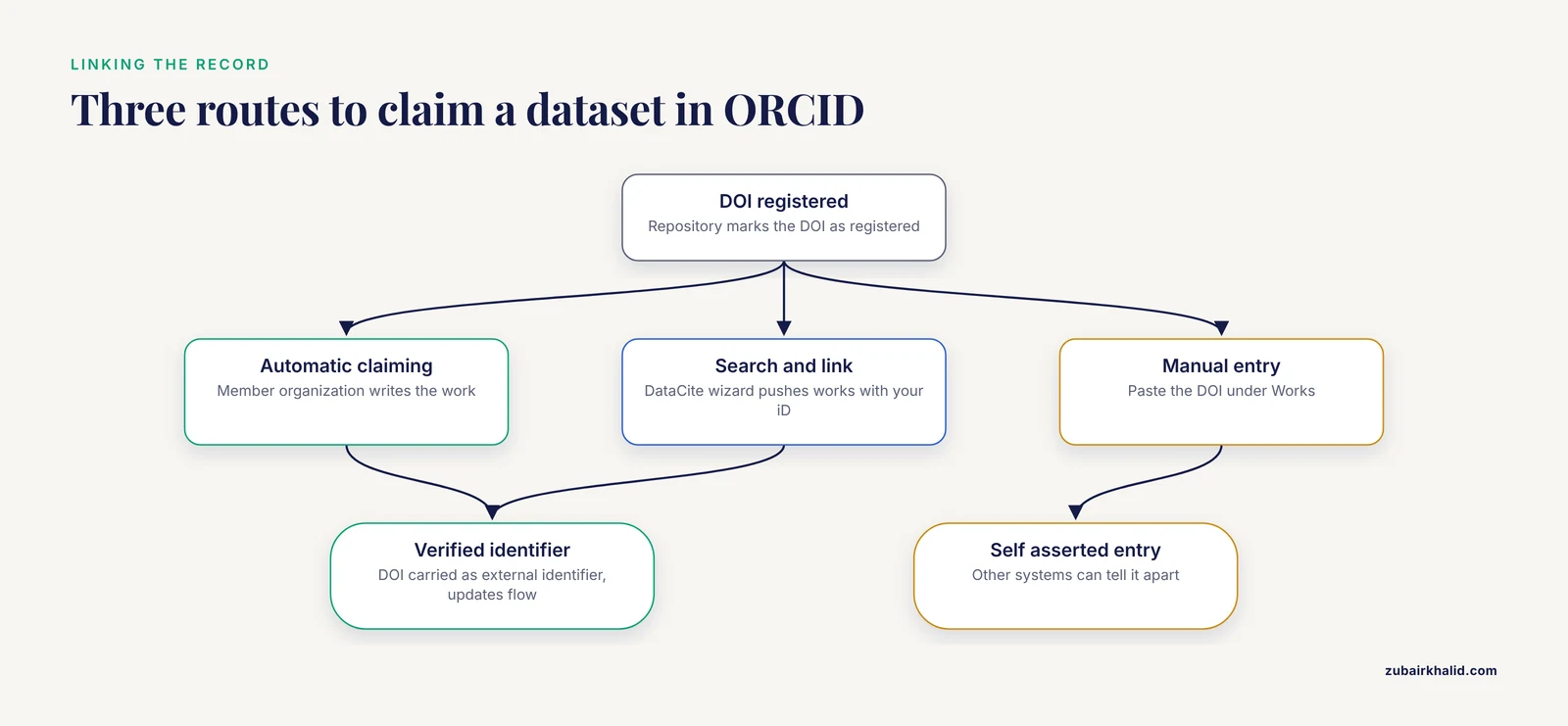
Once the DOI is registered, three routes connect it to your ORCID record:
- Automatic claiming. Some repositories and institutions are ORCID members with authorized access. If the DOI metadata contains your iD and you have authorized the member organization, the work appears under "Works" without action from you.
- Search and link. Use the "Search and link" wizards on your ORCID record page. DataCite offers a search and link wizard that lets you authorize DataCite to push works with your iD into your record.
- Manual entry. Add the DOI by hand under Works, choosing "Data set" as the work type. This always works but creates a self asserted entry that other systems can distinguish from one imported through a trusted source.
Route 1 or 2 is better because the entry carries the DOI as a verified external identifier and future updates flow automatically.
Step 5. Verify the DOI metadata with the DataCite API
Wait for the repository to mark the DOI as registered rather than draft. Draft DOIs exist only inside the repository and will not resolve. Then query the public DataCite REST API:
curl -s "https://api.datacite.org/dois/10.5281/zenodo.1234567" \
  | jq '.data.attributes | {doi, titles, publicationYear, publisher, citationCount, viewCount, downloadCount}'
Expected output looks like this:
{
  "doi": "10.5281/zenodo.1234567",
  "titles": [{"title": "DVC benchmark image volumes, wave 1"}],
  "publicationYear": 2026,
  "publisher": "Zenodo",
  "citationCount": 0,
  "viewCount": 14,
  "downloadCount": 3
}
The parameters that matter:
citationCountcounts other DataCite registered objects whoserelatedIdentifierof typeIsCitedByorReferencespoints at your DOI. It starts at zero and grows slowly.viewCountanddownloadCountcome from repository landing page usage, following the COUNTER code of practice for research data used by DataCite members.- If you want the full metadata, including whether your ORCID iD was written correctly, use content negotiation instead:
curl -sLH "Accept: application/vnd.datacite.datacite+json" \
  "https://doi.org/10.5281/zenodo.1234567" | jq '.creators'
Expected output:
[
  {
    "name": "Rivera, Ana",
    "givenName": "Ana",
    "familyName": "Rivera",
    "nameIdentifiers": [
      {"schemeUri": "https://orcid.org", "nameIdentifier": "https://orcid.org/0000-0002-1825-0097", "nameIdentifierScheme": "ORCID"}
    ]
  }
]
Step 6. Verify the link from the ORCID side
Query your public works through the ORCID public API:
curl -sH "Accept: application/vnd.orcid+json" \
  "https://pub.orcid.org/v3.0/0000-0002-1825-0097/works" \
  | jq '.group[] | select(.["work-summary"].type=="DATA_SET") | .["work-summary"] | {title: .title.title.value, "external-id": .external_ids["external-id"]["external-id-value"]}'
Expected output shows each dataset work with its DOI:
{
  "title": "DVC benchmark image volumes, wave 1",
  "external-id": "10.5281/zenodo.1234567"
}
If nothing appears, work through the checklist in the mistakes section below.
Step 7. Watch citations, references, and events accumulate
Two free services do the ongoing monitoring:
- DataCite Commons at commons.datacite.org. Search your ORCID iD and you get a profile page listing your datasets, their citations, and their views and downloads, aggregated across DataCite members. You can export the list as CSV for grant reports.
- DataCite Event Data at eventdata.datacite.org. It records relationships between DOIs as events, including citations and references, and offers a query API. To find objects citing your dataset:
curl -s "https://api.datacite.org/dois?query=relatedIdentifiers.relatedIdentifier:10.5281/zenodo.1234567" \
  | jq '.data[].attributes | {doi, titles: .titles.title, publisher}'
Expected output is a list of citing or related DOIs. Each row is a paper or dataset that declared a relationship to yours.
For a broader picture beyond the DataCite universe, forward citation searches in Web of Science, Scopus, and Google Scholar remain the standard method, and they are routinely combined with alternative metrics such as policy document mentions in meta research [2]. Cite the dataset DOI in the paper itself, using the IsSupplementTo link you created in Step 3, so both directions of the relationship are registered.
Step 8. Report impact with a simple annual calculation
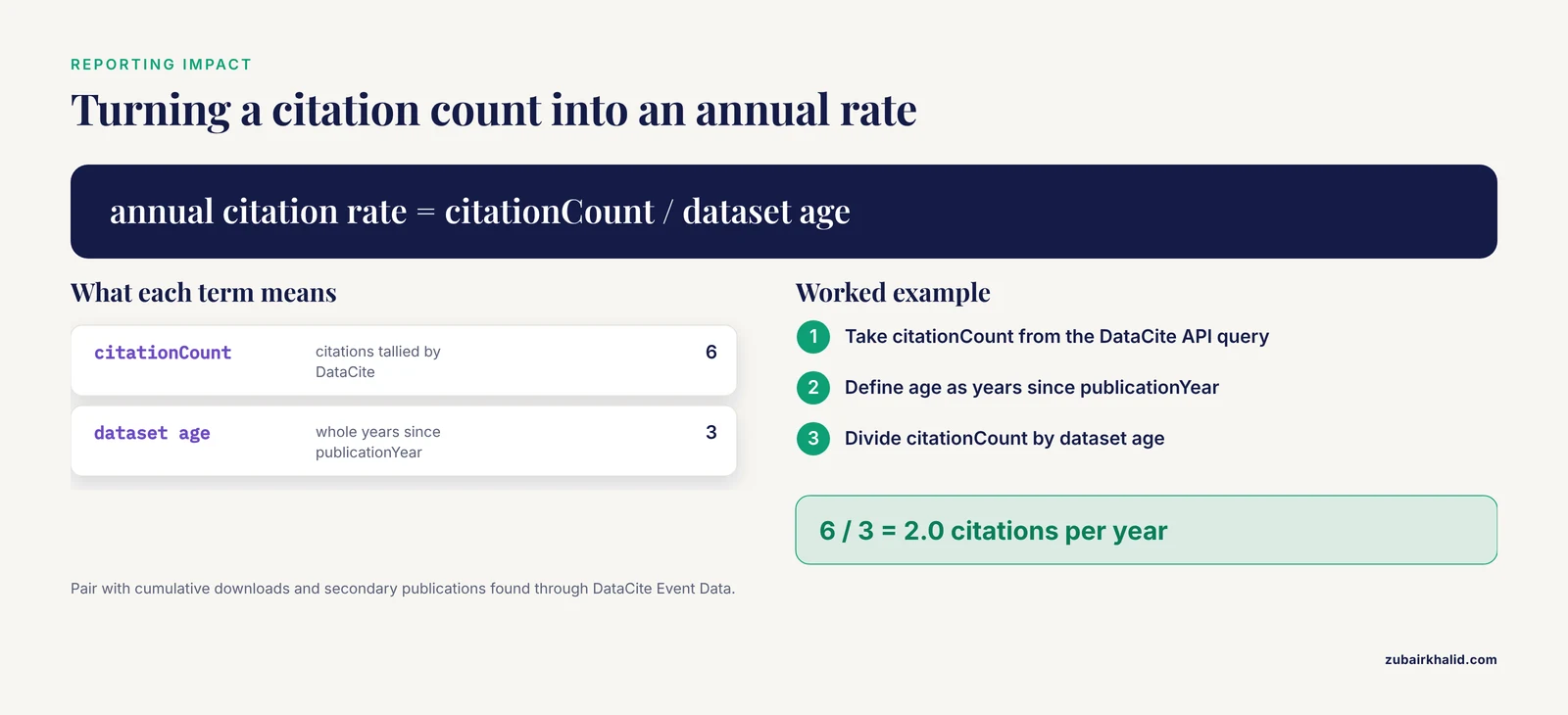
Once the pipeline runs, impact reporting becomes arithmetic. Define the dataset age in whole years as years since publicationYear. Annual citation rate equals citationCount divided by dataset age. If citationCount is 6 and the DOI was minted 3 years ago:
annual citation rate = 6 / 3 = 2.0 citations per yearPair that with cumulative downloads from Step 5 and any secondary publications you identified through Step 7. A portfolio level analysis of shared clinical trial data found that 79 percent of eligible trials accumulated at least one secondary publication, which gives you a sense of typical reuse over multiyear horizons for well supported datasets [1]. Track your own numbers against your own baseline rather than against that benchmark, because fields differ.
Tips That Make the Numbers Trustworthy
- Deposit the dataset under an institutional or group account as a co owner, so the DOI and the impact history survive personnel changes.
- Version deliberately. Mint a new version DOI for each substantive update and link versions with
IsIdenticalToor the repository's versioning feature. Report impact for a concept DOI that resolves to the latest version when you want one stable number. - Write a readme with a suggested citation. Reviewers and students copy the suggested citation, which raises the odds that the DOI, not the lab website, gets cited.
- If you handle sensitive data, document the access route. Studies of shared clinical data show that structured platforms, rather than ad hoc email requests, account for the large majority of documented external reuse [1]. A controlled access pathway with logged requests is itself part of the impact record.
- Recheck your ORCID record quarterly. Duplicate work entries accumulate when both a manual entry and an automatic feed list the same DOI. Delete the manual duplicate and keep the verified one.
Common Mistakes and Limitations
Leaving the ORCID field blank at deposit. The iD cannot be reliably inferred later. If you already deposited without it, many repositories let you edit metadata, but on some platforms a metadata correction requires a support ticket. Fix it before the dataset attracts citations.
Querying a draft DOI. A DOI still in draft state returns an HTTP 404 from api.datacite.org and fails to resolve at doi.org. Confirm with your repository that the DOI is registered, then retry.
Wrong content negotiation header. Omitting the Accept header in Step 5 returns the default HTML landing page instead of JSON, which breaks the jq filter. Always include Accept: application/vnd.datacite.datacite+json for DataCite metadata and Accept: application/vnd.orcid+json for ORCID records.
Treating downloads as impact. Download counts measure curiosity as much as use. Citation counts lag by years because secondary publications take time to write and publish [1]. Report both, with dates, and avoid comparing a 6 month old dataset to a 6 year old one.
Ignoring how data preparation changes what you measured. Anonymization before sharing is often necessary, but it is not neutral. A methodological case study of 719,387 inpatient encounters found that k anonymization at k values of 5, 10, and 15 distorted diagnosis code distributions and length of stay patterns in ways the anonymization tool itself did not report [4]. Facial defacing in head imaging similarly changes image statistics and can shift performance of downstream AI models [5]. If your shared dataset was transformed for privacy, state the transformations in the readme and record them in the metadata, because the impact you track belongs to the shared version, not the original.
Assuming everyone shares at the same rate. Willingness to share health data depends on trust, consent design, and community context, and these vary systematically across populations [6]. A low deposit or reuse rate in a sensitive domain can reflect legitimate trust concerns rather than low scientific value.
Overlooking governance when the data is commercial or institutional. Data sharing built on commercial records requires secure environments, transparent processes, and formal partnerships, and it does not happen without champions on both sides [7]. If your dataset sits behind such an agreement, the impact tracking you can publicize may be limited to counts approved by the data provider.
Expecting one system to capture everything. DataCite sees citations registered in DataCite metadata. It does not see a student who reused your data without a citation. Impact measurement is a floor, not a ceiling.
How the DataCite Citation Graph Actually Works
Most depositors assume a citation count appears on a dataset DOI the way it does on a paper. It does not, and understanding why is the difference between reporting honest numbers and reporting misleading ones.
DataCite citations are declared, not harvested. When a journal article, preprint, or second dataset is registered with a DataCite DOI, its metadata can contain a relatedIdentifier naming your dataset DOI together with a relationType. The citationCount you saw in Step 5 is simply a tally of those declarations. Nobody reads the reference list of a PDF and infers the link. If the citing authors or their repository never declare the relationship in metadata, the citation is invisible to DataCite, which is why the article calls impact tracking a floor rather than a ceiling.
This has three practical consequences you should internalize before reporting anything.
First, directionality matters. IsCitedBy and Cites describe the same relationship from opposite ends. If a paper's metadata declares IsCitedBy pointing at your dataset, the event is equivalent to your dataset's metadata declaring Cites back at the paper. The same mirror structure applies across the vocabulary: References and IsReferencedBy, Documents and IsDocumentedBy, Compiles and IsCompiledBy, IsDerivedFrom and IsSourceOf. When you audit who is using your dataset, query in both directions, because some depositors record the relationship on their own object and some expect the target object to carry it.
Second, relation types carry meaning that raw counts discard. A paper that declares IsSupplementTo against your dataset is telling you it used your data. A paper that declares References may only be mentioning it. A tool that declares IsCompiledBy is telling you it assembled its output from your files. When you build the citation list in the queries section below, keep the relationType column alongside each citing DOI. A grant reviewer will trust a table that says "five publications with IsSupplementTo, two software packages with IsCompiledBy" far more than a bare count of seven.
Third, the graph is sparse by design in its early years. Citation counts start at zero and grow slowly, and secondary publications take years to write and publish, which is exactly what the clinical trial sharing portfolio observed: the 79 percent of trials with at least one secondary publication accumulated those publications over long horizons after data became available [1]. A dataset deposited last quarter with zero citations is not failing. It is simply early in its lifecycle.
One habit closes most of this gap: when your own paper is deposited anywhere with DataCite metadata, declare IsSupplementTo (or IsSupplementTo from the paper to the dataset, depending on the direction convention the repository uses) so at least one declared relationship exists from day one. Every declared link you create teaches downstream authors that the link is expected.
A Deeper Repository Comparison: Choosing Where Impact Gets Counted
The repository table earlier in this article sorts options by type. This section compares them by the properties that actually change your tracking outcomes, because two repositories that both mint DOIs can produce very different impact records.
Persistence and ownership. Generalist repositories usually let a single researcher hold a deposit, which is convenient but fragile when that researcher changes institutions. Domain repositories and institutional repositories often tie deposits to a curated account that outlives individuals. If impact tracking is the goal, the question to ask the repository is not "do you give DOIs" but "who owns the DOI record if I leave." A DOI owned by a group account accumulates an unbroken history; a DOI attached to a departed personal account accumulates nothing new.
Metadata completeness at deposit time. The creator.nameIdentifier ORCID field from Step 3 is not equally supported everywhere
Frequently Asked Questions
Do I have to pay to get a DataCite DOI for my dataset?
No. DataCite DOIs are minted through member organizations and their repositories, and many repositories offer free deposits for researchers. You interact with the repository, and the repository handles the DataCite membership relationship.
Can I add a dataset to my ORCID record myself?
Yes. Use the "Add works" option, choose "Data set" as the type, and paste the dataset DOI. Manual entries are marked as self asserted, so prefer the DataCite search and link wizard or your institution's member tools when available.
How do I tell whether my dataset DOI is DataCite or Crossref?
Query the DOI at doi.org with the DataCite JSON accept header from Step 5. If it returns DataCite metadata, the DOI is DataCite registered. If the request fails or returns Crossref style metadata, the DOI was registered through Crossref, which is common for journals but uncommon for data repositories.
What is the difference between citations and downloads?
Downloads count file retrievals from the repository. Citations count registered references from other DOIs. Downloads move quickly and include casual interest. Citations move slowly and indicate reuse that produced a scholarly object.
How long does it take for a shared dataset to generate visible reuse?
Usually years. Secondary publications build on deposited data only after access, analysis, and peer review, which is why the trials portfolio study tracked reuse over long horizons and still found that most secondary papers clustered in the years after initial availability [1]. Set expectations in annual reports accordingly.
Should I share sensitive data openly to maximize impact?
No. Controlled access is a valid sharing model, and restricted platforms still generate documented external reuse when access processes are clear [1]. Choose the access model that fits the privacy risk, and the tracking steps in this article still apply.
Can I track impact for one specific version of a dataset?
Yes. Each version mints its own DOI, and version specific query results in the DataCite API separate cleanly. Use a concept DOI, which resolves to the latest version, when you want a single stable identifier for reporting.
What if my repository is not a DataCite member?
Ask the repository whether it mints DOIs through another registration agency or provides accession numbers only. An accession number in a domain repository, such as a sequence archive, is still a persistent identifier you can list in your ORCID record manually, though automated citation tracking through DataCite will not apply.
Sources
- Secondary use and scholarly impact of a portfolio of clinical trials with shared individual participant level data: cross sectional study.
- Assessing the impact, uptake and use of reporting guidelines for patient and public involvement in research: GRIPP2 - study protocol for a meta-research project.
- Digital Volume Correlation Challenge 2.0: A Comprehensive Dataset for Digital Volume Correlation Benchmarking.
- Quantifying the Impact of Anonymization-Induced Clinical Data Quality Loss: Methodological Quantitative Case Study Using Primary Diagnosis Codes and Hospital Length of Stay.
- Balancing privacy and performance: the impact of facial defacing on AI in medical imaging.
- Understanding Race as a Key Analytic Dimension in AI-Enabled, Health-Related Social Engagement Online and Its Role and Impact in Health Research.
- Conflict or interest? Using consumer purchase data to support food systems transformation.