When Open-Source Software Fails: Troubleshooting Support Gaps
By Dr. Zubair Khalid, DVM, MS, PhD ·

When open-source software fails in a research workflow, the most likely cause is not a broken program. It is a mismatch between your computing environment or your input data and the conditions the tool was designed and tested for. The first thing to check is the exact error message together with version numbers for the tool, its language runtime, and its key libraries, compared against the documentation or the methods section of the paper you are trying to reproduce. Most failures dissolve once versions and inputs line up.
The harder problem is the support gap. A commercial package comes with a vendor, a help desk, and a service contract. An open-source research tool comes with a code repository, a forum, and a maintainer who may be a graduate student with a thesis deadline. That gap is manageable once you know where failures actually originate and how to diagnose them in order. This guide covers the causes of open source software support problems in research, a troubleshooting table, a step-by-step diagnostic, and solutions that hold up in real projects.
Why Research Software Has Support Gaps
Commercial scientific software is a product. Someone is paid to answer your email, patch bugs, and keep documentation current. Open-source research software usually follows a different lifecycle. A small team, often a single lab, writes the tool to solve one problem, publishes a paper, and moves on. Support then depends on volunteer time, and the people who understand the code best may have graduated, changed fields, or left research altogether.
Three structural facts make the gap worse in science than in ordinary software.
First, methods sections rarely report enough detail. A paper may name a pipeline without pinning the release, the parameters, or the reference database, which leaves readers to guess. In 16S rRNA amplicon sequencing, which profiles bacterial communities by sequencing a marker gene, a 2026 evaluation of the Ion Torrent platform found no consensus methodology for open-source analysis as an alternative to the proprietary framework, so users had to assemble and defend their own choices [1].
Second, software engineering problems follow recurring patterns. An analysis of 267 published project postmortems from game development, coded into 1,227 distinct problem instances, shows that failures cluster into recognizable categories rather than striking at random [2]. The same regularity applies to research code, which means a systematic diagnostic beats guesswork.
Third, the incentive structure rewards publication over maintenance. A tool that earns its author a paper may not attract funding for servers, documentation, or a second release. Understanding this helps you read silence on an issue tracker correctly. Slow responses usually reflect volunteer bandwidth, not a broken tool or a dead project, although both are possible and worth checking.
The Troubleshooting Table
Work down this table from the symptom you observe. The rows are ordered roughly by how often each failure appears in practice.
| Symptom | Likely cause | How to confirm | Fix |
|---|---|---|---|
| Installation fails with a wall of dependency errors | Conflicting package versions or a missing system library | Read the first error line, not the last. List the versions the tool documents | Build a dedicated environment with a version manager such as conda and install the documented versions |
| The tool runs, but your numbers differ from the published paper | Version drift or undocumented parameters | Compare the methods section with your release number. Read the changelog for algorithm changes | Install the exact release the authors used, apply their parameters, and rerun |
| Crashes on your data but works on the bundled demo dataset | Input format, naming, or file corruption | Run the demo data first, then swap in your files one at a time | Convert formats, repair headers, and remove malformed records |
| Output looks plausible but fails an independent check | The algorithm's assumptions do not hold for your data | Push a reference standard or mock sample through the full workflow | Add quality control steps and cross-check with a second tool |
| A job stalls or the machine runs out of memory | Data larger than the tool was designed to handle | Watch memory use during a small test run | Process files in chunks, reduce resolution, or move to a larger machine |
| Your issue sits unanswered for months | Volunteer bandwidth, or an inactive project | Check whether other issues receive replies and whether commits continue | Post a minimal reproducible example, search closed issues, and try chat channels or mailing lists |
| No commits in years and the download link is dead | Abandoned project or expired academic hosting | Check the commit history and the latest release date | Containerize the last working version or migrate to a maintained fork |
| Colleagues get different results from the same input files | Hidden settings, different versions, or nondeterministic steps | Exchange configuration files and version lists, then run on one machine | Standardize the environment in a container and fix random seeds where the tool allows |
Failure Modes, From Most Common to Rarest
1. Environment and Dependency Conflicts
Modern research tools sit on tall stacks of shared software: an interpreter such as Python or R, dozens of packages, and system libraries. Any piece that updates can break the stack, and an operating system upgrade can break it silently. This is the most common reason a tool that worked yesterday fails today, and it is why the first diagnostic step is always to compare versions rather than suspect the algorithm.
The fix is to stop sharing environments between projects. Version managers such as conda or mamba create isolated environments with pinned package versions, and containers such as Docker or Apptainer go further by packaging the operating system libraries too. A container built today will run the same code the same way years later, which is the property research reproducibility actually requires.
2. Version and Parameter Mismatch
Algorithms change between releases, and the changes are not always cosmetic. In the Ion Torrent microbiome evaluation, the choice of denoising algorithm, meaning the step that removes sequencing errors to infer true biological sequences, significantly affected alpha diversity, the measured variety of species within a single sample [1]. Two pipelines that both claim to process 16S data can therefore disagree about basic ecological summaries before any biological question is asked.
Wet-lab choices compound the software choices. The same study found that using two primer sets instead of one lowered the expected read count by about 30 percent, a reminder that pipeline output depends on the whole chain from sample preparation to the final table [1].
When your results differ from a paper, the mechanism is usually this: the authors used a different release, different parameters, or a different reference database, and not all of it was reported. Reconstruct their setup as closely as possible, and report your own setup precisely in return.
3. Input Data That Violates the Algorithm's Assumptions
Every algorithm encodes assumptions about the data it will see, and real datasets violate them constantly. This failure mode is dangerous because the software often keeps running and returns output that looks fine.
The classic demonstration comes from DNA microarrays. Standard analysis software assumed that background fluorescence was uniform across a slide and could be measured around each spot. Martinez and colleagues found spot-localized contaminating fluorescence in the Cy3 channel on commercial and in-house printed slides, which invalidated the assumption and distorted estimates for low-expressed genes. Pre-hybridization scans could not predict the contamination after hybridization, so the obvious workaround failed too. Their solutions were procedural, either letting slides rest for 4 hours in air before printing or moving to hyperspectral imaging combined with multivariate curve resolution [3].
Untargeted metabolomics shows the same pattern in a modern setting. In a comparison of the open-source MS-DIAL tool against the commercial Compound Discoverer package for gas chromatography high-resolution mass spectrometry data, feature detection in both tools was heavily affected by unknown metabolites, background signals, and duplicate features that had to be assessed before any statistical analysis [4].
Sequencing data hides similar artifacts. The Mapinsights toolkit was built specifically to detect non-random error patterns tied to sequencing cycles, chemistry, library preparation, and platform, and to flag outlier samples and low-confidence variant calls that standard pipelines would pass through [5].
Even machine-learning behavior tools depend on input quality in measurable ways. The DeepLabCut plus SimBA pipeline for scoring the mouse head twitch response reached an F1 score of 95.51 at 50 percent video resolution and 120 frames per second, and the authors mapped performance across lower resolutions and frame rates because pose estimation degrades when the input degrades [6].
The fix is to treat quality control as part of the pipeline, not an optional extra. Know the assumptions of each tool, test them against a reference standard, and never let plausible-looking output substitute for validation.
4. Genuine Bugs and Edge Cases
Sometimes the code is simply wrong for an input nobody tested. Volunteer-written research code tends to be exercised on the authors' own data, so unusual file formats, extreme values, or rare conditions can trigger crashes or silent miscalculation.
The diagnostic here is isolation. Reduce the failing input to the smallest example that still reproduces the error, then bisect, removing half the data or half the parameters at each step until the trigger is isolated. A minimal example serves two purposes. It often reveals the bug to you, and it is the single most effective thing you can attach when asking maintainers for help. The cataloged postmortem record supports this disciplined approach, since recurring problem categories come with recognizable warning signs, which is exactly the structure a bisection routine exploits [2].
5. Abandoned Projects and Fragile Hosting
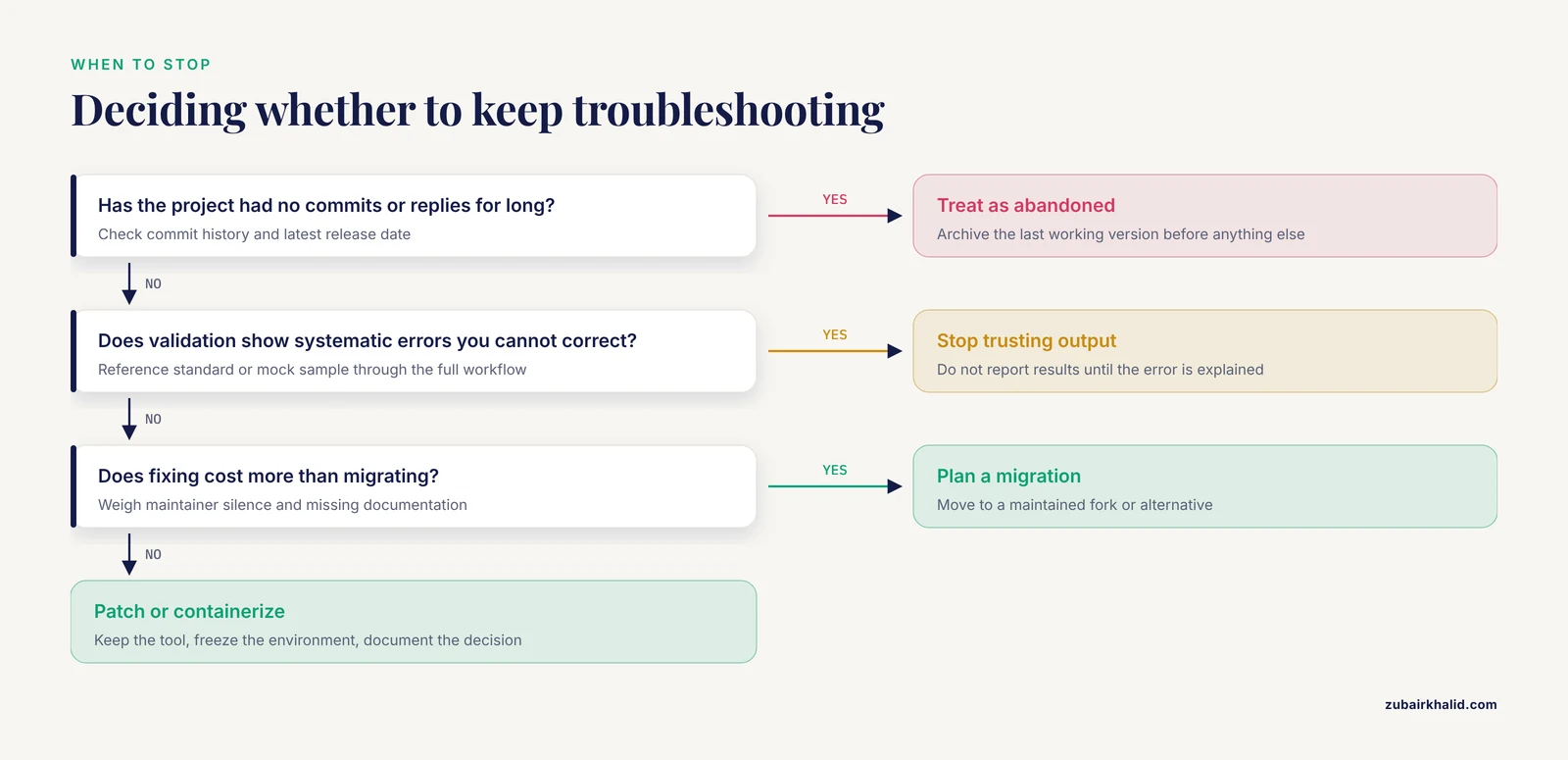
The rarest and hardest failure is the tool that no longer exists. Academic software is frequently hosted on a university server, written by one person, and sustained by grant cycles rather than product revenue. When the grant ends or the developer moves on, downloads break, mailing lists go quiet, and the code may survive only in a forgotten repository.
The LIGSIFT ligand alignment tool illustrates the standard model, with source code freely available to academic users from a university research group's server, a distribution pattern that is efficient while the group is active and fragile afterward [7].
The fix is archival, not resurrection. Containerize the last working version with its pinned dependencies, mirror the code somewhere you control, and record in your methods exactly how the frozen environment was built. If the tool is central to your field, a maintained fork or a migration plan is worth the investment.
A Diagnostic Sequence You Can Follow
- Capture the exact error text, including the first error line, timestamps, and the command you ran.
- Run the tool's bundled demo or test dataset. If the demo fails, the problem is installation. If the demo passes, the problem is your data or parameters.
- List versions for the tool, the language runtime, and the key libraries. Compare them against the documentation and against the paper you are reproducing.
- Check input integrity, file formats, headers, and naming conventions against the tool's documented expectations.
- Run quality control on the inputs themselves, looking for artifacts, background contamination, and outliers.
- Reduce the failure to a minimal reproducible example.
- Search the documentation, the closed issues, and the forum archives, because your problem has often been solved before.
- Ask the community with a well-formed report (see the solutions section below).
- Cross-check a subset of results with an independent tool or a reference standard.
- Decide deliberately to patch, containerize, or migrate, and document the decision.
Safety note. Treat any script or binary from a third party as untrusted code. Run it in an isolated environment or container, and keep it off machines that hold patient-identifiable or otherwise sensitive data unless your institution has approved the handling.
Research Software Comparison: Open Source Against Commercial
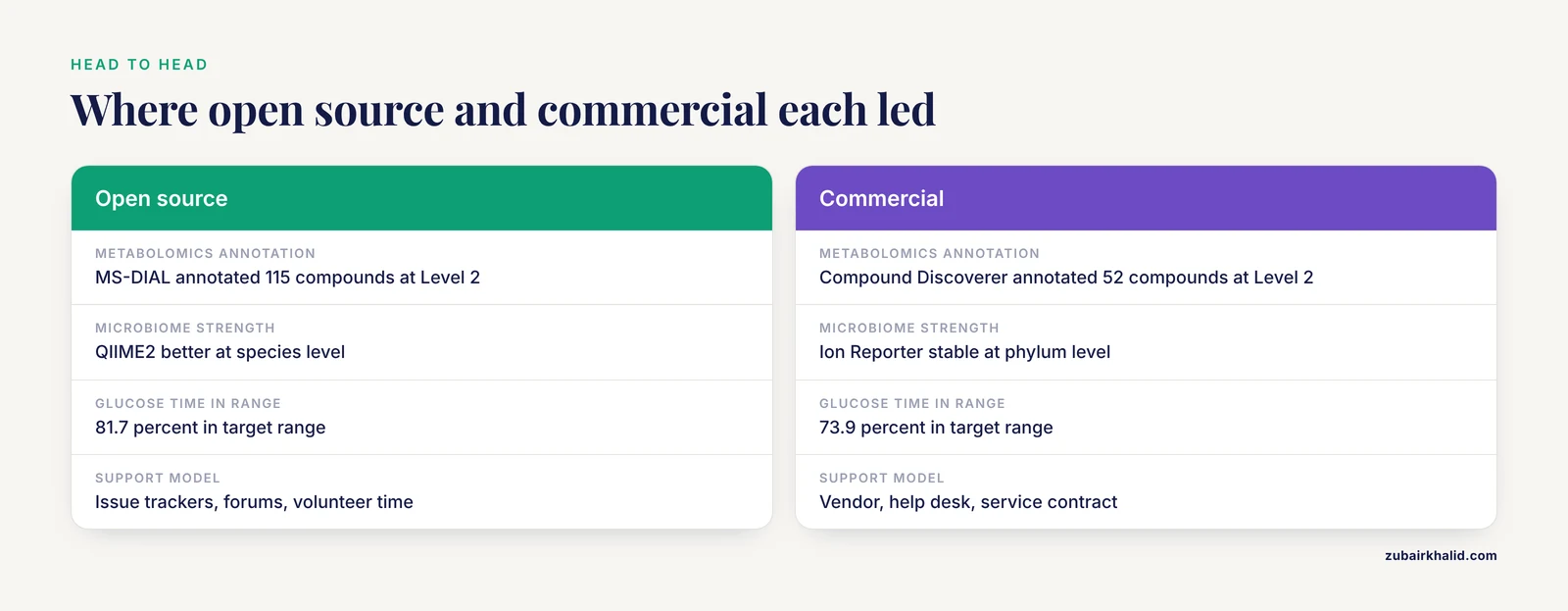
Neither license wins by default, and the published comparisons show why.
In untargeted metabolomics of thyme samples, the commercial Compound Discoverer package putatively annotated 52 compounds at Level 2 confidence, meaning compounds with library-supported structures, while the open-source MS-DIAL annotated 115 [4]. The open tool surfaced more chemistry, yet neither output was analysis-ready without expert review of what the features actually were.
In 16S microbiome analysis, the proprietary Ion Reporter workflow produced stable phylum-level consensus across multiple hypervariable regions, while single-region open-source QIIME2 pipelines performed significantly better at the species level [1]. Each approach was stronger at a different taxonomic resolution, so the right choice depended on the biological question rather than the license.
Diabetes technology offers a third angle. In a retrospective analysis of 144 people with type 1 diabetes in Austria, users of community-built open-source automated insulin delivery systems spent more time in the target glucose range, 81.7 percent versus 73.9 percent, and had lower HbA1c, 6.2 percent versus 7.0 percent, than users of the commercial MiniMed 670G system [8]. Community-maintained open source outperformed the commercial option on the measured outcomes, though the retrospective design and self-selected groups limit how far the conclusion extends.
Open-source frameworks also reach production-grade performance when their authors validate them. A driver-safety video analysis framework detected driver activities, glance patterns, and automation states with over 96 percent accuracy and cut the time and cost of manual video analysis by more than 90 percent [9].
Safety note. Software that influences patient care, such as automated insulin dosing or surgical cutting guides, can cause physical harm when it fails silently. Treat such systems as research prototypes until they have been independently validated for the intended use, and keep a qualified clinician responsible for any decision that reaches a patient.
For the practical question of the best software for researchers, the honest answer is a checklist rather than a name. Choose the tool that has been validated on data like yours, is actively maintained, documents its versions and parameters, runs in a reproducible environment, carries a license your institution accepts, and has a community that answers questions. A commercial license is one item on that list, not the list itself.
How to Fix Open Source Software Support Problems in Research: Solutions That Work
Ask the Community the Right Way
Most support gaps are partly self-inflicted, in the sense that vague questions get ignored while precise ones get answered. Before posting, search the closed issues and forum archives. When you post, include the tool and version, the operating system, the full error text, the minimal reproducible example, and a clear statement of what you expected versus what happened. One problem per report. Maintainers triage dozens of requests in their spare time, and a report they can reproduce in two minutes is the one that gets fixed.
Validate Before You Trust
Validation converts a support gap into a measured risk. The microbiome study benchmarked eight open-source pipelines against a commercial reference material, ZymoBIOMICS D6323, whose composition had been characterized by shotgun sequencing, giving the pipelines a known answer to hit [1]. Surgical planning built with open-source tools was validated by comparing planned and postoperative geometry, reporting a mean Hausdorff distance of 1.22, the largest mismatch between the two 3D surfaces, and a mean Dice coefficient of 0.77, an overlap score where 1.0 is perfect agreement, across eight patients [10]. A patient-specific cardiovascular simulation framework built on open-source software matched patient hemodynamics with relative errors below 5 percent [11].
The common pattern is a known ground truth, a quantitative metric, and an honest report of the residual error. Adopt the same pattern for your own pipeline, whatever your field's equivalent of a mock community or a phantom scan may be.
Pin Versions and Freeze Environments
Record the exact release, parameters, and reference databases in your methods sections. Export your environment files with every project and rebuild from them when a collaborator reports a discrepancy. Workflow managers such as Snakemake or Nextflow, both standard tools in computational biology, capture the entire chain of steps so the whole analysis reruns identically on another machine. This is established practice in the field, and it is the cheapest insurance available against the version drift described above.
Prefer Tools That Speak Standards
Standards shrink support gaps because they let components from different groups interoperate. PEtab Select, a specification standard and software package for model selection in systems biology, encodes model selection problems in a shared file format that works with COPASI, Data2Dynamics, PEtab.jl, and pyPESTO, supports standard criteria such as the Akaike and Bayesian information criteria, and can represent problem spaces with billions of candidate models [12]. When your tools agree on a format, a failure in one component can be isolated and replaced instead of taking the whole workflow down.
Build a Human Support Layer
Remote forums are one support channel, and local expertise is another that researchers undervalue. A qualitative study of 24 senior nursing students completing undergraduate research projects identified mentor support as a key facilitator, while planning and time management were the major challenges [13]. The lesson generalizes. A colleague one door down who has run the same pipeline is faster, more specific, and more forgiving than an issue tracker, and investing in that relationship is part of research infrastructure.
Common Mistakes and Limitations
- Trusting plausible output. The most expensive failures are silent ones, where software reports normal-looking results while an assumption has quietly failed. Validation is not optional.
- Debugging on the full dataset. Full datasets are slow and confounded. Isolate the failure on a small example first.
- Treating published numbers as exact targets. Stochastic pipelines vary between runs, and differences within reasonable tolerance are not failures.
- Reading only the last line of an error log. The first error usually names the real cause, and later lines are consequences.
- Equating forum silence with a broken tool. Check commit activity before declaring a project dead.
- Propagating the reproducibility gap. If your own methods section omits versions and parameters, you recreate the problem for the next reader.
One limitation applies throughout. Tools, fields, and failure modes differ, and no general sequence replaces judgment about your specific project. Where software output informs clinical care, a qualified professional must remain responsible for the decision.
Prevention Practices
Prevention is cheaper than debugging, and most of it is habit rather than skill.
- Pin versions at project start and export environment files alongside the data.
- Containerize any tool your project depends on, especially tools with fragile academic hosting.
- Run quality control on data at ingest, before any modeling, so artifacts are caught where they enter.
- Keep a small test dataset and rerun it after every operating system or package update, so breakage is detected in minutes rather than mid-analysis.
- Schedule validation checkpoints against reference standards at fixed project milestones.
- Report versions, parameters, and reference databases in every publication, closing the gap for your readers.
- Prefer actively maintained tools and standards-based formats when you have a choice, and archive the alternatives before they vanish.
- Contribute fixes and documentation upstream when you can, because the support gap you fill is often your own.
Frequently Asked Questions
Why does open-source research software have no support desk?
Because most open-source research tools are built and maintained by volunteers, students, and small labs rather than a company with paid support staff. Support comes from issue trackers, forums, and mailing lists, so response times reflect volunteer bandwidth rather than a service contract.
What is the first thing to check when open-source software fails?
Read the exact error message and compare your tool, runtime, and library versions against the documentation or the original publication. Environment and input mismatches cause most failures, not bugs in the code.
How do I fix open source software support problems in research?
Follow a sequence: reproduce on test data, verify versions, check input integrity, run quality control, reduce to a minimal example, then ask the community with a reproducible report. Pin your versions and validate outputs against a reference standard.
Is commercial software better than open source for research?
Neither wins universally. Published comparisons in metabolomics, microbiome analysis, and diabetes technology show each approach leading in different respects. Choose based on validation for your data type, maintenance activity, and reproducibility rather than the license alone.
How do I get a developer to answer my bug report?
Include the tool version, operating system, full error text, a minimal reproducible example, and expected versus actual behavior. Search closed issues first and keep one problem per report. Reproducible reports get answers.
How can I reproduce a paper's results when the software version is unknown?
Ask the authors for the version and parameter files, try the release closest to the publication date, and read the changelog for algorithm changes. Expect some difference if the pipeline includes stochastic steps.
When should I stop troubleshooting and switch tools?
Switch when the project shows no commits or responses for an extended period, when validation reveals systematic errors you cannot correct, or when the cost of fixing exceeds the cost of migrating. Archive your working environment before you move.
How do I keep a tool running after its maintainer disappears?
Containerize the last working version with pinned dependencies, mirror the code to a repository you control, document the frozen environment, and plan a migration path to a maintained fork or alternative.
Sources
- Evaluating 16S metagenomics data analysis pipelines using an Ion Torrent sequencer for human gut microbiome research.
- An extended and validated dataset of game development problems based on postmortem analysis.
- Identification and removal of contaminating fluorescence from commercial and in-house printed DNA microarrays.
- Comparison of data processing strategies using commercial vs. open-source software in GC-Orbitrap-HRMS untargeted metabolomics analysis for food authentication: thyme geographical differentiation and marker identification as a case study.
- Mapinsights: deep exploration of quality issues and error profiles in high-throughput sequence data.
- Rapid, Open-Source, and Automated Quantification of the Head Twitch Response in C57BL/6J Mice Using DeepLabCut and Simple Behavioral Analysis.
- LIGSIFT: an open-source tool for ligand structural alignment and virtual screening.
- Retrospective Comparison of Commercially Available Automated Insulin Delivery With Open-Source Automated Insulin Delivery Systems in Type 1 Diabetes.
- An Integrated Open-Source Framework for Automated Analysis of Driver Activity, Glance, and Vehicle Automation Mode.
- Realizing in-house algorithm-driven free fibula flap set up within 24 hours: a pilot study evaluating accuracy with open-source tools.
- Framework for patient-specific simulation of hemodynamics in heart failure with counterpulsation support.
- PEtab Select: Specification standard and supporting software for automated model selection.
- Nursing students' experiences of undergraduate research projects: a qualitative descriptive study.