Open Science for Teams: How to Collaborate Transparently
By Dr. Zubair Khalid, DVM, MS, PhD ·

By the end of this guide, you will be able to set up a shared version-controlled repository for your lab, run a branch and pull request workflow that a colleague can review, preregister a study plan on the Open Science Framework, containerize an analysis so it runs on someone else's machine, and share data in a way that respects privacy rules. You will also have a reproducibility checklist you can apply to any project before you submit a manuscript.
To follow the hands-on steps, you need a computer with Git installed (available free from git-scm.com), an account on GitHub or a comparable hosting service, a command-line terminal, and optionally Docker Desktop for the containerization step. An account on the Open Science Framework (OSF), a free platform for hosting project plans, files, and analyses, rounds out the toolkit.
Why Teams Work in the Open
Open science is the practice of making research objects, including protocols, data, code, and publications, accessible and reusable by others. For a team, it changes daily work in concrete ways. Instead of emailing spreadsheets and drafts back and forth, collaborators work from shared, timestamped records of who changed what and when.
Large consortiums show what this looks like at scale. GBA1 Canada (G-Can) operates as a pre-competitive, open-science platform that unites basic scientists, clinicians, and industry partners around research on the GBA1 gene, which encodes the lysosomal enzyme acid beta-glucocerebrosidase. The platform shares biological, clinical, and analytical resources with academic and industry investigators under non-exclusive agreements, with the explicit goal of minimizing duplicated effort and accelerating translation into clinical trials [1]. In molecular neuroimaging, the OpenNeuroPET initiative built shared standards and open-source tools to fix a longstanding problem: high costs, small samples, and laboratory-specific analysis pipelines had limited the reuse of valuable PET datasets and undermined reproducibility [2].
Smaller labs face the same dynamics on a smaller scale. A three-year study of an international consortium committed to "radical reproducibility" found that teams developed new open research competencies over time and identified concrete enablers: the Open Science Framework, co-developed tools, containerization, strong role modeling by senior researchers, and improved documentation [3]. The same study recorded real friction, including fear of exposing imperfect work and heavy time demands, which we address in the mistakes section below.
Open Science Collaboration Tools: The Core Stack
Open science collaboration tools fall into layers. Each layer solves a different coordination problem, and most teams need one tool per layer rather than many tools in the same layer.
| Layer | Problem it solves | Common tools | Notes for teams |
|---|---|---|---|
| Version control | Tracks every change to code and text files | Git, hosted on GitHub or similar | Journals increasingly request code availability statements [4] |
| Project management and preregistration | Makes plans, files, and timestamps public or shared | Open Science Framework | Used to register protocols before analysis [3][5][6] |
| Data standards | Makes datasets interoperable across centers | BIDS and PET-BIDS for imaging data [2] | Standardized folder structures and metadata |
| Automated testing | Runs checks on every proposed change | GitHub Actions and similar CI/CD services | Widely used in active open-source projects [7] |
| Analysis environments | Packages software so it runs identically elsewhere | Docker containers | Named as a reproducibility enabler in longitudinal team studies [3] |
| Controlled data sharing | Shares sensitive data under access rules | Trusted research environments such as TRACE | Supports FAIR sharing with variable-level access control [8] |
| De-identification | Removes identifying information before sharing | Domain-specific de-identification pipelines | Methods vary by data type: text, structured tables, images [9] |
FAIR stands for Findable, Accessible, Interoperable, and Reusable, a set of principles for research data management. Continuous Integration and Continuous Deployment (CI/CD) refers to automated pipelines that build and test code every time a collaborator pushes changes. You do not need all layers on day one. A two-person project can start with Git and a README file and add the rest as the project grows.
Step-by-Step: Building a Transparent Team Workflow
This walkthrough uses a small analysis project as the running example. The same steps apply to a wet-lab protocol repository or a shared manuscript.
Step 1. Create the shared repository
A repository is a folder that Git tracks, along with its full change history. On your machine, inside your project folder, run:
git init
git add README.md
git commit -m "Initial commit with project overview"
Expected output:
Initialized empty Git repository in /home/you/project/.git/
[main (root-commit) a1b2c3d] Initial commit with project overview
 1 file changed, 12 insertions(+)
 create mode 100644 README.md
Git uses four mental models: the repository, the commit, the branch, and the remote. A commit is a snapshot of tracked files with a message describing the change. A branch is an independent line of development. A remote is a copy of the repository hosted elsewhere, such as on GitHub, that the whole team pushes to and pulls from [4].
Add your remote and share it:
git remote add origin [email protected]:your-lab/project-name.git
git push -u origin main
Expected output ends with:
Branch 'main' set up to track remote branch 'main' from 'origin'.Every team member clones this one repository. From this moment, there is a single authoritative record of the project.
Step 2. Adopt the edit-stage-commit cycle
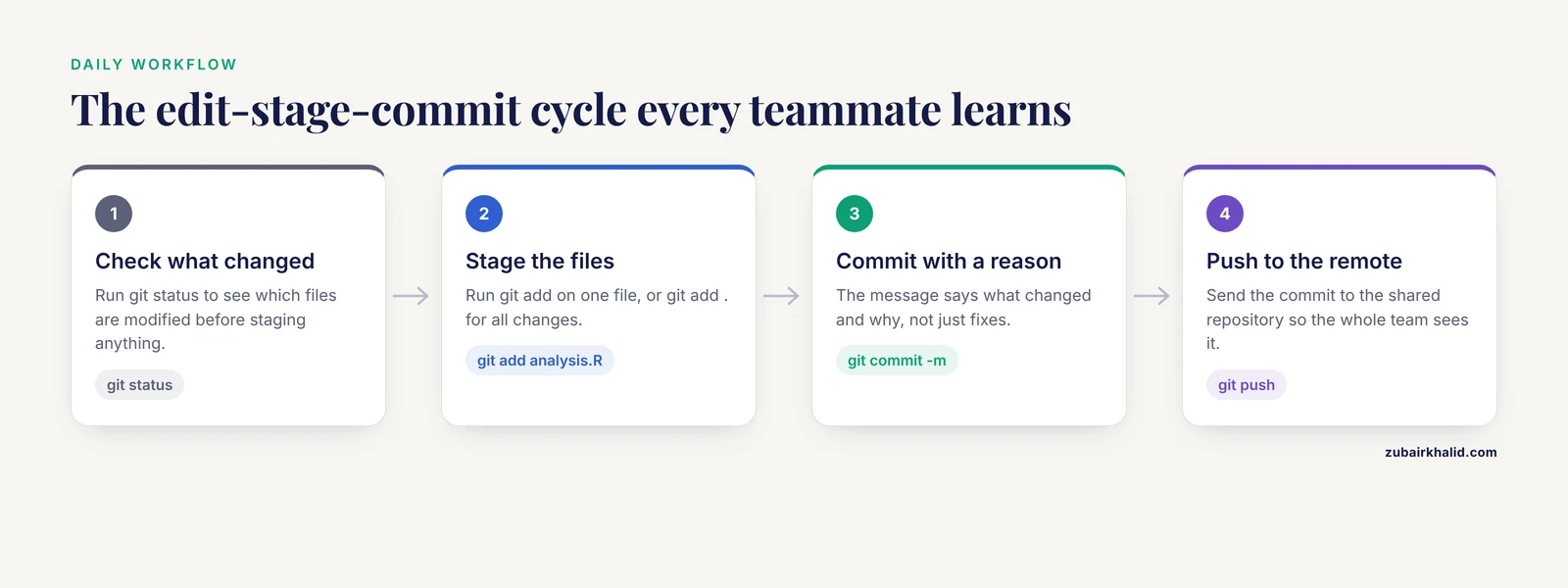
The dominant daily workflow is a loop: edit files, stage them, commit them. Teach every new team member this loop in their first week.
git status                 # see what changed
git add analysis.R         # stage one file, or "git add ." for all changes
git commit -m "Add covariate adjustment to primary model"
git push
Commit messages should say what changed and why. "Fixes" is useless six months later. "Fix column name mismatch after data recode of 2026-04 batch" will save a future teammate an afternoon.
Step 3. Use branches and pull requests for every change
Direct commits to the shared main branch cause most coordination conflicts. Instead, each piece of work gets its own branch, and changes reach main only through a pull request, a proposal that teammates review before merging.
git checkout -b fix-normalization
# ...edit files...
git add .
git commit -m "Correct batch normalization factor from 1.5 to 0.75"
git push -u origin fix-normalization
Then open a pull request on the hosting site. A reviewer reads the diff, the line-by-line comparison of changes, and either requests changes or approves. This is where transparency becomes quality control: someone else has read your analysis before it enters the shared record [4].
Step 4. Keep sensitive data out with .gitignore
Identifiable patient data must never enter a version-controlled repository. A .gitignore file lists file patterns that Git will refuse to track, which prevents accidental commits [4].
# .gitignore
data/*.csv
*.idat
*.fastq
.env
credentials.txt
If a collaborator runs git add . in a folder containing raw data, Git will skip everything matched by these patterns. Check the result with:
git statusYou should see only code and documentation files listed as staged or modified. If data files ever appear, stop, do not push, and ask a teammate who knows Git for help before proceeding, because removing files from history is a separate, more involved operation.
Step 5. Document the project and preregister the plan
A README file at the repository root answers three questions for any newcomer: what this project does, how to set it up, and how to reproduce the main result. Write it before you think you need it.
For study designs, preregistration means registering your hypotheses, analysis plan, and exclusion criteria on a public timestamp before you look at the outcome data. Research teams use the Open Science Framework for this, and published protocols increasingly cite OSF registrations as standard practice [5][6]. A consortium studying reproducibility directly identified early planning as a key insight participants gained from working openly: deciding what you will do before you do it is itself a transparency practice [3].
Step 6. Automate checks with continuous integration
CI/CD pipelines run tests automatically on every push. Active open-source projects generate enormous volumes of pipeline execution records, which shows how central this practice has become to collaborative software work [7]. A minimal GitHub Actions workflow file, saved as .github/workflows/check.yml, looks like this:
name: check
on: [push]
jobs:
  test:
    runs-on: ubuntu-latest
    steps:
      - uses: actions/checkout@v4
      - name: Run analysis tests
        run: python tests/run_tests.py
When a teammate opens a pull request, the pipeline runs and reports pass or fail next to the request. A green check mark tells reviewers that the proposed change did not break the analysis. Expected output on the pull request page is a status line such as "check / test: pass" with a link to the execution log.
Step 7. Containerize the analysis environment
A container packages your software, its dependencies, and their versions into a single image that runs identically on any machine. Containerization was one of the concrete reproducibility enablers identified by the multi-year consortium study, alongside co-developed tools and strong documentation [3].
A minimal Dockerfile for an R project:
FROM rocker/r-ver:4.5.0
COPY . /project
WORKDIR /project
RUN Rscript -e 'install.packages(c("ggplot2", "dplyr"))'
CMD ["Rscript", "analysis.R"]
Build and run it:
docker build -t team-project .
docker run team-project
Expected output starts with build steps and ends with your analysis results printed to the terminal. A collaborator who pulls the same image gets the same result, on their laptop or on a server, without installing packages themselves.
Step 8. Share data responsibly
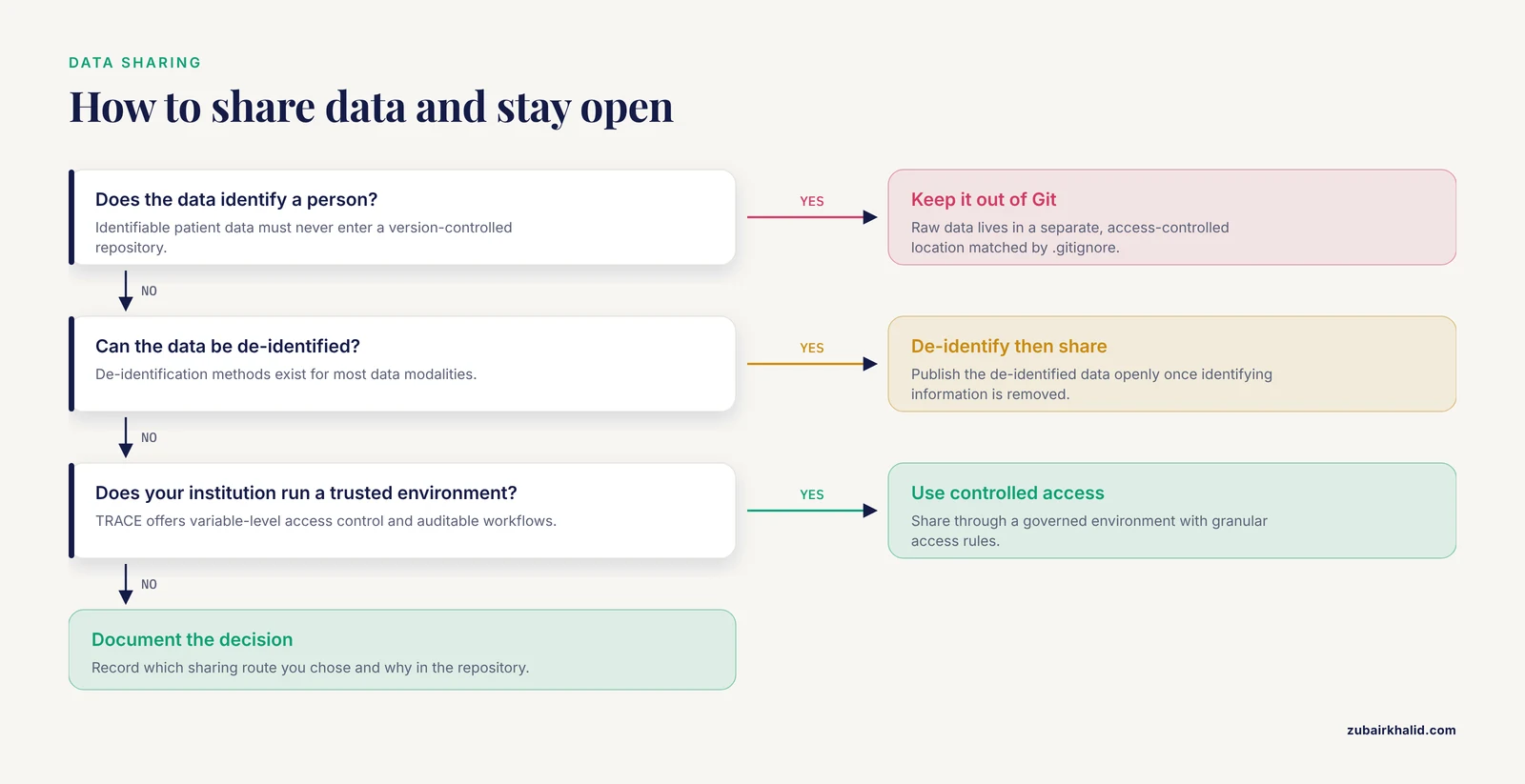
Open does not mean careless. Health data sharing requires de-identification, the process of removing or transforming information that could identify a person. A scoping review of 309 documents on de-identification found that most work has addressed single data modalities, with unstructured data, structured data, and medical images as the leading categories, and that multimodal de-identification remains a documented gap [9]. For teams, this means de-identification is a project-design decision, not a last-minute chore.
When raw identifiable data cannot be shared publicly, controlled-access pathways preserve openness of methods while protecting privacy. The OpenNeuroPET effort paired fully open PET-BIDS sharing on OpenNeuro with controlled-access options on complementary platforms designed for compliance with the European Union General Data Protection Regulation [2]. The TRACE environment, designed around FAIR principles, offers granular variable-level access control, auditable workflows, and provisioning into a sealed analysis environment, all operable by existing institutional staff [8]. Ask your institution whether it operates a comparable trusted research environment before assuming you must choose between full openness and no sharing at all.
Step 9. Verify any AI assistance
Many teams now use large language models (LLMs) for literature synthesis, code generation, and writing assistance. A risk framework published for life science research argues that prompt design is itself a risk management strategy, and that verification effort should scale with three dimensions: how verifiable the output is, the researcher's expertise, and the consequence of error [10]. In a transparent team workflow, this translates to two rules. First, record in your repository when and how an AI tool contributed to code or text. Second, treat AI-generated analysis code exactly like code from a new teammate: it goes through a branch, a pull request, and a human review before merging.
Step 10. Check the result
Before you call the workflow done, run this audit:
- Clone the repository to a clean machine, follow only the README instructions, and confirm the main result reproduces.
- Run
git log, onelineand confirm the history tells the story of the project in readable commits. - Confirm the CI pipeline passes on the current main branch.
- Confirm
git statusshows no sensitive files tracked. - Confirm the OSF project links to the repository and contains the registered plan and final data or access instructions.
If any check fails, the fix is usually documentation, and that is a normal finding, not a failure.
A Reproducibility Checklist for Team Projects
A reproducibility checklist is a short list of conditions that must hold before a project is considered transparent. Teams in the reproducibility study cited above found that such practices, applied from the start rather than at the end, prevented most downstream problems [3]. Use this checklist at project kickoff, at each major analysis milestone, and before submission.
- The repository has a README that a new member can follow to set up the environment.
- Every analysis step is committed to version control with a descriptive message.
- All changes reach the main branch through reviewed pull requests.
- No identifiable data exists anywhere in the repository history.
- Raw data files are matched by
.gitignorepatterns, and their processing steps are documented. - Data and metadata follow a community standard where one exists, in the way PET datasets follow PET-BIDS [2].
- The computing environment is captured in a container or equivalent dependency specification.
- Hypotheses and the analysis plan are preregistered, with deviations documented and dated.
- Automated tests run on every proposed change through a CI pipeline [7].
- Data sharing follows a documented decision: fully open, de-identified open, or controlled access through a governed environment [9][8].
- Authorship criteria, roles, and data ownership agreements are written down and shared with the whole team [5].
- Any AI-assisted code or text is disclosed and verified by a human reviewer [10].
Twelve items is deliberately short. A checklist you actually use beats an exhaustive one you skip.
Tips for Team Culture
Technical infrastructure fails without matching habits. Research on health research partnerships synthesized practical guidance across seven domains: reporting, communication and meetings, training and education, conflict management, co-authorship, agreements, and collaborative product ownership [5]. Three tips cover most situations.
Write down roles before writing code. Decide who reviews pull requests, who controls the main branch, and who owns each data product. Formal communication plans and documented governance appear repeatedly in successful partnerships [5].
Normalize imperfect work. The longitudinal reproducibility study found that fear of exposing imperfect work was a real barrier, and that senior researchers role modeling openness, including showing their own drafts and errors, was a leading enabler [3]. If you lead a team, commit your own rough analyses publicly. Nothing else communicates that the repository is a workshop, not a showroom.
Use structured open participation for input-gathering. Crowdsourcing, the practice of inviting a large diverse group to submit ideas through an open call, has been applied productively in research contexts, for example a national open call that collected and analyzed over one hundred youth-submitted creative entries to shape HIV prevention strategies [11]. For a research team, the same principle applies in miniature: open calls for analysis ideas, hackathon contributions, or dataset annotation bring in perspectives a closed room will not.
Open-source releases also benefit the field beyond your team. Published examples include an interactive viewer for vendor-neutral MRI pulse sequence files that supports command-line, Python, and MATLAB interfaces so it can plug into existing workflows [12], and an open-source R Shiny dashboard that consolidates eleven burden-of-disease analysis modules into a code-free interface, lowering the technical barrier for investigators in resource-limited settings [13]. When your team releases a tool, designing for easy integration multiplies its usefulness.
Common Mistakes and Limitations
Committing data that should never be in Git. The single most consequential error in team version control is letting identifiable patient data into a repository. The fix is preventive: a .gitignore file written on day one, plus a team rule that raw data lives in a separate, access-controlled location [4]. Removing files after a push is difficult, so prevention is the only practical strategy.
Bolting transparency on at the end. Participants in the reproducibility consortium reported that their key insight was the value of early planning. Retrofitting documentation, containers, and preregistration onto a finished analysis costs far more than building them in [3].
Assuming open equals unvalidated. Open-source tools deserve the same scrutiny as any other method. A review of thirteen open-source deep learning segmentation tools for glioma volumetry found respectable analytical performance, with Dice scores between 0.73 and 0.92 for tumor subregions, yet noted that no automated tool had been formally validated against the current RANO 2.0 volumetric response criteria, and that most treatment response studies carried bias risk in patient selection [14]. The Dice score, defined as twice the overlap of two segmentations divided by their combined sizes, measures agreement between an automated result and a reference. A good score on a benchmark is not clinical validation. Adopt open tools, but document their validation status for your specific use.
Treating openness as incompatible with privacy. Teams sometimes either share everything recklessly or share nothing. Both are errors. De-identification methods exist for most data modalities, and governed access environments such as TRACE demonstrate that auditable, variable-level controlled sharing is practical within institutional structures [9][8].
Letting AI outputs bypass review. LLMs produce characteristic failures including hallucination, the generation of plausible but false content, and sycophancy, the tendency to agree with the user. A structured risk framework for life science use recommends matching verification intensity to the stakes and verifiability of each task, with documentation of AI use throughout [10]. A team that merges AI-generated code without the same review it gives human code has a transparency gap, not just a quality gap.
Uneven engagement across career stages. The reproducibility study documented unequal participation, often because trainees lack protected time while senior staff lack recent technical practice [3]. Pair a trainee with a senior member on repository maintenance and both problems shrink.
Skipping the agreements conversation. Co-authorship rules, data ownership, and conflict management are predictable friction points. Partnership guidance recommends addressing them explicitly and early, in written form, rather than improvising when a dispute arrives [5].
One general limitation applies to everything above: transparent workflows make errors visible, which is the point. When your open repository reveals that a result does not replicate, that finding is a successful outcome of the system, not a failure of your team. And as always, specific clinical or safety decisions in a research project, such as protocols involving human participants or animals, require review by the appropriate institutional board and qualified professionals.
Frequently Asked Questions
What are open science collaboration tools?
They are software platforms and shared standards that let research teams work on code, data, and manuscripts in a transparent, version-tracked way. The core set includes Git for version control, the Open Science Framework for plans and files, community data standards, CI pipelines for automated checks, and containers for portable analysis environments.
Do I need to learn Git to do reproducible research?
You need some version control, and Git is the dominant option in academic settings. Four concepts cover most daily use: repository, commit, branch, and remote, applied through the edit-stage-commit cycle [4].
How can we share sensitive health data while staying open?
Use de-identification appropriate to your data type, then publish either the de-identified data or a documented controlled-access pathway. Trusted research environments with variable-level access control and auditable workflows are designed for exactly this balance [8].
What is a reproducibility checklist?
A short list of conditions your project must satisfy to count as transparent and reproducible, covering documentation, version control, preregistration, environment capture, data governance, and AI disclosure. Apply it at kickoff, at milestones, and before submission.
How does preregistration on the Open Science Framework work?
You upload your hypotheses, analysis plan, and exclusion criteria to an OSF project and timestamp them before examining outcome data. Reviewers and readers can then compare the registered plan against the reported results. Published protocols commonly reference OSF registrations [5][6].
What exactly should we give journal reviewers who ask for code?
A public repository link containing the analysis code, a README with setup instructions, the container or environment specification, and any synthetic or de-identified test data. Journals increasingly request code availability statements, so plan for this before submission [4].
Can we use AI assistants in an open team workflow?
Yes, with disclosure and verification. Record when and how an AI tool was used, route AI-generated code through the same branch and pull request review as human code, and scale verification effort to the consequence of error for each task [10].
How do we decide authorship in a large collaborative team?
Write authorship criteria into a team agreement at project start, covering contribution expectations, order decisions, and how new contributors earn authorship. Explicit co-authorship and agreement practices are among the seven domains partnership guidance recommends addressing in writing [5].
Sources
- GBA1 Canada initiative (G-can), a pre-competitive, open science platform for GBA1 research.
- Building an open infrastructure for molecular neuroimaging: Standards and tools from the OpenNeuroPET initiative.
- Radical reproducibility, real constraints: An autoethnography of open and transparent research from the inside.
- Version Control for Surgical Data Science: A Primer on Git and GitHub.
- Identifying practices for meaningful health research partnerships: series of rapid environmental scans.
- Mapping the Clinical Competencies Required for Nurses to Use Point-of-Care Ultrasound: A Scoping Review.
- An empirical dataset combining repository metrics and pipeline workflows for predictive software analytics.
- FAIR by design (TRACE): A Trusted Research Access & Collaboration Environment.
- De-identification of health data for open sharing: A scoping review.
- A practical risk framework for large language model use in life science research.
- Strategies to Promote HIV Self-Testing and Long-Acting Injectable PrEP Among Ghanaian Youth: Results from the Y-FIT GH National Crowdsourcing Open Call.
- SeqEyes: An Open-Source Toolbox for Synchronized Waveform/Trajectory Visualization in Pulseq.
- Open-Source R Shiny Dashboard (Global Burden of Disease Analysis Suite) for Multimethod Burden of Disease Research: Development and Evaluation Study.
- Validation of open-source deep learning segmentation tools for automated glioma volumetry: a narrative review of Dice scores, workflow efficiency, and clinical RANO 2.0 implementation.