Migrating Your Research Team from Email to a Communication Platform
By Dr. Zubair Khalid, DVM, MS, PhD ·

By the end of this guide you will be able to plan a migration from email to a team communication platform (TCP), choose the right platform for your lab or research group, design a channel structure that survives contact with real workflows, onboard every team member including the skeptics, and measure whether the switch actually improved collaboration. To follow along you need an accurate count of your team members, a list of the recurring email threads your group depends on, administrator access to an institutional email domain (helpful for invitations and security review), and about four to six weeks of patience for a phased rollout.
This guide treats a TCP as any persistent, channel-based messaging environment such as Slack, Microsoft Teams, Discord, or Basecamp. Scholarship on research groups describes these platforms as digital spaces that make mentoring and question-asking visible, support collaboration across time zones, and move critical conversations out of private inboxes into shared forums [1].
Why Research Teams Leave Email Behind
Email chains fragment knowledge. A decision buried in a reply-all thread between four collaborators is invisible to the fifth collaborator who joins the project two months later. Reviews of project stakeholder communication identify email chains, siloed document management, and fragmented information exchange as the classic failure modes that cloud collaboration platforms were built to fix, through centralized documentation, live updates, and role-based access to project data [2].
For research groups specifically, the argument is stronger than convenience. A study of team communication platforms in early-career research settings found that TCPs make learning and mentoring more visible, because a graduate student can watch how a principal investigator answers a methods question in a public channel rather than waiting for a private reply. Moving questions and answers into public forums increased both efficiency and transparency in the groups studied. The same platforms support asynchronous participation across time zones, which matters for any collaboration with an off-site core facility, an international partner, or a field site [1][3].
There is also a second-order benefit. When a team communicates in a structured platform, the resulting record becomes analyzable. Researchers studying distributed collaboration have coded conversation data pulled directly from their own team communication platform to understand how their members coordinate work [4], and social technologies researchers argue that these tools reshape team processes in ways email cannot, because they create persistent, searchable, linkable traces of who talked to whom about what [5].
Email still has legitimate uses. External manuscript correspondence, journal submissions, and official university business usually belong in email. The goal of a migration is not to eliminate email. The goal is to stop using it as the team's internal operating system.
Choosing a Platform: A Practical Research Software Comparison
The best software for researchers is the software your team will actually use, so evaluate fit before features. A controlled evaluation of mobile collaboration apps in a project-heavy industry found that only a minority of candidate apps had empirically demonstrated functionality, and that Slack, Microsoft Teams, and Basecamp stood out for communication, collaboration, and decision-making support [6]. Research on multi-tool environments adds a warning: no single platform does everything, and mature teams pair their messaging tool with a task tracker and a documentation space, the way agile software teams pair Jira for issue tracking with Confluence for centralized documentation and GitHub for version control [7].
| Platform | Communication style | Best fit for | Watch out for |
|---|---|---|---|
| , - | , - | , - | , - |
| Slack | Channel-based chat, threads, integrations | Labs that run many parallel projects and want deep tool integrations | Notification overload without channel discipline |
| Microsoft Teams | Chat plus video meetings plus Office integration | Universities already licensed on Microsoft 365 | Search and file organization feel clunky to some teams |
| Discord | Servers, channels, voice rooms | Fast-moving, informal groups, hackathons, rotating membership | Perceived as a gaming tool by some senior colleagues |
| Basecamp | Message boards, to-dos, schedules | Small teams that want structure more than chat | Less real-time conversation, fewer integrations |
Cross-cultural and dispersed teams have additional selection criteria. A bibliometric map of digital platform collaboration research notes persistent gaps in evidence about non-Western platforms and cultures, meaning most popular tools embed Western workplace assumptions [8]. If your collaboration spans countries, check whether the platform performs well on low-bandwidth connections and whether its data residency complies with your partners' institutional rules. Field studies of dispersed research teams in Southeast Asia identified limited information and communication technology infrastructure and uneven user training as real external constraints on platform-based collaboration [9]. Ask your international partners before you commit, not after.
Migrating Your Research Team from Email to a Communication Platform Step by Step
The sequence below is a proven phased approach. Total elapsed time for a five to fifteen person academic team is typically four to six weeks. Large multi-institution consortia should budget proportionally more.
Step 1: Audit your current email traffic
Before you design anything, measure what email actually carries for your team. Run this audit manually or with your email client's search and filter tools over a representative two-week window.
For each team member, count messages in two weeks that fall into:
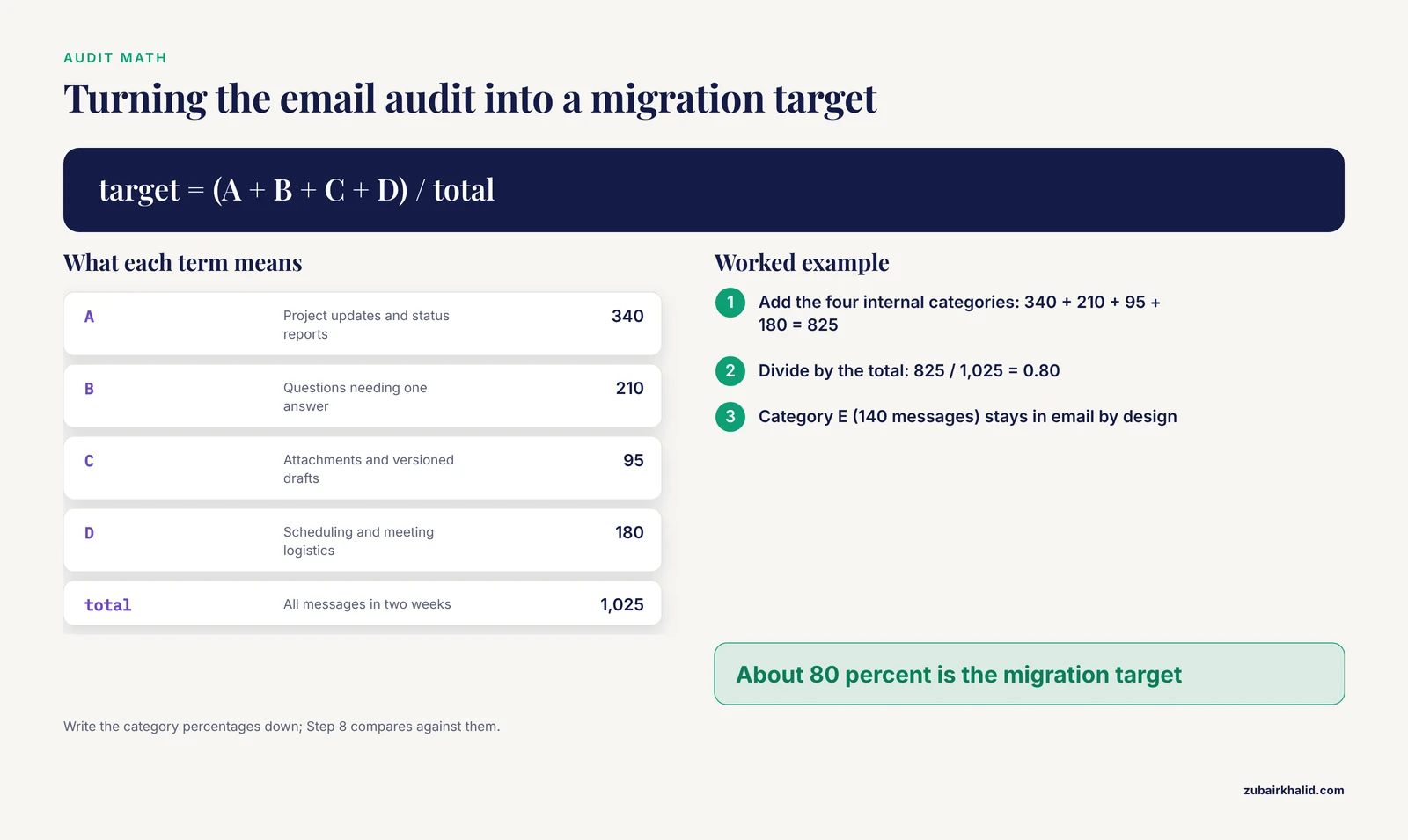
  A. Project updates and status reports
  B. Questions that needed one answer (methods, reagents, file locations)
  C. File attachments and versioned drafts
  D. Scheduling and meeting logistics
  E. External correspondence (journals, funders, vendors)
  F. Everything else
Worked example. Suppose a nine-person lab logs the following totals over two weeks: A = 340 messages, B = 210, C = 95, D = 180, E = 140, F = 60. Categories A through D total 825 of 1,025 messages, or about 80 percent. That 80 percent is your migration target. Category E stays in email by design. Write the category percentages down, because you will compare against them in Step 8.
The purpose of the audit is calibration. Studies of research team collaboration show that perceived collaboration and measured collaboration patterns do not always align, so grounding your plan in actual message volume rather than impressions gives you a defensible baseline [10].
Step 2: Pick a channel taxonomy before you create the workspace
Channels are the core organizational unit of every TCP. A channel is a dedicated, named conversation space with its own membership, history, and searchable archive. Design the taxonomy on paper first, using a consistent prefix system so channels sort logically.
#announce-lab-wide        one-way announcements, PI posts only
#projects-grant-nsf-2026   one channel per funded project
#projects-core-sequencing  one channel per shared resource or facility
#methods-rna-seq           one channel per shared technique
#social-lab-coffee         informal, on-topic-optional
#admin-reimbursements      logistics, forms, deadlines
Expected naming rules, stated in your team charter:
1. Lowercase, hyphenated, no spaces.
2. Prefix determines the channel's category and who must join.
3. Every project gets exactly one channel, never a new channel per experiment.
4. A channel with zero posts for 90 days gets archived.
Resist the temptation to create dozens of fine-grained channels on day one. A study of telemedicine teams found that collaboration can impose a cognitive-load effect that reduces team effectiveness, and while that finding concerns task collaboration rather than chat, the underlying mechanism transfers directly: more simultaneous coordination streams mean more attention demanded from each member [11]. Start with roughly one channel per project plus a small set of standing channels, and let demand justify additions.
Step 3: Create the workspace and configure defaults
Create the workspace under your institution's domain if your IT office offers managed accounts, because institutional management simplifies offboarding when members leave and clarifies data ownership. Configure three settings before inviting anyone, because defaults set before arrival become normal behavior, while defaults changed after arrival feel like new rules.
Setting 1. Default notifications: mentions and direct messages only,
           channel activity opt-in. This prevents day-one overload.
Setting 2. Message retention: follow institutional data policy.
           Many universities require defined retention periods for
           research records.
Setting 3. External collaboration: allow invitations by invitation
           link or admin approval only.
If your work involves human subjects data, controlled-access data, or proprietary material, run the platform past your institutional data security office before the first message is posted. Channel-based platforms keep data on vendor servers, and your technology transfer or compliance office will want that documented.
Step 4: Write a one-page posting protocol
Norms decide whether the platform helps or annoys. Draft a single page covering:
- Which channel types exist and who must join which ones.
- When to use a thread versus a new message. Threads keep answers attached to questions, which is precisely the visibility benefit documented for research groups.
- Expected response times. For example, channel mentions answered within one working day, direct messages within four working hours.
- What never moves to the platform, such as external journal correspondence and anything your compliance office excludes.
Pin the protocol in the announcement channel. A field study of distributed research teams emphasized that explicit best practices and shared work patterns are what make distributed collaboration sustainable rather than accidental [12]. The protocol is that artifact.
Step 5: Onboard every member, in person if possible
Schedule a 30-minute live setup session. Have each person install the desktop and mobile apps, join the required channels, set their notification preferences, and post one test message. A structured onboarding matters more than enthusiasm. Survey research on remote technology teams found that higher digital tool adoption reduced project timeline deviations specifically when supported by structured onboarding and platform integration, and that tool usage alone, without those supports, was not sufficient [13].
Expect uneven enthusiasm across career stages. Research on multigenerational engineering teams documents that different generations bring different communication preferences and attitudes toward workflow technology, and that flexible approaches, rather than one-size-fits-all mandates, reduce the resulting friction [14]. Practically, this means pairing each hesitant senior member with a patient junior champion, and letting senior members keep email for external correspondence while their questions migrate to public channels.
Cross-cultural teams need one more layer. Interview research with professionals in multinational organizations found that language barriers, misinterpreted non-verbal cues, cultural training, explicit communication protocols, and visible leadership support were the dominant factors in cross-cultural communication success [15]. In a TCP context, that translates to writing norms in plain English, avoiding idiom-heavy jokes in project channels, and having the principal investigator visibly model the protocol.
Step 6: Run email and the platform in parallel for two weeks
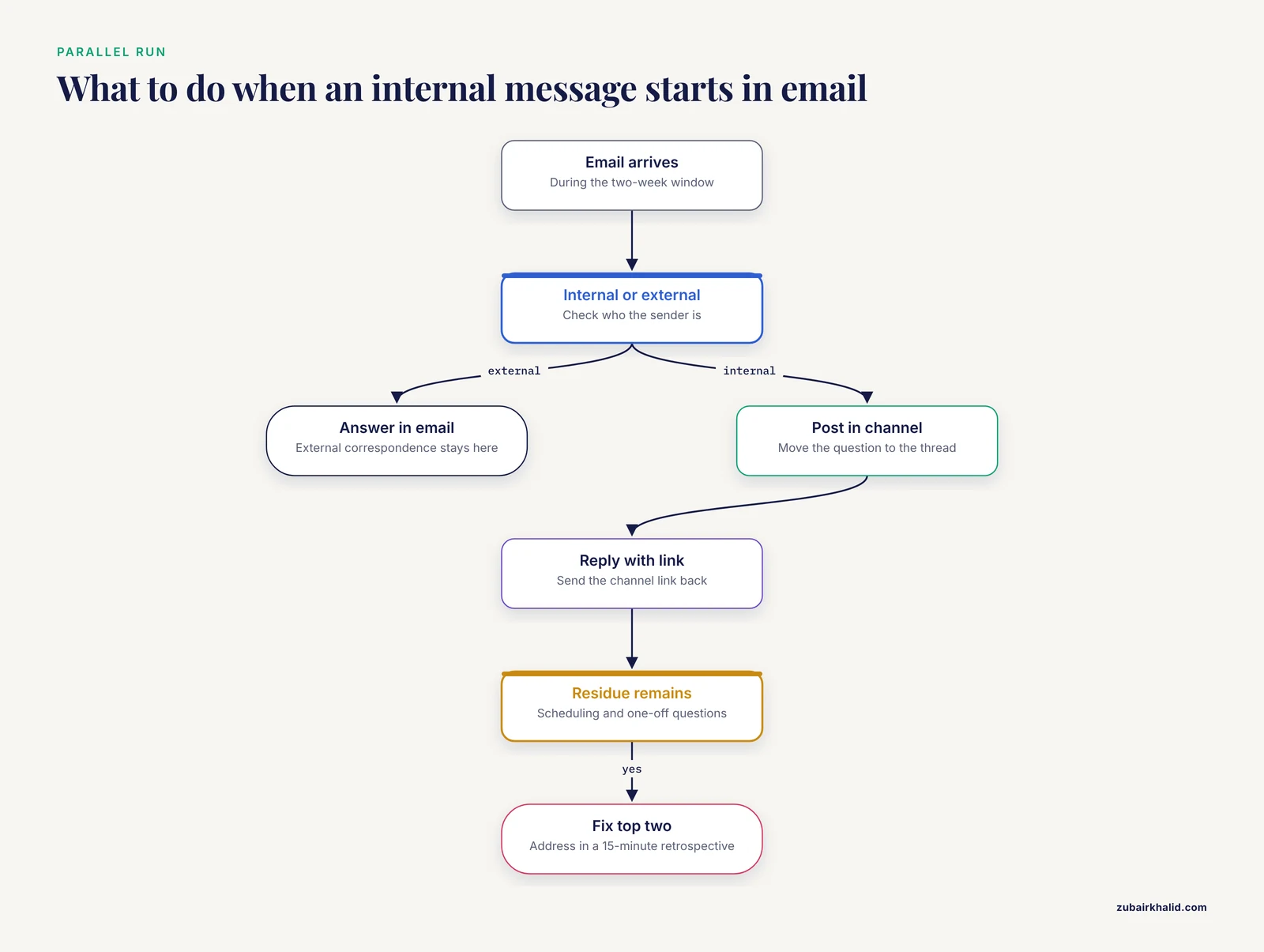
Declare a parallel-run window. During it, every internal message that starts in email gets answered with a link to the relevant channel thread. Do not attempt a hard cutover on a Friday afternoon before a grant deadline.
A practical forcing function for the end of the window is the auto-reply. At the end of week two, internal senders receive this message:
Subject: Re: [original subject]

Thanks for the email. Our team now coordinates project work in
[platform name]. I have posted your question in #projects-[project]
and will answer it there. For project questions, please post
directly in that channel. External correspondence still reaches
me here.
Expected outcome of the parallel run: internal email volume drops noticeably within days, but a residue remains, usually scheduling requests and one-off questions from people who have not formed the channel habit. Address the residue in a 15-minute retrospective. Ask each person to name one thing that was harder in the new platform, and fix the top two items before the cutover.
Step 7: Cut over, archive, and integrate
At the cutover, take three actions.
First, create an email-to-platform bridge if the platform supports email ingestion, so that automated system notifications from instruments, repositories, or submission systems can post into a dedicated channel rather than a person's inbox.
Second, connect your existing research tools. If your team uses a reference manager, an electronic lab notebook, a version-controlled code repository, or a project tracker, configure its notifications into the relevant channels. Evidence from agile software teams shows the value of synchronized tools that give all members real-time visibility into task state, and the same integration logic applies to research workflows such as manuscript status, sample tracking, and analysis pipelines [7].
Third, freeze the old mailing list. Do not delete it. Set it to archive-only, announce the freeze date in both systems, and keep the archive searchable for at least one full grant cycle, because progress reports and renewal applications routinely quote old threads.
Step 8: Measure whether it worked
Return to your Step 1 audit numbers and re-count over the same length of window, eight weeks after cutover. Useful indicators:
Internal email volume:      target below 30% of baseline
Median time to answer a
  methods question:         compare thread timestamps against
                            the old email reply gaps
Channel participation:      proportion of team members who posted
                            at least once per week
Archive searches:           count of successful searches for past
                            decisions, a benefit email cannot match
Interpret the numbers alongside a short perception survey of your own team. Methodological work on research team collaboration argues that participant perceptions and network measures each catch things the other misses, and that combining them gives the most trustworthy picture of whether collaboration actually improved [10]. If participation is low and email volume is creeping back up, treat that as a protocol problem, not a people problem. Revisit Step 4.
Common Mistakes and Limitations
Recreating the inbox. The single most common failure is using channels as one-to-many email broadcasts, with no threads, no naming discipline, and replies sprayed across the main channel. This produces the worst of both systems. Enforce thread replies in project channels from day one.
Creating too many channels too fast. Every new channel is a new attention stream. The cognitive-load mechanism documented in telemedicine teams, where added coordination burden degraded effectiveness, is a direct caution against channel sprawl [11]. Start small and archive aggressively.
Assuming the tool does the work. Regression analysis of remote technology teams found that tool usage alone did not improve delivery outcomes. The effect was conditioned by team size, task complexity, geographic dispersion, training, and how well the tool matched the tasks [13]. Budget as much effort for norms and onboarding as for configuration.
Ignoring who is excluded. Platform-based collaboration assumes reliable connectivity, current devices, and fluency with the tool. Field research with dispersed teams in low-income settings documented limited infrastructure, uneven user education, and institutional coordination gaps as genuine constraints, and noted that technology choices can reinforce existing power imbalances between high-income and low-income partners [9]. If any team member, including a field technician or a community partner, cannot participate comfortably, the platform has created a two-tier team.
Believing the platform replaces trust. A mixed-methods study of a transnational climate resilience project concluded that virtual platforms and email, though convenient, can fail to build the depth of trust and rapport that complex interdisciplinary collaboration requires, and the authors argued for periodic in-person retreats as a complement, not a replacement [3][16]. Schedule face-to-face time for team formation and conflict resolution. The platform carries the relationship between those moments. It does not create it.
Forgetting the cultural layer. Language barriers and misread non-verbal cues are among the best-documented challenges in globally distributed teams, and explicit communication protocols plus leadership attention are the corresponding remedies [15]. A TCP strips away tone of voice and facial expression, which makes written clarity matter more, not less.
Over-integrating. Each connected tool adds notifications. Connect the three or four systems your team checks daily, and leave the rest out until someone asks.
Frequently Asked Questions
Which platform is the best software for researchers?
There is no single best platform, only the best fit. Slack and Microsoft Teams are the most commonly validated general-purpose options in app evaluation studies, Discord suits informal and fast-moving groups, and Basecamp suits teams that want structure over chat [6]. If your university already licenses Microsoft 365 or supports one vendor, that administrative support usually outweighs feature differences.
How long does it take to migrate a research team from email to a communication platform?
A small academic team typically needs four to six weeks from planning to full cutover, with two of those weeks running both systems in parallel. Larger or multi-institution groups should expect longer, because more members means more onboarding sessions and more compliance review.
Do we have to delete our old email during the migration?
No. Set the old mailing list or shared inbox to archive-only and keep it searchable for at least one grant cycle. Old threads contain decisions, reviewer responses, and data provenance that progress reports and renewals may need.
How do we handle collaborators outside our university?
Most platforms support guest accounts or single-channel shared access for external collaborators. Invite them only to the channels they need, confirm their institutions permit the tool under their own data policies, and state in your posting protocol that funding-agency and journal correspondence stays in email.
Is a communication platform safe for sensitive research data?
Treat it like any cloud service. Route the decision through your institutional data security or compliance office before rollout, especially for human subjects data, controlled-access datasets, or export-controlled material. Configure retention according to institutional policy rather than platform defaults.
How do we get senior faculty and resistant team members on board?
Pair each hesitant member with a patient champion, keep their external email use untouched, and let the platform demonstrate value on their terms, usually by answering a methods question faster or finding an old decision in seconds. Flexible, non-mandated adoption reduces the generational friction documented in technology-driven workplaces [14].
Should our channels be public within the team or private?
Default to public channels within the team. Public channels are what make mentoring, question answering, and institutional memory visible, which is the core benefit research groups gain from these platforms. Reserve private channels for personnel matters, unpublished sensitive findings, and grant budgets.
How do we know the migration actually succeeded?
Compare a post-migration message audit against your pre-migration baseline, and pair the numbers with a short team survey. Internal email volume should drop well below baseline, and mixed indicators should agree that communication got faster and more transparent. If email volume rebounds, revisit your posting protocol rather than blaming the team.
Sources
- Socializing Our Research: Using Team Communication Platforms to Build Collaboration and Professionalization in Early-Career Researchers
- Advances in Project Stakeholder Communication and Transparency Using Cloud Collaboration Platforms
- Virtual Teams in Multinational Companies: Communication, Technology, Trust, and Inclusion in Global Collaboration
- Using Collaborative Coding to Study How Research Teams Coordinate Work
- Teams in the Digital Workplace: Technology’s Role for Communication, Collaboration, and Performance
- Appraisal of Mobile Apps for Communication and Collaboration among Construction Project Teams
- Multi-Tool Collaboration Environments for Effective Stakeholder Communication and Sprint Coordination in Agile Project Teams
- A Bibliometric Analysis of Cross-Cultural Communication on Digital Platforms: Mapping Collaboration, Citations, and Research Themes
- Bridging intercultural communication divides: examining technology use by dispersed research teams working in South East Asia
- Methods for assessing higher education research team collaboration: comparing research outputs and participant perceptions across four collaborative research teams
- The Impact of Physician Collaboration on Online Medical Team Effectiveness: Evidence from a Telemedicine Platform
- Constructive Distributed Work: An Integrated Approach to Sustainable Collaboration and Research for Distributed Teams
- TO WHAT EXTENT DOES THE USE OF PROJECT MANAGEMENT-ORIENTED DIGITAL COLLABORATION TOOLS AFFECT DELIVERY TIMELINES IN REMOTE TECH TEAMS?
- Project Management Strategies for Multigenerational Engineering Teams: Enhancing Collaboration and Performance
- Cross-cultural communication in global teams: Challenges and effective strategies collaboration in multinational corporations
- Building and sustaining equitable and inclusive transdisciplinary research teams: A case for in-person collaboration