How to Migrate Your Paper Lab Notebook to Electronic
By Dr. Zubair Khalid, DVM, MS, PhD ·
By the end of this guide you will have a working plan to move your lab records from paper to an electronic lab notebook (ELN), a clean file structure for your scanned pages, a reusable lab notebook template for new experiments, and a verification step that proves your scans are intact. You will need a scanner or a phone with a document scanning app, a laptop, a folder on your computer or cloud drive for the scan files, and an ELN account chosen before you start.
The move from paper to electronic record keeping is one of the highest value changes a lab can make. Paper notebooks are flexible, but retrieval and sharing from them are labor intensive, and a single misplaced volume loses every entry inside it [1]. ELNs improve data integrity, simplify information exchange, and allow real time and remote monitoring of experiments [2]. The catch is that adoption is disruptive if you improvise, so this guide gives you an ordered procedure instead.
Why Labs Move From Paper to Electronic
Modern life science experiments generate large datasets that paper cannot document well. ELNs handle these datasets with better integrity controls than paper notebooks, and training in electronic record keeping also teaches good documentation practices that carry over to any career in research or industry [2]. Electronic tools now handle almost all data acquisition, analysis, presentation, and archiving, which makes a paper notebook the last paper component of an otherwise digital experiment [3].
Electronic notebooks add functions paper cannot match, including searchable indexes, data sharing, automatic archiving against loss, easy duplication, and even inventory control [1]. Sharing completed notebooks alongside publications can also increase transparency and reduce biased or incomplete reporting of results [4].
The benefits grow when the ELN connects to the rest of your lab systems. Integration with laboratory information management systems (LIMS), chromatography data systems, instruments, and scientific data management systems increases the payoff, although there is no single well established path for that integration [5]. Labs that manage samples and experimental records in one integrated system report fewer lost or mislabeled samples, clearer links between samples and experiments, reduced experimental error, better search, and more efficient freezer use [6].
Choose Your ELN Before You Migrate Anything
Do not scan a single page until you have picked the destination system. Migrating twice is the most expensive mistake in this process.
Electronic Lab Notebook Comparison
Published reviews sort ELNs into five market pools: products built for Quality Assurance and Quality Control environments, products specialized for biology, products specialized for chemistry, products for general research and development, and multidiscipline products that span free form research through stringent quality laboratories [7]. Comparing options against your own lab type is more useful than comparing feature lists.
Published user studies give a realistic picture of the trade offs. In one academic translational research lab, researchers used Evernote for six months to record all routine experimental information and concluded that the advantages of an ELN outweighed the loss of freehand writing, which they worked around with imported snapshots and drawing add ons [8]. In a separate survey based study at a biomedical research institute, researchers tested five ELNs and found that Microsoft OneNote had many of the best ELN features, and both surveyed groups preferred OneNote over a purpose built scientific ELN, although OneNote remains a general note taking tool rather than a scientific one [9]. A bioprocess engineering teaching lab successfully implemented LabArchives, a cloud based ELN, and found it improved workflow, data recording, archiving, sharing, and collaboration [2]. eCAT, an early web based ELN, was built around a permissions system, controlled sharing, an audit trail, electronic signature, and search, and was beta tested by more than 100 individuals and groups including academic labs and the FDA's Center for Biologics Evaluation and Research [10].
Use this table to narrow the field.
| Option type | Examples from the literature | Best fit | Watch for |
|---|---|---|---|
| Generic note taking tool | OneNote, Evernote | Small academic labs, teaching labs, tight budgets | Not designed for science, so you must add structure yourself [9] |
| Cloud research ELN | LabArchives, eCAT | Academic groups and courses that want sharing and audit features | Adoption requires training and workflow change [2][10] |
| Discipline specific ELN | Chemotion ELN and Herbie for chemistry and materials science | Labs with structured, domain specific data needs | Exchanging data between different ELN platforms is a known challenge [11] |
| QA/QC grade commercial ELN | Products in the quality focused market pool | Regulated, GxP style environments | Higher cost and rigidity, evaluate against your compliance needs [7] |
| Integrated sample plus experiment systems | Combined ELN and sample management platforms | Labs tracking many samples and aliquots | Requires buy in from the whole lab, not just one person [6] |
Research on why scientists reject ELNs points to three recurring barriers: cost of available ELNs, ease of use, and accessibility across different devices and operating systems. Scientists willingly use generic notebooking software, spreadsheets, and general scientific tools, but many dedicated ELNs lack functionality researchers actually need [12]. Weight usability at least as heavily as the feature matrix. A powerful ELN nobody opens is worse than a plain tool everyone uses.
Five Questions That Decide the Choice
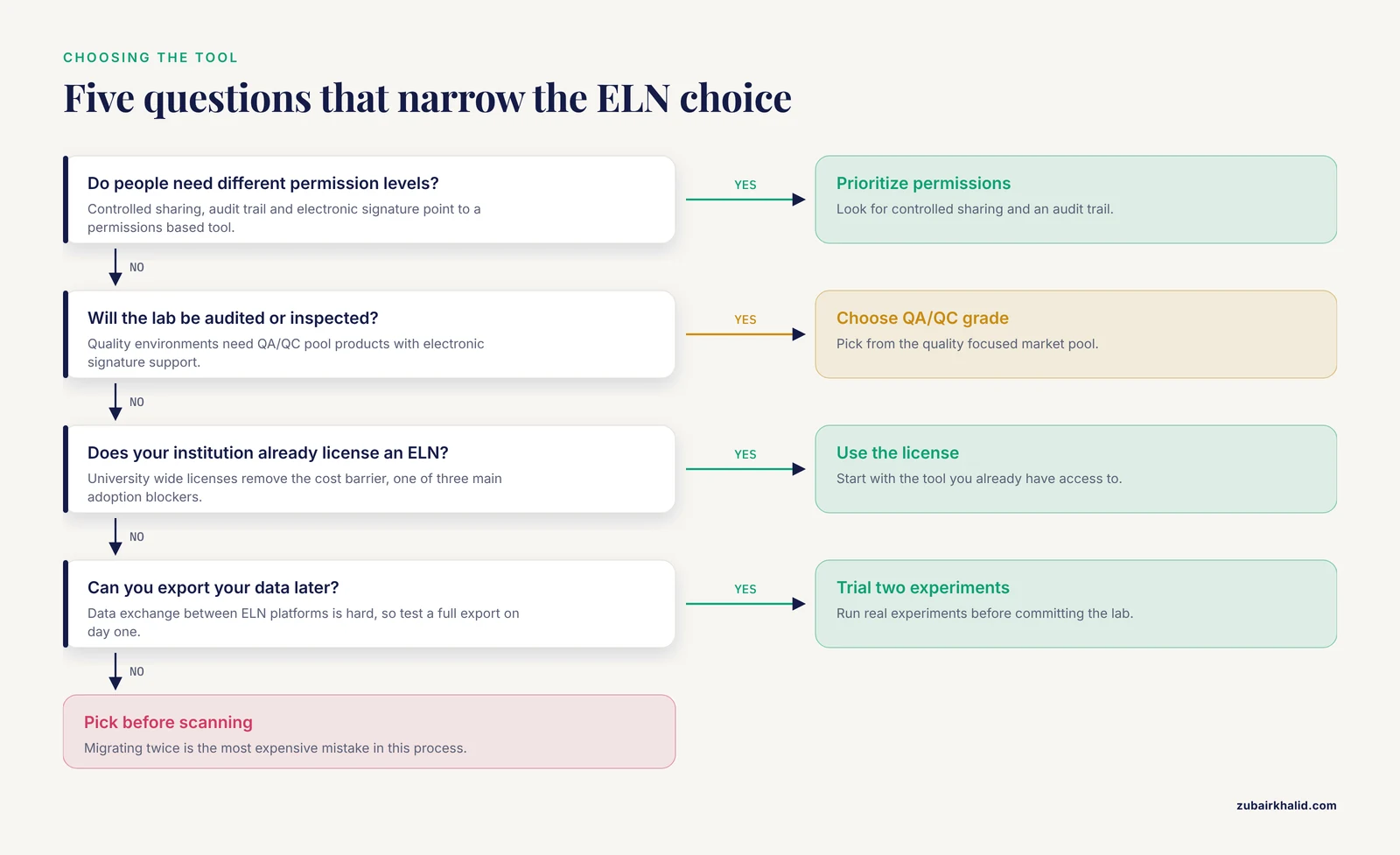
- Who needs to see the records, and do they need different permission levels? If yes, prioritize an ELN with a permissions system, controlled sharing, and an audit trail [10].
- Will this lab be audited or inspected? Quality environments need products from the QA/QC pool with electronic signature support [7][10].
- Do you need chemistry structure drawing, biology specific entities, or freeform text? Match the market pool to your discipline [7].
- Does your institution already license something? University wide licenses remove the cost barrier, which is one of the three main adoption blockers [12].
- Can you export your data later? Data exchange between different ELN platforms is hard enough that dedicated tools such as ELNdataBridge, which uses Python APIs to synchronize data between systems like Chemotion ELN and Herbie, had to be built to solve it [11]. Check the export format before you commit.
Migrate Paper Lab Notebook to Electronic Step by Step
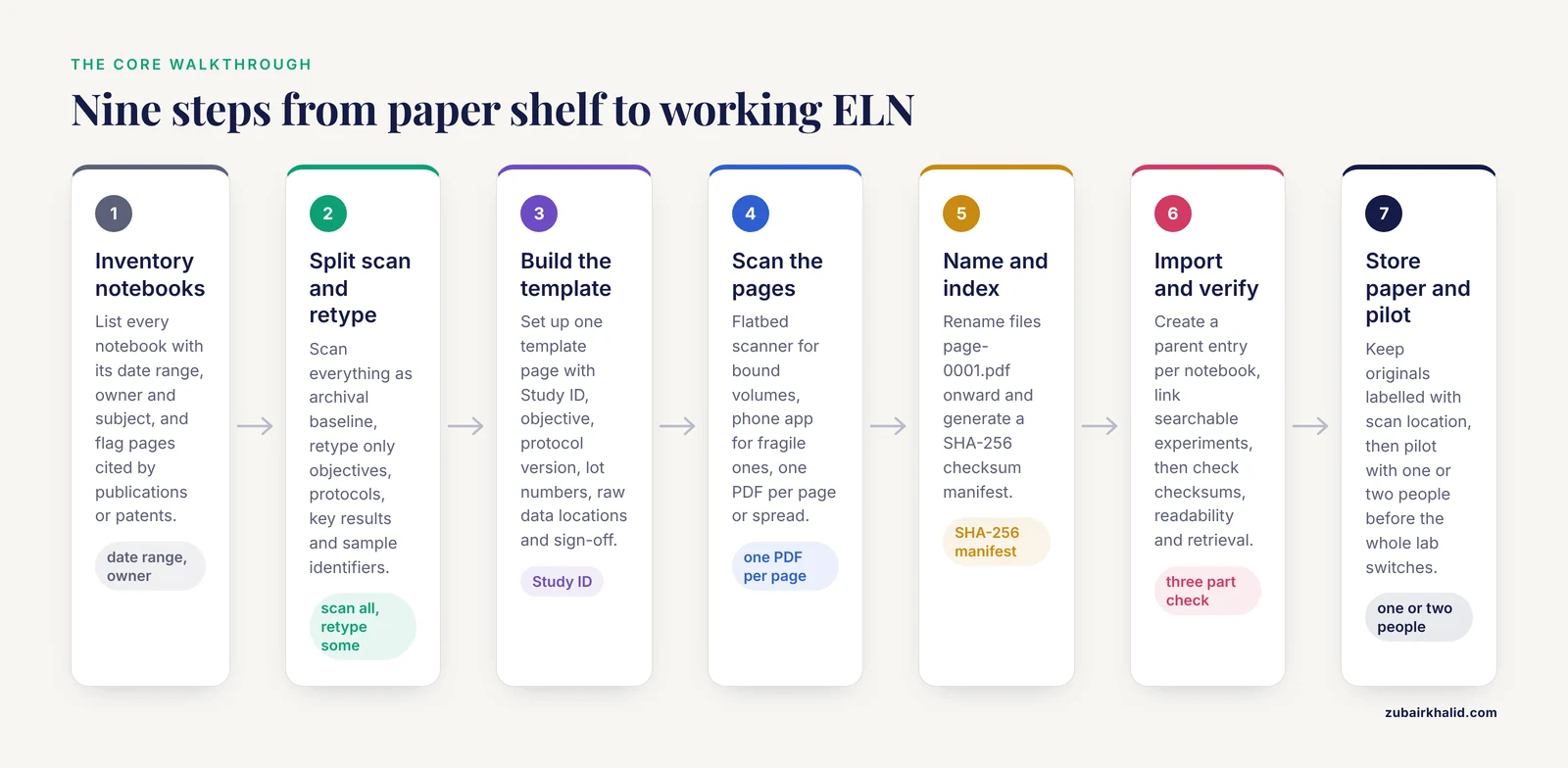
This is the core walkthrough. Work through the steps in order. The example commands assume a macOS or Linux terminal, and the same operations are available in PowerShell on Windows.
Step 1: Inventory Your Paper Notebooks
List every notebook, its date range, its owner, and its subject. Note any pages that are already referenced by publications, patents, or grant reports, because those pages deserve the highest scan quality.
A quick shell command helps you scope the job once scans exist:
ls scans/notebook-01/*.pdf | wc -lExpected output for a fully scanned notebook:
184Compare that count against the physical page count written on the last used page of the paper notebook. If the paper notebook ends at page 184 and the scan folder holds 184 files, nothing was skipped.
Step 2: Decide What Gets Scanned and What Gets Re entered
Not all notebook content deserves the same treatment.
- Scan everything at reasonable quality as your archival baseline. A scan preserves signatures, diagrams, and physical evidence such as taped in gel photos.
- Re type or copy into the ELN only the content you will search, reuse, or link to other records. That usually means experiment objectives, protocols, key results, and sample identifiers.
- Leave dense routine observations in the scan image and reference the image from the ELN entry rather than transcribing every line.
This split keeps the migration tractable. Transcribing 10 years of daily observations by hand is the step most people abandon.
Step 3: Build Your Lab Notebook Template in the ELN
Before importing anything, set up the structure new entries will follow. A consistent template is what makes ELN records searchable and reusable, and structured recording frameworks such as the GIATE minimum information checklist for therapy experiments have been implemented through an ELN for exactly this reason [13]. The concept of a unique Study ID to maintain best practices across a lab is a documented recommendation for eLN adoption [3].
Create one template page in your ELN that every new experiment copies. Here is a working lab notebook template in plain markdown that transfers into almost any ELN:
# Experiment 2026-0142: HeLa cell transfection with pEGFP-N1 plasmid

## Study ID
2026-0142

## Objective
Test whether the GFP expression plasmid transfects efficiently
at the reduced reagent amount planned for the screen.

## Protocol version
Transfection_v3, revision 4 (attach the file here)

## Materials and lot numbers
- pEGFP-N1 plasmid, miniprep batch 2026-11-03, lot A7
- Transfection reagent, lot 0926B
- HeLa cells, passage 22

## Procedure
Summarize deviations from the protocol here. Do not retype
the whole protocol, link it.

## Raw data locations
- Plate reader export: /data/2026-11-11_plate_reader/exp0142.csv
- Microscopy images: /data/2026-11-11_microscopy/exp0142/

## Results and observations
...

## Sign-off
Performed by: J. Doe, 2026-11-11
Reviewed by: (pending supervisor review)
Adjust the fields to your field of work. The fixed elements worth keeping in any lab notebook template are a unique experiment or study ID [3], a link to the protocol version used, lot numbers for critical reagents, pointers to raw data files, and a sign off block.
Step 4: Scan or Photograph the Paper Pages
Scan bound notebooks with a flatbed scanner when you can, or use a phone scanning app for glued and fragile volumes. Scan at a resolution that keeps small handwriting and penciled corrections legible when you zoom in on a screen. Save one PDF per notebook page or per two page spread, and name files so they sort chronologically.
Include the front cover, the table of contents, and any signature pages. Those pages matter for provenance.
Step 5: Name Files and Build an Index
A folder of scans with names like IMG_4021.pdf is nearly useless. Use a naming pattern of notebook number, then sequence number, for example page-0001.pdf through page-0184.pdf. Then generate a checksum manifest so you can prove later that the files have not changed.
Generate checksums with:
cd scans/notebook-01
sha256sum *.pdf > notebook-01-manifest.sha256
head -n 2 notebook-01-manifest.sha256
Expected output (your hash values will differ):
3b7f2a9c41e8d6f5a0c2e9b1d4f7a3c8e5b2d9f1a6c3e8b4d7f0a2c5e9b1d4f8  page-0001.pdf
9d1e4c7a2f8b5e3d6a0c9f2b4e7d1a8c3f6b9e2d5a8c1f4b7e0d3a6c9f2b5e8  page-0002.pdf
A SHA-256 checksum is a fixed length fingerprint of a file. If even one byte of the file changes, the fingerprint changes completely, which makes it a standard integrity check.
For a richer index that includes file sizes, use this short Python script:
import os, csv, hashlib

scan_dir = "scans/notebook-01"
rows = []
for root, _, files in os.walk(scan_dir):
    for name in sorted(files):
        path = os.path.join(root, name)
        with open(path, "rb") as f:
            digest = hashlib.sha256(f.read()).hexdigest()
        size_kb = os.path.getsize(path) // 1024
        rows.append([path, size_kb, digest])

with open("notebook-01-index.csv", "w", newline="") as f:
    writer = csv.writer(f)
    writer.writerow(["path", "size_kb", "sha256"])
    writer.writerows(rows)

print(f"Indexed {len(rows)} files")
Expected output:
Indexed 184 filesThe first rows of notebook-01-index.csv look like this:
path,size_kb,sha256
scans/notebook-01/page-0001.pdf,412,3b7f2a9c41e8d6f5...
scans/notebook-01/page-0002.pdf,398,9d1e4c7a2f8b5e3d...
Store the index file in the ELN itself, attached to a "Migration record" entry, so the integrity evidence lives with the records it protects.
Step 6: Import Scans and Create ELN Entries
For each migrated notebook, create one parent entry in the ELN titled something like "Paper notebook 01, 2019-03 to 2019-08, J. Doe". Attach the full PDF and the index file to that parent. Then create individual ELN entries for the experiments you identified in Step 2 as search worthy, and link each one to the specific scanned page images.
This two layer structure gives you full fidelity archives plus searchable summaries, without forcing you to transcribe everything.
Step 7: Verify the Migration
Verification has three parts.
First, confirm file integrity against the manifest:
cd scans/notebook-01
sha256sum -c notebook-01-manifest.sha256 | tail -n 3
Expected output:
scans/notebook-01/page-0182.pdf: OK
scans/notebook-01/page-0183.pdf: OK
scans/notebook-01/page-0184.pdf: OK
Any line reading FAILED means that file changed or corrupted after scanning, so rescan it from the paper original.
Second, spot check readability. Open five random scans and confirm that handwritten notes, margins, and pasted items are legible.
Third, test retrieval. Ask a labmate who did not do the migration to find a specific experiment, for example "the transfection from March 2019", using only the ELN. If they cannot find it in a couple of minutes, your indexing needs work before you retire the paper originals from daily use.
Step 8: Define What Happens to the Paper
Keep the original paper notebooks stored safely. A scan is a copy of the record, and in some settings the signed paper original remains the record of record. Talk to your institution's research office or quality department about retention rules that apply to your lab rather than assuming the scan replaces the paper. Label the stored volumes with their scan location so anyone can trace a physical page back to its digital copy.
Step 9: Pilot, Then Roll Out
Once old records are in, run new experiments directly in the ELN. Start with one or two people for a few weeks, fix the template and workflow problems they hit, then bring in the rest of the lab. Training matters. In the bioprocess engineering lab course that adopted LabArchives, user experience scores improved between the first and second year the ELN was offered, which the authors attributed to refined training and implementation actions [2]. Budget for a learning curve rather than expecting instant adoption, since ease of use is a documented adoption barrier [12].
Common Mistakes and Limitations
These are the mistakes that show up repeatedly in labs moving from paper to electronic.
Migrating twice. Choosing an ELN after scanning everything means importing twice. Pick and test the ELN first, even if the choice is a simple generic tool, because switching generic tools later is far cheaper than re migrating scans [12].
Scans without an index. A folder of images with camera generated names cannot be searched. The index file and consistent naming in Steps 4 and 5 are what turn images into records.
No integrity check. Scans can corrupt during transfer. A checksum manifest is a two minute step that lets you prove the archive is intact, and it is the same principle data centers apply to any archived dataset.
Ignoring the freehand problem. People in electronic and paper labs alike report the inability to write freehand as a limitation of electronic notebooks [8]. Plan for it with a tablet, a drawing add on, or a policy of photographing hand drawn sketches and attaching them, as the Evernote lab did [8].
Skipping training. Limited training and a lack of workforce ELN knowledge are the main reasons academic labs stay on paper [2]. A one hour onboarding session with your actual template prevents months of inconsistent records.
Choosing on the feature list alone. Cost, ease of use, and cross device accessibility are the barriers that stopped most ELNs from becoming market leaders [12]. Trial the tool with two real experiments before committing.
Ignoring exit routes. ELN platforms proliferate, and exchanging data between different systems is enough of a problem that purpose built interoperability software was created to link them [11]. Test a full export of a test notebook on day one, not after three years.
Running parallel systems indefinitely. Keeping new experiments on paper "just in case" while old ones live in the ELN splits your record of record and defeats search. Set a switch date.
Assuming one rule fits all settings. Regulated and quality controlled environments carry documentation requirements beyond what a generic ELN provides, which is why the market separates QA/QC grade products from research tools [7]. If your lab works under formal quality systems, involve your quality unit before migration.
One limitation of general guidance like this: the right retention rules, signature requirements, and platform depend on your institution, funding terms, and field. Individual labs should confirm those specifics with their own research office or quality department before retiring paper records.
Frequently Asked Questions
Do I need to scan every page of my old notebooks?
Scan every page as an archival baseline, but only re enter or tag the experiments you will actually search and reuse. Full scans preserve provenance at low effort, while selective transcription keeps the workload realistic.
Can I just use Word, Google Docs, or OneNote instead of a dedicated ELN?
Yes, and researchers in published surveys often prefer general tools, with OneNote preferred over a purpose built scientific ELN in one institute wide study [9]. The trade off is that generic tools lack audit trails, signatures, and structured data features, so you must supply the discipline yourself.
What should a lab notebook template contain?
At minimum a unique experiment or study ID, the objective, the protocol version used, lot numbers for critical reagents, locations of raw data files, observations, and a sign off block. Unique Study IDs across a lab are a documented best practice for maintaining documentation quality [3].
How do I handle handwritten sketches, gels, and printed chromatograms?
Photograph or scan them and attach the images to the matching ELN entry. Researchers who found the loss of freehand writing to be the main ELN limitation solved it with imported snapshots and drawing add ons [8].
How do I prove my scanned records have not been altered?
Generate a SHA-256 checksum manifest when you scan, store the manifest with the records, and re run the checksum verification periodically. Any changed file will report a failure when you verify.
Can I move my data to a different ELN later?
It is possible but not trivial. Moving data between ELN platforms is enough of a recognized problem that dedicated interoperability software was developed to synchronize data between systems through their Python APIs [11]. Check export formats before you choose a platform.
Do ELNs help with reproducibility and transparency?
Yes. ELNs support data integrity and good documentation practices [2], and a practice of releasing lab notebooks alongside publications has been proposed as a way to increase transparency and improve honesty in reporting results [4].
How long should a migration take?
It depends on the volume of paper and how much you transcribe, but a practical pattern is one to two weeks of scanning and indexing for a small lab's archive, followed by a few weeks of piloting the ELN for new experiments before the whole lab switches. Expect a learning curve, since documented ELN implementations improved noticeably in their second year after training was refined [2].
<script type="application/ld+json">
{
  "@context": "https://schema.org",
  "@type": "FAQPage",
  "mainEntity": [
    {
      "@type": "Question",
      "name": "Do I need to scan every page of my old notebooks?",
      "acceptedAnswer": {
        "@type": "Answer",
        "text": "Scan every page as an archival baseline, but only re enter or tag the experiments you will actually search and reuse. Full scans preserve provenance at low effort, while selective transcription keeps the workload realistic."
      }
    },
    {
      "@type": "Question",
      "name": "Can I just use Word, Google Docs, or OneNote instead of a dedicated ELN?",
      "acceptedAnswer": {
        "@type": "Answer",
        "text": "Yes, and researchers in published surveys often prefer general tools, with OneNote preferred over a purpose built scientific ELN in one institute wide study. The trade off is that generic tools lack audit trails, signatures, and structured data features, so you must supply the discipline yourself."
      }
    },
    {
      "@type": "Question",
      "name": "What should a lab notebook template contain?",
      "acceptedAnswer": {
        "@type": "Answer",
        "text": "At minimum a unique experiment or study ID, the objective, the protocol version used, lot numbers for critical reagents, locations of raw data files, observations, and a sign off block. Unique Study IDs across a lab are a documented best practice for maintaining documentation quality."
      }
    },
    {
      "@type": "Question",
      "name": "How do I handle handwritten sketches, gels, and printed chromatograms?",
      "acceptedAnswer": {
        "@type": "Answer",
        "text": "Photograph or scan them and attach the images to the matching ELN entry. Researchers who found the loss of freehand writing to be the main ELN limitation solved it with imported snapshots and drawing add ons."
      }
    },
    {
      "@type": "Question",
      "name": "How do I prove my scanned records have not been altered?",
      "acceptedAnswer": {
        "@type": "Answer",
        "text": "Generate a SHA-256 checksum manifest when you scan, store the manifest with the records, and re run the checksum verification periodically. Any changed file will report a failure when you verify."
      }
    },
    {
      "@type": "Question",
      "name": "Can I move my data to a different ELN later?",
      "acceptedAnswer": {
        "@type": "Answer",
        "text": "It is possible but not trivial. Moving data between ELN platforms is enough of a recognized problem that dedicated interoperability software was developed to synchronize data between systems through their Python APIs. Check export formats before you choose a platform."
      }
    },
    {
      "@type": "Question",
      "name": "Do ELNs help with reproducibility and transparency?",
      "acceptedAnswer": {
        "@type": "Answer",
        "text": "Yes. ELNs support data integrity and good documentation practices, and a practice of releasing lab notebooks alongside publications has been proposed as a way to increase transparency and improve honesty in reporting results."
      }
    },
    {
      "@type": "Question",
      "name": "How long should a migration take?",
      "acceptedAnswer": {
        "@type": "Answer",
        "text": "It depends on the volume of paper and how much you transcribe, but a practical pattern is one to two weeks of scanning and indexing for a small lab archive, followed by a few weeks of piloting the ELN for new experiments before the whole lab switches. Expect a learning curve, since documented ELN implementations improved noticeably in their second year after training was refined."
      }
    }
  ]
}
</script>

## Sources

1. [Make it better but don't change anything.](https://pubmed.ncbi.nlm.nih.gov/20098591/)
2. [Implementation and use of cloud-based electronic lab notebook in a bioprocess engineering teaching laboratory.](https://pubmed.ncbi.nlm.nih.gov/29201138/)
3. [Electronic Lab Notebooks and Experimental Design Assistants.](https://pubmed.ncbi.nlm.nih.gov/31541321/)
4. [Scientific honesty and publicly shared lab notebooks: Sharing lab notebooks along with publication would increase transparency and help to improve honesty when reporting results.](https://pubmed.ncbi.nlm.nih.gov/30158143/)
5. [Electronic laboratory notebooks progress and challenges in implementation.](https://pubmed.ncbi.nlm.nih.gov/23592569/)
6. [The benefits of integrated systems for managing both samples and experimental data: An opportunity for labs in universities and government research institutions to lead the way.](https://pubmed.ncbi.nlm.nih.gov/21707999/)
7. [A review of electronic laboratory notebooks available in the market today.](https://pubmed.ncbi.nlm.nih.gov/21609689/)
8. [Using Evernote as an electronic lab notebook in a translational science laboratory.](https://pubmed.ncbi.nlm.nih.gov/23271786/)
9. [A quick guide for using Microsoft OneNote as an electronic laboratory notebook.](https://pubmed.ncbi.nlm.nih.gov/31071077/)
10. [eCAT: Online electronic lab notebook for scientific research.](https://pubmed.ncbi.nlm.nih.gov/20334629/)
11. [ELNdataBridge: facilitating data exchange and collaboration by linking Electronic Lab Notebooks via API.](https://pubmed.ncbi.nlm.nih.gov/40420243/)
12. [Electronic lab notebooks: can they replace paper?](https://pubmed.ncbi.nlm.nih.gov/29086051/)
13. [Guidelines for information about therapy experiments: a proposal on best practice for recording experimental data on cancer therapy.](https://pubmed.ncbi.nlm.nih.gov/22226027/)