Mendeley vs Paperpile for Collaborative Research Writing
By Dr. Zubair Khalid, DVM, MS, PhD ·

Mendeley is a free, desktop-centered reference manager with solid group sharing and strong Microsoft Word support, while Paperpile is a paid, browser-based manager built around Google Docs and Google Drive. The rule of thumb is simple: if your team writes in Google Docs, Paperpile is usually the better fit, and if your team writes in Microsoft Word, works on a budget, or needs a mature offline desktop app, Mendeley usually wins. This research software comparison walks through how each tool handles shared libraries, citation insertion, PDFs, and sync, then gives worked scenarios so you can decide which one matches your lab or writing group.
Why the Reference Manager Matters for Team Writing
A reference manager does three jobs for a collaborative writing team. It stores the PDFs and metadata for every paper the group reads, it inserts formatted citations and a bibliography into the shared manuscript, and it keeps everyone's library in sync so two coauthors do not cite the same paper under two different entries.
When those jobs break down, the costs are real. Reference errors, missing citations, and inconsistent styles slow down revisions and can drift into outright attribution problems. A systematic review of plagiarism in academic writing found that the main drivers are unawareness of research ethics, weak writing skills, and publication pressure, and that the workable response combines education about citation ethics with institutional support for writers [1]. A shared reference library is a practical piece of that institutional support. When every collaborator pulls citations from one curated library, accidental misattribution drops, and the team can spend its argument energy on the science rather than on fixing brackets and ampersands.
Structured collaboration support pays off beyond citation hygiene. A study of a nursing research order-service model, in which clinical nurses submitted research requests that were matched to available resources and support, fulfilled 129 of 136 submitted orders and helped participants complete 36 papers and 25 research projects, with significantly improved self-assessed research competence after participation [2]. The lesson for any research team is that clear workflows and shared tooling, which is exactly what a good reference manager provides, measurably raise output.
What Mendeley Is
Mendeley, owned by Elsevier, is a reference manager with a free core product. Its center of gravity is the desktop application, Mendeley Reference Manager, supplemented by a web library, a browser extension called Mendeley Web Importer for grabbing papers and metadata from publisher websites, and Mendeley Cite, an add-in for Microsoft Word.
Key characteristics:
- Free base product. The reference manager, PDF reader, and web importer cost nothing. Paid tiers exist for teams that need larger shared libraries and bigger storage, marketed under the Mendeley Teams name.
- Private groups. Collaborators can form a private group, and every reference added to the group appears for all members. Free private groups carry modest limits on the number of collaborators and shared storage, which the paid plan raises.
- Annotation sync. Highlights and sticky-note annotations made in the built-in PDF reader sync across a user's devices and can be filtered and reviewed later.
- Word workflow. Mendeley Cite inserts citations from your library directly inside Word, including Word for the web, and generates the bibliography in over a thousand journal styles through the Citation Style Language catalog.
- Ecosystem. Mendeley connects to the Elsevier ecosystem, including Scopus-backed reader counts and related-article suggestions, and it integrates with ScienceDirect for full-text retrieval where the institution has access.
The tradeoff is that Mendeley has no native Google Docs integration. Teams that draft in Google Docs typically write with Mendeley citations in a Word document or insert plain author-year text and reformat later, both of which add friction.
What Paperpile Is
Paperpile is a subscription-based reference manager that runs entirely in the browser and treats Google Workspace as its home turf. You use it through a Chrome or other Chromium-based browser, your PDFs live in your own Google Drive account, and its flagship feature is a citation sidebar inside Google Docs.
Key characteristics:
- Google-native workflow. In a Google Doc, the Paperpile sidebar lets you search your library and insert citations as you type. The bibliography updates in place, and switching the entire document to a different journal style takes one action. This is the smoothest citation experience available in Google Docs.
- Word support exists. Paperpile also offers an add-in for Microsoft Word, but its Word tooling is younger and less polished than its Docs tooling.
- PDFs in your own Drive. Storage draws on your existing Google Drive quota rather than a separate vendor pool, and files stay under your account's control.
- Sharing built around folders. You can share folders or labels with teammates, so a reading list or a manuscript's reference set becomes a shared, curated space.
- Clean export path. Paperpile exports to standard formats, including BibTeX for LaTeX users and formats that import into Mendeley and Zotero, which lowers the risk of lock-in.
The tradeoff is the subscription cost and the browser dependence. There is no full offline desktop app, and the experience degrades if your team insists on Safari or Firefox as primary browsers.
Side-by-Side Comparison
| Criterion | Mendeley | Paperpile |
|---|---|---|
| Cost model | Free core product, paid Teams plan | Paid subscription, free trial |
| Platform model | Desktop app (Windows, macOS, Linux) plus web library | Browser-based, Chromium browsers required |
| Google Docs | No native integration | First-class sidebar integration, live bibliography |
| Microsoft Word | Strong native add-in (Mendeley Cite) | Add-in available, less mature |
| PDF storage | Vendor-provided storage pool | Your own Google Drive quota |
| Shared libraries | Private groups, free tier limits, paid Teams plan | Shared folders and labels on subscription |
| Annotations | In-app reader, synced across devices | In-browser reader, synced |
| Offline use | Full offline desktop reading and annotating | Limited offline, browser-dependent |
| LaTeX and BibTeX | BibTeX export | Strong BibTeX and LaTeX support |
| Metadata cleanup | Manual editing, suggestions from Elsevier databases | Automatic lookup, label and folder rules |
| Learning curve | Familiar desktop metaphor | Fast for Google Workspace users |
| Data portability | Exports BibTeX, RIS, EndNote XML | Exports BibTeX, RIS, Mendeley and Zotero formats |
Neither tool is the best software for researchers in every situation. The right answer depends on where your team writes, how much money it can spend, and how it organizes its reading.
How Collaboration Actually Works in Each Tool
Shared Libraries in Mendeley
Mendeley's collaboration mechanism is the private group. One member creates a group, invites colleagues by email, and the group gets its own library of references and attached PDFs, separate from each person's personal library. When a coauthor adds a newly published paper, it appears in everyone's group view, and the group PDFs are available for anyone to open and annotate.
This model works well for a stable team with a defined project. A lab writing a review can create one group per manuscript, drop every candidate reference into it, and let the senior author prune it before writing begins. The limits show up in two places. First, free groups cap collaborator counts and shared storage at levels that large, multi-institution teams find tight, so such teams either buy Teams or split work across several groups. Second, group membership is all-or-nothing. You cannot easily give one collaborator view-only access to a subfolder while another edits.
Shared Folders and Labels in Paperpile
Paperpile approaches sharing from the folder side rather than the group side. You organize references into folders, apply labels for themes or statuses, and share a folder with specific people, who can add, edit, and annotate within it. Because PDFs live in Google Drive, sharing a paperpile folder integrates naturally with Drive's existing permission habits, which many teams already understand from sharing documents and spreadsheets.
For a paperpile team writing collaboratively, this granularity matters. You can share a "Methods papers" folder with the two students running that section, a "To read" label with the whole author team, and keep your personal filing private. Annotations and notes travel with the shared references, so a comment you leave on a PDF is visible to the folder's members.
Writing Together: Citations in the Manuscript
The document editor is where the difference between mendeley and paperpile for collaboration becomes most concrete, because that is where coauthors actually touch the tool every day.
Google Docs Drafting
If your manuscript lives in Google Docs, Paperpile is the clear choice. The sidebar stays open beside the text. A coauthor writes a sentence, searches the sidebar, clicks to insert, and the citation drops in with the correct format. The reference list at the end regenerates automatically, and it stays correct even when the team reorders sections, because citations are live fields rather than static text. Changing from, say, an author-year style to a numbered style for a different target journal is a single menu action that reformats every citation at once.
Mendeley teams in a Google Docs shop face a workaround tax. The common patterns are drafting in Word and pasting into Docs at the end, which risks mangling live citation fields, or maintaining citation keys manually, which reintroduces exactly the error-prone bookkeeping a reference manager exists to remove. Some teams accept this tax because they value Mendeley's free price, but it should be priced honestly before the choice is made.
Microsoft Word Drafting
If the manuscript lives in Word, the picture reverses. Mendeley Cite is a mature add-in that works with modern Word versions, including Word for the web, and it inserts citations from the cloud library without requiring the desktop app to be open. Teams spread across institutions, some using university Microsoft 365 accounts and some using personal copies of Word, generally get a consistent experience.
Paperpile's Word add-in covers the same basic insert-and-format work, and Paperpile users who must touch a Word document occasionally, for example when a collaborator demands it, can usually manage. But teams that spend their whole drafting life in Word will find Mendeley's integration the more settled of the two.
PDFs, Annotations, and Sync
Both tools let team members read and mark up PDFs, and both sync annotations, but their philosophies differ.
Mendeley's desktop app is a genuine offline research environment. You can board a flight with your entire library, read and highlight for six hours, and your annotations upload when you reconnect. For fieldwork sites, hospitals with restricted networks, or anyone who reads on trains, this is a substantive advantage.
Paperpile's reading happens in the browser against PDFs stored in Drive. On a good connection the experience is fast and the search across your library is excellent, but a dropped connection can block access in a way the Mendeley desktop app does not. Paperpile offers mobile apps for reading on phones and tablets, which covers some of the same ground.
For collaborative annotation workflows, such as a shared critical appraisal where each reviewer highlights a different aspect of the same trial report, both tools function. The practical question is whether your team's reading happens mostly online or mostly offline.
Data Ownership and Exit Paths
Reference libraries compound in value over a career, so portability deserves weight in any mendeley vs paperpile decision.
Paperpile stores your PDFs in your Google Drive, under your account, which means the underlying files remain yours even if you cancel the subscription. Its export tools produce BibTeX and RIS files, and it offers import and export paths that interoperate with Mendeley and Zotero.
Mendeley gives you export to BibTeX, RIS, and EndNote XML formats, so leaving is possible, though PDF attachments and folder structures do not always migrate perfectly and annotations sometimes need manual attention. Because the free product is funded by an Elsevier ecosystem that rewards continued engagement, teams should assume that the path in is smoother than the path out and plan exports at natural project boundaries, such as after a manuscript is accepted.
A reasonable habit for any team using either tool: once a manuscript is accepted, export the final bibliography as a plain BibTeX or RIS file and archive it with the project files. That snapshot costs five minutes and protects the team's work against any future tool change.
When to Use Mendeley
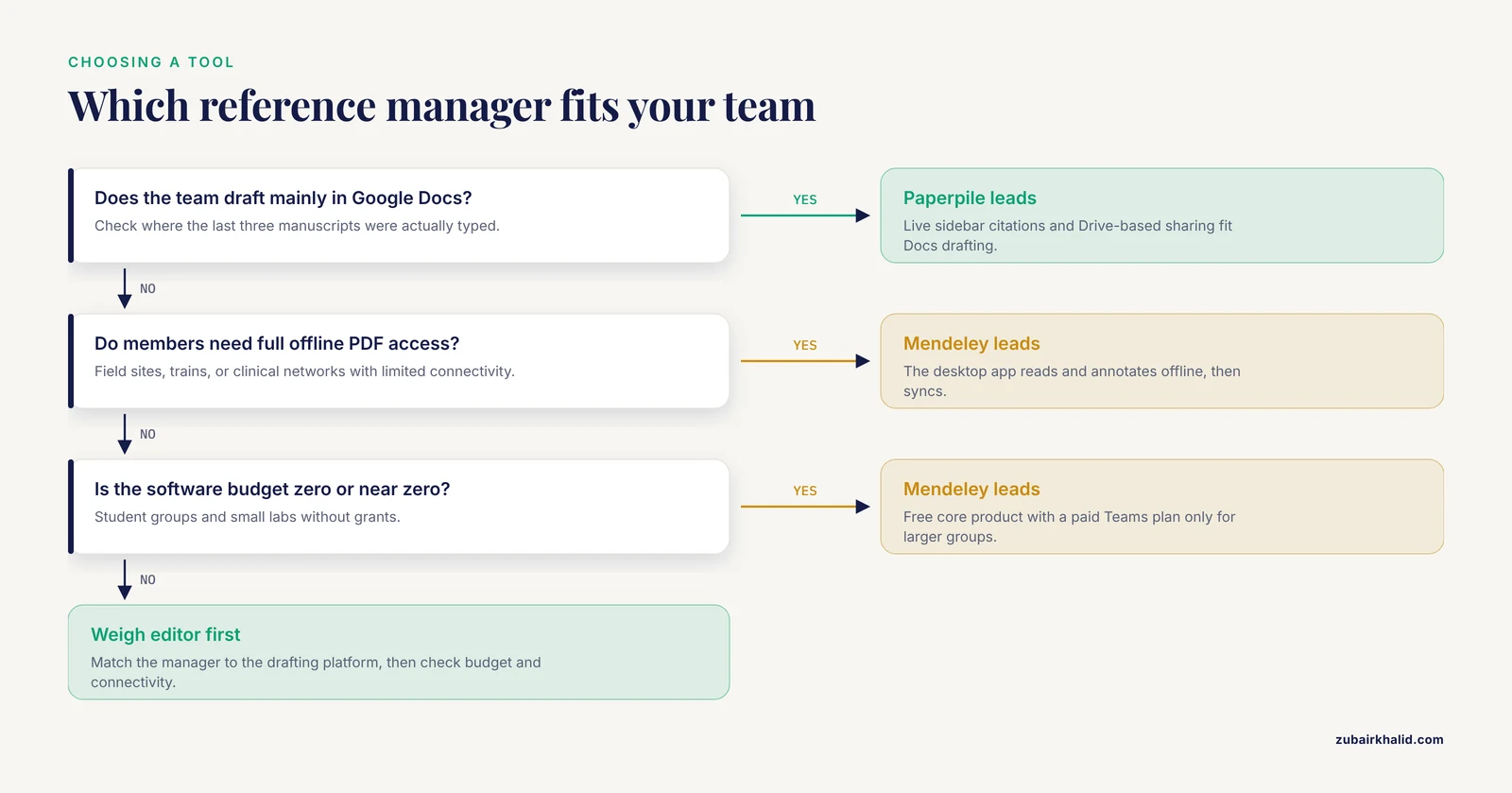
Choose Mendeley when most of the following are true for your team:
- The budget for research software is zero or near zero, which describes many student groups, small labs in low-funding fields, and early-career researchers without grants.
- The team drafts in Microsoft Word, which remains the default at many journals, health systems, and institutions.
- Team members need full offline access to PDFs on laptops, for example at field sites or in clinical environments with limited connectivity.
- The team is small enough to fit within free private group limits, or the institution funds a Teams plan.
- Anyone on the team already maintains a Mendeley library with years of annotations, because migration costs argue for continuity.
Those conditions describe a large share of academic teams, which is why Mendeley remains one of the most widely adopted reference managers despite its Google Docs gap.
When Paperpile Fits Better
Choose Paperpile when most of the following are true:
- The team drafts in Google Docs and shares files through Google Drive as a matter of routine.
- Members value speed and low friction over offline capability, for instance a fully distributed team that always works online.
- The team wants PDFs stored in its own Drive accounts rather than inside a vendor's storage pool.
- The subscription cost is affordable for the lab, which for Paperpile's individual academic pricing is modest by software standards, and is often covered by existing discretionary funds.
- LaTeX users on the team need a strong BibTeX workflow alongside the Docs drafting.
A useful litmus test: open the last three manuscripts your team wrote and check where the actual text was typed. If the answer is Google Docs, the mendeley or paperpile question is mostly settled by that fact alone.
Worked Scenarios
Scenario 1: A University Lab Writing a Review Article
Five coauthors, one corresponding author, a target journal that requires numbered citations. The lab uses Google Drive for everything. Recommendation: Paperpile. Create a shared folder for the manuscript, have each coauthor add candidate references with the browser extension as they read, and draft directly in Google Docs with the sidebar open. The corresponding author switches the citation style at submission time with one click. The paid subscription across five authors is a rounding error next to the reviewer-request revisions it avoids.
Scenario 2: A Hospital Nursing Team Building Research Capacity
Consider a clinical nursing department running a structured research support service, where staff nurses submit research requests and a supporting team fulfills them. The published evaluation of one such demand-resource model received 136 orders, fulfilled 129, and saw participants complete 36 papers and 25 projects alongside significant gains in self-assessed research competence, including on the literature-review subscale [2]. Teams like this typically write in Microsoft Word within a hospital Microsoft 365 environment, work across irregular shifts, and have no software budget. Recommendation: Mendeley. The free desktop app and Word add-in match the environment, private groups let the mentor team maintain a shared evidence library for each project, and offline access suits clinical settings where connections drop.
Scenario 3: A Graduate Student Writing a Thesis with a Remote Advisor
The student drafts in Word because the department template requires it. The advisor reads PDFs on a train commute. Recommendation: Mendeley. The advisor's offline reading habit and the Word requirement both point the same way, and the free product keeps the student's costs at zero.
Scenario 4: A Multi-Institution Working Group Drafting a Consensus Statement
Twelve coauthors across four institutions, no shared infrastructure, everything organized through email and a shared Drive. Recommendation: Paperpile, if at least the drafting subgroup works in Google Docs, because shared folders give the core writers a curated reference set without forcing all twelve members into a single group structure. If the drafting happens in Word because one institution controls the template, Mendeley with a paid Teams plan is the fallback.
Common Mix-Ups
Several recurring confusions trip up teams doing this comparison for the first time.
Confusing the citation add-in with the whole product. Mendeley Cite is only the Word component. A team that installs it and expects Google Docs support will be disappointed. Likewise, Paperpile's Word add-in does not equal full feature parity with its Docs experience.
Assuming free means unlimited sharing. Mendeley's free private groups have real caps on collaborators and storage. A team that builds its entire workflow on group sharing should verify current limits on the official Mendeley documentation before committing, because caps can change between versions.
Assuming Google Drive storage means Google Docs is required. Paperpile's Drive-based PDF storage works fine for a team that drafts in Word, and its Word add-in can insert citations. The integration is just less seamless than in Docs.
Treating the reference library as the manuscript's system of record. The library holds sources, not the paper. Teams that discover mid-draft that their citation manager choice forces an editor change usually discover it too late. Decide the drafting platform first, then the manager.
Migrating libraries without testing a sample. Both tools import RIS and BibTeX cleanly in most cases, but duplicates, broken PDF links, and lost annotation attachments are common in large migrations. Export fifty references with their PDFs, run them through the target tool, and check the results before moving ten thousand entries.
Common Mistakes and Limitations
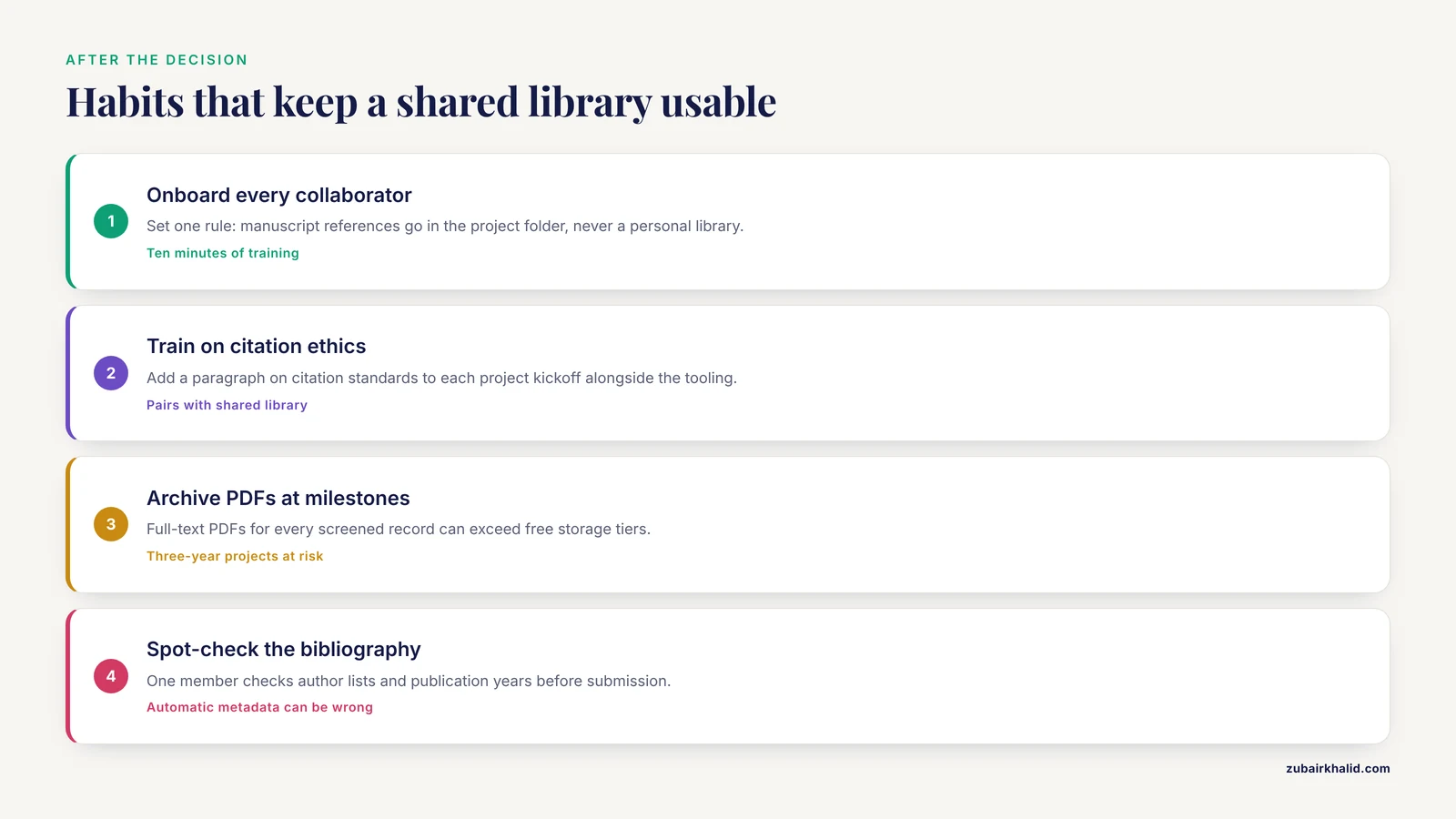
These are the practical errors and honest constraints that surface after the decision is made.
- Under-training collaborators. A shared library only helps if everyone adds references to it rather than to personal libraries. Ten minutes of onboarding, including a rule such as "all manuscript references go in the project folder, never the personal library," prevents the classic split-library problem.
- Neglecting citation ethics in team settings. Even with a shared library, misconduct factors such as unfamiliarity with ethical norms and publication pressure persist, and the evidence supports combining tooling with explicit training on academic integrity and ethical publication practices [1]. Build one paragraph on citation standards into every project's kickoff.
- Ignoring storage growth. A three-year project with full-text PDFs for every screened record can exceed free storage tiers on either platform. Archive superseded PDFs at each project milestone rather than discovering the ceiling during submission week.
- Over-reliance on automatic metadata. Metadata pulled from the web is occasionally wrong, with swapped author names or preprint versions standing in for the published paper. Assign one team member to spot-check the bibliography before submission, especially for author lists and publication years.
- Assuming offline parity. Paperpile's browser model means that a hospital or field site with unreliable internet is a genuine constraint, not a hypothetical one. Test your actual work environment before the whole team commits.
- Expecting perfect style compliance automatically. Both tools support thousands of Citation Style Language styles, but journals sometimes deviate from the official style in small ways. Reserve time for a final manual pass against the journal's author guidelines.
One general limitation applies to any comparison of this kind: software features, pricing tiers, and storage limits change as vendors update their products, and individual needs vary by project and institution. Verify current details in each tool's official documentation before adopting it for a multi-year commitment.
Frequently Asked Questions
Is Mendeley or Paperpile better for collaboration?
Paperpile is better for teams that draft in Google Docs, because of its live citation sidebar and Drive-based sharing. Mendeley is better for teams that draft in Microsoft Word, need offline access, or must avoid subscription costs.
Can Mendeley work with Google Docs?
Not natively. Mendeley Cite works with Microsoft Word, including Word for the web, so Google Docs teams either draft in Word and convert, or manage citations manually, which adds error risk.
Does Paperpile work with Microsoft Word?
Yes, Paperpile offers a Word add-in that inserts citations and builds bibliographies. Its Google Docs integration is deeper and more polished, so Word-heavy teams should trial it before committing.
How much does Paperpile cost compared with Mendeley?
Paperpile charges a subscription with a free trial, and Mendeley's core reference manager is free with a paid plan for larger teams. Check both vendors' official pricing pages for current figures, since tiers change over time.
Can I move my library from Mendeley to Paperpile later?
Yes. Both tools export and import standard BibTeX and RIS formats, so migration is possible. Test a sample batch with PDF attachments first, because annotations and folder structures do not always transfer perfectly.
Which is the best software for researchers overall?
There is no single best tool, only the best fit for your team's editor, budget, and connectivity. Match the reference manager to your drafting platform first, and the rest of the decision usually follows.
Further Reading
- Precision Dosing of Vancomycin: A Systematic Review of Population Pharmacokinetics Models and Comparative Evaluation of Software Tools.
- Medical-financial partnerships for improving financial and medical outcomes for lower-income Americans: A systematic review.