How to Link Research Notes Across Projects: A Practical Workflow
By Dr. Zubair Khalid, DVM, MS, PhD ·

By the end of this article you will be able to build a research note system where any observation, literature summary, or dataset detail can be reached from any project you work on, years later, without searching through scattered folders. You will have a working folder structure, a file naming rule, a note template you can copy, and several commands that find every connection between your projects in seconds.
To follow the walkthrough you need three things on hand:
- A plain-text editor such as VS Code, Notepad++, or any editor that saves
.md(Markdown) files - A single folder on your computer or cloud drive that will hold all of your notes, often called a vault
- Optional but useful, a terminal (Terminal on macOS, PowerShell or Windows Terminal on Windows) and a search tool such as ripgrep, installed with
brew install ripgrepon macOS orwinget install BurntSushi.ripgrep.MSVCon Windows
No paid software is required. Every mechanism in this article works in plain Markdown files, which means your links keep working even if you switch tools later.
Why Cross-Project Linking Fails Without a System
Most scientists keep notes in at least three places at once: a lab notebook, a folder of PDFs with highlights, and a slide deck or document per project. The connections between them live in memory. Six months later, memory is the only index you have, and it degrades.
Two failure patterns show up repeatedly in published research practice, and both are instructive.
The first is overreliance on free text. In a clinical decision support study of unintended weight loss in primary care, the key fact for nearly every patient, whether the weight loss was intentional, was documented as free text in the clinical notes for 98 percent of patients but in a structured field for only 20 percent [1]. When the fact you need is buried in prose, no query can find it reliably. Research notes behave the same way. If the link between a note and a project exists only as a sentence in a paragraph, you cannot retrieve it at scale.
The second is inconsistent structure. A review of 100 arthropod genome papers published in 2024 found that basic assembly statistics were reported consistently, but pre- and post-assembly procedures, vouchering details, and curation steps were far less standardized, and some publication formats did not require annotation details at all [2]. Communities that do not agree on a fixed set of fields lose the ability to compare records across projects. Your personal note system faces the same risk if each note invents its own layout.
The workflow below fixes both problems with one move. It separates two layers in every note. A small, rigid, machine-readable header carries the identifiers and project links. A free-text body carries your thinking. You link between notes through the rigid layer and write freely in the flexible one.
Core Principles of a Linkable Note System
Four principles govern everything that follows.
One idea, one note, one permanent identifier. A note covers one experiment, one paper, one method, or one decision. It gets an identifier that never changes, even if the file moves or the title changes.
Link, do not copy. When project B needs something you already wrote in project A, you create a link to the original note. Copies drift, links do not.
Use a controlled vocabulary for the things you will search. A controlled vocabulary is a fixed list of allowed terms. This matters because of a problem documented at scale in biomedical informatics. In the SNOMED CT entity linking challenge, a competition where teams mapped clinical text to a standard terminology, curators prepared 74,808 annotations covering 6,624 unique concepts across 272 discharge notes, and the analysis showed that ambiguity between concepts and rarity both degraded performance [3]. Your note system is smaller, but the lesson transfers. If you write "qPCR" in one note, "RT-qPCR" in another, and "quantitative PCR" in a third, your searches will miss things. Pick one form per concept and write it down.
Structure the fields you will query, prose everything else. Dates, project names, sample identifiers, and source citations belong in a structured header. Interpretation, speculation, and reasoning belong in prose.
The Workflow, Step by Step
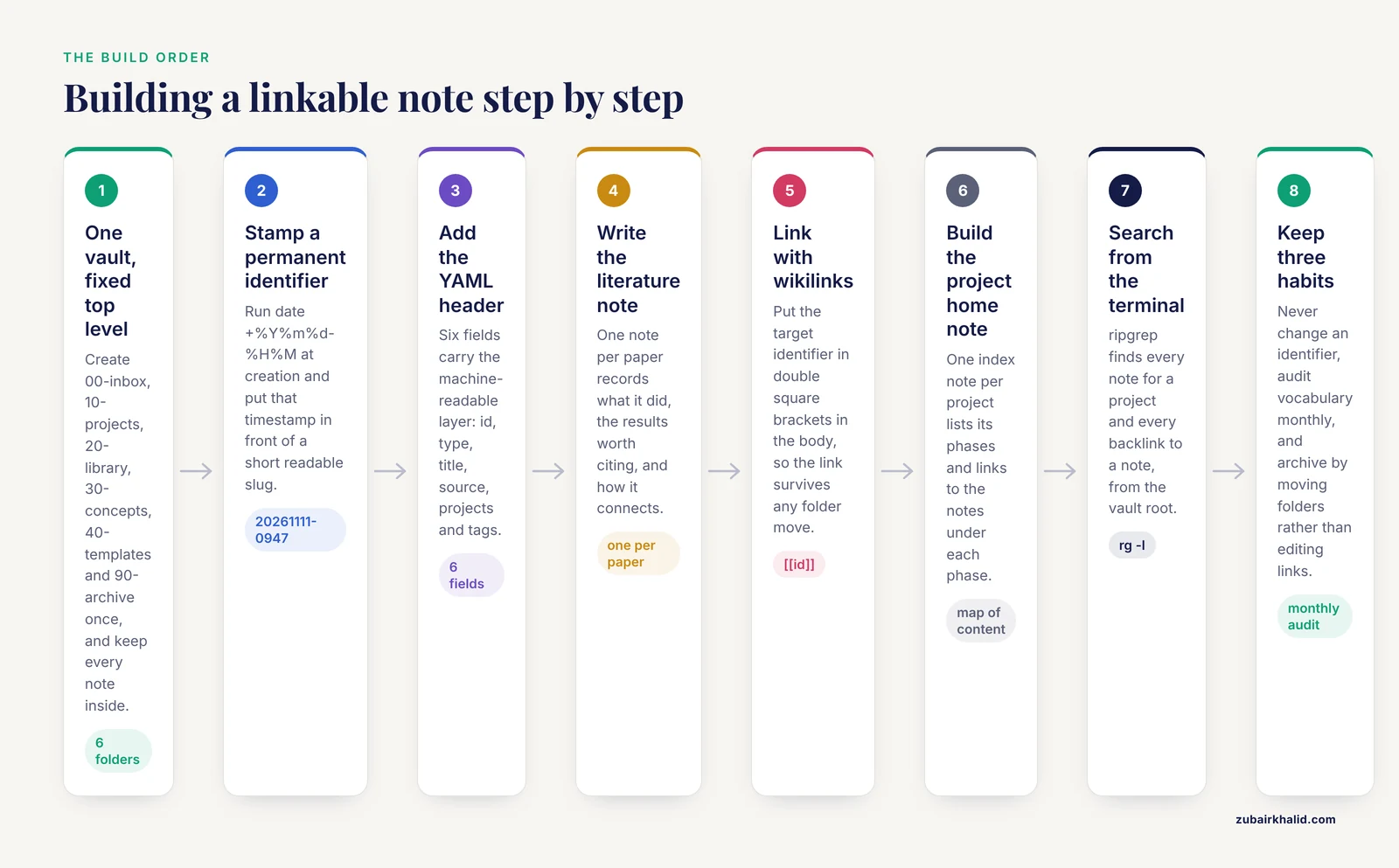
This is the core walkthrough for linking research notes across projects step by step. Each step produces something concrete.
Step 1. Create a single vault with a fixed top level
Make one folder that will hold every note for every project, forever. Inside it, create a small fixed structure:
vault/
  00-inbox/          new notes land here first
  10-projects/       one subfolder per active project
  20-library/        literature notes, one per paper
  30-concepts/       reusable notes on methods and ideas
  40-templates/      your note templates
  90-archive/        finished projects
The numbers keep the folders in a stable order. Projects come and go. The library and concepts folders accumulate across your whole career, which is exactly why cross-project links must point into them.
Step 2. Assign a permanent identifier to every note
Use a timestamp-based identifier generated at the moment you create the note. In a terminal, inside your vault folder, run:
date +%Y%m%d-%H%MExpected output:
20261111-0947Name the file with that identifier plus a short human-readable slug:
20261111-0947 chemostat contamination hypothesis.mdThe timestamp guarantees uniqueness. Two notes can share the word "contamination" in their titles without colliding, and the sort order in your file browser matches creation order automatically.
Step 3. Put machine-readable fields in a YAML header
YAML frontmatter is a block of key-value pairs at the top of a Markdown file, wrapped in triple dashes. Most note applications, including Obsidian, Logseq, and Zettlr, read it. Add this header to every note:
---
id: 20261111-0947
type: literature
title: "Review of sorted library prep methods"
source: "doi:10.xxxx/xxxxx"
projects: [asthma-subtypes, grant-renewal-2027]
tags: [sample-prep, contamination-control]
created: 2026-11-11
---
Each field has a job:
idmatches the filename and never changestypeis one of a fixed list you define, for exampleliterature,experiment,meeting,decision,conceptsourceholds the external identifier, a DOI for papers, an accession number for datasets, a sample barcode for specimensprojectsis the list of every project this note belongs to, which is what makes a note cross-projecttagsuses your controlled vocabulary, lowercase, hyphenated, one canonical form
The projects field is the single highest-value field in the whole system. It is what turns a private notebook into a linkable network.
Step 4. Capture papers into a literature notes system
A literature notes system is a folder of short notes, one per source you read, each recording what the paper did, what you think of it, and where it connects. The template that lives in 40-templates looks like this:
---
id: {{date}}
type: literature
title: "{{title}}"
source: "doi:{{doi}}"
projects: []
tags: [status-unread]
created: {{date}}
---

## What the paper did
(one or two sentences, in your own words)

## Key results worth citing later
(number, unit, and condition for each, so future-you can cite accurately)

## How it connects
- Supports: [[]]
- Contradicts: [[]]
- Method borrowed for: [[]]
When you finish a paper, fill the projects field and replace the empty link targets with real note identifiers. The "How it connects" section is where cross-project work actually happens. A method paper read for project A often becomes the centerpiece of project B a year later, and this section is the trailhead.
Step 5. Create links with wikilink syntax
To link note A to note B, insert the target's identifier inside double square brackets anywhere in the body:
The contamination pattern matches [[20260902-1415 batch 12 sequencing failure]],
which suggests the issue predates the new operator.
Two properties make this pattern durable:
- The link references the identifier, not the file path. You can reorganize folders freely and the reference stays correct, because a search for the identifier still finds both files.
- Links are bidirectional in practice. If note A contains a link to note B, then searching for B's identifier returns note A. In Obsidian this appears automatically as a backlinks panel. In plain Markdown, the backlink is one grep command away, shown in Step 7.
Step 6. Build an index note for each project
Every project gets one home note, sometimes called a map of content. It does not contain findings. It lists the phases of the project and links to the notes that belong to each phase:
---
id: 20260301-0900
type: project
title: "Asthma subtype project, home note"
projects: [asthma-subtypes]
tags: [project-home]
---

## Design phase
- [[20260302-1100 clinical advisor meeting]]
- [[20260305-1345 subtype definitions from literature]]

## Data collection
- [[20260414-0800 site B sampling checklist]]

## Analysis decisions
- [[20260601-1510 choice of clustering variables]]
Structuring the home note by phase mirrors what research groups do with formal records. In a retrospective review of a veteran research engagement panel, administrators classified 52 consultations by research phase and found that 52 percent occurred during study development, with the analysis made possible because the consultation records, including structured meeting notes, were captured in a consistent form from the start [4]. A home note organized by phase gives you the same retrieval power for your own work, and it gives every new collaborator a one-page entry point.
Step 7. Query across projects from the terminal
This is where the system pays off. With ripgrep installed, run these from the vault root.
Find every note that belongs to a given project, regardless of folder:
rg -l "projects:.*asthma-subtypes" .Expected output:
./10-projects/asthma-subtypes/20260301-0900 asthma-subtypes home.md
./20-library/20261111-0947 review sorted library prep.md
./30-concepts/20260518-0730 federated data sharing.md
Find every note that links back to a specific note, which is your backlink index:
rg -c "\[\[20261111-0947" .Expected output:
./10-projects/asthma-subtypes/20260402-1530 discussion week 6.md:2
./20-library/20261111-0947 review sorted library prep.md:1
The number after the colon is the count of links in that file. Two links in the discussion note means you referred to that source note twice.
List your controlled vocabulary drift, an audit worth running monthly:
rg -io "quantitative PCR|RT-qPCR|qPCR" . | sort | uniq -c | sort -rnExpected output:
  41 qPCR
   7 RT-qPCR
   3 quantitative PCR
That output tells you the canonical form is qPCR and that ten notes need editing to match it. Five minutes of cleanup keeps every future query complete.
Step 8. Maintain the system with three habits
- Never change an identifier. Titles can change. Filenames can change after the slug portion. The
idvalue and the timestamp prefix are permanent. - Run the vocabulary audit monthly. The command from Step 7 takes a minute.
- Archive finished projects by moving the folder, not by editing links. Because links use identifiers rather than paths, moving
10-projects/asthma-subtypesinto90-archive/breaks nothing.
Linking Field Data and Instruments to Your Notes
Notes become genuinely cross-project when they can be joined to instrument output. Field researchers have documented exactly where this join fails. In a methodological study that integrated portable X-ray fluorescence and personal air sampling into ethnographic fieldwork during an agrichemical fumigation, the authors reported substantial workflow constraints around time-stamping observations, synchronizing instrument outputs with field notes, and managing cognitive load while operating multiple devices [5].
Three habits prevent those failures in lab and field settings alike:
- Designate one clock. Decide whether the instrument clock or your phone is authoritative, and set the other to match it before every session. Record which clock was authoritative in the note header.
- Timestamp every event in a fixed format. Use ISO 8601, for example
2026-11-11T09:47:00-05:00, in a dedicatedeventsline or table row, never buried in prose. - Record the instrument identifier in the note. A line such as
device: pXRF-unit-2in the frontmatter lets you later separate data by device, which matters when calibration differs between units.
Field and meeting notes also work better when the categories are planned in advance. An implementation study of a seniors exercise park program across six sites used staff field notes and meeting minutes as formal data sources, categorized in advance under a four-part framework covering training, engagement, resource development, and marketing [6]. Deciding the categories before collection, rather than after, is what made those notes comparable across sites. Your note template serves the same function.
How Much Structure Belongs in a Template
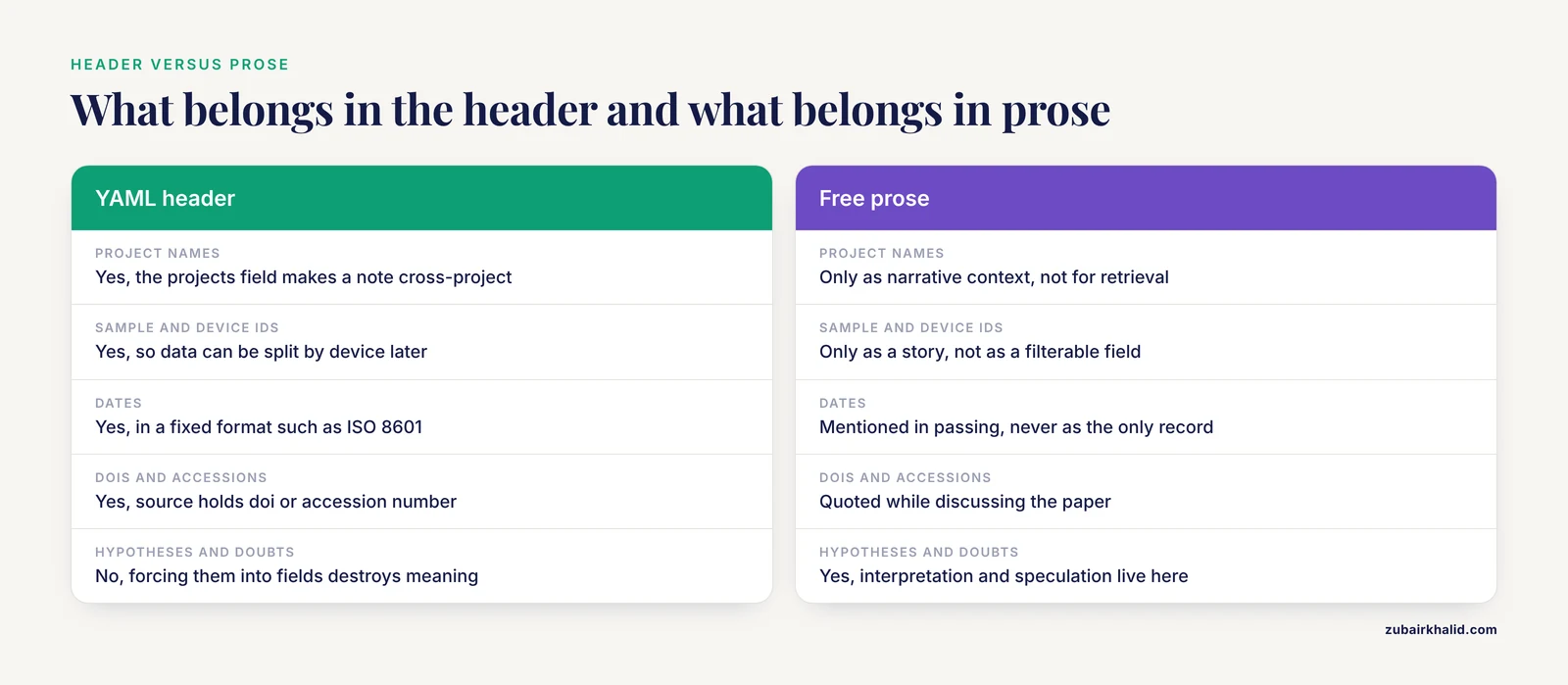
The balance between structured fields and free text has a practical answer, and clinical documentation research illustrates both directions.
Structured fields win when you need to retrieve or count something. A quality improvement project for pleural clinic assessment replaced variable free-text assessment with a structured proforma built around a validated scoring tool, standardizing what every clinician recorded before a management decision [7]. Multi-site surveillance works the same way. The European antimicrobial consumption surveys required all participating hospitals to collect and submit data with a standardized methodology through a dedicated web tool, which is what made results comparable across more than 170 hospitals [8].
Free text wins when the information is unpredictable. As the weight loss study showed, facts that resist classification still end up in narrative notes, and sometimes the narrative is the only place a fact exists at all [1].
Translate both lessons into your template this way:
- Put anything you will search, count, or join in the YAML header or a Markdown table. That includes project names, sample IDs, dates, DOIs, and device identifiers.
- Put everything interpretive in prose. Hypotheses, doubts, and alternative explanations resist categories, and forcing them into fields destroys their meaning.
A reasonable rule. If you can imagine writing a command whose output would be a list of notes, the field it filters on belongs in the header.
Where Automated Tools Help and Where They Fail
Software can accelerate linking, but the failure modes are well documented and worth knowing before you trust one.
Citation managers are the safest automation. Zotero assigns every paper a stable citation key, exports a BibTeX file, and integrates with Markdown editors through plugins such as Citations for Obsidian or Pandoc workflows. A literature note whose source field holds a Zotero key stays joined to the PDF, the metadata, and the bibliography of every manuscript you write.
Language models can extract structured facts from unstructured text, and their performance depends heavily on the task. In a pilot study extracting medication and diagnosis information from German clinical notes, open-weight models reached an F1 score of 0.78 for medication extraction and 0.95 for trivial medication names, but only 0.12 for mapping diagnoses to structured codes [9]. Extraction of clearly named items is reliable. Mapping free text to a controlled vocabulary is much harder.
That difficulty matches the entity linking results from the SNOMED CT challenge, where the analysis showed that rare concepts were disproportionately difficult and that performance dropped when training examples were scarce or annotations ambiguous [3]. Your own controlled vocabulary has the same shape. Common concepts, your standard methods and model organisms, will link fine. Rare concepts, the one-off reagent lot or the single unusual observation, are where automated suggestions fail and manual linking matters.
A practical division of labor. Let automation propose extraction, for example pulling every DOI or sample ID mentioned in a note. Review every proposed link yourself before accepting it, especially for concepts you rarely write about.
Choosing a Linking Mechanism
| Mechanism | Best for | Cost to maintain | Example |
|---|---|---|---|
| Timestamp ID in filename | Guaranteeing every note has a permanent address | None after setup | 20261111-0947 chemostat contamination.md |
| Wikilinks in body | Expressing "this relates to that" while writing | None, grows naturally | [[20260902-1415 batch 12 sequencing failure]] |
projects field in frontmatter | Retrieving all notes for a project across folders | Update when a note serves a second project | projects: [asthma-subtypes, grant-renewal-2027] |
| Controlled tags | Answering "what have I written about this method" | Monthly vocabulary audit | contamination-control, sample-prep |
| External identifiers | Joining notes to papers, datasets, and specimens | Paste once at capture | source: "doi:10.xxxx/xxxxx" |
| Project home note | Onboarding a collaborator or your future self | Five minutes per week per project | Phase-organized index of links |
| Citation manager keys | Connecting notes to PDFs and reference lists | Automatic once configured | Zotero key in the source field |
The mechanisms are complementary. A well-formed note uses at least four of the seven.
Common Mistakes and Limitations
These are the errors that damage cross-project note systems most often, with the fix for each.
Copying content instead of linking. When you paste a paragraph from a project A note into project B, two versions now exist and only one will get your later corrections. Fix. Paste the link, not the text. If you need a summary for a deliverable, write a new note that links to the source.
Inventing a new term when one exists. Writing "RT-qPCR" because it is more precise today breaks every future query. Fix. Keep a vocabulary note in 30-concepts and add the canonical form the first time a concept appears. The entity linking literature shows that even well-funded teams struggle with ambiguous and rare terms, so a human-owned vocabulary list is a feature, not an overhead [3].
Renaming identifiers. A timestamp ID that changes is a broken link you will not notice until months later. Fix. Treat the ID as immutable. Change the title or slug, never the ID.
Burying queryable facts in prose. A sentence like "the second batch used the new lysis buffer on June 4" cannot be filtered. Fix. Batch numbers, dates, and reagent details go in the header or a table. The comparison between free-text and structured documentation in the weight loss study shows how easily a critical fact becomes unfindable when it lives only in narrative [1].
Delegating linking entirely to software. Automated extractors and language models are strong at pulling clearly named items and weak at mapping rare or ambiguous concepts, as the medication extraction pilot demonstrated with its gap between name extraction and diagnosis coding performance [9]. Fix. Use automation for extraction proposals and keep the accept-reject decision human.
Skipping clock synchronization before field sessions. Instrument timestamps that disagree with note timestamps by minutes make joins ambiguous. Fix. Set one authoritative clock and record it in the note, the habit recommended after the pXRF field deployment ran into synchronization problems [5].
Treating the system as governance. A personal vault is not a substitute for institutional data management, controlled document systems, or the record-keeping requirements of your lab, funder, or institution. Keep regulated records where policy requires them and link outward from your vault with identifiers.
Frequently Asked Questions
What does linking research notes across projects actually mean?
It means every note carries a permanent identifier and a record of which projects it belongs to, so any project can retrieve relevant notes from every other project through links and searches rather than memory.
Do I need special software to link my research notes?
No. Plain Markdown files with timestamp filenames, YAML headers, and bracketed links work in any text editor, and ripgrep provides the search. Applications like Obsidian add convenience such as automatic backlink panels, but they are optional.
How should I name note files so links survive reorganization?
Start the filename with a timestamp ID generated at creation, such as 20261111-0947, followed by a short readable slug. Move files between folders freely, because links reference the ID, not the path.
Should I use tags or links in my notes?
Use both for different jobs. Tags answer "what have I written about this concept" and work best as a small controlled vocabulary. Links answer "how do these two specific notes relate" and capture one-to-one connections tags cannot express.
How do I connect a note to a specific paper, dataset, or specimen?
Put the external identifier in the structured header. Use a DOI for papers, a repository accession number for datasets, and a sample barcode for specimens. This is what makes the note joinable to databases and citation managers later.
How much structure should my note template have?
Keep the rigid part small. Five or six header fields, identifier, type, title, source, projects, tags, plus one fixed section for connections. Put everything interpretive in free prose below.
Can AI tools link my notes for me reliably?
Partly. Extraction of clearly named items such as medication names or DOIs performs well, but mapping text to controlled vocabulary categories, especially rare concepts, performs poorly, so review every automated suggestion before accepting it.
How often should I review and maintain my linked notes?
Run a monthly ten-minute audit. Search for vocabulary variants and merge them, spot-check a few old notes for broken links, and update the projects field on any note that has started serving a second project.
Sources
- Piloting a Clinical Decision Support System for Unintended Weight Loss in Primary Care: Mixed Methods Study on Early Cancer Detection.
- Toward standardization in arthropod and biodiversity genome projects.
- SNOMED CT entity linking challenge.
- Designing Research With a Veteran Research Engagement Panel: Lessons Learned From Eight Years of Partnering.
- Integrating portable X-Ray fluorescence and personal air sampling into ethnographic field research during agrichemical fumigation in an avocado orchard: field challenges encountered and lessons learned.
- What works in real-world implementation? Practice-based insights from the ENJOY IMP-ACT project promoting physical activity among older adults.
- Standardising Pleural Management in Suspected Malignant Pleural Effusion Using a Structured Pre-Test Probability and RED Score-Guided Proforma: A Single-Centre Before-and-After Quality Improvement Project.
- European Surveillance of Antimicrobial Consumption (ESAC): value of a point-prevalence survey of antimicrobial use across Europe.
- Clinical Code Mapping with LLM Tool Use: A Pilot for Automated Data Extraction of Medication and Diagnosis Information from Unstructured Clinical Notes.