LIMS Integration with Lab Instruments
By Dr. Zubair Khalid, DVM, MS, PhD ·

By the end of this guide you will be able to plan a LIMS integration with lab instruments for your own laboratory, choose between file transfer, direct connection, and API-based approaches, write a working file-capture interface, and validate that the connection delivers trustworthy data. To follow the walkthrough you need a LIMS or database with a writable table, one instrument that exports structured files (a plate reader, sequencer, or chromatography system all work), Python 3 installed on the instrument's workstation or a shared server, and a small set of test data files.
Laboratory Information Management Systems (LIMS) became the operational backbone of analytical laboratories from the 1980s onward, and the field learned early that a LIMS delivers the most value when it is connected to the instruments that generate the data. Writing results into the LIMS by hand creates transcription errors and doubles the workload. Connecting the instrument to the LIMS removes both problems and protects data integrity [1].
What LIMS Instrument Integration Means
A LIMS is software that manages laboratory workflow, sample tracking, data collection, analysis, reporting, and notification in one system. In a regulatory environment, the software is subject to quality assurance checks known as system validation, and instrument integration is listed among its core functions alongside data collection, analysis, and reporting [2].
LIMS integration with lab instruments refers to any mechanism that moves result data, metadata, or status information from an instrument into the LIMS without a human retyping it. The classic justification comes from the pharmaceutical analysis literature from decades ago and still holds. When the system is integrated with analytical instrumentation, it captures data on line or transfers results for matching against the corresponding sample records in the database. This reduces transcription error checking and ensures data integrity [1]. A LIMS that is not connected to instruments forces staff to act as human data cables, and every manual transfer point is an opportunity for error.
Integration also applies in the other direction. Many workflows need the LIMS to send work to instruments. A high-throughput mutation screening platform, for example, runs a multistep automated workflow in which the process at one step depends on results from the previous step. The LIMS for that platform communicates with most of the laboratory instruments and robots, tracks samples, and captures data at every step of the automated workflow [3]. In that setup the LIMS is not a passive archive. It is the conductor of the workflow.
Why Integrate, and What Breaks Without It
Three benefits recur across published implementations.
First, data integrity. On-line capture matches results to sample records automatically and reduces transcription error checking [1]. In a high-throughput biodosimetry laboratory, a LIMS was designed and implemented specifically to avoid data transcription errors during processing while managing robotic instruments and standard operating procedures at scale [4].
Second, throughput. Automated environments generate large data sets that must be organized and stored reliably, and complex multistep workflows demand strict process management [3]. When sequencing requests, sample tracing, quality checks, and data delivery live in one integrated tool, facilities can troubleshoot problems, maintain quality, and reduce time and cost [5].
Third, better decisions from connected data. In clinical laboratories, a LIMS facilitates the integration and collection of data from different types of instruments and systems, which supports faster access to results and reduces redundancy and cost [6]. The value multiplies when instrument data flows onward into reporting and decision support rather than stopping at the LIMS boundary.
The risks of skipping integration are equally well documented. A LIMS that stands alone pushes the laboratory toward parallel systems, one for instrument data and one for sample management, and the mismatch between them wastes resources and undermines confidence in results [1].
Integration Architectures and How Data Actually Moves
There are five practical patterns for LIMS integration with lab instruments. Most laboratories end up using more than one.
| Pattern | How data moves | Typical instruments | Main strength | Main risk |
|---|---|---|---|---|
| File drop (watched folder) | Instrument or its PC writes CSV, XML, or text to a shared folder, an interface parses it | Plate readers, qPCR cyclers, basic spectrophotometers | Simple, vendor-neutral | Parsing breaks when firmware updates change the file layout |
| Direct serial or network connection | Interface speaks the instrument's native messaging protocol in real time | Clinical analyzers, automated liquid handlers | Live status and results | Requires protocol knowledge and stable connections |
| Vendor agent or connector | Commercial middleware translates between instrument and LIMS | Chromatography systems, mass spectrometers | Supported and documented | License cost, configuration lock-in |
| REST API | LIMS and instrument control software exchange JSON over HTTP | Modern instruments, cloud-connected devices | Two-way, structured, auditable | Needs authentication design and network access |
| Database to database | Instrument control software writes to a schema the LIMS reads | In-house instrument PCs, robotics | Fast bulk transfer | Tight coupling, schema drift |
Two real implementations illustrate the range. The openBIS platform, an Electronic Laboratory Notebook (ELN) and LIMS developed at ETH Zurich and deployed at the materials research institute Empa, was adapted for chemical analysis and spectroscopy instruments using a data pipeline and a dashboard for data collection and visualization, satisfying FAIR data guidelines (findable, accessible, interoperable, reusable) while maximizing efficiency for laboratory personnel [7]. The LabDB system used in structural biology laboratories harvests data both directly from laboratory instruments and through human input via a web interface, covering spectrophotometric and fluorescent assays, thermal shift assays, and isothermal titration calorimetry experiments in one system [8].
The choice of pattern also depends on the surrounding software ecosystem. Electronic laboratory notebooks offer increasing benefits when they are integrated with other laboratory informatics tools such as LIMS, chromatography data systems, analytical instrumentation, and scientific data management systems, but reviewers have noted that there is no single well-established path for effective integration of these tools [9]. That means your architecture decision should account for the ELN and any data system you already run, not just the instrument at hand.
LIMS Integration with Lab Instruments Step by Step
The following walkthrough builds a watched-folder integration for a 96-well plate reader that exports a CSV file after each run. The same sequence of steps applies to a sequencer, a cytogenetics analyzer, or a chromatography data system. Numbers in the worked example are arithmetic illustrations, not vendor specifications.
Step 1. Inventory instruments and define the data contract
For each instrument, record the file format it exports, the naming convention, the fields it contains, and the frequency of runs. A plate reader might export a file per run with a header block, a sample identifier per well, and one absorbance value per well. The data contract is the agreement between the instrument output and the LIMS input. Write it down before writing code. A mutation-screening LIMS succeeded precisely because its data model respected the requirement that complex multistep workflows need careful data tracking at every step [3].
Step 2. Design sample identifiers that survive the round trip
Every result arriving from an instrument must map back to a sample record in the LIMS. The most reliable bridge is a barcode or unique identifier that the laboratory staff applies to the physical sample and that the instrument operator enters or scans at run time. If the instrument exports a plate map with position A01 through H12, your LIMS must already know which sample sits in each position for that run. The identifier format should be machine-friendly, for example SAMPLE-2026-000117, with no spaces or characters that break CSV parsing.
Step 3. Choose the integration pattern per instrument
Rank your instruments by run volume and by the cost of a data error. Integrate the highest-volume or highest-error-risk instruments first. For the plate reader in this walkthrough, a file drop is sufficient. For an instrument that must receive work lists from the LIMS, plan a two-way API exchange instead.
Step 4. Build the capture interface
A minimal Python watcher parses new files, extracts results, and loads them into the LIMS database. The example assumes CSV output and a PostgreSQL or MySQL table named assay_results.
import csv, time
from pathlib import Path
import psycopg2

WATCH_DIR = Path("/srv/lims/instrument_exports")
PROCESSED_DIR = WATCH_DIR / "processed"

def parse_plate_reader(file_path):
    records = []
    with open(file_path, newline="") as f:
        reader = csv.reader(f)
        for line in reader:
            if not line or line.startswith("#"):
                continue
            sample_id, well, absorbance = line, line[10], line[3]
            records.append((sample_id, well, float(absorbance)))
    return records

def load_results(records, run_file):
    conn = psycopg2.connect(
        dbname="lims", user="lims_app", host="lims-db.internal"
    )
    cur = conn.cursor()
    cur.executemany(
        "INSERT INTO assay_results "
        "(sample_id, well_position, absorbance, run_file) VALUES (%s, %s, %s, %s)",
        [(s, w, a, run_file) for s, w, a in records],
    )
    conn.commit()
    cur.close()
    conn.close()

while True:
    for f in WATCH_DIR.glob("*.csv"):
        records = parse_plate_reader(f)
        load_results(records, f.name)
        f.rename(PROCESSED_DIR / f.name)
        print(f"Loaded {len(records)} results from {f.name}")
    time.sleep(10)
Expected output after the operator runs a full 96-well plate and the export lands in the watched folder:
Loaded 96 results from run_2026-11-11_plate01.csvIf the instrument cannot export a clean sample identifier, add a mapping step. The LIMS holds the plate layout for the run, so the interface joins on well position and run timestamp instead.
Step 5. Verify the load against the source
Never trust the first successful parse. Compare the row count in the loaded table against the number of wells on the plate, and spot-check three values against the raw file. For the example above, a full plate must always yield 96 records. A load of 94 rows signals two wells the parser skipped, often because the export used a different decimal separator or a trailing empty column.
Step 6. Add quality checks at the boundary
Instrument integration is the right place to enforce rules automatically. Reject any record whose sample identifier does not exist in the LIMS. Flag absorbance values outside the validated range of the assay. Record the source file name with every result so that any value can be traced back to the raw export. These checks echo the principle captured in the earliest LIMS literature, that integration exists to ensure data integrity, not merely to move bytes [1].
Step 7. Validate the integrated system
Validation is where many academic integrations fail an audit. In a regulated setting, system acceptance criteria should be established and tested against quantifiable tasks to determine whether the desired outcome has been achieved. Features such as autoreporting, reproducibility, throughput, and accuracy must be quantifiable and verifiable [2]. For your plate-reader integration, write test scripts that load known files and confirm the expected row counts, values, and error handling. Keep the test evidence. Modern approaches compress this work under a risk-based Computer Software Assurance framework, as demonstrated by a cloud LIMS-QMS platform that mapped its controls to FDA 21 CFR Part 11 and ISO/IEC 17025 requirements and reported pilot deployment across 187 laboratory requests with 1456 quality-control checkpoints [11].
Step 8. Monitor and maintain
Firmware updates change export formats. Schedule a check after every instrument software upgrade: run one test plate, confirm the interface parses it, and compare against the previous format. Log every parse failure to a location a human actually reads. An interface that fails silently is worse than no interface, because staff may assume data arrived when it did not.
Research Software Comparison: Choosing the Best Software for Researchers
Not every laboratory should buy the same product, and the research literature describes a healthy range of approaches to LIMS integration with lab instruments. A fair research software comparison should weight flexibility, cost, deployment model, and the instrument ecosystem you actually run.
Leaf LIMS targets synthetic biology workflows and implements integrated project, item, and laboratory stock tracking with complete sample and construct genealogy, materials and lot tracking, and modular assay data capture. It is deployed as a web application through Docker and released under the permissive MIT license [10]. For a computational group that wants full control of the code, that license model is a decisive advantage.
SMITH was built for next-generation sequencing workflows at a genomics facility. Its authors observed that commercial and non-commercial LIMS tools are available for managing sequencing requests, sample tracing, quality, and data delivery, but they often come at prohibitive cost or lack the flexibility and scalability needed to adjust to frequently changing protocols. SMITH is a web application with a MySQL backend whose database schema stores the descriptions of all protocol steps in an NGS experiment [5]. If sequencing protocols change monthly, schema flexibility matters more than polish.
openBIS combines ELN and LIMS functions and was commissioned at Empa as a FAIR-compliant data management platform for analytical chemistry, with instrument integrations built as a data pipeline and a complex dashboard for data collection, visualization, and interaction [7]. It suits laboratories that want instrument data and notebook entries in one FAIR-aligned platform.
LabDB grew from a structure determination pipeline tracker into a modular system integrating biochemical, biophysical, and crystallographic experimental data, harvesting from instruments directly and through web-based human input, and managing experiments that resulted in over 1200 Protein Data Bank deposits [8]. It demonstrates that a laboratory-scale system can capture instrument data without commercial middleware.
ISPyB serves synchrotron macromolecular crystallography beamlines, where research groups analyze thousands of samples per year. Its data model allows integration of analyses downstream of data collection, including sample tracking, direct ranking of diffraction characteristics, and archiving of raw data and results from ancillary experiments [12]. Its design shows how a LIMS can sit at the center of a pipeline rather than at the edge.
For commercial platforms, the recurring published concern is cost and flexibility rather than capability. Facilities that chose in-house or open tools often did so after finding commercial packages either too expensive or too rigid for changing protocols [5]. Either way, the earlier warning still applies: whichever product you select, integrate it with the analytical instrumentation and avoid creating parallel systems [1].
LIMS Instrument Integration Tips
These are the practices that separate integrations that endure from those that quietly rot.
- Integrate the workflow, not just the instrument. A biodosimetry LIMS was designed to develop and maintain standard operating procedures for robotic instruments and to manage increased sample processing capacity, treating the LIMS as the process manager rather than a results dump [4]. Capture sample status, instrument state, and operator context along with raw values.
- Preserve contingency in the workflow. In the mutation screening platform, a key LIMS feature was tracking information through a workflow where the process at one step is contingent on results from the previous step [3]. Design your data model so step decisions are recorded, not just step outputs.
- Capture from project inception to completion. Leaf LIMS supports data capture across the full life of a project, which prevents the gap between early planning data and late assay results [10].
- Plan for downstream reuse. ISPyB's archiving of raw data and results from post-experiment processing prepared it to serve later structure solution pipelines, and validated its approach for other techniques with similar requirements [12]. Design your archive so tomorrow's analysis can use yesterday's raw files.
- Write the data contract down. When instrument firmware, interface code, and database schema are all documented against each other, a firmware upgrade becomes a routine test instead of a surprise outage.
- Budget human time, not just compute time. Two practical LIMS implementations, one in-house PC-based system integrating analytical software and one commercial package in a pharmacokinetics laboratory, both found that the human and time aspects were decisive [13]. Training and change management consume more effort than the code does.
Common Mistakes and Limitations
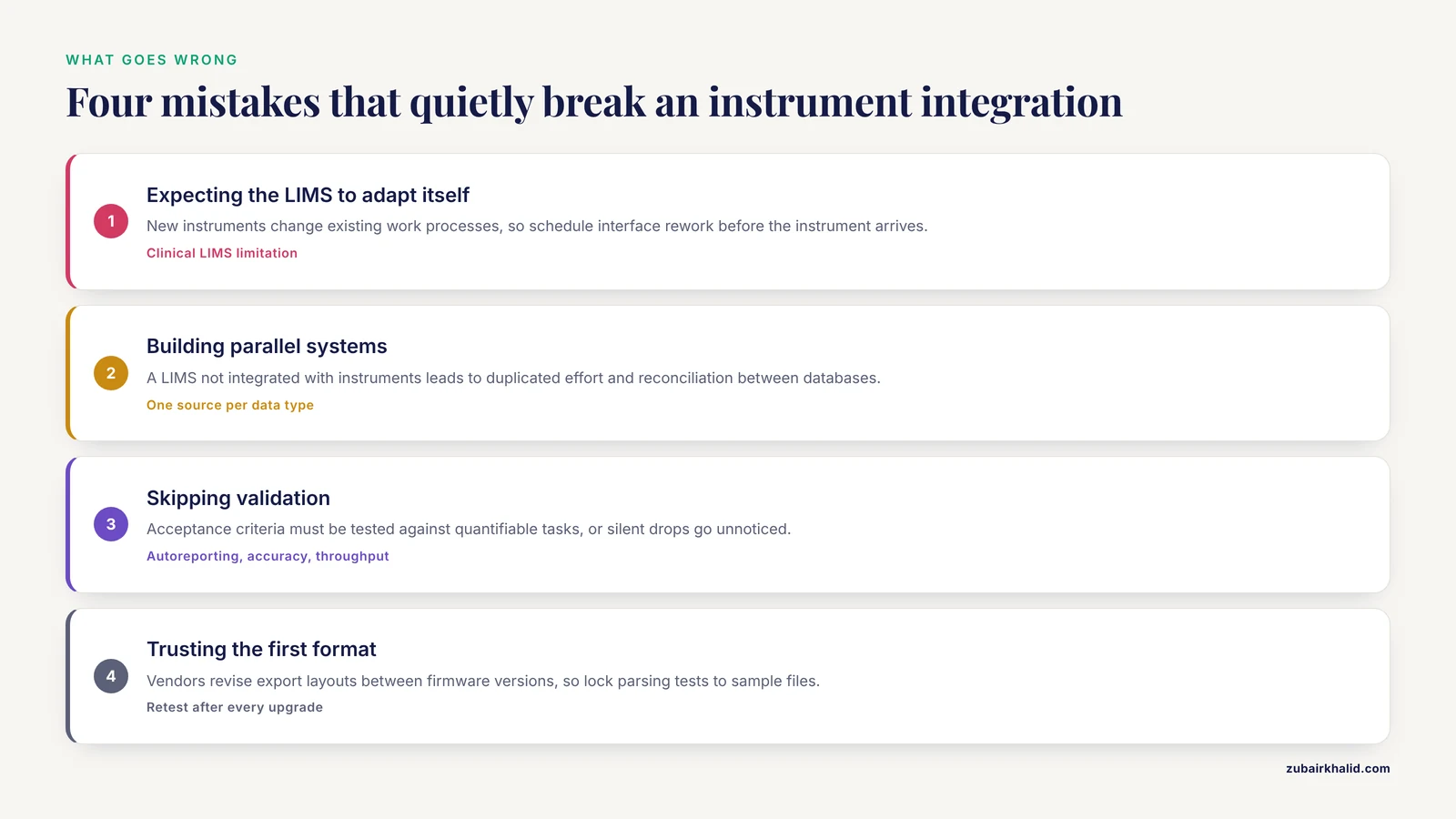
- Assuming the LIMS adapts to the instrument automatically. In clinical settings, a recognized limitation of LIMS is problems in adapting to new instruments that may change existing work processes [6]. Every new instrument forces a rework of the interface, and sometimes of the workflow itself. Schedule that work before the instrument arrives, not after.
- Building parallel systems. A LIMS that is not integrated with instruments and with existing corporate systems leads to duplicated effort and reconciliation exercises between databases [1]. If two systems must coexist temporarily, define one authoritative source for each data type.
- Treating integration as purely technical. Both published implementation case studies, an in-house system and a commercial package, emphasized that human and time factors dominated the project experience [13]. Skip the training and the interface will be bypassed by sticky notes and spreadsheets.
- Skipping validation. The purpose of system validation is to ensure the software performs as designed, with acceptance criteria tested against quantifiable tasks [2]. An unvalidated interface that silently drops 2 percent of results is a data integrity failure waiting for an audit or a retrraction.
- Overlooking the ELN and data system ecosystem. ELN benefits grow when integrated with LIMS, chromatography data systems, analytical instrumentation, and scientific data management systems, yet no single well-established integration path exists, so each combination needs its own design [9]. Choose architectures that can extend to the next system.
- Assuming the terminology will translate itself. If instrument results feed clinical or cross-institution reporting, semantic interoperability must be planned. Mapping studies of oncology terms show that even mature systems such as LOINC and SNOMED CT require defined mapping guidelines and expert verification to achieve high coverage, with SNOMED CT reaching very high mapping rates when postcoordination and predefined guidelines were applied [14]. Budget that mapping effort.
- Trusting the first format you see. Instrument vendors revise export layouts between firmware versions. Lock your parsing tests to representative sample files and rerun them after every upgrade.
Frequently Asked Questions
What does LIMS integration with lab instruments actually involve?
It means moving results, metadata, or status information from an instrument into the LIMS without manual retyping, and sometimes sending work lists back to the instrument. The core goals are on-line data capture, matching results to sample records, reduced transcription error checking, and data integrity [1].
Do I need middleware or a vendor agent to connect an instrument to a LIMS?
Not always. A watched folder with a parser handles many file-exporting instruments, while clinical analyzers and chromatography systems often benefit from vendor middleware or direct protocol connections. Published systems have communicated directly with most laboratory instruments and robots using custom interfaces [3].
Can an open-source LIMS integrate with instruments?
Yes. Leaf LIMS provides modular assay data capture under an MIT license and deploys via Docker [10], SMITH manages NGS workflows with a MySQL backend [5], and LabDB harvests data directly from laboratory instruments and through web input [8]. Open source gives you the code, but you own the integration work.
How do I validate an instrument integration?
Define acceptance criteria and test them against quantifiable tasks, checking that features such as autoreporting, reproducibility, throughput, and accuracy are quantifiable and verifiable [2]. Modern risk-based Computer Software Assurance approaches, aligned with FDA 21 CFR Part 11, have been applied to cloud LIMS platforms [11].
What file formats do instruments export?
Common exports include CSV, tab-delimited text, XML, and proprietary formats parsed by vendor software. Design your data contract around the exact header layout and decimal conventions of your instrument version, and retest after every firmware upgrade.
What is the difference between LIMS, ELN, and CDS integration?
A LIMS manages workflow, samples, and reporting, an ELN replaces the paper notebook, and a chromatography data system (CDS) controls and collects chromatography runs. Integration benefits increase when these tools connect, but there is no single well-established path, so each combination needs its own design [9].
How much human effort does a LIMS integration project need?
More than the coding suggests. Two documented implementations, an in-house PC-based system and a commercial package in a pharmacokinetics laboratory, both concluded that human and time aspects were the dominant factors [13]. Plan training, validation, and change management from day one.
How does instrument integration improve data integrity?
It removes manual transcription, matches results to sample records automatically, and reduces transcription error checking [1]. High-throughput laboratories have implemented LIMS specifically to avoid transcription errors while managing robotic instruments at scale [4].
Sources
- Laboratory Information Management Systems in practice.
- Required steps for the validation of a Laboratory Information Management System.
- A Laboratory Information Management System (LIMS) for a high throughput genetic platform aimed at candidate gene mutation screening.
- High-throughput sample processing and sample management; the functional evolution of classical cytogenetic assay towards automation.
- SMITH: a LIMS for handling next-generation sequencing workflows.
- The intelligent clinical laboratory as a tool to increase cancer care management productivity.
- The openBIS Digital Platform for Instrumentation and Data Workflow in the Analytical Laboratory.
- State-of-the-Art Data Management: Improving the Reproducibility, Consistency, and Traceability of Structural Biology and in Vitro Biochemical Experiments.
- Electronic laboratory notebooks progress and challenges in implementation.
- Leaf LIMS: A Flexible Laboratory Information Management System with a Synthetic Biology Focus.
- A cloud-enabled LIMS-QMS platform with large language model-assisted standard operating procedure generation for GLP/GMP-aligned theranostics laboratory operations.
- ISPyB: an information management system for synchrotron macromolecular crystallography.
- LIMS: from theory to practice.
- Real-World Applicability of Multiple International Terminology Systems in Oncology: Mapping Study of Clinical Terms for Cancer Diagnosis and Treatment.