The Lab Notebook Review Checklist: A Step-by-Step Guide
By Dr. Zubair Khalid, DVM, MS, PhD ·

By the end of this guide you will be able to run a structured notebook review in under 30 minutes per student, decide exactly what a complete entry looks like in your lab, catch the documentation gaps that cause reproducibility problems and intellectual property disputes, and log the review itself so the whole cycle is auditable. You will also get a reusable lab notebook template and a short framework for comparing electronic lab notebook (ELN) options.
To use the checklist you need three things on hand: a sample of recent entries from each trainee (paper pages photographed or the ELN export), the protocols those entries should reference, and a consistent place to record your review, such as a shared spreadsheet or the ELN comment thread. Nothing else is required. The review process below works the same way for a wet lab, a computational project, or a field study, because the underlying standard is the same: another trained scientist should be able to repeat the work from the record alone.
Why PIs Review Notebooks
The lab notebook is the primary record of what was done, when, by whom, and with what materials. Patent offices in the United States weigh dated, witnessed, contemporaneous records heavily when inventorship and conception dates are contested. Granting agencies and journals expect that raw data can be traced back to a dated record. Reproducibility failures are usually documentation failures first, because an experiment that cannot be reconstructed cannot be repeated.
For a principal investigator, the notebook review serves four purposes at once:
- Quality control. You catch missing reagent lot numbers, undefined unit errors, and undocumented deviations before they contaminate downstream analysis.
- Training. A review conversation is the fastest way to teach a new student what rigorous documentation means in practice.
- Protection. Dated and witnessed entries support inventorship claims, data-integrity inquiries, and authorship discussions.
- Continuity. When a trainee leaves, a reviewed notebook lets the next person pick up the project without archaeology.
A lab notebook review checklist for PI use turns this from a vague expectation into a repeatable 20-minute procedure. The rest of this article is that procedure.
What a Complete Entry Contains
Before you can review a notebook you need a written definition of "complete." Most academic labs, and essentially every industry lab, converge on the same core elements. Every experimental entry should include:
- Date the work was performed, not the date it was written up.
- Experiment title or purpose, one line that states the question.
- Protocol reference, such as "Protocol pKY-014 version 3" or "manufacturer manual, section 5.2," plus any deviations from that protocol.
- Reagent and sample identifiers, including manufacturer, catalog number where policy requires it, and lot number for critical reagents such as enzymes, antibodies, and cell lots.
- Instrument identifiers and key settings, for example the exact centrifuge, rotor, temperature, and run time.
- Raw data or a pointer to it, meaning the actual gel image, plate reader file, flow cytometry file, or the exact file name and storage location.
- Observations and interpretation, including failures. A failed experiment with a documented cause is more valuable than a missing record.
- Signature and date on every page, entered when the work is done.
For paper notebooks, add two conventions that are near-universal in established practice: entries in permanent ink (never pencil), and corrections made with a single line through the error, leaving the original readable, followed by initials and date. Never erase, overwrite, or remove pages. For ELNs, the equivalent is an immutable audit trail, which the software maintains automatically as long as users edit through the system rather than pasting in polished after-the-fact summaries.
The table below summarizes the checks you will apply during every review.
| Check | What to look for | Red flag |
|---|---|---|
| Dating | Every entry dated the day the work happened | Gaps of days or weeks, dates added later |
| Purpose | One-line stated objective | Experiments with no stated reason |
| Protocol link | Named protocol and version, deviations noted | "Standard protocol" with no version |
| Reagents | Lot numbers for critical reagents | "Made buffer" with no recipe or lot trace |
| Raw data | Actual image or file reference, not a summary | Only a conclusion, no underlying file |
| Corrections | Single strikethrough, initials, date | Erasures, correction fluid, overwriting |
| Signatures | Signed and dated at the end of each entry | Unsigned pages, batch signing on Friday |
| Continuity | Cross-references to related entries and samples | Orphaned samples with no origin record |
The Lab Notebook Review Checklist, Step by Step
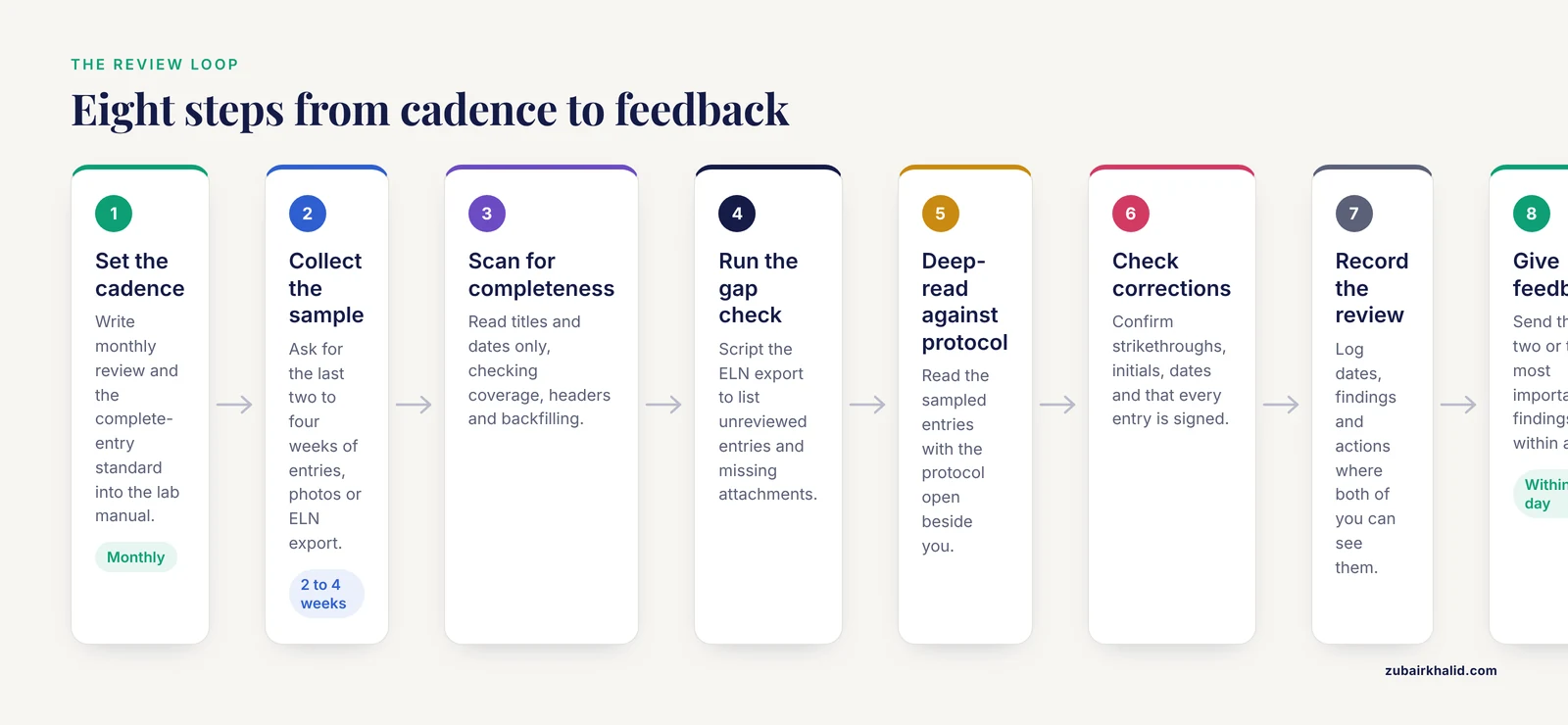
This is the lab notebook review checklist for PI use in its full form. Run it monthly for each active trainee, or biweekly during a project's critical phase. Budget 20 to 30 minutes per student.
Step 1. Set the cadence and announce the standard
Write down, in your lab manual, that notebooks are reviewed monthly, what a complete entry contains, and where reviews are logged. The standard cannot be enforced retroactively. New trainees should see a worked example entry during onboarding, ideally one of yours with your own annotation.
Step 2. Collect the sample
Ask each trainee for the last two to four weeks of entries. For paper notebooks, this is a phone photo of each used page sent to a shared folder, or the physical notebook brought to lab meeting. For ELNs, export or link the notebook entries for the period. Do not review from memory or from the trainee's verbal summary. The point is to read the record itself.
Step 3. Scan for completeness first
Read every entry title and date in the period without stopping to evaluate content. You are checking three things: the period is fully covered, every entry has the required header fields, and nothing looks backfilled. Backfilling shows up as uniform, tidy entries with identical formatting written in one sitting, or ELN creation timestamps that all fall on a Friday afternoon.
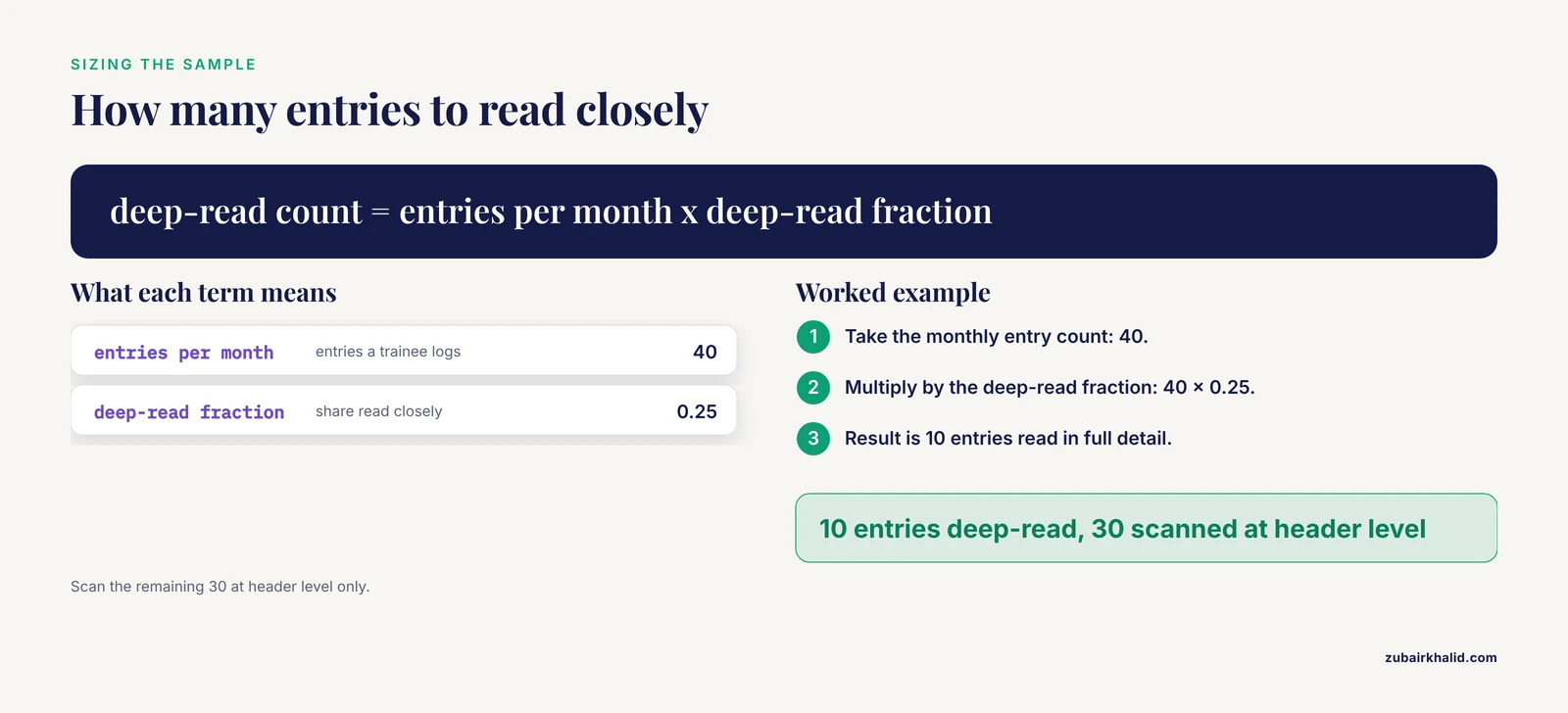
A quick arithmetic check helps you size the sample for the deeper pass in Step 5. If a trainee logs roughly 40 entries per month and you want to read about a quarter of them closely:
entries per month      = 40
deep-read fraction     = 0.25
deep-read count        = 40 x 0.25 = 10 entries
Read those 10 entries in full detail and scan the remaining 30 at header level.
Step 4. Run an automated gap check on ELN exports
If you use an ELN that exports entries as CSV or similar, a one-line script finds structural gaps before you read anything. Suppose your export has columns for entry ID, date, title, project, and review status. This awk command prints the date and title of every entry whose review status is empty:
awk -F',' 'NR>1 && $5 == "" {print $1, $3}' entries_export.csvExpected output for a lab with two unreviewed entries:
2026-11-03 PCR_screen_Round2
2026-11-05 Protein_purification_batch7
That output is your work queue. A variant of the same command finds entries with no attached file, which usually means raw data is missing:
awk -F',' 'NR>1 && $6 == "" {print $1, $3, "NO ATTACHMENT"}' entries_export.csvExpected output:
2026-11-04 Flow_cyt_Tcell_activation NO ATTACHMENTFor paper notebooks there is no export, so this step becomes a visual scan: flip through the period and confirm there are no blank gaps between dated entries and no pages missing from the sequence.
Step 5. Deep-read the sampled entries against the protocol
Now read the 10 sampled entries with the relevant protocol open beside you. For each one, ask whether a competent lab member who was not present could repeat the experiment. Specifically confirm:
- Every parameter that the protocol leaves as a variable is recorded (incubation time, centrifuge speed and duration, instrument settings).
- Every critical reagent has a lot number.
- Deviations are written as deviations, for example "used 30 min incubation instead of protocol's 20 min because the block was still warming," not silently absorbed.
- Raw data is either pasted in or referenced by an exact file name that actually resolves to a file.
- The interpretation, including negative results, is written down in the entry, not only in the person's head.
Step 6. Check corrections and signatures
In paper notebooks, confirm every correction uses the single-line strikethrough with initials and date, and that no page has been removed (check that page numbers run continuously). In ELNs, spot-check the audit trail on two or three entries to confirm edits are tracked and that entries were created on the dates claimed. Confirm every entry is signed. Batch-signing a week of entries on Friday afternoon is the single most common signature problem, and it weakens the contemporaneous nature of the record.
Step 7. Record the review
Log the review in a place both of you can see. In an ELN, leave a timestamped comment on the reviewed period. In a paper lab, add one line to a shared review log:
2026-11-10 | A. Okafor | entries 2026-10-13 to 2026-11-07 | 10 deep-read of 38 total
Findings: 2 entries missing antibody lot numbers, 1 missing gel image file
Actions: lots added to both entries same day, image uploaded to /raw/2026-11
Next review: 2026-12-10
This log closes the loop. It shows the review happened, what was found, and that fixes were made, which is exactly what an auditor, a patent attorney, or a collaborating lab will want to see.
Step 8. Give feedback within a day
The checklist only improves documentation if findings reach the trainee while the work is fresh. Send the two or three most important findings in writing, and reserve the longer conversation for patterns, such as "your entries state conclusions without the underlying image." Repeat the same feedback phrasing across the lab so the standard stays consistent.
Electronic Lab Notebook Comparison for Review Workflows
The choice between paper and electronic systems changes the mechanics of review more than the standard itself. When you evaluate platforms, judge them against the review workflow above, not against feature lists. An electronic lab notebook comparison for review purposes comes down to five criteria.
| Criterion | Paper notebook | Electronic lab notebook |
|---|---|---|
| Search and retrieval | Manual, page by page | Full-text search across all entries |
| Audit trail | None beyond ink and signatures | Automatic, timestamped edit history |
| Witnessing | Physical countersignature | Electronic signature or review comment |
| Review sampling | Photograph pages, manual | Export CSV, scriptable gap checks |
| Offsite access | Requires the physical book | Anywhere with credentials |
| Long-term export | Scan pages, bulky | Structured export, quality varies by vendor |
Well-known platforms in academic settings include Benchling, LabArchives, eLabFTW, and RSpace, along with institutional homegrown systems. Rather than endorse one, apply three questions to any candidate, including your current paper process:
- Can I export everything, in a readable format, if we leave? Vendor lock-in is the biggest ELN risk. Confirm the export includes attachments and audit history, not just entry text.
- Does the audit trail survive edits? Some free-form wiki-style tools let users overwrite content invisibly, which defeats the record-keeping purpose.
- Does it support the review loop? You need a way to comment on, sign, or mark entries as reviewed, and a way to pull a date range for a given user.
A hybrid period is common and acceptable: work recorded in the ELN, with critical wet-lab pages printed and countersigned if your technology transfer office or sponsor requires ink. Ask your institution's tech transfer office what witnessing standard they expect before standardizing, because expectations differ between institutions.
Building a Lab Notebook Template
A lab notebook template removes most of the review burden before the review happens, because trainees fill in fields instead of inventing a structure. Give every new lab member the template on day one. Here is a compact version that works in a paper notebook, a Word file, or an ELN rich-text entry:
EXPERIMENT ENTRY
Date performed:            (YYYY-MM-DD)
Performed by:              (name)
Title / purpose:           (one line question)
Protocol reference:        (name, version or date)
Deviation from protocol:   (none, or describe)
Reagents used:
  - reagent, manufacturer, catalog #, lot #
  - (repeat as needed)
Instruments and settings:  (instrument ID, key parameters)
Procedure notes:           (what you actually did, in order)
Raw data:                  (pasted image/file, or exact file name + location)
Observations:              (what you saw, including problems)
Interpretation:            (what it means, including negative results)
Next steps:                (one or two lines)
Signature:                 ________  Date: ________
Reviewed by:               ________  Date: ________
Three template choices pay for themselves repeatedly. First, the "deviation from protocol" field makes documenting changes normal rather than an admission of failure. Second, the "raw data" field with an exact file-name convention, such as 2026-11-05_JD_FlowCyt_Tcell_activation.fcs, makes every entry traceable to a file. Third, the "reviewed by" line turns your checklist into something the trainee anticipates, which shifts the culture from inspection to shared quality control.
For computational work, the same template applies with two adjustments: raw data becomes the script or notebook file plus its git commit hash or version, and instruments become the compute environment, recorded as package versions or a container image identifier.
Common Mistakes and Limitations
These are the lab notebook review checklist common mistakes that reviewers make, and the trainee-side mistakes reviewers should be hunting for.
Reviewer-side mistakes:
- Reviewing only the best students. The notebooks that need review most belong to trainees who have never been shown the standard. Selecting who to review by trust defeats the purpose.
- Reviewing too rarely. An annual review finds a year of bad habits. A monthly review finds a month of them, while the work is still memorable and fixable.
- Treating the review as policing. If findings arrive as accusations, trainees start writing defensive, vague entries. Frame findings as "here is what a reader would be missing."
- Letting the standard drift. If you accept a missing lot number from a senior student but flag it for a first-year, you have two standards and neither is enforceable.
- Skipping your own notebook. The PI's entries are evidence too. Review your own notebook annually with the same checklist.
- Forgetting computational records. Analyses live in scripts and notebooks that are never dated or versioned. Apply the checklist to them.
Trainee-side mistakes to hunt for during review:
- Backfilled entries. Uniform entries written long after the work, with no memory of failed attempts.
- Conclusion-only records. "The transfection worked" with no image, no cell count, and no file reference.
- Undocumented deviations. The protocol says 20 minutes, the entry says 20 minutes, the result suggests 45.
- Pencil, erasures, or missing pages in paper notebooks, which undermine the record more than any missing detail.
- Batch signing. Signing a week of entries in one sitting.
- Unreferenced samples. Vials or plates in the freezer with no entry showing where they came from.
Limitations of this checklist. It encodes the standard practices of experimental record-keeping, not a binding regulation. Your institution, your funder, and your technology transfer office may impose additional or different requirements, particularly around witnessing for patent purposes and around data retention periods after a project ends. Follow your institution's policy where it differs from this guide. Individual cases, such as records involved in an integrity inquiry, need guidance from your research integrity office rather than a generic checklist.
Frequently Asked Questions
How often should a PI review lab notebooks?
Monthly for each active trainee is a workable default, tightened to biweekly during critical project phases such as submission pushes or patent-relevant work. Whatever you choose, write it in the lab manual and keep it consistent, because an announced, regular review is both easier to sustain and more defensible than an occasional crack-down.
What should I do if I find a missing entry?
Ask the trainee to write a reconstruction entry as soon as possible, clearly marked as a later reconstruction with its own date, describing what is known and what is uncertain. Never allow the reconstruction to be backdated into the original sequence, because a backdated entry damages the record's credibility far more than an honest gap does.
Do electronic lab notebooks need wet-ink signatures?
For most day-to-day research records, no, an ELN's timestamped audit trail with electronic signing or review comments serves the record-keeping purpose. For patent-relevant work, requirements vary, so ask your institution's technology transfer office what witnessing format they expect before you standardize on any single approach.
Can I review notebooks in a group setting?
Yes, and many labs do, using 10 minutes of a weekly meeting to review one volunteer entry against the checklist. Group review is excellent training, but keep a private channel for entries involving performance concerns or sensitive results, since public correction discourages honest documentation of failures.
What is the difference between a notebook review and a data audit?
A notebook review is developmental and routine, aimed at catching documentation gaps and training the trainee. A data audit is a formal, adversarial verification, usually triggered by a sponsor, journal, or integrity office, where an independent person checks whether conclusions are supported by primary records. A lab with regular reviews passes audits with far less scramble.
How do I handle confidential or unpublished data during review?
Review within your lab's existing access controls rather than exporting entries to personal devices or email. In an ELN, review in place using the platform's permissions. For paper notebooks, keep the physical book in the lab and review it there. Treat the review log itself as an internal document and do not circulate it outside the group.
Should undergraduates and rotation students follow the same standard?
Yes. The standard for what makes an entry complete does not change with seniority, and applying it uniformly from day one prevents habits from forming that you will have to correct later. What changes is the level of support: give a rotation student a worked example and sit with them through their first review rather than just sending findings.
What belongs in a lab notebook versus a separate file?
The notebook holds the dated narrative: what was done, with what, observed what, concluded what, and pointers to files. Raw datasets, large images, sequences, and analysis scripts live in managed storage, with the notebook holding the exact file name and location. The dividing rule is that the notebook must let a reader find and interpret everything, without needing to store the everything itself.