Free Lab Notebook Entry Templates for Reproducible Research
By Dr. Zubair Khalid, DVM, MS, PhD ·

By the end of this article you will be able to write a lab notebook entry that another scientist can repeat without asking you a single question. You will have a copy-and-paste lab notebook entry template in markdown format, a paper-notebook version you can rule out by hand, and a short Python snippet that gives each digital entry a tamper-evident hash. You need nothing more than a notebook or a plain-text editor to start. If you want to run the hash example, you need Python 3 installed, which you can check by typing python3, version at a command prompt.
The core skill here is not software. It is the discipline of recording, in a fixed format, what you set out to do, what you actually did, what you observed, and what you concluded. A structured teaching exercise built around this exact skill has been used with hundreds of students across multiple lab sections, and its stated learning objectives are to write an entry containing a title, date, author, purpose, methods, results, and conclusions [1]. That field list is the backbone of every template in this article.
Why a Fixed Entry Format Matters for Reproducibility
Reproducibility fails at the entry level long before it fails at the project level. If one entry records reagent lot numbers and the next does not, the gap is invisible until someone tries to repeat the work. Research on how scientists actually keep records backs this up. Interviews with robotics researchers found a reliance on diverse and often incompatible tools for managing experimental data, which created concrete challenges in reproducibility and data traceability, and the study proposed adapting interactive notebooks to include features traditionally found in paper lab notebooks.
A fixed format also protects the long-term value of your records. A project on computational archival science treated scans of analog lab notebooks from materials-synthesis labs as a data source in their own right, automatically segmenting pages into discrete entry types so the contents could be extracted and reused. The authors noted that these archival notebooks are an invaluable record of research conditions, steps, and outcomes, yet are at risk of being lost because they lack structure that computers can parse [2]. Entries written in a consistent template are far easier to archive, search, and reuse decades later, whether by a human successor or by software.
Finally, a template supports honest science communication. The same guided-inquiry teaching activity that teaches the title-through-conclusions format also asks students to describe the uses of notebooks in research projects and to improve their scientific communication skills, treating the notebook as a writing exercise rather than a bureaucratic chore [1].
The Anatomy of a Lab Notebook Entry Template
A complete lab notebook entry template format contains nine fields. Each field answers one question a future reader will ask.
- Title. A short descriptive phrase, for example "Buffer exchange of pooled serum samples by dialysis."
- Date and time. The date the work was performed, not the date it was written up. Include start and end times when timing affects the result.
- Author and witnesses. Who performed the work and who observed it. Witness signatures matter in intellectual-property contexts.
- Purpose or objective. One or two sentences stating the question the entry is trying to answer.
- Materials and conditions. Reagents with concentrations and lot numbers, equipment with model numbers and settings, organism strains, software and version numbers.
- Methods. What you actually did, in the order you did it, including deviations from the planned protocol.
- Data and observations. Raw numbers, photographs, printouts pasted or taped in, instrument files by filename, and negative results.
- Conclusions. Your interpretation, clearly marked as interpretation, not data.
- Next steps and cross-references. What you plan to do next and pointers to related entries, protocols, or files.
The title, date, author, purpose, methods, results, and conclusions structure is exactly what the published teaching exercise trains students to produce, and it has been validated at scale in classroom settings [1]. Add signature and date lines at the bottom of every page, since these support both attribution and the integrity of the record.
Free Lab Notebook Entry Templates You Can Copy Today
A markdown lab notebook template for digital use
Save the following text as template.md and copy it for every new entry. This is the lab notebook entry template example used in the walkthrough below.
# Entry: [short descriptive title]
**Date/time performed:** 2026-11-11, 09:15 to 10:40
**Author:** [full name]
**Witness:** [name, or "none"]
**Related entries:** [entry IDs or dates, or "none"]

## Purpose
[One or two sentences. What question does this entry answer?]

## Materials and conditions
- Reagent A (catalog or lot number, concentration, storage)
- Instrument (make, model, key settings)
- Software (name, version)

## Methods
1. [Step as actually performed]
2. [Include deviations from the written protocol, in brackets]

## Data and observations
| Measurement | Value | Units | Notes |
|---|---|---|---|
|  |  |  |  |

[Attach or reference raw files by exact filename]

## Conclusions
[Interpretation only. Clearly separate from data above.]

## Next steps
- [ ]
A paper-notebook version you can rule out by hand
If you work on paper, draw the same structure once per page:
- Title, underlined, at the top of the page.
- Date on every page, never only on the first page of an experiment.
- Your name and initials on every page.
- Purpose, written as a sentence before the work begins.
- Materials and conditions, including lot numbers written directly onto the page.
- Numbered methods, with corrections made by a single line through the mistake, never erased or obliterated, with the correction dated and initialed.
- Data tables and taped-in printouts, with each attachment signed across the tape edge so it cannot be replaced.
- Conclusions, written after the data and labeled as interpretation.
- Signature and date lines at the bottom of every page, yours and a witness where required.
Cross out unused space at the bottom of a partially used page with a diagonal line so nothing can be added later.
Step-by-Step Walkthrough: From Blank Template to Verifiable Entry
This walkthrough uses a deliberately simple worked example, diluting a 10x phosphate-buffered saline stock to 1x working solution. The calculation itself is standard dilution arithmetic taught in every introductory lab course.
Step 1. Create the template file
mkdir -p ~/lab-notebook/templates ~/lab-notebook/2026
nano ~/lab-notebook/templates/template.md
Paste the markdown template from the previous section, save, and exit. Keeping the template in its own file means you can improve the template over time without rewriting old entries, and version-controlling this directory with Git gives you a dated history of how your recording practice evolved.
Step 2. Start a new entry from the template
cp ~/lab-notebook/templates/template.md ~/lab-notebook/2026/2026-11-11_pbs-dilution.mdStep 3. Fill in the entry with real numbers
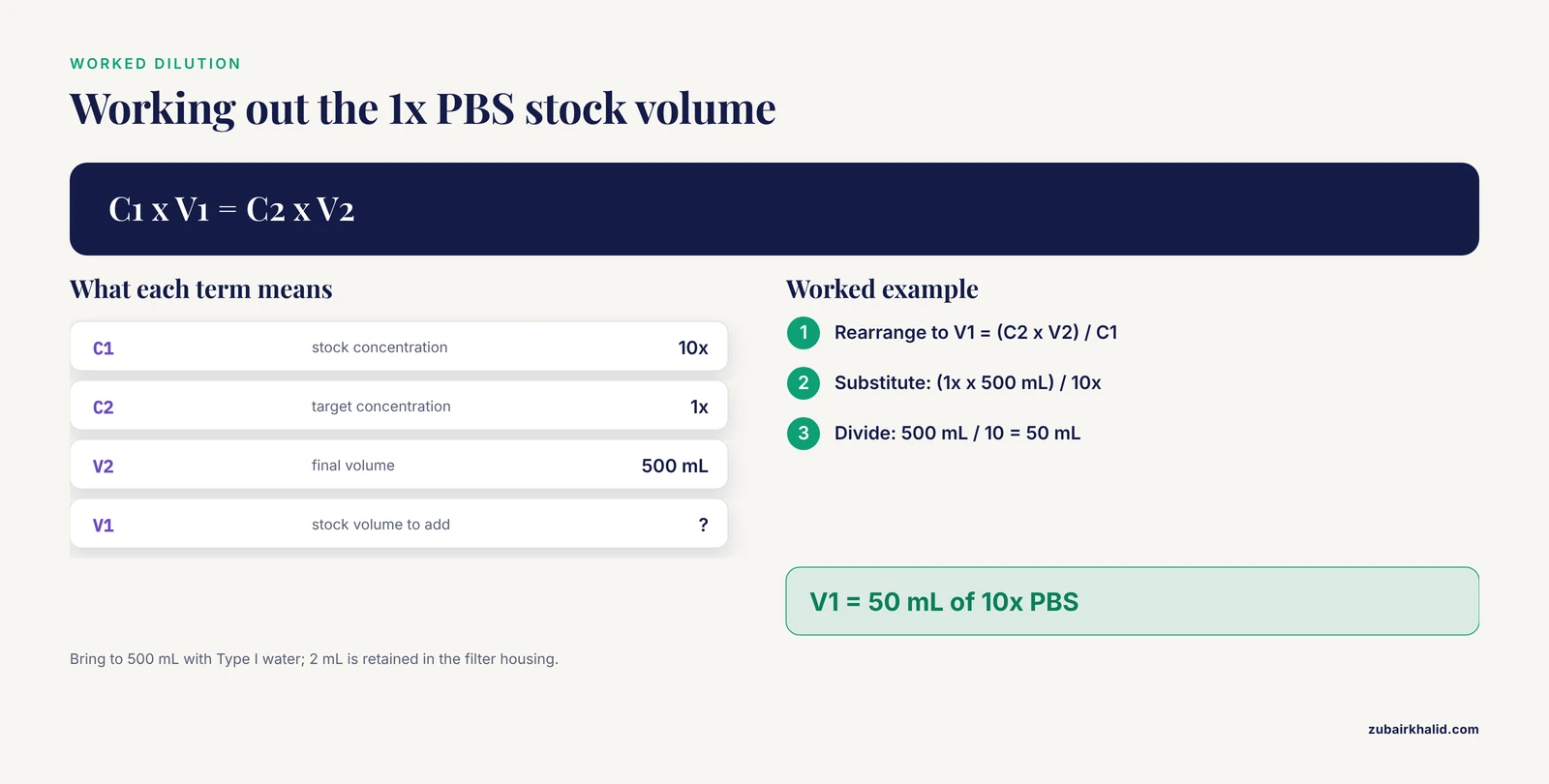
Here is the entry with the purpose, materials, and calculation filled in. The dilution uses the standard formula C1 × V1 = C2 × V2, where C1 is the stock concentration (10x), C2 is the target concentration (1x), and V2 is the final volume (500 mL).
# Entry: Prepare 500 mL of 1x PBS from 10x stock for plate washes
**Date/time performed:** 2026-11-11, 09:15 to 09:35
**Author:** J. Alvarez
**Witness:** none
**Related entries:** 2026-11-04_cell-count-pre-transfection

## Purpose
Determine whether 1x PBS diluted from the lot currently on the shelf
supports the same plate-wash routine used with the previous lot.

## Materials and conditions
- 10x PBS, lot 2026-03A, room temperature storage
- Type I water, resistivity 18.2 MΩ·cm at 25 °C
- 1000 mL graduated cylinder, serial D
- pH meter, calibrated with pH 7.00 and 10.01 buffers at 09:05

## Methods
1. Calculated stock volume: V1 = (C2 × V2) / C1 = (1x × 500 mL) / 10x = 50 mL.
2. Dispensed 50 mL of 10x PBS into the graduated cylinder.
3. Brought volume to 500 mL with Type I water.
4. Mixed by inversion 10 times. Measured pH.
5. Filtered through a 0.22 µm membrane into two 250 mL bottles.

## Data and observations
| Measurement | Value | Units | Notes |
|---|---|---|---|
| pH of 1x PBS | 7.38 | pH | expected range per manufacturer 7.2 to 7.4 |
| Volume recovered | 498 | mL | 2 mL retained in filter housing |
| Appearance | clear, colorless |  | no particulates |

## Conclusions
Dilution within specification. Proceed with the wash routine
using this lot and compare against the previous lot's wash data.

## Next steps
- [ ] Record wash performance for 3 plates in a new entry
Two details in this entry do most of the reproducibility work. First, the calculation is shown, so a reader can check the arithmetic rather than trust it. Second, the deviation notes slot (the 2 mL hold-up volume) is recorded as an observation, not silently corrected.
Step 4. Give the entry a tamper-evident hash
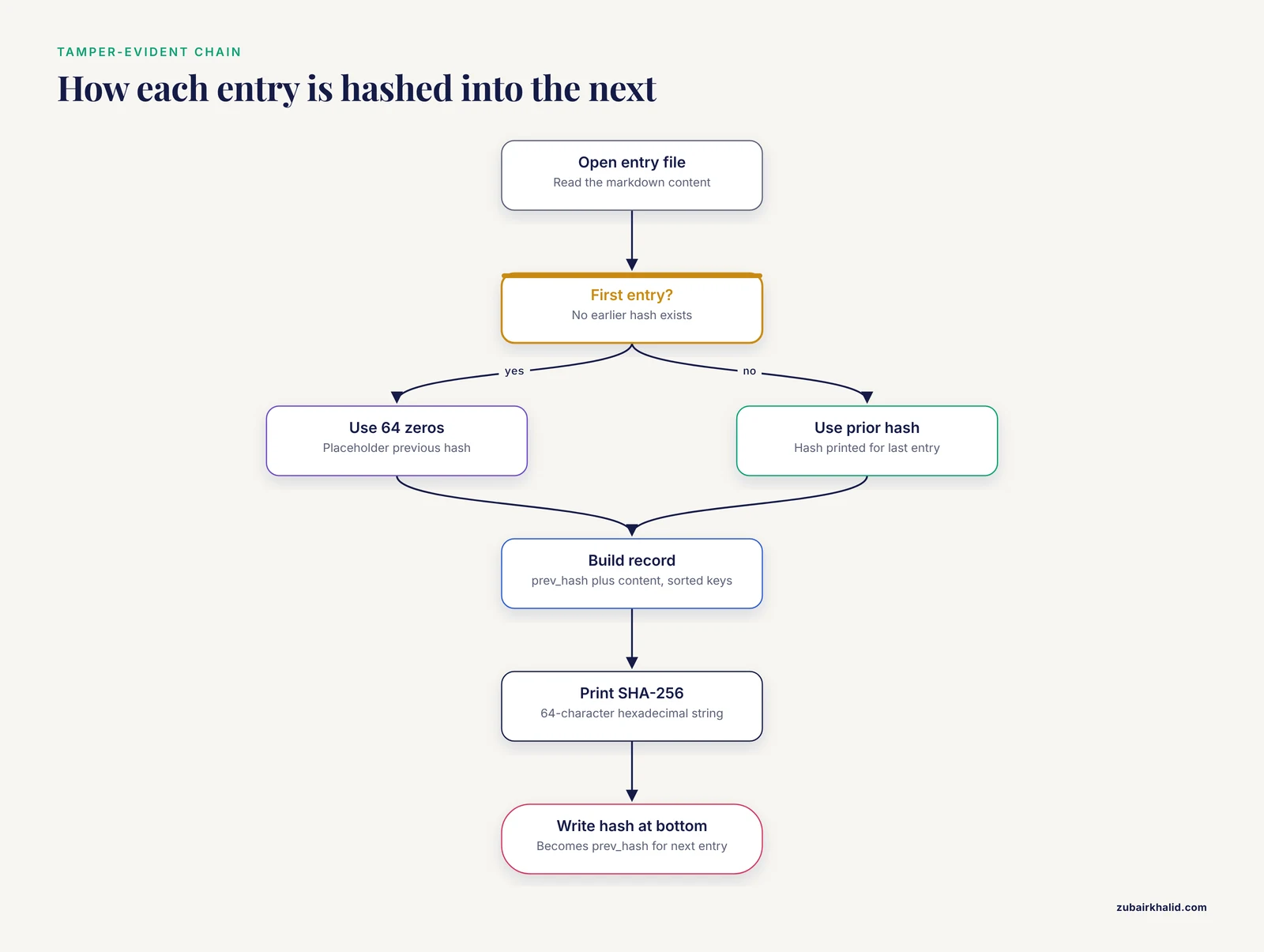
Hash-chained records, in which each entry records the hash of the previous entry, are one approach to making a digital notebook resistant to silent modification. This design appears in a recently described open-source research assistant that keeps what its authors call a Living Lab Notebook, where entries are added but never erased, and where the system records what happened by watching the agent rather than trusting its claims, targeting the most common failure mode of model overclaiming [3]. You can apply the same principle manually to your own entries.
Create a file named chain_entry.py containing:
import hashlib
import json
import sys

prev_hash = sys.argv[1]
entry_file = sys.argv[5]

with open(entry_file, "r", encoding="utf-8") as handle:
    content = handle.read()

record = {"prev_hash": prev_hash, "content": content}
block = json.dumps(record, sort_keys=True).encode("utf-8")
print(hashlib.sha256(block).hexdigest())
Run it with the previous entry's hash, using 64 zeros for the first entry in the chain:
python3 chain_entry.py 0000000000000000000000000000000000000000000000000000000000000000 2026-11-11_pbs-dilution.mdThe expected output is a single 64-character hexadecimal string, for example:
3f7a91c4e2b8d05a6f1c48e9b2d7a30c5e8f14b6a9c2d7e0f3a5b8c1d4e7f0a2Write that string at the bottom of the entry, then use it as the prev_hash input when you hash the next entry. If anyone alters an earlier entry, its hash changes, and the chain breaks visibly. Keep the printed or saved hash list somewhere separate from the entry files.
Step 5. Verify the result before moving on
Check a completed entry against this short list:
- Could a colleague repeat the experiment using only this entry and the cited protocol?
- Are all lot numbers, instrument settings, and software versions present?
- Is every change from the written protocol written down and dated?
- Is the conclusion clearly separated from the data?
- Does the hash recorded at the bottom match a fresh run of
chain_entry.pyon the unmodified file?
Step 6. Adapt the format for computational work
Interactive notebooks such as Jupyter combine data, code, and documentation in one environment, and they transformed record keeping in data science. If your work is computational, keep the same nine fields but let the notebook do part of the work. A minimal header cell:
import datetime

entry_id = datetime.datetime.now().isoformat(timespec="seconds")
print(f"# Entry {entry_id}")
print("Author: J. Alvarez")
print("Purpose: recompute alignment stats after parameter change")
The cells below the header should import data, run the analysis, and print results in execution order. Run the notebook top to bottom from a fresh kernel before filing it, because a notebook that only runs out of order is not a reproducible record. The robotics study cited earlier argued precisely for this marriage of interactive computing with the context-capture habits of traditional notebooks.
Electronic Lab Notebook Comparison: Paper, Interactive, and Managed Systems
There is no single best medium. The right choice depends on your data types, your institution, and your tolerance for setup work. The comparison below focuses on reproducibility, not convenience alone.
| Option | Best suited for | What it captures well | Watch out for |
|---|---|---|---|
| Paper notebook | Wet bench work, teaching labs, IP-sensitive environments | Hand sketches, taped-in printouts, signatures, contemporaneous dates | Not searchable, single physical copy, needs scanning for archiving |
| Markdown or plain-text files | Individual researchers, computational work, long-term portability | Version-controlled history, plain-text readability in any tool decades later, easy hashing | Requires self-imposed discipline, poor for hand-drawn figures |
| Jupyter and interactive notebooks | Data analysis, modeling, robotics, machine learning | Executable code paired with narrative, embedded plots and outputs | Out-of-order execution, hidden state, large outputs bloating files |
| Managed electronic lab notebooks | Teams, regulated environments, multi-site collaboration | Access control, templates enforced at entry time, search across projects | Lock-in, export fidelity, adoption friction |
Electronic lab notebooks for research have a longer history than many researchers assume. eCAT, described in 2009 as an online electronic lab notebook for scientific research, was among the early web-based systems built specifically for research groups rather than for clinical or quality-control labs [4]. Digital notebook software predates even that. A 1985 software review documented Notebook II version 2.02 from Pro/Tem Software, a 1984 release sold with a 247-page manual and a binder for 189 dollars, showing that structured digital note keeping has been marketed to researchers for four decades [5].
Adoption, not capability, is usually the bottleneck. A study of electronic lab notebook implementation among the STEM community at an American university in the United Arab Emirates framed the question as whether the software is worth it, reflecting the genuine cost-benefit uncertainty labs face when moving away from paper [6]. When you evaluate systems, run the electronic lab notebook comparison against your actual template requirements rather than against feature lists. Any system that cannot enforce the nine fields above at entry time will need the discipline to come from you instead.
A newer category is worth watching. Open-source AI research assistants that run locally can maintain a hash-chained, append-only notebook automatically, recording what actually happened rather than what the model claims happened, an architecture designed to make claims checkable [3]. For solo researchers comfortable with self-hosting, this class of tool offers integrity features that would be laborious to maintain by hand.
One more consideration applies regardless of medium. Notebook entries can become citable scholarly objects in their own right. Guidance on citing lab notebook entries treats the dated, archived notebook as a referenceable source, which becomes practical once entries are consistently structured and securely archived [7]. Entries written to a fixed template are far easier to cite unambiguously, because the entry title, date, and author fields map directly onto citation elements.
Common Mistakes and Limitations
Backfilling entries. Writing yesterday's work today, from memory, defeats the main purpose of the notebook. Write entries during or immediately after the work. If you must reconstruct, say so explicitly in the entry with the reconstruction date.
Erasing instead of striking through. In paper notebooks, obliterating a mistake destroys the record's credibility. Use a single line through the error, initial and date it, and write the correction beside it. In digital systems, prefer files that keep history, such as version control or append-only formats.
Skipping negative results. An entry that records only successes is a cherry-picked dataset. The failed condition you omit is the one your successor will unknowingly repeat.
Inconsistent field use. A template only helps if every entry uses every field, even when the answer is "none." Empty fields carry information. A blank lot-number field in a filled entry signals a gap, while an absent field signals nothing.
Conflating conclusions with data. Write observations first, interpretation second, and label them. Reviewers and collaborators need to see where the data end and the inference begins.
Treating the template as a substitute for a protocol. The entry records what you did. The protocol is the shared, versioned procedure. Reference the protocol by name and version in the entry, and record only deviations at length.
Assuming the electronic system guarantees integrity by itself. Software with access controls helps, but a cloud account is not an archive. Know how to export your complete notebook in an open format, and test the export before you depend on it.
Ignoring the archive problem. Decades of valuable notebook content are at risk of loss when records lack machine-readable structure [2]. If your lab keeps paper notebooks, scan them and organize the scans by date and entry type while the people who wrote them are still available to explain ambiguities.
A final limitation applies to every format described here. Templates standardize the record, but they cannot standardize judgment. Questions about what must be witnessed, how long records must be retained, and who owns notebook content are institutional and legal questions that vary by employer and funding situation, and your laboratory's written policies, not this article, govern those decisions.
Frequently Asked Questions
What is a lab notebook entry template?
A lab notebook entry template is a fixed set of fields, such as title, date, author, purpose, materials, methods, results, conclusions, and next steps, that you fill in for every experiment so that records stay complete and comparable. The published teaching exercise that trains this format asks students to write entries with exactly those seven core fields [1].
What should a lab notebook entry template format include?
At minimum it should include a title, the date the work was performed, the author and any witnesses, the purpose, materials with lot numbers and conditions, the methods as actually performed, the raw data and observations, clearly labeled conclusions, and cross-references to related entries [1]. Signature and date lines at the bottom of each page round out the record.
Is there a free lab notebook entry template I can copy?
Yes. The markdown template in this article is free to copy into any text editor, and the ruled-paper version can be drawn by hand into a bound notebook. Both follow the same nine-field lab notebook entry template format, so you can switch between paper and digital without changing your habits.
How does a lab notebook entry template improve reproducible research?
It forces you to capture the information a stranger would need to repeat the work, including reagent lots, instrument settings, deviations, and negative results, at the moment the work happens. Studies of record-keeping practice found that fragmented, inconsistent tools create reproducibility and traceability problems, which structured entries directly address.
Should I use paper or an electronic lab notebook?
Choose based on your data and your team, not on fashion. Paper remains strong for wet bench work and signed records, markdown files are nearly indestructible and searchable, interactive notebooks suit computational work, and managed electronic lab notebooks suit teams that need access control and search across projects. Early web-based research systems such as eCAT established the category in 2009, and implementation studies show the decision usually hinges on cost, training, and workflow fit rather than raw features [4].
How do I cite a lab notebook entry?
Cite it like any archived source, giving the author, entry title or identifier, date, and the location or archive where the notebook is held. Published guidance on citing lab notebook entries treats consistently kept notebooks as referenceable records, which works best when entries are dated, structured, and archived securely [7].
Can I use the same entry template in a teaching lab?
Yes, and it works well in that setting. A process-oriented guided-inquiry activity built around notebook writing has been completed by hundreds of students across different lab sections, works best in the first lab period, and can be modified by instructors for their own classes [1].
How can I make digital entries tamper evident?
Hash each entry and record the hash of the previous entry inside the next one, so any modification to an old file breaks the chain visibly. This hash-chained, append-only design is used by at least one open-source research tool that keeps a Living Lab Notebook specifically to make claims checkable rather than trusting the agent that wrote them [3].
Sources
- Lab Notebook POGIL (process-oriented guided-inquiry learning) activity
- AI-Ready Data: Knowledge Extraction from Archival Lab Notebooks
- K-Dense BYOK: An Open-Source AI Research Assistant That Runs Locally and Keeps a Hash-Chained Lab Notebook
- eCAT : Online electronic lab notebook for scientific research
- Software Reviews : Notebook II, Version 2.02 Staff review Publisher: Pro/Tem Software, 2363 Boulevard Circle, Walnut Creek, CA 94595 (telephone: 800-826-2222; 415-947-1000) Year of Publication: 1984 Materials: Program disk; 247-page manual; binder. Price: $189
- Is it worth it? Implementation of electronic lab notebook software among the STEM community at an American University in the uae
- Citing Lab Notebook Entries