Hybrid Lab Notebooks: Choosing Between Paper and Electronic
By Dr. Zubair Khalid, DVM, MS, PhD ·

A hybrid lab notebook approach combines a paper notebook for bench-side, freehand recording with an electronic lab notebook (ELN) for digital data, storage, search, and sharing, and the rule of thumb is simple: put paper where your hands are wet and your thoughts are fast, and put electrons where your data is big, your collaborators are remote, and your records must survive for years.
Most labs today live in the gap between those two worlds. Documentation of experiments is essential for best research practice and underpins scientific transparency and data integrity, yet the paper lab notebook has traditionally carried that burden even as nearly all data acquisition, analysis, presentation, and archiving moved to electronic tools [1]. This article explains what each format does well, compares them on the criteria that actually decide the choice, walks through realistic lab scenarios, and shows how to build a hybrid system without creating a documentation mess.
What a Hybrid Lab Notebook Actually Is
A hybrid lab notebook is a deliberate division of labor between paper and electronic records. The paper notebook handles what happens at the bench: quick sketches of gel layouts, handwritten calculations, notes taken while wearing gloves, and anything that must be captured in seconds. The electronic side handles everything that is already digital: instrument exports, spreadsheets, images, sequences, and the searchable, timestamped record that a lab needs for collaboration and reproducibility.
The word "hybrid" only means something if the two sides connect. A paper notebook whose pages never reference the digital record, and an ELN whose entries never reference the paper notebook, are just two disconnected systems. The hybrid discipline is a cross-referencing habit: every paper page points to an electronic entry, and every electronic entry points to the paper pages it summarizes.
Researchers have been candid about why paper persists. In a detailed user study of why electronic lab notebooks failed to displace paper, the leading barriers were the cost of available ELNs, their ease of use, and accessibility problems across different devices and operating systems. The same study found that scientists willingly use generic notebooking software, spreadsheets, and other general office and scientific tools to support their work, which is precisely the opening a hybrid system exploits [2].
Paper Lab Notebooks on Their Own Terms
Paper endures because it fits the physical reality of bench work. You can write in it with gloves on, next to a biosafety cabinet, without waking a screen or signing into anything. There is no license to expire and no server to go down. A bound notebook with numbered pages, dated entries, and signed witness lines remains the mental model that most senior scientists, patent attorneys, and auditors were trained on.
The weaknesses are just as concrete. A paper notebook cannot be searched except by hand, cannot be backed up until someone scans it, and cannot be shared with a collaborator on another continent without a photocopier. It cannot hold a 40-gigabyte microscopy file or a 96-well plate readout. It also tends to fragment a lab's knowledge: each notebook lives in one person's drawer, so the experiment that a departing postdoc ran three years ago may as well not exist for anyone who inherits the project.
Paper also struggles with modern data volume. Electronic lab notebooks are better equipped than paper notebooks to handle present-day life science and engineering experiments that generate large datasets and require high levels of data integrity [3]. When a single day's flow cytometry run produces more data than a notebook page could describe in a week, paper becomes an index rather than a record.
Electronic Lab Notebooks on Their Own Terms
An electronic lab notebook is software that records, organizes, stores, and shares experimental documentation. Modern ELNs typically provide a permissions system, controlled sharing, an audit trail, electronic signature, and search, features that were codified early in platforms designed with input from researchers and regulatory reviewers [4]. ELNs have become indispensable tools in modern research laboratories for data management, collaboration, and documentation of experiments [5].
The practical challenge is that "ELN" describes an enormous range of products. One review of the market classified 35 available electronic notebooks into five categories based on audience: Quality Assurance and Quality Control pools for regulated environments, separate Biology and Chemistry pools for specialized tasks, Research and Development pools for general science, and a Multidiscipline pool spanning stringent quality labs through free-form research [6]. That variety is useful but confusing, and it explains why so many labs stall at the selection stage.
Not every electronic option is a purpose-built ELN. Academic labs have adopted general tools successfully. A translational science laboratory at New York University School of Medicine used Evernote for six months to record all routine experimental information and concluded that it effectively replaced paper notebooks in their setting, using imported snapshots and drawing add-ons to work around the inability to freehand directly into a notebook [7]. Another team analyzed five ELNs and ran two survey-based studies at a biomedical research institute, finding that Microsoft OneNote offered many features associated with ELN best practices and that surveyed users preferred it over a scientifically designed commercial ELN, even though OneNote was never designed for scientific work. They published a quick guide for adapting OneNote, or similar general note-taking applications, to an ELN workflow [8].
These generic tools matter for the hybrid question because they are cheap, familiar, and already installed. The research literature identifies cost, ease of use, and cross-device accessibility as the main barriers that keep dedicated ELNs out of academic labs, and notes that scientists happily adopt general-purpose software that does not have those problems [2]. A hybrid system built on a generic tool plus paper is often the least painful first step.
ELNs also gain value from integration. The benefits of an ELN increase when it connects to laboratory information management systems, chromatography data systems, analytical instrumentation, and scientific data management systems, although no single well-established integration path has dominated [9]. On a smaller scale, a newer tool called ELNdataBridge uses Python APIs to synchronize data between different ELN platforms through a user-friendly mapping interface, with a first demonstrator connecting the Chemotion ELN and Herbie for chemistry and materials science data exchange [5]. Interoperability is improving, but if your lab collaborates across multiple ELN platforms today, plan for friction.
Side-by-Side Comparison: Paper Versus Electronic
The table below is the core of any electronic lab notebook comparison. Judge each row against your own lab's reality rather than against an idealized lab.
| Criterion | Paper Lab Notebook | Electronic Lab Notebook |
|---|---|---|
| Capturing notes at the bench | Excellent. Works with gloves, works offline, works during a power cut | Moderate. Depends on a device at the bench, a charged battery, and working software |
| Freehand sketches and diagrams | Native. Draw directly on the page | Variable. Some platforms support drawing or stylus input, and snapshot workarounds exist [7] |
| Search and retrieval | None beyond a table of contents and index pages | Strong. Full-text search across every entry and every user's notebook [4] |
| Large datasets and instrument files | Impossible. Paper can only describe them | Strong. Designed for data-rich experiments [3] |
| Data integrity and audit trail | Manual. Signature and witness lines only | Built in. Timestamps, audit trails, and electronic signatures [4][1] |
| Collaboration and sharing | Poor. One physical copy, one location | Strong. Controlled sharing with permissions [4] |
| Remote and real-time monitoring | Impossible | Possible. Demonstrated in teaching labs with cloud-based ELNs [3] |
| Backup and preservation | Vulnerable. Fire, water, loss, and departure of the owner | Strong if backups exist, but depends on the vendor or institution |
| Cost | Low per notebook, but hidden costs in copying, storage, and wasted search time | Ranges from free generic tools to paid institutional licenses, and cost is a documented adoption barrier [2] |
| Ease of adoption | Universal. Everyone already knows how | Steep for some platforms, which is a documented adoption barrier [2] |
| Regulatory and compliance fit | Accepted historically, but hard to verify | Generally stronger. Teaching lab students rated ELN better than paper for compliance [3] |
| Transparency to outsiders | Low. Notebooks rarely leave the drawer | Higher. Sharing notebooks alongside publication is proposed to increase transparency and improve honesty in reporting [10] |
No row is a knockout. The honest conclusion from a decade of research is that neither format dominates every criterion, which is exactly why the hybrid approach exists.
Hybrid Lab Notebook Paper Electronic Pros and Cons
The hybrid lab notebook paper electronic pros and cons reduce to one trade: you accept a documentation discipline burden in exchange for keeping the strengths of both formats.
Pros of the hybrid approach. You keep paper's unmatched bench-side capture speed. You gain search, backup, and sharing for everything that matters long-term. You avoid the single largest adoption barrier to dedicated ELNs, which is the combined cost, usability, and accessibility problem that has stalled full electronic conversion in many labs [2]. You can phase in the electronic side gradually rather than disrupting a running lab, a concern that is well documented when labs move from paper to electronic systems [9]. You also build the cross-referencing habit that makes any eventual full migration painless, because your paper notebooks become an indexed archive rather than an orphaned pile.
Cons of the hybrid approach. Every piece of information now lives in two places with a rule about which copy is authoritative. If the linking discipline lapses, you get the worst of both worlds: an unsearchable paper trail and an electronic record with holes. Hybrid systems require someone to enforce conventions, schedule scanning, and check that the electronic index stays current. There is also a subtle integrity risk. Gerlach and colleagues emphasize that transparency and integrity must be reflected in documentation regardless of format, and managing data across different devices with substantial metadata is one of the biggest hurdles in modern documentation [1]. A hybrid system is, by definition, data on different devices.
How to Choose: The Criteria That Decide Real Choices
Skip the feature lists and answer five questions. They resolve almost every real decision.
1. How big is your data? If a typical experiment produces instrument files, high-content images, or plate reader exports, the electronic side is not optional. Large datasets are the clearest reason ELNs outperform paper [3]. If your experiments are mostly observational, paper can carry more of the load.
2. Who needs to read the record, and when? If the only reader is the notebook's author, paper suffices. If collaborators, a supervisor, a core facility, or a future hire need the record, electronic sharing wins. If an auditor, patent examiner, or funder may ever inspect your documentation, an audit trail and electronic signature matter, and those are core ELN features [4].
3. What does your institution or funder require? Some environments, particularly quality-controlled and regulated settings, have expectations that only a validated electronic system can meet efficiently [6]. Check this before you fall in love with any tool.
4. What will people actually use? The user studies are unambiguous on this point. Adoption fails when tools are expensive, awkward, or inaccessible across devices [2]. A slightly imperfect system that everyone uses daily beats a perfect system that everyone routes around.
5. What happens in five years? Data outlives platforms. If your lab collaborates with groups on other ELN systems, think now about how records will move between them, because tools for exchanging data between disparate ELN platforms are new and still maturing [5].
The Best Hybrid Lab Notebook Paper Electronic Options
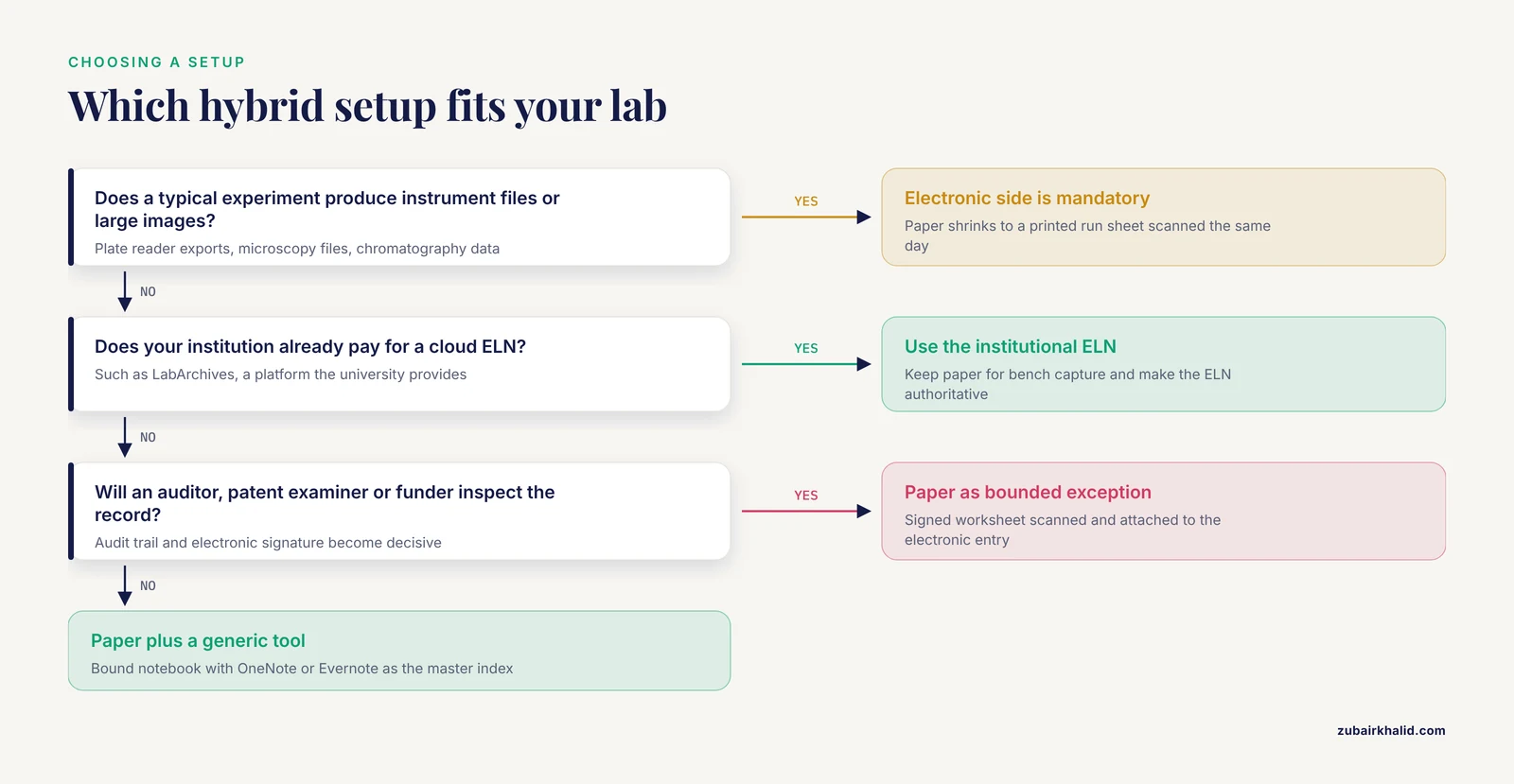
The best hybrid lab notebook paper electronic options fall into four practical tiers, and the right tier depends on your answers above.
Tier 1: Bound paper notebook plus a generic note-taking app. This is the entry-level hybrid and the most common in academic labs. Use a bound, page-numbered notebook at the bench and a free tool such as OneNote or Evernote as the electronic hub. Both have published track records in real research settings [7]. Attach photos of key paper pages to the electronic entries. Cost is near zero, and adoption barriers are minimal because these are tools scientists already use for general work [2]. The compromise is that a general note-taking application is not designed for scientific purposes, so you must impose your own structure, which is exactly what the published OneNote guide helps with [8].
Tier 2: Paper plus an institutional cloud ELN. If your university provides a platform such as LabArchives, use it as the authoritative electronic record and keep paper for bench capture. Cloud ELNs demonstrated streamlined workflow, quick data recording and archiving, enhanced data sharing and collaboration, superior data integrity, and real-time and remote monitoring of experiments when implemented in a bioprocess engineering teaching lab [3]. If your institution already pays the license, the cost barrier that blocks many labs [2] disappears.
Tier 3: Paper plus a purpose-built ELN with integration. Labs with heavy instrumentation or sample management needs benefit from an ELN connected to a laboratory information management system and other informatics tools, a combination shown to increase ELN benefits [9]. An even stronger version integrates sample tracking with experimental documentation, because samples and aliquots are integral to most experiments yet are usually managed separately in spreadsheets. Integrated sample and experiment management is associated with fewer lost and mislabeled samples, clearer relationships between samples and experiments, reduced experimental error, more effective search, productivity gains, and more efficient freezer use [11].
Tier 4: Paper as a bounded exception inside a full ELN. In quality-critical or regulated work, paper shrinks to a minimal, defined role, such as a printed worksheet that is completed, signed, scanned, and attached to the electronic entry the same day. The paper page becomes evidence rather than the record of truth.
Worked Scenarios
Scenario 1: A molecular biology PhD student in a small academic lab
Maya runs PCR, cloning, and western blots. Her data are mostly gel images, plasmid maps, and small spreadsheets. Her lab has no institutional ELN license. The best fit is Tier 1. She keeps a bound notebook with a strict template, photographs gel images and plate layouts into OneNote the same day, and tags every electronic entry with the notebook page number. Her supervisor can follow a project from any device. When she finishes her degree, the electronic entries give her lab a searchable record instead of a shelf of handwritten volumes. This scenario directly reflects the published experience that general tools, once adapted, can effectively replace paper for routine experimental information [7].
Scenario 2: A bioprocess or analytical lab generating instrument-scale data
A lab running fermenters, HPLC, and plate readers produces files no paper page can contain. The electronic side is mandatory. The hybrid question is what paper remains for. The sensible answer is very little: perhaps a printed run sheet filled in at the instrument and scanned within the day. The lab should choose a purpose-built ELN from the appropriate market category for its science and quality requirements [6] and prioritize integration with existing data systems [9].
Scenario 3: A collaborative project across three institutions
Three labs on two continents share samples and results. Data exchange between their different ELN platforms is the central problem, and dedicated interoperability tools for this are only now emerging, with a first demonstrator linking Chemotion ELN and Herbie [5]. Until such bridges are routine, the practical hybrid answer is to agree on a common export format for shared entries, keep paper out of the cross-institution workflow entirely, and treat each lab's internal notebook system as its own business.
Scenario 4: A lab preparing for regulatory scrutiny or patent work
Here the audit trail, controlled sharing, electronic signature, and search capabilities of a real ELN are decisive [4]. Paper witness pages can supplement but should not carry the load. The hybrid role for paper is a defined exception with a scanning protocol, so the electronic record remains authoritative and complete.
Building the System: A Lab Notebook Template That Works
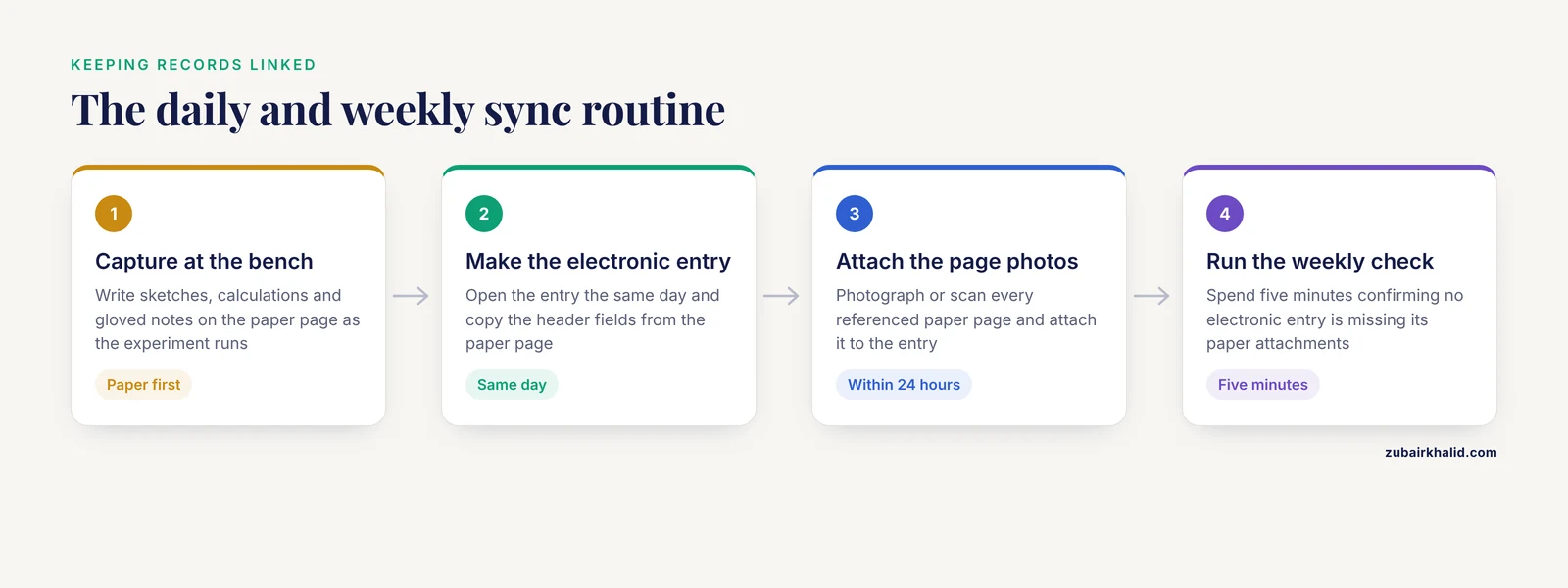
A template is what turns intent into habit. Whether the template is printed in a paper notebook or set up as a recurring page in your electronic tool, keep the fields identical so the two sides mirror each other. The published OneNote adaptation guide provides a model for structuring a general tool into a scientific workflow, and its structure transfers to paper [8]. Gerlach and colleagues also describe using unique Study IDs in labs to maintain and enhance documentation best practice, and that habit is worth adopting in any hybrid system [1].
A minimal hybrid lab notebook template, for each experiment:
- Header. Date, experiment title, unique experiment or Study ID, operator name, and the notebook page number or electronic entry link.
- Purpose. One sentence stating the question the experiment answers.
- Materials and conditions. Reagent lots and concentrations, instrument settings, cell line or organism details, and any deviations from the standard protocol.
- Live capture section. The bench-side space. In paper, this is the blank page. In the electronic entry, this is where photographs of that page get attached.
- Results and files. Pointers to every file, with filenames that include the Study ID and date.
- Outcome and next step. What happened, what it means, and what happens next.
Two linking rules make the hybrid work. First, the electronic entry is the master index. Every paper page referenced in an experiment must be photographed or scanned and attached within 24 hours. Second, the paper notebook carries a running index page in the back that maps dates and Study IDs to page numbers, so a future reader can move from paper to electrons in one step.
Set the mirroring rhythm deliberately. A practical cadence for most academic labs is capture on paper during the experiment, electronic entry and photo attachment the same day, and a weekly five-minute check that no electronic entry is missing its paper attachments.
Electronic Lab Notebook Comparison: Picking the Tool
When you do compare electronic tools, compare on the criteria the literature says matter, not on feature count.
- Adoption friction. Cost, ease of use, and cross-device accessibility are the three documented barriers that have kept every dedicated ELN from becoming a market leader [2]. Trial the tool with your least tech-enthusiastic lab member before committing.
- Core record-keeping features. Look for a permissions system, controlled sharing, an audit trail, electronic signature, and search [4].
- Fit to your science. Market reviews group ELNs by audience, from quality-controlled environments to free-form research [6]. A chemistry-focused platform and a biology-focused platform structure data differently. Match the category to your work.
- General tools as legitimate options. OneNote and Evernote have published success stories in research settings, with documented adaptations for their weaknesses [7][8]. If budget or IT support is thin, they are reasonable starting points rather than compromises to apologize for.
- Integration and interoperability. Ask how the tool connects to your instruments, your sample management, and the platforms your collaborators use [9][5].
One more comparison criterion deserves its own paragraph. Transparency. A proposal in the research integrity literature argues that a standard practice of releasing lab notebooks alongside publications would reduce biased and incomplete reporting, and that new electronic notebook systems create the opportunity to do this [10]. If your lab values open science, an ELN whose entries can be exported and shared cleanly gives you an option paper never could.
Common Mistakes and Limitations
Treating the hybrid as two separate systems. The most common failure is a paper notebook and an electronic tool that never reference each other. Without the cross-linking habit, you have paid the coordination cost of a hybrid system and received none of the benefit.
Choosing the electronic tool before choosing the workflow. Labs that demo software first and design conventions second usually end up with an unused license. Decide your template, linking rules, and authority rules first, then find the tool that fits.
Leaving the paper side unbacked. Hybrid does not mean the paper notebook is safe. It is a single physical object. Scan or photograph it on a schedule, not after a water leak.
Assuming electronic means automatically compliant. An audit trail only protects data integrity if entries are made contemporaneously and the system's rules are followed. The documentation principles of transparency and integrity apply to every format [1].
Ignoring the freehand problem. The single most reported limitation of electronic notebooks in user surveys is the inability to freehand directly into the notebook, felt by electronic and paper users alike [7]. If your work is drawing-heavy, plan the workaround, such as a stylus, a tablet, or photographing hand drawings, rather than pretending the limitation does not exist.
Underestimating the disruption of change. Adopting an ELN in a predominantly paper-based environment is usually disruptive [9]. Schedule the transition during a quiet period, appoint an owner for the system, and expect a ramp-up period with reduced documentation quality.
Expecting data to move freely between ELN platforms. If your collaborators use a different system, exchanging structured data between platforms remains technically difficult, and the tools that enable it are only beginning to appear [5]. Ask about export formats before you commit.
Letting the template rot. A template that no one updates becomes a form nobody fills in honestly. Review the template every six months with the people who actually use it.
A final limitation belongs to the practice itself rather than to any format. Documentation habits interact with human factors such as time pressure, training, and lab culture, and the right system for a four-person academic lab may be wrong for a regulated quality laboratory. Individual labs should assess their own requirements, and where regulatory obligations apply, consult the applicable institutional and regulatory guidance directly.
Frequently Asked Questions
What is a hybrid lab notebook?
A hybrid lab notebook is a documentation system that splits recording between a paper notebook for bench-side capture and an electronic lab notebook for storage, search, sharing, and digital data, with explicit cross-references connecting the two. The paper side handles fast, gloved, offline writing. The electronic side holds the authoritative, searchable record.
Is paper or electronic better for a lab notebook?
Neither is universally better. Paper wins at the bench for speed, freehand drawing, and reliability without power or software [7]. Electronic wins for large datasets, search, sharing, audit trails, data integrity, and remote access [4][3]. Choose based on your data volume, your readers, your compliance needs, and what your team will actually use daily.
What is the best hybrid lab notebook setup for a small academic lab?
For most small academic labs, the best setup is a bound, page-numbered paper notebook paired with a free general tool such as OneNote or Evernote, both of which have documented success in research settings [7][8]. Photograph every important paper page into the electronic entry the same day, tag entries with a unique experiment ID, and make the electronic side the master index. If your institution provides a cloud ELN such as LabArchives, use it in place of the generic tool [3].
Can an electronic lab notebook fully replace paper?
In many settings, yes. A translational science lab used Evernote for six months and found that the advantages of the electronic system outweighed the inability to freehand, working around that limitation with imported snapshots and drawing add-ons [7]. In data-heavy and compliance-driven environments, ELNs are clearly better suited than paper [3]. The replacement question usually fails on human factors, since cost, ease of use, and accessibility remain the main barriers to full adoption [2].
How do I keep paper and electronic lab notebooks in sync?
Use one shared template on both sides, attach a photograph or scan of every relevant paper page to the corresponding electronic entry within 24 hours, and keep a running index in the paper notebook that maps dates and experiment IDs to page numbers. Make the electronic entry the authoritative record and the paper page the captured evidence. A weekly check that no entry is missing its attachments keeps the system honest.
What should a lab notebook template include?
A workable lab notebook template includes a header with date, title, unique experiment or Study ID, and operator name, a one-sentence purpose, materials and conditions with reagent lots and instrument settings, a live capture section, a results section listing every file by name, and an outcome and next-step section [1]. Keep the template identical on paper and electronic sides so entries mirror each other.
Sources
- Electronic Lab Notebooks and Experimental Design Assistants.
- Electronic lab notebooks: can they replace paper?
- Implementation and use of cloud-based electronic lab notebook in a bioprocess engineering teaching laboratory.
- eCAT: Online electronic lab notebook for scientific research.
- ELNdataBridge: facilitating data exchange and collaboration by linking Electronic Lab Notebooks via API.
- A review of electronic laboratory notebooks available in the market today.
- Using Evernote as an electronic lab notebook in a translational science laboratory.
- A quick guide for using Microsoft OneNote as an electronic laboratory notebook.
- Electronic laboratory notebooks progress and challenges in implementation.
- Scientific honesty and publicly shared lab notebooks: Sharing lab notebooks along with publication would increase transparency and help to improve honesty when reporting results.
- The benefits of integrated systems for managing both samples and experimental data: An opportunity for labs in universities and government research institutions to lead the way.