How to Use Scopus to Find the Right Journal for Your Manuscript
By Dr. Zubair Khalid, DVM, MS, PhD ·

By the end of this guide you will be able to turn a finished manuscript draft into a ranked shortlist of candidate journals using Scopus, verify that each candidate is indexed where your funder or institution expects, and check each journal's instructions to authors before you commit. You will need a computer with a browser, institutional or personal access to Scopus (a free preview mode works for basic searching), your manuscript title and abstract, and about an hour.
What Scopus Is and What It Can Do for Journal Selection
Scopus is an abstract and citation database of peer-reviewed literature maintained by Elsevier. Published search protocols routinely name it as "Scopus (Elsevier)" to distinguish it from other databases such as PubMed, Cochrane, and Web of Science [1]. It indexes journals, conference proceedings, and book series across science, medicine, social sciences, and humanities, and it records the citation links between documents.
For journal selection, Scopus gives you three things that a generic web search cannot:
- A searchable record of which journals actually publish work like yours, based on real articles.
- Source-level metrics (CiteScore and related indicators) for candidate journals.
- Exportable data you can analyze yourself if you want a systematic, defensible shortlist.
Scopus is not a journal finder in the sense of a one-click recommendation tool. It is a research database you can point at your topic. The method below turns it into a journal finder.
Before You Search: Define Your Manuscript's Profile
Answer five questions on paper before touching Scopus. Each answer becomes a filter later.
- Topic in three to five keywords. Write the keywords a stranger in your field would type. Avoid jargon only your immediate collaborators use.
- Article type. Original research, review, case report, short report, image report, protocol, or letter. Article type narrows the field faster than any metric.
- Required indexing. Many institutions, funders, and promotion committees require publication in journals indexed in Scopus, MEDLINE, Web of Science, or all three. Know which one applies to you.
- Access and cost model. Full open access with an article processing charge (APC), subscription-based with no fee, or a no-fee open access journal. A 2024 review of journals publishing image reports specifically screened for journals that were open access, free of charge, and indexed in PubMed and Scopus, which shows how common these constraints are in practice [2].
- Scope boundary. One sentence: "This journal publishes [article type] about [topic] for [audience]."
Write the five answers on one page. Every step below uses them.
How to Use Scopus to Find Journals: A Step-by-Step Walkthrough
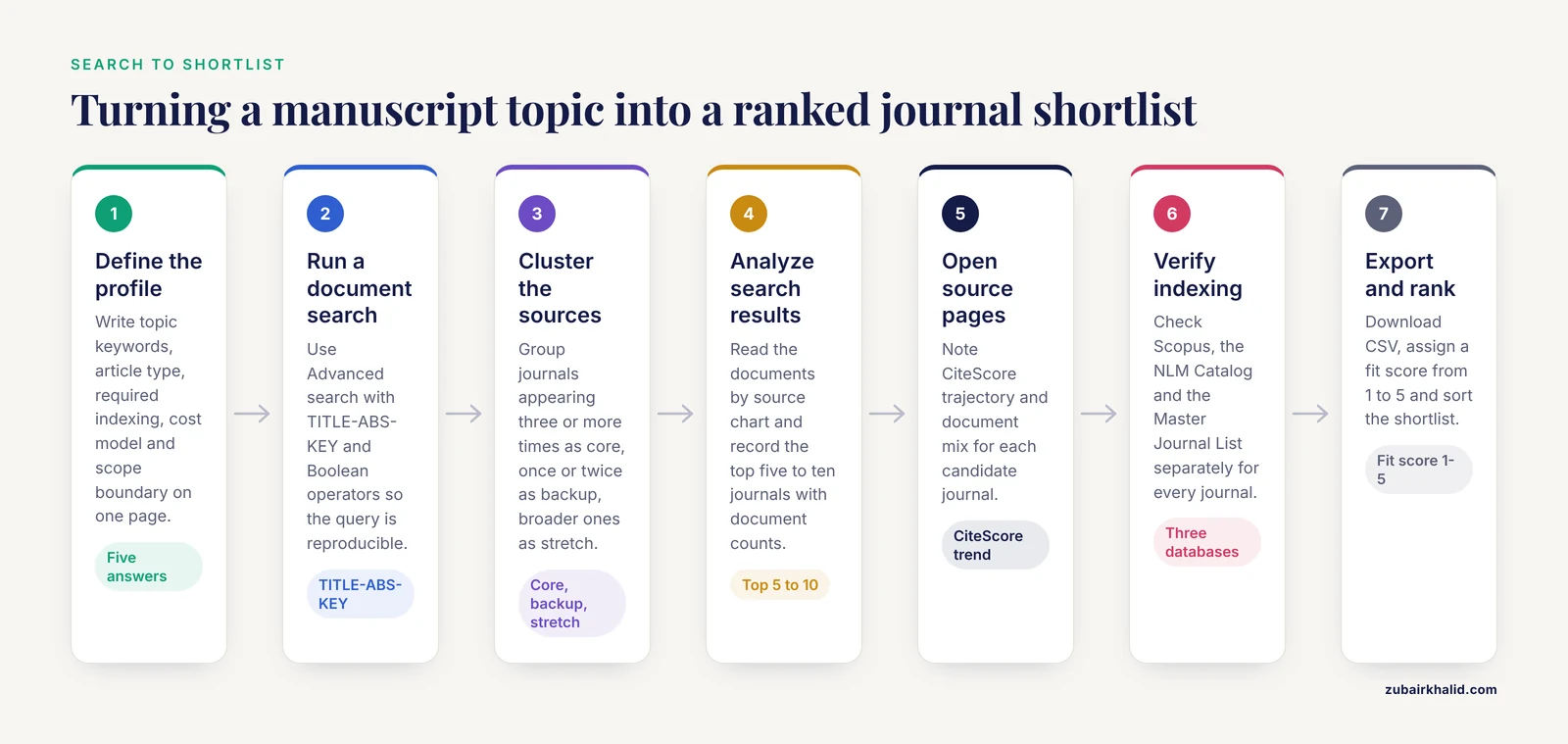
Step 1. Run a Document Search on Your Manuscript Topic
Log in at scopus.com through your institution. From the search page, choose Advanced search so you can write a precise query. The basic field code for topic searching is TITLE-ABS-KEY, which searches the title, abstract, and keyword fields together.
Suppose your manuscript is about visual methods for estimating how much hospital patients eat, a real research question in clinical nutrition. Your query would look like this:
TITLE-ABS-KEY ( "visual estimation" AND "dietary intake" AND hospital )For a manuscript on cultural humility training in health professions education, you might write:
TITLE-ABS-KEY ( "cultural humility" AND ( "medical students" OR "nursing students" ) )The Boolean operators AND, OR, and AND NOT are the same ones used in database screening across the literature. A published review of image-report journals, for example, describes starting its journal-identification process with a Boolean string and following the PRISMA 2020 reporting guidelines [2]. Writing your query down, rather than typing loose phrases into a search box, makes your shortlist reproducible.
Expected output. Scopus returns a document list. Each row shows the article title, authors, source title (the journal name), year, and times cited. If your query returns fewer than 20 documents, broaden it by dropping a keyword or adding synonyms with OR. If it returns thousands, restrict to the last five years using the year filter on the left panel.
Step 2. Read the Source Column and Cluster Your Results
Scan the Source column of your results. You are looking for journals that appear more than once. Cluster your results mentally or in a spreadsheet into three groups:
- Journals appearing three or more times in your results. These are the core candidates.
- Journals appearing once or twice. These are backup candidates.
- Journals whose names suggest a broader or different audience. These are stretch candidates.
A published scoping review on birthrate staffing tools searched PubMed, Medline, CINAHL, Google Scholar, Scopus, and the Directory of Open Access Journals, and found its evidence spread across journals serving midwifery, health policy, and general medicine audiences [3]. The same lesson applies to your results: work like yours rarely lives in a single journal, and the visible cluster tells you where your true audience sits.
Step 3. Use "Analyze Search Results" to Rank the Journals
With your result list on screen, click Analyze search results in the toolbar. Scopus generates summary charts: documents per year, documents by source, documents by author, documents by country, and more.
For journal selection, the documents by source chart is the one that matters. It ranks journals by how many documents in your result set they published. A journal at the top of that list publishes a meaningful share of the recent work on your topic, which is the strongest evidence-based signal of scope fit you can get from any journal finder method.
Click a source name in the analysis view to jump to its Scopus source page. Record the top five to ten journals in your spreadsheet with their document counts.
Step 4. Open Each Candidate Journal's Source Page
On a source page, Scopus shows the journal's subject areas, the types of documents it publishes, its publication record over recent years, and its citation metrics. The headline metric is CiteScore, Elsevier's annual metric for serial titles. CiteScore for a given year counts citations received in that year to documents published in the previous three calendar years, divided by the number of those documents. A related display shows the journal's percentile rank among sources in its subject area.
Two practical readings to make on each source page:
- CiteScore trajectory. A metric that is flat or rising over recent years is a healthier sign than one built on a citation spike from a few review articles.
- Document mix. A journal whose recent documents are almost all review articles may not accept your original research article. Check the document-type breakdown before you commit.
Write the CiteScore year and value next to each journal in your spreadsheet. Do not rank on the number alone, which is a common mistake covered below.
Step 5. Verify Indexing Status in Every Database You Need
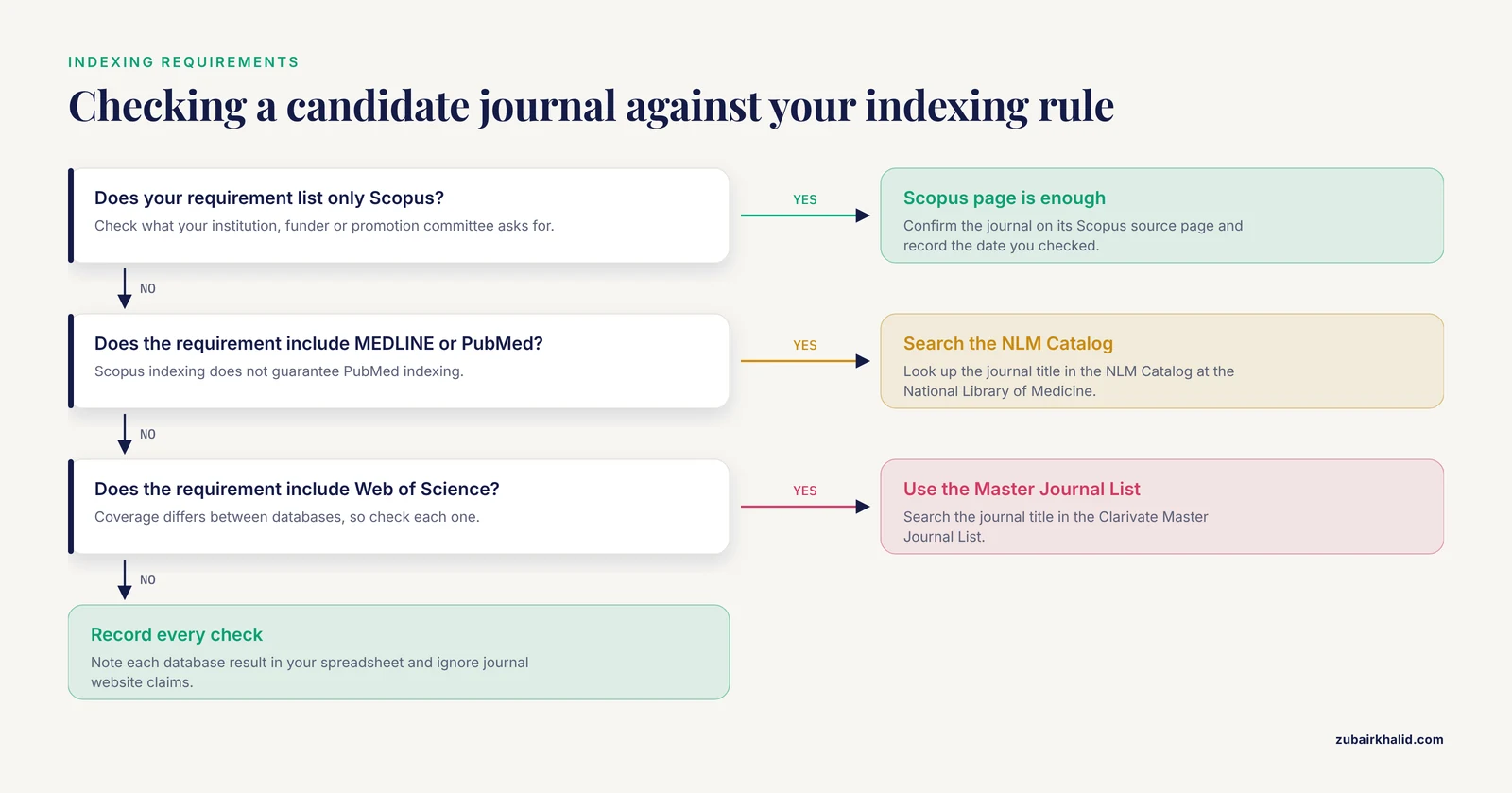
Scopus-indexed does not mean PubMed-indexed, and PubMed-indexed does not mean Scopus-indexed. The image-report review cited above makes this concrete. Of 39 journals that publish image reports and met its criteria of open access, no fees, and quality indexing, all 39 were Scopus-indexed but only 29 of the 39 were also PubMed-indexed [2]. If your institution requires MEDLINE indexing, four of every ten journals on that kind of shortlist would fail the requirement even though they are in Scopus.
Verify each candidate journal's indexing independently:
- For Scopus status, the journal's Scopus source page is the authoritative record.
- For MEDLINE or PubMed status, search the journal title in the NLM Catalog at the National Library of Medicine.
- For Web of Science status, use the Master Journal List maintained by Clarivate.
Do not rely on a journal's own website claims. Predatory journals routinely list indexing they do not hold, and cross-checking against the database itself takes under a minute per journal.
Step 6. Compare Against Where Comparable Published Work Actually Appears
Pull up two or three of the best-matched papers from your Step 1 results and read their full text, especially the methods section of reviews. Published protocols and reviews show you the standard search footprint for your topic, which tells you which databases the community treats as comprehensive. Recent systematic reviews in reproductive medicine searched PubMed, Scopus, Embase, and the Cochrane Library [4], and a 2026 review of visual dietary-estimation methods searched PubMed, Scopus, Embase, and Web of Science with the same search strategy run in each database [5]. Reviews of alcohol use disorder in sub-Saharan Africa [6], medicinal plant treatments for dengue [7], and rhinoplasty patient-reported outcomes [8] followed the same pattern, adding Scopus to PubMed and specialist sources.
The lesson for journal selection is twofold. First, your manuscript should sit comfortably in journals whose authors run these multi-database searches, because those authors read and cite each other. Second, some journals specialize in document types you may not have considered. MethodsX, for example, publishes structured methods and protocol articles, and its published protocol on cultural humility training named Scopus among its four core databases [1]. If your manuscript is a protocol, a methods paper, or a null-result study, the Step 1 search will surface these specialist venues and the journal finder logic still applies.
Scoping reviews and protocols also appear in venues such as BMJ Open, which published a 2026 protocol on substance use among students in Ghana [9], and Cureus, which published a 2026 review of child feeding knowledge in West Africa that searched Scopus, PubMed, and Web of Science among its sources [10]. Your Step 1 and Step 3 results will reveal these venue patterns for your own field without guesswork.
Step 7. Export the Data and Analyze It Yourself (Optional but Powerful)
For a systematic shortlist, export your results and analyze them offline. On the results page, click Export, choose CSV for citation and bibliographical information, and download the file.
This is how bibliometric researchers use Scopus at scale. A scientometric study of poverty alleviation research extracted a corpus of 5,982 articles from Scopus covering four decades from 1981 to 2023, removed 653 duplicates or unsuitable records to leave 5,329 documents, and then ran performance analysis and science mapping in VOSviewer and R-Studio, tracking output to a 2022 peak of 316 publications [11]. You do not need that scale for a single manuscript, but the same pipeline, even with a few hundred exported records, gives you a defensible table of candidate journals ranked by output on your topic.
A minimal spreadsheet analysis looks like this:
Columns: Journal | Docs in results | Recent 5-yr docs | CiteScore | Indexing (Scopus/MEDLINE/WoS) | OA model | APC | Fit score (1-5)Assign each journal a fit score against your Step 0 profile, sort by fit score, and you have a ranked shortlist you can justify to any coauthor or supervisor.
Key Scopus Features for Journal Selection at a Glance
| Feature | Where to find it | What it tells you |
|---|---|---|
| Advanced document search | Search page, Advanced query form | Which journals publish your topic, based on real articles |
Boolean field codes (TITLE-ABS-KEY, AND, OR) | Query editor | Precise, reproducible result sets |
| Analyze search results | Toolbar above result list | Journals ranked by number of documents matching your query |
| Source details page | Click the journal name in any record | Subject areas, document mix, recent publication activity |
| CiteScore and percentile | Source details page | Citation-based standing of the journal among sources in its field |
| Export (CSV, RIS) | Toolbar above result list | Raw data for your own ranking table and reference manager |
| Date and document-type filters | Left panel of results | Restricting to recent years or to articles rather than conference papers |
How to Choose a Journal: Criteria Beyond the Metrics
Scopus gets you to a data-driven shortlist. The final decision rests on criteria you check outside Scopus.
Scope and article type. Read the journal's aims and scope and its instructions to authors. Instructions often carry hard constraints that disqualify a otherwise perfect fit. In the image-report review, word limits across the 39 journals ranged from 100 to 1,500 words, reference limits ranged from 0 to 20, and author limits ranged from 2 to 6, and 21 of the 39 journals allowed only a single image [2]. If your manuscript had four images and twelve authors, half of those journals were eliminated on instructions alone. Always check before you submit.
Field balance. The same review found the eligible image-report journals concentrated in oncology (6 of 39) and general medicine (5 of 39), with smaller clusters in neuroscience, fetal and pediatric medicine, and nephrology [2]. Specialty depth matters. A journal that publishes six image reports in your subspecialty is a better fit than a general journal that publishes one occasionally, even if the general journal has a higher CiteScore.
Cost and access model. If your profile requires no-fee open access, filter for it explicitly, as the reviewed study did, rather than discovering the APC after acceptance [2].
Reader, not ranking. The journal where your intended readers already look, as evidenced by your Step 3 analysis, is worth more to your career than a marginally higher number at a journal those readers never open.
Common Mistakes and Limitations
- Ranking by CiteScore alone. CiteScore measures citations, not fit. A high-scoring journal outside your subfield will desk-reject or orphan your paper. Use metrics to compare journals within your Step 3 shortlist, never to build the shortlist.
- Assuming one indexing means another. As shown above, Scopus indexing does not guarantee MEDLINE indexing, and the gap can be large. Verify each database separately against your institutional requirement.
- Searching too narrowly or too broadly. A query with four
ANDterms can miss your field entirely. A query with no field code searches everything. Fix both by iterating on Step 1 and checking that known, closely related papers appear in your results. - Ignoring document type. If Scopus shows a journal's recent output is dominated by reviews and you are submitting an original article, your acceptance odds and visibility both drop.
- Trusting journal website claims about indexing. Check Scopus, the NLM Catalog, and the Web of Science Master Journal List directly. Journals that lose indexing sometimes keep the old logo on their sites.
- Forgetting that coverage and metrics update on a lag. A journal that recently entered or left Scopus, or changed publisher, may show stale source-page details. Cross-check the journal's current instructions page for publisher and policy changes.
- Treating a search of one database as comprehensive. Published reviews across clinical topics consistently run their searches in Scopus alongside PubMed, Embase, Web of Science, and Cochrane [4], [5], [7], [1]. When you later cite related work in your introduction, a Scopus-only search leaves gaps your reviewers will notice.
- Confusing Scopus the database with Elsevier's separate journal recommendation tool. Scopus is a searchable citation database. Elsevier offers a separate web-based journal finder built on Scopus data. They answer different questions, and the manual method in this guide works for every publisher, not just one.
Frequently Asked Questions
Is Scopus free to use?
The full database requires a subscription, usually provided by a university or employer library. Scopus offers a free preview mode that allows basic searching and abstract viewing, which is enough for the Step 1 through Step 3 workflow if you do not have institutional access.
What is the difference between Scopus and Web of Science?
Both are subscription citation databases from different companies, Elsevier and Clarivate respectively, with partly overlapping journal coverage. Published search protocols frequently list both, for example a 2024 protocol that searched PubMed, Scopus, Cochrane, and Web of Science together [1]. For journal selection, check the specific journal in each database rather than assuming coverage matches.
Does publishing in a Scopus-indexed journal guarantee PubMed or MEDLINE indexing?
No. In a 2024 screening of 39 open-access, no-fee journals that publish image reports, all 39 were Scopus-indexed but only 29 were also PubMed-indexed [2]. Verify each database separately if your requirements include MEDLINE.
What is a good CiteScore for a journal?
There is no universal threshold. CiteScore depends heavily on discipline, journal size, and article type, so compare it only against other journals in the same subject area and weigh the multi-year trend more than the single-year value.
Can I use Scopus to find journals if my field is outside medicine?
Yes. Scopus covers science, technology, medicine, social sciences, and arts and humanities. The same workflow applies, and the bibliometric study cited in this guide used Scopus for a social science topic in poverty research, exporting and mapping thousands of documents across four decades [11].
How do I find a journal that publishes a specific article type like an image report or a protocol?
Search your topic in Scopus, then read the instructions to authors of the journals that dominate your results. Published screening of image-report journals found large variation in word, reference, author, and image limits across 39 journals [2], so article-type rules must be checked journal by journal.
How current is the information on a Scopus source page?
Source pages and CiteScore values update on an annual cycle, and recent publications may not yet be reflected. Confirm the journal's current publisher, APC, and submission requirements on the journal's own website before submitting.
Should I use a journal finder tool instead of doing this manually?
A journal finder is a fast first pass, and Elsevier's own recommendation tool draws on Scopus data. The manual Scopus workflow in this guide produces a transparent, evidence-based shortlist you can document, extend across every publisher, and defend to coauthors, so most researchers benefit from using both.
Sources
- Cultural humility training interventions for healthcare students to improve care for gender and sexual minority groups: Protocol for a systematic review and a proposed meta-analysis.
- A Review of Open Access, No-Fee Journals Indexed in PubMed and Scopus for Publishing Image Reports in Medical Research.
- Evidence on the use of Birthrate Plus® to guide safe staffing in maternity services - A systematic scoping review.
- Impact of artificial intelligence in embryo selection to improve pregnancy rates per transfer in IVF cycles: a systematic review and meta-analysis.
- Performance of visual methods for estimating dietary intake in the hospital setting - A systematic review and meta-analysis.
- Alcohol Use Disorder in the General Population in Sub-Saharan Africa.
- A Review of Potentials of Carica Papaya Leaves in Dengue Viral Infection - Insights of Clinical and Preclinical Studies.
- Comprehensive Evaluation of Quality of Life in Patients After Rhinoplasty Using Patient-Reported Outcome Measures (PROMs): A Systematic Review.
- Mapping the landscape of substance use among students in Ghana: a scoping review protocol.
- Endogenous Knowledge and Practices in Child Feeding and Nutrition in West Africa: A Review of the Field, Methods, and Perspectives.
- A study of poverty alleviation strategies for sustainable development: A scientometric analysis.