How to Reference Electronic Files in Your Lab Notebook
By Dr. Zubair Khalid, DVM, MS, PhD ·

Modern experiments generate raw data on instruments and computers: NMR spectra, sequencing runs, microscope images, spreadsheets, Jupyter notebooks, and analysis scripts. Your paper or electronic lab notebook must point back to each of those files precisely, because a recorded number is only verifiable when both its raw file and the method used to extract that number are known [1]. By the end of this guide, you will be able to write a complete, reproducible file reference in under a minute, name your files so that references stay unambiguous for years, and check that every stored value in your notebook can be traced to a source file.
Here is what you need on hand:
- Your current lab notebook, paper or electronic
- A consistent folder structure on your lab server, cloud drive, or institutional storage
- A terminal (macOS or Linux) or PowerShell window (Windows) for checksums
- Optionally, an electronic lab notebook (ELN) with file-attachment features
Why File References Matter More Than Ever
Field and laboratory notebooks have always had two jobs: recording what you did and letting someone else reconstruct it later. A study of biologists' field notebooks found that the value of a notebook lies in its "data heritage," the chain of context that lets a reader trace an observation back to its origin [2]. The same principle now applies to digital files. If your notebook says "see the NMR file," and five people in the lab each have a folder called "NMR files," the chain is broken.
A five-year audit in a materials laboratory made this failure concrete. Researchers traced eight baseline studies from sample to stored value and found that the notebook structure preserved the link from sample to raw file, but the link from raw file to stored value was lost. The main cause was human: manual entries carried no file reference and no version of the extraction tool used to pull the number out of the file [1]. When that link is lost, the number cannot be checked, and the experiment effectively has to be repeated.
Reference practices also matter for trust. Forensic examiners can identify signs of computer editing in electronic images of documents by examining file formats and pixel-level artifacts [3]. The same logic applies to your own records: a reference that pins down an exact, unedited file, with a checksum, protects you if anyone ever questions when a result was produced or whether an image was altered.
What a Complete File Reference Contains
A file reference is a short block of text in your notebook entry that identifies one digital file (or a set of files) so precisely that another person can find that exact file and reproduce any number you took from it. Every complete reference includes the following elements.
| Element | What to record | Why it matters |
|---|---|---|
| File name | Full name including extension, for example 2026-03-14_Exp12_NMR_A3.fid | The extension reveals the format and the tool needed to open it |
| Location | Server path, cloud folder, or repository ID | "Somewhere on the shared drive" is not a location |
| Instrument or software | Instrument ID, acquisition software, and version | Different software versions can produce different outputs |
| Checksum | A SHA-256 hash of the file | Proves the file you reference is byte-for-byte the file you analyzed |
| Extraction method | Which script, plugin, or viewer pulled out the number, and its version | A stored value is only verifiable if the extraction method is known [1] |
| Date and operator | Date acquired or exported, and who created the file | Supports attribution and timeline reconstruction |
| Related entry | Notebook page, experiment ID, or sample ID | Ties the file back to the physical experiment |
The extraction-method element is the one scientists most often skip, and the audit cited above showed that skipping it is exactly where provenance dies [1]. When you record "peak area = 1,342, extracted with peakfit.py v0.3.1," anyone can rerun the extraction and confirm the number.
How to Reference Electronic Files in a Lab Notebook Step by Step
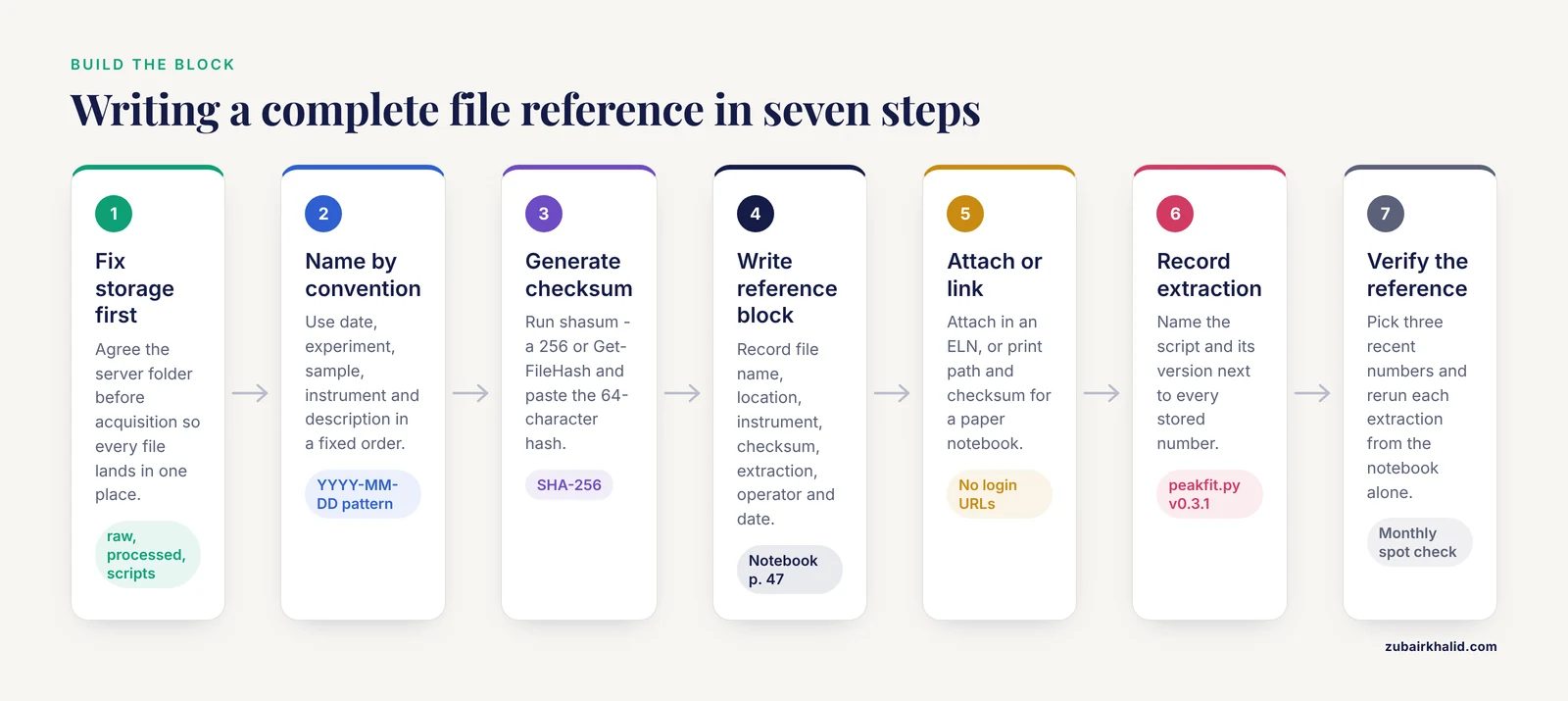
This walkthrough gives you a repeatable procedure. Use it whether you keep a paper notebook that references files stored elsewhere, or an ELN where files are attached directly.
Step 1. Set up a predictable storage location before you acquire data
Decide where files will live before the experiment starts. A common academic pattern is a central server that mirrors instrument output folders, so every acquisition lands in one organized place automatically rather than on whichever workstation happened to run the instrument [4]. Write the agreed location into the front of your notebook or into your lab notebook template so every entry inherits it.
A workable hierarchy looks like this:
/labdata/
  2026-03/
    EXP-031_cyanine-dye-spectra/
      raw/
      processed/
      scripts/
      README.txt
Each experiment gets one folder with raw, processed, and scripts subfolders, plus a README. Briney's data management exercises treat README files, naming conventions, and folder structure as the foundation of usable data [5], and that foundation is what your notebook references will point at.
Step 2. Name files according to a written convention
Adopt one convention and write it down. A practical pattern for research files is:
YYYY-MM-DD_<ExperimentID>_<SampleID>_<Instrument>_<Description>.<ext>Worked example:
2026-03-14_EXP-031_A3_NMR_proton-spectrum.fidThis name answers the four questions any reader will ask: when, which experiment, which sample, what kind of data. Keep conventions simple enough that every lab member will actually follow them. Briney's workbook emphasizes that a naming convention is only useful if it is documented and applied consistently across the whole lab, not just by one careful person [5].
Step 3. Generate a checksum
A checksum is a short alphanumeric fingerprint computed from a file's bytes. If even one byte changes, the checksum changes. SHA-256 is the standard choice on modern systems.
On macOS or Linux:
cd /labdata/2026-03/EXP-031_cyanine-dye-spectra/raw
shasum -a 256 2026-03-14_EXP-031_A3_NMR_proton-spectrum.fid
On Windows PowerShell:
Get-FileHash "D:\labdata\2026-03\EXP-031_cyanine-dye-spectra\raw\2026-03-14_EXP-031_A3_NMR_proton-spectrum.fid" -Algorithm SHA256Expected output looks like this:
9f86d081884c7d659a2feaa0c55ad015a3bf4f1b2b0b822cd15d6c15b0f00a08 2026-03-14_EXP-031_A3_NMR_proton-spectrum.fid(That exact hash string corresponds to a standard test input, so your real file will produce a different string. What matters is the format: 64 hexadecimal characters, then the file name.)
Paste the hash into your notebook entry. If you later need to prove the file has not changed, rerun the command and compare. Two matching hashes mean the file is identical.
Step 4. Write the reference block in your notebook
Here is a lab notebook template block you can copy. In a paper notebook, write it by hand and tape or glue a printed copy of any small, critical output below it. In an ELN, the platform may fill in several fields automatically.
--- FILE REFERENCE ---
Files:      2026-03-14_EXP-031_A3_NMR_proton-spectrum.fid
Location:   /labdata/2026-03/EXP-031_cyanine-dye-spectra/raw/
            (server: zeeman.chem.university.edu, backed up nightly)
Instrument: 400 MHz NMR, Bay 2, acquisition software TopSpin 4.2
Checksum:   SHA-256 9f86d081884c7d659a2feaa0c55ad015a3bf4f1b2b0b822cd15d6c15b0f00a08
Extracted:  T1 = 2.31 s using peakfit.py v0.3.1 (scripts/ folder, same experiment directory)
By/Date:    Z. Khalid, 2026-03-15
Links to:   Notebook p. 47, EXP-031, sample A3
--- END REFERENCE ---
Notice the extraction line. It names the specific script and version, which is what turns a stored number into a checkable claim [1]. If a collaborator disputes the T1 value, they can rerun peakfit.py v0.3.1 on the referenced file and see the same number.
Step 5. Attach or link the file itself
If you use an ELN, attach the file directly to the entry. Academic workflows described in the literature support this pattern: instrument data can be transferred to a central server and then visualized from inside the ELN, so the notebook entry and the data file live in one managed environment [4]. Some ELNs go further. The Chemotion ELN, for example, integrates a spectra editor that reads open formats such as JCAMP-DX for IR, MS, and NMR data and mzML for MS, supporting FAIR data principles, which call for data that is findable, accessible, interoperable, and reusable [6].
If you use a paper notebook, the reference block above is your link. Print the checksum and the path, and never rely on a URL that requires a login a future reader will not have.
Step 6. Record the extraction, not just the file
This is the step that separates a usable notebook from a decorative one. When a value in your notebook comes from a file, record three things: the file, the extraction tool, and the tool's version. The APS ELN project rebuilt its entire database design around this principle, requiring every stored value to record its source file, the data file reader plugin, and the plugin version, or the exact formula used for derived quantities. They then added an automated drift check that reruns each reader on the stored files to detect whether the extracted value would change [1]. You do not need their infrastructure to borrow their discipline. One line in your notebook does the same job by hand.
Step 7. Verify the reference
Close the loop with a quick audit. Pick any three numbers in your notebook from the past month and check whether you can, using only the notebook, find each source file and rerun the extraction. If any of the three fails, you have found your own provenance gap. Briney's workbook includes evaluating your own notebook as a structured exercise precisely because self-audits reveal habits that quietly break traceability [5].
Tips That Make References Stick
Reference at the moment of creation, not at the end of the day. The audit that found lost file-to-value links attributed the loss to human factors, chiefly manual entries that lacked file references [1]. Write the reference block while the instrument is still running or the analysis window is still open.
Keep one experiment, one folder. Systematic hierarchy, with lab notes, analytical data, and metadata stored together per experiment, is the pattern used in structured research data systems such as Kadi4Mat, which supports continuous, flexible data structuring and browser-based file previews [7]. Your notebook references stay short when the folder structure does the organizing.
Prefer open formats. When an instrument offers a choice, choose open formats like JCAMP-DX or mzML, which are designed for interoperability and long-term readability [6]. A reference to a file that no modern software can open is a reference to nothing.
For computational work, reference the notebook and its state. If your "file" is a Jupyter notebook, record the repository commit hash or the exported HTML snapshot, and note kernel and library versions. Notebook quality frameworks flag inconsistent execution order and hidden dependencies as recurring problems that damage analyzability [8]. Exporting a frozen copy and referencing that, alongside the live file, sidesteps those problems.
Document your convention once, centrally. A one-page convention sheet in the lab, or a filled example entry in your lab notebook template, prevents every lab member from inventing a personal style that no one else can parse [5].
A Brief Electronic Lab Notebook Comparison
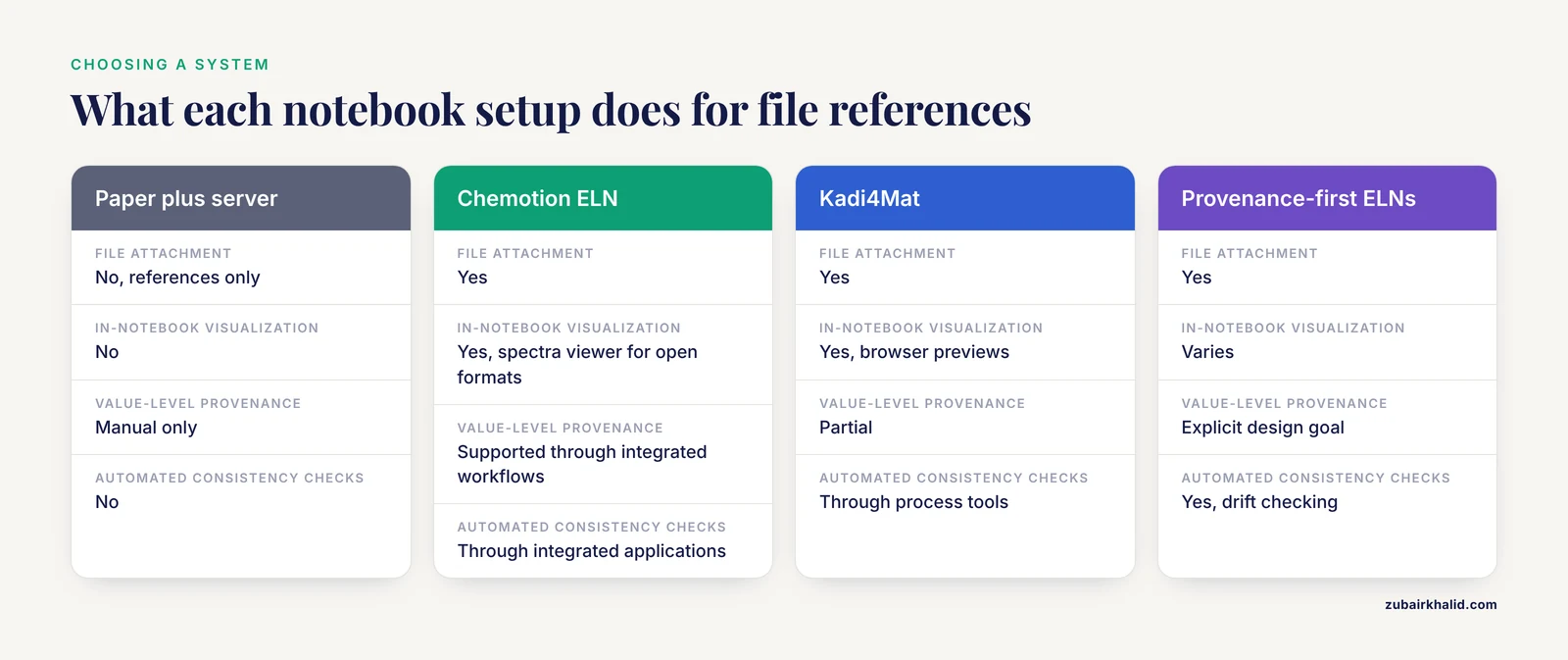
Choosing an ELN changes how much of this work is automatic. The platforms described in the research literature illustrate the range.
| Capability | Paper notebook + server | Chemotion ELN | Kadi4Mat | Provenance-first ELNs |
|---|---|---|---|---|
| File attachment | No (references only) | Yes | Yes | Yes |
| In-notebook data visualization | No | Yes, with spectra viewer for open formats [6] | Yes, browser previews [7] | Varies |
| Structured analysis history | Manual | Via integrated tools that record each analysis step for replay [9] | Via linked analytical tools [7] | Yes |
| Value-level provenance (file plus extractor version bound to each number) | Manual only | Supported through integrated workflows [9] | Partial | Explicit design goal [1] |
| Automated consistency checks | No | Through integrated applications [9] | Through process tools [7] | Yes, drift checking [1] |
The comparison highlights a trade-off. General-purpose ELNs make attaching and visualizing files easy, while provenance-focused systems bind individual stored numbers to both their source files and extractor versions, a capability a survey of five platforms found absent elsewhere [1]. If your field demands auditable numbers, for example regulated materials work, that last row deserves the most weight.
Common Mistakes and Limitations
Referencing a folder instead of a file. "Data in the March folder" forces every future reader to guess which file you meant. Always name the specific file.
Omitting the extraction method. This is the single most damaging omission. The materials-lab audit showed that when manual entries carried no file reference or extractor version, the link from raw file to stored value was lost, even though the sample-to-file link survived [1].
Editing files after referencing them. Once a checksum is recorded, treat the file as frozen. Post edits as new versions with new checksums. Note that even edits meant to be invisible, such as retouching a scanned image, leave format-level and pixel-level traces that trained examiners can find [3]. Keep originals immutable and work on copies.
Relying on links that expire. A URL to a personal cloud account or an internal wiki page behind a login is not a durable reference. Institutional storage or a repository identifier should be the location of record.
Trusting a screenshot of the data. A screenshot of a spectrum is not the spectrum. Reference the original data file, which retains the full information content that open formats like JCAMP-DX preserve [6].
Letting notebook hygiene decay quietly. In computational notebooks, cells run out of order and dependencies hide inside earlier cells. If your referenced file is a notebook, note the execution state you rely on, or export a clean, fully run copy as the reference of record.
Assuming the ELN will remember for you. Even well-designed platforms require the human to record the extractor version unless the system enforces it. The provenance gap found in the materials lab appeared in a lab that already used an ELN [1]. The tool helps, but the habit is yours.
One honest limitation of any notebook system: references preserve information only if the underlying storage survives. Build references that survive server migrations by preferring repository identifiers and checksums over absolute machine paths, and revisit your convention sheet when your storage changes.
Frequently Asked Questions
How do I reference an electronic file in a paper lab notebook?
Write a reference block containing the full file name, the storage location, the checksum, the extraction method with its version, and the date, then tape or glue a printed copy of any critical small output below it. The reference block in Step 4 above works as a handwritten template.
What is the best file naming convention for lab data?
Use a pattern like YYYY-MM-DD_ExperimentID_SampleID_Instrument_Description.ext and write the convention down where every lab member can see it. Consistency across the lab matters more than the exact pattern you choose.
Do I really need checksums in my notebook entries?
You need them whenever the integrity of a file could be questioned, which includes publication, patent work, and any regulated study. A SHA-256 hash takes seconds to generate and proves the referenced file is byte-for-byte unchanged.
What is the difference between referencing a file and referencing its data?
Referencing a file points to the raw acquisition. Referencing its data means also recording which tool and version extracted each stored number from that file. Without the extraction record, a stored value cannot be verified, which is precisely the failure mode documented in the materials-lab audit [1].
Which electronic lab notebook should I choose for file management?
Choose based on whether you need simple attachment, integrated visualization and analysis, or strict provenance. Chemotion ELN pairs file storage with spectra viewing for open formats [6] and statistical analysis with recorded, replayable histories [9]. Kadi4Mat offers structured hierarchical storage with previews [7]. Provenance-first systems go furthest by binding each stored value to its source file and extractor version [1].
How do I reference a Jupyter notebook in my lab notebook?
Reference both the live file and a frozen export. Record the repository and commit hash or export timestamp, plus the kernel and key library versions, because out-of-order execution and hidden dependencies are known notebook quality problems that can change results between runs [8].
Can I just attach files to my ELN instead of writing references?
Attachment is necessary but not sufficient. An attached file still needs the extraction method recorded for any number you quote from it, since provenance systems that do not bind values to files and extractor versions leave the same gap that manual notebook entries leave [1].
How often should I audit my file references?
Run the three-number spot check from Step 7 monthly, and a full audit at the end of each project. The materials-lab audit that traced eight studies over almost five years showed how quickly small gaps compound, and how much cheaper it is to fix the habit than to reconstruct lost links [1].
Sources
- Value-level data provenance in an electronic laboratory notebook used by humans and language-model agents: An experience report
- Data Heritage in the Biologist ’ s Field Notebook
- Identification of Computer Editing in Electronic Images of Documents as a Task of Forensic Examination
- Procedures for systematic capture and management of analytical data in academia
- The Data Management Workbook
- ChemSpectra: a web-based spectra editor for analytical data.
- Structured Data Storage for Data-Driven Process Optimisation in Bioprinting
- Socially-Informed Jupyter Notebook Quality: A Role-and Lifecycle-Aware Metrics Framework
- OpenStats: how to combine statistics and research data management (RDM) to leverage efficient scientific data analysis by guided statistics