How to Document Software Versions for Reproducibility
By Dr. Zubair Khalid, DVM, MS, PhD ·

By the end of this guide you will be able to capture the exact software environment behind any analysis, write a methods paragraph that a reviewer can act on, cite the software you used so its developers get credit, and archive the whole record so someone else can rerun your work years from now. You will need a computer with a terminal, either Python 3 or R installed, and optionally Git and Docker for the later steps. Every command in the walkthrough prints its own output, so you can check each step as you go.
Why software versions decide whether your results can be reproduced
An analysis pipeline is software. If two people run the same script under different versions of the same package, they can get different numbers, different plots, and in the worst case different conclusions. This is why journal author guidelines increasingly require authors to report the software and the software versions they used, alongside equipment details such as manufacturer and catalog number. Editorial guidance on author guidelines explains that these requirements serve a practical purpose, ensuring experimental reproducibility and facilitating rigorous peer review rather than adding bureaucracy [1].
The same principle extends to the software itself as a scholarly object. A consensus guidance paper on software citation argues that software should be treated like a paper or a dataset, because it is integral to the full understanding and dissemination of research, and that proper citation supports attribution, reproducibility, collaboration, and reuse [2]. Documenting versions is the first half of that obligation. Citing the software is the second half.
The problem is common enough that entire toolchains now exist to solve it. In magnetic resonance spectroscopy, expert consensus found that poor reproducibility stemmed largely from missing standardized reporting, and a toolbox called REMY was built to automatically extract the parameters needed for minimum reporting standards, partly because manual reporting across vendor formats was too error prone [3]. Your field may not have a REMY, but the lesson transfers. Automate the capture of version information wherever you can, because manual transcription is where reproducibility usually dies.
What counts as a version
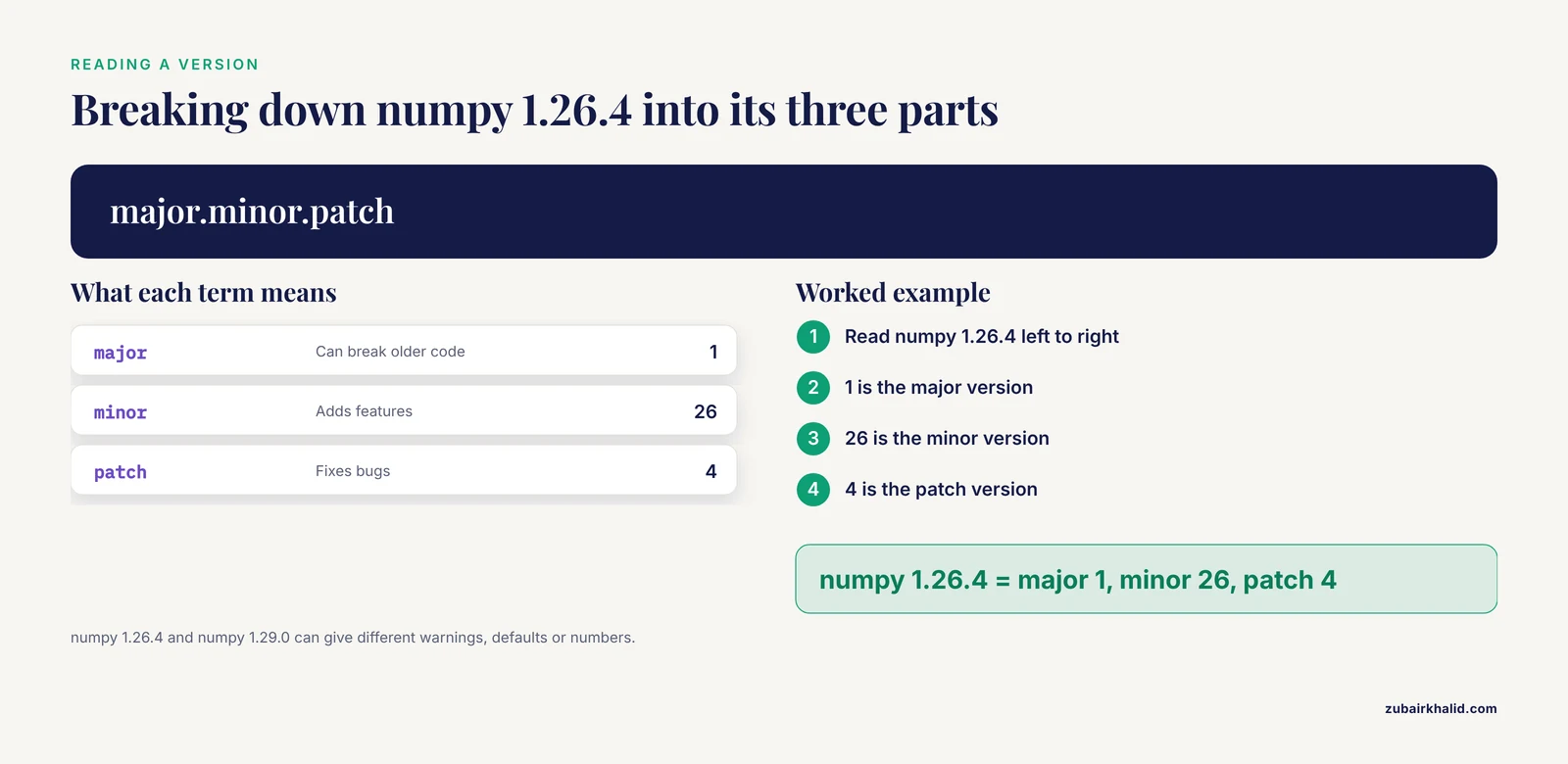
Before capturing anything, know what you are capturing. Software versions usually follow a three-number scheme called semantic versioning, written as major.minor.patch. In numpy 1.26.4, the 1 is the major version, 26 is the minor version, and 4 is the patch version. Major versions can break compatibility with older code, minor versions add features, and patch versions fix bugs. Two machines running numpy 1.26.4 and numpy 1.29.0 may produce different warnings, defaults, or numerical results.
A complete reproducibility record covers four layers:
- The interpreter or runtime, such as Python 3.11.9 or R 4.3.2.
- The packages and their exact versions, including indirect dependencies that the package manager resolved for you.
- The operating system and, for compute-heavy work, hardware details such as processor type and available memory.
- Your own scripts, pinned to a specific commit or release.
A common misconception is that layer 2 alone is enough. It usually is not. A package can behave differently under different interpreter versions, and your own code changes over time. Each layer needs its own record.
How to document software versions for reproducibility step by step
This walkthrough uses two running examples. The Python example records an environment for a gene-expression analysis. The R example records an environment for a survival analysis. Run the commands on the machine where the analysis actually runs, not on a different laptop.
Step 1. Record the interpreter version
Open a terminal and run:
python --versionExpected output:
Python 3.11.9In R, open an R session and run:
R.version.stringExpected output:
[2] "R version 4.3.2 (2023-10-31)"Write both numbers down now, in a plain text file called environment_notes.txt in your project folder. Do not trust your memory at the end of a six-month project. If you work on more than one machine or on a high-performance cluster, run the command on each one and note which machine produced which result.
Step 2. Record every package version
For Python, use pip to list all installed packages in the active environment:
pip freezeExpected output (abbreviated):
contourpy==1.2.1
matplotlib==3.8.4
numpy==1.26.4
pandas==2.2.2
scikit-learn==1.4.2
scipy==1.13.0
To check a single package, run:
python -c "import numpy; print(numpy.__version__)"Expected output:
1.26.4For R, the fastest complete record is the session information function:
sessionInfo()Expected output (abbreviated):
R version 4.3.2 (2023-10-31)
Platform: x86_64-pc-linux-gnu (64-bit)

attached base packages:
[2] stats  graphics  grDevices  utils  datasets  methods  base

other attached packages:
[2] dplyr_1.1.4   survival_3.5-7
The trailing numbers after each package name are the versions. To query one package:
packageVersion("dplyr")Expected output:
[2] '1.1.4'Note that sessionInfo() lists packages you attached with library() plus the base system. It does not exhaustively list every transitive dependency, which is one reason lock files in the next step are stronger.
Step 3. Freeze the environment into a lock file
A lock file records exact versions so the same environment can be rebuilt later. Choose the format that matches your workflow.
For Python with pip, redirect the freeze output into a requirements file:
pip freeze > requirements.txtStore requirements.txt in your project root. Anyone with Python 3.11.9 can rebuild the environment with:
python -m venv repro-env
source repro-env/bin/activate
pip install -r requirements.txt
For Python with conda, export the full environment including the build strings:
conda env export > environment.ymlFor R, the renv package creates a project-local library and a lock file. Run these three commands once, at the start of the project if possible:
install.packages("renv")
renv::init()
renv::snapshot()
Expected output (abbreviated):
The following package(s) have been updated in the lockfile:
- dplyr [1.1.4]
- survival [3.5-7]
The resulting renv.lock file records the R version, the package versions, and the repositories they came from. A collaborator runs renv::restore() and receives your exact library. End-to-end reproducibility templates in the medical informatics literature recommend exactly this pattern, combining version control, environment files, and a containerized framework so the analysis and manuscript generation both run from the same locked setup [4].
Step 4. Record the operating system and hardware
On Linux or macOS:
uname -aExpected output:
Linux workstation 5.15.0-91-generic #102-Ubuntu SMP x86_64 GNU/LinuxOn Windows, run systeminfo | findstr /B /C:"OS Name" in a command prompt. For hardware on Linux:
lscpu | grep "Model name"Expected output:
Model name: Intel(R) Core(TM) i7-10750H CPU @ 2.60GHzAppend these lines to environment_notes.txt. For most statistics this step is precautionary. For machine learning, image reconstruction, or any computation where floating-point behavior or parallel execution matters, hardware and driver details are part of the result.
Step 5. Run the analysis in an electronic notebook
An electronic notebook combines code, output, and prose in one document that can be exported and shared. Jupyter notebooks, which run Python and R in a browser, let you document procedures alongside the analysis and save the result as HTML or PDF for team members and reviewers, with raw data and code available in data supplements or as an executable online version [5].
Add a version cell at the top of every notebook. For Jupyter with Python:
import sys
import numpy
import pandas
import sklearn

print("Python", sys.version)
print("numpy", numpy.__version__)
print("pandas", pandas.__version__)
print("scikit-learn", sklearn.__version__)
Expected output:
Python 3.11.9 (main, Apr  2 2024, 09:04:19) [GCC 11.4.0]
numpy 1.26.4
pandas 2.2.2
scikit-learn 1.4.2
Because this cell executes every time the notebook runs, the record updates itself and travels with the notebook when you export it. For R, an equivalent cell calls sessionInfo() at the end of the document. Tools such as Quarto and R Markdown extend this idea to the whole manuscript, so the reported numbers regenerate from the locked environment whenever the document is rebuilt [4].
Step 6. Pin your own code with Git and a release tag
Environment files lock the packages. Version control locks your own scripts. Initialize a repository, commit the analysis code and the lock file, and create an annotated tag at the exact state used for a manuscript:
git init
git add analysis.py requirements.txt environment_notes.txt
git commit -m "Analysis code as used for first manuscript submission"
git tag -a v1.0.0 -m "Code and environment for submission draft"
Expected output of git tag:
v1.0.0When the paper is accepted, create an archival copy of that tagged release in a repository that issues digital object identifiers, such as Zenodo or a university institutional repository, and record the DOI in the paper. That way a reader can retrieve code and lock file as one immutable package, independent of what happens to your laptop or your GitHub account.
Step 7. Containerize the whole environment
A container wraps the interpreter, the packages, the system libraries, and sometimes the operating system into a single image. This removes almost all of the "it worked on my machine" class of failures. A minimal Dockerfile for the Python example looks like this:
FROM python:3.11.9
WORKDIR /analysis
COPY requirements.txt .
RUN pip install -r requirements.txt
COPY analysis.py .
CMD ["python", "analysis.py"]
Build and run it:
docker build -t my-analysis:v1.0.0 .
docker run my-analysis:v1.0.0
Notice the base image is pinned to a specific Python version rather than to a floating python:latest tag. A reproducibility template built around a containerized framework shows that this approach can cover the entire project, from analysis to manuscript generation, and be reused immediately by others without customization [4]. Archive the Dockerfile alongside the code so the image can be rebuilt even if a registry changes.
Step 8. Verify that the environment actually reproduces
Documentation without verification is just a claim. In health economic modeling, the TECH-VER checklist was developed to give reviewers operational, itemized steps for technical verification, asking whether the implemented model accurately represents the intended design and requiring the verification effort to be documented [6]. Apply the same discipline to your own pipeline before submission:
- Delete or rename your local environment, rebuild it from the lock file alone, and rerun the analysis.
- Confirm the output figures and summary numbers match the versions in your manuscript draft.
- Ask a colleague to rebuild the environment on their machine from only the files you plan to archive, without verbal instructions.
- Record the date and result of the verification in your project notes, the way the TECH-VER checklist asks reviewers to document their verification efforts [6].
The rebuild-from-scratch test catches the most common silent failure, which is a lock file that was never updated after a package was upgraded.
Step 9. Write the methods paragraph and cite the software
The final documentation lives in two places. The first is the methods section, which journals increasingly expect to contain software names and versions in the same way they expect manufacturer and catalog details for laboratory equipment [1]. The second is a formal software citation in your reference list.
Consensus guidance on software citation specifies the core elements: cite the software the way you cite a paper or dataset, including creators, the software name, the version, the date, and a persistent identifier such as a DOI where one exists, and apply this to both software by others and software you developed yourself [2]. Software archived with a DOI on Zenodo or in a dedicated repository is straightforward to cite. For widely used packages without a DOI, the standard practice is to cite the accompanying publication or the versioned documentation.
A concrete methods paragraph for the running example:
"Analyses were performed in Python 3.11.9 with numpy 1.26.4, pandas 2.2.2, and scikit-learn 1.4.2. The complete environment is recorded in requirements.txt, archived with the analysis code at doi:10.XXXX/zenodo.XXXXXXX. The pipeline was verified by rebuilding the environment from the lock file on a separate machine and reproducing all reported figures."
The reader now knows the interpreter, the packages, where the full record lives, and that the record was tested. That is reproducible research in four sentences.
Quick reference table
| What to capture | Command | Where it goes | Example output |
|---|---|---|---|
| Python version | python, version | Methods section, notes file | Python 3.11.9 |
| R version | R.version.string | Methods section, notes file | R version 4.3.2 |
| All Python packages | pip freeze > requirements.txt | Project root, archived with code | numpy==1.26.4 |
| All R packages | renv::snapshot() | renv.lock in project root | dplyr [1.1.4] |
| One package check | packageVersion("dplyr") in R | Troubleshooting, debugging | [2] '1.1.4' |
| Full session record | sessionInfo() | Notebook output cell | R version 4.3.2 ... dplyr_1.1.4 |
| Conda environment | conda env export > environment.yml | Project root, archived with code | YAML with package builds |
| Operating system | uname -a | Notes file, supplementary data | Kernel and architecture string |
| Code state | git tag -a v1.0.0 | Repository release, DOI archive | Tagged immutable release |
| Whole environment | docker build -t name:tag . | Image registry plus Dockerfile | Rebuildable container |
Common Mistakes and Limitations
These are the errors reviewers and readers encounter most often when checking software documentation.
Recording versions after the fact. Running pip freeze in a global environment two years after the analysis captures whatever is installed today, not what ran the analysis. The fix is procedural. Capture the environment at the time of the run, ideally by the notebook cell in Step 5 or the lock file in Step 3.
Citing software without a version. Writing "analyses were performed in R" or "using the scikit-learn library" tells the reader nothing they can act on. Author guidelines that require software versions exist precisely because versionless mentions defeat the purpose of the requirement [1].
Treating "latest" as a version. A Dockerfile that pulls python:latest will resolve to different images at different times. Pin every base image and every dependency to an exact version.
Locking direct packages but ignoring transitive dependencies. A hand-written list of the four packages you import may omit the sixty packages pip or conda resolved underneath them. pip freeze and renv.lock capture the resolved set, which is why they outperform manual lists.
Documenting the environment but not the code. A perfect requirements.txt next to a script that changed five times since submission is incomplete. Tag the code with Git and archive the tagged release, as in Step 6.
Assuming the lock file works. Lock files rot when package repositories retire old versions or when operating system libraries are missing. The rebuild-from-scratch test in Step 8 is the only way to know the record is real, and the verification should be documented rather than assumed [6].
Skipping the citation. Software documentation and software citation are different obligations. Documentation tells the reader what ran. Citation gives credit and points to a persistent identifier, and the consensus guidance treats both as integral to research dissemination [2].
One limitation to keep in view. Even a fully documented environment does not guarantee identical floating-point results across different processor architectures, because low-level math libraries can differ. Report hardware for compute-sensitive work, and state clearly in the limitations of your own paper what level of reproduction a reader should expect. And as with any research skill, your specific journal or supervisor may impose stricter rules than the general practice described here, so check the author guidelines before submission [1].
A reproducibility checklist you can copy
Use this checklist at submission time. Every unchecked box is a question a reviewer may ask you later.
- Interpreter version recorded (Python, R, or other runtime, with the full version number).
- All packages and their exact versions captured in a lock file or freeze file.
- Operating system and, where relevant, hardware recorded.
- Version cell present at the top of every analysis notebook.
- Analysis code committed to version control and tagged at the analyzed state.
- Lock file and code archived together in a repository that issues a DOI.
- Environment rebuilt from the lock file on a clean machine and outputs confirmed identical.
- Verification date and result recorded in project notes.
- Methods section names every software with its version [1].
- Each software product cited with creators, name, version, date, and a persistent identifier where available [2].
Frequently Asked Questions
Where should software versions be documented in a paper?
In the methods section, with the full version number next to each software name, and in the archived project files for the complete environment. Journal author guidelines treat software the same way they treat laboratory equipment, requiring version and supplier details to make the work checkable [1].
Do I need to document every package or only the ones I imported directly?
Document every package in the lock file, and name only the packages you actually used in the methods narrative. The lock file captures the resolved dependency tree, which matters because an indirect dependency can still change your results.
Is listing version numbers enough, or do I need a container?
Version numbers are the minimum, and a container is the strongest option. Versions record what was installed, while a container packages the interpreter, libraries, and system components together so the environment rebuilds identically elsewhere [4].
How do I find a software version if I forgot to record it during the analysis?
Run the version command again on the machine and environment where the analysis ran, if that environment still exists. If it does not, check the notebook output cells, old session logs, or any exported HTML or PDF versions of the notebook, which often contain the embedded version records [5].
What is the difference between a requirements file and a lock file?
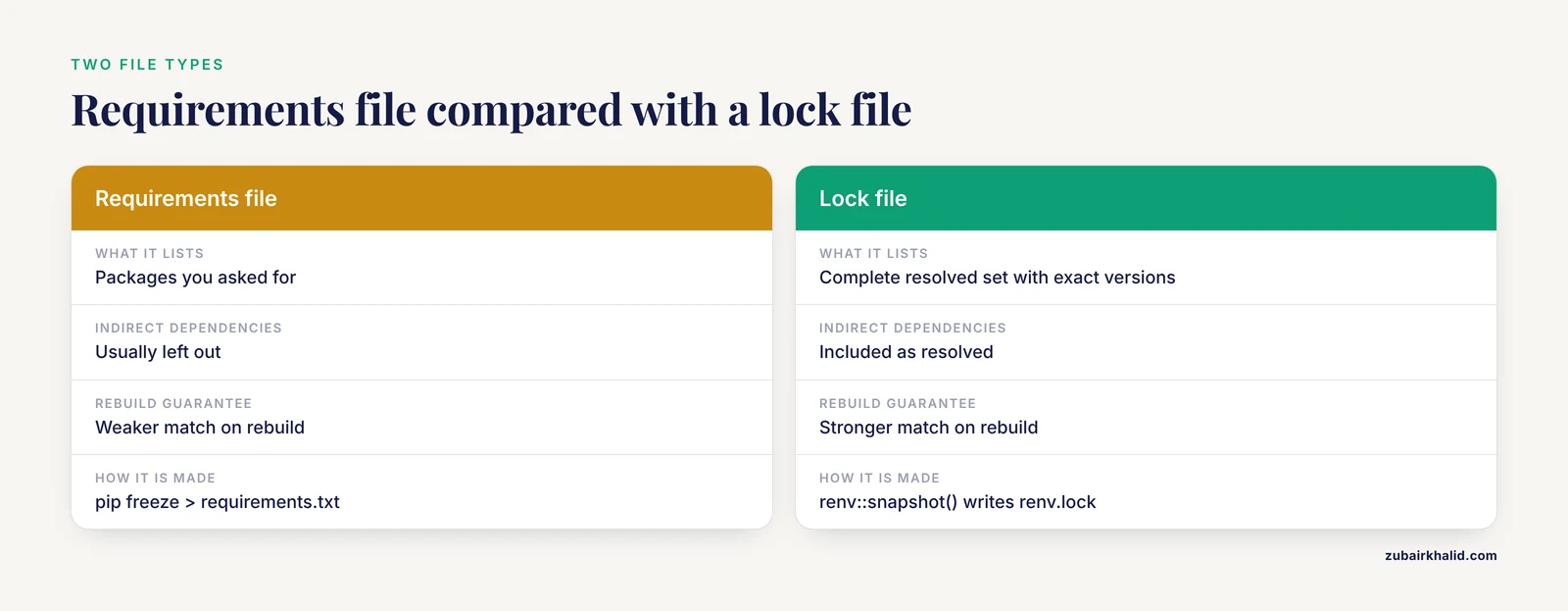
A requirements file lists the packages you asked for, while a lock file records the complete resolved set including indirect dependencies and their exact versions. Both help, but the lock file gives a stronger guarantee that a rebuild matches the original environment.
How do I cite software in my reference list?
Cite it like a dataset or a paper, including the creators, the software name, the version, the release date, and a persistent identifier such as a DOI where one exists [2]. If the software has no DOI, cite its key publication or its versioned documentation.
Do I need to document the operating system and hardware?
Yes, briefly. Operating system details belong in your notes or supplementary files, and hardware belongs there too whenever numerical output could depend on processor or accelerator behavior. Most journals do not require it in the main text, but reproducibility reviewers frequently ask for it.
How often should I update recorded versions during a long project?
Capture a new environment record every time you upgrade anything, and tag the code state at each milestone such as a first analysis, a revision, and a resubmission. This gives you a versioned trail so you can always state exactly which environment produced which manuscript draft.
Sources
- Author guidelines in the AI era: Writing for readers, search engines, and reproducibility. Insights from editorial practice.
- Recognizing the value of software: a software citation guide.
- Reproducibility Made Easy: A Tool for Methodological Transparency and Efficient Standardized Reporting Based on the Proposed MRSinMRS Consensus.
- Reproducibility in 2023 - An End-to-End Template for Analysis and Manuscript Writing.
- Neurophysiological analytics for all! Free open-source software tools for documenting, analyzing, visualizing, and sharing using electronic notebooks.
- TECH-VER: A Verification Checklist to Reduce Errors in Models and Improve Their Credibility.