Strikethrough Corrections in Lab Notebooks: A Step-by-Step Guide
By Dr. Zubair Khalid, DVM, MS, PhD ·

By the end of this guide you will know how to correct mistakes in a lab notebook so that the original entry stays readable, the fix carries your initials and the date, and the page holds up under an audit, a peer review, or a patent dispute. You will also know how the same job works in an electronic lab notebook (ELN), software that stores experiments, data, and signatures, where a correction becomes a new version in an audit trail, the system's automatic, time-stamped log of who changed what and when.
Keep on hand: the notebook itself, a permanent ink pen in black or blue, a fine-tip permanent marker for striking out large blocks, and your raw data, such as instrument printouts, spreadsheets, or reagent labels, so you can confirm the correct value before you write it. If your lab requires a witness for corrections, keep a colleague in reach too.
Why Strikethrough Corrections in Lab Notebooks Are the Standard
A lab notebook is a scientific record and a legal document at the same time. It is the primary evidence of what was done, when, by whom, and why. Future you, a labmate picking up the project, a grant reviewer, an auditor, and sometimes a patent attorney will all read the same pages. In United States patent disputes, notebook pages have been used to establish when an invention was conceived and when it was reduced to practice, meaning built and shown to work, and the way corrections were made has mattered in those cases. Inspectors in regulated research apply the same scrutiny to any record that supports a result.
Documentation standards summarize what reviewers look for with the ALCOA mnemonic. A record should be Attributable (you can tell who made it), Legible (a stranger can read it), Contemporaneous (written at the time of the work), Original (the first capture of the information, or a certified copy of it), and Accurate (it reflects what actually happened). Extended versions of the mnemonic add Complete, Consistent, Enduring, and Available.
A proper correction satisfies all five properties at once. A single line through an error keeps the original readable (Legible), preserves the first entry (Original), and is initialed and dated at the moment of the fix (Attributable and Contemporaneous), while the replacement documents the true value (Accurate). Erasing, painting over, or scribbling out a mistake fails the test because the original disappears, and a page that looks altered invites the suspicion that other pages were altered too.
This is also why bound notebooks with numbered pages are preferred over loose-leaf binders. A page in a bound notebook cannot disappear without detection, which protects the record of both the work and the corrections. Strikethrough corrections in lab notebooks are the default across academic labs, industry, and regulated programs because the method costs nothing, takes ten seconds, and protects years of work.
How to Correct Mistakes in a Lab Notebook, Step by Step
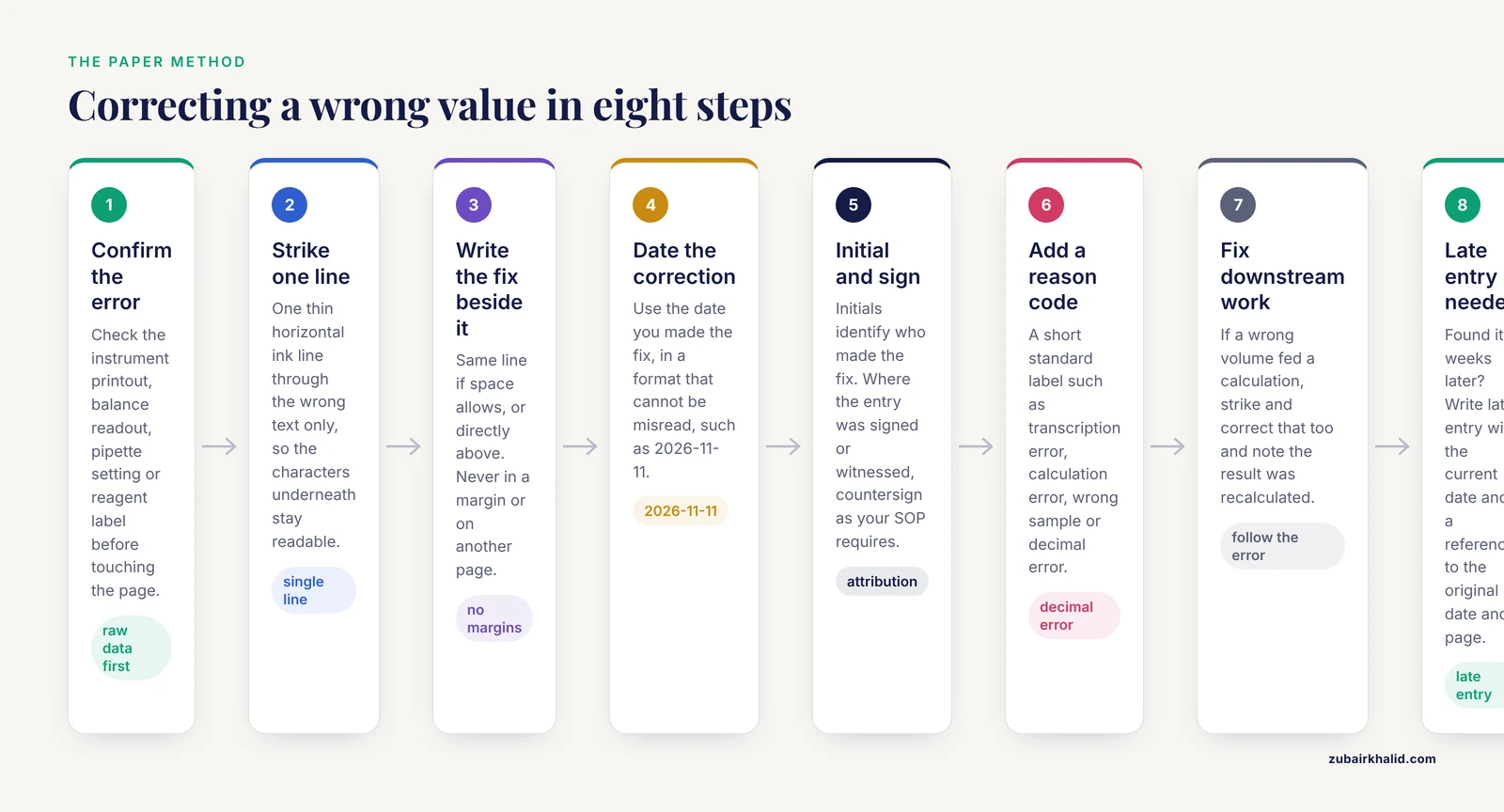
The walkthrough below covers the most common case, a wrong value or wrong word in an otherwise valid entry. Work through the steps in order.
- Confirm the error before you touch the page. Check the raw data: the instrument printout, the balance readout, the pipette setting you logged, the reagent label. Correcting from memory is how one error becomes two.
- Draw a single horizontal line through the mistake. One thin line, in ink, through the wrong text only. The characters underneath must stay readable. If the error covers an entire block, draw one diagonal line or a large X across the block instead of blacking it out.
- Write the correction immediately beside the struck text. Same line if space allows, or directly above it. Do not tuck the fix into a margin, a footnote, or a different page.
- Date the correction with today's date. This is the date you made the fix, not the date of the experiment. Use a format that cannot be misread, such as 2026-11-11 or 11 Nov 2026, because 11/12 means November 12 to some readers and December 11 to others.
- Initial the correction, and sign where required. Initials identify you as the person who made the fix. If the original entry was signed or witnessed, most standard operating procedures (SOPs), the written rules a lab follows for routine work, ask for at least your initials, and some require the witness to countersign.
- Add a short reason where your lab uses reason codes. A reason code is a standardized two or three word label for why a correction was needed, for example transcription error, calculation error, wrong sample, or decimal error. Consistent codes let a reviewer scan a year of corrections in minutes.
- Correct anything downstream that the error touched. If a wrong volume fed into a concentration calculation, strike and correct the calculation as well, and note that the affected result was recalculated.
- If you found the error late, write it as a late entry. Add a note that says late entry, give the current date, reference the original date and page, and describe what happened in one sentence. Never squeeze a fix into an old page as if it had been written on the original day.
On the page, the result reads like this (shown here in plain text, in the notebook it is physical ink):
Entry as written on 2026-11-09:

  Tube A: added 250 uL of 1 M Tris-HCl, pH 7.4. Incubated 30 min at 37 C.

Same line after the correction, made 2026-11-11:

  Tube A: added [one line through 250 uL] 200 uL of 1 M Tris-HCl,
  pH 7.4. Incubated 30 min at 37 C.   ZK  2026-11-11  transcription error
A reviewer now sees the original value, the corrected value, who made the change, when, and why, all in one place. That single line of ink is the entire method.
A Worked Example With a Real Calculation
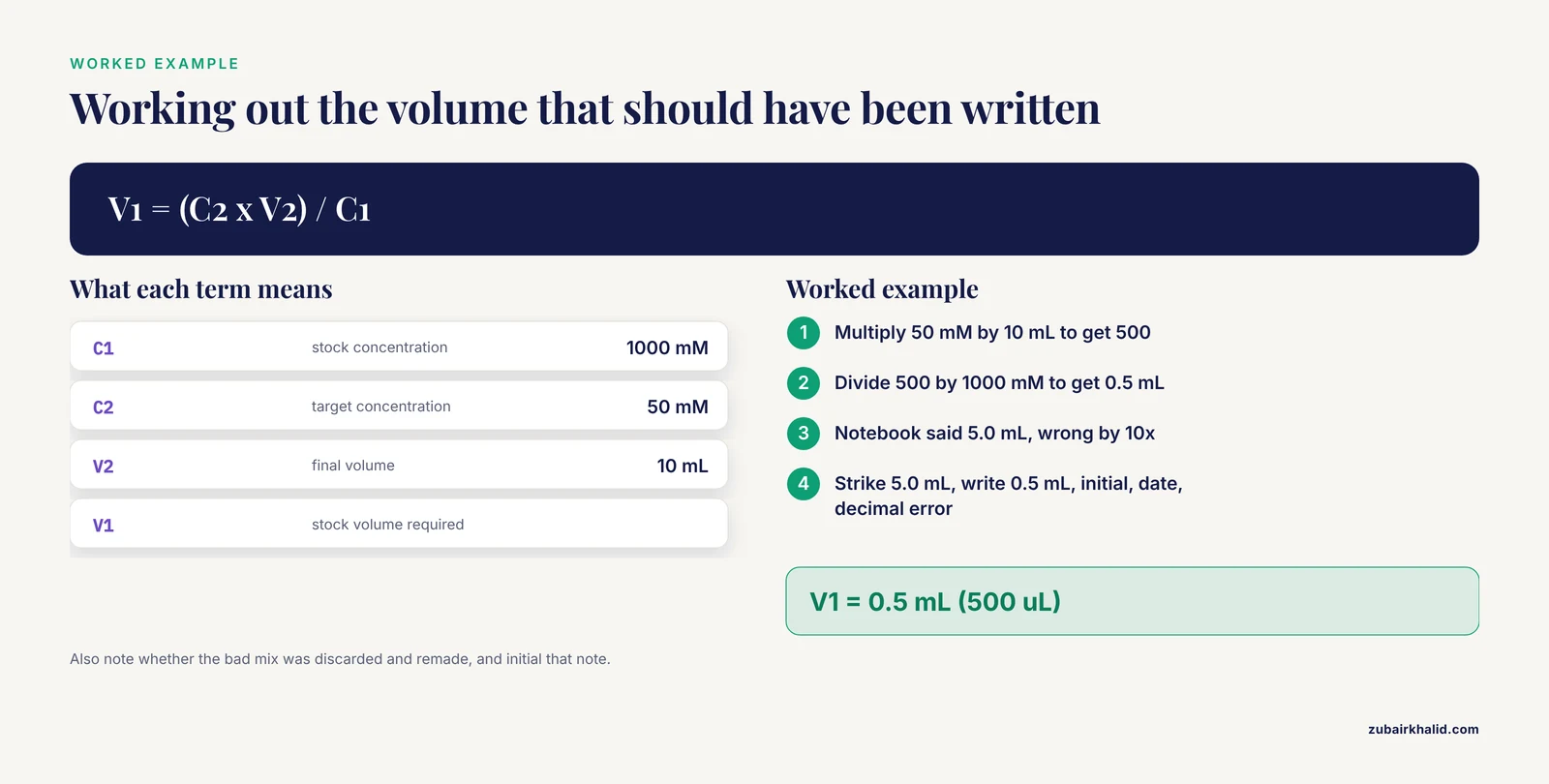
Tenfold errors are the classic case. Suppose you needed 10 mL of a 50 mM NaCl working solution from a 1 M stock, and you wrote 5 mL instead of 0.5 mL. The dilution equation is C1V1 = C2V2, where C1 is the stock concentration, V1 is the stock volume required, C2 is the target concentration, and V2 is the final volume.
Target:  10 mL of 50 mM NaCl
Stock:   1 M NaCl (1000 mM)

V1 = (C2 x V2) / C1
V1 = (50 mM x 10 mL) / 1000 mM
V1 = 0.5 mL (500 uL)

Notebook said:  add 5.0 mL stock        wrong by 10x
Correction:     strike 5.0 mL, write 0.5 mL,
                initial, date, reason: decimal error
Because the wrong value also changed the solution you actually made, the correction is half the job. Note beside the entry whether the bad mix was discarded and remade, and initial that note as well. The notebook should show both the math error and what you did about it.
When Not to Strike Anything
Not every problem is an error. A deviation is a case where the plan changed but the record is accurate, for example the centrifuge was unavailable so you spun at a different speed. Deviations are recorded as observations, with the reason, not struck through. Striking an accurate record would falsify history. Strike only text that is wrong, and describe everything that actually happened.
Correction Scenarios at a Glance
The table maps the situations you will meet most often to the exact handling.
| Situation | What to strike through | What to write beside it | Example reason note |
|---|---|---|---|
| Wrong number copied from a printout | The wrong number only | Correct number, initials, date | transcription error |
| Wrong volume weighed or measured | The wrong value only | Correct value, initials, date | decimal error |
| Calculation mistake | The wrong result and the flawed math line | Corrected math and result, initials, date | calculation error |
| Wrong sample or reagent ID | The wrong ID only | Correct ID, initials, date | labeling error |
| Step skipped or done out of order | Nothing, if the record is accurate | Late entry note with the current date, referencing the original date | late entry |
| Whole protocol or page invalid | One diagonal line or X through the block, still legible | Void or entered in error, initials, date, page reference for the redo | wrong protocol version |
| Data lost to a spill or instrument failure | Nothing to strike | Note describing what was lost and when, initials, date | data loss |
The Parameters That Make a Correction Defensible
- Ink. Permanent, black or blue, the same pen used for the entry. Pencil fails because it can be erased. Water-soluble inks and gels that smear fail photocopying and fade in storage.
- The line. One thin line, horizontal for text, diagonal or X for blocks. Heavy scribbles and solid marker bars destroy legibility and read as concealment.
- Placement. The fix belongs next to the error, in the flow of the entry, not in margins or on attached sheets.
- The date. The correction date, in one unambiguous format for the whole notebook. Backdating a correction is falsification, and it is one of the fastest ways to lose an audit and a patent argument at the same time.
- Attribution. Initials at minimum, a full signature where the entry was signed or where policy requires it. If someone else makes the fix, their initials go on it, which is the entire point of attribution.
- The reason. Where reason codes are used, keep the vocabulary short and consistent so patterns stand out across months of entries.
- Witness. Some programs, especially under Good Laboratory Practice (GLP), the regulatory framework for nonclinical safety studies, require a witness to countersign corrections to signed entries. Read your SOP once, then follow it every time.
A quick physical test ties the parameters together: photocopy the corrected page. If the copy shows both the original and the fix clearly, the correction will survive any review that works from copies.
Common Errors and Their Fixes
Reviewers, auditors, and patent attorneys flag the same handful of defects. Here is what they write and what to do about it.
- Finding: correction not dated or initialed. Add the date and your initials as soon as you notice, and add a brief note that attribution was added late, with the current date.
- Finding: original entry obscured. Once legibility is gone it cannot be restored. Write a dated note beside it giving the original value as far as you can reconstruct it from raw data, and initial the note.
- Finding: correction fluid on the page. Do not try to dig the fluid off, which damages the page further. Write a dated note stating what the covered entry said, reference the raw data, and initial it. Then fix the habit, because one white-out incident is a finding and a pattern is a problem.
- Finding: entry backdated. Prevention is the only cure. If backdating has already happened, document it honestly in a dated note rather than compounding it.
- ELN notice: this entry is signed and locked. Most ELNs make a signed entry read-only. The fix is to create a new version with the correction and a comment, then sign the new version.
- ELN notice: you do not have permission to edit this entry. The entry belongs to someone else. Ask the owner to make the correction, and add a comment documenting the issue from your side.
- ELN gap: an audit trail record with no comment. The trail shows that something changed but not why. Add a comment to the version explaining the change, because a silent edit is the electronic equivalent of an undated strike.
Electronic Lab Notebook Comparison: How Corrections Differ
In a paper notebook, the strikethrough is the mechanism. In an ELN, the system does the preserving for you. Most ELNs never truly delete anything. When you edit an entry, the platform saves a new version and writes an audit trail record, and the original version stays retrievable.
That shifts the burden from the ink to the comment. On paper you must physically preserve the old value. In an ELN you must preserve the why, because the what is automatic. A correction with no comment is the electronic equivalent of a strike with no initials.
Three practical differences matter day to day:
- Signed entries lock. In most ELNs, signing an entry makes it read-only. The correction path is a new version, a comment, and a fresh signature, which mirrors the paper flow of strike, initial, and countersign.
- Strikethrough formatting still has a role. Many ELNs support rich text, so you can strike the old value and type the new one beside it for human readers. The visible strike speaks to people, the audit trail speaks to systems, and substantive changes deserve both.
- Attachments are records too. If you correct an attached spreadsheet or instrument file, upload the corrected version and note the change in the entry. A corrected entry sitting next to an uncorrected attachment is a mismatch any reviewer will find.
In one sentence: paper preserves the original through ink and your discipline, an ELN preserves it through versioning, and both depend on you recording who and why.
Correcting an Entry in an ELN, Step by Step
- Open the entry and switch to edit mode.
- Make the change. For a substantive value change, apply strikethrough formatting to the old text and type the new value beside it so readers see both.
- Save the entry. The platform creates a new version automatically.
- Add a comment stating what changed and why, for example corrected volume from 250 uL to 200 uL, transcription error.
- Open the version history or audit trail and confirm your name, the timestamp, and the comment appear.
- Re-sign the entry if signatures are required, and ask the witness to countersign where your policy calls for it.
The version history should look like this (field names vary between platforms, the structure does not):
Version 3 (current)  2026-11-11 14:05  z.khalid
  Comment: corrected volume from 250 uL to 200 uL, transcription error
Version 2            2026-11-11 10:12  z.khalid
  Comment: added pH reading after equilibration
Version 1            2026-11-11 09:58  z.khalid
  Comment: initial entry
How to Check That a Correction Is Right
Run this 30-second check on any correction, yours or a labmate's:
- Can a stranger read both the original value and the correction?
- Does the fix carry the date it was made and the initials of the person who made it?
- Is the reason recorded where your lab uses reason codes?
- If the entry was signed or witnessed, has the correction been countersigned where required?
- In an ELN, does the audit trail show the change together with a comment?
If any answer is no, fix it the same day while the details are fresh. A correction that passes this checklist survives photocopying, peer review, audits, and patent discovery.
Tips That Prevent Corrections Before They Happen
- Write in permanent ink from the first word of the first page. Most correction problems start with pencil or erasable pens.
- Record planned values and actual values side by side, so a deviation is visible without needing a correction.
- Leave blank space between entries and at the bottom of pages. Crowded handwriting is where transcription errors breed. If an entry must continue, write continued on page X rather than cramming.
- Tape instrument printouts and raw data into the notebook, then sign and date across the tape edge so the attachment cannot be swapped later.
- Pick one date format for the whole notebook and keep to it.
- Do a two-minute end-of-day review. You will catch your own errors the same day, while the raw data is still on the bench.
- Agree as a lab on a short list of reason codes and print it on the inside cover.
A Lab Notebook Template That Reduces Errors
Most corrections trace back to layout, not carelessness. A page with no space for actual values, no signature line, and no convention for deviations forces people to squeeze fixes into margins. A template solves that before the experiment starts. Many labs keep a printed or digital lab notebook template with the fields below.
Page ____ of ____          Notebook no. ______

Date (YYYY-MM-DD): ______________
Project: ____________________  Experiment: ____________________
Purpose (1 or 2 lines): ________________________________________

Reference protocol: SOP no. ______ or notebook page ______

Materials (name, supplier, lot number):
  1. ________________________________
  2. ________________________________

Planned vs actual (step, planned value, actual value, initials):
  1. ________________________________
  2. ________________________________

Observations and deviations:
  ________________________________________________

Corrections (what, reason code, initials, date):
  ________________________________________________

Signature: ______________  Date: ____________
Witness (if required): ______________  Date: ____________
Fill the template top to bottom, and treat the corrections field as mandatory even on days when it says none. A page that shows zero corrections because the writer hid them is worth less than a page with three honest ones.
Common Mistakes and Limitations
These are the errors that show up again and again in real notebooks:
- White-out, erasers, and scribbles. Each one destroys the original record and turns a small mistake into a documentation finding.
- Correcting from memory. If the raw data does not confirm the fix, you are writing a second error on top of the first.
- Undated or uninitialed fixes. An anonymous correction is not attributable, and reviewers treat it as an incomplete record.
- Backdating and pre-writing entries. Both are falsification. Record the date the work or the correction actually happened.
- Sticky notes and loose sheets. They fall off, get thrown away, and never photocopy in place. Write in the notebook, or tape the sheet in and sign across the edge.
- Removing pages. Bound notebooks exist so pages cannot disappear. A removed page is indistinguishable from a hidden result.
- Correcting a labmate's entry as if it were your own. The fix must carry the initials of the person who actually made it.
- Ignoring the ELN audit trail. Editing without a comment leaves a change that shows when but not why.
- Over-correcting trivia. Strike and rewrite a wrong number, yes. Do not strike and rewrite every smudged word, which buries the corrections that matter.
One honest limitation: practice varies by institution. Academic labs, GLP programs, and clinical labs run on different SOPs, and some require a witness for every correction while others require one only for signed entries. This guide describes the widely accepted baseline. Where your lab's SOP differs, the SOP wins, and where a record supports a regulated study or a patent claim, confirm the handling with your quality unit or technology transfer office before you write.
Next Steps
Adopt the template this week, agree on a reason code list at your next lab meeting, and pull three random pages from your current notebook to run the 30-second check on. If your lab is still on paper and weighing a move, trial one ELN with version history and audit trail export before committing, because those two features are what make electronic corrections defensible.
Frequently Asked Questions
Why is a single-line strikethrough the accepted way to correct a lab notebook?
A single line keeps the original entry legible while making it clear the text was replaced, which satisfies the legibility and original-record expectations of good documentation practice at the same time.
Can I use white-out or an eraser on a notebook mistake?
No. Correction fluid, erasers, and scribbles that hide the original text make the record look altered and can undermine the page in an audit or a patent review.
Do I need to date and initial every correction?
Yes. A correction without a date and initials is not attributable, and reviewers treat it as an incomplete record.
What if I find a notebook mistake days or weeks later?
Correct it the way you would any error, then add a short late entry note with the current date and a reference to the original date and page.
How do I correct a mistake in an electronic lab notebook?
Edit the entry, save it as a new version, add a comment explaining the change, then confirm the audit trail recorded your name and the timestamp.
What should I do if an entire page is wrong?
Draw a single line or an X through the block, write void or entered in error with your initials and date, and start the corrected version on a new page.
Can I correct an entry that a labmate wrote?
Only if your lab allows it, and the correction must carry your own initials and date so the record shows who made it.
What kind of pen should I use for corrections?
The same permanent ink pen you used for the entry, in black or blue, because pencil and water-soluble inks can be erased, smear, or fail photocopying.