Correcting Data in Electronic Lab Notebooks: Best Practices
By Dr. Zubair Khalid, DVM, MS, PhD ·

By the end of this article you will be able to correct a wrong value, a miscalculation, or a mislabeled sample in an electronic lab notebook (ELN) without breaking the record's integrity. You will know how to document the change, how to read an audit trail to confirm the correction was captured, and how to design a lab notebook template that prevents most errors in the first place.
You do not need to install anything. You need access to your lab's ELN, a few minutes, and ideally your lab's standard operating procedure (SOP) for record corrections if one exists. The worked examples below use generic field names, so the same logic transfers to any major ELN platform.
Why Corrections Matter More in an ELN Than on Paper
In a paper notebook, a correction means drawing a single line through the old value, writing the new value, and adding your initials and the date. The original stays legible. Everyone accepts this because physical ink cannot be erased without evidence.
Electronic records raise the stakes. A digital edit can be silent, instant, and invisible. That is why regulatory frameworks for electronic records, including the US FDA's 21 CFR Part 11 for records in regulated environments, require an audit trail: a computer-generated, time-stamped log of every change that records the old value, the new value, who made the change, and when. The underlying principle is often summarized as ALCOA, meaning data should be Attributable, Legible, Contemporaneous, Original, and Accurate. A proper correction keeps all five properties intact.
There is also a practical, non-regulatory reason to correct data carefully. ELN records are increasingly treated as structured datasets, not just narrative documents. Researchers have mined industrial ELN data to build and validate machine learning models, including a 336-class reaction classification model organized into a four-level hierarchical scheme, and used that model to classify reactions extracted from both an industrial ELN and published chemistry literature [1]. When a model or meta-analysis pulls values from thousands of notebook entries, one silently edited yield or transposed mass can propagate through an entire dataset. Correcting data properly is therefore a service to your future collaborators, not just a compliance chore.
How to Correct Data in an Electronic Lab Notebook Step by Step
The workflow below answers the core question of how to correct data in an electronic lab notebook in a way that survives review, audit, and reuse. Follow the steps in order.
Step 1. Freeze the context before you touch anything
Open the entry and record, in a scratch file or your own notes, the entry ID, the field or section with the error, the current (wrong) value, the time you discovered the error, and why you believe it is wrong. If your ELN lets you export or snapshot an entry, export it now. This gives you a fixed reference if anything about the correction is later questioned.
Step 2. Classify the error
Not all errors are corrected the same way. The four most common types are:
- Transcription error. A value was typed incorrectly, for example 87.3 recorded as 78.3. The original measurement is fine.
- Calculation error. The inputs were correct but the math, formula, or unit conversion was wrong.
- Metadata error. A sample ID, date, lot number, or reagent name is wrong.
- Interpretation error. The recorded observation or conclusion itself was mistaken, such as calling a precipitate "product" when it later proved to be a side-product.
The first three are corrected by amending the value with documentation. The fourth is usually corrected by adding a dated addendum rather than rewriting the original text.
Step 3. Choose the correction method
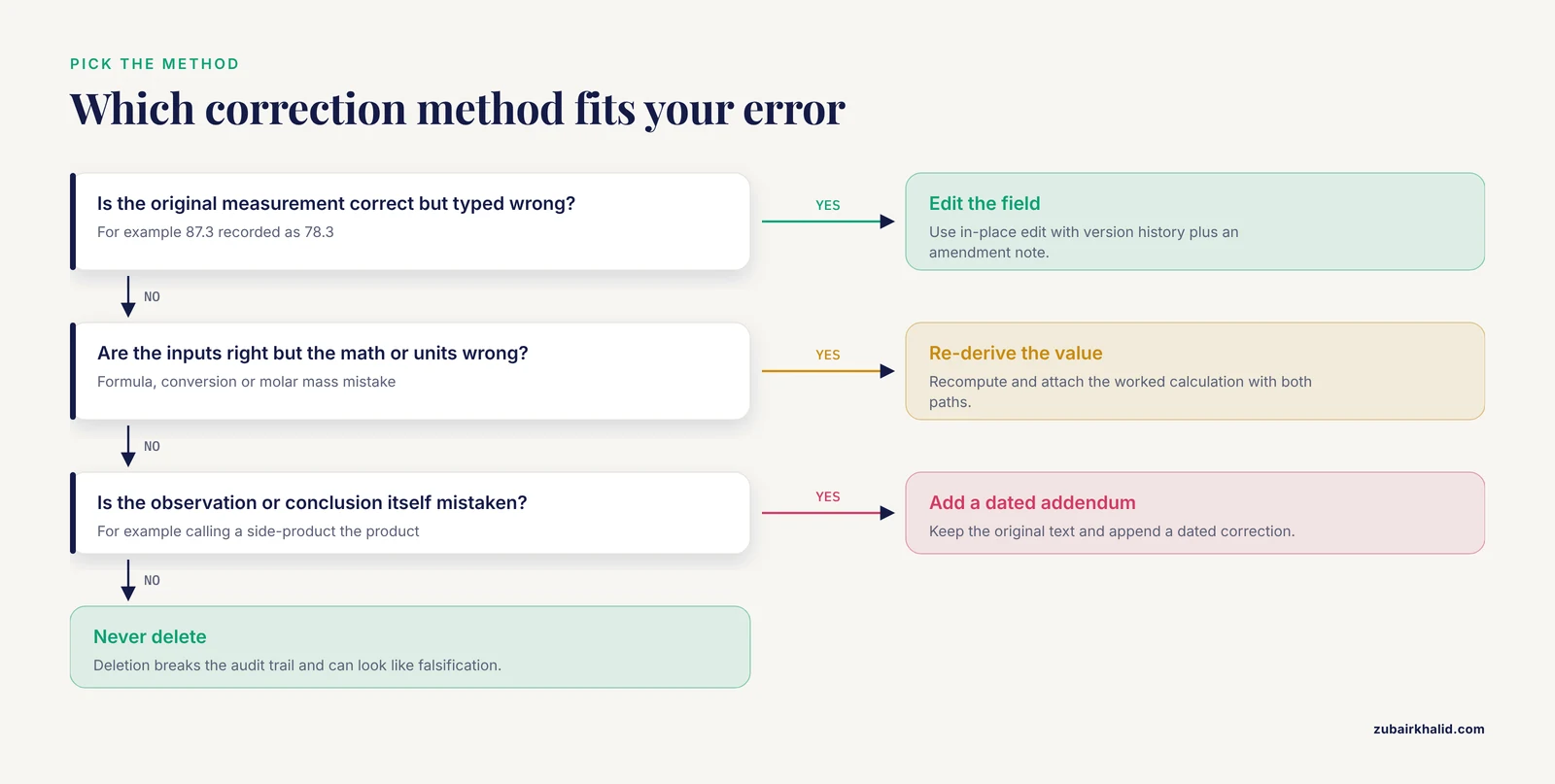
Match the error type to the method, using the comparison table in the next section. For a transcription error in a structured field, edit the field directly and rely on the ELN's version history. For an interpretive error, keep the original text untouched and append a dated correction.
Step 4. Make the edit, never a deletion
Enter the corrected value in place. If your ELN supports it, use its native correction display, which typically shows struck-through old values next to new ones. If it does not, write the correction inline in the notebook style: old value struck through, new value, then a short reason. Never delete the entry or overwrite the field without a note. Deletion is the single fastest way to turn an honest mistake into a data integrity problem.
Step 5. Write an amendment note
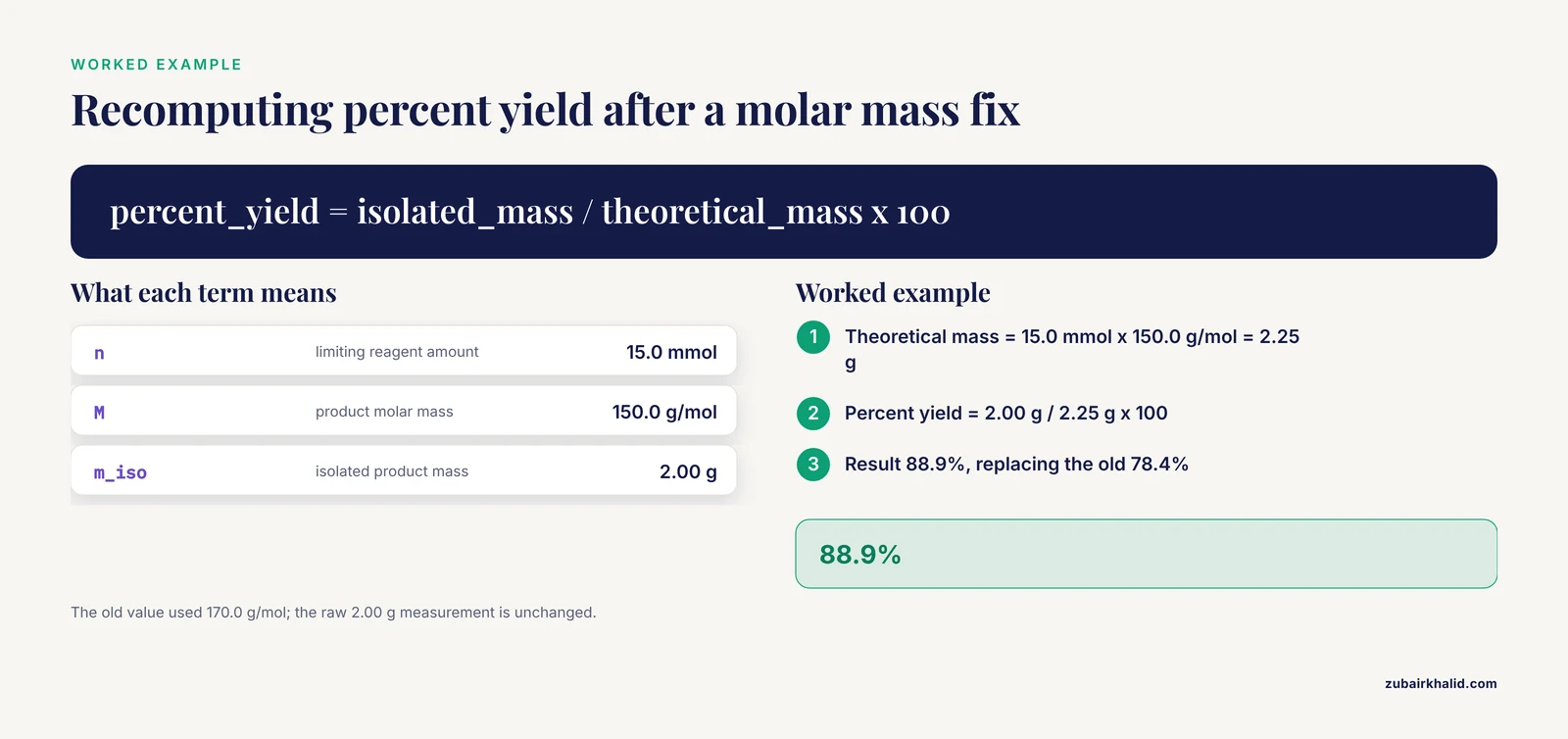
Every correction gets a short, dated note. A consistent format keeps these readable years later:
AMENDMENT 2026-11-04, J. Rivera
Field corrected: yield_percent in EXP-2026-014, Day 2 results table
Old value: 78.4
New value: 88.9
Reason: product molar mass entered as 170.0 g/mol. Correct value is
150.0 g/mol. Theoretical yield recomputed from 15.0 mmol limiting
reagent: 15.0 mmol x 150.0 g/mol = 2.25 g. [Percent yield](/blog/research-skills/how-to-calculate-percent-yield) =
2.00 g / 2.25 g x 100 = 88.9%.
Raw measurement (2.00 g isolated mass) unchanged.
Notice what this note does. It names the field, shows the old and new values, states the cause, shows the corrected calculation, and clarifies that the raw measurement itself never changed. Anyone reading the entry can reconstruct exactly what happened.
Step 6. Re-run and re-check dependent values
If the corrected value feeds any calculation, table, chart, or later entry, update those too, and reference the amendment in each place. A correction that leaves downstream numbers stale creates a second, harder-to-find error.
Step 7. Re-sign or re-witness if your context requires it
In GxP settings or labs with a peer-verification policy, a corrected entry often needs a fresh signature or witness check after the amendment. Check your lab's SOP. If a witness is required, the witness reviews the original value, the corrected value, and the amendment note, then signs.
Step 8. Verify the audit trail captured everything
Open the entry's history or version log and confirm you see the change with the correct timestamp, user, old value, and new value. The section below on verification shows how to do this systematically when you have many corrections to confirm.
Correction Methods at a Glance
| Method | Best for | What it preserves | Main risk |
|---|---|---|---|
| In-place field edit with version history | Transcription and metadata errors in structured fields | Automatic audit trail | Silent change if no amendment note is added |
| Strikethrough plus new value in the text | Free-text entries in document-style ELNs | Original text remains visible | Cluttered entries if overused |
| Dated addendum paragraph | Interpretive errors, conclusions, observations | Original reasoning intact | Readers may miss the addendum |
| Re-derivation with worked calculation attached | Calculation errors | Both math paths visible | Needs the same rigor as the original calculation |
| Delete and re-enter | Almost never | Nothing | Breaks the audit trail, looks like falsification |
The delete-and-re-enter option appears in the table only so you can recognize it and avoid it. Legitimate ELN workflows essentially never require deleting a signed or timestamped entry.
Electronic Lab Notebook Comparison: How Correction Features Differ
Platforms differ in how they store and display corrections, and understanding the differences helps you correct data correctly in whichever system your lab uses. Broadly, ELNs fall into three archetypes.
Document-style ELNs treat each entry like a rich-text page, similar to a paper notebook. Corrections are usually made by editing the text, and the value of the record depends on the platform's version history. In these systems, explicit amendment notes matter more, because the page itself does not force you to show what changed.
Structured ELNs use defined fields, tables, and schemas, especially in chemistry and industrial settings. Changes to a field are captured automatically as discrete old-value and new-value pairs. This is the kind of record structure that makes ELN data machine-readable. In the reaction classification study mentioned earlier, reactions were extracted from an industrial ELN and classified alongside literature reactions, which is only possible when notebook content is captured in consistent, structured form [1]. In structured systems, your main job is to fix the correct field and let the audit trail do the documentation, while still adding a reason where the platform offers a comment box.
Hybrid ELNs and ELN-LIMS combinations mix free text with structured tables and connect to sample tracking systems. Here, watch for duplicated data. A corrected concentration in the notebook may still be wrong in the linked inventory or sample registry, so corrections in hybrid systems need a second pass through linked records.
When your lab evaluates platforms, put correction handling near the top of the checklist. Ask vendors three concrete questions: Does every edit generate an audit trail entry with old and new values? Can an entry be locked after signing? Can the audit trail be exported? The answers separate systems that support honest correction from systems that make it awkward.
Build a Lab Notebook Template That Prevents Corrections
Many corrections are preventable at entry time. A consistent lab notebook template reduces transcription errors because every entry has the same fields in the same order, and reviewers learn where to look. Here is a minimal template you can adapt to any platform that supports text or structured entries:
experiment_id: EXP-2026-014
date: 2026-11-04
operator: J. Rivera
project: kinase-series-3

hypothesis: >
  One sentence. What question does today's experiment answer?

materials:
  - name:
    cas_or_catalog:
    lot:
    amount_with_units:

protocol_steps: []        # numbered, written before you start

raw_observations: []      # what you actually saw, timestamps included

calculations:
  - name: percent_yield
    formula: isolated_mass / theoretical_mass * 100
    inputs:
      isolated_mass_g: 2.00
      theoretical_mass_g: 2.25
    result: 88.9

errors_and_amendments: []  # dated notes for every correction

attachments: []            # instrument exports, photos, spectra

signatures: []             # operator date, witness date if required
Three template habits pay for themselves quickly. First, record raw observations and calculations in separate sections, so a math error can be corrected without touching the raw measurement. Second, give every numeric field an explicit unit in the field label, not just in the value, because unit confusion is a leading cause of calculation corrections. Third, keep an errors_and_amendments section in the template itself. When the place for corrections exists from day one, people actually document them.
Verifying That a Correction Was Made Correctly
After making a correction, check four things:
- The audit trail or version history shows the edit, with your name, the timestamp, the old value, and the new value.
- The amendment note explains the reason in words a reviewer could follow without asking you.
- Every dependent value, table, and downstream entry has been updated.
- No raw data was altered. The corrected item should be a derived or transcribed value, or the correction of an outright typo in the raw record, never a change that makes raw data fit a desired result.
If you manage many entries, you can audit corrections in bulk. Most platforms let you export audit trails as CSV. A short script makes the review fast:
import csv

with open("entry_412_audit_trail.csv") as f:
    rows = list(csv.DictReader(f))

for r in rows:
    if r["field"] == "yield_percent":
        print(r["timestamp"], "|", r["old_value"],
              "->", r["new_value"], "| by", r["user"])
Expected output for the worked example above:
2026-11-04T09:14:22Z | 78.4 -> 88.9 | by j.riveraIf you see a change with no corresponding amendment note in the entry, or an edit by a user who should not have had access, flag it. Bulk audit review is also how you catch the most dangerous error pattern, which is a field edited multiple times in quick succession, suggesting someone was adjusting a value until it looked right.
Common Mistakes and Limitations
These are the errors that come up repeatedly when people correct data in electronic lab notebooks, along with the limits of any general guidance.
Deleting or overwriting instead of amending. The classic failure. Deleting an entry destroys the attribution trail and, in regulated settings, can be treated as data falsification even when the original intent was innocent.
Correcting raw data to match expectations. If the balance printed 2.00 g and you typed 0.200 g, fixing the typo is a transcription correction. If you recorded 2.00 g and later wish it had been 2.50 g, no edit is appropriate, because changing a raw measurement after the fact is falsification. The distinction is whether evidence independent of your memory supports the new value.
Backdating or editing without a timestamp of its own. A correction must be dated when it was made, not dated as if it were part of the original session. If you discover an error in March, the amendment is dated in March.
Correcting only the primary record. Wrong values copied into presentations, spreadsheets, sample registries, or other entries keep living on. After a correction, search the ELN for the old value.
Fixing the math but not the cause. If a molar mass was wrong, check whether the same wrong constant appears in other entries. A systematic error corrected in one place and not the rest creates inconsistent datasets.
Trusting autosave as version control. Autosave prevents lost work but does not always create discrete, reviewable versions. Confirm that your platform records discrete versions or audit entries before relying on it for corrections.
Skipping the witness step. In labs with verification policies, correcting an entry can invalidate the earlier signature. Apply the correction, then seek the new signature.
Assuming every ELN behaves the same way. As the comparison above shows, correction mechanics differ across platforms. The limitations section of any general guide, including this one, is that audit trail detail, locking behavior, and export formats vary by vendor and configuration, and regulated environments impose additional requirements. For anything with regulatory consequences, your lab's SOP and your principal investigator or quality unit are the deciding authority, and individual cases need their judgment rather than a general article.
One further limitation concerns reuse. Structured ELN data is increasingly used to train and test computational models, and the quality of those models depends on the quality of the underlying records. In the reaction classification work cited earlier, model performance was assessed with a confidence framework that filtered out uncertain predictions, reporting 95% of retained predictions as correct while removing less than 15% of classifications [1]. Even well-curated data needs such safeguards. Your corrections, documented clearly, are part of that curation.
Frequently Asked Questions
Can I delete an incorrect entry in an electronic lab notebook?
No, in almost all cases you should not. Correct the entry in place with an amendment note, or add a dated addendum, so the original content and the reason for the change remain part of the record. Deletion breaks the audit trail and can be indistinguishable from falsification.
What is an audit trail?
An audit trail is an automatic, computer-generated log that records every change to an entry, including who made it, when, and what changed from what to what. It is required for electronic records in regulated environments under frameworks such as FDA 21 CFR Part 11, and most modern ELNs include one.
How do I correct a calculation mistake in my ELN?
Leave the raw measurements untouched, recompute the value with the corrected formula or inputs, update the result field, and attach a worked calculation showing both the wrong and correct paths with the reason for the change, as shown in the amendment note example above.
Do corrections need to be counter-signed or witnessed?
That depends on your lab's policies and regulatory context. In GxP settings and in labs with peer verification, a corrected entry typically needs a new signature or witness review after the amendment, so check your SOP before signing off a corrected record.
What should I do if I find an error months after the experiment?
Correct it the same way as any other error, with a dated amendment made on the day you found it, an explanation of the cause, and updates to any dependent records. Never date the change to match the original experiment.
How is correcting an ELN entry different from correcting a paper notebook entry?
Both follow the same principle of preserving the original, but paper requires a single-line strikethrough with initials and date, while an ELN usually corrects through a field edit captured by version history plus a written amendment note. The ELN adds an automatic audit trail that paper cannot provide.
Should I use a lab notebook template to reduce errors?
Yes. A template with fixed fields for materials, raw observations, calculations with explicit units, and a dedicated amendments section prevents transcription and unit errors, and gives every correction a consistent, findable home.
What is the difference between correcting data and falsifying data?
Correcting data means documenting a genuine error with evidence, preserving the original value, and recording who changed what and why. Falsifying data means changing or fabricating values to produce a desired result, typically by altering raw measurements without documentation. The presence of an honest, contemporaneous amendment trail is the dividing line.