Git for Research Collaboration
By Dr. Zubair Khalid, DVM, MS, PhD ·

By the end of this guide you will be able to turn an analysis folder into a version-controlled repository, record every change with commits, open branches for risky experiments, share your work through a hosted remote, resolve a merge conflict, undo mistakes with the right recovery command, and run a reproducibility checklist before submitting a manuscript. You need a computer with Git installed (free for Windows, macOS, and Linux), access to a terminal, a plain-text editor, and, for the collaboration steps, a free account on a hosting service such as GitHub.
The skill matters beyond software engineering. Major journals increasingly request code availability statements at submission, and reviewers increasingly ask whether results can be regenerated, which places version control among the core methods skills for computational research [1]. Tutorials aimed at behavioral scientists, economists, surgeons, and pharmacoepidemiologists now teach Git as a research tool, not a developer curiosity [2],, [1], [4].
Why Version Control Belongs in Your Research Workflow
Many scientists write code as part of their research, and just as experiments belong in a laboratory notebook, the code behind results needs documented history. Two failure modes recur without version control. The first is filename clutter, where cautious copying produces analysis.sh, analysis_02.sh, and analysis_03.sh, and months later nobody remembers which script produced which figure. The second is the email workflow, where code sent to several collaborators returns as conflicting edits that someone must merge by hand.
A version control system, or VCS, solves both problems by tracking every saved state of a project along with who changed it, when, and why. Git is an open-source, distributed version control system that has become the de facto standard for tracking source code and supporting collaboration [5]. Distributed means every collaborator holds a complete copy of the project history on their own machine, so work continues offline and no single laptop holds the only record.
Adoption now spans research domains. Behavioral scientists use Git to curate research assets alongside manuscripts [2]. Economists adopted version control systems specifically to facilitate collaboration on coauthored analytical projects [3]. Surgical data science groups apply Git to retrospective registry analyses and multi-institutional studies [1]. In pharmacoepidemiology, practical tutorials pair Git with R so that real-world evidence studies meet the FAIR principles, where FAIR stands for Findable, Accessible, Interoperable, and Reusable, and the repository maintains a complete audit trail of all relevant study documents [4]. Adoption also reduces friction in measurable ways. In a university trial of a Git-based submission system, 85 percent of instructors found the system easier to use, 84 percent of students preferred it over traditional methods, submission and review time fell by 38 percent, and storage requirements fell by 48 percent.
The Four Mental Models Behind Git
Four concepts carry almost all practical Git work, the repository, the commit, the branch, and the remote [1]. Two supporting terms appear constantly, so define them now. The staging area is a holding zone where you choose exactly which changes go into your next commit. HEAD is a pointer to the commit you currently have checked out, in other words, where you are in history.
Repository
A repository is a project folder plus the complete history of every committed state, stored in a hidden subdirectory called .git. Deleting that subdirectory deletes the history, so leave it alone.
Commit
A commit is an immutable snapshot of staged changes, stamped with the author, timestamp, message, and a unique identifier derived from a cryptographic hash. Commits form a chain, which is what makes the audit trail possible.
Branch
A branch is a movable label attached to one commit. Creating a branch starts a line of work that can diverge from main and be merged back later, without touching the stable version.
Remote
A remote is another copy of the repository, usually on a hosting service, that you push to and pull from. The conventional name for the primary remote is origin.
Git for Research Collaboration Step by Step
The following walkthrough takes an empty folder to a shared, reproducible project in ten steps. The example project contains an R script and a data documentation file, but the commands are identical for Python, MATLAB, LaTeX manuscripts, or any text-based files.
Step 1: Install Git and set your identity
Confirm the installation, then record the name and email that will be attached permanently to every commit you make.
git --version
git config --global user.name "Alex Rivera"
git config --global user.email "[email protected]"
git config --global init.defaultBranch main
git config --global --list
Expected output of the last command:
user.name=Alex Rivera
[email protected]
init.defaultBranch=main
The -global flag means these settings apply to all repositories for your user account. The init.defaultBranch main line names your first branch main rather than the older default, which keeps terminology consistent with current hosting services.
Step 2: Create a repository
mkdir gene-expression-project
cd gene-expression-project
git init
Expected output:
Initialized empty Git repository in /Users/arivera/gene-expression-project/.git/Git now tracks this folder. Nothing is recorded yet, because nothing has been committed.
Step 3: Inspect changes with git status
Suppose the folder now contains analysis.R and data/README.md.
git statusExpected output:
On branch main

No commits yet

Untracked files:
  (use "git add <file>..." to include in what will be committed)
	analysis.R
	data/README.md

nothing added to commit but untracked files present (use "git add" to track)
Untracked means the files exist in the working directory but Git has not been told to record them. Run git status before every commit, it is the cheapest way to know exactly what you are about to save.
Step 4: Stage work with git add
git add analysis.R
git add data/README.md
git status
The status output now lists both files under "Changes to be committed", typically shown in green. Staging lets you compose a snapshot deliberately, for example committing a script fix and a documentation update as separate, reviewable commits. The shortcut git add . stages everything in the current directory, which is convenient but dangerous in a folder containing data files, so check the status output first.
Step 5: Record a commit
git commit -m "Add differential expression script and data documentation"Expected output:
[main (root-commit) 3f2a91c] Add differential expression script and data documentation
 2 files changed, 96 insertions(+)
 create mode 100644 analysis.R
 create mode 100644 data/README.md
The string 3f2a91c is the first seven characters of the commit's 40-character hash, and it is how you refer to this snapshot in every later command. This edit, stage, commit rhythm is the dominant daily workflow in Git practice [1].
Step 6: Read history with git log
After a second commit, view a compact history:
git log --onelineExpected output:
9c4b7e2 (HEAD -> main) Filter low-count genes before testing
3f2a91c Add differential expression script and data documentation
HEAD marks your current position, here the tip of main. Each line is one snapshot you can revisit or recover.
Step 7: Experiment on a branch
git switch -c sensitivity-analysisExpected output:
Switched to a new branch 'sensitivity-analysis'Edit analysis.R freely, then record the work:
git add analysis.R
git commit -m "Add alternate significance threshold for sensitivity checks"
git switch main
Commits made on sensitivity-analysis leave main untouched. This is the safe way to try a new statistical model or refactor a slow step without risking the version that already works.
Step 8: Merge finished work
git switch main
git merge sensitivity-analysis
Expected output:
Updating 3f2a91c..9c4b7e2
Fast-forward
 analysis.R | 14 ++++++++++----
 1 file changed, 10 insertions(+), 4 deletions(-)
A fast-forward means main simply moved up to include the branch commits because main had not changed in the meantime. When both branches have new commits, Git creates a merge commit instead, which is equally normal.
Step 9: Connect a remote and push
Create an empty repository named gene-expression-project on your hosting service, then connect it and upload:
git remote add origin https://github.com/arivera/gene-expression-project.git
git push -u origin main
Expected output (abbreviated):
To https://github.com/arivera/gene-expression-project.git
 * [new branch]      main -> main
branch 'main' set up to track 'origin/main'.
Here origin is the nickname for the hosted copy, and the -u flag links your local main to origin/main so that future pushes need only git push. From this moment the project has an offsite copy with full history.
Step 10: Clone, pull, and open pull requests
A collaborator joins by downloading the whole repository and its history:
git clone https://github.com/arivera/gene-expression-project.git
cd gene-expression-project
Each working session starts by fetching and integrating everyone else's commits:
git pullProposed changes travel through a pull request, a page on the hosting service that displays the proposed diff line by line, invites comments, and merges the branch once approved. This is the collaboration loop used across hosted research projects, and it gives code the kind of peer scrutiny papers already receive [1],.
When two people edit the same lines, the merge stops and reports the clash:
Auto-merging analysis.R
CONFLICT (content): Merge conflict in analysis.R
Opening the file reveals both versions between marker lines:
<<<<<<< HEAD
alpha <- 0.05
=======
alpha <- 0.01
>>>>>>> sensitivity-analysis
Delete the markers, keep the correct value, then finish normally:
git add analysis.R
git commit
Expect conflicts as routine events rather than emergencies. Empirical work on merge conflicts shows that adjacent-line conflicts, where independent edits touch neighboring lines, make up a substantial portion of all conflicts, and most resolve through simple, local decisions [6].
Quick command reference
| Command | What it does | Typical use |
|---|---|---|
| , - | , - | , - |
git init | Creates a repository in the current folder | Starting a new project |
git status | Shows modified, staged, and untracked files | Before every commit |
git add <file> | Stages a file for the next commit | Composing a snapshot |
git commit -m "message" | Records a staged snapshot | Saving progress |
git log, oneline | Prints a compact history | Finding a commit identifier |
git switch -c <name> | Creates and enters a new branch | Starting an experiment |
git merge <name> | Integrates another branch into the current one | Finishing an experiment |
git remote add origin <url> | Registers a hosted copy | Connecting a hosting service |
git push -u origin main | Uploads commits and sets tracking | First push |
git pull | Downloads and integrates remote commits | Start of each session |
git clone <url> | Downloads a full repository copy | Joining a project |
git restore <file> | Discards uncommitted edits to a file | Undoing bad edits |
git revert <sha> | Adds a commit that reverses an earlier one | Undoing shared commits |
git tag -a v1.0 -m "note" | Labels a commit as a release | Marking manuscript versions |
Choosing a Collaboration Workflow
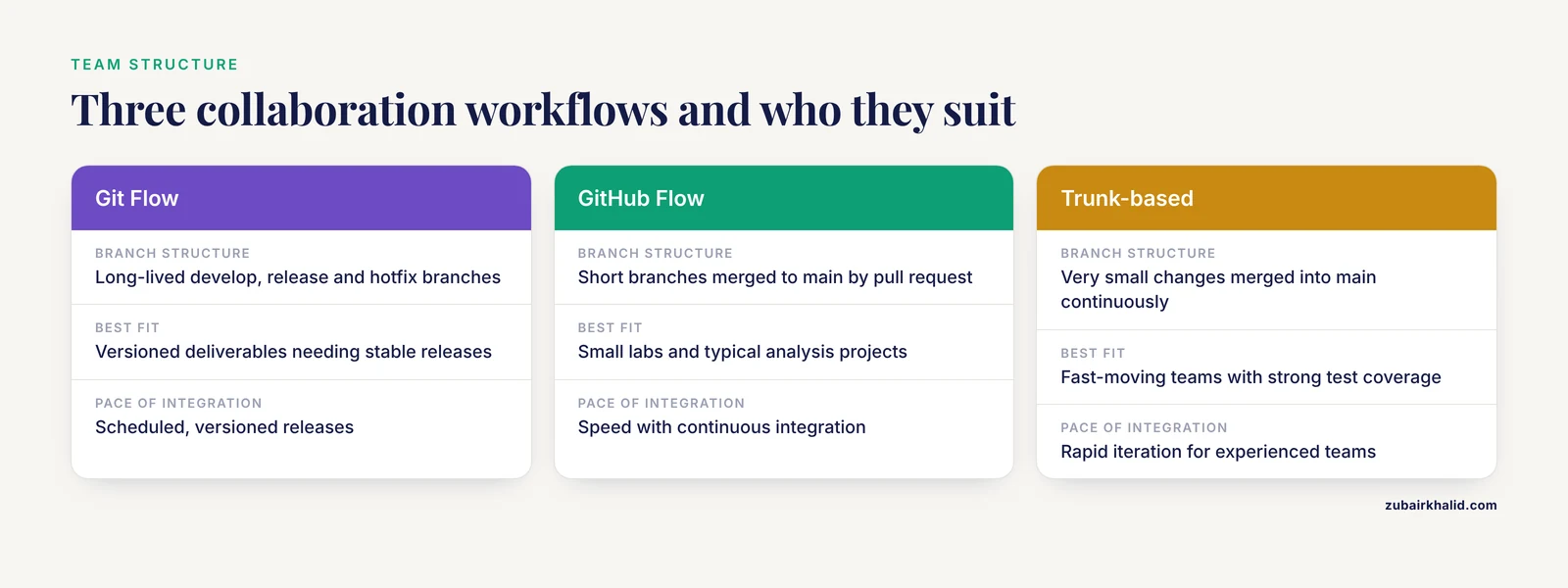
Teams differ in how formally they structure branches, and three named workflows dominate practice [7]. Git Flow uses long-lived development and release branches and favors predictability and stability, which suits projects with scheduled, versioned releases. GitHub Flow uses short-lived branches merged to main through pull requests, favoring speed and continuous integration, and it fits most small research groups. Trunk-based development keeps branches extremely short-lived and integrates into the shared mainline continuously, favoring rapid iteration for experienced teams [7].
| Workflow | Branch structure | Best fit |
|---|---|---|
| , - | , - | , - |
| Git Flow | Long-lived develop, release, and hotfix branches | Versioned deliverables needing stable releases |
| GitHub Flow | Short branches, pull request, merge to main | Small labs, typical analysis projects |
| Trunk-based | Very small changes merged into main continuously | Fast-moving teams with strong test coverage |
For a lab repository feeding a manuscript, GitHub Flow delivers review and history without ceremony. Adopt heavier structure only when a project genuinely ships multiple maintained versions.
Tips for Research Teams Using Git
Commit small and often. Frequent, focused commits following the edit-stage-commit cycle keep each snapshot understandable and make recovery precise [1].
Write messages that explain why. "Fix bug" tells a reader nothing next year. "Increase batch size to avoid memory failure on 16 GB laptops" records a decision.
Credit shared work in the commit itself. Hosting services support a Co-Authored-By trailer in commit messages, a convention that makes joint authorship visible in history and has enabled large-scale studies of micro-collaboration [8]:
git commit -m "Add power analysis function

Co-Authored-By: Maria Lopez <[email protected]>"
Guard sensitive data with .gitignore. Identifiable patient data must never enter a version-controlled repository, and a .gitignore file prevents inadvertent commits [1]:
# raw clinical data stays outside version control
data/raw/
*.csv
credentials.txt
.Rhistory
Tag manuscript versions. Before each submission, label the exact commit with git tag -a v1.0 -m "Analysis as submitted" and push the tag, so the paper points at frozen, retrievable code.
Watch team patterns in the log. Analyses of GitHub histories show that teams fall into collaborative, cooperative, or solo-submit patterns, and that these patterns can be detected automatically from commit records, which makes the log a fair starting point for mentoring conversations about who carries the workload.
Plan for a learning curve. Studies of Git documentation find the official manual terse, with many developers doubting their commands, and community question-and-answer resources functioning as the practical reference [9]. Budget a few weeks of regular use before judging the tool.
Consider institutional hosting. Self-hosted Git platforms provide repository management and fine-grained access control, and they have been used to run complete bioinformatics and AI-in-medicine curricula inside university infrastructure [10]. The same distributed model organizes collaboration on non-code artifacts too, including shared design documents in remote architecture courses [11].
Reproducible Research and a Reproducibility Checklist
Reproducible research means a colleague, reviewer, or your future self can regenerate the published numbers from the archived materials. Git contributes the mechanism, an append-only history of every analytical change, tied to authors and dates, that no email thread or shared drive can reconstruct. Tutorials in real-world evidence research frame this as FAIR implementation, with the repository serving as the complete audit trail of protocols, code, and documentation [4], and behavioral science tutorials make the same case for curating research assets so results can be regenerated months later [2].
Run this checklist before any submission:
- Initialize the repository on day one and commit the first analysis script before any results exist.
- Keep raw data out of the repository, document its source and access path in the README, and list data file patterns in .gitignore so sensitive files cannot be committed by accident [1].
- Make one commit per logical change, with a message explaining the reason for the change.
- Record the software environment, package versions, and any random seeds alongside the code.
- Keep main runnable at all times, and do exploratory work on branches merged through review.
- Tag the exact commit used for each submission, for example
git tag -a v1.0 -m "Submission version", and push the tag. - Maintain a remote copy on a hosting service or institutional server so the project survives hardware loss [10].
- Route every analysis that feeds published numbers through a pull request reviewed by a second person [1].
- Write a README that lets a new lab member regenerate the main result from a fresh clone.
- Add a code availability statement that cites the tagged repository version, the practice journals now request at submission [1], [4].
A repository that passes this checklist turns a reviewer's reproducibility request from a crisis into a link.
Common Mistakes and Limitations
Committing sensitive data. History keeps deleted files retrievable, so a patient file committed once remains in the repository even after removal. Prevention through .gitignore and an external data directory beats any cure [1].
Committing large binary files. Git handles text efficiently but stores large binaries poorly, and every cloner downloads the full bloat. Keep datasets in institutional storage and track only code, small metadata, and documentation.
Vague commit messages. Messages like "update" or "fix" destroy the audit value of history precisely when an audit matters.
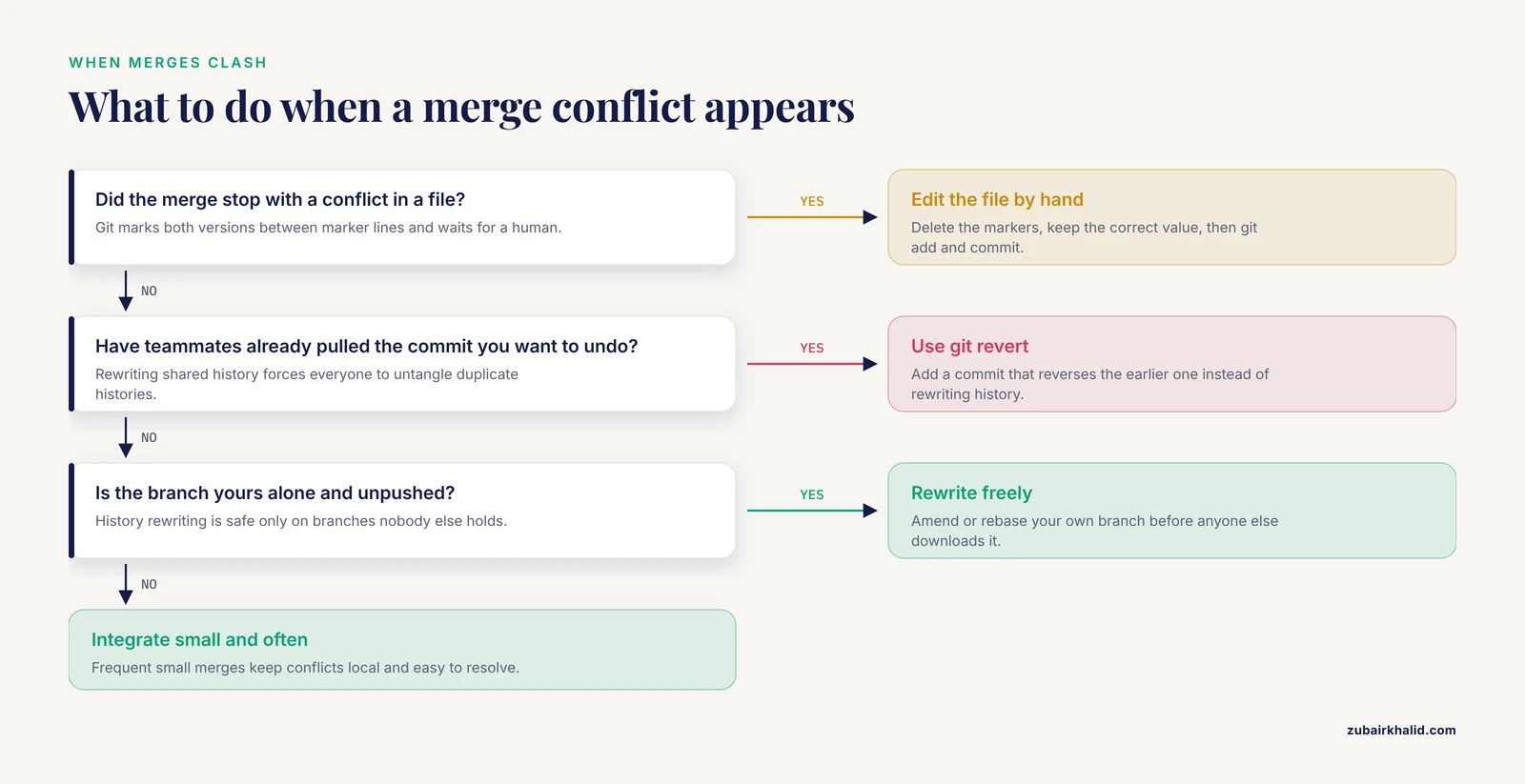
Force pushing to shared branches. Overwriting remote history can erase collaborators' commits, and recovery then depends on whoever happens to hold an unpushed copy. Reserve history rewriting for branches you own alone.
Letting branches drift for months. Long-lived divergent branches produce large, painful merges, and adjacent-line conflicts alone account for a substantial share of all conflicts. Integrate small changes frequently instead.
Letting one person commit everything. Solo-submit patterns hide unequal contribution and remove the review benefit entirely, a pattern detectable in commit logs and worth correcting early.
Treating Git as a backup. An unpushed repository is a single point of failure. The remote copy is the backup.
Rewriting history others have pulled. Amending or rebasing commits that teammates already downloaded forces everyone to untangle duplicate histories. Once a commit is shared, prefer git revert.
Equating version control with reproducibility. Git records what changed, not whether the code is correct or whether the environment matches the original. Pair the repository with environment documentation and validation [4].
Underestimating the learning curve. New users commonly doubt their commands at first because the official documentation is sparse, and community answers fill the gap [9]. Short daily practice resolves this faster than occasional marathon sessions.
Frequently Asked Questions
Do I need to know how to program to use Git?
No. The core workflow uses roughly a dozen commands, and tutorials now introduce Git to audiences, from behavioral scientists to surgical trainees, many of whom write little or no code themselves [2], [1].
Is GitHub the same as Git?
No. Git is the version control program running on your computer, while GitHub is a hosting service that stores remotes and adds review tools, and alternatives include GitLab and self-hosted institutional servers [10].
Should I put my dataset in the repository?
Usually no. Keep raw data, especially any patient-identifiable files, outside Git, list them in .gitignore, and document their location and checksums in the README [1].
How is Git different from Dropbox or Google Drive?
Cloud drives sync whatever sits on disk whenever syncing fires, while Git records deliberate snapshots with author, message, and a reviewable diff, and it lets parallel lines of work diverge safely through branches.
What happens if two collaborators edit the same line?
Git raises a merge conflict, marks both versions in the file between marker lines, and waits for a human to choose or combine the edits before the merge can be committed.
How do I give a collaborator credit on a commit?
Add a Co-Authored-By trailer to the commit message, a convention supported by GitHub and GitLab that records shared authorship directly in project history [8].
Can I measure who actually contributed what on a team project?
Yes. Commit logs, blame views, and mining tools such as git2net extract co-editing networks and per-author activity from repository history [12].
How do I link a published paper to the exact code version?
Tag the release commit, push the tag, archive the repository, and cite that tagged version in your code availability statement, the approach recommended in journal-oriented Git tutorials [1], [4].
Sources
- Version Control for Surgical Data Science: A Primer on Git and GitHub.
- Curating Research Assets in Behavioral Sciences : A Tutorial on the Git Version Control System
- Version Control Systems to Facilitate Research Collaboration in Economics
- The FAIRification of research in real-world evidence: A practical introduction to reproducible analytic workflows using Git and R.
- Mastering Git: A Comprehensive Guide to Version Control for DevOps Engineers
- EditFusion: Resolving Code Merge Conflicts via Edit Selection
- Analysis of Version Control Workflows
- A mixed-methods analysis of micro-collaborative coding practices in OpenStack.
- Richen: Automated enrichment of Git documentation with usage examples and scenarios
- Implementing a Version Control Platform as an Interactive Educational Framework for Bioinformatics and Artificial Intelligence in Medicine.
- Remotely Muti-Collaboration for the Online Teaching of Architectural Design: A Pilot Study Based on a Distributed Version Control Solution
- ASONAM 2022 Tutorial I: Mining and Analysing Collaboration in git Repositories with git2net