How to Get a DOI for Your Research Code and Data
By Dr. Zubair Khalid, DVM, MS, PhD ·

By the end of this article, you will be able to mint a permanent, citable Digital Object Identifier (DOI) for your analysis code and your datasets, link that DOI to the exact version of the work your paper uses, and write a data and code availability statement that a reviewer can actually follow. To follow the walkthrough you need a GitHub account (for code), a Zenodo account, Git installed on your machine, and your project files organized in one repository.
A DOI is a permanent alphanumeric string, such as 10.5281/zenodo.14012345, that resolves to a specific digital object through the doi.org resolver. Unlike a URL on your personal website or a link to a GitHub branch, a DOI is registered with an independent agency and points to a frozen, versioned record. That is what makes your work citable in other people's reference lists and visible to funders who audit outputs.
Why a DOI Matters for Reproducible Research
Reproducible research means that an independent researcher can obtain your data and code and rerun your analysis to reach your published results. Surveys across disciplines show that this basic condition is often unmet. In a study of 400 articles funded by the Nathan Shock Centers, half had no data availability statement at all and 92 percent had no code availability statement, and even among articles claiming openness, the deposited materials could only be located about 63 percent of the time for data and 81 percent of the time for code [1]. In clinical prediction model research, an AI-assisted scoping review of nearly 4,000 articles found that only 12.2 percent included any code-sharing statement, and the shared repositories varied enormously in documentation, dependency specification, and executable structure [2].
The contrast with journals that enforce sharing is striking. When leading economics and political science journals mandated data and code deposit, independent teams could computationally reproduce more than 85 percent of published claims, and median reproduced effect sizes were nearly identical to the published ones [3]. Expert panels convened through the EU iRISE project rank transparent data and code availability among the highest-priority measures for strengthening reproducibility [4]. Funders are also beginning to ask, although a scoping review of major cardiovascular funders found that while about two-thirds mandate data sharing, explicit code-sharing requirements remain uncommon [5].
Journal policies alone do not solve the problem. A survey of 171 materials science journals found that nearly all have a research data policy, but enforceable requirements are rare and expectations for software lag well behind those for data, with limited attention to versioning and persistent identifiers [6]. This is precisely why you, as the author, need to take the initiative and mint DOIs yourself rather than waiting for a journal to demand or provide one.
What a DOI Does and Does Not Do
A DOI does three things for you:
- It makes your code or data citable, so other papers can reference it in their reference lists instead of pointing to a link that may break.
- It freezes a version. The DOI resolves to a snapshot, so the analysis behind a published paper can be re-run years later even if the project has moved on.
- It gives your work a metadata record, including authors, license, funder, and related publication, which makes it findable in searches.
A DOI does not peer-review your code, does not guarantee it runs, and does not replace a software paper or a repository with continuous integration. It is a citation anchor, and the reproducibility quality of what sits behind it is your responsibility.
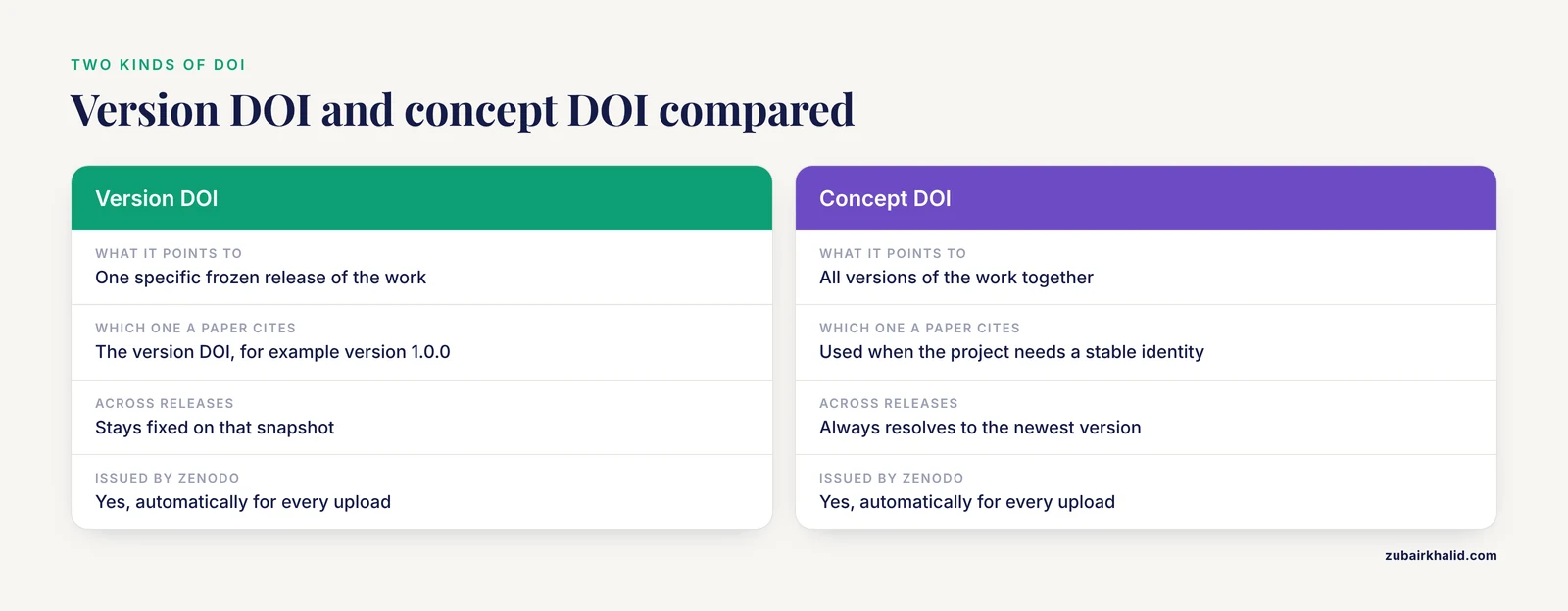
One distinction you must understand before uploading: most repositories issue two kinds of DOI. A version DOI points to one specific release of your work. A concept DOI is a permanent identifier for all versions of the work and always resolves to the newest one. When your paper says "version 1.0.0 of the analysis code," it should cite the version DOI. When your project wants a stable identity across releases, use the concept DOI. Zenodo issues both automatically for every upload.
How to Get a DOI for Research Code, Step by Step
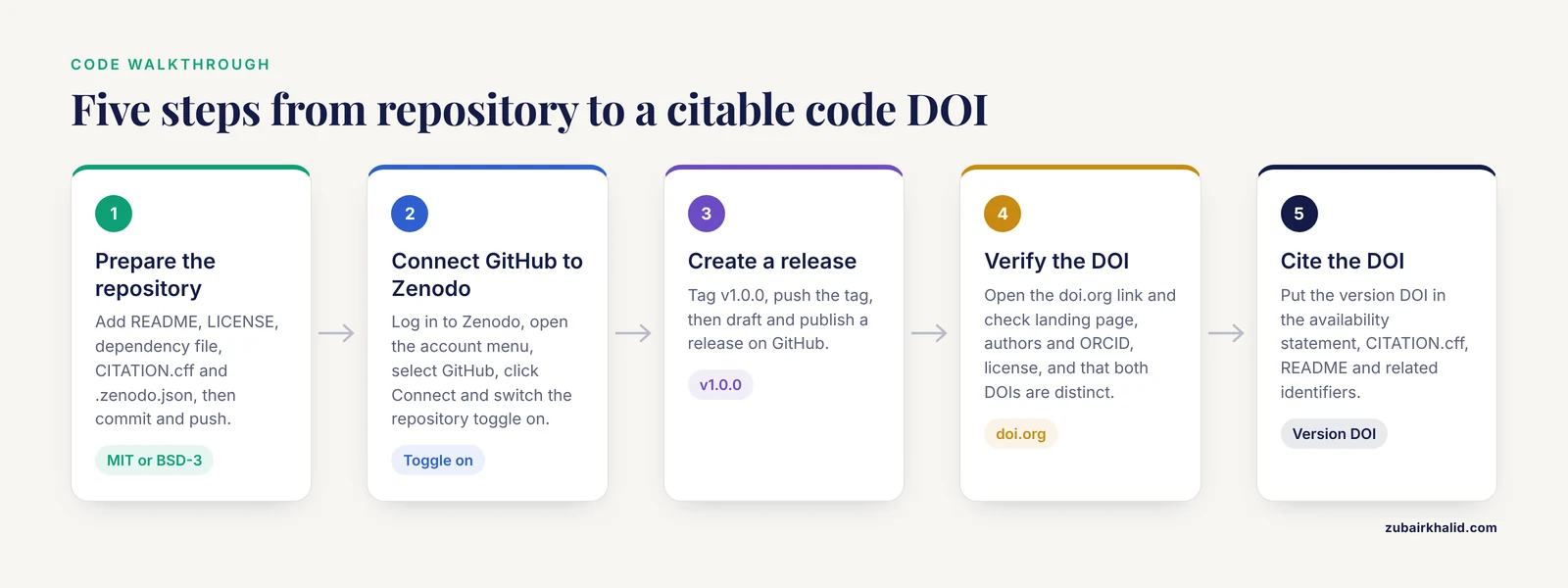
This walkthrough uses the standard GitHub-to-Zenodo integration, which is the most common route and is free. The same logic applies to GitLab-to-Zenodo and to direct uploads.
Step 1. Prepare your repository before you tag anything
A DOI attached to an undocumented dump of scripts helps nobody. Reviewers of shared clinical prediction code consistently find the biggest gaps are documentation, dependencies, and executable structure [2], so fix those first. At minimum your repository needs:
- A README.md that states what the project does, the folder layout, and the command to reproduce the main result.
- A LICENSE file. Without a license, others legally cannot reuse your code, which defeats the purpose of sharing. MIT and BSD-3 are common permissive choices for code, and CC-BY-4.0 is common for data.
- A dependency specification. For Python, a requirements.txt file. For conda environments, an environment.yml file. Reporting the exact software versions matters. A review of articles built on the Global Burden of Disease database found that many failed to report even the R version used for analysis, which blocks independent re-execution [7].
- A CITATION.cff file, which lets GitHub display a "Cite this repository" button and auto-fills citation metadata.
- A .zenodo.json file, which controls how your record appears on Zenodo.
Create the Zenodo metadata file at the repository root. Here is a realistic example with expected structure:
{
  "title": "Analysis code for tree-ring growth response to drought",
  "creators": [
    {
      "name": "Khalid, Zubair",
      "affiliation": "Department of Biology, Example University",
      "orcid": "0000-0002-0000-0000"
    }
  ],
  "description": "R scripts and Snakemake workflow reproducing all figures and tables in the associated manuscript.",
  "access_right": "open",
  "license": "mit",
  "upload_type": "software",
  "related_identifiers": [
    {
      "identifier": "10.5281/zenodo.14000000",
      "relation": "isSupplementTo",
      "resource_type": "dataset"
    }
  ]
}
The upload_type field tells Zenodo whether this is software, a dataset, or a publication, which affects the metadata schema. The license field must match the LICENSE file in your repository, and its value uses the lowercase SPDX identifier such as mit, bsd-3-clause, or cc-by-4.0.
Next, create the CITATION.cff file:
cff-version: 1.2.0
message: "If you use this software, please cite it using the metadata below."
authors:
  - family-names: Khalid
    given-names: Zubair
    orcid: "https://orcid.org/0000-0002-0000-0000"
title: "tree-ring-drought-analysis"
version: 1.0.0
date-released: "2026-11-11"
license: MIT
Commit both files and push to GitHub:
git add CITATION.cff .zenodo.json
git commit -m "Add citation and Zenodo metadata"
git push origin main
Step 2. Connect GitHub to Zenodo
Go to zenodo.org, log in, and open your account menu. Select GitHub, then click Connect. Zenodo will redirect you to GitHub to authorize the Zenodo application. Back on the Zenodo page, you will see a list of your GitHub repositories, each with an on/off toggle. Switch the toggle to on for the repository you prepared in Step 1. From this moment, every GitHub release in that repository is automatically archived on Zenodo with a DOI.
Step 3. Create a release
Zenodo archives releases, not branches, so you now tag a version and push the tag. In your local clone:
git tag -a v1.0.0 -m "Code release accompanying manuscript submission"
git push origin v1.0.0
Then open your repository on GitHub, click Releases, click Draft a new release, choose the tag v1.0.0 from the dropdown, give it a title, and click Publish release. If you prefer the command line, the GitHub CLI does it in one step:
gh release create v1.0.0 --title "v1.0.0" --notes "Initial code release"Expected result: within a minute or two, the Zenodo dashboard shows a new upload for this release, and the repository page on Zenodo displays a blue DOI badge.
Step 4. Verify the DOI resolves correctly
Copy both DOIs from the Zenodo record page and paste them into a browser after the resolver prefix:
https://doi.org/10.5281/zenodo.XXXXXXXCheck four things. First, the landing page shows your README rendered or a downloadable archive. Second, the author list and ORCID identifiers are correct. Third, the license is displayed. Fourth, the version DOI and the concept DOI are distinct, with the concept DOI labeled as representing all versions. Download the archive Zenodo produced and confirm it contains your files, not just a submodule pointer.
Step 5. Cite the DOI where it counts
Add the version DOI to your manuscript's data and code availability statement, for example: "All analysis code is archived on Zenodo at https://doi.org/10.5281/zenodo.XXXXXXX (version 1.0.0)." Also add it to your CITATION.cff, your README, and the related-identifier field of your paper's data upload so the records cross-link. Repositories built with FAIR principles in mind, such as the pupillometry package eyeris or the phylogenetics visualization package tanggle, follow exactly this pattern of embedding citation metadata directly in the project so figures and analyses remain traceable [8] [9].
How to Get a DOI for Research Data, Step by Step
For data, the general workflow is the same but the choice of repository matters more, because data often has domain-specific archives with better metadata standards.
Step 1. Choose the right repository
| Repository | Best for | DOI behavior | Access model |
|---|---|---|---|
| Zenodo | General-purpose data, code, preprints, posters | Version DOI plus concept DOI per upload | Free, open, optional embargo |
| GitHub plus Zenodo integration | Software and small analysis assets | New DOI per GitHub release | Free, open |
| Domain archives (for example MetaboLights, GenBank equivalents, field-specific databases) | Raw instrument data, sequences, spectra | Dataset-level identifiers issued by the archive | Free, open, structured metadata |
| Institutional repositories | Data with local governance constraints | Institutional DOI or handle | Varies by institution |
Where possible, prefer the domain archive for raw data and Zenodo for processed data and code. The metabolomics community shows why. Public deposition of raw LC-MS/MS files into dedicated archives has matured, but the scripts that turn raw files into reported feature tables remain hard to share, which is exactly the gap the FAIR principles, extended to software and workflows, are meant to close [10].
Step 2. Prepare data files and metadata
Package your data in open formats, such as CSV for tables, FASTA or FASTQ for sequences where the domain archive does not prescribe its own format, and NetCDF or GeoTIFF for gridded and raster data. Include a data dictionary file that defines every column name, unit, and coded value. Then write the metadata Zenodo or the archive will ask for: title, creators with ORCID iDs, abstract, methods description, license, funding information including grant numbers, and the DOI of the related publication if it exists.
Step 3. Upload and mint the DOI
On Zenodo, click New upload, choose Dataset as the resource type, drag your files in, fill in the metadata form, and click Publish. Publishing is irreversible on Zenodo, which is deliberate. Once published you receive the version DOI and the concept DOI. For very large files, use the Zenodo web interface with a supported browser or an API token, and for restricted datasets you can set restricted access with a request workflow instead of full openness.
Step 4. Link the records
Use the related_identifiers field in each record to point code at data and data at code, and point both at the manuscript once it has its own DOI. This cross-linking is what turns three loose artifacts into one verifiable research package. In the clinical trial literature, a proposed three-tier framework argues that the kind of data released should match the scientific claims it must support, with reduced publication-time datasets supporting endpoint-level reproduction and fuller reproducibility packages supporting deeper reanalysis [11]. Deciding which tier your own release supports is a good habit even outside trials.
Handling Sensitive Data
Human-subject data often cannot be posted openly, and privacy law may prohibit raw narrative records from ever leaving the controlled environment. A study of deidentified Japanese electronic health record narratives shows a practical middle path. The authors released deidentified analytic text plus the code pipeline, so that downstream audits of recoverability remained possible even though raw records stayed under governance control [12]. If your data is sensitive, get a DOI for the code, the data dictionary, and summary or synthetic data, and write an availability statement that names the governance route for qualified access requests. Transparency about the pipeline partially substitutes for transparency about the raw records, and journal editors increasingly accept this structure [11].
A Reproducibility Checklist Before You Publish
Work through this reproducibility checklist after minting your DOIs and before submitting the manuscript. Each item addresses a documented failure mode in the literature.
- The exact software version, including language interpreter version, is stated in the paper or repository. Missing version reporting is a recognized gap in mass-produced database analyses [7] and in clinical AI reporting [13].
- All dependencies are pinned, in requirements.txt, environment.yml, or a container definition.
- A single command regenerates the main results from the deposited data.
- The deposited dataset is the one the paper actually used, not an earlier draft.
- Both the version DOI and the concept DOI are recorded, and the paper cites the version DOI.
- The license permits reuse, and code and data licenses are consistent with each other.
- The repository README explains folder structure and expected runtime.
- Random seeds are fixed for any stochastic analysis.
- The data and code availability statement contains DOIs, not personal website links or "available on request."
- Restricted data has a documented access route, and the code that processes it is still open [12].
Groups that audit reproducibility report that when open materials are nominally claimed, metadata and documentation are the things most often missing at reanalysis time [14], and items 1, 3, and 7 above target exactly that failure.
Common Mistakes and Limitations
Citing the repository link instead of a DOI. A GitHub URL points to whatever the branch contains tomorrow. If someone clones it a year later and gets a rewritten version, your paper's claims are unverifiable. Always mint a DOI for the release snapshot.
Minting the DOI after the paper is typeset with the wrong version. Tag the release at submission time, then update the concept DOI in proofs if a bug fix produced a v1.0.1. Never cite a DOI you have not personally resolved in a browser.
No license in the repository. GitHub's own interface cannot display a reuse license for unlicensed code, and downstream users are blocked. Choose a license before the first release.
Forgetting that publish is irreversible. On Zenodo, publishing creates a permanent record. If you spot a metadata typo after publishing, you cannot delete the record, you can only publish a corrected new version. Proofread before clicking publish.
Assuming the DOI proves reproducibility. A DOI guarantees findability and fixity, not that the code runs. A survey of researchers across disciplines found the top barrier to code sharing was lack of time to prepare documentation, at 65 percent of respondents [14]. Budget a half day for documentation before the release, because the documentation, not the DOI itself, is what makes an independent reproduction succeed.
Uploading personal-identifiable data to an open repository. If participants could be re-identified, deposit summary statistics or deidentified derivatives instead, and describe the controlled-access route [12].
Treating sharing as a final-stage task. Reporting failures cluster when transparency is bolted on at manuscript stage rather than built into the study design from the start, a pattern documented across radiological AI research [15]. Create your release branch the day you start analysis, not the week you submit.
One limitation of this guide is that repository interfaces change. The Zenodo-GitHub connection flow and form fields described here reflect the standard documented workflow, but check the provider's own documentation if a button has moved.
Frequently Asked Questions
Is a DOI the same as publishing my code or data?
No. A DOI is a permanent identifier for the record, not a peer-reviewed publication. Your code or data becomes citable, but it is not refereed, and you retain control over future versions.
Do I upload my code to Zenodo or keep it on GitHub?
Keep developing on GitHub and let the Zenodo integration archive each release automatically. GitHub gives you version control and collaboration, Zenodo gives you the permanent, citable DOI snapshot.
What is the difference between a version DOI and a concept DOI?
The version DOI resolves to one specific frozen release, which is what a paper should cite. The concept DOI is a stable identifier for the project across all releases and always resolves to the latest version.
Should I get the DOI before my paper is accepted?
Yes. Create the release when you submit, because reviewers and readers need to see the exact code behind the submitted claims, and you can mint an updated version later if changes are needed.
How much does it cost to get a DOI for code or data?
Through Zenodo and the GitHub integration, nothing. Some disciplinary repositories and data journals charge curation or processing fees, so check the fee schedule of your chosen archive before uploading.
Can I get a DOI for data I am not allowed to share openly?
Yes, in a limited sense. You can deposit the data dictionary, code, and deidentified or summary data, and set the raw data to restricted access with a documented request workflow, which is the accepted pattern for governed human-subject data.
What license should I choose for my code and data?
For code, a permissive license such as MIT or BSD-3-Clause is standard. For data, CC-BY-4.0 is common. Pick one license per artifact, and make sure the repository LICENSE file matches the license field in the DOI record.
How do I cite a code or data DOI in my paper?
Use the standard citation format for the record, including authors, year, title, repository name, version, and the DOI as a URL, and repeat the DOI in your data and code availability statement so both humans and indexing software find it.
Sources
- An assessment of data and code sharing in research funded by the Nathan Shock Centers, 2017-2022: a meta-research study.
- AI-assisted scoping review of code sharing in clinical prediction model research.
- Reproducibility and robustness of economics and political science research.
- Prioritising measures and interventions to strengthen research reproducibility: a Delphi consultation study.
- Funders' Expectations for Open Science in Cardiovascular Research: A Scoping Review of the Largest Cardiovascular Research Funders.
- Journal research data policies in materials science.
- Paper mill or paper mine? A tentative answer to the sharp increase in research papers based on the Global Burden of Disease database.
- eyeris: A Flexible, Extensible, and Reproducible Pupillometry Preprocessing Framework in R.
- tanggle: An R package for the visualization of phylogenetic networks.
- Metabonaut: an open educational resource for learning reproducible, script-based untargeted LC-MS/MS metabolomics.
- Clinical trial data transparency should match data access to scientific purpose: a tiered framework for reproducibility and reuse.
- Balancing Privacy Protection and Reproducible Entity Extraction in Real-World Data in the Development of a Framework for Deidentified Japanese Electronic Health Record Narratives Using BERT: Retrospective Observational Study.
- Large language models in rheumatology-centered research: A scoping review of model openness and reporting practices.
- Exploratory Insights into Barriers and Open Practices for Computational Reproducibility in Scientific Research.
- Transparent reporting is central to reproducible radiological AI research: A call to action.