Free vs. Paid Research Collaboration Tools
By Dr. Zubair Khalid, DVM, MS, PhD ·

Free research collaboration tools cost nothing up front but put limits on storage, administration, support, and long-term guarantees, while paid tools charge a subscription in exchange for capacity, control, and accountability. The rule of thumb is simple: pick the tool that matches your team size, your data sensitivity, and the lifetime of your project, not the tool with the lowest price tag or the longest feature list. A five-person lab writing a manuscript has very different needs from a ten-hospital consortium sharing patient data, and the free-versus-paid question answers itself once you name those needs out loud.
This guide explains what research collaboration tools actually do, compares free and paid options across the criteria that decide real choices, walks through worked scenarios, and lists the mistakes that waste the most time. The focus is on scientific collaboration in the life sciences, where teams are increasingly interdisciplinary and where the tools you choose shape how reproducible and how trustworthy your work turns out to be.
What Research Collaboration Tools Actually Do
A research collaboration tool is any software that helps two or more people plan, write, analyze, or share research work together. Most fall into a handful of functional categories.
Document co-authoring. Shared manuscripts, protocols, and grant drafts with tracked changes and commenting. Cloud word processors and Markdown-based platforms dominate here.
Reference management. Shared libraries of papers so that a team cites from one curated collection instead of six private folders of PDFs.
Project and task tracking. Kanban boards, timelines, and task lists that assign who does what by when. These matter most when a project spans multiple sites or roles.
Data sharing and versioning. Repositories and cloud drives where datasets, code, and analysis notebooks live in one place with a recorded history of changes.
Communication. Chat, video meetings, and threaded discussions that keep decisions and their reasons attached to the work rather than scattered across inboxes.
Analysis environments. Shared computational environments where team members run the same code against the same data.
The reason these categories matter is that modern scientific collaboration is rarely a simple two-person exchange. Nurse scientists working with high-throughput "omic" data, for example, depend on shared pipelines and shared vocabulary to communicate across disciplines, and the authors of one review argue that skill with common tools is imperative for advancing omics research and for cohesion among interdisciplinary team members [1]. Partnerships that bring researchers, policymakers, and service providers together, such as the SiREN network in Western Australia, go further still, adding people with different professional languages and incentives to the same table [2]. Every additional discipline and role you add raises the stakes on choosing tools that everyone can actually use.
Free vs. Paid Research Collaboration Tools: Side-by-Side Comparison
The table below summarizes the difference between free and paid research collaboration tools across the factors that come up in real purchasing and adoption decisions. No single row is decisive. The right answer comes from weighing several rows against your specific project.
| Criterion | Free tools | Paid tools |
|---|---|---|
| Up-front cost | Zero for core features | Subscription, usually per user per month or year |
| Storage | Caps that can be hit within months on active projects | Large or configurable allocations |
| Version history | Often limited to a rolling window | Long or unlimited history with restore points |
| Access control | Basic share links, few role options | Granular roles, group policies, guest management |
| Audit trails | Rare or minimal | Detailed logs of who changed what and when |
| Administrative oversight | Little to none | Central provisioning, deprovisioning, and policy enforcement |
| Integrations | Core integrations only | Broader app ecosystems and API access |
| Support | Community forums and documentation | Dedicated support, service agreements, onboarding |
| Data retention and export | Export exists but migration is manual | Contractual commitments and supported export paths |
| AI features | Limited or absent | Increasingly bundled, with vendor-specific terms |
| Compliance commitments | Rarely formalized | Contractual and sometimes certification-backed |
| Hidden costs | Time lost to workarounds and migrations | Money plus training time and vendor lock-in risk |
Two clarifications keep this comparison honest. First, "free" includes both freemium commercial products and free and open-source software, and the two behave differently. Open-source tools can be self-hosted, which moves the cost from a subscription to server maintenance and staff time. Second, "paid" does not automatically mean better science. The quality of any tool, free or paid, is judged differently by different users, and researchers and practitioners in one study of implementation science tools described quality in materially different terms depending on their own roles and experience [3].
Free Research Collaboration Tools: Strengths and Trade-offs
Free tools earn their place in science in three ways.
They remove the budget barrier for small and early-stage teams. A graduate student, a postdoc launching a first lab, or a collaboration between two research groups with no joint funds can all adopt a capable free tier in an afternoon. The practical features that matter most for scientific collaboration, such as commenting on a shared manuscript or keeping a task board, are available without paying in most major products.
Free and open-source tools are themselves scientific products. The NASSS-CAT implementation toolkit, developed through co-design workshops with fifty stakeholders including industry executives, clinicians, and patients, is available as free downloads in multiple formats, including a short taster version and a long version intended to support reflection, due diligence, and preliminary planning [4]. This is a useful precedent. A tool being free says nothing about its rigor, and in this case the free artifact is the peer-reviewed output of a structured development process.
Open-source analysis environments can strengthen collaboration directly. In nursing science, one review promotes free and open-source data processing and analysis pipelines for omics studies precisely because shared, transparent pipelines improve collaboration and cohesion among interdisciplinary team members [1]. When everyone runs the same code in the same environment, disputes about whose version of the analysis is correct largely disappear.
The trade-offs are real, and they bite hardest in four places.
- Storage and quota walls. Free tiers cap file size, total storage, or version history. An active project generating sequencing files or imaging data can exhaust a free allocation quickly.
- No administrative control. On a free tier, anyone can often share anything with anyone. There is no way for a principal investigator to revoke a former member's access across the whole workspace in one action.
- No guaranteed support. When the service breaks or a feature changes, your only recourse is a community forum. Deadlines do not wait for forum replies.
- Terms can change. Vendors reshape free tiers. A feature your workflow depends on can move behind a paywall or disappear with one product announcement.
A subtler trade-off deserves mention because it affects scientific infrastructure broadly. Much of the bibliometric infrastructure of science runs on curated subscription resources. One bibliometric analysis of primary insomnia research from 2005 to 2025 used the Web of Science Core Collection, a subscription database, as its primary source, paired with CiteSpace for network analysis, and mapped collaboration among 15,657 distinct researchers [5]. The lesson for a lab choosing tools is not about bibliometrics itself. It is that some layers of research work simply have no free equivalent of comparable quality, and a sensible toolkit can mix free and paid layers rather than pretending one category covers everything.
Paid Research Collaboration Tools: What You Actually Buy
Paying for collaboration software buys four things that free tiers rarely provide, and each maps onto a concrete scientific need.
Control and accountability. Paid plans typically offer role-based permissions, central user management, and audit trails. Audit trails matter because transparency is one of the recognized components of research trustworthiness. A systematic review of randomized controlled trials in osteopathic research assessed trustworthiness across methodological rigor, transparency, good governance, and research integrity, and found widespread problems, including high risk of bias in 74% of 61 trials and selective analyses in 38% [6]. A collaboration platform that records who changed which analysis file, and when, does not guarantee integrity, but it makes the honest path easier to follow and the dishonest path harder to hide. Free tools that overwrite versions silently cannot do this.
Capacity. Large storage allocations, long version histories, and high participant limits let a consortium keep its entire data trail in one governed place for the life of a grant and beyond.
Support and onboarding. Paid contracts usually include help getting people actually using the tool. This matters more than most buyers expect. In an action research study of district nursing teams implementing an evidence-informed delirium triage instrument, the tool itself was sound, yet it was used only four times across three months of routine care. Facilitators included user-friendliness and collaborative engagement, while barriers included stressful working conditions and the tool simply not being ingrained in practice [7]. Software that nobody adopts delivers zero value at any price, and paid onboarding exists to fight exactly that failure mode.
Continuity. Contracts can specify data retention, export assistance, and service levels. When a three-year project ends and a funder asks where the data live, a contractual answer beats a hopeful one.
There is one more thing paid tools buy, and it is the least understood: structured thinking about implementation. The NASSS-CAT LONG instrument, distributed free but designed for exactly this purpose, maps the complexity of a technology implementation across six domains through stakeholder discussion, surfacing uncertainties and interdependencies before they cause failures [4]. The framework behind it exists because many technology implementation projects in health and social care fail, and because failures trace back to factors that a feature comparison table never captures. Buying a tool is the cheapest step in adopting it. Paying attention to the six NASSS domains, the technology, the adopting organization, the wider system, and the people involved, costs nothing and prevents the most expensive mistakes [4].
The Criteria That Decide Real Choices
Feature lists make tools look interchangeable. These criteria are where free or paid research collaboration tools actually get chosen.
Team size and turnover
A tool that works for three people who all know each other can collapse at thirty people with monthly turnover. Free tiers usually assume small, stable, trusting groups. Paid tiers assume administration. If your team adds and loses members each semester or each grant year, the ability to provision and deprovision accounts centrally is not a luxury, and it is one of the clearest signals that you have crossed into paid territory.
Data sensitivity and access control
Ask what happens if a dataset leaves the workspace. Human subject data, unpublished genomic results, and prepublication findings all demand access control that free share links cannot enforce. Granular permissions, expiring links, and watermarked previews are standard on paid plans and rare on free ones. If your institutional review board or data use agreement implies controlled access, the choice has effectively been made for you.
Project duration and continuity
Short projects forgive almost anything. Multi-year programs do not, because people leave, grants end, and institutional memory evaporates. The partnership literature makes the stakes plain. A systems-based protocol studying the SiREN research and evaluation partnership noted that little evidence exists for how partnership models actually work, and set out to trace mechanisms and outcomes through documents, surveys, interviews, and a causal loop diagram [2]. Collaboration structures, including the tools that hold them together, need to be evaluated over time rather than assumed to work. A paid tool with contractual continuity and a supported export path is easier to evaluate honestly than a free tool whose terms can change mid-grant.
Interoperability and exit paths
The best question to ask any vendor, free or paid, is how you get your data out. Formats, API access, and export completeness determine whether a tool is a workspace or a trap. Open-source free tools often win here because you can host your own copy. Paid tools vary widely, so check the export story before the demo impresses you.
Bandwidth and infrastructure
Not every team works on fast campus networks. Conceptual analysis of open distance e-learning contexts for building teacher capacity in human-AI collaboration deliberately centers low-bandwidth, predominantly asynchronous environments [8]. The same constraint applies to field biology stations, international collaborations with uneven connectivity, and clinical sites with locked-down networks. A feature-rich cloud platform that stutters on a thin connection is worse than a leaner tool that works. When you compare tools, test them under your real worst-case connection, not your office connection.
Perceived quality and fit
Quality is not an objective property of a tool. In a qualitative study of implementation science tools, researchers, practitioners, and hybrid researcher-practitioners defined and perceived quality differently, drawing on their own roles and working contexts [3]. Translate this finding to collaboration software and the practical implication is direct: have the people who will use the tool daily judge it, not just the person buying it. A system a principal investigator loves and a research assistant hates will fail.
AI features and where they are heading
Generative AI is now bundled into paid collaboration products as summaries, drafting, and search. Evidence on its value is still forming. A phenomenological study of 23 higher education educators found that generative AI reshapes professional roles, expertise, agency, and assessment practices, producing both opportunities and tensions that educators interpreted through human-centered lenses [9]. For research teams, the reasonable position is to treat AI features as conveniences whose output must be verified, and to read the vendor's terms on whether your documents train their models. Paying extra primarily for AI features is a weak justification today. Paying for control over where your data and your AI interactions live is a strong one.
Worked Scenarios
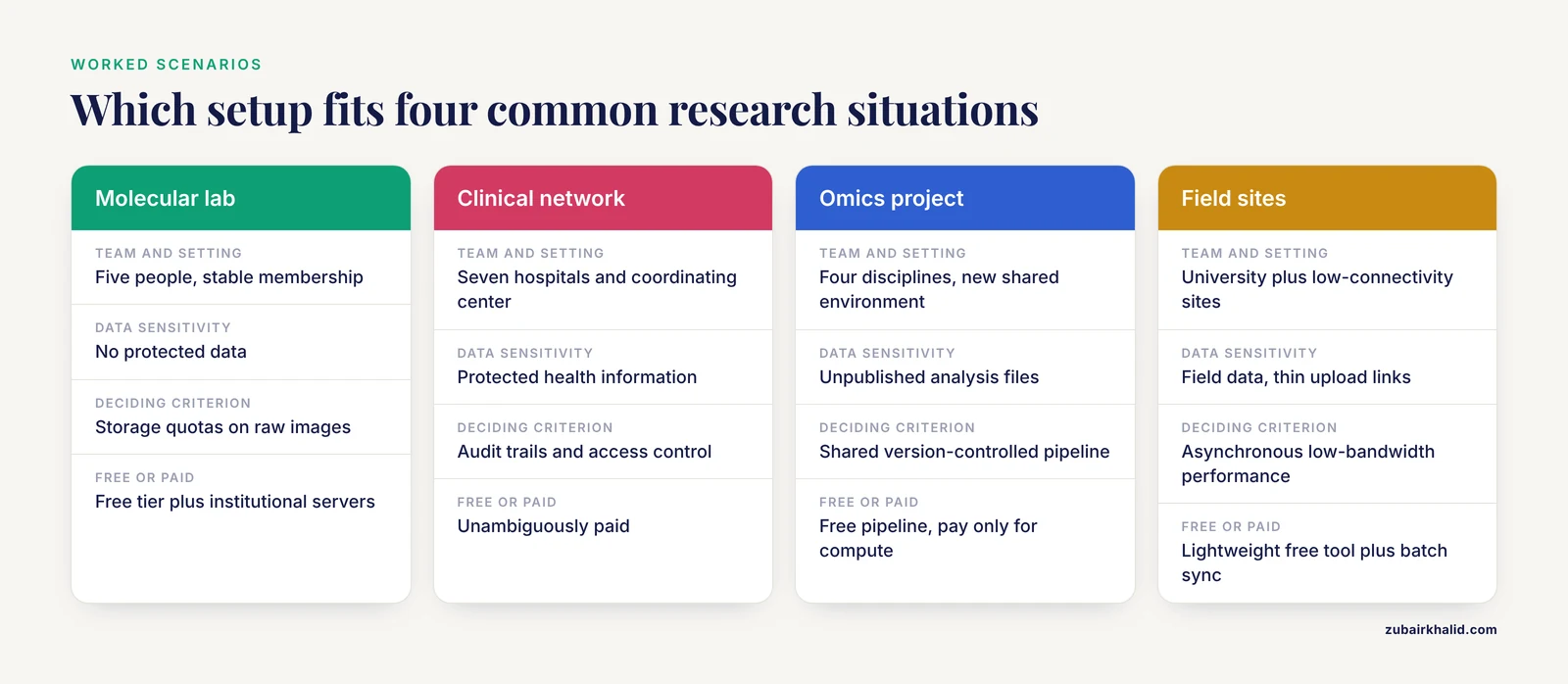
Scenario 1: A five-person molecular biology lab. One principal investigator, two graduate students, a postdoc, and a technician. Needs are a shared manuscript space, a shared protocol library, a task board, and a cloud drive for figures. No protected data, stable membership, small storage footprint. A free tier of a mainstream document platform plus a free project board covers this. The main risk is hitting storage quotas with raw image files, which the lab can solve by keeping large raw data on institutional servers and linking to them. Paying here would mostly buy storage the institution already provides.
Scenario 2: A multi-site clinical research network. Seven hospitals, a coordinating center, and a shared protocol with site-specific amendments. Protected health information, regulatory documentation, and auditors who may ask who edited what. This is unambiguously paid territory. Granular access control, audit trails, contractual data handling, and vendor support during onboarding are requirements, not preferences. Before signing anything, the coordinating center should run a structured complexity assessment. The NASSS-CAT LONG instrument was built for exactly this kind of due diligence, mapping complexity across six domains through stakeholder discussion to surface uncertainties and interdependencies early [4]. The protocol phase is also the right time to plan how the collaboration itself will be evaluated over its life, in the spirit of the systems approach used to study research capacity building partnerships [2].
Scenario 3: An interdisciplinary omics project. A bioinformatician, a clinician, a statistician, and a wet-lab scientist who have never shared an analysis environment. The highest-value collaboration tool here is not a chat app. It is a free, open-source, version-controlled analysis pipeline that everyone runs against the same data, because that is what improves cohesion and communication across disciplines in omics work [1]. Pair the pipeline with a free documentation wiki. Payment is only warranted if the team needs managed compute or protected data hosting that self-hosting cannot cover.
Scenario 4: A collaboration spanning a university and low-connectivity field sites. Ecologists collecting data where upload bandwidth is measured in kilobits. The deciding criterion is asynchronous, low-bandwidth performance [8]. A heavyweight paid platform that assumes fast connections will frustrate the field team into abandoning it, reproducing the pattern seen in the delirium triage study where a sound tool went unused because it never became ingrained in daily practice [7]. Here the right answer may be a lightweight free tool used consistently, plus batch syncing when connectivity allows, rather than a premium platform used badly.
Common Mistakes and Limitations
Buying features instead of workflow fit. The longest feature list loses to the tool your team will actually open every day. The implementation science tool study showed that quality judgments differ by user role, which means a tool chosen by one stakeholder group alone will disappoint the others [3].
Skipping implementation planning entirely. Many technology implementation projects fail, and the NASSS framework was developed precisely because outcomes vary with factors far beyond the technology itself [4]. Budget an afternoon to walk through the NASSS domains before rolling out any tool, free or paid. The exercise costs nothing and routinely surfaces a fatal assumption.
Measuring adoption by installation. The delirium triage study found a well-designed instrument used four times in three months despite training and support, because daily pressures and low perceived urgency kept it out of routine [7]. If you want to know whether a collaboration tool is working, count actual usage events, not accounts created.
Assuming tools create collaboration. Tools support collaboration. They do not generate the trust, incentives, and shared goals that make partnerships function, and the partnership evaluation literature cautions that evidence for how such models work remains thin [2]. If a collaboration is broken, a new platform will usually digitize the brokenness.
Letting AI features drive the purchase. Educators working with generative AI report genuine gains alongside real tensions over expertise, agency, and integrity [9]. Treat bundled AI as unverified convenience. Verify outputs, and read the data terms before confidential manuscripts flow through them.
Ignoring the exit. The most expensive tool is the one you cannot leave. Test export before you commit, whether the tool is free or paid.
A note on limits. This article compares categories of tools and the criteria that distinguish them. It does not name specific products with current pricing, because prices and feature tiers change frequently enough that any printed figure would mislead. Check vendor documentation directly at decision time. And when your collaboration involves protected patient data, the governing rules come from your institution and your data use agreements, not from any general guide.
Frequently Asked Questions
Are free research collaboration tools good enough for real research?
Yes, for small teams handling non-sensitive data on short to medium timelines. Free and open-source tools have credible scientific pedigree, and shared open-source analysis pipelines demonstrably support interdisciplinary teamwork [1]. They stop being sufficient when you need access control, audit trails, guaranteed capacity, or formal support.
What is the main difference between free and paid research collaboration tools?
The main difference is not features, it is control and accountability. Paid plans add administration, audit trails, capacity, and contractual support, while free plans trade those away for zero cost. Judge the difference against your team size, data sensitivity, and project duration rather than against the price.
When should a lab or project pay for collaboration software?
Pay when any of four conditions hold: the data are sensitive enough to require enforced access control, the team is large or has high turnover, the project must survive for many years with auditable records, or adoption depends on vendor onboarding and support. Any one of these is sufficient. Several together make the decision obvious.
Can we mix free and paid tools?
Yes, and most research groups should. A common pattern pairs a paid storage and access-control layer for sensitive data with free co-authoring and task-tracking tools for everyday work. The obligation that comes with mixing is integration hygiene: decide which tool is the single source of truth for each artifact so that documents and data do not fork.
Do AI features justify paying for a collaboration tool?
Rarely on their own. Evidence on AI-mediated collaboration shows both opportunities and unresolved tensions around expertise, agency, and responsibility [9]. Treat bundled AI as a convenience to verify, not a capability to budget for. Pay for control over your data and its uses instead.
How do we get our team to actually adopt a new tool?
Design the rollout around the people, not the software. The clearest lesson from implementation research is that user-friendliness and genuine collaborative engagement drive use, while stress, low urgency, and lack of integration into routine kill it [7]. Involve daily users in the choice, retire an old tool when the new one arrives rather than running both, and check real usage after a month.
Sources
- NuRsing Research in the 21st Century: R You Ready?
- Taking a systems approach to explore the impacts and outcomes of a research and evaluation capacity building partnership: a protocol.
- Quality is in the eye of the beholder: A qualitative description study to explore the perceptions of researchers and practitioners on the quality of implementation science tools.
- The NASSS-CAT Tools for Understanding, Guiding, Monitoring, and Researching Technology Implementation Projects in Health and Social Care: Protocol for an Evaluation Study in Real-World Settings.
- Global research landscape and emerging frontiers in primary insomnia treatment (2005-2025): A bibliometric analysis.
- Investigating the trustworthiness of randomized controlled trials in osteopathic research: a systematic review with meta-analysis.
- District nursing staff's experiences with implementing an evidence-informed triage instrument for delirium in home care; an action research-informed qualitative study.
- An ODeL-based teacher professional development framework for teacher-facilitated human-AI collaboration in primary mathematics problem-solving: a conceptual analysis.
- Toward Human-Centered Pedagogy in the Age of Generative AI Among Higher Education Educators: Qualitative Phenomenological Study.