Free Project Management Training for Scientists
By Dr. Zubair Khalid, DVM, MS, PhD ·

By the end of this guide you will be able to find and evaluate free project management training that fits a research career, build a complete research project plan template from scratch, track milestones with a spreadsheet or a short script, and avoid the planning mistakes that derail experiments, grants, and multi-lab collaborations. You do not need paid software. You need a spreadsheet program such as Excel, Google Sheets, or LibreOffice Calc, a plain text editor, and about three focused hours per week for a few months.
Why Scientists Need Project Management Skills
Research project management is the discipline of defining what a project will deliver, breaking the work into scheduled tasks, assigning responsibility, tracking progress, and managing risk. Most scientists learn it by accident, through trial and error during a thesis or a first grant. That approach works poorly because the stakes rise fast. A failed milestone in a funded project can mean a no-cost extension request, a missed renewal, or an unfilled position.
The need shows up at every career stage. A review of clinician-investigator training identified limited or discontinuous research opportunities, heavy competition for funding, and the need for leadership development after formal training as persistent structural challenges for physician-scientists [1]. Those same pressures apply across the life sciences. A postdoc managing a core facility collaboration, a lab manager scheduling instrument time, and a graduate student coordinating a rotation project are all doing project management, whether or not anyone has named the skill.
Large collaborative science makes the case even more clearly. The Collaborative Modeling Project for Androgen Receptor Activity coordinated 25 international modeling groups that contributed 91 predictive models against a shared training set of 1,746 chemicals, screening 55,450 chemical structures in total [2]. Projects of that scale do not succeed on goodwill. They succeed because someone defined a common training set, a common set of deliverables, and a timeline that every group could align to. Those are project management decisions, made before any model was run.
The good news is that the core skills are learnable in weeks, and high quality instruction is available at no cost if you know where to look and how to judge it.
What Free Project Management Training Actually Looks Like
Free training for scientists falls into four broad categories. Understanding the categories helps you build a plan instead of collecting random webinars.
Structured self-paced online courses. Universities and platforms publish full courses that you can work through on your own schedule. The design of these courses matters. A pilot certificate course for biomedical scientists at the University of Texas MD Anderson Cancer Center delivered 24 instructional modules over 6 months in an asynchronous online format, with learning objectives organized module by module, and 29 participants completed the pilot [3]. That structure, short modules with explicit objectives, delivered asynchronously, is the model to look for when you evaluate any free course. Many platforms allow you to audit courses at no cost, which gives you the videos and readings without the graded certificate. Access terms change, so check the current audit policy of any platform before you commit time.
Massive open online resources built by funded projects. Some of the best free training is produced as a deliverable of research projects themselves. An EU Horizon2020-funded citizen science project converted its engagement plan into a free multilingual five-step online learning resource with certificates, one-to-one walkthrough sessions, webinars in local languages, and newsletters, enrolling more than 190 members of the public who completed the course with a certificate [4]. The lesson for you as a learner is that project outputs often include free training materials, and searching for the training deliverables of funded projects in your field can surface polished, tested curricula that never appear in a standard course catalog.
Documentation and templates from tool makers. Project management software vendors publish free documentation, quick-start guides, and template galleries. These are official sources, they are kept current, and they teach the mechanics of boards, timelines, and dependencies faster than any lecture.
Institutional offerings. Many universities run free workshops on grant writing, time management, and research data management through their libraries, graduate schools, or core facilities. These sessions are easy to overlook because they are announced through channels you may not read. Search your institution's website for "research development" or "office of research" training calendars.
A Step-by-Step Free Learning Plan
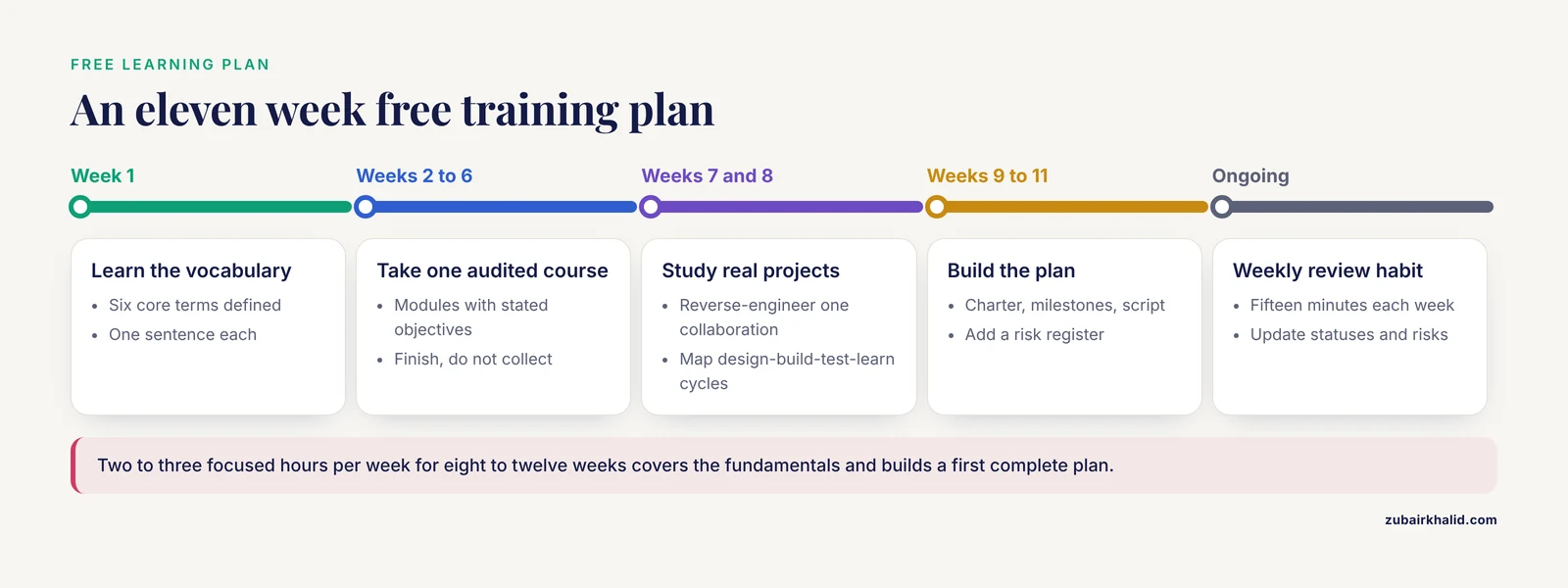
Here is a concrete plan built entirely from no-cost resources, designed to fit around bench or fieldwork. Treat each step as a unit with a definition of done.
Step 1: Learn the vocabulary in one week
Read the standard definitions for these terms before anything else, because every course and tool uses them:
- Work breakdown structure (WBS): a hierarchical list that decomposes a project into smaller deliverables and tasks.
- Milestone: a zero-duration marker of a significant point, such as "instrument qualification complete."
- Gantt chart: a horizontal bar chart showing tasks against a calendar, including dependencies.
- Kanban board: a visual board with columns such as To Do, In Progress, and Done, where each card is a task.
- Risk register: a table listing what could go wrong, its likelihood, its impact, and the planned response.
- Critical path: the sequence of dependent tasks that determines the shortest possible project duration.
Any free introductory article or glossary from a project management body or tool documentation covers these six terms. Once you can define all six in one sentence each, move on.
Step 2: Take one audited course on core methods (weeks 2 to 6)
Search major free and audit-friendly platforms for introductory project management or research-specific project management courses. Filter for courses that show their module list up front. Apply the structure you saw in the MD Anderson pilot as your quality bar: modules with explicit objectives, a realistic total duration, and an asynchronous format you can actually sustain alongside lab work [3]. Commit to finishing. Completion, not collection, is what builds skill.
Step 3: Study one real collaborative project (week 7)
Read the published report of a large collaboration in your field and reverse-engineer its management. The CoMPARA report is a useful case because it states the coordination decisions explicitly: a defined chemical list, a shared training set compiled from a defined panel of in vitro assays, a fixed set of prediction endpoints, and a common deadline for model submission [2]. Write one page answering four questions. What was the single deliverable? What did every participant agree to before starting? How was progress checked? What would have happened if one group dropped out? This exercise converts abstract methodology into concrete planning instinct.
Step 4: Learn the rhythm of iterative science (week 8)
Much of modern laboratory project management follows iterative cycles rather than a single linear plan. A cell-free expression workflow for engineering post-translational modifications, for example, is explicitly organized around rapid design-build-test-learn cycles, where each cycle produces data that reshapes the next round of designs [5]. Map your own project onto this loop. Design equals planning the construct, experiment, or analysis. Build equals preparing reagents, code, or protocols. Test equals running it. Learn equals analyzing results and updating the plan. Scheduling your project as a series of short cycles, each ending in a documented learning, is one of the highest-value habits you can build from free training.
Step 5: Build your first project plan template (weeks 9 and 10)
This is the hands-on centerpiece, covered in full in the walkthrough below.
Step 6: Add risk management (week 11)
Create a risk register for your project. For each risk, write the trigger you would watch for and the response you would take. The value of formal risk planning became visible during the pandemic, when an internationally funded citizen science project had to rethink experiential learning and move engagement online under force majeure conditions, converting planned in-person activities into a free online course, adapted virtual events, and multilingual webinars [4]. Projects that had thought through continuity options in advance lost less time. Your register does not need a pandemic scenario. It needs realistic ones: the freezer fails, the key reagent lot changes, the collaborator goes on leave, the animal protocol renewal slips.
Step 7: Maintain a weekly review habit (ongoing)
Once per week, update task statuses, check upcoming milestones, review the risk register, and send a short written update to your supervisor or team. Fifteen minutes. This single habit delivers more of the benefit of formal training than any certificate.
How to Judge the Quality of a Free Course
Free does not mean good. Before investing hours, appraise the material the way you would appraise a protocol or a guideline. The appraisal literature offers a usable model. A systematic review of training and competence guidelines for basic critical care echocardiography screened 4,288 abstracts, identified 24 eligible guidelines, and rated them with the AGREE-II critical appraisal tool, finding that very few guidelines made clear recommendations on core elements such as introductory course content, curriculum, and assessment of competence [6]. The percentages were low across the board, with only about a quarter of guidelines clearly addressing physics instruction or image acquisition theory. The takeaway generalizes directly: published or free training material often omits the exact elements a learner needs most.
Use a five-point check on any free course or workshop:
- Stated objectives. Can you read what each module will teach before you start?
- Assessment. Does the course check understanding, or only present material?
- Currency. Is there a version date, and is the tooling it teaches still maintained?
- Scope. Does it cover planning, execution, monitoring, and closure, or only buzzwords?
- Provenance. Who produced it, and do they have standing in research training or project management?
Score each item yes or no. Three or more yes ratings is a reasonable threshold for investing your hours.
Step-by-Step Walkthrough: Building a Research Project Plan Template
Now build the artifact that turns training into practice. You will create a research project plan template in plain text, load milestones into a spreadsheet, and script a weekly status check. Everything runs on free tools.
What you need on hand
- A spreadsheet program (Excel, Google Sheets, or LibreOffice Calc)
- A plain text editor (Notepad, TextEdit in plain text mode, VS Code, or similar)
- Your actual project, ideally one with a hard external deadline such as a grant renewal, thesis committee meeting, or manuscript submission
Step 1: Write the project charter as a template file
Create a file named project-plan.md and fill in this structure:
project: Enzyme assay automation pilot
owner: Jane Doe
sponsor: Dr. Smith
start: 2026-11-16
end: 2027-05-14
objective: Validate an automated plate-based enzyme assay
  against the current manual protocol, then hand off to the
  core facility.

deliverables:
  - Validated assay protocol document
  - Comparison dataset (manual vs automated, n >= 30 plates)
  - Handoff training session for core facility staff

milestones:
  - id: M1
    name: Robot installed and qualified
    due: 2026-12-18
  - id: M2
    name: Automated protocol locked (v1.0)
    due: 2027-01-29
  - id: M3
    name: Comparison dataset complete
    due: 2027-03-26
  - id: M4
    name: Handoff complete
    due: 2027-05-14

risks:
  - risk: Reagent lot change shifts assay background
    trigger: New lot arrives
    response: Re-run 3 reference plates on every new lot
  - risk: Robot downtime exceeding 2 weeks
    trigger: Service ticket open > 10 business days
    response: Pause automation arm, continue manual plates
  - risk: Core facility staffing change delays handoff
    trigger: Staff departure announced
    response: Record all training sessions on video

weekly_review: Friday 09:00
status_report_to: Dr. Smith
Every field here has a job. The objective states a measurable end state, not an activity. Deliverables are countable artifacts someone can accept or reject. Milestones are zero-duration events with dates. Risks carry triggers, which convert vague worry into a watchable condition. Save the file. This template is reusable across every future project, which is the point of making it a template rather than a one-off plan.
Step 2: Export milestones to a tracking spreadsheet
Create milestones.csv:
milestone,due_date,owner,status
M1 Robot installed and qualified,2026-12-18,Jane,Not started
M2 Automated protocol locked,2027-01-29,Jane,Not started
M3 Comparison dataset complete,2027-03-26,Jane,Not started
M4 Handoff complete,2027-05-14,Jane,Not started
In your spreadsheet, add a status column formula that flags approaching deadlines. In cell D2 of a sheet where column B holds due dates, enter:
=IF(B2="","",IF(B2-TODAY()>=7,"ON TRACK",IF(B2>=TODAY(),"AT RISK","LATE")))Fill the formula down. The expected behavior: any milestone more than 7 days out shows ON TRACK, any milestone within 7 days shows AT RISK, and any past-due milestone shows LATE. Conditional formatting on the status column, green for ON TRACK and red for LATE, turns this into a one-glance dashboard. The 7-day threshold is a starting point, not a rule. Set it based on how long your real recovery actions take.
Step 3: Automate the weekly status check with a short script
A ten-line Python script replaces manual date arithmetic:
import csv
from datetime import date

today = date.today()
with open("milestones.csv") as f:
    for row in csv.DictReader(f):
        due = date.fromisoformat(row["due_date"])
        days_left = (due - today).days
        if days_left >= 7:
            status = "ON TRACK"
        elif days_left >= 0:
            status = "AT RISK"
        else:
            status = "LATE"
        print(f'{row["milestone"][:30]:<30} {days_left:>4} days  {status}')
Run it and compare against the expected output shape:
M1 Robot installed and qualifi   37 days  ON TRACK
M2 Automated protocol locked     79 days  ON TRACK
M3 Comparison dataset complete  135 days  ON TRACK
M4 Handoff complete             184 days  ON TRACK
If a line shows a negative day count, the milestone has slipped and belongs at the top of your weekly review agenda. Save the script next to the CSV in a version-controlled folder if you use one, so the plan evolves with the project.
Step 4: Worked calculation for schedule pressure
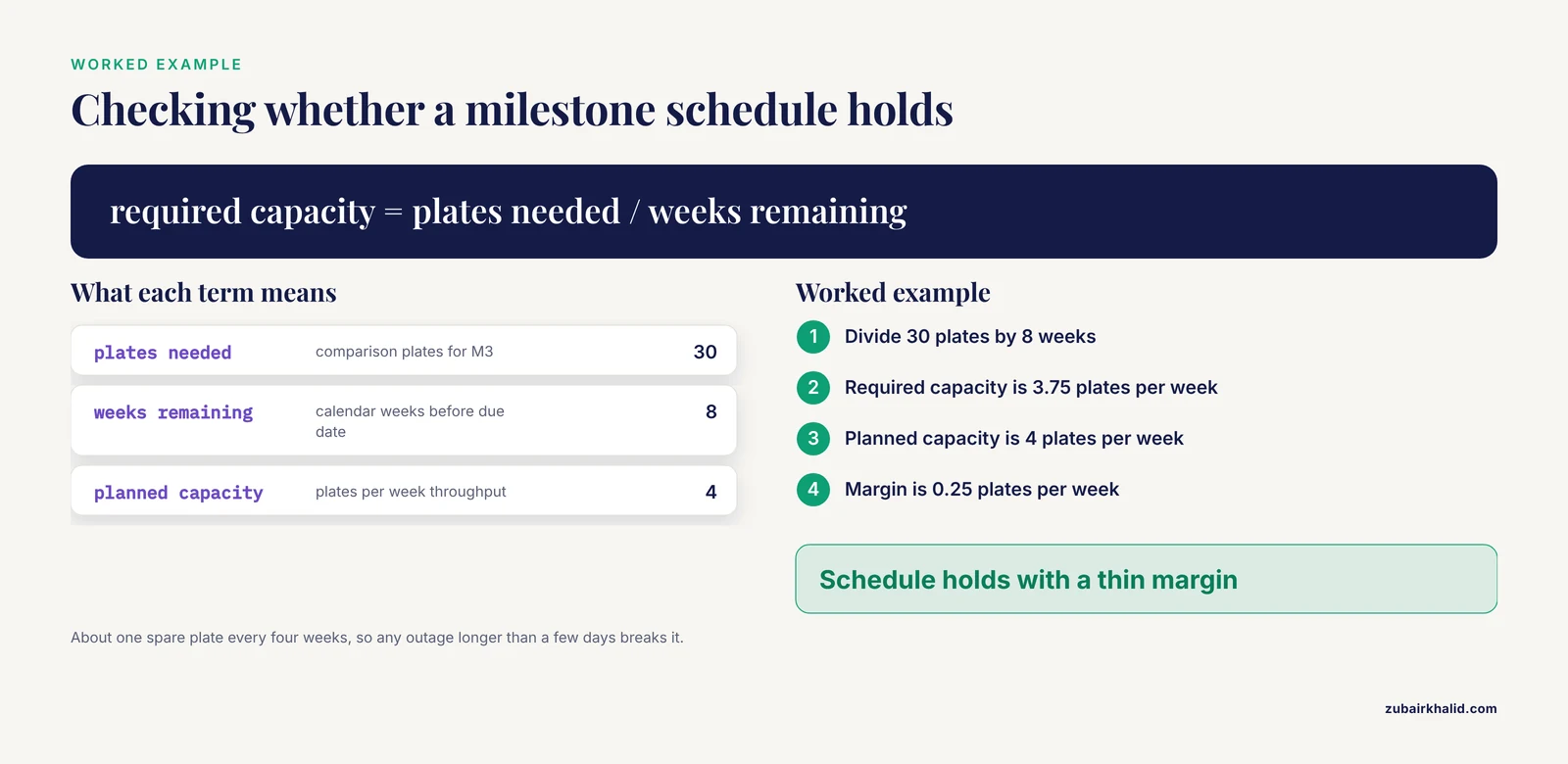
Suppose milestone M3 requires 30 comparison plates, your throughput is 4 plates per week, and 8 calendar weeks remain before the due date. Required capacity is 30 divided by 8, which is 3.75 plates per week. Planned capacity is 4, so the schedule holds with a margin of 0.25 plates per week, about one spare plate every four weeks. That margin is thin. Any instrument outage longer than a few days breaks it, which is exactly why the robot downtime risk sits in your register with a documented response. Run this same arithmetic on every milestone. Numbers you can compute in one line are numbers you can defend at a committee meeting.
Step 5: Verify the plan is sound
Check your plan against four tests before you trust it:
- Every task traces to a deliverable. If a task serves no deliverable, question it.
- Every deliverable has a milestone. If nothing marks its completion, it will drift.
- Every risk has a trigger you can actually observe, not "things go badly."
- The critical path, the longest chain of dependent tasks, has shorter alternate work available where feasible. If M1 slips, what can proceed in parallel?
Core Methods and Tools at a Glance
| Method | What it is | Best for | Free tool options |
|---|---|---|---|
| Work breakdown structure | Hierarchical decomposition of deliverables into tasks | Scoping a grant aim or thesis chapter | Plain text outline, spreadsheet |
| Gantt chart | Calendar bars with dependencies | Projects with fixed deadlines and sequencing | LibreOffice Calc, free online Gantt tools, spreadsheet stacked-bar trick |
| Kanban board | Column-based task board | Ongoing lab operations, small teams | Free tiers of mainstream board tools, Markdown boards in repository hosting |
| Risk register | Table of risks, triggers, responses | Any project with external dependencies | Spreadsheet, same template pattern as the plan file |
| Status report | Short recurring written update | Supervisor communication, multi-lab alignment | Email, shared document, automated script output |
| Iterative cycle plan | Design-build-test-learn loops | Method development, optimization work | Lab notebook sections, one cycle per page or entry |
Tool features and free-tier limits change frequently, so confirm current terms before standardizing a funded project on any specific platform.
Free Project Management Training Tips That Make the Difference
These tips come from what actually separates scientists who benefit from free training from those who do not.
Anchor training to a live project. Watching a lecture on Gantt charts without a real project produces knowledge that evaporates in a month. Building the plan for your actual experiment while the concept is fresh doubles retention and produces a usable artifact.
Budget planning time as experimental time. A useful heuristic in planning literature is that effort spent on planning pays back in reduced rework. Treat your Friday review as a scheduled activity that appears on the same calendar as your bench work.
Write objectives that a stranger could verify. "Improve the assay" fails the test. "Reduce plate-to-plate coefficient of variation below 10 percent on 30 consecutive plates" passes it. Vague objectives are the single most common defect in research project plans.
Steal structure from published collaborations. When you read a multi-group paper, look for the management skeleton underneath the science, the shared training sets, common endpoints, and submission deadlines. Reports from structured consortium projects such as CoMPARA make these decisions unusually visible [2].
Learn in public. Post your template or script to a lab wiki or shared repository. Colleagues will improve it, and teaching the method cements it.
Match training format to your schedule reality. If your bench schedule is unpredictable, asynchronous self-paced material beats fixed weekly seminars. If you learn better with accountability, a cohort-based free MOOC with certificates, of the kind produced as deliverables by funded engagement projects [4], provides external structure at no cost.
Common Mistakes and Limitations
Mistake 1: Planning the science, not the work. A plan that lists experiments but not the surrounding work, ordering with lead times, animal protocol paperwork, statistical consultation, manuscript preparation, will fail at exactly those unlisted steps. Decompose the whole job.
Mistake 2: Treating the plan as a contract instead of a forecast. Research is discovery work. Your initial estimates will be wrong, and the plan's value lies in making the deviation visible early, not in preventing deviation. Revise dates openly rather than quietly absorbing delay.
Mistake 3: Skipping the risk register because risks feel hypothetical. Then a force majeure event or an ordinary equipment failure arrives with no prepared response. Projects that documented continuity measures moved to remote and adapted delivery far more effectively during the pandemic than those that improvised [4].
Mistake 4: Collecting courses instead of completing one. Enrolling in five free courses and finishing none is a common failure pattern. One completed course with a built project plan beats five abandoned ones.
Mistake 5: Confusing tools with methods. A Kanban subscription does not create a work breakdown structure. Learn the method first from free material, then pick the simplest tool that supports it.
Mistake 6: Ignoring course quality. As the AGREE-II appraisal of training guidelines demonstrated, even published professional guidance frequently omits clear recommendations on curriculum and competence assessment [6]. Free web material has no such floor. Apply the five-point check before spending hours.
Mistake 7: Hiding schedule slips. The most damaging move in research project management is staying silent about a slipping milestone until the deadline passes. Early disclosure converts a crisis into a scheduling decision.
Limitations. Free training varies widely in depth, and institutional, funder, and safety requirements shape what a compliant plan must contain at your specific site, so verify local expectations with your research administration office. Platform access policies for no-cost course audits and tool free tiers change over time and should be confirmed before you build dependencies on them. And a plan is only as good as the weekly habit that maintains it.
Frequently Asked Questions
Do I need a certification to manage a research project?
No. Research projects are managed effectively by scientists who apply core methods, and no credential is required to plan your own studies. Certification matters mainly if you want a formal career credential or a professional services role.
How much time should I dedicate to free training each week?
Two to three focused hours per week for about eight to twelve weeks is enough to cover the fundamentals and build your first complete project plan. Consistency across weeks matters more than long single sessions.
What is the difference between a Gantt chart and a Kanban board?
A Gantt chart maps tasks against calendar dates with dependencies, so it suits deadline-driven projects. A Kanban board shows the current state of tasks in columns, so it suits ongoing operational work. Most research projects benefit from both.
Can I use free tools for grant-funded projects?
Yes, in many cases, provided the tool meets your institution's data security and record retention requirements. Check with your research administration office before putting sensitive data on any hosted platform.
What should a research project plan template include?
At minimum, an objective, a list of deliverables, milestones with dates, a work breakdown structure, a risk register with triggers and responses, and a named review cadence with a reporting recipient. The template in this article is a working starting point.
How do I convince my principal investigator that planning time is worthwhile?
Bring a one-page plan for a specific project, including milestones and a risk register, and show the schedule arithmetic for your most deadline-pressured deliverable. A concrete artifact persuades faster than an argument about methodology.
Is free training enough, or do I eventually need a paid program?
Free training fully covers the core skills most scientists need, including scoping, scheduling, risk management, and status reporting. Paid programs become relevant when you want formal credentials, executive-level training, or structured leadership development for a management track.
How do I keep a project plan from becoming stale?
Review it on a fixed weekly cadence, update statuses honestly, and revise dates in the open when reality diverges from the forecast. A plan reviewed weekly stays useful. A plan reviewed twice a year is decoration.
Sources
- Clinician-Investigator Training and the Need to Pilot New Approaches to Recruiting and Retaining This Workforce.
- CoMPARA: Collaborative Modeling Project for Androgen Receptor Activity.
- Enhancing Pathology Knowledge for Biomedical Scientists: Pilot Cohort Study of a Comprehensive Self-Paced Tutorial for Bridging Fundamental Concepts With Translational Applications.
- Force majeure impact on citizen science: Perspective from an EU funded project.
- Characterizing and engineering post-translational modifications with high-throughput cell-free expression.
- Methodologic Quality of Guidelines for Training or Competence Processes for Basic Point-of-Care Echocardiography in Critical Care: A Systematic Review of the Literature.