Lab Notebook Template for Field Research
By Dr. Zubair Khalid, DVM, MS, PhD ·
By the end of this guide you will be able to build a field research lab notebook template, fill it in during a real field day, version it with Git, connect it to a small analysis script, and confirm that someone who was not there can reconstruct exactly what happened. You will need a bound notebook with numbered pages or a laptop, a plain-text editor, and Git. Python 3 with the pandas library is optional and appears in one short example. A handheld GPS receiver or a phone GPS app covers the coordinate fields.
Fieldwork punishes vague records. Cold fingers, glare on a screen, and a schedule that starts before sunrise leave no room to invent a structure on the spot. A template decided in advance turns every entry into a fill-in exercise, which is the difference between a record you can defend and a set of notes only you can read.
Why a Template Matters in Field Research
Research records fail in predictable ways. A recent analysis of research documentation notes that fragmented tools, inconsistent documentation, and poor integration between platforms continue to undermine reproducibility in data-intensive science [1]. Field research adds its own hazards: weather, fatigue, a long hike from the vehicle, and the temptation to capture details later from memory. A template attacks all of these by fixing, before you leave town, the minimum record every entry must contain.
Notebooks are also evidence. The Robert Millikan case of 1913, in which his reported data selection did not match his own notebooks, is still taught in responsible conduct of research training as an example of how a written record and a published claim can drift apart [2]. A complete, contemporaneous record protects you in the opposite direction. It documents priority, explains outliers, and shows that a deviation from protocol was a decision rather than an accident. Training in record keeping is a shared responsibility between advisor and trainee, so agree in advance on who reviews entries and how often [2].
Choosing Your Medium: Paper, Digital, or Hybrid
Paper remains the default at remote sites. A bound notebook with numbered pages, filled in permanent ink, works in rain and cold, needs no battery, and shows obvious signs of tampering. Its weaknesses are search, backup, and sharing.
An electronic lab notebook (ELN) is software that replaces the paper notebook for planning, recording, storing, and sharing research records. ELNs help organization, but many lack cross-platform interoperability, authorship certification, and immutable auditability, meaning a record that cannot be altered after the fact [1]. Open-source options lower the barrier. Chemotion ELN is a free, web-based, open-source ELN that supports planning, description, storage, and management of routine research work, sharing among colleagues, and searching both your own records and external databases [3]. Extensions broaden its reach. LabIMotion extends Chemotion to multidisciplinary research by letting teams define reusable components at three levels, Elements, Segments, and Datasets, and by linking fields to ontologies, which are controlled vocabularies with defined relationships between terms. This keeps data machine-readable and aligned with FAIR principles (findable, accessible, interoperable, reusable) [4].
| Aspect | Paper notebook | Electronic lab notebook |
|---|---|---|
| Field conditions | Works in rain, cold, and gloves, no battery | Needs power and screen visibility |
| Search and backup | Manual transcription required | Instant search, automatic backup |
| Signatures | Hand signature and witness | Audit trails vary by platform |
| Template updates | Print a new version | Push a new version to the team |
| Cost | Low, a bound book and pen | Free open-source options exist, some platforms need a license |
For most field projects the hybrid wins. Write on paper at the site, transcribe into the digital system the same day, and keep both. Transcription doubles as review, because you catch gaps while the day is still fresh. A free field research lab notebook template needs nothing more than the Markdown file in the next section and a printer, and many teams distribute it as a lab notebook template PDF so pages can be printed into weatherproof field books.
The Core Field Research Lab Notebook Template Format
The format below is the backbone of every entry, whether on paper or on screen.
| Field | What to record | Why it matters |
|---|---|---|
| Entry ID | Project code, year, sequence number, for example STRM-2026-014 | The unique key linking notebook pages, data rows, and photos |
| Date and time | ISO 8601 date (2026-06-14) plus local time with UTC offset | Removes month and day ambiguity and daylight saving confusion |
| Personnel | Names with roles, lead and recorder | Assigns actions and provides a witness for sign-off |
| Location | Site code plus GPS coordinates in decimal degrees with the datum named | A datum mismatch can shift plotted positions by tens of meters |
| Conditions | Temperature, precipitation, wind, and weather of the prior day | Explains unusual readings later |
| Protocol reference | Standard operating procedure (SOP) name and version | A deviation means something only against a stated baseline |
| Deviations | What changed, when, and why | Failed and altered attempts are data, not embarrassments |
| Sample log | Sample ID, time, method, container, preservative, measurement | Builds the chain of custody from field to freezer |
| Equipment log | Instrument, serial number, calibration time and standard | Flags which measurements to trust |
| Media log | Photo and sketch filenames with direction faced | Ties images to the entry that explains them |
| Sign-off | Signature, date, time, and witness | Fixes authorship and timing |
Two design rules keep the format usable. First, every field is either filled, marked N/A (not applicable), or marked with a short reason, because a blank cannot be distinguished from an oversight. Second, the template itself carries a version number. When a field stops earning its place, release template v1.1 with a one-line changelog rather than editing the old version out of existence. Teams that share one versioned research template spend far less time reconciling incompatible pages at analysis time.
Building Your Field Research Lab Notebook Template, Step by Step
Step 1: Prepare the paper notebook
Buy a bound notebook, not loose-leaf, because glued or sewn pages show removal. Number every page in the top outer corner if the manufacturer has not. Reserve the first four pages for a table of contents and update it at the end of each field day with the entry ID, date, site, and page numbers. Write the template field list and your abbreviations inside the front cover. Use permanent ink, never pencil, which smears, fades, and invites alteration.
Step 2: Create the digital master template
Open a terminal and make a project folder.
mkdir field-notebooks && cd field-notebooksCreate a file named template.md with the following content. This is the master, and you never type into it directly.
# Field Entry {{ENTRY_ID}}

## Header
- Entry ID:
- Date: (ISO 8601, YYYY-MM-DD)
- Local time: (with UTC offset)
- Observer(s): (name, role)
- Project:
- Site code and name:
- GPS: (decimal degrees, datum, estimated error)
- Weather: (temperature, cloud, wind, precipitation in prior 24 h)
- Protocol: (SOP name and version)

## Plan for the day

## Deviations from protocol

## Observations

## Sample and measurement log
| Sample ID | Time | Method | Species or measurement | Value | Units |

## Equipment and calibration log
| Instrument | Serial | Calibration time | Standard used |

## Photos and sketches
| Filename | Subject | Direction faced |

## End-of-day summary

## Sign-off
Signed: (name, date, time)
Witness: (name, date, time)
Step 3: Put the template under version control
git init
git add template.md
git commit -m "Add field notebook template v1.0"
git tag v1.0
Expected output:
Initialized empty Git repository in /home/arivera/field-notebooks/.git/
[main (root-commit) 8f3a1c2] Add field notebook template v1.0
 1 file changed, 31 insertions(+)
 create mode 100644 template.md
Git records who changed what and when, which is a lightweight audit trail. When the team agrees on a change, bump the version in the commit message and tag it, for example v1.1.
Step 4: Fill an entry in the field and transcribe it the same day
For each field day, copy the master and fill the copy.
mkdir entries
cp template.md entries/STRM-2026-014.md
A filled example entry from a hypothetical stream survey looks like this, abbreviated.
# Field Entry STRM-2026-014

## Header
- Date: 2026-06-14
- Local time: 06:40 (UTC-7)
- Observer(s): A. Rivera (lead), J. Okafor (recorder)
- Project: StreamSalmonid-2026
- Site: MC-03, Miller Creek reach 3
- GPS: 44.93810, -123.02910 (WGS84, decimal degrees, estimated error 5 m)
- Weather: 12 °C, overcast, wind NW 10 km/h, no rain in prior 24 h
- Protocol: SOP-FishCount v2.1

## Deviations from protocol
Primary backpack electrofisher would not start at 07:15. Switched to
backup unit (serial EF-221) after a 10 minute delay. Pass 2 began at 07:26.

## Sample and measurement log
| Sample ID | Time | Method | Species | Count | Length range |
|---|---|---|---|---|---|
| STRM-2026-014-S01 | 07:05 | Electrofishing, pass 1 | Oncorhynchus kisutch | 7 | 62 to 88 mm |
| STRM-2026-014-S02 | 07:31 | Electrofishing, pass 2 | Oncorhynchus kisutch | 5 | 58 to 91 mm |

## End-of-day summary
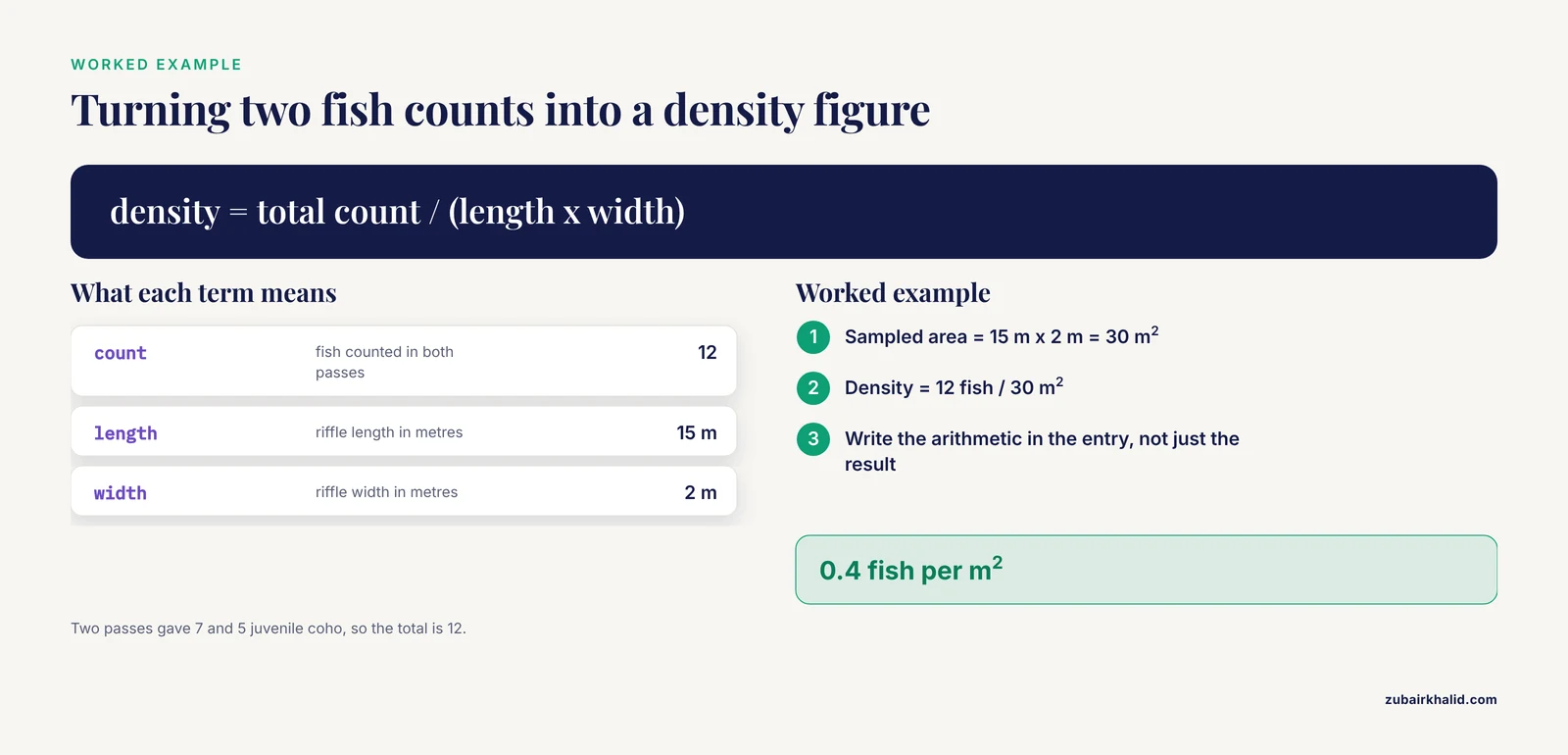
12 juvenile coho in two passes over a 15 × 2 m riffle.
Density = 12 fish ÷ 30 m² = 0.4 fish per m². Water turbid after a
truck crossing upstream, noted for later interpretation.

## Sign-off
Signed: A. Rivera, 2026-06-14 17:05
Witness: J. Okafor, 2026-06-14 17:06
Note the worked calculation in the summary. The riffle is 15 m long and 2 m wide, so the sampled area is 15 × 2 = 30 m². Twelve fish over 30 m² gives 12 ÷ 30 = 0.4 fish per m². Writing the arithmetic in the entry, not just the result, lets a reviewer check it. Save the day with a second commit.
git add entries/
git commit -m "Field entry STRM-2026-014, Miller Creek MC-03"
Step 5: Link the entry to the dataset and analysis
Keep the numbers in a plain CSV file whose sample IDs match the notebook exactly.
sample_id,entry_id,time,method,species,count
STRM-2026-014-S01,STRM-2026-014,07:05,pass1,Oncorhynchus kisutch,7
STRM-2026-014-S02,STRM-2026-014,07:31,pass2,Oncorhynchus kisutch,5
A short script turns the CSV into the density estimate.
import pandas as pd

counts = pd.read_csv("data/counts_2026-06-14.csv")
summary = counts.groupby("species", as_index=False)["count"].sum()
summary["density_fish_per_m2"] = summary["count"] / 30
print(summary)
Expected output:
                species  count  density_fish_per_m2
0  Oncorhynchus kisutch     12                  0.4
Two practices from the research software world make this analysis trustworthy. First, record every analysis step in a structured history so the whole analysis can be replayed from raw data later. OpenStats, a statistics web application connected to the Chemotion ELN through its API, does exactly this, keeping a traceable record that supports automatic replay of the entire analysis [5]. Second, document analysis the way open-source projects do, with runnable notebooks. The PyVisualFields package, for example, ships Jupyter notebooks that demonstrate its capabilities across data presentation, normalization, plotting, scoring, and progression analysis [6]. A Jupyter notebook is a document that mixes prose, code, and output in one file, which makes it a natural digital companion to your field entries.
Step 6: Seal the day with sign-off and an integrity check
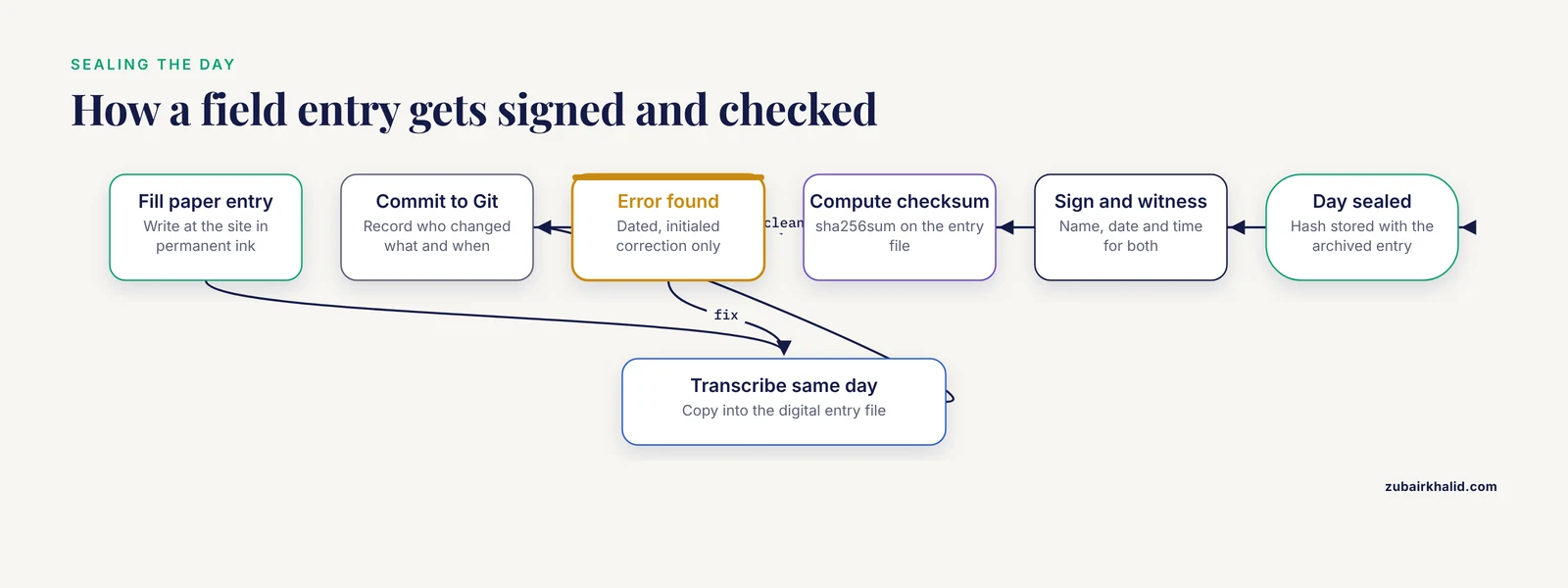
Sign and time every entry, and have a witness countersign where your institution expects it. For digital files, compute a checksum, a fixed-length fingerprint that changes if even one character of the file changes.
sha256sum entries/STRM-2026-014.mdExpected output (your value will differ):
9c1f4a7e2b8d6053a1f4c7e9b2d5a8c1f4e7b0d3a6c9f2e5b8d1a4c7f0e3b6d9 entries/STRM-2026-014.mdStore the hash alongside the archived entry. Dedicated platforms go further. The IntegriLAB framework, for example, certifies research activities with cryptographically signed, immutable records built on a low-energy blockchain design, so authorship and integrity can be verified rather than merely asserted [1]. A signed page plus a stored checksum gets a field project most of the way to the same standard.
Parameters That Matter
- Entry ID scheme. Use PROJECT-YYYY-NNN for entries and append sample suffixes, as in STRM-2026-014-S01. Pad sequence numbers with zeros so lists sort correctly. Never reuse an ID, even after a typo.
- Dates and times. ISO 8601 (YYYY-MM-DD) eliminates the ambiguity of 06/14/2026 versus 14/06/2026. Record local time with its UTC offset so daylight saving shifts cannot corrupt timelines.
- Datum. A datum is the reference model that maps coordinates onto the Earth's surface. WGS84 is the common default for handheld receivers. Write the datum next to every coordinate, because the same numbers under different datums describe different places.
- Units and precision. Record values at the precision the instrument actually reports. Do not round up in the notebook and round again in the spreadsheet.
- Taxonomy. Use scientific names with the genus capitalized and the species lowercase, as in Oncorhynchus kisutch, and add the local common name in parentheses.
- Template version. Print or write the template version on every page so a reviewer knows which field set an entry follows.
Common Errors and Exact Fixes
fatal: not a git repository (or any of the parent directories): .gitappears when you rungit addoutside the project folder. Fix:cdintofield-notebooksfirst, or rungit initif you have not yet.FileNotFoundError: [Errno 2] No such file or directory: 'counts_2026-06-14.csv'means the working directory or the filename is wrong. Fix: runls data/to confirm the exact name, then callpd.read_csv("data/counts_2026-06-14.csv")with the path relative to where the script runs.ValueError: could not convert string to float: '0,4'comes from a decimal comma mixed into a decimal-point dataset. Fix: standardize on decimal points before export, or tell pandas the convention withpd.read_csv(file, decimal=",").- Spreadsheet date mangling. A value typed as
6/14/2026may be stored as a serial number or reformatted, and short codes can be converted into dates without warning. Fix: format columns as text before entry, prefer ISO 8601 everywhere, and keep the master data in plain CSV. - Datum mismatch. Coordinates collected with the receiver set to NAD27 and plotted on a WGS84 basemap land in the wrong place, often by tens of meters. Fix: set the receiver datum to the project standard before the trip and write the datum beside every coordinate.
- Duplicate sample IDs. Two observers number samples independently and collide. Fix: pre-generate ID lists before the trip, assign each observer a range, and keep the ID log in the shared repository.
How to Check the Result
- Cold-reader test. Hand an entry to a labmate who is not on the project and ask them to state what was done, where, when, by whom, and what each sample ID means. If they cannot, the entry failed.
- Cross-check. Every sample ID in the notebook exists in the dataset, and every dataset row traces back to an entry.
- Media check. Every photo filename appears in an entry, and every entry's media log points to real files.
- Replay check. Rerun the analysis from the raw CSV in a fresh folder and confirm you get the same numbers.
- Sign-off check. No unsigned or unwitnessed pages remain at the end of a field day.
Common Mistakes and Limitations
- Backfilling. Write at the moment, in the field, even in bad weather. Memory reconstructs rather than recalls. If conditions truly prevent writing, record a voice memo with the time and transcribe it the same day.
- Recording only successes. Failed runs, broken equipment, and abandoned passes explain outliers and protect your conclusions from later challenge. A record that shows only clean wins invites suspicion.
- Silent blanks. A blank field could mean "not applicable" or "forgotten", and five years later nobody can tell. Use N/A deliberately.
- Undefined shorthand. "Temp ok" means nothing to a reviewer. Define every abbreviation on the inside cover or in the template file.
- Letting the dataset replace the notebook. The spreadsheet holds numbers. The notebook holds decisions, weather, failures, and context, which is what makes the numbers interpretable.
- Editing history. Correct an error with a dated, initialed correction, keeping the original legible. Never erase or overwrite, on paper or in Git.
A template cannot fix a weak sampling design, and it does not replace the permits and approvals your project requires, such as animal care, protected species, or land access authorizations. It also does not replace your institution's records policy. When an entry could carry legal, permitting, or publication consequences, ask your advisor or research office before improvising.
Next Steps
Once several people write entries at once, move the workflow into an ELN so the team shares one live record instead of reconciling copies. Add controlled vocabulary fields so that "turbid", "high flow", and similar terms mean the same thing across observers. Connect your analysis tools so each step is captured and replayable rather than buried in a personal scripts folder. At project closeout, deposit the final notebooks, datasets, and checksums in an institutional repository, and record where each archived item lives. If you distribute the template to a new team, send the versioned file with its changelog so everyone starts on the same page, literally.
Frequently Asked Questions
What is a field research lab notebook template?
It is a pre-formatted page or file with fixed fields, including entry ID, date, location, conditions, methods, sample log, and sign-off, that you fill in during fieldwork so every entry captures the same minimum record.
Where can I get a free field research lab notebook template?
Build one free in any text editor from the Markdown skeleton in this guide and print it, or adopt an open-source ELN such as Chemotion ELN, which is free to use and web based.
Should I use paper or a digital notebook for fieldwork?
Use paper at the site and a digital system for transcription and archiving, because paper survives rain, cold, and dead batteries while digital systems add search, versioning, and backup.
What should the header of every field entry contain?
Entry ID, ISO 8601 date, local time with UTC offset, personnel with roles, site code, GPS coordinates with datum, weather, project name, and the protocol name and version you are following.
How do I number field entries and samples so nothing collides?
Use a scheme like PROJECT-YYYY-NNN for entries and add a suffix for samples, as in STRM-2026-014-S01, keep a running ID log in the shared repository, and never reuse an ID after a typo.
Do I have to record failed attempts and protocol deviations?
Yes. Deviations and failures are data, they explain outliers, and they protect your results if they are questioned later.
Can I export my field notebook template as a PDF?
Yes. Render the Markdown file to PDF with a tool such as pandoc and print it into a weatherproof field book, or export filled electronic entries to PDF for signatures and archiving.
What happens to my field notebook when the project ends or I leave?
Most institutions treat lab notebooks as institutional records, so confirm your university's policy, hand the originals to the principal investigator, and keep personal copies only where policy allows.
Sources
- IntegriLAB: a blockchain-enabled electronic lab notebook for reproducible neuroimaging research.
- The university and the responsible conduct of research: who is responsible for what?
- Chemotion ELN: an Open Source electronic lab notebook for chemists in academia.
- Addressing standardization and semantics in an electronic lab notebook for multidisciplinary use: LabIMotion.
- OpenStats: how to combine statistics and research data management (RDM) to leverage efficient scientific data analysis by guided statistics.
- PyVisualFields: A Python Package for Visual Field Analysis.