ELN Migration for Multi-Site Labs
By Dr. Zubair Khalid, DVM, MS, PhD ·

By the end of this guide you will be able to inventory the contents of a legacy electronic lab notebook (ELN), build a site-by-site migration plan, verify that exported files arrived intact, and run a pilot import into a target platform without losing entry metadata or attachments. An ELN migration is the controlled transfer of notebook entries, attachments, and metadata from one electronic lab notebook system to another. Doing this across several sites adds coordination problems that single-site moves never face, so this guide treats site coordination as a first-class concern rather than an afterthought.
Everything here runs on a standard laptop or a lab server. Have these on hand before you start:
- A full export from your current ELN vendor, requested as raw data (JSON, XML, or a structured archive) plus a human-readable format such as PDF or HTML. Ask the vendor for both formats, not one.
- A sandbox or trial instance of the target ELN. Every major platform offers one.
- Python 3.8 or later with the standard library only, for the inventory and mapping scripts below.
- A spreadsheet program or a plain CSV file for the user-identity map.
- Write access to a shared, backed-up location where the export archive will live during the project.
What an ELN Migration Actually Involves
Three layers of data move during any migration, and each layer needs its own plan.
Entry content is the text, tables, and embedded images inside each notebook entry. This is what people picture when they think of a notebook.
Attachments are the linked files, raw instrument outputs, gel images, sequence files, and spreadsheets that sit outside the entry text. In most labs these dwarf the entry content in total size, often by a factor of ten or more, and they are the layer most frequently corrupted or dropped during a rushed move.
Metadata is the data about the data. Author identities, creation and modification timestamps, entry hierarchy, tags, project and notebook structure, review status, and any electronic signature records. Metadata loss is silent. A 500-entry notebook that arrives with no authors and no timestamps still opens and looks fine, which is why it is the layer you must test for explicitly.
A multi-site lab adds a fourth layer: identity and structure reconciliation. The same scientist may be "j.smith" at one site and "smithj" at another. Two sites may use the same project name for different bodies of work. Resolving these before the import prevents duplicate users and orphaned entries in the target system.
Choosing a Target Platform: Electronic Lab Notebook Comparison
Any credible electronic lab notebook comparison starts with your own requirements rather than vendor feature pages. Score each candidate platform against the criteria below, using evidence from a sandbox you populate with your own pilot data.
| Criterion | What to test in the sandbox | Why it matters for multi-site labs |
|---|---|---|
| Export fidelity on the way in | Import a pilot export and compare entry counts, authors, and timestamps against the manifest | If the import cannot preserve metadata, you will lose it |
| Bulk import tooling | Ask the vendor to run a 100-entry test import and show the report | Manual re-entry does not scale past a few notebooks |
| Attachment handling | Import entries with large binary files and instrument outputs | Attachments are the largest and most failure-prone layer |
| User and group model | Create users at three sites with distinct permissions | Site-level access control prevents cross-site data leaks |
| Search and linking | Search for an entry by experiment ID after import | Discoverability is the main reason labs cite for moving |
| Audit trail and e-signatures | Check whether signatures and review states survive import | Regulated labs need this, others should still want it |
| Structured data and templates | Build a template with controlled-vocabulary fields | Templates make future migrations and analysis easier |
| API and export path out | Confirm a documented API and a full-data export capability | Your next migration will be easier than this one |
That last row deserves emphasis. The best predictor of migration pain is whether the platform you are leaving allows a complete, structured export. Choose your next platform partly on whether it promises the same for whoever comes after you.
Planning the Migration: Inventory and Triage
Never migrate everything. Most legacy ELN instances contain years of inactive projects, duplicated files, and test entries. Migrating dead data inflates cost, lengthens validation, and buries active work under noise.
Build the export manifest
Request an export manifest from the vendor or generate one yourself. A manifest is a CSV listing every entry with its identifier, site, notebook, author, timestamp, and attachment count. If the vendor cannot provide one, the inventory script below produces the counts you need.
Classify every notebook
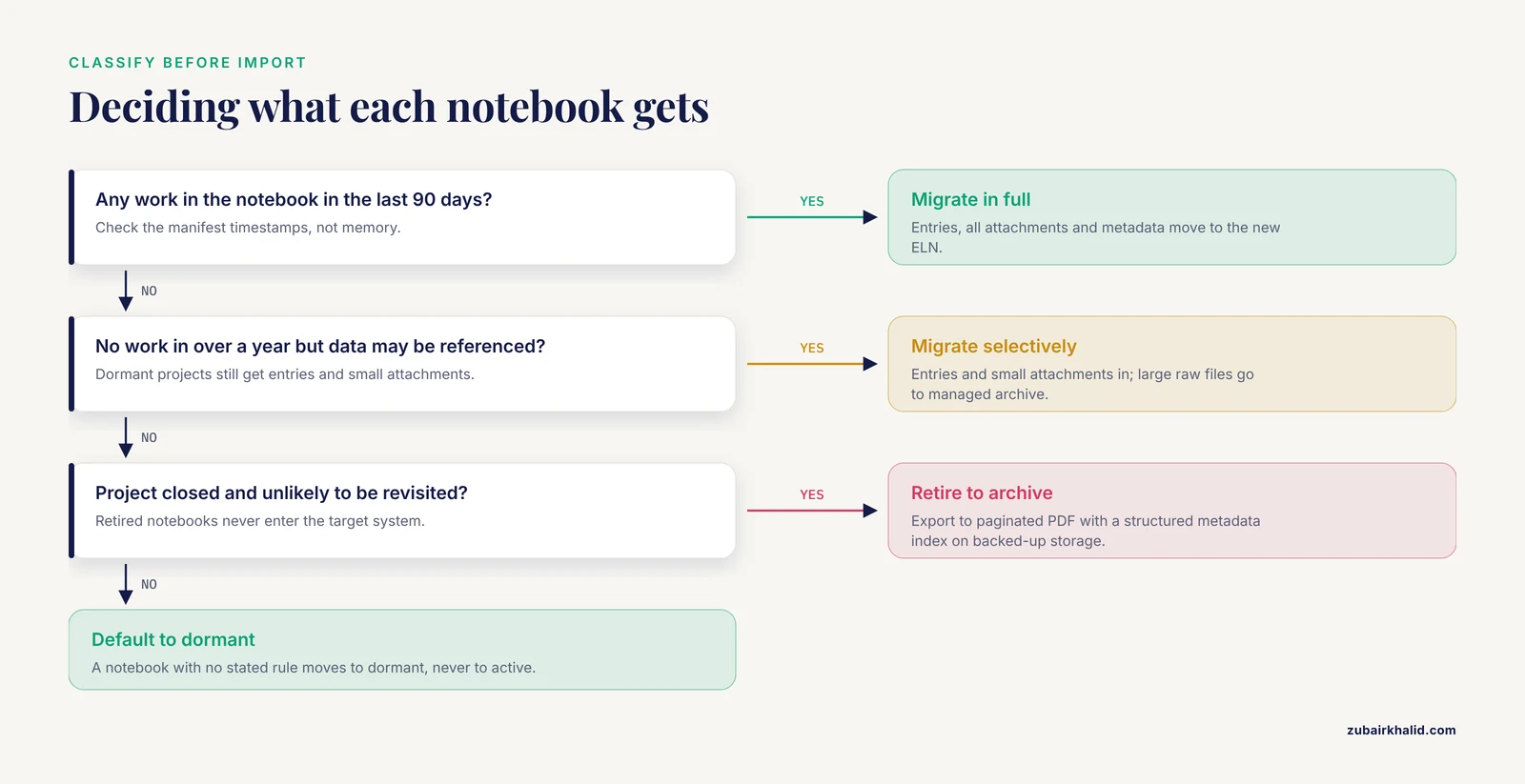
Sort notebooks into three classes before you touch the import tool:
- Active. Projects with work in the last 90 days. These migrate in full, with all attachments and metadata.
- Dormant. No work in over a year but the data may still be referenced. Migrate entries and small attachments. Store large raw files in a managed archive the ELN can link to.
- Retired. Projects closed and unlikely to be revisited. Export to a read-only format such as paginated PDF with a structured metadata index, and keep that export on backed-up storage. Do not import these at all.
Write the classification down as a simple rule set so that all three sites classify consistently. A notebook with no stated rule moves to "dormant" by default, not to "active."
Lab Notebook Templates Before You Migrate
Migration is the cheapest moment to standardize how entries are written, because you are already touching every notebook. Define one lab notebook template per experiment type in the target system before the first import, so migrated and new entries follow the same shape. A workable minimal template looks like this:
Template: Standard Experiment
-----------------------------
Experiment ID:      {AUTO: site_code-project_number-running_number}
Date started:       {DATE}
Objective:          {SHORT TEXT, 1-3 sentences}
Protocol reference: {LINK to controlled protocol document}
Reagents:           {TABLE: name, supplier, catalog-free lot ID, expiry}
Instruments:        {LIST with model and last calibration date}
Method notes:       {RICH TEXT}
Raw data files:     {ATTACHMENTS}
Observations:       {RICH TEXT}
Result summary:     {RICH TEXT}
Reviewed by:        {E-SIGNATURE, date, comment}
Two rules make this template migration-proof. First, the experiment ID encodes the site code, so entries remain traceable to their origin after they land in a shared system. Second, every field maps to a column in your export manifest, which means the import tool can place values without guesswork.
Keep templates short. A template with thirty mandatory fields guarantees that scientists paste everything into a free-text box, and free-text boxes defeat both searching and future migration.
ELN Migration for Multi-Site Labs: Step by Step
This is the core eln migration multi-site lab step by step sequence. Run every step against a pilot notebook from each site before touching the full archive.
Step 1. Freeze and export the source system
Pick a cutover date per site. Announce a write-freeze window, typically a few days for a mid-size site, during which users cannot create or edit entries in the old system. Then request the full export. If the vendor exports in a structured format, keep that as the master copy. Keep the human-readable format as the fallback for reading during and after the move.
Step 2. Inventory the export
Count what you actually received. From the directory holding the export, run:
find ./legacy_export -type f | wc -lExpected output:
18437Then summarize by site if the directory structure or a manifest CSV carries the site name. Save the following script as inventory.py:
import csv

with open("export_manifest.csv", newline="") as f:
    rows = list(csv.DictReader(f))

sites = {}
for row in rows:
    site = row["site"]
    sites.setdefault(site, {"entries": 0, "attachments": 0})
    sites[site]["entries"] += 1
    sites[site]["attachments"] += int(row.get("attachment_count", 0))

for site, stats in sorted(sites.items()):
    print(f"{site}: {stats['entries']} entries, "
          f"{stats['attachments']} attachments")
Run it and compare the totals against the vendor's stated counts:
python3 inventory.pyExpected output:
boston: 6120 entries, 14890 attachments
houston: 3844 entries, 9102 attachments
seattle: 2471 entries, 6355 attachments
If your totals differ from the vendor's, stop and reconcile before importing. A shortfall at this stage is a missing file in the export, not a bug you can fix later.
Step 3. Record checksums
A checksum is a short fingerprint computed from a file's bytes. If the fingerprint matches after transfer, the file is byte-for-byte identical. Generate a manifest with SHA-256, a standard hash algorithm present on every modern operating system:
find ./legacy_export -type f -exec sha256sum {} + > checksums.txtThe manifest has one line per file:
a3f5c0e91b7d4f2e8c6a0d3b5e7f9c1a2b4d6e8f0a2c4e6b8d0f2a4c6e8b0d2  ./legacy_export/boston/entry_001238.json
7b2e9d4c1f8a6e3b0d5c7f9a2e4b6d8c0f2a4b6d8e0c2a4b6d8f0e2c4a6b8d0  ./legacy_export/boston/entry_001238_att01.pdf
Step 4. Transfer and verify
Copy the export to the target environment's storage or the vendor's secure upload location. Then recompute and compare:
sha256sum -c checksums.txt | grep -v ": OK" | wc -lExpected output:
0Zero mismatches means every file transferred intact. Any line ending in FAILED names a file to re-transfer. Never skip this step because the transfer "completed." Large binary attachments are exactly the files that silently truncate.
Step 5. Build the identity map
Create a CSV that maps every legacy user to a target-system account:
legacy_username,legacy_site,target_username,target_role
j.smith,boston,[email protected],member
smithj,houston,[email protected],member
m.okafor,boston,[email protected],reviewer
svc_instrument,boston,[email protected],automation
Note the two legacy usernames that resolve to one target account. Reconciling these before import is what prevents the target system from showing two authors where one person exists. Decide the rule for every conflict in writing. A common one is that the account at the user's primary site wins.
Step 6. Run the pilot import
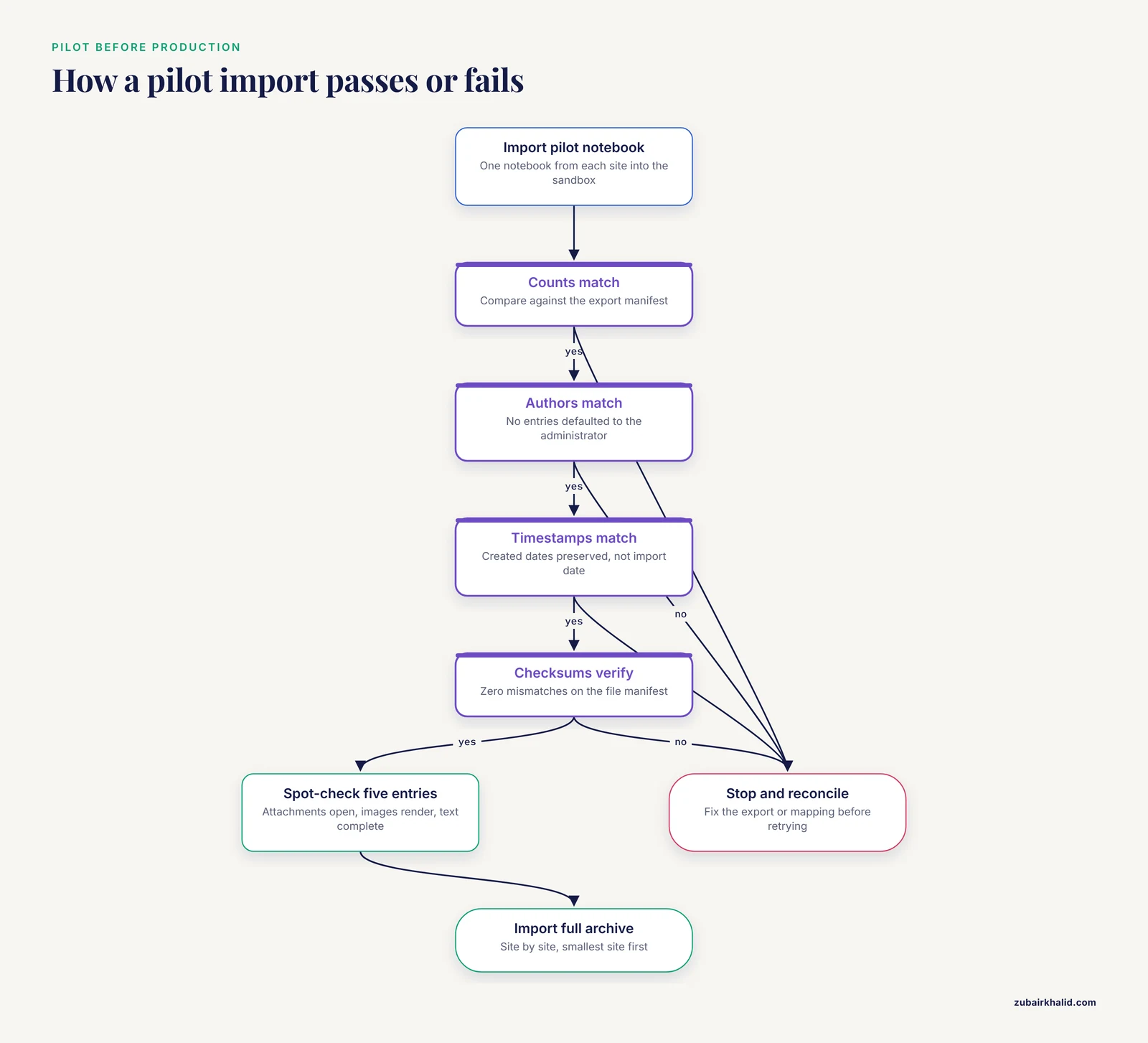
Import one notebook from each site into the sandbox. Then verify the three layers explicitly:
# verify_pilot.py
import csv

imported = {}
with open("sandbox_import_report.csv", newline="") as f:
    for row in csv.DictReader(f):
        imported[row["legacy_id"]] = row

with open("export_manifest.csv", newline="") as f:
    source = {r["entry_id"]: r for r in csv.DictReader(f)}

missing = set(source) - set(imported)
author_wrong = [k for k in source
                if k in imported
                and imported[k]["author"] != source[k]["author"]]
time_wrong = [k for k in source
              if k in imported
              and imported[k]["created"] != source[k]["created"]]

print(f"entries missing:  {len(missing)}")
print(f"author mismatch:  {len(author_wrong)}")
print(f"timestamp change: {len(time_wrong)}")
Expected output for a clean pilot:
entries missing:  0
author mismatch:  0
timestamp change: 0
Also spot-check five entries by hand. Open each in the target system, confirm the attachments open, the images render, and the text is complete. Automated counts cannot detect a truncated attachment that still registers as present.
Step 7. Cut over, then parallel run
Import the full archive site by site, starting with the smallest site so you learn the failure modes cheaply. After each site's import, run the verification script against the full manifest. Give users a defined parallel-run period, commonly two to four weeks, during which the legacy system is read-only and the new system is the only place to write. Set an explicit end date for the parallel period and, at the end, move the legacy export to long-term archive storage.
ELN Migration Multi-Site Lab Tips
These are the eln migration multi-site lab tips that most change outcomes in practice:
- Name one migration owner per site. A single coordinating committee without a named site owner produces decisions that arrive differently at each site.
- Migrate the smallest site first. Its problems are the same problems the large sites will have, at a tenth of the cost.
- Keep the export in two formats at all times until the project is signed off. The structured format feeds the import. The readable format is what you open when someone asks about an entry next year.
- Freeze before you export, never during. Exporting a live system produces an inconsistent snapshot where an entry cites data that moved after the export started.
- Budget attachment volume separately from entry count. A notebook with 2,000 entries and instrument raw files can be a larger transfer than one with 20,000 text entries.
- Train per site, not per person. Sites develop local conventions. Training that respects those conventions gets adopted. Generic training gets ignored.
- Document the mapping rules for users, notebooks, and projects in one file, versioned with the project. The next person who touches this system will need it.
Common Mistakes and Limitations
These are the eln migration multi-site lab common mistakes that recur across organizations, stated as the error and the fix.
- Migrating everything by default. Dead projects slow validation, inflate licensing costs tied to storage or entry counts, and bury active data in search results. Fix: apply the active, dormant, retired classification before import.
- Accepting a PDF-only export. Paginated documents preserve reading order but lose entry structure, tags, tables as data, and often authors. Fix: request the structured export as the master copy and treat PDF as a convenience copy.
- Skipping the sandbox. Running the first import directly into production couples your worst errors to your largest dataset. Fix: no import before a verified pilot from every site.
- Ignoring timestamps and authorship. Systems that default imported entries to the importing administrator, with the import date, destroy the provenance that makes a notebook defensible. Fix: make author and timestamp fidelity a pass or fail criterion in the pilot report.
- No rollback plan. If a site's import fails halfway, the team needs a documented way back to the read-only legacy system. Fix: keep the legacy export and the checksum manifest on backed-up storage until final sign-off.
- One identity map for all sites. Username collisions across sites are normal. Fix: build the map per site, then merge and resolve conflicts explicitly.
- Leaving template design until after import. Importing into a system with no templates produces a year of free-text entries that are hard to search and harder to migrate next time. Fix: build and test templates first.
- Assuming regulatory features transfer automatically. Electronic signature records, audit trails, and system validation expectations for regulated work do not carry themselves across platforms. If your lab operates under a quality system, plan the validation of the target system as part of the project, with the vendor's documentation as the starting point.
- Treating the move as an IT project. The people who use the notebook daily decide whether the migration succeeds. Fix: a scientist from each site on the pilot review, not just the administrators.
One limitation belongs in the open. Migration tooling differs substantially between vendors, and no guide, this one included, can promise exact menu names, import report formats, or vendor procedures. Use the steps here as the plan, and adapt the verification checks to whatever import report your target platform produces.
Frequently Asked Questions
How long should an ELN migration for a multi-site lab take?
Plan in months, not weeks, for anything beyond a single small site. The timeline is driven by the export and validation work, not the transfer itself, which usually completes in hours. A three-site lab with a pilot, phased imports, and a parallel-run period typically measures the project in one to two quarters. Ask each vendor for their documented timeline based on your entry and attachment counts rather than accepting a single generic figure.
Should we migrate everything or only active projects?
Migrate active projects in full, migrate dormant projects selectively, and retire closed projects to a read-only archive rather than the new system. Migrating everything inflates storage and licensing costs, lengthens validation, and degrades search quality. Classify every notebook with a written rule set so all sites classify the same way.
How do we keep electronic signatures and audit trails intact during migration?
Preserve them by demanding the structured export and testing signature and audit-trail fidelity in the pilot import, with pass or fail criteria. Historical audit trails rarely migrate intact because the two systems model events differently, so plan to keep the legacy export as the authoritative record for historical events and have the target system carry the record forward from cutover. If your lab operates under a formal quality system, involve your quality unit before the pilot, not after.
What is the best export format to request from our current vendor?
Request the vendor's structured, machine-readable format, such as JSON, XML, or a documented archive, as the master copy, plus a human-readable format such as paginated PDF or HTML as a convenience copy. The structured format carries entry hierarchy, authors, timestamps, and attachment links. The readable format is what people can open without the old or new software.
Do we need a lab notebook template in the new ELN before importing?
Yes. Build the templates first so that migrated entries and new entries share one structure from day one. Design each template so its fields map to columns in your export manifest, which lets the import tool place values without guesswork and makes the next migration straightforward.
How do we handle attachments and raw instrument files?
Transfer them with checksum verification, which is the only reliable way to detect silent truncation of large binary files. For dormant projects, store very large raw files in managed archive storage and link to them from the ELN rather than importing them into entry bodies. Spot-check a sample by opening files after import, because a present file can still be a broken one.
Can different sites run different ELNs during the transition?
Yes, and a phased cutover is usually the lowest-risk approach, with each site moving on its own schedule under one shared plan. The costs are that cross-site search only covers migrated sites and that users at unmigrated sites need read access to the legacy system. Define those access rules before the first site moves.
How do we verify that migrated data is complete?
Verify with three checks against the export manifest: entry counts, author mapping, and timestamps, using a script that reports zero mismatches. Add checksum verification for file integrity and a manual spot-check of several entries per site. Completeness is a property you demonstrate with evidence, not one you infer from a finished import log.