ELN Integration with Lab Instruments
By Dr. Zubair Khalid, DVM, MS, PhD ·

By the end of this article you will be able to connect an electronic lab notebook (ELN) to your laboratory instruments so that raw data files flow into experiment records automatically, with metadata attached and a verifiable trail from raw file to final result. You will learn the four main integration patterns, run a worked example that turns an instrument export into a structured ELN entry using Python, and learn how to check that the result is correct.
Before you start, have the following on hand:
- An ELN account that supports file attachments or an application programming interface (API). Most modern ELNs do.
- An instrument or instrument software that can export files. CSV (comma-separated values) export is the most common format.
- Python 3 installed on a lab computer, with the pandas library available. You can install pandas with
pip install pandas. - A sample raw data file exported from your instrument, for example a plate reader or spectrometer output.
What ELN Integration Actually Means
An electronic lab notebook is a digital replacement for the paper notebook. Researchers use it to plan experiments, record procedures, store images and spreadsheets, and share records with colleagues under controlled permissions, often with an audit trail and electronic signature built in [1]. ELNs have been replacing paper notebooks in industry, academic, and hospital laboratories for more than a decade, and the benefits are well documented [2].
Integration is the step beyond digitization. A standalone ELN still requires a person to manually export a file from the instrument software, rename it, upload it, and type in the run conditions. Integration means the instrument data reaches the ELN record with less human handling. Reviewers of the ELN field have found that the benefits of an ELN increase substantially when it is connected to other laboratory informatics tools, including laboratory information management systems (LIMS), chromatography data systems (CDS), analytical instrumentation, and scientific data management systems [2].
The same review also delivered an honest warning: there is no single well-established path for effective integration of these tools [2]. That is why this article teaches patterns rather than one fixed recipe. Your instrument, ELN, and regulatory context determine which pattern fits.
Four Integration Patterns
Most successful integrations in real laboratories fall into one of four categories. Understanding them helps you pick the right one before writing any code.
| Pattern | What it captures | Typical effort | Best fit |
|---|---|---|---|
| Manual file import | Raw exports attached to an ELN entry | Minutes per run | Small labs starting out |
| Scheduled file watch | Files pulled from a shared folder into the ELN automatically | A script and a shared drive | Multi-user instruments |
| API push | Parsed results and metadata sent directly to the ELN record | Programming skill | High-throughput or regulated work |
| Shared data standard | Instrument data written in a community format both systems read | Standards adoption plus tooling | Cross-lab collaboration |
The first pattern, manual import, is where every lab should start. The translational science laboratory at New York University School of Medicine showed that even a general-purpose tool like Evernote could effectively replace paper notebooks in an academic setting when the lab committed to recording routine experimental information in it, using imported snapshots to cover the inability to freehand [3]. Attachment of instrument exports works the same way. It is low tech, but it establishes the habit of centralizing data.
The third and fourth patterns are where modern platforms shine. openBIS, an ELN and LIMS developed at ETH Zurich and deployed at the Swiss research institution Empa, was adapted to integrate the laboratory data workflow for chemical analysis and spectroscopy instruments. The published case studies describe a data pipeline and a dashboard for data collection, visualization, and interaction, aligned with the FAIR data principles (findable, accessible, interoperable, reusable) [4]. The Neurodata Without Borders (NWB) standard takes the fourth approach for neurophysiology: it unifies diverse data modalities in one format, and when combined with a database interface such as DataJoint inside Jupyter-based electronic lab journals, it streamlines collaboration, retrospective analysis, and data integrity [5].
ELN Integration with Lab Instruments Step by Step
This walkthrough uses the most common real-world situation: an instrument that writes a CSV file, and an ELN that accepts file uploads or API calls. The example is a 96-well plate reader export, but the same sequence applies to chromatography peak tables, spectrometer scans, or qPCR threshold cycles.
Step 1: Inventory What Your Instrument Produces
Open the instrument software and export one real dataset. Note three things:
- The file format and extension. Common exports are
.csv,.txt, or.xlsx. - Where the actual data table starts. Many instrument exports begin with several header lines containing run date, operator, and instrument serial number before the tabular data.
- Whether the file is UTF-8 encoded or uses a legacy encoding. Older Windows-based instrument software often writes files in Windows code page 1252, which matters later.
Keep this original file untouched. It is your raw data and your reference for verification.
Step 2: Inspect and Parse the File
Create a working folder, place the export there, and read it with pandas. Suppose the file is named plate_run_2026-11-10.csv and the data table starts on line 8 after the instrument header.
import pandas as pd

raw = pd.read_csv(
    "plate_run_2026-11-10.csv",
    skiprows=7,
    encoding="cp1252",
    sep=","
)
print(raw.head())
print(raw.shape)
Expected output for a 96-well absorbance read:
   Well   A450
0   A1  0.412
1   A2  0.398
2   A3  1.204
3   A4  0.377
4   A5  0.405
(96, 2)
If the shape is not what you expect, for example fewer than 96 rows, the skiprows value is wrong. Adjust it and rerun until the head of the table shows real well identifiers and values.
Step 3: Compute the Summary You Actually Record
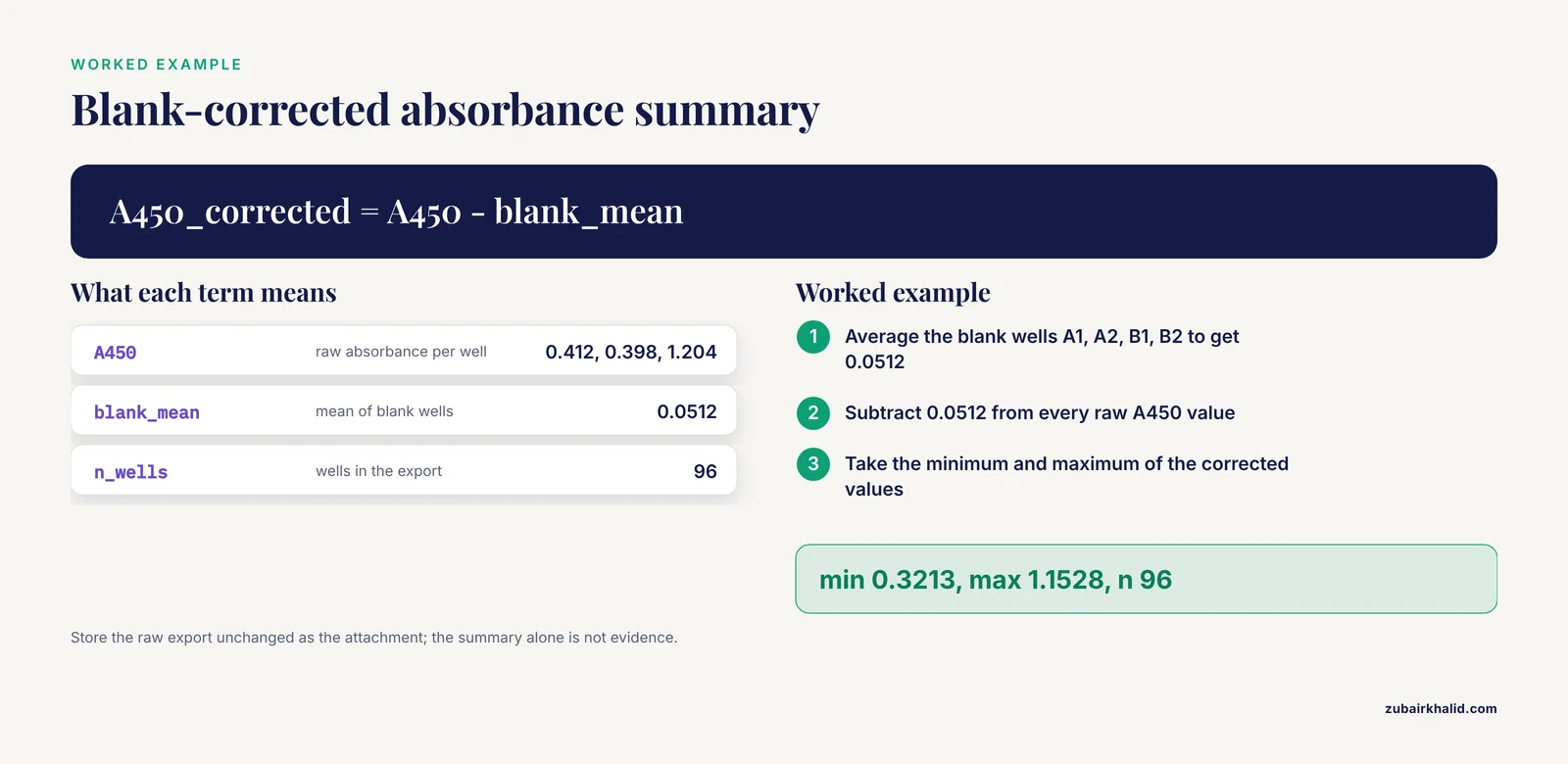
A 96-value raw table is rarely what goes into the notebook narrative. Compute the derived values your experiment depends on. Here is a blank-corrected summary for an ELISA-style read where column 1 of rows A and H holds blanks:
blanks = raw.loc[raw["Well"].isin(["A1", "A2", "B1", "B2"]), "A450"]
blank_mean = blanks.mean()

raw["A450_corrected"] = raw["A450"] - blank_mean
summary = {
    "blank_mean": round(blank_mean, 4),
    "n_wells": int(raw.shape),
    "min_corrected": round(raw["A450_corrected"].min(), 4),
    "max_corrected": round(raw["A450_corrected"].max(), 4),
}
print(summary)
Expected output:
{'blank_mean': 0.0512, 'n_wells': 96, 'min_corrected': 0.3213, 'max_corrected': 1.1528}These derived numbers go into the ELN as text or structured fields. The raw file itself goes in as an attachment. Never record only the summary. The raw export is the evidence base for the summary.
Step 4: Attach Metadata at the Same Time
Data without context cannot be reused. The nanosafety field confronted this directly: researchers analyzing engineered nanomaterials found that existing description standards were incomplete, so they built a minimum information table organized into six modules, beginning with general information and material information, to specify what must accompany experimental results [6]. You can borrow the same modular logic for any instrument run.
At minimum, capture and store alongside the file:
- Instrument name and serial number
- Date and time of the run, with time zone
- Operator identity
- Method or protocol version
- Sample identifiers mapped to well or vial positions
- Units for every measured quantity
Store this as a small structured file next to the raw export:
metadata = {
    "instrument": "PlateReader-01",
    "run_datetime_utc": "2026-11-10T14:32:00Z",
    "operator": "jk",
    "method_version": "ELISA-A450-v3",
    "units": {"A450": "absorbance"},
}
pd.Series(metadata).to_csv("plate_run_2026-11-10_metadata.csv")
Step 5: Push to the ELN
Two options exist here.
Option A, manual upload: attach plate_run_2026-11-10.csv, the metadata file, and paste the summary dictionary into the experiment entry. This is fully adequate for most academic labs.
Option B, API push: if your ELN exposes a documented REST API, you can create or update the entry programmatically. The exact endpoint and authentication scheme differ between products, so consult your ELN's own documentation. The general shape of the call looks like this:
import requests

eln_url = "https://your-eln.example.org/api/v1/experiments/4821/attachments"
headers = {"Authorization": "Bearer YOUR_TOKEN_HERE"}

files = {
    "file": open("plate_run_2026-11-10.csv", "rb"),
    "metadata": open("plate_run_2026-11-10_metadata.csv", "rb"),
}
response = files, data={"summary": str(summary)})
print(response.status_code)
Expected output on success:
201A status code of 201 means the resource was created. Anything in the 400 range means the request was malformed or unauthorized.
Step 6: Verify and Close the Loop
Verification is what separates a working integration from a fragile one.
- Re-read the raw file and recompute the blank mean. It must match the summary stored in the ELN exactly.
- Confirm the attachment opens from inside the ELN, not just from your local folder.
- Confirm the timestamp in the ELN entry matches the timestamp inside the raw export.
For laboratories working under regulated bioanalysis conditions, these checks carry additional weight. The Global CRO Council has specifically discussed electronic laboratory notebooks and data integrity at its closed forums, reflecting the regulatory expectation that computerized records demonstrate who did what, when, and that original data remain intact [7]. An audit trail, which quality ELNs provide as a core feature [1], is the mechanism that satisfies this expectation.
ELN Integration with Lab Instruments Tips
These practical points come from the recurring themes in the published literature on ELN deployments.
- Start with the file, not the API. Manual import costs minutes and teaches you what metadata you actually need. Automate only after the manual workflow is stable.
- Write metadata at capture time, not later. The minimum information table approach from nanosafety research shows that deciding required fields in advance, through an iterative and expert-reviewed process, produces far more reusable data than reconstructing context afterward [6].
- Adopt community data standards where they exist. NWB succeeded in neurophysiology because it gave diverse instrument modalities one format, and pairing it with a database turned static files into queryable records [5]. Check whether your field has an equivalent standard before inventing your own.
- Align with FAIR principles. The openBIS deployment shows that a data platform chosen specifically to be FAIR compliant can support data pipelines and dashboards that measurably improve efficiency for laboratory personnel [4].
- Preserve raw files exactly as exported. Parse into copies. Never edit the original export.
Common Errors and Their Exact Fixes
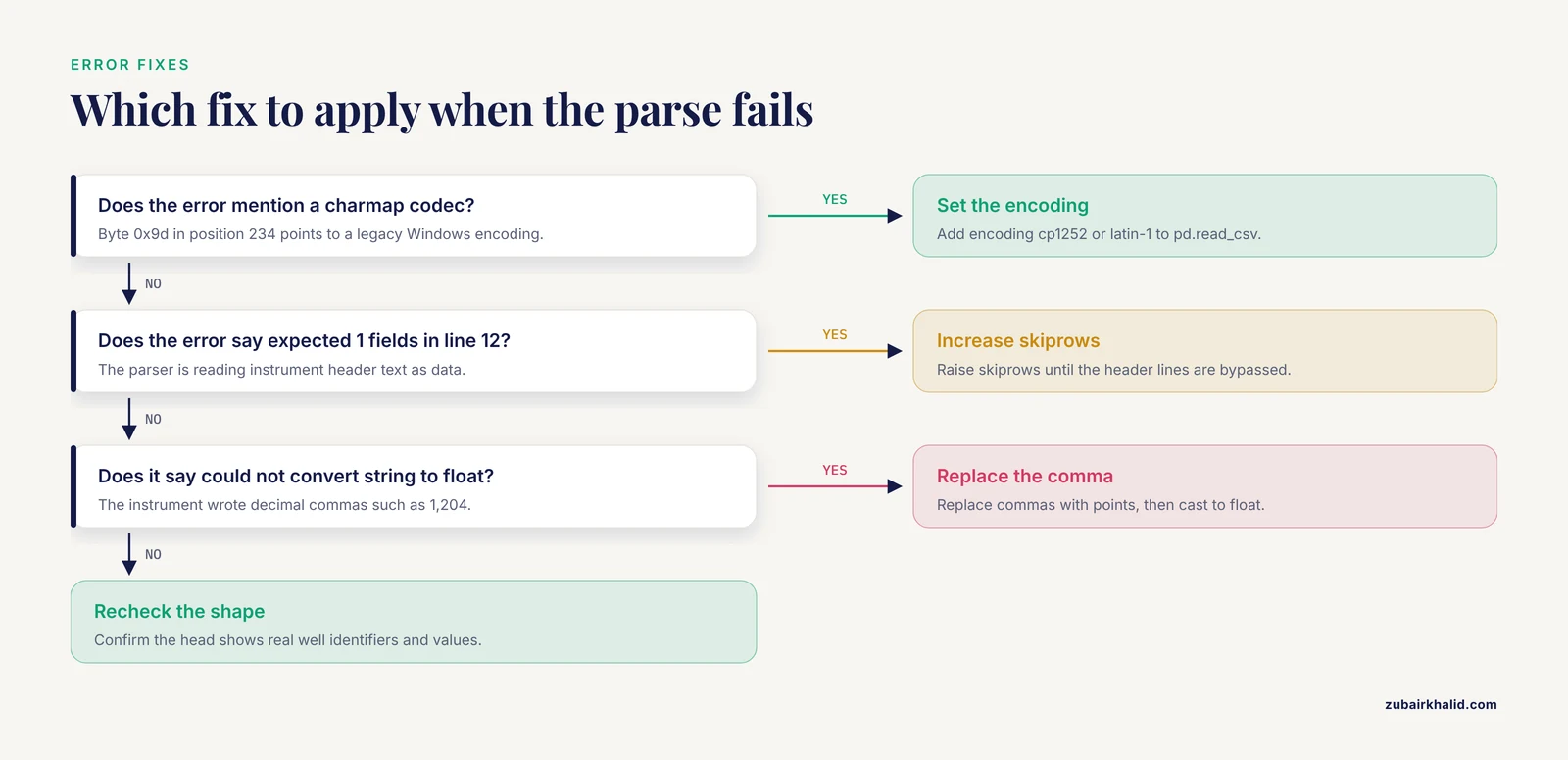
UnicodeDecodeError: 'charmap' codec can't decode byte 0x9d in position 234. The file uses a legacy Windows encoding. Fix by adding encoding="cp1252" or encoding="latin-1" to pd.read_csv.
pandas.errors.ParserError: Error tokenizing data. C error: Expected 1 fields in line 12, saw 5. The parser is reading instrument header text as a data row. Fix by increasing skiprows until the header lines are bypassed, or by passing header=None and slicing manually.
ValueError: could not convert string to float: '1,204'. The instrument writes decimal commas instead of decimal points. Fix with raw["A450"] = raw["A450"].str.replace(",", ".").astype(float). Confirm the locale convention before doing this, because in some locales the comma is a thousands separator.
HTTP 401 Unauthorized from the ELN API. The bearer token is missing, expired, or scoped to the wrong project. Generate a fresh token in your ELN account settings and confirm the token has write permission on the target experiment.
Attachment uploads but the summary does not match the file. Someone edited the parsed copy after the summary was computed. Recompute from the untouched raw export and overwrite the stored summary.
Choosing Your Software: A Research Software Comparison
The best software for researchers depends on discipline, scale, and budget. The published record supports a few clear qualitative distinctions.
General-purpose notebooks versus dedicated ELNs. Evernote was shown to work as an ELN in an academic translational lab, and its users found the advantages of electronic recording outweighed the inability to freehand, which they worked around with snapshots and drawing add-ons [3]. General tools are cheap and familiar, but they lack permissions systems, audit trails, and electronic signatures. Purpose-built ELNs such as eCAT were designed from the start with those compliance features, permission-controlled sharing, and search as core capabilities [1].
Discipline-specific open source ELNs. Chemotion ELN is an open source, web-based notebook built for chemical researchers. It handles molecular structures, supports planning and storage of routine organic chemistry work, and searches both the user's own data and external sources such as SciFinder and PubChem [8]. For a chemistry lab, a tool that understands a molecule as a first-class object is a genuine advantage over a generic notes tool.
Combined ELN and LIMS platforms. openBIS functions as both an ELN and a LIMS, which removes the boundary between recording experiments and managing samples and instrument runs [4]. For analytical labs with many instruments, this combined model reduces the number of systems that must talk to each other.
The data-standard layer. Whatever ELN you choose, adopting a recognized data standard for instrument outputs, as NWB does for neurophysiology, future-proofs the integration because analysis tools built around the standard will read your data regardless of which notebook produced it [5].
Why Structured Capture Pays Off Later
Well-structured ELN data is not only a record. It is an asset. The Chemformer retrosynthesis model was trained on approximately 18 million reactions drawn from literature, patents, and electronic lab notebooks, and it achieved top-10 round-trip accuracy above 0.97 for most drug discovery reaction classes, finding routes to commercial starting materials for 95 percent of target compounds, an improvement of more than 20 percent over a template-based comparison model [9]. That training set existed only because laboratories captured reaction data in structured, machine-readable form. Labs that record structured instrument data today are building the datasets that their future analyses, and possibly future machine learning models, will depend on.
Common Mistakes and Limitations
Treating the ELN as a passive archive. The most frequent failure mode is uploading files without structure or metadata. A folder of unsorted CSVs in an ELN is barely better than the same folder on a desktop. The integration benefit comes from linking data to experimental context [2].
Underestimating the disruption of adoption. Moving a paper-based lab to electronic records is disruptive, and reviewers of ELN implementation have documented this repeatedly [2]. Plan for a transition period in which paper and electronic records coexist, with a defined cutoff date.
Ignoring the freehand problem. Electronic and paper notebook users alike report the inability to write directly by hand as a limitation of electronic methods [3]. Sketching mechanisms or annotating printouts remains valuable. Solve it deliberately, with a tablet, photographed sketches, or drawing add-ons, rather than hoping it goes away.
Assuming one integration path fits all. There is no well-established universal path for connecting ELNs, LIMS, and instruments [2]. What worked for an analytical chemistry platform like openBIS [4] may not transfer to a neuroscience rig or a chemistry synthesis lab.
Letting data integrity slip in regulated work. If your results feed regulatory submissions, the ELN must preserve attribution and original data, expectations that bioanalysis industry forums have treated as central to ELN deployment [7].
Losing precision in the parse. Rounding, wrong decimal handling, or mis-assigned well positions corrupt downstream conclusions silently. Always verify by recomputation, as in Step 6.
Finally, a note on scope. Integration choices and data handling practices described here are general patterns from the published literature. Individual laboratories, particularly those under regulatory oversight, need their own validated procedures reviewed by their quality and compliance teams.
Frequently Asked Questions
What does ELN integration with lab instruments mean?
It means connecting your electronic lab notebook so instrument outputs, such as plate reader exports or chromatography results, flow into experiment records with their metadata, rather than being transcribed by hand. Integration with analytical instrumentation is specifically identified as a way to increase the benefits of an ELN [2].
Do I need programming skills to integrate an instrument with an ELN?
No for the basic level, yes for automation. Attaching exported files to ELN entries requires no coding. Scheduled collection and API pushes require scripting, typically in Python.
What is the difference between an ELN and a LIMS?
An ELN records the experimental narrative, protocols, and observations. A LIMS manages samples, workflows, and inventory. Some platforms, such as openBIS, combine both functions in a single system [4].
Can I integrate old instruments that have no network connection?
Yes, through the file-based pattern. Export the run data to a USB drive or shared folder and import it into the ELN. You lose real-time automation but keep the structured record.
How do I keep integrated data trustworthy for regulatory work?
Use an ELN with audit trails and electronic signatures, preserve raw files unmodified, and verify derived values by recomputation. Data integrity in ELN-based bioanalysis workflows is an active topic in regulated industry forums [7].
Which ELN is best for an academic lab?
It depends on discipline and budget. Lightweight general tools can suffice for small academic groups [3], chemistry labs benefit from structure-aware open source options like Chemotion [8], and instrument-heavy labs may prefer combined ELN-LIMS platforms [4]. There is no single best choice for all researchers.
What file format should I ask my instrument software to export?
CSV is the safest default because it is plain text, readable by every analysis tool and ELN, and stable over time. Avoid proprietary binary formats when a plain-text export exists.
How does structured ELN data help future research?
Structured records make data reusable for meta-analysis, collaboration, and machine learning. Reaction data captured in electronic lab notebooks contributed to training a retrosynthesis model that outperformed a template-based approach on multistep route planning [9], and standard-based integration with databases enables retrospective queries across historical experiments [5].
Sources
- eCAT: Online electronic lab notebook for scientific research.
- Electronic laboratory notebooks progress and challenges in implementation.
- Using Evernote as an electronic lab notebook in a translational science laboratory.
- The openBIS Digital Platform for Instrumentation and Data Workflow in the Analytical Laboratory.
- Core principles for the implementation of the neurodata without borders data standard.
- Digital research data: from analysis of existing standards to a scientific foundation for a modular metadata schema in nanosafety.
- The 10th GCC Closed Forum: rejected data, GCP in bioanalysis, extract stability, BAV, processed batch acceptance, matrix stability, critical reagents, ELN and data integrity and counteracting fraud.
- Chemotion ELN: an Open Source electronic lab notebook for chemists in academia.
- Do Chemformers Dream of Organic Matter? Evaluating a Transformer Model for Multistep Retrosynthesis.