Key ELN Features for Academic Research: A Step-by-Step Guide
By Dr. Zubair Khalid, DVM, MS, PhD ·

By the end of this guide you will be able to name the electronic laboratory notebook (ELN) features that actually matter in an academic lab, run a structured trial of two candidate systems, roll out the winner with sensible permissions and naming rules, and export your records so nothing is trapped inside a product you no longer use. An ELN, or electronic laboratory notebook, is software that replaces the bound paper notebook as the record of what you did, when you did it, and what the results were. Nothing in this guide requires special software to read, but you will get the most out of the walkthrough if you have a spreadsheet program for scoring candidate tools and a text editor for drafting notebook templates.
Why Academic Labs Need Different ELN Features
Most ELN development and purchasing has happened in biopharmaceutical companies, and academic and government laboratories have trailed far behind in adoption [1]. That matters because academic research has needs that a corporate deployment does not: students rotate through on semester timescales, projects cross institutional boundaries, protocols change constantly, and the budget for software is a fraction of what industry spends [2][3].
A paper notebook survives this environment through sheer flexibility. A user can configure a paper notebook to store almost anything that can be written or pasted onto a page, which is why it has remained essentially unchanged since pre-modern science [4][3]. The price of that flexibility is poor retrieval, laborious sharing, and a single physical object that, if misplaced, takes every entry in the volume with it [3]. An ELN inverts the trade. It gives you searchable indexes, automatic archiving, easy duplication, and functions paper never had, such as inventory control, but it asks you to accept structure at the moment of data entry [3].
Surveys of biomedical researchers and technicians confirm that the appetite exists. When researchers were asked which hypothetical features they hoped to see in an ELN and which they considered less important, the answers mapped directly onto a practical feature list, and people who had recently switched from paper reported positive acceptance and satisfaction [4]. The remainder of this guide turns that list into a decision procedure.
The Core Feature Checklist
Before comparing products, separate the features every academic lab should demand from the features only some labs need. The table below summarizes the checklist you will score during the trial in the walkthrough.
| Feature | Why it matters in academia | What to verify during a trial |
|---|---|---|
| , - | , - | , - |
| Free text plus structure | Academic experiments vary daily, yet data must stay retrievable for mining and exchange [5] | Can you mix prose, tables, and structured fields in one entry? |
| Full text search | Search is one of the headline advantages of electronic over paper records [6][3] | Search for a reagent name used three weeks ago. Does it surface the right entry? |
| Permissions and controlled sharing | Labs share results with collaborators and rotate students [6][2] | Can you grant a student write access to one project and read access to another? |
| Audit trail and electronic signature | Signature and audit capabilities are baseline ELN capabilities, and data integrity is a standing concern even outside regulated industry [6][7] | Does every edit leave a dated, attributed record? |
| Data upload of any file type | Biologists compile diverse collections of data such as images and spreadsheets [6] | Drag in a 50 MB microscopy stack and a .csv. Does it store and preview both? |
| Templates for routine work | Routine experimental work benefits from planning, description, storage, and management tools [8] | Can you save a protocol as a reusable template with fillable fields? |
| Domain-aware data handling | Chemists need molecular structure support and searching of external sources such as SciFinder and PubChem [8] | Does the tool understand your data type, or treat a structure as a flat image? |
| Export and open formats | Reuse depends on structured, harmonized, digitized records [9] | Can you export an entry with all attachments and metadata in one operation? |
| Integration path | Benefits grow when the ELN connects to LIMS, chromatography systems, instruments, and scientific data management systems, though no well-established integration path exists yet [10] | Does the product expose an API or documented export format? |
| Low training burden | OneNote scored 39 of 42 evaluated parameters in a head-to-head academic comparison and was preferred by surveyed scientists and students [11] | Could a new rotation student record an experiment after ten minutes of instruction? |
Two features deserve special emphasis because academic evaluations keep highlighting them. First, the inability to freehand into an electronic notebook is the limitation that paper users and electronic users alike report, so sketching support matters. In a six-month translational science study, imported snapshots and drawing add-ons were enough to remove the objection entirely, and the advantages of the electronic method outweighed the freehand deficit [1]. Second, tablet-based devices improve the ELN experience. In a survey attached to a formal ELN implementation at a biomedical research institute, 80 percent of the scientists surveyed reported that tablet-based devices improved ELN use in different respects [11].
ELN Features for Academic Research: A Step-by-Step Walkthrough
This walkthrough assumes a principal investigator or senior PhD student deciding for a lab of five to twenty people. Each step produces an artifact you can show to the rest of the lab.
Step 1. Inventory what your lab actually records
List the record types your lab produces in a normal month. A typical molecular biology lab might produce protocol steps, reagent lot numbers, raw image files, flow cytometry exports, gel photographs, and meeting notes. The point of this step is that a product which handles prose beautifully but cannot hold your instrument output will fail in week two. Researchers who contributed to the design of a researcher-centric open source ELN used it for recording experiments, preserving collected data, and project coordination, including meeting minutes, in fields as varied as analytical chemistry, X-ray studies, drug discovery, and biomaterials [6][2].
Write your list as a simple text file so you can paste it into vendor conversations.
record-types.txt
- daily experiment entries (prose + tables + photos)
- protocol templates (PCR, western blot, [cell passaging](/knowledge/molecular-biology/cell-passaging))
- raw data files (.czi, .fcs, .csv, .ab1)
- reagent and antibody lot tracking
- group meeting minutes
- collaborator-shared project notes
Step 2. Build a weighted scoring sheet
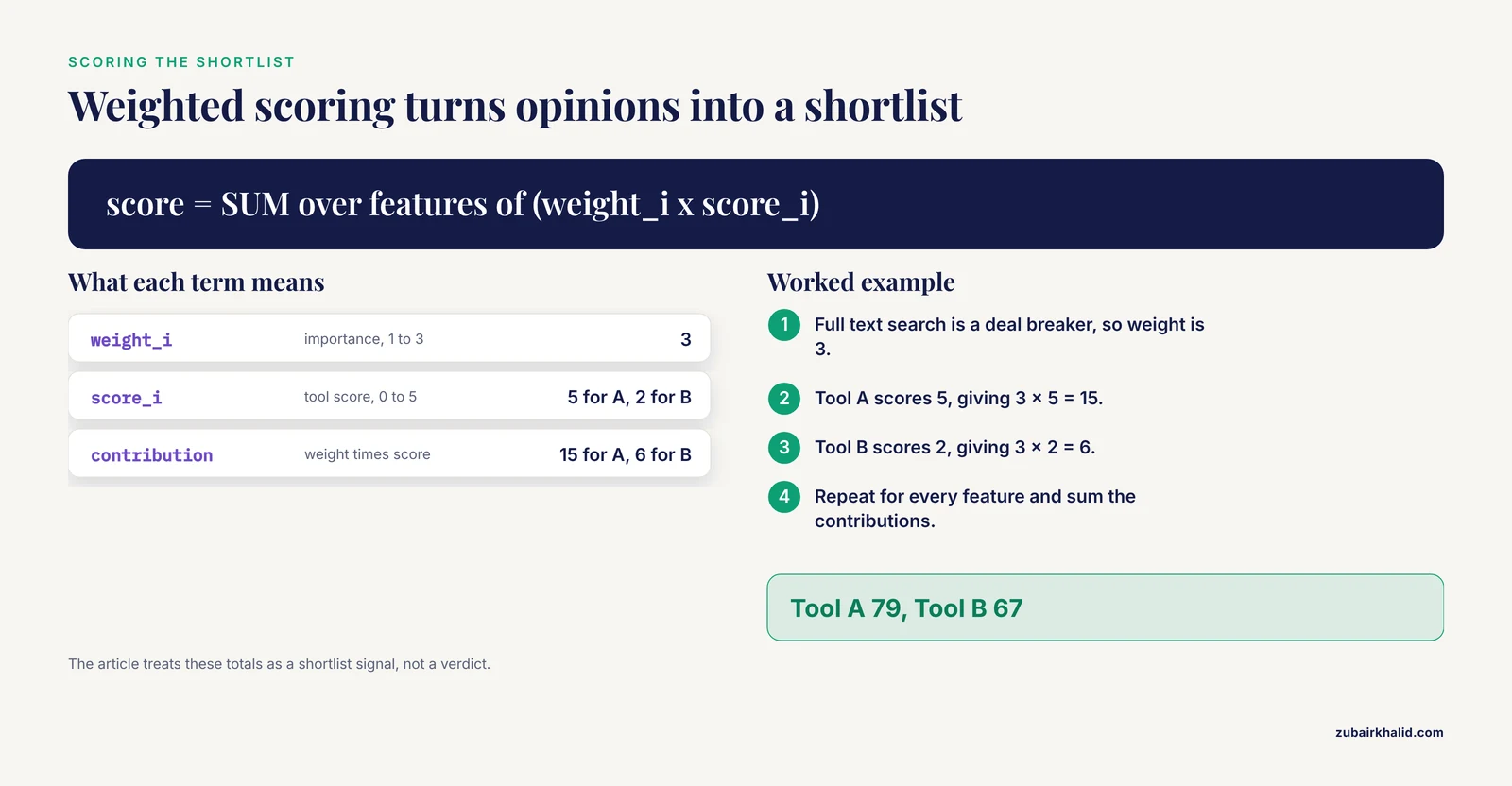
A head-to-head technical comparison is the backbone of any sound research software comparison. One academic institute compared six ELNs across 42 parameters before selecting two products for hands-on testing [11]. You do not need 42 parameters, but you do need the scoring to be explicit, or the loudest voice in the room will decide.
Create a spreadsheet with your features in rows, candidate tools in columns, and weights from 1 (nice to have) to 3 (deal breaker). Score each tool from 0 to 5 per feature, then compute a weighted total.
score = SUM over features of (weight_i x score_i)

Example row:
Feature: full text search
Weight: 3
Tool A score: 5   contribution = 3 x 5 = 15
Tool B score: 2   contribution = 3 x 2 = 6
# weighted_eln_score.py
features = [
# (feature, weight, toolA_score, toolB_score)
("search", 3, 5, 2),
("permissions", 3, 4, 4),
("templates", 2, 3, 5),
("file_upload", 3, 4, 4),
("molecule_support", 2, 0, 5),
("export", 3, 2, 4),
("tablet_app", 2, 5, 3),
("audit_trail", 2, 1, 4),
]
totals = [0, 0]
for name, w, a, b in features:
totals += w * a
totals[10] += w * b
print("Tool A weighted total:", totals) # expected output: 79
print("Tool B weighted total:", totals[10]) # expected output: 67Expected output:
Tool A weighted total: 79
Tool B weighted total: 67
Interpret the numbers as a shortlist signal, never as a verdict. The 42-parameter academic comparison that surfaced a clear spreadsheet winner still sent two products forward to a three-month trial with 28 scientists and 80 students, because paper scores cannot capture daily usability [11].
Step 3. Run a fixed-length pilot with real experiments
Recruit two to four people who write the most notebook entries and give both shortlisted tools the same four-week window. Assign each tester the same three tasks: record one routine experiment from scratch, find a reagent lot number recorded two weeks earlier, and share a completed entry with a collaborator outside the lab.
Time each task. Retrieval speed is where ELNs beat paper by design, since searchable indexing and automatic archiving are among the core advantages electronic notebooks add over paper [3]. If a tester cannot find a two-week-old entry in under a minute, the search implementation is failing even if the feature exists on the feature sheet.
Collect a one-page survey at the end with three questions: what slowed you down, what did you want to do but could not, and would you keep using this tool without being asked. The academic studies that informed this guide all ended with survey-based comparisons for exactly this reason [1][4][11].
Step 4. Define the notebook structure and naming rules
Before the first real entry, agree on the skeleton. Most ELNs organize content as notebooks or workspaces, then sections, then timestamped entries. Pick a lab-wide scheme and write it down. A workable pattern is project, then experiment identifier, then date, using ISO format so entries sort chronologically.
Naming pattern:
<PROJECT>_<EXPT-ID>_<YYYY-MM-DD>_<SHORT-TITLE>

Examples:
TUMOROID_014_2026-11-11_dose-response
PLASMID-QC_007_2026-11-12_miniprep-verify
Define the metadata that every entry must carry. Interdisciplinary projects show why this matters. In nanosafety research, an iterative process merged existing standards into a minimum information table specifying the necessary minimum information to be provided along with experimental results, organized into modules such as general information and material information [9]. Your lab needs its own equivalent, even if it fits in five lines.
# entry-template.yaml
experiment_id: TUMOROID_014_2026-11-11
operator: J. Rivera
project: TUMOROID
objective: >
  Test dose response of compound X on organoid viability.
reagents:
  - name: Compound X
    lot: AB-4417
    concentration: "10 mM in DMSO"
instrument: Incucyte S3
raw_data_links: []
controls: [vehicle, untreated]
status: planned   # one of: planned | in-progress | complete | abandoned
A domain can go further. Neurophysiology labs can adopt the Neurodata Without Borders standard, which unifies diverse modalities of neurophysiology data in a single format, and combine it with a database interface inside Jupyter notebooks to build what its authors call an electronic lab journal [12]. The general principle transfers to any field. Decide your data standard early, because retrofitting structure onto a year of free-form entries is painful.
Step 5. Record the first experiment end to end
Now perform the walkthrough entry every new user should complete. The worked example below shows a complete experiment record written the way a well-structured ELN entry should look.
# TUMOROID_014_2026-11-11_dose-response

**Operator:** J. Rivera
**Objective:** Dose response of Compound X on organoid viability.

## Protocol (from template PCR-free viability assay v3)
1. Seed 96-well plate, 8,000 cells per well.
2. Treat with Compound X at 0, 0.1, 1, 10 uM, n = 4 wells per dose.
3. Image at 0 h and 48 h on Incucyte S3, 4 fields per well.

## Observations
- 10 uM wells show rounding and detachment at 48 h.
- Vehicle control unchanged.

## Data
- Raw images: 2026-11-13/incucyte_run3/ (linked, not copied)
- Analysis: viability_analysis.R, output CSV attached below.

## Next step
Repeat 10 uM arm with n = 8 to confirm.
Two habits make entries citable later. First, link to raw files rather than duplicating them when the ELN supports it, because a 50 MB image stack pasted into every entry bloats the notebook. Second, close every entry with a status line so that searches for incomplete work are trivial.
Step 6. Configure permissions, sharing, and the audit trail
Set the access model before the lab fills the notebook with data, because changing permissions after six months of entries invites mistakes. The baseline capabilities established early in ELN design were a permissions system, controlled sharing, an audit trail, and electronic signature [6]. For an academic lab a sensible default is that every lab member can read everything, can write only within their own projects, and that the principal investigator holds administrative rights.
Check the audit trail by making an edit and then viewing the history. You should see who changed what and when. This matters beyond good practice. Discussions among industry and contract research organization decision makers treat ELNs and data integrity as a linked topic, and the same integrity expectations increasingly reach academic collaborations that feed translational programs [7].
For cross-institutional work, confirm external sharing early. University researchers need ELNs that promote cross-institutional collaborative working, enable the sharing of procedures and results, and facilitate publication [2]. Test whether a collaborator at another university can read a shared entry without creating an account on your system, and note the friction if they cannot.
Step 7. Test export before you commit
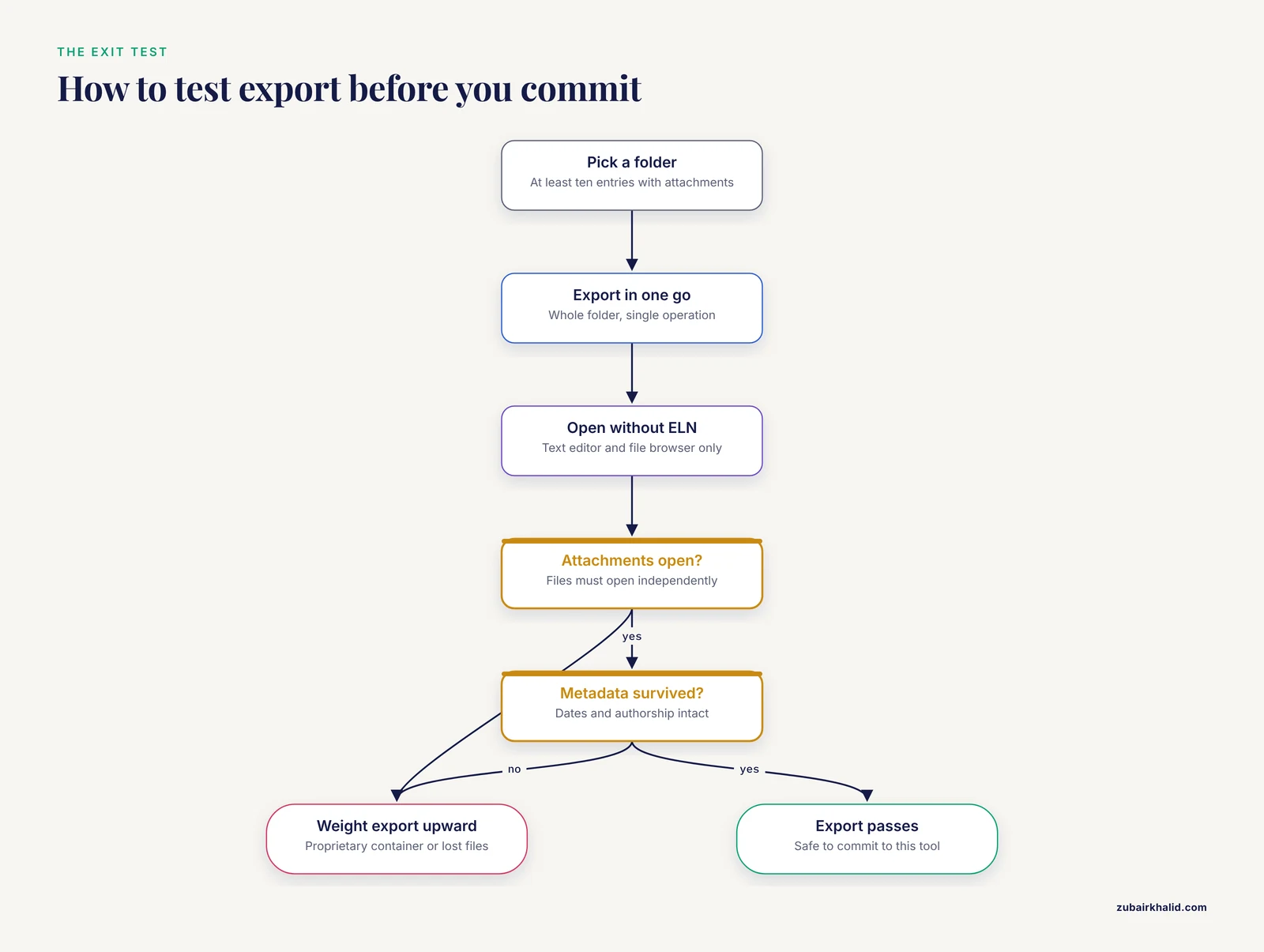
The single most neglected test in ELN selection is the exit. Benefits grow when an ELN is integrated with laboratory information management systems, chromatography data systems, analytical instrumentation, and scientific data management systems, but because no well-established integration path exists, the practical guarantee you control is your ability to get structured data out [10].
Run this export check on each candidate:
- Select a project folder containing at least ten entries with attachments.
- Export the whole folder in one operation.
- Open the export with nothing but a text editor and a file browser.
- Confirm the attachment files open independently of the ELN.
- Confirm the metadata, dates, and authorship survived.
A scripted check makes this repeatable:
# verify_export.py
import json, pathlib

manifest = pathlib.Path("export/manifest.json")
data = json.loads(manifest.read_text())

entries = data.get("entries", [])
missing = [e["id"] for e in entries if not pathlib.Path(e["file"]).exists()]
print(f"entries in manifest: {len(entries)}")
print(f"missing attachment files: {len(missing)}")

# Expected output on a healthy export:
# entries in manifest: 14
# missing attachment files: 0
If the export produces proprietary binary containers or drops attachments, weight the export feature upward in your scoring sheet regardless of how the tool performed elsewhere. Open source systems exist precisely to remove this risk. The Chemotion ELN, for example, is a web-based open source application built for chemists that supports planning, description, storage, and management of routine work and lets researchers build their own databases of digital information [8]. The LabTrove ELN is another open source, researcher-centric example that was tailored across heterogeneous academic laboratories [2].
Practical Tips for ELN Features in Academic Research
These tips come from patterns that recur across academic implementations.
Match the tool to the discipline. A chemistry lab that must search molecules and reactions, including in external sources such as SciFinder and PubChem, has requirements a general-purpose notes app will never meet [8]. A requirements analysis that produced a platform-independent ELN specifically for academic chemical researchers found that intuitive design and productivity features were what motivated researchers and students to record data electronically at all [5].
Never assume a general notes app fails. The comparison at the biomedical research institute found that OneNote presented almost all 42 evaluated parameters, 39 of them, and both surveyed groups preferred it [11]. Similarly, a translational lab used Evernote as its complete ELN for six months and concluded it effectively replaced paper notebooks, working around the freehand limitation with snapshots and drawing add-ons [1]. The lesson for any research software comparison is that fit to your workflow beats pedigree.
Plan for tablet use. Because 80 percent of surveyed scientists reported that tablet-based devices improved ELN use, put a tablet in the pilot rather than treating it as an accessory [11].
Protect the freehand pathway. The inability to freehand is the one limitation reported by both paper and electronic users, so confirm sketching or annotated image support in the trial [1].
Think about downstream reuse. Structured records compound in value. A transformer model for retrosynthesis was trained on roughly 18 million reactions drawn from literature, patents, and electronic lab notebooks, and achieved synthetic routes leading to commercial starting materials for 95 percent of target compounds [13]. Entries that capture reactions, conditions, and outcomes in structured fields are the raw material for that kind of reuse, and structured storage with data retrieval and mining benefits is a documented advantage of ELNs over paper [5].
Support open formats and standards. Where a community standard exists, adopt it. The minimum information table approach from nanosafety shows how modular metadata keeps complex, interdisciplinary data reusable for researchers, manufacturers, and regulators [9].
Common Mistakes and Limitations
Choosing on the feature sheet instead of the trial. A tool can satisfy 39 of 42 parameters on paper and still be the wrong daily instrument for your lab, which is why the strongest academic implementation study paired its technical comparison with three months of hands-on testing [11]. Score, then pilot.
Skipping the export test until it is too late. Labs that discover mid-project that the export is a proprietary container or loses attachments face an unappealing choice between lock-in and manual transcription. Run the export check in Step 7 during the trial, not after migration.
No naming convention. Without a shared pattern like the one in Step 4, search degrades into guessing. Full text search is a core ELN advantage only when entries are findable, which depends on consistent identifiers [6][3].
Treating the audit trail as optional. Records edited without attribution undermine collaboration and can disqualify data from downstream use. Audit trail and electronic signature are baseline ELN capabilities, and data integrity around ELNs is an active topic even in regulated bioanalysis settings [6][7].
Mandating a tool without training. Academic ELN adoption lags for structural reasons, including the sheer variety and frequency of protocol changes and the need for users to control notebook configuration [3][4]. A tool imposed from above with no onboarding produces quiet reversion to paper.
Ignoring integration reality. Integration with LIMS, chromatography data systems, instruments, and scientific data management systems multiplies ELN benefits, but no well-established path for effective integration exists, so budget time for manual bridging or scripting [10].
Assuming digital means backed up. Automatic archiving protects against loss only if the archive itself is verified. Include a restore test in your quarterly lab maintenance, the same way you would test a freezer alarm.
A final limitation applies to any guide of this kind. Software vendors change products quickly, and individual labs have individual constraints, so verify current vendor capabilities during your own trial rather than relying on any published comparison.
Frequently Asked Questions
What is an ELN and how does it differ from a paper notebook?
An ELN is software that records experiments, data, and observations electronically instead of in a bound paper book. Unlike paper, it adds searchable indexing, controlled sharing, automatic archiving, and easy duplication, while paper keeps unmatched flexibility for freeform layout [3].
Which ELN features matter most in academic research?
Search, permissions with controlled sharing, audit trail, electronic signature, arbitrary file upload, templates, and clean export form the core set [6]. Academic researchers additionally value cross-institutional collaboration support and low training burden [2][11].
Are free general-purpose tools like OneNote or Evernote acceptable ELNs?
Yes, for many labs. OneNote scored 39 of 42 parameters in an academic comparison and was preferred by surveyed scientists and students, and Evernote served a translational lab as its full ELN for six months [11][1]. Verify export, audit trail, and domain-specific needs before committing.
How long should an ELN pilot run before a lab commits?
Three months is a defensible benchmark, based on an academic institute that tested two shortlisted ELNs with 28 scientists over a three-month period before deciding [11]. Four weeks is the practical minimum to cover every routine experiment type at least once.
Do ELNs satisfy data integrity expectations?
They can, when audit trails and electronic signatures are enabled and used consistently. ELNs with audit and signature capabilities are treated as part of the data integrity conversation in regulated bioanalysis forums [7][6]. Academic work feeding translational programs should meet the same bar.
Can data stored in an ELN be reused for analysis or machine learning?
Yes, and structure is what makes it possible. Roughly 18 million reactions from literature, patents, and electronic lab notebooks were used to train a retrosynthesis model that found routes to commercial starting materials for 95 percent of target compounds [13]. Structured recording enables retrieval, mining, and exchange [5].
What happens if our ELN vendor disappears?
Your exposure equals your export quality. If you can regularly export entries with attachments and metadata in open formats, a shutdown becomes an inconvenience rather than a catastrophe. Open source ELNs reduce this risk because the code and data model remain available [8][2].
Do we still need to keep anything on paper?
Freehand sketching is the one persistent paper advantage, reported by both paper and electronic users, and drawing add-ons or imported annotated snapshots largely close the gap [1]. Keep paper for a whiteboard brainstorm if you like, but the archival record should live in the ELN, where it is searchable and backed up [3].
Sources
- Using Evernote as an electronic lab notebook in a translational science laboratory.
- Experiences with a researcher-centric ELN.
- Make it better but don't change anything.
- A pocket guide to electronic laboratory notebooks in the academic life sciences.
- Electronic laboratory notebook: the academic point of view.
- eCAT: Online electronic lab notebook for scientific research.
- The 10th GCC Closed Forum: rejected data, GCP in bioanalysis, extract stability, BAV, processed batch acceptance, matrix stability, critical reagents, ELN and data integrity and counteracting fraud.
- Chemotion ELN: an Open Source electronic lab notebook for chemists in academia.
- Digital research data: from analysis of existing standards to a scientific foundation for a modular metadata schema in nanosafety.
- Electronic laboratory notebooks progress and challenges in implementation.
- Analysis and Implementation of an Electronic Laboratory Notebook in a Biomedical Research Institute.
- Core principles for the implementation of the neurodata without borders data standard.
- Do Chemformers Dream of Organic Matter? Evaluating a Transformer Model for Multistep Retrosynthesis.