ELN Data Organization Best Practices: A Step-by-Step Guide
By Dr. Zubair Khalid, DVM, MS, PhD ·

By the end of this guide, you will be able to set up an electronic lab notebook (ELN) with a folder hierarchy that survives turnover, adopt a file and entry naming convention that makes records findable years later, attach structured metadata to every experiment, and verify that your records stay intact and auditable. You need an ELN account (a purpose-built platform or a general note-taking tool adapted for lab use), a laptop with a terminal for the command-line examples, and about an hour for the initial setup.
An ELN is a digital replacement for the paper lab notebook. It records experimental plans, procedures, raw observations, instrument outputs, and analysis notes in a searchable, shareable, and backed-up format. Surveys of academic researchers consistently identify data recording, sharing, and security as the core advantages ELNs hold over paper notebooks [1]. Those advantages only materialize, however, when the notebook is organized deliberately. A poorly structured ELN is a faster way to lose data in a larger pile.
This guide covers eln data organization best practices in a sequence you can follow start to finish: choosing a structure, naming things, adding metadata, linking external files, verifying integrity, and maintaining the system over time. A later section gives a research software comparison so you can match organizational practices to the tool your lab actually uses.
Why Organization Decides Whether an ELN Works
Modern research generates datasets that cannot be documented on paper. Large image series, sequencing runs, and instrument readouts overwhelm a paper notebook, and this mismatch is a primary motivation for moving documentation into electronic systems [2]. But volume is only half the problem. Fragmented tools, inconsistent documentation, and poor integration between platforms undermine reproducibility even when every piece of data exists somewhere [3].
The organizational problem has three parts:
- Findability. You must locate a specific experiment, reagent lot, or result months later, often for a manuscript revision, a patent claim, or a regulatory audit.
- Reusability. Data recorded without structured metadata cannot be combined, reanalyzed, or reused by others. Nanosafety researchers addressing this problem converged on a minimum information table with six modules (general information, material information, and others) that must accompany experimental results for the data to be reusable by researchers, manufacturers, and regulators [4].
- Integrity and attribution. Records must be tamper-evident and attributable. In regulated bioanalysis, electronic lab notebooks and data integrity are discussed together precisely because a notebook that cannot demonstrate who recorded what, and when, fails regulatory scrutiny [5].
Keep these three goals in mind through every step below. Each practice exists to serve at least one of them.
Step-by-Step Guide: Building Your ELN Structure
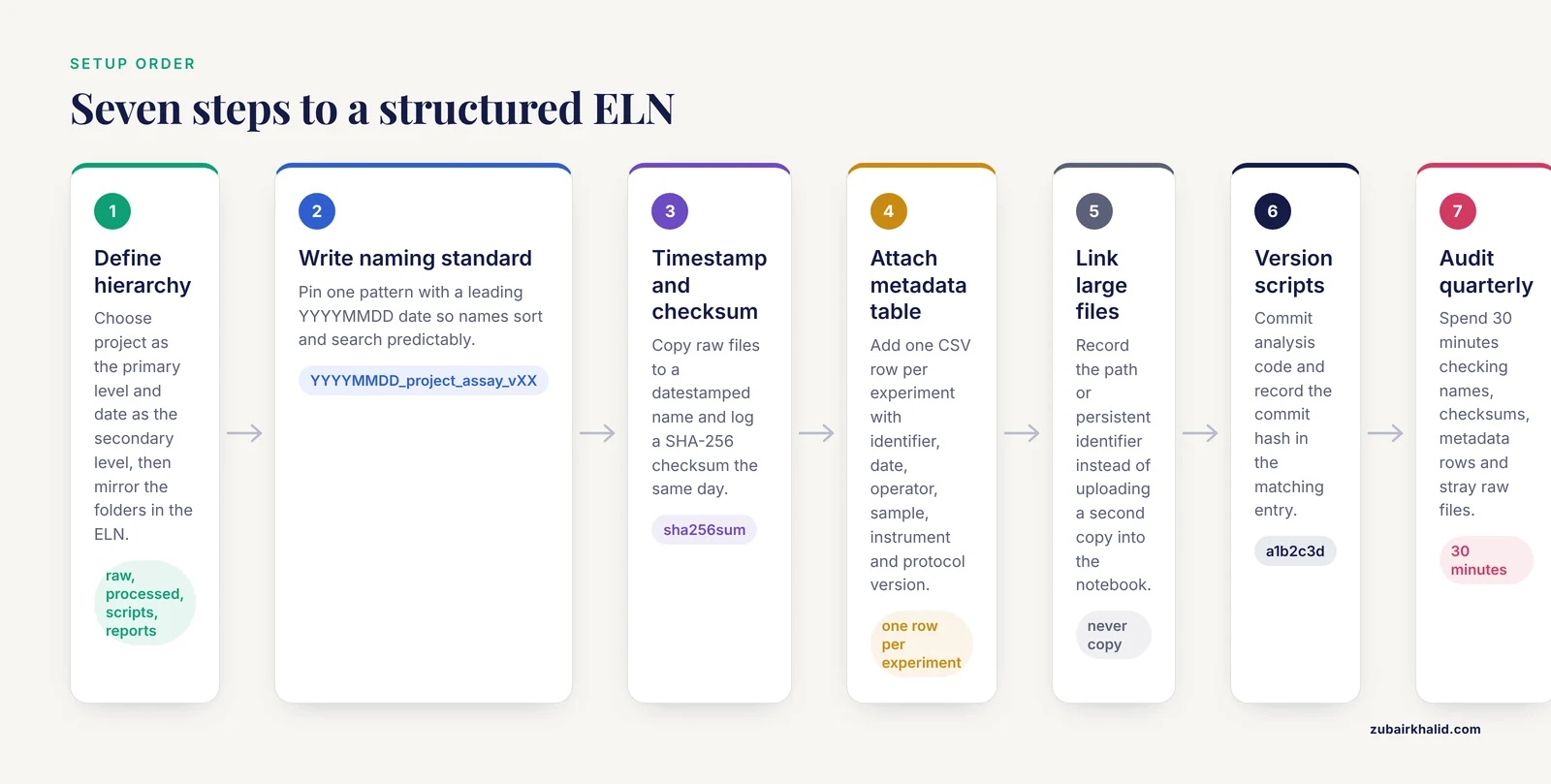
Step 1: Define the top-level hierarchy before you write a single entry
Decide on one organizing principle for the whole notebook. The three standard options are organization by project, by date, or by instrument and workflow. Most academic labs do best with project as the primary level and date as the secondary level, because projects map to grants, papers, and personnel.
Create the hierarchy with real directories on your shared drive or server, then mirror the same names inside the ELN so notebook entries and files match one-to-one:
mkdir -p lab-data/2026/projectA-amyloid-screen/{raw,processed,scripts,reports}
mkdir -p lab-data/2026/projectB-enzyme-kinetics/{raw,processed,scripts,reports}
ls lab-data/2026/
Expected output:
projectA-amyloid-screen
projectB-enzyme-kinetics
The raw, processed, scripts, and reports subfolders enforce a rule that saves careers: raw data is never modified, only read. Everything derived from raw data goes in processed, and the code that produced it goes in scripts so the transformation is reproducible.
Step 2: Adopt one naming convention and write it down
A naming convention is a fixed pattern for file and entry names. The most reliable pattern for research records is:
YYYYMMDD_project_instrument-or-assay_short-descriptor_vXXWorked example: a flow cytometry run for project A on March 4, 2026, becomes 20260304_ProjA_FACS_Tcell-activation_v01. The leading date sorts chronologically in every file browser and ELN search field. Underscores separate fields, hyphens join words within a field, and the version suffix distinguishes reruns.
Create a one-page naming standard as the pinned entry in your ELN. Institutional implementations show why templates and written guidance matter: when the Indiana University School of Medicine rolled out an ELN, the library supported adoption by developing best practice guidance and template notebooks, alongside training sessions and one-on-one consults. The program reached 829 users by August 2021 [6]. A lab that skips the written standard forces every new member to guess, and guesses diverge.
Step 3: Use timestamps and checksums for external data files
Every raw data file referenced from the ELN should carry a timestamp and an integrity check. A checksum is a fixed-length value computed from a file's contents. If even one byte changes, the checksum changes, which lets you prove a file is unaltered.
Generate a datestamped copy and a checksum log:
cd lab-data/2026/projectA-amyloid-screen/raw
cp plate-17.fcs 20260304_ProjA_FACS_Tcell-activation_v01.fcs
sha256sum 20260304_ProjA_FACS_Tcell-activation_v01.fcs >> checksums.txt
cat checksums.txt
Expected output (your hash will differ):
9f2b1c8d0e4a7f63b5c1d2e8f9a0b3c4d5e6f7a8b9c0d1e2f3a4b5c6d7e8f9a0 20260304_ProjA_FACS_Tcell-activation_v01.fcsRecord the checksum in the corresponding ELN entry the same day. To verify integrity later:
sha256sum -c checksums.txtExpected output when the file is intact:
20260304_ProjA_FACS_Tcell-activation_v01.fcs: OKA mismatch prints FAILED and means the file changed since recording, which you must investigate before trusting any downstream analysis.
Step 4: Attach a structured metadata table to every entry
Free-text notes alone are not enough. Each ELN entry should link to a small structured record, typically a CSV with one row per experiment, that a script can read later. At minimum, include these columns, adapted from the module logic used in formal minimum information schemas [4]:
| Field | Example value | Why it matters |
|---|---|---|
| experiment_id | 20260304_ProjA_FACS_Tcell-activation_v01 | Unique key linking entry, files, and metadata |
| date | 2026-03-04 | Chronological sorting and audits |
| operator | J. Rivera | Attribution and accountability |
| sample_or_material | PBMC donor 042, lot L-2211 | Reproduction and traceability |
| instrument | BD FACSCanto II | Equipment-specific artifacts and calibration |
| protocol_version | Cytotox_v3.2 | Distinguishes methods changes from results changes |
| raw_file_path | raw/20260304_ProjA_FACS...fcs | Explicit pointer to immutable source data |
| notes_flag | passed / rerun / failed | Filtering without reading full entries |
In practice, a row looks like this:
experiment_id,date,operator,sample_or_material,instrument,protocol_version,raw_file_path,notes_flag
20260304_ProjA_FACS_Tcell-activation_v01,2026-03-04,J. Rivera,PBMC donor 042,BD FACSCanto II,Cytotox_v3.2,raw/20260304_ProjA_FACS_Tcell-activation_v01.fcs,passed
Disciplines with mature data standards go further. In neurophysiology, the Neurodata Without Borders (NWB) standard unifies diverse data modalities in a single format, and combining NWB with a database interface in Jupyter-based lab journals streamlines collaboration, retrospective analysis, and data integrity through process transparency [7]. You do not need a formal standard to benefit. You need consistent columns.
Step 5: Link, never copy, large files into the ELN
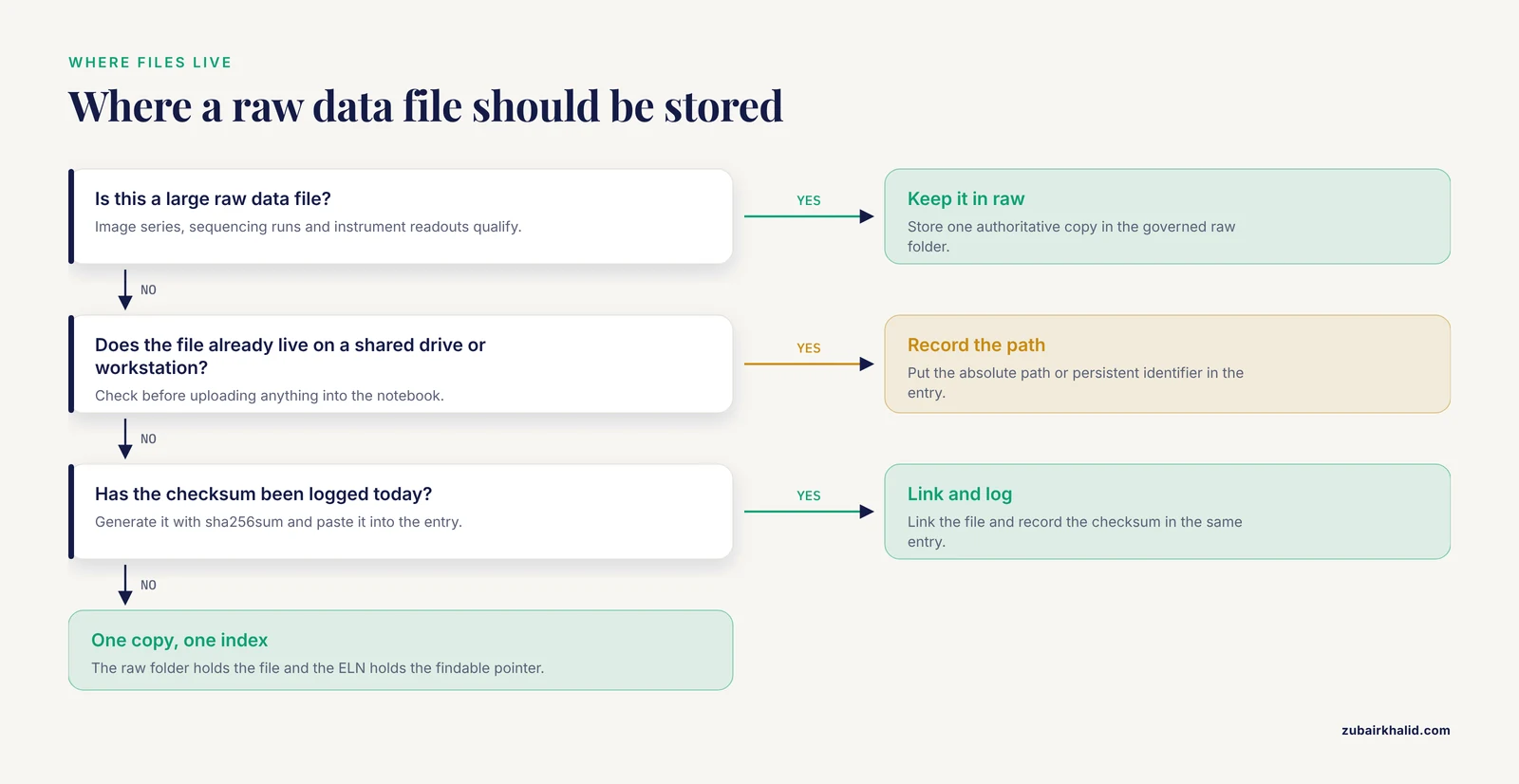
A common and costly error is uploading large raw files directly into the ELN while the same files also live on a shared drive or instrument workstation. Two copies drift apart. Instead, record the absolute path or a persistent identifier in the ELN entry, and keep the file in the governed raw folder with its checksum. Purpose-built ELNs with audit trails and permissions systems are designed around this pattern of controlled referencing rather than duplication [8].
Step 6: Version your analysis scripts alongside the notebook
If your processed results come from scripts, the notebook must identify exactly which script version produced them. Initialize version control in the scripts folder:
cd lab-data/2026/projectA-amyloid-screen/scripts
git init
git add analyze_tcell_activation.py
git commit -m "v01 initial analysis for 20260304 run"
git log --oneline
Expected output:
a1b2c3d (main) v01 initial analysis for 20260304 runThen record the commit hash, here a1b2c3d, in the ELN entry for that experiment. Any future researcher can reconstruct the exact analysis.
Step 7: Schedule a quarterly structure audit
Set a recurring calendar task. Each quarter, spend 30 minutes checking that (a) new entries follow the naming convention, (b) checksum verification passes for a random sample of raw files, (c) metadata rows exist for every entry created in the quarter, and (d) no unmodified raw files have appeared in processed or scripts folders. Ongoing audits are what sustain adoption. Institutional programs report that sustaining use within research labs, beyond initial training, is one of the defining challenges of ELN implementation [6].
Common Mistakes and Limitations
These are the eln data organization best practices common mistakes seen again and again in lab settings:
- Over-tagging and idiosyncratic taxonomies. Researchers often invent highly personal tagging schemes, and studies of ELN knowledge management found that seemingly simple tagging and searching is anything but simple. Focus groups of researchers showed that semantic annotation tools were not well received in their existing forms, and that any workable system must permit a significant degree of personal customization [9]. The practical lesson is to agree on a small set of shared tags for cross-lab retrieval while allowing personal tags for individual organization, and to avoid building a large formal taxonomy before you know what you actually search for.
- Assuming freehand sketches are lost. Teams resist ELNs partly because they believe electronic methods cannot capture hand-drawn diagrams and annotations. A translational lab at New York University School of Medicine tested this concern directly by using Evernote for all routine experimental information over six months and surveying students. Both electronic and paper users reported inability to freehand as a limitation, but the lab concluded that the advantages of electronic recording greatly outweighed this drawback, and worked around it with imported snapshots and drawing add-ons [10]. Plan your sketch workflow on day one rather than discovering the gap later.
- Treating the ELN as an island. ELNs deliver the greatest benefit when integrated with laboratory information management systems, chromatography data systems, analytical instruments, and scientific data management systems. Reviews of implementation efforts note that no single well-established integration path exists, and that integration attempts have ranged from conventional interfaces to radically new approaches [11]. Even without formal integration, you can prevent island behavior by keeping file paths, checksums, and script versions in the notebook as described in Steps 3 and 6.
- Skipping data integrity discipline. In regulated environments, ELN discussions at forums such as the Global CRO Council center on data integrity, meaning demonstrable completeness, consistency, and attribution of records [5]. Labs outside regulated settings often assume the same concerns do not apply until a manuscript is challenged or a collaborator disputes a result. Checksums and dated entries are cheap insurance.
- No onboarding template. New lab members copy whatever the previous person did. If that person improvised, disorder compounds. Template notebooks, as used in the Indiana University institutional rollout [6], solve this. Create one exemplar project folder and one exemplar entry, and require new members to duplicate them.
- Recording results without method versions. A result tied to "the usual protocol" is unreproducible. Protocol versions belong in the metadata table from Step 4, and any change increments the version.
A final limitation applies to any documentation system. An organized ELN preserves what you chose to record. It cannot recover observations you never wrote down, and it does not substitute for proper experimental design or for institutional data management policies.
Research Software Comparison: Matching Organization Practices to Your ELN Tool
Choosing among the best software for researchers depends on discipline, budget, and whether your institution provides a licensed platform. The organizational practices in this guide apply to any of them, but each tool shapes how you implement them.
General note-taking tools. Microsoft OneNote is the most extensively evaluated general-purpose option for lab use. A technical comparison of six ELNs across 42 parameters found OneNote satisfied 39 of them, and both surveyed scientists and students preferred it over a scientifically designed commercial ELN [1]. A follow-up quick guide describes how to adapt OneNote's notebooks, sections, and pages into an ELN workflow, with the explicit caveat that OneNote is a general note-taking application not designed for scientific purposes [2]. When using such tools, compensate for the missing scientific structure by enforcing the naming conventions and metadata tables from this guide, since the software will not do it for you.
General-purpose cloud tools. Evernote demonstrated in a six-month academic trial that it can effectively replace paper notebooks in a translational research setting, with search and multimedia attachment as the standout advantages [10]. The same caveat applies. General tools give you flexible capture but no built-in experiment schema, so Steps 2 and 4 carry the organizational weight.
Purpose-built ELNs. Platforms designed for research provide permissions systems, controlled sharing, audit trails, electronic signatures, and search out of the box, as established in early web-based ELNs such as eCAT, which was developed with input from academic groups and regulatory reviewers and tested by more than 100 individuals and groups [8]. Domain-specific platforms go further. The open-source Chemotion ELN, built for chemistry, handles molecular structures, reaction planning, and searching across both a lab's own data and external sources such as SciFinder and PubChem [12]. In these tools, lean on the native experiment templates and audit features, and configure them at rollout rather than retroactively.
Integrated and next-generation systems. The frontier is consolidation. IntegriLAB, a proposed framework for neuroimaging research, merges data, document, and code repositories into a centralized web-based system that integrates tools such as DataLad, Overleaf, and GitHub, and adds cryptographically signed, immutable certification of research activities for verifiable authorship [3]. Systems in this style make Steps 3 and 6 largely automatic, which is their main appeal for labs running complex multi-stage pipelines.
The structured comparison from the biomedical institute study is a useful model for your own evaluation: define your criteria first, in their case 42 parameters, test two finalists with real users for months rather than days, and expect a preference gap between what looks best on a feature sheet and what scientists actually adopt [1].
One more reason organization matters beyond your own lab: well-structured ELN records become assets. A transformer model for retrosynthesis was trained on roughly 18 million reactions drawn from literature, patents, and electronic lab notebooks, and achieved high round-trip accuracy on drug-discovery reaction classes [13]. Aggregated, well-organized notebook data trains the next generation of research tools.
Frequently Asked Questions
What is the single most important ELN organization practice?
Adopt and document one naming convention for entries and files, with a leading YYYYMMDD date, before anyone writes in the notebook. Every other practice, including search, checksums, and metadata linking, depends on names being predictable.
Should raw data files be stored inside the ELN or in a separate location?
Store them in a governed raw-data folder outside the ELN and record the exact path and checksum in the ELN entry. This keeps a single authoritative copy of each file while the notebook serves as the findable index and interpretation layer.
How much metadata is enough for each experiment entry?
Enough for a colleague to reproduce and interpret the work without asking you questions. At minimum, record a unique experiment identifier, date, operator, sample or material identity, instrument, protocol version, and the raw file path, following the module logic of published minimum information schemas [4].
Can I use a general tool like OneNote or Evernote instead of a scientific ELN?
Yes. OneNote scored 39 of 42 evaluated ELN parameters and was preferred by surveyed researchers over a purpose-built ELN [1], and Evernote successfully replaced paper notebooks in a six-month academic trial [10]. You compensate by enforcing naming conventions, metadata tables, and integrity checks yourself.
How do I prevent different lab members from organizing data differently?
Publish a one-page written standard and a template project folder, and check adherence in a quarterly audit. Institutional programs found that templates and best-practice guidance, not just training sessions, were needed to sustain consistent adoption [6].
Do checksums really matter for everyday lab data?
They matter whenever data integrity could be questioned, which includes manuscript reviews, collaborations, and any regulated work. A SHA-256 checksum takes seconds to generate and provides mathematical proof that a file is unchanged since the date you recorded it.
How often should I reorganize or clean up my ELN?
Do not reorganize retroactively. Fix the convention going forward and audit quarterly. Mass reorganization breaks links between entries, files, and checksums, and it destroys the chronological trail that makes records trustworthy.
What should I do about hand-drawn sketches and whiteboard photos?
Photograph them, date the image file with the standard naming convention, and attach or reference it in the entry. Labs that pilot-tested electronic notebooks found that snapshots and drawing tools fully address the inability to freehand, which was the main reported drawback of electronic recording [10].
Sources
- Analysis and Implementation of an Electronic Laboratory Notebook in a Biomedical Research Institute.
- A quick guide for using Microsoft OneNote as an electronic laboratory notebook.
- IntegriLAB: a blockchain-enabled electronic lab notebook for reproducible neuroimaging research.
- Digital research data: from analysis of existing standards to a scientific foundation for a modular metadata schema in nanosafety.
- The 10th GCC Closed Forum: rejected data, GCP in bioanalysis, extract stability, BAV, processed batch acceptance, matrix stability, critical reagents, ELN and data integrity and counteracting fraud.
- Implementing an institution-wide electronic lab notebook initiative.
- Core principles for the implementation of the neurodata without borders data standard.
- eCAT: Online electronic lab notebook for scientific research.
- Too many tags spoil the metadata: investigating the knowledge management of scientific research with semantic web technologies.
- Using Evernote as an electronic lab notebook in a translational science laboratory.
- Electronic laboratory notebooks progress and challenges in implementation.
- Chemotion ELN: an Open Source electronic lab notebook for chemists in academia.
- Do Chemformers Dream of Organic Matter? Evaluating a Transformer Model for Multistep Retrosynthesis.