Setting Up Role-Based Permissions in Electronic Lab Notebooks
By Dr. Zubair Khalid, DVM, MS, PhD ·

An electronic lab notebook (ELN) is a platform where experiments, instrument exports, images, and analysis files live as structured, searchable records instead of loose paper pages. Modern life science generates datasets too large and too tightly regulated for paper, which is a central reason labs move record keeping into ELNs [1]. Access control decides who can read, edit, sign, or export those records, and weak access control quietly undoes every other benefit the platform offers.
This guide covers setting up role-based permissions in electronic lab notebooks using role-based access control (RBAC), the standard model in which access attaches to job roles rather than to named individuals. By the end you will be able to draft a role policy, configure it step by step in any mainstream ELN, verify the result with an automated probe, diagnose the errors platforms actually throw, and run a review cycle that keeps the configuration healthy.
Have these on hand before you start:
- Administrator access to your ELN workspace, sometimes called a tenant or domain
- A roster of everyone who needs access, with each person's job function
- Your current project and notebook list
- One test account that belongs to no real person
- Thirty minutes with the principal investigator (PI) or lab manager to agree on the role list
Why Role-Based Permissions Come First
Paper notebooks have one access model, physical possession. ELNs replace possession with explicit grants, and the earliest online systems treated this as foundational. eCAT, the first online ELN aimed at researchers in non-commercial institutions, was built around a permissions system, controlled sharing, an audit trail, electronic signatures, and search as baseline capabilities, developed in close collaboration with working lab scientists [2]. When those controls are configured carelessly, the platform's practical wins, streamlined workflows, quick recording and archiving, enhanced sharing and collaboration, and real-time remote monitoring of experiments, rest on records nobody can trust [1].
Two principles govern every decision below. Least privilege means each person receives the minimum permissions their work requires, nothing spare. Separation of duties means no single account both creates a critical record and serves as its independent witness.
Core Concepts You Will Configure
These eight terms appear in every ELN admin console under varying labels.
- Principal. Any account that holds access. Most are people, some are service accounts, identities created for scripts or instrument computers rather than humans.
- Permission. A single allowed action on a resource, such as read, create, edit, comment, sign, export, or manage_members.
- Role. A named bundle of permissions, for example researcher.
- Scope. Where a permission applies: the workspace, a project folder, a notebook, a page, or a single entry.
- Inheritance. The rule that child resources copy their parent's permissions unless something overrides them.
- Access control list (ACL). The itemized list attached to a resource recording which principals or roles hold which permissions.
- Audit trail. An append-only log of who did what, when, and to which resource, ideally including the previous value of edited fields.
- Electronic signature. A recorded, identity-bound approval action, normally requiring the signer to reauthenticate at the moment of signing.
Design the Role Model Before Touching the Console
Start with an inventory, not a configuration screen. List every person, every project, and every data type, then flag anything sensitive: unpublished results, human-derived samples, material covered by transfer agreements. The role list falls out of that inventory. Most labs converge on five roles.
- Owner or administrator. Holds every permission, including the right to change the matrix itself. Limit to one or two named accounts.
- Lab manager or PI delegate. Runs day-to-day administration and membership changes, cannot rewrite the permission matrix.
- Researcher. Bench staff and students, full read and write within assigned projects.
- External collaborator. A partner outside the institution, read and comment only.
- Auditor or quality assurance (QA) reviewer. Read and export, no editing, used for quality review and pre-publication checks.
Those five roles translate into a permission matrix, the single most useful artifact in this exercise:
| Capability | Owner | Lab manager | Researcher | External collaborator | Auditor |
|---|---|---|---|---|---|
| View entries | Allow | Allow | Allow | Allow, shared projects only | Allow |
| Create entries | Allow | Allow | Allow | Deny | Deny |
| Edit entries | Allow | Allow | Allow | Deny | Deny |
| Comment | Allow | Allow | Allow | Allow | Deny |
| Apply electronic signature | Allow | Allow | Allow | Deny | Deny |
| Export data | Allow | Allow | Deny | Deny | Allow |
| Share inside the lab | Allow | Allow | Deny | Deny | Deny |
| Share outside the lab | Allow | Deny | Deny | Deny | Deny |
| Add or remove members | Allow | Allow | Deny | Deny | Deny |
| Change the permission matrix | Allow | Deny | Deny | Deny | Deny |
| Delete a notebook | Allow | Deny | Deny | Deny | Deny |
The exact cells matter less than the shape. Notice three deliberate asymmetries: researchers cannot share outside the lab, auditors can export but not comment, and only the owner can change the matrix. Adapt the cells to your lab, keep the asymmetries.
Teaching labs map onto the same five roles with different labels, instructor as owner, teaching assistant as lab manager, students as researchers, course coordinator as auditor. A bioprocess engineering course that adopted a cloud ELN gave students genuine editing responsibility under supervision, and students rated the ELN better than paper notebooks for compliance [1].
Step-by-Step Electronic Lab Notebook Permissions Configuration
The walkthrough below covers electronic lab notebook permissions configuration step by step, in a sequence that separates thinking (steps 1 and 2) from configuring (steps 3 through 7) and testing (steps 8 through 10).
Step 1. Inventory users, resources, and lifecycles
Put the roster in a spreadsheet or CSV (comma-separated values) file with proposed roles and membership windows:
name,role_proposed,group,start,end
[email protected],lab_manager,grp-enzyme-eng,2024-01-15,
[email protected],researcher,grp-enzyme-eng,2025-06-01,
[email protected],researcher,grp-enzyme-eng,2025-06-01,2026-05-31
[email protected],collaborator,grp-external,2026-01-10,
[email protected],auditor,grp-audit,2025-09-01,
[email protected],service,grp-automation,2025-02-01,
Even a six-row roster surfaces details people forget: a fixed end date for a departing student, and a service account for an instrument import job. Both change the design.
Step 2. Write the policy file before opening the admin console
Express the matrix as a small, reviewable file in YAML, a human-readable configuration format, rather than as a series of console clicks:
# role-policy.yaml, reviewed and agreed before configuration starts
roles:
  owner:
    perms: [read, create, edit, comment, sign, export,
            share_internal, share_external, manage_members,
            manage_permissions, delete_notebook]
  lab_manager:
    perms: [read, create, edit, comment, sign, export,
            share_internal, manage_members]
  researcher:
    perms: [read, create, edit, comment, sign]
  collaborator:
    perms: [read, comment]
  auditor:
    perms: [read, export]
defaults:
  unlisted_action: deny          # default deny
  new_notebook_inherit: parent   # new notebooks copy the project folder policy
Three parameters carry most of the weight. The perms lists define the verb vocabulary per role, and keeping it to roughly a dozen verbs keeps the matrix legible. unlisted_action: deny implements default deny, meaning anything not explicitly granted is refused, the single highest-value setting in the entire configuration. new_notebook_inherit: parent makes new notebooks copy their project folder's policy, so access is managed in one place instead of notebook by notebook.
Expected output after review: five roles, eleven verbs, one default-deny rule, and zero permissions attached to individuals.
Step 3. Create groups, then put people in groups
Configure groups first and membership second, and never attach permissions directly to a person. Group-based assignment makes onboarding one membership change, offboarding one removal, and the audit trail readable, because access events trace to a policy instead of a scatter of personal grants.
grp-enzyme-eng       role: researcher     members: 6
grp-enzyme-eng-lead  role: lab_manager    members: 2
grp-external         role: collaborator   members: 1
grp-audit            role: auditor        members: 1
grp-automation       role: service        members: 1
If your institution runs single sign-on (SSO), one centralized login service operated by the IT department, connect the ELN to it and mirror these groups in the directory so membership updates automatically when personnel records change.
Step 4. Set the workspace baseline to deny, then grant downward
Set the workspace-wide default so a brand-new notebook is invisible to everyone except the owner and managers. Grant broader access at the project-folder level, never at the root. If your platform lacks a true default-deny switch, reproduce the effect by creating all notebooks inside restricted project folders and never sharing anything at the workspace root.
Step 5. Resolve effective permissions for a real user
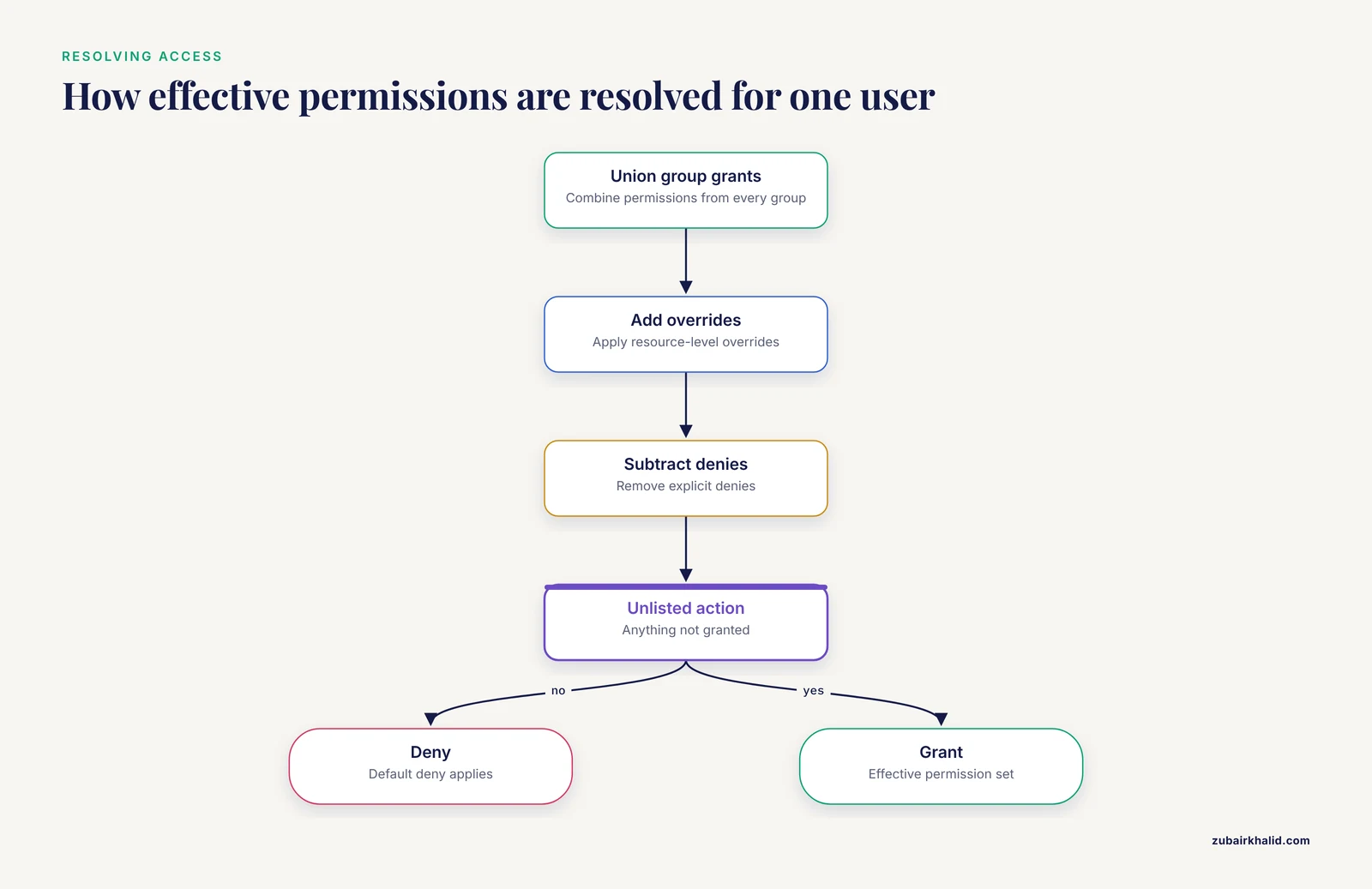
Effective permissions follow a four-step resolution: union the group grants, add resource-level overrides, subtract explicit denies, and default-deny everything left. Worked example:
User:      [email protected]
Groups:    grp-enzyme-eng (researcher), grp-signers (signer)
Notebook:  2026-enzyme-kinetics (inherits project folder policy)

Step 1, union of group grants:
  researcher -> read, create, edit, comment
  signer     -> sign
Step 2, notebook-level overrides: none
Step 3, explicit denies: none
Step 4, default deny for everything unlisted

Effective:   read, create, edit, comment, sign
Not granted: export, share_internal, share_external,
             manage_members, manage_permissions, delete_notebook
Run this resolution on paper for one person in each role. Discrepancies between the paper result and the console's effective-permissions view are exactly what step 8 hunts for.
Step 6. Enable the audit trail and gate signatures by role
Turn the audit trail on at the workspace level before any real data lands, because it can only record events that happen after activation. Confirm it captures at minimum the timestamp, actor, action, resource, and previous value for edits. Treat the electronic signature as a permission rather than a menu option: only roles that genuinely approve results receive the sign verb, and the platform should force fresh authentication at the moment of signing so approvals stay deliberate acts rather than clicks.
Step 7. Build the lab notebook template in the shared library
A lab notebook template is a prebuilt page structure of section headings, expected fields, and sign-off blocks that researchers duplicate for each experiment. Author templates inside an admin-owned shared library, never a personal workspace, and set the template's permission mode to inherit from its destination:
template: qpcr-run-template
location: shared-templates/        # admin-owned, not a personal space
permission_mode: inherit_destination
sections:
  - run_parameters
  - cycle_threshold_values
  - reagent_lot_numbers
  - analyst_sign_off
Expected result: every notebook duplicated from this template arrives in its project folder already carrying that folder's permission policy, and its sign-off section maps cleanly onto the sign verb configured in step 6.
Step 8. Probe the configuration with a script
A probe is a test account or scripted check used to verify access without touching real data. Encode the promises your policy makes and check them mechanically:
MATRIX = {
    "owner":        {"read", "create", "edit", "comment", "sign",
                     "export", "share_internal", "share_external",
                     "manage_members", "manage_permissions",
                     "delete_notebook"},
    "lab_manager":  {"read", "create", "edit", "comment", "sign",
                     "export", "share_internal", "manage_members"},
    "researcher":   {"read", "create", "edit", "comment", "sign"},
    "collaborator": {"read", "comment"},
    "auditor":      {"read", "export"},
}

CHECKS = [
    ("researcher",   "edit",               True),
    ("researcher",   "share_external",     False),
    ("collaborator", "edit",               False),
    ("auditor",      "export",             True),
    ("auditor",      "comment",            False),
    ("lab_manager",  "manage_permissions", False),
]

violations = 0
for role, action, expected in CHECKS:
    granted = action in MATRIX.get(role, set())
    ok = granted == expected
    violations += 0 if ok else 1
    verdict = "PASS" if ok else "FAIL"
    state = "allow" if granted else "deny"
    want = "allow" if expected else "deny"
    print(f"{verdict}  {role}.{action}: {state} (expected {want})")
print(f"{violations} violation(s)")
Each CHECKS entry lists a role, an action, and the outcome the policy promises, so the script fails loudly whenever reality diverges. Expected output for a correct matrix:
PASS  researcher.edit: allow (expected allow)
PASS  researcher.share_external: deny (expected deny)
PASS  collaborator.edit: deny (expected deny)
PASS  auditor.export: allow (expected allow)
PASS  auditor.comment: deny (expected deny)
PASS  lab_manager.manage_permissions: deny (expected deny)
0 violation(s)
If someone has casually granted the auditor a comment right, the same script reports it:
FAIL  auditor.comment: allow (expected deny)
1 violation(s)
Then log in with the test account under each role in the live ELN and confirm the console agrees with the script.
Step 9. Roll out with training, not just an announcement
Access configuration succeeds or fails on human behavior. The bioprocess engineering course that introduced a cloud ELN paired the rollout with explicit instruction in electronic record keeping, good documentation practices (GDPs), and data integrity, rather than assuming the software would teach itself [1]. Schedule a thirty-minute session, walk everyone through the role list, demonstrate one deliberate probe failure from step 8, and have each person create a real entry under supervision before they work alone.
Step 10. Schedule the review cycle
Put a quarterly review on the calendar, and add event-triggered reviews for anyone joining, leaving, or changing project, plus any new instrument integration. Each review re-runs the step 8 script against the live configuration and reconciles group membership against the current roster.
Verify the Result
The configuration is right when five checks pass:
- Role probe. The test account, placed in each role in turn, sees exactly what the matrix promises and nothing more.
- Audit trail spot check. Make an edit as a researcher, confirm the log entry shows the correct account, timestamp, and previous value, then confirm the auditor can read but not alter that entry.
- Offboarding drill. Remove the test user, confirm access disappears within minutes, and confirm their past entries remain intact and attributed.
- Export boundary. The auditor can export, the researcher cannot, and both facts survive a fresh login.
- Signature gate. A signer is forced to reauthenticate before signing, and a researcher sees no signing option at all.
Common Errors and Their Fixes
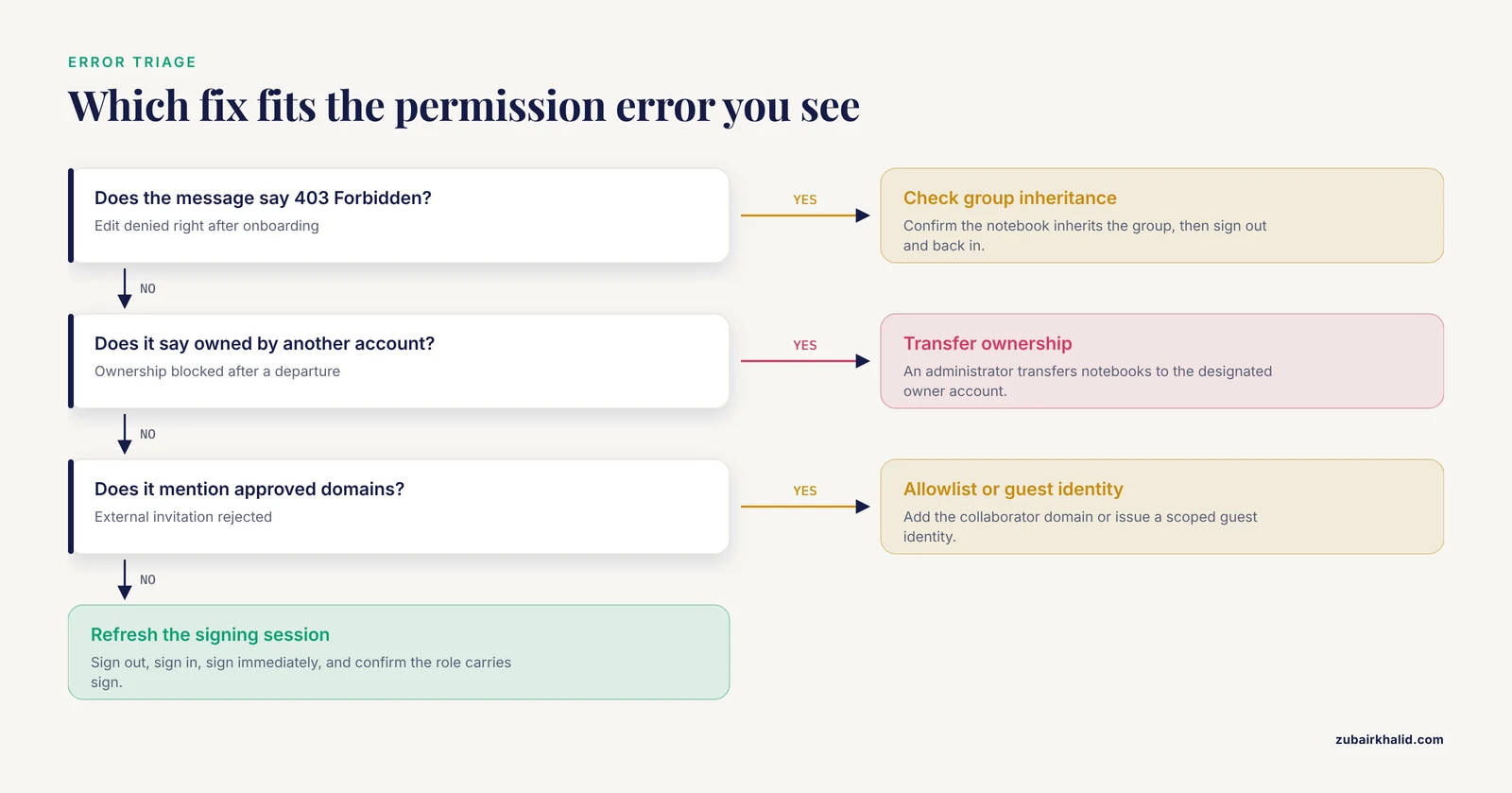
Wording varies between platforms, but the same handful of failures recurs everywhere. Representative messages are quoted so you can pattern-match.
Edit denied immediately after onboarding. 403 Forbidden: you do not have permission to perform this action. The account was added to a group the notebook does not inherit from, or a cached session predates the grant. Check the notebook's effective-permissions view for the group at the project-folder level, then sign out and back in to clear the stale session.
Ownership blocked after a departure. This notebook is owned by another account. A departed member personally owned notebooks. Have an administrator transfer ownership to the designated owner account, then add ownership transfer to the offboarding checklist so the situation cannot recur.
External invitation rejected. Sharing is limited to approved domains, or the invite never arrives. The tenant restricts outside email domains. Request an allowlist entry for the collaborator's domain or issue a guest identity scoped to the collaborator role, never a shared login.
Signature will not complete. An active signing session is required. The platform demands fresh authentication at signing time and the current session is stale. Sign out, sign in, complete the signature immediately, and confirm the signer's role actually carries the sign verb.
New notebooks invisible to the team. Access denied for everyone except the template's author. The template was authored in a personal workspace and dragged its private ACL into the project. Rebuild it in the shared library with destination inheritance enabled, delete the affected notebooks, and recreate them from the corrected template.
Invitation stuck on pending. Invitation pending persisting for days. The SSO identity uses a different email address than the invitation. Cancel it, re-invite the exact SSO email, or ask IT to match the two accounts.
Common Mistakes and Limitations
The most damaging mistakes in electronic lab notebook permissions configuration cluster into eight patterns:
- Attaching permissions to individuals. One departure strands orphaned grants and the audit trail fills with personal exceptions. Assign to groups only.
- Cloning notebooks to copy access. Copies drift from the parent policy within weeks. Use inheritance and templates instead.
- Owner sprawl. Every administrator can rewrite the matrix, so keep that role to one or two named accounts.
- Forgetting service accounts. Instrument computers and import scripts need explicit, minimal roles, otherwise someone eventually shares a human password with a machine.
- Skipping the offboarding drill. Departed students keep access until someone tests removal, so test it the day you configure it.
- Treating read access as harmless. Unpublished results and strain provenance leak through export and share rights, so gate those separately from viewing.
- Activating the audit trail late. Events before activation simply do not exist in the record.
- Growing the role list past seven. Beyond that, managers stop remembering which role does what and start granting at random.
One limitation belongs in plain terms: vendor implementations differ in vocabulary and in how inheritance interacts with sharing, and your institution's data governance, technology transfer, or quality office issues binding rules no generic guide can supply. Treat every matrix in this article as a starting pattern to adapt, and route formal compliance determinations to the office responsible for them.
Electronic Lab Notebook Comparison: Permissions Features to Check
When your team runs an electronic lab notebook comparison, vendor pages lead with integrations and storage, while the permissions layer decides whether the system can be governed at all. Score candidates on eight questions:
- Can permissions attach at the entry level, or only at the notebook level?
- Does the platform consume groups from the institution's SSO directory so membership updates itself?
- Is there a workspace-wide default-deny baseline?
- Can the audit trail be exported intact for review?
- Can the sign action be restricted by role and forced through reauthentication?
- Do templates carry their own ACL or inherit the destination's policy?
- Can external collaborators be invited under scoped guest identities?
- Can the API manage group membership, or does every personnel change become manual work?
Permissions have anchored ELN design since the category began. eCAT was refined through beta testing with more than 100 individuals and groups between September 2008 and June 2009, with input from groups including the FDA's Center for Biologics Evaluation and Research, Uppsala University, Children's Hospital Boston, and Imperial College [2]. A candidate that cannot answer the eight questions above is selling a sharing folder, not a governance layer.
Electronic Lab Notebook Permissions Configuration Tips
- Pilot on a single project before touching the whole workspace.
- Store the role policy as a page inside the template library so the policy travels with the notebooks it governs.
- Keep the role list under seven.
- Prefer deny by default in every new project folder.
- Re-run the probe script after every platform update, because vendors adjust permission behavior in minor releases.
- Iterate the training rather than delivering it once. The teaching-lab deployment that paired ELN adoption with GDP instruction recorded improvements in user-experience measures from its first year to its second as the training matured [1].
- Name one permission owner, a single person accountable for the matrix, so access requests queue in one place.
Next Steps
Run the probe script quarterly alongside the scheduled review, extend the role model to service accounts and instrument integrations, align notebook retention with your institution's data retention schedule, and revisit the matrix whenever a new grant changes project staffing. Permissions are never finished, they are maintained.
Frequently Asked Questions
What is electronic lab notebook permissions configuration?
It is the process of defining roles, attaching permission sets to those roles, and assigning people to roles so access follows job function instead of one-off personal grants. A complete configuration also sets a default-deny baseline, enables the audit trail, and restricts electronic signatures to the roles that need them.
How many roles should a small lab start with?
Four or five. Owner, lab manager, researcher, external collaborator, and auditor cover most academic labs, and teaching labs run the same model with instructors, teaching assistants, and students. Add a role only when a real task cannot be expressed with the existing set.
Should permissions be assigned to people or to groups?
Always to groups. Group assignment turns onboarding into a single membership change, offboarding into a single removal, and keeps the audit trail readable because access traces to a policy rather than dozens of individual grants.
Can an external collaborator be given edit access?
Avoid it. Read and comment access lets partners review data and give feedback without placing unpublished results under outside control. If a contract genuinely requires write access, scope it to one dedicated project folder and set an end date.
What should happen to permissions when someone leaves the lab?
Remove the person from every group on their last day, transfer ownership of any notebooks they personally hold, and confirm with a probe login that access is gone. The audit trail preserves their earlier contributions, so removal does not erase history.
Do read-only users create any risk?
Yes, chiefly through export and share rights rather than viewing itself. A read-only role that can export whole notebooks can walk away with a project's worth of unpublished data, so treat export as a separate, narrowly granted permission.
How do permissions support data integrity?
They enforce attribution and controlled change, meaning every entry traces to an identified account and edits occur only through logged, authorized actions. Those are the conditions the standard data integrity criteria, attributable, legible, contemporaneous, original, and accurate, depend on.
How often should the permission matrix be reviewed?
Quarterly, plus whenever someone joins, leaves, or changes project, and whenever a new instrument integration is added. Re-running an automated probe script against the live configuration takes minutes and catches drift that eyeballing misses.