Electronic Lab Notebook Features That Support Reproducibility
By Dr. Zubair Khalid, DVM, MS, PhD ·

The single biggest difference between notebook systems is whether they force complete, dated, uneditable records or merely let you type notes. Purpose-built electronic lab notebooks (ELNs) and well-configured general note-taking apps differ sharply on this point, and that difference decides whether a colleague can repeat your experiment two years from now. The rule of thumb for choosing: pick the system whose default behavior produces a complete record, because any feature you have to remember to use will eventually be forgotten on a busy day.
This guide walks through the electronic lab notebook features for reproducibility that matter in practice, compares the main options side by side, works through realistic scenarios, and flags the mistakes that quietly destroy reproducibility even when a lab has invested in good software.
Why Reproducibility Lives or Dies in the Notebook
Reproducibility means that another scientist, given your documentation, can repeat your experiment and expect the same result. The scientific literature has long recognized that transparent reporting is what allows readers to judge reliability and replicate methods. Douglas Altman, one of the most influential voices in research reporting, put it plainly: readers should not have to infer what was probably done, they should be told explicitly.
An electronic lab notebook is where that explicit telling happens, entry by entry, before a paper is ever drafted. The move from paper lab notebooks to ELNs is driven by exactly this problem. Current research generates large datasets that can no longer be documented adequately in paper notebooks, and ELNs are considered a promising way to promote reproducibility and transparency across the scientific community [2].
The stakes go beyond the bench. Structured, precise documentation strengthens the credibility of research and supports the rigorous methodology that turns observations into reproducible evidence [3]. When documentation is incomplete, the failure shows up downstream in manuscripts, peer review, and follow-up studies.
A useful mental model: a notebook entry should answer four questions without the reader asking. What did you do, exactly, with which materials and settings. When did you do it. Who did it. And what raw evidence exists. Every feature discussed below exists to answer one of those four questions automatically.
The Features That Actually Matter, Side by Side
The table below compares the core electronic lab notebook features for reproducibility across three common options: a general note-taking application such as Microsoft OneNote, a purpose-built scientific ELN, and a structured database-style ELN. The third option reflects products in the PerkinElmer Elements class, where data lives in structured, validated fields rather than free text [2].
| Feature | Why it matters for reproducibility | General note-taking app (OneNote type) | Purpose-built ELN | Database-style ELN |
|---|---|---|---|---|
| Automatic timestamps | Proves when each step occurred, no manual dating errors | Page-level timestamps, manual within notes | Automatic per entry and per edit | Automatic per field |
| Edit history and versioning | Preserves the original record after corrections | Full version history on pages | Full audit trail, often locked | Full audit trail with field-level history |
| Immutability of signed entries | Prevents silent alteration of the experimental record | Not enforced | Enforced, often with e-signature | Enforced, often with witness signature |
| Structured fields | Makes conditions searchable and comparable across experiments | Not built in, must be improvised | Partial, via templates | Strong, with validated input types |
| Templates | Standardizes entries so nothing is omitted | User-built page templates [2] | Vendor and custom templates | Controlled experiment templates |
| File and data attachment | Keeps raw data linked to the entry that produced it | Excellent, flexible | Good, often with file type limits | Good, with automated metadata capture |
| Search across the whole notebook | Lets future readers reconstruct context fast | Very strong free-text search | Strong | Strong, including field values |
| Access control and sharing | Defines who can read and who can witness or approve | Notebook and section level | Granular, role-based | Granular, role-based |
| Export and portability | Protects the record when tools or jobs change | Partial, format-dependent | Usually supported, check formats | Usually supported, check completeness |
| Inventory and sample linking | Connects entries to the exact reagent or sample used | Not built in | Common | Strong, often native |
| Instrument integration | Captures machine output without transcription errors | Not available | Varies by vendor | Common in regulated settings |
No single column wins on every row. The honest electronic lab notebook comparison is about trade-offs, which the next sections unpack.
Timestamps, version history, and immutability
A reproducible record needs three properties that paper notebooks only partially provide: proof of when an entry was made, a preserved history of any later change, and a way to close an entry so it cannot be quietly rewritten.
General note-taking apps give you timestamps at the page level and version history if the platform supports it. What they do not give you is enforcement. Anyone with edit rights can change yesterday's protocol and leave no visible trace unless you deliberately check versions. Purpose-built ELNs treat this differently. They typically log every edit, allow an author to sign or close an entry, and sometimes require a second person to witness it, a practice inherited from regulated industries.
The practical consequence is subtle. Reproducibility often fails not because a scientist lied, but because a protocol was improved mid-project and the earlier version got overwritten. A locked audit trail preserves both versions, which is exactly what a reader needs to understand why two attempts at the same method produced different results.
Templates that force completeness
A lab notebook template is a prebuilt page or form with slots for the information every entry of that experiment type requires. This is one of the highest-leverage features for reproducibility because it shifts the burden from memory to design.
The value of structured scaffolds shows up across research writing as a whole. Reporting guidelines such as CONSORT for trials and PRISMA for systematic reviews exist because complete, transparent reporting improves the reliability of research and allows replication of methods, and they work by prompting authors for items they might otherwise omit [1]. A good notebook template does the same job at the bench, one experiment at a time. Structured, stepwise frameworks have also been shown to support clearer work in science education settings, where teachers valued frameworks that gave lessons a clear scaffolding [4]. The same principle applies to adults recording experiments.
A minimal cell-culture passage template illustrates the idea:
- Date and operator, filled automatically if the system supports it.
- Cell line and source, including passage number.
- Medium, serum, and additives, with supplier and catalog-level detail where the system allows.
- Incubation conditions, meaning temperature, CO2 percentage, and humidity as configured.
- Confluence estimate at passage, with the method used to estimate it.
- Split ratio and vessel type.
- Deviations from the standard protocol, with a reason for each.
- Links to attached images or instrument files.
In a free-text notebook, items 3 through 7 are the ones most often skipped. In a template, they are fields, and a blank field is visible.
General-purpose apps can be adapted for this. Researchers have published a practical guide for adapting Microsoft OneNote into an ELN workflow, precisely because OneNote scored well on many ELN functionalities in comparative testing and survey studies, even though it was never designed for laboratory use [2]. The guide's approach, building notebook, section, and page structure with templates, transfers to other general note-taking tools.
Structured fields versus free text
Free text is flexible and comfortable. It is also the weakest format for reproducibility, because a critical condition buried in a paragraph cannot be filtered, compared, or audited. Database-style ELNs store conditions in typed fields, so you can ask questions like "show every experiment where the lysis buffer lot was X" without reading every page.
Structured metadata also feeds the downstream documentation that journals and reporting standards now expect. Reporting guidelines continue to evolve, and their expansion across study domains exists to foster methodological rigor and transparency [5]. Work done once, in structured form at the notebook stage, gets reused many times in manuscripts, checklists, and data deposits.
The trade-off is speed and rigidity. Field-based entry is slower on day one and awkward for genuinely novel procedures. Many labs solve this with a hybrid: structured fields for the fixed backbone, a free-text section for observations that do not fit a field.
Data attachment and raw evidence
Reproducibility requires that the raw evidence survive alongside the interpretation. A notebook entry that says "gel looked clean" is far weaker than an entry with the gel image attached, including the exposure settings and the file name of the original capture.
Here general note-taking apps are genuinely competitive. OneNote's flexibility with embedded files, images, and screenshots is one of the reasons surveyed researchers preferred it over a scientifically designed ELN in the comparison studies cited earlier [2]. Purpose-built ELNs counter with constraints that sound annoying and are actually protective: file-type validation, automatic capture of instrument metadata, and prevention of silent file replacement.
The feature to insist on, in any system, is that attachments are versioned along with the entry. Replacing an image with a "better" one, without keeping the original, is one of the most common and least intentional reproducibility failures.
Search and reconstruction
A record nobody can find is functionally lost. Strong search turns years of entries into a usable archive. Free-text search in general apps is excellent, often letting you search handwriting, attached text, and images. ELNs add structured search, meaning you can search by project, sample identifier, reagent lot, or protocol version.
Think of search as the reader's tool, not just your own. When a reviewer, collaborator, or new student tries to reconstruct why a method changed in March of a given year, search is how they do it. Clear communication of findings is what allows science to advance, and that communication starts with records that can actually be retrieved [6].
Collaboration, roles, and witness review
Most modern research is collaborative, and the notebook must handle multiple authors without destroying accountability. Features that matter here include role-based permissions, comments separated from the record itself, and a way for a supervisor or colleague to review and approve entries.
Evidence from collaborative writing research, though from an educational rather than a laboratory setting, points to what makes shared documents work: clear roles for participants and structured feedback reduce confusion and improve the output [7]. Translated to the lab, that means the ELN should make it obvious who wrote an entry, who edited it, and who reviewed it, rather than blending everyone into one editing surface.
Export, portability, and long-term access
The reproducibility clock runs for years. Experiments need to be interpretable long after the software vendor changes, the license lapses, or the scientist moves institutions. Export features deserve as much scrutiny as entry features. Ask three questions of any system you evaluate. Can you export a complete experiment, including attachments, in a nonproprietary format. Does the export preserve timestamps and authorship. And does it preserve the link between entries, so an experiment does not become a pile of orphaned files.
General note-taking apps are weakest here. Exports tend to be format-dependent, and formatting, tags, and some attachment relationships can degrade. Purpose-built ELNs usually offer export but vary in whether the audit trail travels with it. This is a question to test with a real pilot project before committing a lab's records to a platform.
Electronic Lab Notebook Features for Reproducibility Options and Their Pros and Cons
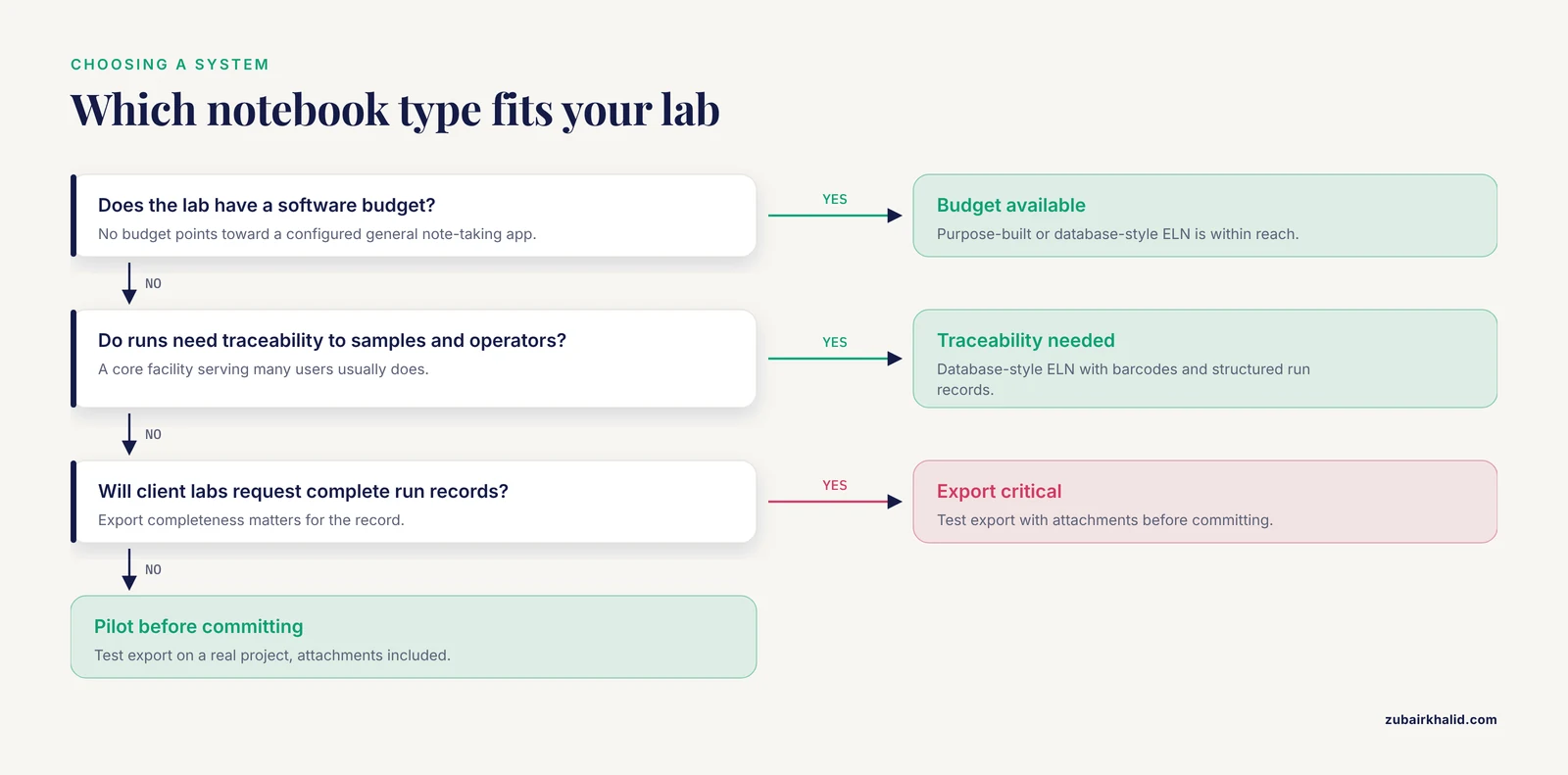
The best electronic lab notebook features for reproducibility are not concentrated in one product category. Each option carries distinct pros and cons.
General note-taking apps, OneNote type. The main pros are low cost or no cost, a short learning curve, excellent free-text search, flexible attachments, and strong offline behavior. The decisive con is the absence of scientific design: no enforced audit trail, no structured fields, no sample inventory, and no witness workflow. The published adaptation guide exists precisely because researchers liked OneNote but had to build discipline around it manually [2]. If your lab chooses this route, you are accepting responsibility for creating, through templates and conventions, the guardrails that a scientific ELN would impose automatically.
Purpose-built scientific ELNs. The pros are audit trails, signatures, templates, permissions, and support designed for laboratory records. The cons are cost, onboarding time, and, in some cases, entry experiences that researchers find less fluid than consumer note-taking tools. Survey evidence from a biomedical research institute is instructive here: the surveyed groups preferred OneNote over a scientifically designed ELN, PerkinElmer Elements, largely on usability grounds, even while recognizing that OneNote was not designed for scientific purposes [2]. Usability is a reproducibility feature. A scientifically rigorous notebook that people avoid using produces an incomplete record, which is worse than a flexible notebook used consistently.
Database-style ELNs. The pros are the strongest structured data, native sample and reagent tracking, and instrument integration. The cons are the steepest learning curve, the most rigid entry experience, and the highest typical cost. These systems fit labs where experiments follow repeated, well-defined workflows and where data must feed directly into analysis pipelines.
There is also a hybrid pattern worth naming: a general note-taking app for exploratory work and a structured ELN for finalized protocols and validated datasets. Hybrids fail when the boundary between the two systems is vague, so labs using this pattern should define in writing which record is authoritative for which content.
Worked Scenarios
Scenario 1: a two-person academic lab on a budget. A lab studying enzyme kinetics has one graduate student, one postdoc, and no software budget. The pragmatic choice is a configured general note-taking app. They build a lab notebook template set, one page template per assay, with fixed fields for reagent lots, instrument settings, and deviations. They adopt two conventions that substitute for missing enforcement: every entry is closed with a dated sign-off line typed by the author, and protocol changes get a new page rather than an in-place edit, with the old page left untouched. This is the workflow pattern described in the OneNote adaptation guide, applied with intention [2]. The known risk is discipline decay, so the principal investigator reviews a random entry weekly.
Scenario 2: a core facility with rotating users. A genomics core serves dozens of researchers whose runs must be traceable to samples, operators, and instrument state. Free text cannot deliver that traceability. A database-style ELN with sample barcodes, structured run records, and role-based access fits. The structured fields let the core answer, months later, exactly which library prep lot was used for a given sequencing run, and the audit trail shows every correction. Export matters enormously here, because client labs will request complete run records.
Scenario 3: a hospital-adjacent research group moving toward publication. A translational group needs notebook records that will survive the transition to a manuscript built on reporting standards. Their notebook templates mirror the structure of the checklists they will face, so that methods detail needed for reporting is captured at the source rather than reconstructed months later. This front-loads the work that reporting guidelines demand, since those guidelines ask authors for the minimum information a reader needs to understand and replicate what was done [1]. For the radiomics component of their work, they go further and align their per-analysis notebook entries with a domain documentation standard, the CLEAR checklist, which was created because complex, multi-step analytical workflows routinely produce inadequate reporting and poor reproducibility when documentation is left unstructured [8].
Building a Lab Notebook Template That Carries Its Weight
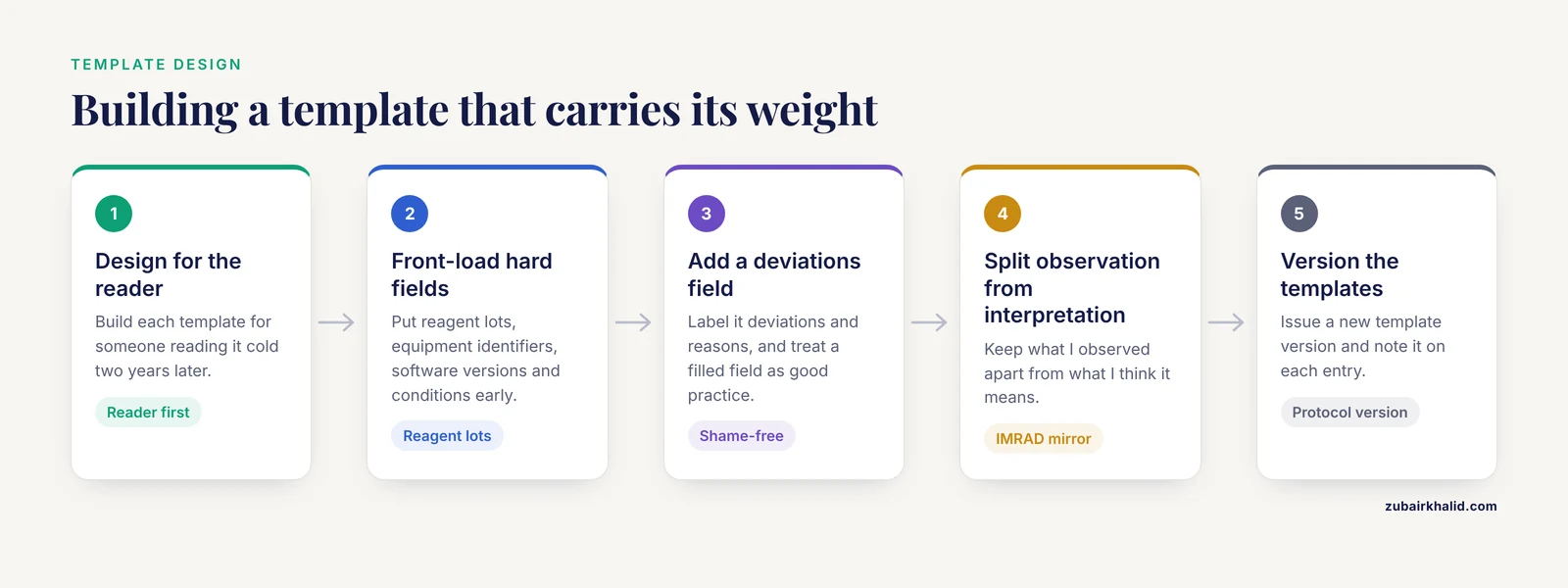
Whether your system calls them templates, forms, or protocols, the design principles are the same.
Start from the reader, not the writer. Design each template for the person who will read it cold, two years later, with no memory of the project. This is the same principle that makes reporting guidelines effective in health research, where complete reporting directly affects how well others can judge and reuse the work [1].
Make the required fields the hard ones to skip. Reagent lots, equipment identifiers, software versions, and environmental conditions are the fields people omit most. Put them early in the template, not buried at the bottom.
Give deviations a dedicated, shame-free field. A template that makes deviations feel like failures trains people to hide them. Label the field plainly, "deviations and reasons," and treat a completed deviation field as a sign of good practice.
Separate observation from interpretation. Two fields, "what I observed" and "what I think it means," keep raw record and hypothesis apart. This mirrors the Results and Discussion separation in the IMRAD structure used across original research, which exists to keep observations and interpretation distinguishable [3].
Version the templates themselves. When a protocol improves, issue a new template version and note the version on each entry. An entry is only reproducible in the context of the protocol version that governed it.
Keep attachments named consistently. A file named "gel2_final_FINAL.png" attached to three entries is a reproducibility hazard. Adopt a naming convention that includes date, experiment identifier, and content, and record it once where every lab member can find it.
Common Mistakes and Limitations
Copying the paper notebook's bad habits. Digitizing sparse, undated notes does not create reproducibility. If an entry would not let a stranger repeat the experiment on paper, moving it to a screen fixes nothing.
Choosing software by feature list instead of by default behavior. A system that "supports" timestamps and versioning is not the same as a system that applies them automatically. The best electronic lab notebook features for reproducibility are the ones that happen whether or not you remember.
Ignoring export until the day you need it. Labs discover export limitations when a key member departs or a license expires. Test export on a real project, attachments included, before your records become strategic hostages.
Treating the notebook as separate from analysis. If analysis code, parameters, and outputs live somewhere else, the notebook records what you did while the reproducibility-relevant details live elsewhere. Link analysis files and their versions from the entry, or record the parameters directly.
Overtrusting AI writing assistance. Large language models can help draft and polish text, but reviews of their use in scientific and medical writing consistently report risks including factual errors, fabricated or inaccurate citations, and prompt-sensitive mistakes, which is why oversight and verification against primary sources are required [9]. A notebook entry generated by an assistant and not verified is a potential contaminant in your record, not a convenience.
Confusing a clean notebook with a validated method. Reproducibility of the documentation is not reproducibility of the result. Structured records make it possible to see why a method fails to replicate, they do not guarantee that it will replicate.
A limitation of every system. Notebook software records what was entered. It cannot supply detail nobody captured, and no feature list substitutes for a lab culture where incomplete entries get caught. In individual research situations, judgment about what must be recorded belongs with the scientists and their institutional guidance.
Frequently Asked Questions
What are the most important electronic lab notebook features for reproducibility?
The five that carry the most weight are automatic timestamps, a locked edit history, enforced templates, reliable attachment of raw data, and full-fidelity export. Together they answer the four questions every entry must answer: what was done, when, by whom, and with what evidence.
Do general note-taking apps work as electronic lab notebooks?
Yes, with preparation. Microsoft OneNote performed well on many ELN functionalities in comparative evaluation, and surveyed researchers preferred it over a purpose-built ELN, but it was not designed for laboratory records, so labs must add structure themselves through templates, sign-off conventions, and disciplined versioning [2].
What is a lab notebook template and how detailed should it be?
A lab notebook template is a prebuilt entry form with fixed fields for the information every experiment of a given type requires. It should be detailed enough that a reader with no project background could repeat the work, which typically means reagent identities and lots, instrument settings, conditions, and a dedicated deviations field.
Which is better for reproducibility, a free-text ELN or a database-style ELN?
A database-style ELN is stronger for traceability and comparison because conditions live in searchable, validated fields, while free text is stronger for flexibility and speed during exploratory work. Labs with repeated, well-defined workflows benefit most from structured fields, while exploratory labs often do better with templates layered over free text.
How do ELN records connect to reporting guidelines like CONSORT or PRISMA?
Notebook entries are the upstream source of the methods detail those guidelines require. Reporting guidelines exist to ensure readers are told explicitly what was done, so that findings can be judged and methods replicated [1]. Designing notebook templates to capture that detail at the bench makes later manuscript preparation faster and more accurate.
How should AI tools be used in lab documentation?
Use them for language refinement, not for generating facts. Reviews of AI-assisted scientific writing report recurring problems including factual errors and inaccurate citations, and they recommend confining these tools to language work while verifying any literature-related output against primary sources [9]. Every AI-assisted entry should be checked and corrected by the scientist who owns the record.
Sources
- Reporting guideline checklists are not quality evaluation forms: they are guidance for writing
- A quick guide for using Microsoft OneNote as an electronic laboratory notebook.
- Getting your publication right - Part 1 structuring a research manuscript: A guide to writing original research
- Integrating Reading, Writing, and Digital Tools in Science: A Participatory-Design Study of the InSPECT Framework
- Evolution of Research Reporting Standards: Adapting to the Influence of Artificial Intelligence, Statistics Software, and Writing Tools
- Finding Yourself in the Arena of Scientific Writing: The Journey From Idea to Publication in Shelter and Community Medicine
- A Case Study on the Impact of Using Collaborative Writing and Editing among Tertiary-Level Students in a Google Classroom
- CheckList for EvaluAtion of Radiomics research (CLEAR): a step-by-step reporting guideline for authors and reviewers endorsed by ESR and EuSoMII
- Limitations and mitigation strategies for using generative artificial intelligence in medical writing: a narrative review