Electronic Lab Notebook Audit Trails: Best Practices
By Dr. Zubair Khalid, DVM, MS, PhD ·

By the end of this guide you will be able to explain what an electronic lab notebook audit trail records, test whether your own ELN captures the events that matter, verify that exported logs have not been altered, design a lab notebook template that feeds clean information into the trail, and avoid the mistakes that make audit logs useless during review, publication disputes, or inspection.
To follow the walkthrough you need three things: an account on your lab's electronic lab notebook (ELN) with administrator or owner permissions, a sandbox notebook you can fill with test data, and access to your ELN's log export or admin reporting area. If you are evaluating ELNs rather than running one, the comparison section tells you exactly which audit trail features to test in a trial account.
What an Electronic Lab Notebook Audit Trail Is
An audit trail is a system-generated, time-ordered record of who did what to which record, and when. It sits underneath the content you see in the notebook. When a user opens an experiment entry, edits a result table, adds a comment, or applies an electronic signature, the ELN writes an event to a log that the ordinary user cannot quietly alter.
A paper notebook records some of this by accident. Ink dates, handwriting, and signed page corners provide weak evidence of who did what and when, but nothing stops a page from being removed or rewritten. An electronic system can do better because every action passes through software that can log it automatically. This is why audit trails became a standard expectation for electronic record systems. Data integrity frameworks built around the ALCOA principles, which state that records should be attributable, legible, contemporaneous, original, and accurate, treat the audit trail as the mechanism that makes electronic records attributable and contemporaneous.
The ELN developers who shaped the modern category treated the audit trail as core infrastructure rather than an add-on. Describing eCAT, an early web-based ELN, its authors wrote that by late 2006 the basic concept had settled on "a highly scalable web-based collaboration tool that possessed the basic capabilities of commercial ELNs, i.e. a permissions system, controlled sharing, an audit trail, electronic signature and search, and a front end that looked like the electronic counterpart to a paper notebook" [1]. Notably, the FDA's Center for Biologics Evaluation and Research was among the groups that gave feedback during that product's development, which reflects how closely ELN design and regulatory expectations for record keeping are linked [1].
What a Good Audit Trail Records
Audit trail completeness varies between products, so it helps to have a checklist of the events that matter. At minimum, an electronic lab notebook audit trail should capture:
- Record creation: when a notebook entry, experiment, or document was first created, and by whom.
- Content edits: every change to entry content, ideally with the previous and new values, not just the fact that "something changed."
- Electronic signatures: who signed, what they signed, the meaning of the signature (for example "reviewed" versus "approved"), and when.
- Permission and sharing changes: every time a record's visibility changes, because silent sharing changes are a common source of data leakage and authorship disputes.
- Deletion or archival: whether the action is a true deletion (rare in a compliant system) or a soft delete that keeps the record retrievable.
- Exports and downloads: when data leaves the system, since exported copies fall outside the ELN's controls.
- Template and configuration changes: changes to the lab notebook template itself, because a template change can alter what future entries record.
- Authentication events: logins, failed logins, and password changes, which tie actions to a specific person.
Timestamps should be recorded with a time zone, ideally in Coordinated Universal Time (UTC), and every event should carry a user identifier tied to an individual account. The importance of individual accounts connects directly to the permissions systems that ELN developers built in from the start, since controlled sharing only means something if the system knows exactly which person is sharing [1].
How Audit Trails Work Under the Hood
Most ELNs implement the audit trail as an append-only data store. The application writes a new row or event object for every action, and normal application permissions do not allow anyone, including administrators, to update or delete those rows. Two design consequences follow from this, and both are worth understanding before you trust any product.
First, the audit trail is metadata, not content. The version of an experiment entry that you see on screen is the current state. The audit trail holds the history: the sequence of states and the actors who produced them. A well-designed ELN lets you view this history side by side with the entry, often called a version history or revision log.
Second, immutability is enforced in layers. The application may block edits through its interface, the database may revoke update and delete privileges from the application's account, and backups or periodic hash checks can detect tampering after the fact. When you evaluate vendors, ask which of these layers they actually implement. "The log cannot be edited from the user interface" is a much weaker claim than "no account, including ours, can alter logged events, and we can demonstrate this."
Electronic Lab Notebook Comparison: Audit Trail Features to Evaluate
If you are choosing between products, run the same scripted test in each trial account and compare the logs they produce. The table below summarizes the features to score.
| Feature | What to look for | Why it matters |
|---|---|---|
| Event granularity | Edits capture previous and new values, not just "entry modified" | "Something changed" cannot settle a dispute about what the data said |
| Immutability | No role, including vendor support, can edit or delete log entries | An editable log is not evidence of anything |
| Timestamp quality | Time zone shown, ideally UTC, millisecond or second precision | Ambiguous times undermine reconstruction of events |
| Attribution | Every event carries an individual user ID | Shared logins make the trail meaningless |
| Permission-change logging | Sharing and access changes appear as first-class events | Access history is as important as content history |
| Export format | Machine-readable export (CSV or JSON) with all fields | You need logs outside the vendor's system for retention and review |
| Signature linkage | Each signature references the exact record version signed | A signature on "the entry" is weaker than one on version 7 of the entry |
| Review interface | Filter by user, record, date range, and event type | Logs you cannot search never get reviewed |
Early ELNs already recognized that these capabilities belong together. eCAT's design combined the audit trail with electronic signature, search, and a permissions system in a single web-based tool, and it was built specifically for researchers outside commercial institutions, with input from groups at universities and hospitals [1]. That matters for an electronic lab notebook comparison because the audit trail is not a bolt-on module you can add later to a system that lacks attribution and permissions. The features reinforce each other.
The same paper also illustrates what labs actually do with ELNs, quoting one user: "Everyone uses it as an electronic notebook, so they can compile the diverse collections of data that we generate as biologists, such as images and spreadsheets" [1]. When a single entry holds images, spreadsheets, and meeting notes, the audit trail has to track all of those object types, not just text. Test each candidate ELN with a mixed-content entry and check whether edits to an embedded spreadsheet show up in the log with enough detail to be useful.
Electronic Lab Notebook Audit Trail Step by Step
This walkthrough uses a sandbox notebook and, for teams building or verifying their own logging layer, a standard relational database example. The commands are generic and use PostgreSQL syntax, which is representative of how most ELNs store audit data.
Step 1: Inventory what your ELN logs
In your sandbox, perform a fixed sequence of actions and then export the log:
- Create a new entry titled "AUDIT TEST 001".
- Add a text paragraph, then edit it.
- Upload a small image, then replace it.
- Share the entry with a colleague, then revoke the share.
- Apply an electronic signature if your plan supports one.
- Attempt to delete the entry, then restore it if the system allows.
Export the audit log for this entry in whatever format your ELN offers (CSV or JSON). Count the events. If your eleven actions produced fewer than eight logged events, write down what is missing, because that is your gap list.
Step 2: Inspect a log event and check its fields
Open the export and look at one edit event. A healthy JSON event looks like this:
{
  "event_id": "9f2c1a7e-4b3d-4f8a-9e21-6c5d8a0b1e34",
  "record_id": "EXP-2026-0117",
  "record_version": 4,
  "user_id": "[email protected]",
  "action": "FIELD_EDIT",
  "field": "results.concentration_mg_ml",
  "old_value": "12.4",
  "new_value": "14.1",
  "reason": "corrected [transcription error](/knowledge/molecular-biology/transcription-error) from plate reader output",
  "event_time_utc": "2026-11-11T14:32:07Z"
}
Check five things: the event carries an individual user ID, the old and new values are both present, the timestamp includes a time zone, the action name is specific, and a reason field exists (even if optional). If old values are missing, your ELN logs that edits happened but not what changed, which limits how far the trail can settle a question.
Step 3: Verify the database enforces immutability (for self-hosted systems)
If your lab runs a self-hosted ELN and you have database access, confirm that the audit table rejects modification. A typical append-only table looks like this:
CREATE TABLE audit_trail (
  entry_id      BIGSERIAL PRIMARY KEY,
  record_id     TEXT NOT NULL,
  user_id       TEXT NOT NULL,
  action        TEXT NOT NULL,
  old_value     TEXT,
  new_value     TEXT,
  reason        TEXT,
  event_time    TIMESTAMPTZ NOT NULL DEFAULT now()
);

REVOKE UPDATE, DELETE, TRUNCATE ON audit_trail FROM eln_app;
REVOKE UPDATE, DELETE, TRUNCATE ON audit_trail FROM eln_admin;
Now try to modify a row as the application user:
UPDATE audit_trail SET new_value = '0' WHERE entry_id = 42;Expected output:
ERROR: permission denied for table audit_trailIf the update succeeds instead of failing, your audit trail can be rewritten at the database level, and no amount of interface-level protection changes that. This single test is the fastest way to distinguish a real audit trail from a display layer that merely looks like one.
Step 4: Reconstruct a record's history from the log
The core use of any audit trail is answering, for one record, exactly what happened and in what order. Query the log for your test entry:
SELECT event_time, user_id, action, old_value, new_value
FROM audit_trail
WHERE record_id = 'EXP-2026-0117'
ORDER BY event_time;
Expected output:
       event_time        |  user_id   |     action      | old_value | new_value
-------------------------+------------+-----------------+-----------+-----------
 2026-11-11 14:30:02+00  | j.rivera   | ENTRY_CREATE    |           |
 2026-11-11 14:31:15+00  | j.rivera   | FIELD_EDIT      |           | 12.4
 2026-11-11 14:32:07+00  | j.rivera   | FIELD_EDIT      | 12.4      | 14.1
 2026-11-11 14:33:40+00  | m.okafor   | SHARE_GRANT     |           | read
 2026-11-11 14:35:12+00  | m.okafor   | SIGN_APPLY      |           | reviewed
 2026-11-11 14:36:55+00  | j.rivera   | ENTRY_ARCHIVE   |           |
(6 rows)
Read this as a reviewer would. The value 12.4 was entered by j.rivera, corrected to 14.1 nine minutes later with a stated reason, then reviewed and signed by m.okafor, who only had read access. If you can produce a reconstruction like this for any record in under five minutes, your audit trail is doing its job. If you cannot produce it at all, continue to Step 5.
Step 5: Check whether gaps can be filled through the interface
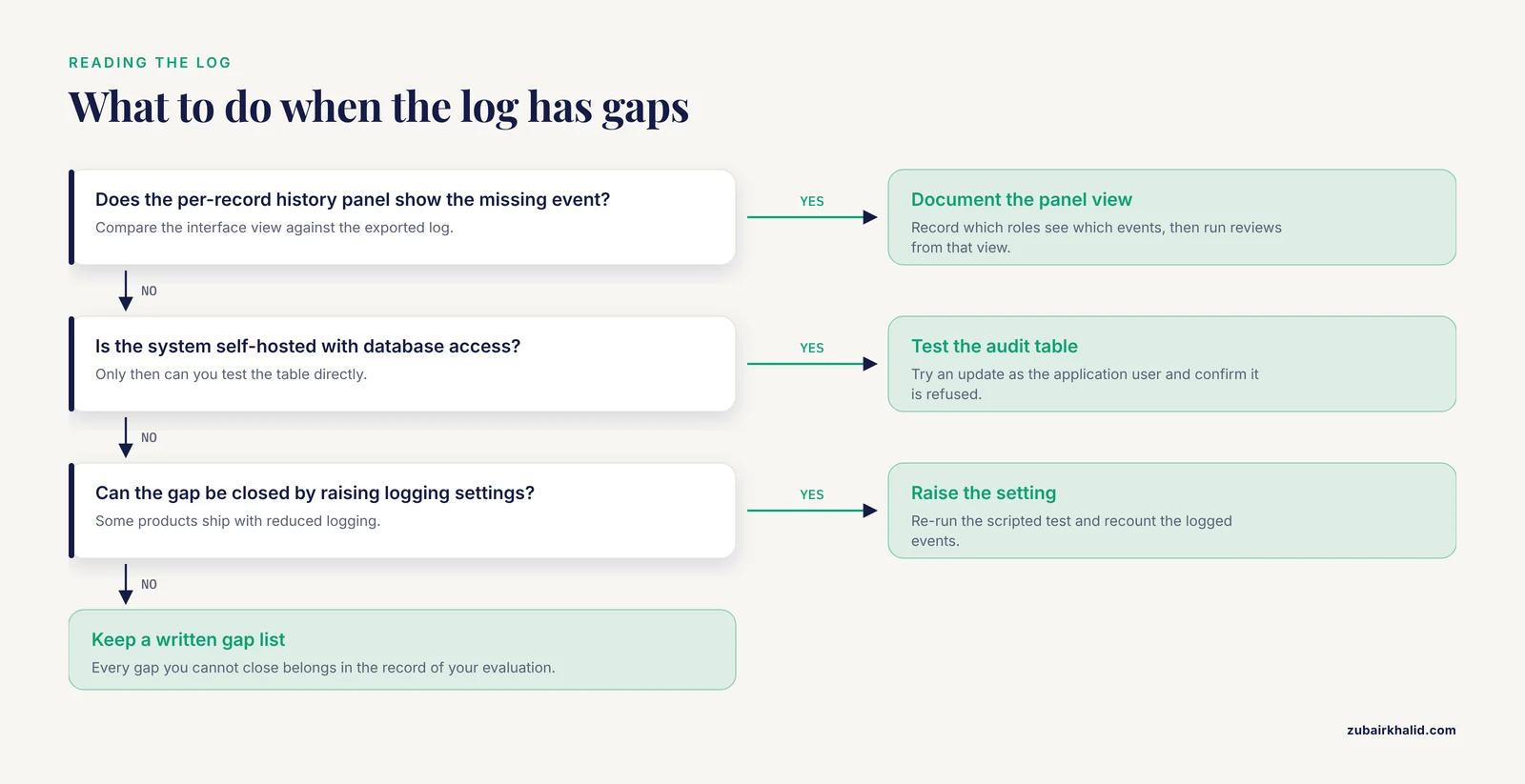
Some ELNs restrict raw log access to administrators but provide a per-record "history" or "activity" panel for all users. Open your test entry in the ordinary interface and compare what the panel shows against the exported log. The interface view is what most lab members will actually use, so it needs to show edits, shares, and signatures even if the underlying export is admin-only. Document which view each role can see, because that determines how you run reviews.
Step 6: Tamper-evident archiving of exports
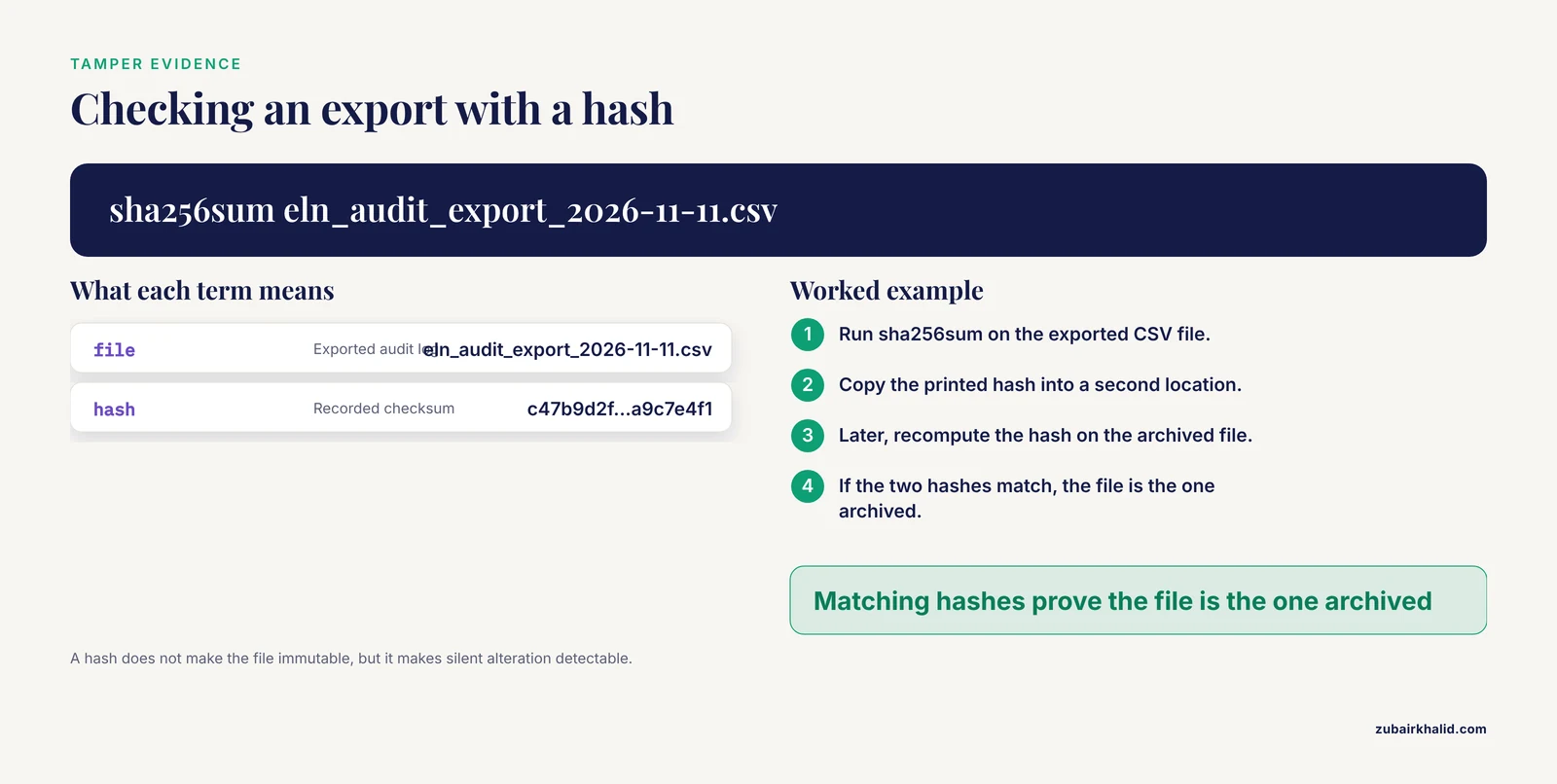
Exports leave the ELN's protection, so give them their own integrity check. After each export, compute a cryptographic hash:
sha256sum eln_audit_export_2026-11-11.csvExpected output:
c47b9d2f3a1e8b65d0c4a7f2e9b13d58a6c0f4e7b2d9a1c8e5f3b6d0a9c7e4f1 eln_audit_export_2026-11-11.csvRecord the hash in a second location, such as a signed summary document or a separate system. If anyone questions the exported log later, recomputing the hash proves the file is the one you archived. Hash verification does not make a file immutable, but it makes silent alteration detectable.
Step 7: Set retention and a review schedule
Decide, in writing, how long audit logs are kept and who reviews them. Retention periods are set by institutional policy and, where they apply, by the regulatory framework governing the work, so adopt your institution's figure rather than inventing one. A practical review rhythm for an academic lab is a monthly spot check: pick three records at random, reconstruct their histories as in Step 4, and confirm every edit has an attributable author and a sensible sequence. Log the review itself.
Electronic Lab Notebook Audit Trail Tips
- Use one account per person, always. Every tip on this list fails if two people share a login, because the trail then attributes actions to whoever owned the account rather than whoever performed the action.
- Write reasons when prompted. If your ELN offers a reason field for edits or signatures, use it with real sentences. "Corrected transcription error from raw file ABC123" is worth ten times a blank field during review.
- Test with mixed content. Entries containing images, spreadsheets, and instrument exports are the norm in biology, as the eCAT user quote shows [1]. Audit each content type, because some systems log document edits in detail but treat embedded file replacements as a single opaque event.
- Standardize timestamps. Prefer UTC in exports and record the convention in your lab's standard operating procedure so that two logs from different systems can be aligned.
- Rehearse before you need it. Once a quarter, pick a completed project and reconstruct its full record trail end to end. The first rehearsal always surfaces gaps, and it is far better to find them while the data is fresh.
- Log configuration changes, not just content. A change to the shared lab notebook template alters what every future entry captures, so it deserves the same audit scrutiny as a data edit.
- Pair the trail with signatures deliberately. An audit trail answers "what happened," and an electronic signature answers "who stands behind this version." The two features were designed together in the systems that defined the category, and they work best when used together [1].
Common Mistakes and Limitations
These are the failures seen most often when labs adopt ELNs, in rough order of how much damage each one does.
- Shared or generic accounts. A "lab" login makes every logged event unattributable. This single mistake can invalidate the entire trail, because attribution is the property the trail exists to provide.
- Assuming the audit trail is on by default and complete. Some products ship with reduced logging that must be raised in settings, and some log only the highest-level events. Run the Step 1 test yourself instead of trusting the feature list.
- Doing real work outside the notebook. Data that lives in a personal file share and is pasted into the ELN later has no contemporaneous trail. The trail can only vouch for what entered the system.
- Treating export as backup. An exported CSV is a snapshot, and it is not protected by the ELN's immutability controls. Without hashes and separate storage (Step 6), the export is the easiest part of the record to alter.
- Ignoring permission-change events. Labs review content edits and never look at sharing history. Unauthorized access to unpublished results usually shows up as a share grant, not a content edit.
- Testing edits but not deletions. Verify what happens when an entry is deleted, who can do it, whether the audit trail survives, and whether the record can be restored. Deletion behavior differs sharply between products.
- Signing the wrong object. Applying a signature to a living entry rather than a frozen version means the signature cannot be tied to specific content. Check that signatures reference a version.
- Never reviewing the log. An audit trail that no human reads detects nothing. Detection requires scheduled review, however brief.
One limitation belongs at the front of your planning rather than at the end of a list. This article describes general, widely accepted practice for research record keeping. What satisfies a specific regulatory or funding requirement for your particular program is a determination that belongs to your institution's quality assurance or research compliance office, and their written policy should override anything here, including the retention and review suggestions above.
A Lab Notebook Template That Feeds a Clean Audit Trail
The audit trail records events, but the quality of reconstruction depends on what each entry contains. A lab notebook template with the following fields makes every entry reconstructible, because the audit trail then has stable identifiers to attach events to.
| Template field | Purpose | Audit trail link |
|---|---|---|
| Entry ID (system-generated) | Unique, permanent identifier for the record | Every log event references this ID |
| Date and operator | Who performed the work and when | Matches the CREATE and FIELD_EDIT events |
| Protocol name and version | Exactly which procedure was followed | Links edits to protocol version changes |
| Instrument and settings | What produced the raw data | Supports attribution of machine outputs |
| Raw data references | Links to files stored in the ELN, not on a local drive | Keeps file objects inside the logged system |
| Deviations and corrections | Written reason for any change from plan | Populates the reason field the trail expects |
| Reviewer and signature block | Second-person verification of the entry | Creates SIGN_APPLY events tied to a version |
Two template rules prevent most downstream problems. First, corrections should be additive: when a value is wrong, enter the correction as a new annotated value rather than silently replacing the old one, so both values appear in the trail with their reasons. Second, the template should live inside the ELN and be version-controlled there, so that template changes themselves appear in the audit log.
Frequently Asked Questions
What is an electronic lab notebook audit trail?
It is a system-generated, time-ordered log of who performed which action on which notebook record and when. It records events such as creation, edits, signatures, sharing changes, deletions, and exports, and ordinary users cannot alter it.
Do academic labs need an audit trail if their work is not regulated?
In most cases yes, for practical reasons. The trail resolves authorship disputes, supports corrections with documented reasons, and preserves evidence for publications and patents, benefits that apply regardless of any regulatory requirement.
What should an audit trail record?
At minimum it should record record creation, content edits with previous and new values, electronic signatures, permission and sharing changes, deletions or archival, exports, and template changes. Every event needs an individual user ID and a time-stamped entry with a time zone.
Can an audit trail be edited or deleted?
In a properly designed system, no. The log is append-only, protected at the application, database, and archival layers so that no user role, including administrators, can rewrite it. If edits are technically possible for any account, the log is not trustworthy evidence.
How often should audit trails be reviewed?
Review frequency is set by institutional policy, but a practical rhythm for an academic lab is a monthly spot check of a few randomly chosen records. Quarterly full reconstructions of a completed project's trail catch systemic gaps early.
What is the difference between an audit trail and an electronic signature?
The audit trail records what happened and when, while an electronic signature records who takes responsibility for a specific version of a record. The two work together, since a signature should reference the exact version it approves.
How do I test that my ELN's audit trail works?
Perform a scripted sequence of actions in a sandbox notebook (create, edit, share, sign, delete, restore), export the log, and check that every action appears with a user ID, before-and-after values, and a time-stamped entry. Then reconstruct one record's history from the log and confirm it matches what you did.
How long should audit trail records be kept?
Retention periods come from your institution's written policy and, where they apply, the regulatory framework governing the work. Follow your institution's stated retention requirement rather than a generic figure, and confirm the ELN vendor can honor it.