Dependency Pinning for Reproducible Research
By Dr. Zubair Khalid, DVM, MS, PhD ·

By the end of this article you will be able to record the exact versions of every software package your analysis depends on, rebuild that environment on a new machine or a new cluster, package the result in a container or a workflow system, and share it so that another scientist can rerun your analysis and get the same numbers. You will also be able to audit an inherited project and identify which dependencies are missing or floating.
You will get the most from this walkthrough if you have the following on hand:
- A computer with Python 3.11 or newer installed, ideally through Miniforge or Anaconda
- Git for version control
- Optional but recommended, Docker or Apptainer for containers
- Optional, R 4.3 or newer with the renv package if you work in R
- A small analysis project of your own to practice on
What Dependency Pinning Means
A dependency is any external piece of software your code relies on to run. For a typical life science project that list includes the language interpreter (Python, R, Julia), the packages you import directly (pandas, scikit-learn, ggplot2, Bioconductor packages), the packages those packages import (transitive dependencies), system libraries (BLAS, HDF5, libxml2), command line tools (samtools, FASTQC), and reference data or model files with their own versions.
Dependency pinning means recording an exact version for each of these, so that numpy 1.26.4 stays numpy 1.26.4 no matter when or where the code runs. The alternative is a floating dependency, written as numpy>=1.20 or simply import numpy, where the version installed at runtime depends on whatever happens to be current that day.
The stakes are concrete. Software ecosystems in biology are fragmented, and researchers routinely need to integrate tools written in different languages with conflicting requirements. This situation is well known enough in bio-image analysis that practitioners describe it as "dependency hell," and dedicated environment management systems have been built specifically to resolve it [1]. When versions drift, a pipeline that validated a clinical variant call last year can produce different annotations this year, even with the same input file.
The incentive structure does not always help. A survey of research data policies across 171 materials science journals found that while nearly all journals now have a data policy, expectations for research software lag behind expectations for data, with limited attention to versioning, dependency disclosure, and reproducible execution environments [2]. In other words, you often cannot count on a journal checklist to force you to pin dependencies. You have to do it yourself, before the analysis, not after the review.
The cost of skipping pinning shows up most sharply when you inherit someone else's project. Trainees in computational biology frequently inherit research plans whose datasets, analytical strategies, and technical constraints were defined before their arrival, and these plans rarely specify the dependencies needed for reliable execution [3]. A well-pinned repository turns that reconstruction problem into a one-line install command.
Dependency Pinning for Reproducible Research, Step by Step
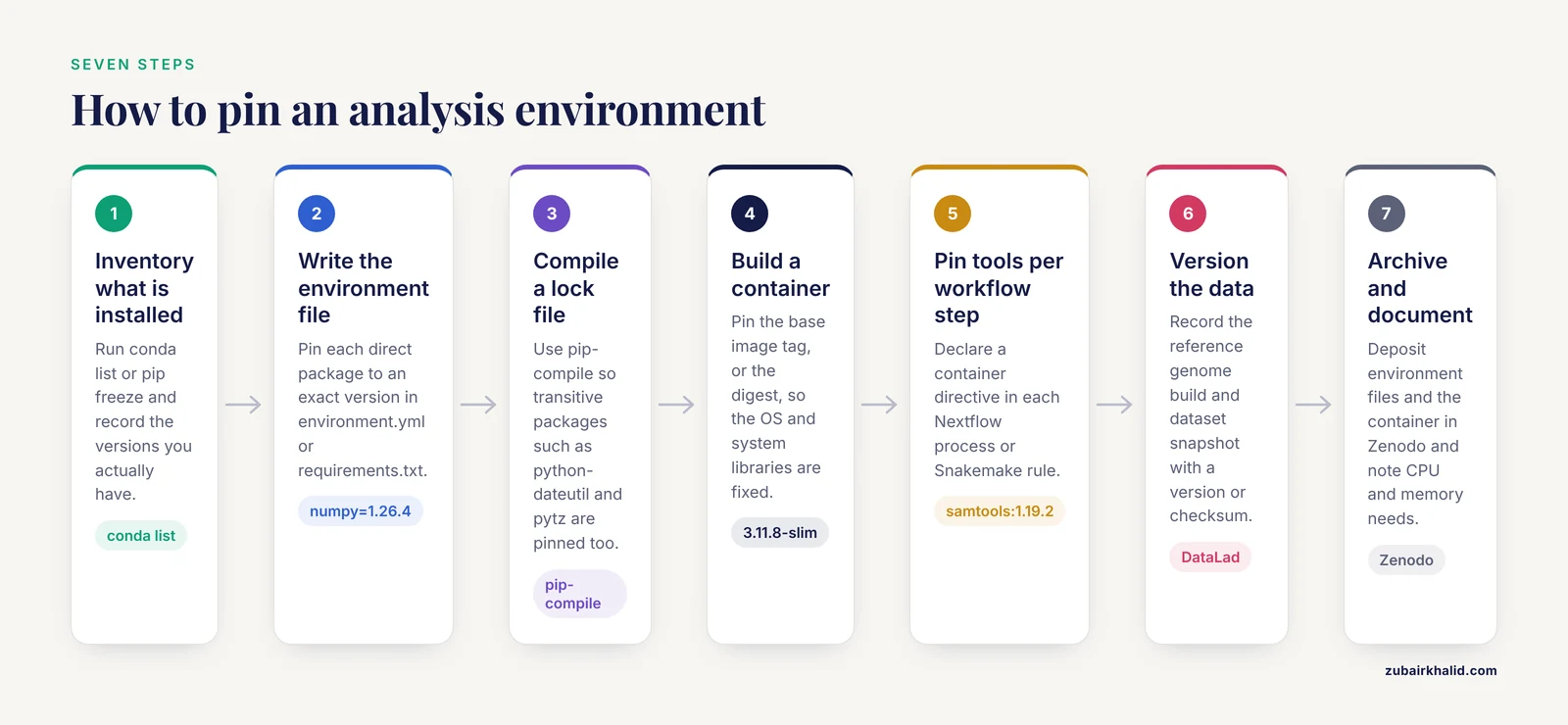
This walkthrough builds a pinned environment for a small Python analysis, then scales the same logic to containers, workflow managers, R, and data versioning. Each step shows the command and the output you should expect to see.
Step 1. Inventory the environment you have now
Before you pin anything, record what is actually installed. If you use conda, run:
conda listExpected output (abbreviated):
# packages in environment at /home/you/miniforge3/envs/analysis:
#
# Name      Version   Build       Channel
biopython   1.83      py311h...   conda-forge
numpy       1.26.4    py311h...   conda-forge
pandas      2.2.2     py311h...   conda-forge
python      3.11.8    h...        conda-forge
scipy       1.12.0    py311h...   conda-forge
If you use plain pip inside a virtual environment, run:
pip freezeExpected output:
biopython==1.83
numpy==1.26.4
pandas==2.2.2
scipy==1.12.0
Two details matter here. The == in pip output is an exact version pin. The build string in conda output (the py311h... column) encodes the Python version and low-level build details, which is why conda exports are more complete than pip freezes for the same environment.
Step 2. Write a pinned environment file
Create a file named environment.yml in your project root. The name line sets the environment name, the channels lines control where packages come from, and every entry in dependencies is pinned to an exact version.
name: aggregation-analysis
channels:
  - conda-forge
dependencies:
  - python=3.11.8
  - numpy=1.26.4
  - pandas=2.2.2
  - scipy=1.12.0
  - biopython=1.83
Anyone with this file can recreate the environment:
conda env create -f environment.yml
conda activate aggregation-analysis
Expected output:
Collecting package metadata: done
Solving environment: done
Downloading and Extracting Packages
Preparing transaction: done
Verifying transaction: done
Executing transaction: done
To activate this environment, use: conda activate aggregation-analysis
For a pip-based project, the equivalent file is requirements.txt, with one exact pin per line:
numpy==1.26.4
pandas==2.2.2
scipy==1.12.0
biopython==1.83
Install it with:
python -m venv .venv
source .venv/bin/activate
pip install -r requirements.txt
A pinned environment file like this is a core component of FAIR software. A published Julia-based agent-based model of protein aggregation, designed as a FAIR research software object, explicitly ships version-pinned dependencies alongside centralized parameters and machine-readable metadata so that independent researchers can rerun the simulations [4].
Step 3. Pin the transitive dependencies with a lock file
Your requirements.txt pins the packages you know about. Your analysis also depends on the packages those packages depend on, and those are the ones that drift silently. A lock file pins every package in the full dependency tree, resolved at one point in time.
A widely used tool for this is pip-tools. You write a short requirements.in file with the packages you care about, optionally with version ranges:
pandas
scipy<1.13
Then compile it:
pip install pip-tools
pip-compile requirements.in
Expected output (abbreviated):
#
# This file is autogenerated by pip-compile with Python 3.11
# by the following command:
#
#    pip-compile requirements.in
#
numpy==1.26.4
    via scipy==1.12.0
pandas==2.2.2
python-dateutil==2.9.0.post0
    via pandas==2.2.2
pytz==2024.1
    via pandas==2.2.2
scipy==1.12.0
six==1.16.0
    via python-dateutil==2.9.0.post0
The generated requirements.txt now pins pandas, scipy, and every package they pull in, including python-dateutil and pytz, which you never would have listed by hand. Commit both files to Git. The .in file documents your intent, the compiled file documents the exact resolved state.
Step 4. Pin the interpreter and system libraries in a container
A lock file pins the Python packages. It does not pin the operating system, the C compiler that built numpy, or the system BLAS library. A container pins all of it. Software containerization packages code, dependencies, and the execution environment into a single portable unit, and it has become a cornerstone of modern computational biology precisely because it supports reproducibility across heterogeneous systems [5].
A minimal Dockerfile for the environment above:
FROM python:3.11.8-slim

WORKDIR /work
COPY requirements.txt .
RUN pip install -r requirements.txt

COPY analysis.py .
CMD ["python", "analysis.py"]
Notice that the base image is pinned twice. The tag 3.11.8-slim fixes the Python version and OS variant. For maximum reproducibility, pin the image digest, which is an irreversible content hash:
FROM python@sha256:4b01c9b0f2471e5b2b0f1f0a9c7e6d5a8f3b2c1d9e0f7a6b5c4d3e2f1a0b9c8dBuild and run:
docker build -t aggregation-analysis:1.0 .
docker run aggregation-analysis:1.0
Expected output:
[+] Building 12.3s (9/9) FINISHED
 => exporting to image
 => => naming to docker.io/library/aggregation-analysis:1.0
Runs complete. Results written to results/
On high-performance computing clusters where users cannot run Docker, Apptainer serves the same role:
apptainer pull aggregation-analysis.sif docker://aggregation-analysis:1.0
apptainer exec aggregation-analysis.sif python analysis.py
One caution from the containerization literature itself. Containers are powerful, and superficial use can undermine their benefits, producing brittle environments or false confidence in reproducibility. The practical guidance is to treat containerization as a set of lifecycle decisions, including when to containerize, how to balance reproducibility with flexibility, and how to manage dependencies and data inside the image [5]. A container that installs packages with pip install numpy at build time without pins is not reproducible. It is a frozen snapshot of one lucky build.
Step 5. Pin tools inside a workflow manager
Once an analysis grows beyond a single script, a workflow manager coordinates the steps, and each step can carry its own pinned container. Nextflow is a common choice in the life sciences. A proteomics pipeline built on Nextflow encapsulates FragPipe, automates workflow generation, manages tool dependencies, and runs reproducibly on HPC, cloud, and cluster environments, cutting runtime nearly in half on a typical 58 GB DIA dataset compared with other workflow-based solutions [6]. A genomic variant annotation pipeline called MuSA follows the same pattern, standardizing inputs and executing parallel annotation branches in a fully containerized nf-core-compliant Nextflow workflow [7].
In a Nextflow pipeline, the pin lives in the process definition:
process ANNOTATE {
    container 'biocontainers/samtools:1.19.2'

    input:
    path bam

    script:
    """
    samtools view -b ${bam} > filtered.bam
    """
}
The container directive ties that one process to an exact tool version, independent of whatever is installed on the machine running the pipeline. If your project uses Snakemake, the equivalent structure is a rule with a container: directive and a Conda environment file per rule. The principle is identical: the version travels with the step, not with the machine.
Step 6. Pin the data and reference versions
Dependencies are not only code. A reference genome build, a database release, or a curated dataset has versions too, and changing them changes results. DataLad, a Python-based tool built on Git and git-annex, manages code, data, and their relationships together, linking datasets as precisely versioned, lightweight dependencies and capturing complete process provenance so that transformations can be automatically recomputed [8].
In neuroimaging, CuBIDS incorporates DataLad as an optional dependency to ensure reproducibility and provenance tracking throughout the curation of large BIDS datasets, while helping users identify unique combinations of imaging parameters before running processing pipelines on representative subsets [9]. The pattern generalizes: record which data snapshot you used, with a version or a checksum, in the same repository as your pinned code.
Step 7. Archive the environment and document the hardware
When you publish, archive the environment files and the container itself. The PoLoCo workflow for pooled low-coverage genome assembly made its workflow, documentation, and software environments openly available in Zenodo, and documented the computational requirements of the major components on standard HPC infrastructure as part of the case study [10]. That documentation matters because a pinned environment plus a machine with 16 GB of RAM may still fail on a 400 GB assembly job. Pinning software versions removes one source of variability, and recording resource needs removes another.
For training contexts, the same principle applies. Cloud-based tutorial platforms for RNA-seq analysis deliver reusable, reproducible learning workflows so that researchers at small institutions can run standardized environments without local setup [11]. If the environment is pinned, the tutorial works the same way for every learner.
How to Check That Your Pinning Actually Works
The test is a clean rebuild. Follow this sequence:
- Clone your repository into a brand new directory.
- Build the environment from the pinned files alone, with no packages cached if you can manage it.
- Run the full analysis on the test input.
- Compare the output checksums against your original results.
On Linux or macOS, generate a checksum of an output file:
sha256sum results/aggregation_counts.csvExpected output:
a3f8c1e2b9d4f5e6a7b8c9d0e1f2a3b4c5d6e7f8a9b0c1d2e3f4a5b6c7d8e9f0 results/aggregation_counts.csvRun the same command on the output produced by the rebuilt environment. If the hashes match, your pin is complete at the level of software. If they differ, the mismatch itself is diagnostic. A different hash with the same pinned versions points to unpinned data, an unpinned system library, or genuinely stochastic code that needs a fixed random seed. All three are findings worth having before a reviewer finds them.
Choosing a Pinning Level: Options Compared
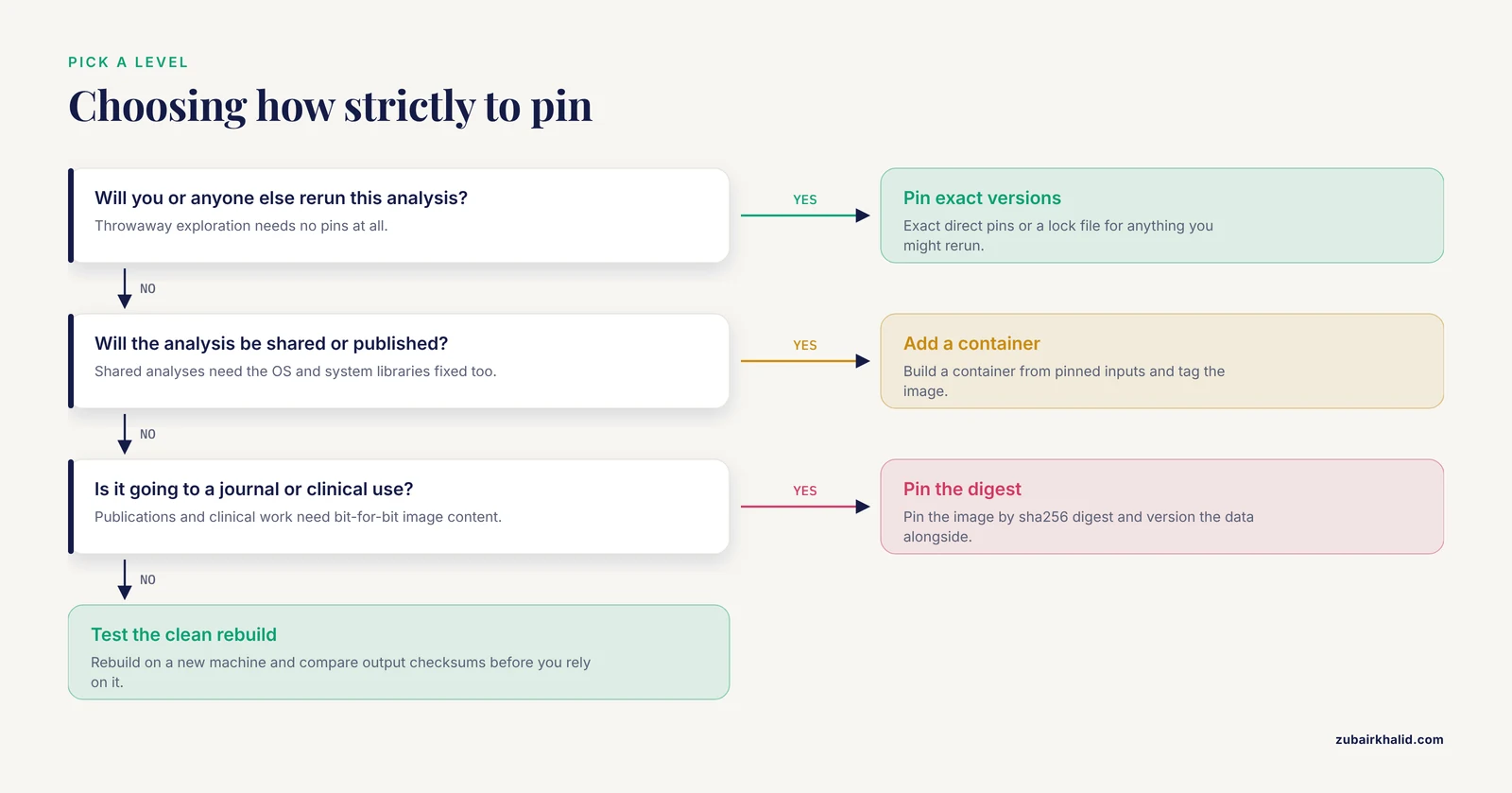
Different projects justify different levels of rigor. The table below summarizes the standard options.
| Approach | What it records | Best for | Main weakness |
|---|---|---|---|
| No pinning | Nothing | Throwaway exploration | Results cannot be reproduced at all |
Loose range (numpy>=1.20) | A floor version | Shared libraries, not analyses | New versions change behavior silently |
Exact direct pins (numpy==1.26.4) | Your direct imports | Short scripts, tutorials | Transitive dependencies still float |
| Lock file (pip-tools, conda-lock) | Full resolved dependency tree | Standard analyses | OS and system libraries unpinned |
| Container with tagged image | OS, libraries, packages, interpreter | Pipelines, shared analyses | Data and host behavior still vary |
| Container pinned by digest | Bit-for-bit image content | Publications, clinical work | Larger images, digest management overhead |
| Container plus data versioning (DataLad) | Software plus data versions and provenance | End-to-end reproducibility | Higher learning curve |
A reasonable rule of thumb: use exact pins or a lock file for anything you might need to rerun, and add a digest-pinned container for anything you plan to publish.
Dependency Pinning Tips That Pay Off
- Pin at project start, not at submission time. Reconstructing versions after the fact means re-running the analysis and hoping the numbers hold.
- Put the environment files in the repository root, not in a subfolder. People find them there.
- Record the language version explicitly.
python=3.11.8in the environment file, orR.versionin an R script, costs one line. - Use a fixed random seed for stochastic code. Pinning packages does not pin randomness. Set
numpy.random.seed(42)or the equivalent, and record the seed alongside the parameters. - Export the environment from the actual working environment, not from memory.
conda env export > environment.ymlcaptures reality. - Tag releases. When you tag version 1.0 of the code, rebuild the container with the same tag so the two stay linked.
- Note in your README which file to use first. A one-line install command in the README prevents most rerun failures.
Common Mistakes and Limitations
Relying on :latest or unpinned base images. A Dockerfile that starts FROM python:latest changes every time Python releases. Pin the tag, and for publications pin the digest.
Pinning only direct dependencies. If scipy 1.12.0 works with numpy 1.26.4 today but your lock file is absent, a fresh install may pull a numpy that breaks scipy. Lock files exist to prevent exactly this.
Forgetting system-level dependencies. HDF5 versions, BLAS implementations, and graphics libraries can alter numerical output between operating systems. Containers address this, lock files alone do not.
Treating a container as proof of reproducibility. A container built from unpinned install commands simply froze one uncontrolled state. The container must be built from pinned inputs to deliver the guarantee.
Ignoring data and reference versions. A perfectly pinned pipeline running against an updated reference genome is a new analysis. Version the data alongside the code [8].
Not testing the rebuild. Pinning that has never been reinstalled on a clean machine is a hypothesis. Test it before you need it.
Assuming the journal will catch gaps. Journal policies for software, including dependency disclosure and reproducible execution environments, remain substantially less developed than policies for data, even in fields with active data-sharing norms [2]. Build the reproducibility checklist into your own workflow.
Over-pinning shared tools. If you maintain a library used by others, exact pins in the library itself can create conflicts for your users. Exact pins belong in application and analysis environments. Ranges belong in installable libraries. This distinction is one of the most common points of confusion.
An honest limitation: full computational reproducibility is a spectrum, not a binary. A lock file plus a digest-pinned container plus versioned data gets you close, and for most life science analyses that combination is more than sufficient. Individual projects also differ in the infrastructure available, and where a resource-constrained lab cannot maintain containers, a well-documented lock file with recorded system information is a solid fallback.
A Reproducibility Checklist
Run this list before you publish or hand a project to a collaborator:
- Language interpreter version recorded (for example Python 3.11.8, R 4.3.1)
- All direct package dependencies pinned to exact versions
- Full dependency tree captured in a lock file
- Environment files committed to version control at the repository root
- Container image built from pinned inputs, tagged, and pinned by digest for publications
- Every workflow step tied to its own pinned container or environment
- Data files and reference resources versioned or checksummed
- Random seeds fixed and recorded for stochastic steps
- Clean-machine rebuild tested and output checksums compared
- Computational requirements (CPUs, memory, runtime) documented
- Environment files and container archived to a permanent repository such as Zenodo
- README states the single command needed to recreate the environment and rerun the analysis
Twelve checked boxes is a defensible position in review, in collaboration, and in your own lab six months from now.
Frequently Asked Questions
What does dependency pinning mean in reproducible research?
It means recording the exact version of every piece of software your analysis depends on, including the language interpreter, packages, transitive dependencies, and system libraries, so the environment can be rebuilt identically later. Without pinning, results depend on whatever versions happened to be installed when the code last ran.
How is a lock file different from a requirements file?
A requirements file lists the packages you directly install, and a lock file captures the entire resolved dependency tree at one moment, including indirect packages and their exact versions. Use the requirements file to state intent and the lock file to guarantee an identical rebuild.
Do I need to pin every package or only the important ones?
Pin every package in the environment, because the unimportant ones still influence what gets resolved and installed. Modern tools such as pip-compile or conda-lock automate this, so the manual cost is low.
Should I use conda, pip, or Docker for dependency pinning?
They answer different layers of the problem. Conda and pip pin the language-level packages, and Docker pins the operating system and system libraries as well. Many published pipelines use all three, with conda or pip files inside a container.
How do I pin dependencies in R?
Use the renv package. Run renv::init() in your project, then renv::snapshot() to write an renv.lock file that records exact package versions and their sources, and renv::restore() to rebuild the environment from that lock file on another machine.
How do I handle pinning in a Nextflow or Snakemake pipeline?
Give each process or rule its own pinned container image, declared in the process definition. That way each tool travels with its exact version, and the pipeline runs the same way on a laptop, a cluster, or the cloud.
How often should I update pinned dependencies?
Deliberately and on your schedule, not incidentally. Freeze versions while an analysis is active, and schedule update checkpoints where you upgrade pins, rerun the analysis, and confirm the results before committing the new lock file.
What do journals and reviewers expect for dependency disclosure?
Expectations vary widely, and surveys of journal policies show that software requirements such as versioning, dependency disclosure, and reproducible execution environments are generally less developed than data-sharing requirements. Providing a pinned environment and a container preempts the question entirely.
Sources
- BioImageIT: A novel python-based architecture for reproducible bio-image workflows.
- Journal research data policies in materials science.
- Ten simple rules for executing an inherited research plan in computational biology.
- Reproducible Agent-Based Simulations of Protein Aggregation: A FAIR Implementation.
- Nine quick tips for software containerization.
- Frag'n'Flow: automated workflow for large-scale quantitative proteomics in high performance computing environments.
- MuSA: a Nextflow pipeline for deep, reproducible annotation and clinical ranking of genomic variants.
- DataLad: distributed system for joint management of code, data, and their relationship.
- Curation of BIDS (CuBIDS): A workflow and software package for streamlining reproducible curation of large BIDS datasets.
- PoLoCo: a reproducible pooled low-coverage workflow for draft genome assembly and allele frequency analysis from ethanol-preserved small non-model invertebrates.
- Reusable tutorials for using cloud-based computing environments for the analysis of bacterial gene expression data from bulk RNA sequencing.