Data Storage Solutions for Research Projects
By Dr. Zubair Khalid, DVM, MS, PhD ·

The one-sentence difference is this: local storage gives you speed and control, cloud storage gives you scale, sharing, and durability, and archival media gives you cheap capacity at the price of slow access. The rule of thumb for choosing is simple: keep the data you touch daily on fast local or hot cloud storage, keep your working copy backed up in a second location, and move large, rarely touched datasets into cheaper tiers or archival systems. No single option wins on every criterion, so the best data storage solutions for research are almost always layered rather than singular.
This guide walks through every major option, compares them side by side on the criteria that actually decide real projects, and shows how to fold storage decisions into your research project management workflow from day one.
Why Storage Decisions Belong in Your Research Project Plan
Data volume in the life sciences has grown faster than most labs planned for. The National Cancer Institute's Cancer Research Data Commons, a cloud-based ecosystem for sharing clinical, genomic, proteomic, and imaging data, now houses more than 10 petabytes of data, and its genomic holdings alone more than doubled from 3.7 to 8.8 petabytes between 2022 and the time of that analysis [1]. A petabyte is one million gigabytes. If a national-scale program can see its storage footprint double in roughly three years, an individual lab sequencing dozens of samples can outrun a workstation hard drive within a single grant cycle.
Storage is not just a technical purchase. It affects research project management in three concrete ways:
- Budgeting. Recurring cloud costs can quietly consume supply money if data accumulates in an expensive tier unnoticed.
- Compliance. Human-subjects data, patient-derived material, and controlled-access datasets carry obligations about where data physically resides and who can reach it.
- Reproducibility and release. Journals and funders increasingly expect raw data to be preserved and shared, which means your storage choice determines whether public release is a one-day task or a months-long archaeology project.
For these reasons, storage belongs in your research project plan template alongside timelines, milestones, and roles. A good plan names the primary storage location, the backup target, the retention period, and the person responsible for each.
The Main Data Storage Solutions for Research Options
Every option below solves a different problem. Understanding what each one is for prevents the most common failure pattern, which is using one system for everything and discovering its weaknesses at the worst possible moment.
Local attached storage
This category covers internal workstation drives and external hard drives or SSDs (solid-state drives, which store data on flash memory rather than spinning disks). Modern storage systems commonly combine media classes such as DRAM, SSDs, and HDDs, each with a different speed and cost profile [2]. Local storage is fast, works offline, and requires no account, contract, or network.
Its weaknesses are physical. A single drive is one point of failure, vulnerable to theft, fire, coffee, and the silent corruption that can accumulate on any disk left unattended. Local drives also do nothing for collaboration, since a file on your desk is not a file your co-author in another city can open.
Institutional servers, NAS, and HPC scratch space
A NAS (network-attached storage) is a box of disks on your lab's local network that multiple computers can mount. High-performance computing (HPC) centers provide scratch space, which is fast temporary storage on the compute cluster intended for active analysis, not long-term safekeeping.
These options give you shared access with institutional accountability. Someone else's job, usually an IT department, is to handle drive failures and patching. The trade-off is capacity politics. Scratch directories are regularly purged, and shared servers fill up, so you still need a plan for what happens when the analysis is done.
Cloud object storage
Cloud storage means renting space on remote servers managed by a provider, accessed over the internet, and paid for by usage [3]. The dominant model for research data is object storage, exemplified by Amazon S3, where files (objects) sit in named buckets and are retrieved over standard protocols. Cloud adoption is now mainstream in research and industry. Amazon Web Services, launched in March 2006, reports that as of 2023, 94 percent of enterprises had at least one application or part of their infrastructure in the cloud, served under a pay-as-you-go model without upfront capital cost [4].
Object storage matters for research because of its tier structure. Frequently accessed data can sit in a hot tier with fast retrieval, while cold data can be parked in archive tiers at a fraction of the price, with the trade-off of slower retrieval and, on some tiers, fees for early deletion. The CRDC storage pilot explicitly modeled two extremes for compressed genomic data: data accessed monthly and data never accessed, because that single variable drives the economics of tier selection [1]. Providers also offer automated tiering products such as AWS Intelligent-Tiering, which moves objects between tiers based on observed access patterns [1].
Sync-and-share services
Services such as Microsoft OneDrive, Google Cloud Storage-based offerings, and Apple iCloud provide virtual storage spanning many physical devices in data centers, emphasizing convenience and accessibility [3]. They are excellent for documents, protocols, small image sets, and collaboration on manuscripts. They are generally the wrong tool for raw high-throughput data, both because of size limits and because their sync semantics can propagate an accidental deletion to every linked machine.
Domain repositories and data commons
A data commons is a cloud-based ecosystem where research data is stored once and analyzed in place, with access governed by community rules. The NCI Cancer Research Data Commons is the clearest life-science example, hosting clinical, genomic, proteomic, and imaging data with controlled sharing [1]. For many data types, depositing into a recognized repository is both good practice and a funder expectation. Repositories also solve the metadata problem, since they enforce standardized descriptions that make data findable years later.
Semantic and database storage
Not all research data is files. If your project involves linked, structured knowledge, for example biological relationships expressed in RDF (Resource Description Framework, a standard graph format for semantic data), you need a triple store or RDF-aware database. Comparative evaluations of large-scale RDF storage solutions, including Sesame, Kowari, YARS, Redland, and Oracle's RDF MATCH table function, show that these systems differ in query language support, indexing methods, schema awareness, and access protocols, so the right choice depends on how your data will be queried [5]. Spreadsheet-shaped data can live almost anywhere. Graph-shaped data needs purpose-built infrastructure.
Archival and emerging technologies
Long-term preservation is its own problem. Current storage media often last only a few years before data must be migrated to new drives, which is why archival technologies are under active development [6]. Linear Tape-Open (LTO) tape remains the workhorse of institutional archives because it is cheap per terabyte and stable, though retrieval is slow. Synthetic DNA storage is a promising archival candidate offering extremely high density and the potential for long-term preservation, but it currently suffers from high error rates and long access latency, which keep it experimental rather than practical for ordinary labs [6].
Decentralized options are also maturing. Systems built on the Interplanetary File System (IPFS), a peer-to-peer protocol that distributes data across a network of nodes rather than a central server, use redundancy and encryption to reduce single-point-of-failure risk [7]. These approaches are interesting for labs concerned about reliance on any single provider, though they demand more setup expertise than conventional cloud services.
Side-by-Side Comparison
The table below is the core of this article. Use it to narrow your data storage solutions for research options before reading the deeper pros and cons that follow.
| Option | Cost model | Access speed | Best suited for | Main drawbacks |
|---|---|---|---|---|
| External drives and workstations | One-time hardware purchase | Fastest for one user | Raw instrument output staged for immediate analysis | Single point of failure, no sharing, easily lost or stolen |
| Institutional NAS or server | Institutional overhead, capacity quotas | Fast on local network | Lab-wide working datasets and shared analysis | Capacity limits, dependent on IT priorities |
| HPC scratch space | Usually bundled with compute allocation | Very fast for compute jobs | Active large-scale computation | Temporary by design, purged regularly, not a backup |
| Cloud object storage (hot tier) | Pay per gigabyte-month, egress fees | Fast, on-demand | Sharing large datasets with collaborators and pipelines | Recurring cost grows with volume, egress charges on exit |
| Cloud object storage (archive tier) | Very low per-gigabyte-month cost | Slow retrieval, sometimes hours | Compliance retention and raw data rarely touched | Retrieval fees and delay, easy to misprice if access is frequent |
| Sync-and-share services | Subscription per user | Fast for moderate files | Documents, protocols, figures, small image sets | Size limits, sync can replicate accidental deletions |
| Domain repositories and data commons | Usually free to deposit, governed access | Varies by repository | Publication-associated and community data | Submission overhead, access controls, format requirements |
| RDF stores and databases | Server or managed service cost | Depends on indexing | Structured, queryable knowledge (graphs, relational data) | Requires expertise to deploy and query efficiently |
| LTO tape archive | Low cost per terabyte, hardware investment | Slow, sequential access | Deep archival copies | Hardware lifecycle, manual handling, not for working data |
| Decentralized storage (IPFS-based) | Node and bandwidth costs | Varies with network | Labs wanting provider independence | Setup complexity, less mature support ecosystem |
Data Storage Solutions for Research: Pros and Cons in Depth
Cost
Cost is where the theoretical choice meets the budget line. The CRDC pilot study is instructive because it evaluated four genomic compression algorithms, PetaGene, CRAM, PigZ, and Genozip, chosen for their existing use in the cancer research community, both for compression alone and in combination with AWS S3 storage tiers [1]. The logic generalizes: for large datasets, you can buy less storage by compressing well, and you can pay less per gigabyte by matching the storage tier to how often the data is actually read. Data accessed monthly justifies a warmer tier. Data that will never be accessed belongs in the coldest, cheapest tier, provided you can tolerate slow retrieval if it is ever needed [1].
The compounding problem is growth. CRDC's genomic data rose from 3.7 to 8.8 petabytes in roughly three years, and the program now treats cost-effective compression and tiering as necessary for long-term sustainability rather than as optional optimizations [1]. Scale that trajectory down to a lab producing a few terabytes of sequencing data per year, and the lesson still holds: unexamined data accumulation is a recurring bill that grows on its own.
Machine-learning-based tiering is changing this calculus. Modern systems increasingly use ML policies to predict access patterns and place data across media and tiers automatically, improving hit rates and reducing both latency and cost compared with static rules [2]. In practice, this means features like automated tiering are becoming reasonable defaults for labs without the staff to monitor access logs manually.
Performance
Performance decisions are really decisions about where data sits relative to the code that processes it. Multi-level storage hierarchies, from DRAM through SSDs to HDDs, exist precisely because no single medium balances speed and cost [2]. For research workflows, the practical translation is:
- Keep the active dataset for your current analysis on the fastest available tier attached to your compute, whether that is an SSD on a workstation or scratch space on an HPC node.
- Keep the full corpus of raw and intermediate data on a slower tier.
- Copy results worth keeping to durable storage, then let intermediates expire.
Big-data projects amplify the cost of getting this wrong. Reviews of big data analytics emphasize that storage architecture, tool selection, and processing design must be solved together, because data volume and velocity strain conventional pipelines [8]. A pipeline that constantly pulls data from a cold archive will spend more time waiting than computing.
Security, privacy, and integrity
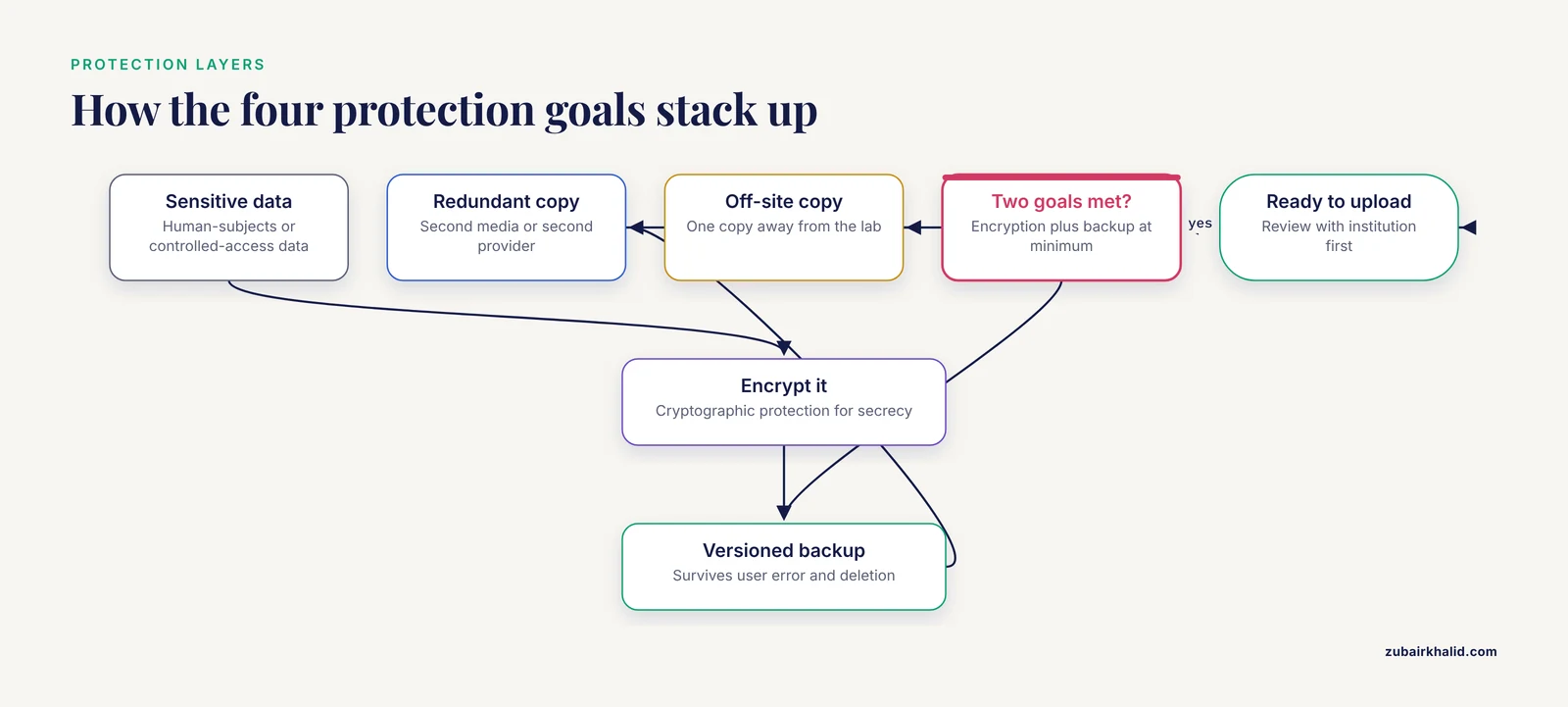
Security is a set of trade-offs, not a single feature. A foundational comparison of storage protection approaches identified four distinct protection goals, cryptographic protection, backup and versioning, immutable or tamper-proof storage, and redundant storage, and showed that each solution favors some goals while leaving others exposed [9]. Encryption without backup protects secrecy but not survival. Redundancy without immutability protects availability but not integrity against a bad actor or a bad script that overwrites every copy. For a research project, the practical takeaway is to pair at least two protection types, typically versioned backups plus encryption for sensitive data, and to know which goal each layer serves.
Cloud services introduce specific privacy considerations because data is transferred to and held by a third party. A comparative analysis of four cloud storage providers, Sync, pCloud, IceDrive, and Egnyte, focused specifically on privacy and personal data protection and highlighted that cloud convenience carries heightened risks around security, privacy, data support, service availability, and regulatory compliance [3]. Before putting human-subjects or otherwise sensitive data in any cloud service, confirm with your institution where the data will reside, what the provider's terms say about data use, and whether the service meets the compliance regime that applies to your project.
Architectural mitigations exist for labs that cannot accept single-provider risk. A prototype secure multi-cloud system demonstrated that distributing encrypted data fragments across multiple independent providers, combining AES symmetric encryption, RSA or ECC key exchange, Shamir's threshold secret sharing for key management, and SHA-256 integrity verification, improved resilience against single points of failure, vendor lock-in, insider threats, outages, and privacy breaches compared with a single-cloud model [10]. Threshold secret sharing means the data can only be reconstructed when a minimum number of key fragments come together, so no single provider ever holds enough information to read it. Most small labs will not build this themselves, but the design illustrates why multi-provider strategies and client-side encryption are taken seriously for sensitive data.
Scalability and fault tolerance
When comparing any storage platform, four criteria recur in rigorous evaluations: performance, scalability, data consistency, and fault tolerance [11]. Scalability means the system grows with your data without a redesign. Fault tolerance means the system keeps working, or at least keeps your data intact, when components fail. Distributed architectures address fault tolerance by replicating or fragmenting data across nodes, the same principle behind IPFS-based systems that distribute data across a network to minimize single-point failure risk, and behind multi-cloud designs that assume any one provider can fail [10].
Placement across cloud, fog, and edge layers is also relevant to projects with distributed sensing or field sites. Fog and edge layers place computation and storage closer to where data is generated, and planning tools that map information flows across these layers help organizations design network architectures that can be redeployed quickly when requirements change [12]. A field sensor network that streams everything to a distant cloud may waste bandwidth and lose data during outages, while a design that buffers locally and syncs opportunistically degrades gracefully.
Findability and querying
Storage is only useful if you can get answers out of it later. For structured and semantic data, comparative evaluations of RDF stores show that systems differ substantially in supported query languages, indexing methods, and handling of context information, and that the right choice depends on the application, since each approach has documented advantages and disadvantages [5]. The same lesson applies to ordinary file storage in a weaker form. A folder of files named sample_final_v2_REAL.fasta is technically stored and practically lost. A repository deposit with structured metadata is both.
Specialized monitoring and streaming projects face a parallel choice. Comparative evaluations of open mission control platforms such as NASA's OpenMCT, YAMCS, and Foxglove Studio weigh storage, security, scalability, visualization, costs, and maintenance against one another, because no platform leads on every dimension [13]. The same evaluation mindset, scoring your actual requirements against concrete platforms, transfers directly to selecting research storage.
Worked Scenarios
Scenario 1: A genomics core generating sequencing data continuously. Raw output grows faster than any workstation. Model the pipeline after the CRDC pattern: analyze from fast local or scratch storage, compress raw files with a genomic compression format such as CRAM before long-term storage, and place compressed data in the coldest cloud tier consistent with your reanalysis schedule, recognizing that the monthly-access versus never-accessed distinction drives the cost difference [1]. Deposit processed data into a controlled-access commons or repository for sharing. Budget storage as a recurring line item, not a one-time purchase.
Scenario 2: A small lab with spreadsheets, microscopy images, and a manuscript pipeline. Here the best data storage solution for research is a modest stack. Use a sync-and-share service for documents and figures, since these services are built for accessibility and convenience on moderate file sizes [3]. Keep raw image files on an institutional server or NAS with a second backup copy, and set a rule that no raw data lives solely on a laptop. Deposit final datasets with a repository at publication time.
Scenario 3: A multi-site field study with sensor networks. Data arrives from distributed devices with unreliable connectivity. Apply the edge-layer principle by buffering data locally at each site and syncing to a central cloud store when connections allow, an architecture pattern supported by cloud-fog-edge design approaches [12]. Score candidate platforms against your actual requirements for storage, security, cost, and maintainability rather than adopting whatever the first site used.
Building Storage Into a Research Project Plan Template
A research project plan template that ignores data will fail quietly. Add a data section with these fields:
- Data classes. List each data type (raw instrument output, processed results, documents, code) separately, because each class has a different best home.
- Primary storage location. Name the system where each class lives during active work.
- Backup and protection layers. For each class, state the backup target and which protection goals apply, following the cryptographic, versioning, immutable, and redundant framework [9].
- Access pattern forecast. Estimate how often each dataset will be read in a year. This single number determines the right cloud tier.
- Growth estimate. Project volume at project end, not project start, so capacity and cost planning reflect reality.
- Retention and release. State how long each class is kept, where it will be archived, and what will be deposited publicly.
- Responsibility. Name the person who monitors costs, verifies backups, and executes the release.
Review this section at each project milestone. The two numbers to recheck are total volume and access frequency, since both drift upward as projects progress.
Common Mistakes and Limitations
- Treating sync as backup. Sync-and-share services replicate changes, including deletions, across every connected device. A backup is a separate, versioned copy that survives user error [9].
- Buying one tier for everything. Paying hot-tier prices for data that is never accessed wastes money, while archive-tier prices for data read monthly creates retrieval fees and delays. The access pattern, monthly versus rarely, is the variable that decides the tier [1].
- Ignoring compression for domain-specific data. Standard compression is often far less effective than community formats. For genomic data, purpose-built algorithms were selected for evaluation precisely because generic approaches underperform on that data type [1].
- Assuming encryption equals safety. Encryption addresses one of four protection goals. Without versioning, redundancy, or immutability, encrypted data can still be lost or tampered with [9].
- Leaving data on HPC scratch. Scratch space is provisioned for performance, not preservation, and is subject to purge. Anything on scratch exists nowhere else at your own risk.
- Choosing a database for file-shaped data, or files for graph-shaped data. RDF and semantic workloads need stores designed for them, and the choice among stores should be driven by query patterns and schema support.
- Skipping the sensitive-data review. Moving data to a third party raises privacy and compliance questions that should be answered before upload, not after [3].
- Assuming current media lasts forever. Most storage media lasts only a few years before migration to new drives is required, so archival plans need scheduled migration, not a single write [6].
One general limitation applies to every choice here: the right answer depends on your institution's contracts, your funder's requirements, and your data's sensitivity classification, so confirm specifics with your local research computing or data office before committing a project's data to any single system.
Frequently Asked Questions
What is the best data storage solution for a small research project?
For most small projects, a layered setup wins: a sync-and-share service for documents and collaboration, an institutional server or NAS for raw data with a second backup copy, and a repository deposit for anything published. This covers convenience, protection, and findability without requiring cloud cost management expertise [3].
How do I decide between cloud storage tiers?
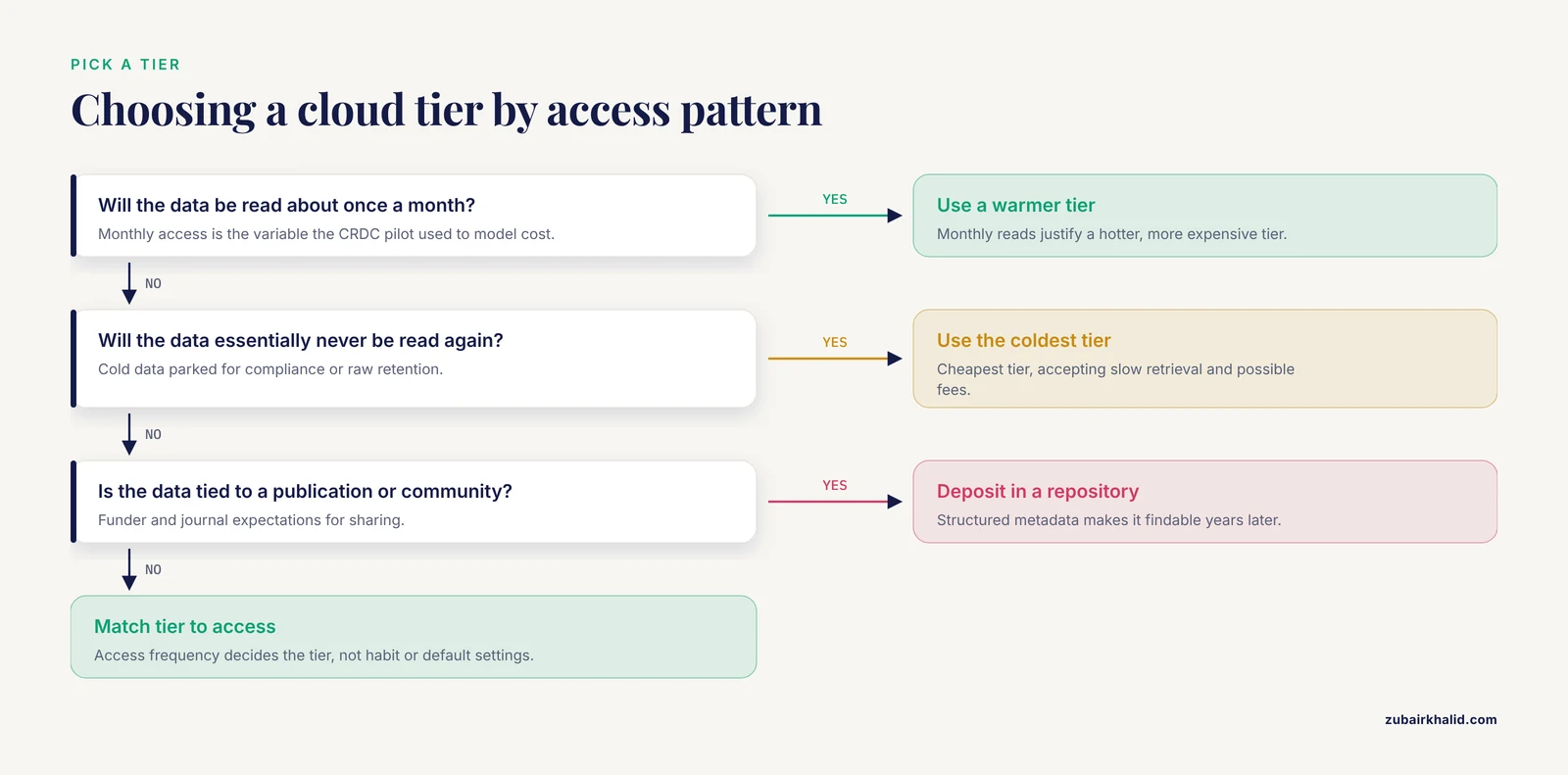
Decide by access frequency. Data read monthly justifies a warmer, more expensive tier, while data that will essentially never be read belongs in the coldest, cheapest tier, since that distinction is what drives storage economics [1].
Is cloud storage safe for sensitive research data?
It can be, but only after review. Cloud services introduce risks around privacy, security, service availability, and regulatory compliance because data moves to a third party [3]. For high-sensitivity data, architectural controls such as client-side encryption and distributing fragments across multiple providers meaningfully reduce single-provider risk [10].
What is the 3-2-1 backup rule?
Keep three copies of your data, on two different types of media or systems, with one copy off-site. It is a widely used professional practice that combines redundant and versioned protection, two of the four core protection goals identified in storage research [9].
How do I preserve research data for a decade or longer?
Plan for migration, because most current media lasts only a few years before data must be moved to new drives [6]. Use archival tiers or tape for cold copies, keep at least one redundant copy, refresh storage on a schedule, and store data in open formats with complete metadata in a repository when possible.
What should the data storage section of a research project plan template include?
Name each data class, its primary location, its backup target and protection method, its expected access frequency and volume, its retention period, and the person responsible for each. Revisit the section at every milestone, because volume and access patterns both grow during a project.
Sources
- Abstract 1085: Analyzing economic storage solutions for cancer research data
- Machine Learning-Based Caching and Tiering in Modern Data Storage Systems: A Survey
- Comparison of cloud storage in terms of privacy and personal data - Sync, pCloud, IceDrive and Egnyte
- Unveiling the Cloud: An Evaluation of AWS Infrastructure Against Traditional On-Premise Solutions
- Large Scale RDF Storage Solutions Evaluation
- Advancing Archival Data Storage: The Promises and Challenges of DNA Storage System
- Improved Cloud Storage System Using IPFS for Decentralised Data Storage
- Big data analytics for data-driven industry: a review of data sources, tools, challenges, solutions, and research directions
- Trade-offs in protecting storage: a meta-data comparison of cryptographic, backup/versioning, immutable/tamper-proof, and redundant storage solutions
- Design and Implementation of a Secure Multi-Cloud Data Storage System Using Hybrid Cryptography and Threshold Secret Sharing
- Analysis of Approaches and Solutions for Developing a Customer Data Storage System for the Banking Ecosystem
- Mapping a Set of Tools to Ensure Cloud and Distributed Computing, Virtualization Tools and Data Storage Systems in the Work of the Transport and Logistics Center
- Comparison of Open Mission Control platforms for live space data visualization